

🚀 Email marketing, WhatsApp integration, AI chatbot, CRM, contact forms, popup builder, newsletters, lead generation, segmentation and marketing automation for WordPress.
All-in-One AI Marketing Automation – Email Marketing, Popup Builder, AI Chatbot, CRM, Contact Forms is a comprehensive WordPress marketing solution designed to bring your essential lead generation, contact management, customer communication, campaigns, WhatsApp marketing, newsletters, popups, AI-powered conversations, and marketing automation into one centralized WordPress dashboard.
Instead of managing multiple disconnected marketing tools, All-in-One AI Marketing Automation – Email Marketing, Popup Builder, AI Chatbot, CRM, Contact Forms provides an organized environment where you can move visitors through the complete marketing journey — from lead capture to contact management, segmentation, engagement, follow-up, and conversion.
✨ Why Choose All-in-One AI Marketing Automation – Email Marketing, Popup Builder, AI Chatbot, CRM, Contact Forms ?
✦ All-in-One Marketing Workspace — Manage multiple marketing activities without constantly switching between separate WordPress tools.
✦ WordPress-Native Experience — Access your marketing features directly from the familiar WordPress Admin Dashboard.
✦ Centralized Dashboard — Quickly review marketing statistics, recent contacts, module readiness, system health, configuration warnings, and important actions.
✦ Built for Lead Generation — Capture visitor information through forms, newsletters, popups, and supported chatbot workflows.
✦ Connected Marketing Workflow — Bring your contacts, campaigns, communication channels, and automation together for a more organized marketing process.
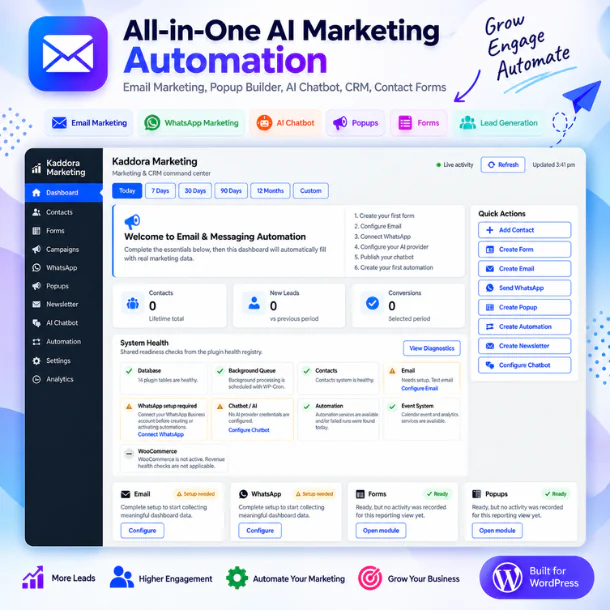
📊 Powerful Marketing Dashboard
Get a clear overview of your marketing environment from one centralized dashboard.
✦ Monitor contacts, new leads, conversions, and marketing activity.
✦ Review recent contacts and lead information.
✦ Check the status of Email, WhatsApp, Forms, Popups, Newsletter, AI Chatbot, and Automation.
✦ Identify incomplete configurations through Needs Attention notifications.
✦ Monitor important components through System Health.
✦ Quickly access frequently used marketing actions.
The dashboard is designed to help administrators understand what is happening, what requires attention, and what action should be taken next.
👥 Contacts & Lead Management
Keep your leads and customers organized inside WordPress with a centralized contact management system.
✦ Add and manage contacts.
✦ Search and organize your contact database.
✦ Access detailed Contact 360° information.
✦ Create and manage contact segments.
✦ Import existing contact information.
✦ Review lead sources and available engagement information.
✦ Use contact data across supported marketing modules.
This creates a connected journey:
Visitor → Lead → Contact → Segment → Engagement → Conversion
📝 Forms & Lead Generation
Create lead-generation forms and turn website visitors into actionable contacts.
✦ Create and manage marketing forms.
✦ Configure fields for collecting relevant visitor information.
✦ Capture website leads directly in WordPress.
✦ Manage submitted information.
✦ Connect captured leads with your Contacts database.
✦ Use collected information for supported campaigns and follow-up workflows.
From a simple contact request to marketing lead capture, forms provide an important entry point into your marketing ecosystem.
📧 Campaigns & Email Marketing
Build and manage targeted email communication directly from your WordPress marketing environment.
✦ Create marketing email campaigns.
✦ Select relevant contacts and audiences.
✦ Prepare promotional, informational, and nurturing content.
✦ Manage campaigns from a centralized workspace.
✦ Configure the required email delivery options.
✦ Review available campaign activity and statistics.
✦ Connect email communication with supported automation workflows.
Create an organized flow from:
Contacts → Audience → Campaign → Email → Tracking → Follow-Up
💬 WhatsApp Marketing
Bring WhatsApp communication into your WordPress marketing workflow using the supported WhatsApp Business/API configuration.
✦ Configure supported WhatsApp integration.
✦ Send messages to individual contacts.
✦ Manage supported bulk messaging workflows.
✦ Use contact information from your marketing database.
✦ Work with targeted contact segments.
✦ Manage supported message templates.
✦ Incorporate WhatsApp actions into supported automation workflows.
✦ Monitor configuration and connection readiness.
This helps connect:
Contacts → Segments → WhatsApp → Customer Engagement → Follow-Up
📌 WhatsApp functionality requires the appropriate external WhatsApp service/API configuration and is subject to the provider's policies and requirements.
📰 Newsletter & Popups
Turn website traffic into subscribers and marketing opportunities with newsletter and popup tools.
✦ Capture newsletter subscribers.
✦ Grow your marketing contact database.
✦ Create marketing and lead-generation popups.
✦ Promote offers, announcements, and subscription opportunities.
✦ Configure supported popup display and targeting options.
✦ Connect captured subscriber information with Contacts.
✦ Use captured leads in supported campaigns and automation.
Create a simple conversion journey:
Visitor → Popup/Newsletter → Subscriber → Contact → Campaign
🤖 AI Chatbot
Engage website visitors with AI-powered conversations using a configured supported AI provider.
✦ Add an AI-powered chat experience to your website.
✦ Provide automated responses to visitor questions.
✦ Configure available chatbot behavior and AI settings.
✦ Support visitor engagement and lead-generation workflows.
✦ Connect supported captured information with marketing processes.
✦ Guide visitors toward useful pages, forms, products, services, or offers.
✦ Monitor AI provider configuration status.
The chatbot can become another entry point into your marketing journey:
Visitor → AI Conversation → Assistance → Lead → Follow-Up
📌 AI functionality requires configuration of a supported external AI provider. Provider charges, limits, and policies may apply separately.
⚙️ Marketing Automation
Reduce repetitive marketing work by creating structured automated workflows.
✦ Create marketing automation workflows.
✦ Use supported triggers, conditions, and actions.
✦ Automate selected customer follow-up activities.
✦ Use contact information within workflows.
✦ Add supported email actions.
✦ Add supported WhatsApp actions.
✦ Build lead-nurturing journeys.
✦ Activate and manage workflows from WordPress.
The automation model follows an easy-to-understand structure:
Trigger → Condition → Action → Follow-Up
This helps connect individual Kaddora Marketing modules into a more complete marketing process.
📈 Analytics & Marketing Insights
Use available marketing information to better understand your lead-generation and engagement activities.
✦ Review marketing activity and performance information.
✦ Monitor contacts and leads.
✦ Review available campaign statistics.
✦ Understand how your marketing modules are being used.
✦ Use available insights to improve future marketing decisions.
🔐 Privacy, Security & Performance
All-in-One AI Marketing Automation – Email Marketing, Popup Builder, AI Chatbot, CRM, Contact Forms includes administrative tools and configuration options designed to support responsible marketing operations.
✦ Manage available privacy-related options.
✦ Support responsible contact and subscriber data handling.
✦ Configure integrations and external services carefully.
✦ Review system and module readiness.
✦ Monitor important background components.
✦ Use system-health information to identify configuration issues.
Administrators remain responsible for configuring their marketing activities according to applicable privacy requirements and third-party provider policies.
⚙️ Centralized Settings
Configure important plugin functionality from one organized settings environment.
✦ General plugin configuration
✦ Email settings
✦ WhatsApp configuration
✦ AI provider configuration
✦ Marketing module settings
✦ Supported integrations
✦ Privacy-related options
✦ System configuration and status
This makes Settings the central configuration point for yourAll-in-One AI Marketing Automation – Email Marketing, Popup Builder, AI Chatbot, CRM, Contact Forms environment.
🛠️ Troubleshooting & System Health
Quickly identify common configuration problems without searching through multiple areas of WordPress.
✦ Review System Health.
✦ Check modules requiring attention.
✦ Verify Email configuration.
✦ Verify WhatsApp configuration.
✦ Check AI provider readiness.
✦ Review Forms, Popups, Newsletter, and Automation configuration.
✦ Diagnose common cache, Cron, integration, and compatibility issues.
🎧 ThemeKaddora Support & Updates
Need assistance withAll-in-One AI Marketing Automation – Email Marketing, Popup Builder, AI Chatbot, CRM, Contact Forms ? If the documentation, troubleshooting information, and FAQs do not resolve your issue, contact ThemeKaddora Support through the official support channel supplied with your TemplateMonster product.
When requesting support, provide:
✦All-in-One AI Marketing Automation – Email Marketing, Popup Builder, AI Chatbot, CRM, Contact Forms version
✦ WordPress & PHP versions
✦ Short description of the issue
✦ Steps to reproduce the problem
✦ Screenshots or relevant error messages
Keep All-in-One AI Marketing Automation – Email Marketing, Popup Builder, AI Chatbot, CRM, Contact Forms updated to receive available bug fixes, improvements, compatibility changes, and feature enhancements.
🔐 Security Notice: Never include passwords, API secrets, private keys, access tokens, or database credentials in a normal support request.
🚀 One Plugin. One Dashboard. Connected Marketing.
All-in-One AI Marketing Automation – Email Marketing, Popup Builder, AI Chatbot, CRM, Contact Forms brings the core stages of digital marketing together inside WordPress:
Capture Leads → Manage Contacts → Build Segments → Create Campaigns → Send Email & WhatsApp → Engage with Popups & AI Chatbot → Automate Follow-Ups → Monitor Results
Subscribe to access unlimited downloads of themes, videos, graphics, plugins, and more premium assets for your creative needs.

This item was featured on themekaddora
Last update:
Sep 23, 2026 11:03 AM
Published:
Sep 11, 2026 09:24 PM
Version:
v1.0.1
Category: