
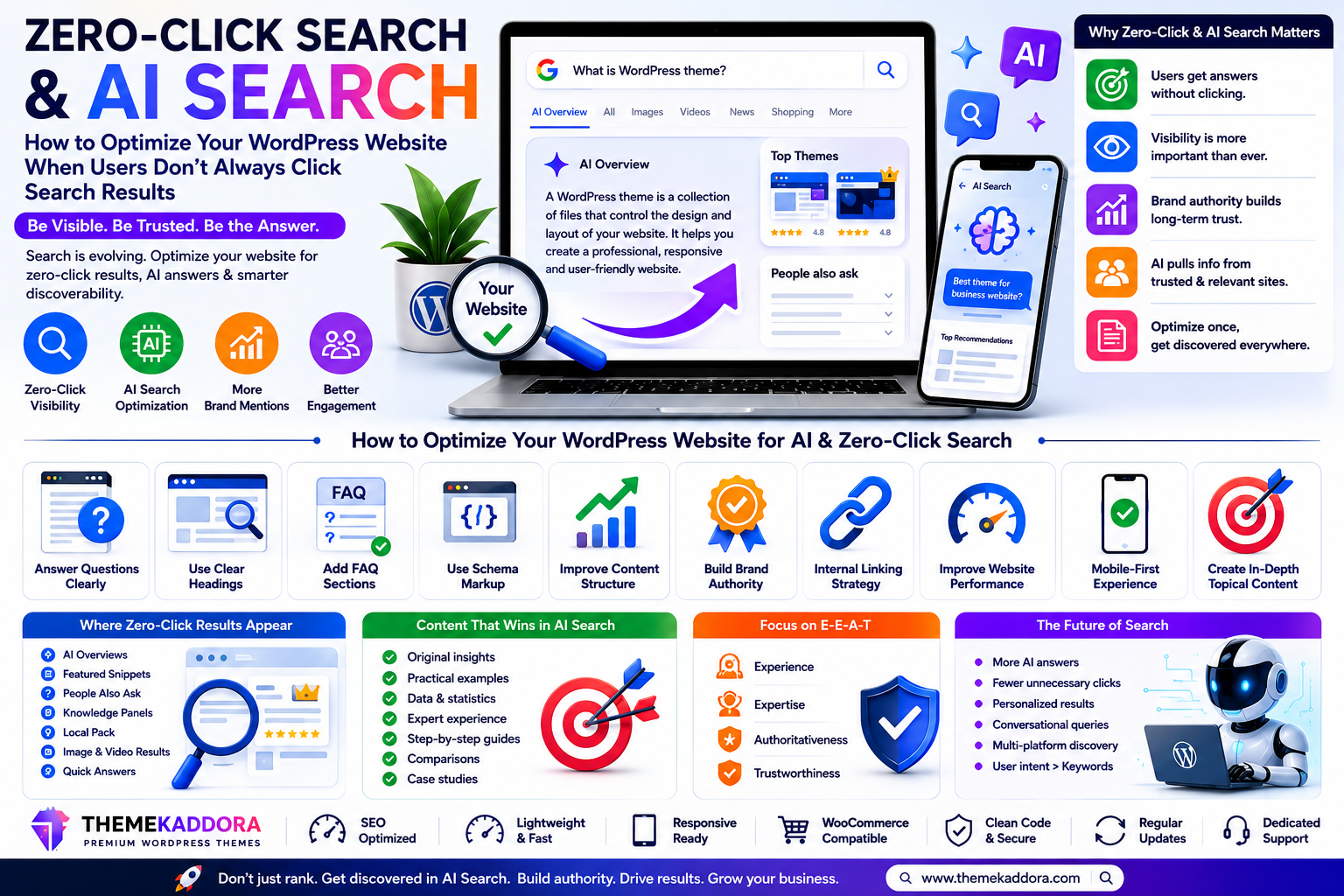
Zero-Click Search and AI Search: How to Optimize Your WordPress Website When Users Don’t Always Click Search Results
Introduction
Search is changing.
For years, the traditional SEO journey was relatively simple:
A user entered a query, reviewed a list of links, clicked a website, and explored the page.
Today, that journey is becoming more complex.
Search engines can answer many questions directly. AI-powered search experiences can summarize information, compare options, explain concepts, and guide users without requiring an immediate website visit.
Users may also discover information through:
Featured answers
Knowledge panels
Local results
Video results
Product results
AI-generated summaries
Voice assistants
Conversational search tools
This creates an important challenge for website owners:
How do you build visibility when users don't always click traditional search results?
The answer is not to abandon SEO.
Instead, businesses need to expand their strategy beyond rankings and think about visibility, authority, citations, brand recognition, structured content, and the complete customer journey.
In this guide, you'll learn how zero-click search and AI search are changing discovery—and how to prepare your WordPress website for this new environment.
What Is a Zero-Click Search?
A zero-click search occurs when a user receives enough information from the search results page that they don't immediately visit another website.
Examples may include:
Quick definitions
Weather information
Calculations
Local business details
Featured answers
Direct facts
Sports results
Conversion tools
The user completes their immediate task without clicking a traditional organic result.
What Is AI Search?
AI search refers to search experiences that use artificial intelligence to interpret questions, combine information, generate explanations, and support conversational follow-up queries.
Instead of only displaying links, AI search may help users:
Understand complex topics
Compare alternatives
Summarize information
Explore follow-up questions
Make decisions
This changes how websites compete for attention.
Traditional SEO vs AI Search Optimization
Traditional SEO often focuses on:
Keywords
Rankings
Organic clicks
Backlinks
Technical optimization
AI search optimization expands the focus to include:
Clear answers
Entity understanding
Brand authority
Structured information
Topical depth
Trust
Quotable insights
Content relationships
Traditional SEO remains valuable, but the strategy becomes broader.
What Is Answer Engine Optimization?
Answer Engine Optimization, often called AEO, focuses on making content easier for answer-based systems to understand and surface.
AEO may involve:
Direct answers
Clear headings
FAQ sections
Structured content
Concise definitions
Strong context
Logical page organization
The goal is to make information understandable and useful.
Why Zero-Click Search Matters for WordPress Websites
WordPress powers many types of websites, including:
Blogs
Business websites
Online stores
News publications
Portfolios
Educational websites
Membership platforms
Changes in search behavior can affect all of them.
If your strategy depends entirely on ranking for informational keywords and receiving clicks, zero-click experiences may create challenges.
A broader strategy helps build visibility even when the journey doesn't begin with a traditional click.
1. Answer Important Questions Directly
Don't force readers to search through long introductions for a simple answer.
If the heading asks:
What is website accessibility?
Provide a direct explanation immediately below it.
Then expand with examples and context.
This structure improves usability for both readers and search systems.
2. Write Clear Definitions
Definitions help establish topical clarity.
A useful definition should explain:
What something is
What it does
Why it matters
Avoid vague marketing language.
Clarity is more valuable than unnecessary complexity.
3. Use Question-Based Headings
People increasingly search conversationally.
Useful headings include:
What is a WordPress theme?
How does website caching work?
Why is mobile responsiveness important?
How do I improve WordPress speed?
Question-based sections align naturally with user intent.
4. Build Strong Topic Clusters
One isolated article rarely demonstrates deep expertise.
Create connected content clusters.
Example:
Pillar Topic: WordPress SEO
Supporting articles:
Technical SEO
Image SEO
Internal Linking
Core Web Vitals
Local SEO
WooCommerce SEO
AI Search Optimization
Connect these pages with useful internal links.
5. Create Original Insights
AI can summarize information that already exists.
Businesses can differentiate through:
Original research
Unique frameworks
First-hand experience
Case studies
Expert commentary
Internal data
Practical experiments
Originality creates stronger reasons for people to reference your content.
6. Demonstrate Real Experience
Generic content is increasingly easy to produce.
Show genuine experience through:
Screenshots
Examples
Case studies
Before-and-after comparisons
Testing methods
Lessons learned
Experience makes content more useful.
7. Strengthen Brand Identity
In an AI-driven search environment, brand recognition becomes increasingly valuable.
Build consistency across:
Website
Social profiles
Author pages
Product listings
Business information
External mentions
A recognizable brand is easier for users to remember.
8. Create Strong Author Pages
If your website publishes expert content, explain who created it.
Include relevant:
Name
Role
Experience
Expertise
Published content
Author transparency can strengthen credibility.
9. Improve Your About Page
Your About page should clearly explain:
Who you are
What you do
Who you serve
Your experience
Your mission
Avoid vague statements that provide little useful information.
10. Keep Business Information Consistent
Maintain consistent details where relevant, including:
Business name
Website identity
Contact information
Product information
Brand descriptions
Consistency reduces confusion.
11. Use Structured Data Carefully
Structured data can help search engines understand page content.
Depending on the page, relevant structured information may relate to:
Articles
Products
Organizations
Breadcrumbs
Events
Local businesses
Only use markup that accurately represents visible content.
12. Build FAQ Sections Around Real Questions
Don't create FAQs only to add keywords.
Use questions from:
Customer support
Sales conversations
Search queries
Product objections
Community discussions
Real questions create useful content.
13. Create Comparison Content
Comparison pages are valuable for decision-stage users.
Examples:
Free vs premium themes
Custom website vs WordPress theme
Multipurpose vs niche themes
Page builder vs block editor
Use fair criteria rather than manipulating the comparison.
14. Optimize for Long-Tail Queries
Long-tail searches often reveal specific intent.
Instead of targeting only:
WordPress theme
consider:
Best WordPress theme for a digital marketing agency
Specific content can attract more relevant audiences.
15. Create Quotable Sections
Make key insights easy to understand.
Use:
Concise definitions
Clear statistics
Original findings
Expert observations
Practical frameworks
Avoid burying your most valuable information.
16. Improve Content Structure
Use:
Clear headings
Short paragraphs
Lists
Tables
Definitions
Summaries
Well-structured content is easier to scan and understand.
17. Add Summary Sections
Long guides benefit from concise summaries.
Examples:
Key Takeaways
Quick Answer
Checklist
What to Do Next
Summaries help users understand essential points quickly.
18. Optimize Images for Search and Context
Use:
Descriptive filenames
Relevant alt text
Appropriate captions
Optimized file sizes
Images should support the content.
19. Improve Internal Linking
Internal links help users and search engines understand content relationships.
Link:
Beginner guides to advanced guides
Blog posts to product pages
Product pages to documentation
Comparison pages to relevant solutions
Create meaningful pathways.
20. Build External Authority
Authority isn't created only on your website.
External signals may include:
Industry mentions
Interviews
Partnerships
Guest contributions
Reviews
Community participation
Focus on genuine relevance rather than artificial link building.
21. Optimize for Branded Search
Users may search directly for:
Your brand
Your products
Reviews
Comparisons
Support
Ensure branded information is clear and consistent.
22. Create Content AI Cannot Easily Replace
Focus on content that includes:
Original research
Proprietary data
Interactive tools
Templates
Case studies
Real demonstrations
Unique expertise
Give visitors a reason to visit your website directly.
23. Build Email and Direct Audiences
Search platforms can change.
Build channels you can maintain more directly.
Examples:
Email newsletters
Customer communities
Subscriber lists
Returning audiences
Diversification reduces dependence on one traffic source.
24. Track More Than Organic Clicks
Traditional traffic metrics remain useful, but also monitor:
Branded searches
Direct traffic
Assisted conversions
Mentions
Returning visitors
Newsletter growth
Lead quality
Visibility can influence customers before the final click.
25. Improve Technical WordPress SEO
AI search doesn't eliminate technical SEO.
Your website still needs:
Fast loading pages
Mobile responsiveness
Crawlable content
Clear site structure
HTTPS
Logical URLs
Internal linking
Reliable performance
Strong technical foundations remain essential.
Zero-Click Search Optimization Checklist
Use this checklist:
✅ Direct answers
✅ Clear definitions
✅ Question-based headings
✅ Strong topic clusters
✅ Original insights
✅ Real examples
✅ Author information
✅ Brand consistency
✅ Accurate structured data
✅ Helpful FAQs
✅ Long-tail content
✅ Internal links
✅ Fast performance
✅ Mobile responsiveness
✅ Original assets
Common AI Search Optimization Mistakes
Avoid:
Writing only for algorithms
Publishing generic AI-generated content
Creating fake expertise
Adding unsupported claims
Overusing schema markup
Ignoring brand building
Neglecting technical SEO
Focusing only on rankings
Ignoring conversion strategy
Copying competitors
The goal is usefulness, clarity, and trust.
Why Your WordPress Theme Matters
Search visibility depends partly on technical quality.
A strong WordPress theme should support:
Fast loading performance
Responsive design
Clean HTML structure
Logical headings
Accessibility
Flexible content layouts
WooCommerce compatibility
A poorly optimized theme can make SEO improvements more difficult.
Why Choose Themekaddora for Search-Ready WordPress Websites?
Themekaddora WordPress themes are designed to provide a modern foundation for businesses, agencies, blogs, and online stores.
Key benefits include:
Lightweight architecture
Responsive layouts
SEO-friendly code
WooCommerce compatibility
Fast loading performance
Clean HTML5 and CSS3 standards
Flexible customization
Cross-browser compatibility
Regular updates
Professional support
These features support websites that need to perform across traditional search, evolving AI discovery experiences, and modern customer journeys.
A Practical AI Search Roadmap
Phase 1: Audit
Review:
Top content
Search queries
Brand visibility
Technical SEO
Content gaps
Phase 2: Improve
Add:
Direct answers
Better headings
Clear definitions
FAQs
Internal links
Phase 3: Differentiate
Create:
Original research
Case studies
Unique frameworks
First-hand examples
Phase 4: Build Authority
Strengthen:
Author pages
About page
Brand consistency
External mentions
Phase 5: Measure
Track:
Traffic
Branded search
Leads
Returning visitors
Conversions
Conclusion
Zero-click search and AI-powered discovery are changing how people find and consume information, but they do not make websites irrelevant.
Instead, they raise the standard.
Websites need to become clearer, more authoritative, more useful, and more distinctive.
The strongest strategy combines traditional SEO with answer-focused content, topic authority, original experience, technical performance, brand building, and conversion optimization.
For WordPress websites, that journey begins with a strong foundation. Themekaddora themes provide responsive design, lightweight architecture, SEO-friendly code, WooCommerce compatibility, and flexible customization to help businesses build modern websites prepared for evolving search behavior.
Don't optimize only for the click.
Optimize to become a trusted source people—and search systems—recognize.
Frequently Asked Questions (FAQs)
What is a zero-click search?
A zero-click search occurs when a user gets enough information directly from a search experience and doesn't immediately click a traditional website result.
What is AI search optimization?
AI search optimization is the process of making content clear, authoritative, structured, useful, and contextually strong so it can perform well in evolving AI-powered discovery experiences.
What is Answer Engine Optimization?
Answer Engine Optimization focuses on creating content that directly and clearly answers user questions while maintaining strong context and structure.
Is traditional SEO still important?
Yes. Technical SEO, useful content, internal linking, mobile usability, page speed, and site structure remain important foundations.
Can WordPress websites appear in AI-powered search experiences?
WordPress websites can build visibility by publishing high-quality, accessible, well-structured, authoritative content supported by strong technical foundations.
Why choose Themekaddora WordPress themes?
Themekaddora themes provide lightweight architecture, responsive layouts, SEO-friendly code, WooCommerce compatibility, flexible customization, and modern performance, helping businesses create strong foundations for evolving search experiences.
Comments (0)