
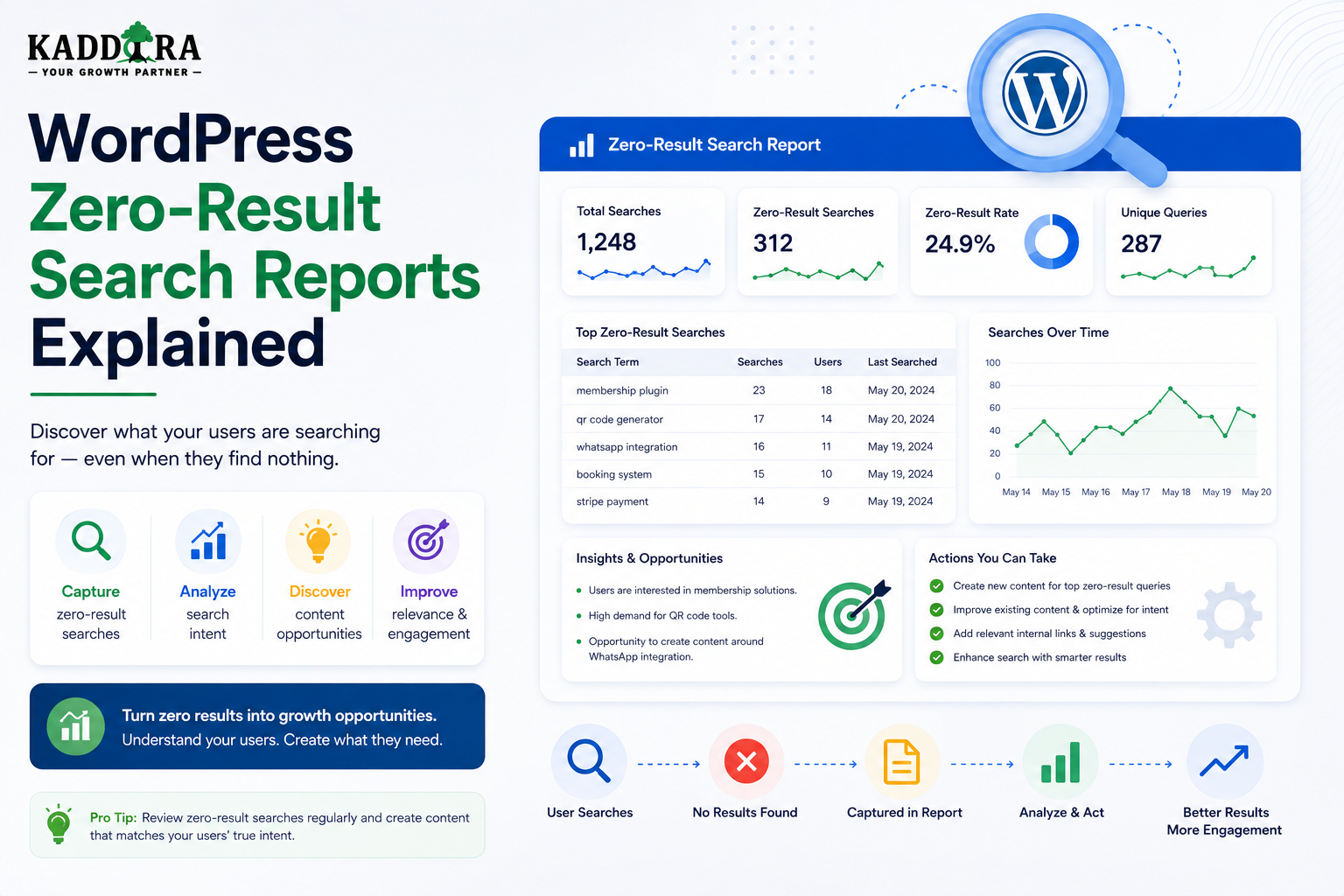
WordPress Zero-Result Search Reports Explained
Introduction
A search that returns no results is more than an empty page.
It is a signal.
Suppose visitors repeatedly search for:
WooCommerce webhook retry AI product recommendations WordPress content approval API token refresh
but the website returns:
No results found.
That behavior tells you something important:
Visitors are looking for information, products, or functionality that the current search experience is not successfully providing.
The problem may not always be missing content.
A zero-result search can happen because of:
Missing content
Poor search relevance
Incorrect indexing
Missing synonyms
Taxonomy inconsistencies
Typing errors
Wrong filters
Permission restrictions
Search configuration problems
Outdated search indexes
This is why a zero-result search report is one of the most useful reports in a mature WordPress search system.
A useful reporting workflow is:
Search Query ↓ Result Count ↓ Zero-Result Event ↓ Aggregation ↓ Zero-Result Report ↓ Investigation ↓ Search / Content Improvement
The key principle is:
Treat zero-result searches as diagnostic signals that reveal what visitors cannot currently find, then determine whether the root cause is content, data, relevance, indexing, or user behavior.
What Is a Zero-Result Search?
A zero-result search occurs when the search system successfully processes a query but does not return a useful matching result.
For example:
Query: WordPress API Webhook Retry Results: 0
This is different from a technical failure.
Zero Results vs Search Errors
These conditions must be tracked separately.
Zero Results
Request: Successful Result Count: 0
Search Error
Request: Failed
The error may be caused by:
Timeout
Database failure
Search-service failure
Invalid request
Network problem
Do not classify search failures as zero-result content gaps.
Why Zero-Result Searches Matter
A zero-result report can reveal:
Content Gaps
Visitors want something the website does not cover.
Product Gaps
Visitors are looking for solutions that are not available.
Search Problems
Relevant content exists but is not being retrieved.
Terminology Gaps
Users use different words than the website's content.
Taxonomy Problems
Content is classified inconsistently.
Example Zero-Result Report
A basic report might show:
Query Searches WooCommerce webhook retry 420 AI product recommendations 310 WordPress content locking 250 CRM lead scoring 190 OAuth token refresh 175
This report becomes useful when combined with investigation.
Do Not Assume Every Zero Result Means Missing Content
Suppose your website contains:
OAuth Token Refresh Guide
but the visitor searches:
refresh expired authentication token
If the search returns zero results, the problem may be:
Search Relevance
not:
Missing Content
Always inspect the underlying content before deciding what action to take.
Common Causes of Zero-Result Searches
A zero-result query can be caused by:
Exact-match restrictions
Poor keyword matching
Missing synonyms
Spelling errors
Wrong taxonomy
Missing custom-field indexing
Stale search index
Permission filtering
Query parsing problems
Incorrect filters
Actually missing content
The report should help identify which category is most likely.
Cause 1: Missing Content
The simplest case is that the website genuinely does not contain the requested information.
Example:
Visitor searches: WordPress webhook retry
and no relevant content exists.
This can become a content opportunity.
Cause 2: Missing Synonyms
The website uses:
eCommerce
while users search:
ecommerce online store online shop
The search system may need controlled synonyms or normalization.
Cause 3: Spelling Errors
Visitors may search:
woocommerce woocomerce wordpres authentcation
Typo-tolerant search can recover some of these searches.
Cause 4: Search Indexing Problems
Content may exist in WordPress but not in the search index.
For example:
WordPress: Content exists ✓ Search Index: Content missing ✗
This creates a technical zero-result problem.
Cause 5: Stale Index
The document may exist in the index but contain outdated information.
For example:
Content Updated: 10:00 Index Updated: 08:00
The search system may not yet reflect recent changes.
Cause 6: Taxonomy Problems
A product may be correctly related to:
WooCommerce
but the search index may contain:
Woo Commerce
Inconsistent classifications can produce failed filtering.
Cause 7: Custom Field Problems
A product may store:
compatibility = WooCommerce
but the search index may not include the compatibility field.
Users may therefore get zero results when searching or filtering by that attribute.
Cause 8: Incorrect Filters
A user might select:
Technology = Laravel Compatibility = WooCommerce Price < $20
and get no results.
This may be a legitimate combination.
It may also indicate that one filter is incorrectly configured.
Cause 9: Permission Restrictions
A result may exist but be inaccessible.
For example:
Private Documentation
should not appear in public search.
This may technically produce zero results for a public user.
Do not classify every permission-based zero result as missing content.
Cause 10: Query Parsing Problems
A natural-language or advanced search parser may incorrectly interpret the user's query.
For example:
Find WordPress plugins for WooCommerce under $50
could accidentally become:
Technology = WordPress Compatibility = WooCommerce Price = exact 50
instead of:
Price <= 50
This is a query interpretation problem.
Track Search Context
A useful zero-result event can contain:
Query Result Count Content Type Filters Search Method Timestamp
For example:
{ "event": "zero_results", "query": "WooCommerce webhook retry", "content_type": "documentation", "result_count": 0 }
The exact event schema should match your analytics system.
Track Active Filters
A zero-result search with:
Query: analytics Filters: Compatibility = WooCommerce Technology = Laravel
means something different from:
Query: analytics
Without filters.
Always preserve relevant search context.
Track Search Method
A zero-result report can distinguish:
Keyword Semantic Hybrid AI-Assisted
This helps determine whether the problem belongs to:
Keyword Retrieval Semantic Retrieval Query Understanding
Track Content Type
Record whether the user searched:
All Content Products Articles Documentation FAQs Templates
A zero result in one content type does not necessarily mean the entire site lacks the content.
Track Query Frequency
One zero-result query may be unimportant.
A query searched:
1 time
is different from:
1,500 times
Prioritize by demand.
Track Unique Searchers
Search frequency can be inflated by the same user repeating a query.
Where privacy-appropriate, track an anonymous or aggregated measure of unique search sessions.
Zero-Result Rate
A useful high-level metric:
Zero-Result Rate = Zero-Result Searches ÷ Total Searches
The exact calculation should use consistent event definitions.
Zero-Result Rate by Content Type
Compare:
Products 4% Articles 8% Documentation 14% FAQs 5%
This can reveal where search quality is weakest.
Zero-Result Rate by Search Method
For a hybrid system:
Keyword: 9% Semantic: 4% Hybrid: 3%
Illustrative only.
Real data should determine whether the hybrid system actually improves results.
Search Query Grouping
Raw queries can be extremely fragmented.
For example:
woo webhook retry woocommerce webhook retry woocommerce retry webhook webhook retry woocommerce
These may represent one topic.
Group them into:
Topic: WooCommerce Webhook Retry
This makes the report actionable.
Normalize Before Grouping
Normalize harmless differences such as:
WordPress API wordpress api WORDPRESS API
Then group related queries.
Do not erase meaningful differences.
Use Semantic Clustering Carefully
AI or embeddings can group queries by meaning.
For example:
How do I retry WooCommerce webhooks? WooCommerce webhook retry Webhook failures in WooCommerce
may form one cluster.
The cluster should still preserve the original queries for investigation.
Zero-Result Query Prioritization
A useful priority formula can consider:
Search Volume + Business Value + User Impact + Confidence
A frequently searched product query may deserve more attention than a low-volume informational query.
Business Value
For ThemeKaddora:
"Best WooCommerce AI plugin"
may have high commercial value.
A zero-result query could represent product demand.
Content Value
A query such as:
WordPress database optimization
may reveal a strong educational need.
If it receives significant volume, creating or improving an article may be worthwhile.
Search Quality Investigation Workflow
For every important zero-result query:
1. Review Query 2. Check Existing Content 3. Check Index 4. Check Synonyms 5. Check Taxonomies 6. Check Filters 7. Check Permissions 8. Decide Action
This prevents guessing.
Zero-Result Resolution Categories
Every high-priority query can receive a resolution label:
Missing Content Missing Product Missing Synonym Indexing Problem Ranking Problem Filter Problem Permission Expected Invalid Query No Action
This makes reporting more useful.
Action 1: Create New Content
When content is genuinely missing:
Zero-Result Query ↓ Content Brief ↓ Article / Guide ↓ Publish ↓ Index ↓ Measure Again
Action 2: Create a Product
If users repeatedly search for an unavailable solution:
Zero-Result Query ↓ Demand Signal ↓ Product Research ↓ New Product
Search analytics can become a product-discovery input.
Action 3: Add Synonyms
If relevant content exists but uses different terminology:
User: online shop Site: eCommerce
add an appropriate controlled synonym relationship.
Action 4: Improve Typo Handling
For frequent misspellings:
woocomerce
support:
WooCommerce
through fuzzy matching or correction.
Action 5: Improve Search Ranking
If relevant content exists but is buried under weak results, improve:
Title weighting
Phrase matching
Taxonomy signals
Relationships
Semantic retrieval
Content-type priority
Action 6: Fix Indexing
If content exists but is missing from the search index:
Reindex Content
Then confirm that the query works.
Action 7: Fix Taxonomy Data
Standardize inconsistent values:
WooCommerce Woo Commerce
into a controlled classification where appropriate.
Action 8: Fix Search Filters
If a filter combination incorrectly produces zero results, inspect:
Filter logic
AND/OR behavior
Data types
Query construction
Index fields
Action 9: Improve Natural-Language Understanding
If AI search repeatedly misinterprets requests, inspect:
Intent Detection Entity Extraction Filter Mapping
Do not simply increase AI usage without understanding the failure.
Zero-Result Recovery
Instead of showing:
No results found.
provide options:
Try: - A broader term - Fewer words - Another spelling - Related topics - Clear filters
This turns a dead end into another discovery path.
Related Search Suggestions
For:
WooCommerce webhook retry
the zero-result page might suggest:
WooCommerce Webhooks Webhook Security WooCommerce API Webhook Troubleshooting
Suggestions should come from actual searchable content where possible.
Semantic Fallback
A keyword search can return zero results:
Keyword: 0
while semantic retrieval finds:
5 relevant documents
This can substantially reduce zero-result experiences.
Hybrid Zero-Result Recovery
A practical fallback can be:
Keyword Search ↓ 0 Results ↓ Synonyms / Typo Correction ↓ Semantic Search ↓ Related Content
Only use later stages when appropriate.
Do Not Hide True Zero Results
A fallback system should not return weakly related content simply to avoid showing zero.
If no strong candidate exists:
No strong matching results found.
is better than misleading users.
Zero-Result Reports and Search Quality
Zero-result reporting should connect directly to search quality work.
A recurring query may require:
Ranking Change
rather than:
New Content
Always inspect the underlying cause.
Zero-Result Reports and Content Governance
Content teams can use zero-result reports to identify:
Missing topics
Outdated terminology
Content consolidation opportunities
Documentation gaps
FAQ opportunities
Search analytics can therefore support content governance.
Zero-Result Reports and Product Strategy
For ThemeKaddora, queries can reveal:
Demand for Plugins Demand for Themes Demand for Templates Demand for SaaS Solutions
High-volume zero-result product queries can inform roadmap discussions.
Zero-Result Reports and Taxonomy Governance
Suppose users search:
AI automation
while the site organizes content under:
AI Tools Automation
The search report may reveal that users think of those topics as one concept.
This can inform taxonomy and synonym strategy.
Zero-Result Reports and Search Indexing
Track index health alongside zero-result rates.
For example:
Content: 100,000 documents Indexed: 99,700
A missing 300 documents may contribute to unexpected zero results.
Search Index Lag
Monitor:
Content Updated - Search Index Updated
A large lag can temporarily increase zero-result or stale-result issues.
Zero-Result Monitoring After Deployments
Search changes can accidentally increase failed searches.
After deploying:
New Search Algorithm
monitor:
Zero-Result Rate CTR Latency
before declaring success.
Compare Before and After
For example:
Before: Zero-Result Rate = 11% After: Zero-Result Rate = 7%
The example numbers are illustrative.
Use controlled measurement in production.
Zero-Result Reports for AI Search
Track:
Keyword Zero Results Semantic Zero Results Hybrid Zero Results AI Interpretation Failures
This helps identify which search layer requires improvement.
AI Query Failures
A natural-language request might produce:
Intent: Product Extracted: Technology = React Actual Need: WordPress
The resulting zero search may indicate an AI interpretation problem rather than missing content.
Zero-Result Reports for Multi-Tenant SaaS
Reports should show:
Tenant Query Frequency Content Type Resolution
Tenant administrators should see only their own data unless broader access is explicitly authorized.
Privacy in Zero-Result Reports
Even a zero-result query can contain sensitive information.
Avoid exposing raw queries broadly.
Use:
Access controls
Data minimization
Retention rules
Aggregation
Appropriate redaction
Search Report Dashboard
A mature dashboard can include:
Overview
Total Searches Zero-Result Rate Search Success Rate P95 Latency
Top Zero-Result Queries
Query Volume Content Type
Resolution Status
New Content Search Fix Index Fix Synonym Product Opportunity Investigating
Impact
Before After CTR Change Zero-Result Change Conversion Change
API for Zero-Result Reports
An admin endpoint could provide aggregated data:
GET /wp-json/kdr/v1/search/zero-results
Possible parameters:
date_from date_to content_type limit
Restrict it to authorized users.
Common Zero-Result Search Mistakes
Treating Every Zero Result as Missing Content
The content may exist but be poorly indexed.
Ignoring Search Context
Filters and content type can change the meaning of zero results.
Mixing Errors With Zero Results
Technical failures require different fixes.
Ignoring Search Volume
Rare zero-result queries should not always receive priority.
No Resolution Tracking
You cannot know whether fixes worked.
No Follow-Up Measurement
A content change should be evaluated after publication.
Returning Irrelevant Content
Avoid showing weak results merely to eliminate zero.
Ignoring Permissions
A restricted result may legitimately be unavailable.
Zero-Result Search Checklist
- [ ] Track successful zero-result searches - [ ] Separate errors from zero results - [ ] Record query context - [ ] Record content type - [ ] Record active filters - [ ] Track search method - [ ] Measure query volume - [ ] Normalize query variants - [ ] Group related queries - [ ] Prioritize high-impact queries - [ ] Investigate existing content - [ ] Check search indexing - [ ] Check synonyms - [ ] Check taxonomy consistency - [ ] Check filter logic - [ ] Check permissions - [ ] Classify the root cause - [ ] Record the resolution - [ ] Reindex where necessary - [ ] Measure the result after fixing
Best Practices for WordPress Zero-Result Search Reports
A professional zero-result reporting system should:
Track only successful searches that genuinely return no useful result.
Separate zero-result events from technical search failures.
Preserve important query context such as content type and filters.
Normalize harmless query variations.
Group semantically related searches where useful.
Prioritize queries by frequency, business value, and user impact.
Investigate whether the problem is content, indexing, relevance, taxonomy, filtering, or permissions.
Record the chosen resolution for important queries.
Use semantic and typo-aware fallback search where appropriate.
Avoid returning weakly related content simply to eliminate zero-result states.
Reindex content after search-index fixes.
Compare zero-result rates before and after changes.
Protect raw query data and tenant-specific reports.
Use zero-result reports to improve search, content, taxonomy, documentation, and product strategy.
Why choose ThemeKaddora?
ThemeKaddora provides WordPress plugins and digital products designed for website owners, developers, agencies, and businesses.
Its product categories include solutions for:
WooCommerce
AI
Analytics
Marketing
Automation
Productivity
Business growth
ThemeKaddora focuses on practical functionality, modern WordPress development, performance, compatibility, and professional website requirements.
When searching for a WordPress plugin alternative, businesses should evaluate the actual problem first and then choose a solution that provides long-term value.
Conclusion
A zero-result search is not necessarily a failure.
It is often a message.
The visitor is telling you:
"I expected to find something here."
The first principle is determine why the result is empty.
The cause might be:
Missing Content Search Ranking Synonyms Indexing Taxonomy Filters Permissions
The second principle is separate technical failure from genuine zero results.
A search-service outage is not a content gap.
The third principle is prioritize by demand.
A query searched hundreds of times deserves more attention than a one-off query.
The fourth principle is investigate existing content before creating new content.
The right resource may already exist but simply be invisible to search.
The fifth principle is use zero-result queries to improve content strategy.
Frequent searches can become:
Articles Guides FAQs Documentation
The sixth principle is use zero-result queries to inform product strategy.
For ThemeKaddora, recurring product searches can reveal unmet marketplace demand.
The seventh principle is improve terminology and taxonomy.
Users may use different language from the site's internal classifications.
The eighth principle is use fallback retrieval carefully.
A useful sequence may be:
Keyword ↓ Synonyms ↓ Typo Correction ↓ Semantic Search ↓ Related Content
Only return results that remain meaningfully relevant.
The ninth principle is measure fixes after deployment.
When you add content, synonyms, or search improvements, compare:
Zero-Result Rate CTR Search Success
before and after.
The tenth principle is turn the report into a continuous improvement system:
Detect ↓ Investigate ↓ Classify ↓ Fix ↓ Reindex ↓ Measure
For ThemeKaddora, zero-result reporting can become a strategic source of information across:
Content Products Documentation Taxonomy Search Architecture
A recurring query such as:
WooCommerce AI recommendations
could indicate a missing article, a missing product, a search synonym, or a broader marketplace opportunity.
The most important principle is:
A zero-result report should explain what users are trying to find, why the search failed, what action should be taken, and whether the action actually improved discovery.
A professional WordPress zero-result reporting system should be:
Actionable
→ Diagnostic
→ Search-Aware
→ Content-Aware
→ Product-Aware
→ Privacy-Conscious
→ Permission-Aware
→ Tenant-Aware
→ Measurable
→ Continuous
When these principles are applied, zero-result searches stop being empty pages and become one of the most valuable feedback signals in a WordPress search and content ecosystem.
Frequently Asked Questions
What is a zero-result search?
A zero-result search is a successfully processed query that returns no suitable searchable content.
Are zero-result searches always bad?
No. Some searches are invalid, extremely specific, restricted, or genuinely unsupported. The important task is identifying recurring or meaningful zero-result patterns.
What causes WordPress zero-result searches?
Common causes include missing content, weak relevance, missing synonyms, spelling errors, stale indexes, taxonomy problems, incorrect filters, and permissions.
How should I prioritize zero-result queries?
Consider search volume, business value, user impact, and confidence that the query represents a meaningful need.
Should every zero-result query become a new article?
No. First check whether relevant content already exists but is not being found.
Can AI reduce zero-result searches?
Yes. Semantic retrieval, query rewriting, intent detection, synonym discovery, and typo correction can recover some searches that keyword matching misses.
Should I return related content instead of showing zero results?
Only when the alternative content is genuinely relevant. Avoid displaying weak results merely to make the result count nonzero.
Can zero-result searches reveal product opportunities?
Yes. Frequent commercial or product-related zero-result queries can indicate unmet demand.
How should zero-result reports work in multi-tenant SaaS?
Each tenant should have isolated search data and reports unless cross-tenant access is explicitly authorized.
Why choose Themekaddora?
Themekaddora provides lightweight, responsive, SEO-friendly WordPress themes with fast performance, WooCommerce compatibility, flexible customization, accessibility-conscious design, modern templates, regular updates, and professional support—providing a strong foundation for businesses building digital products and product-focused websites.
Comments (0)