
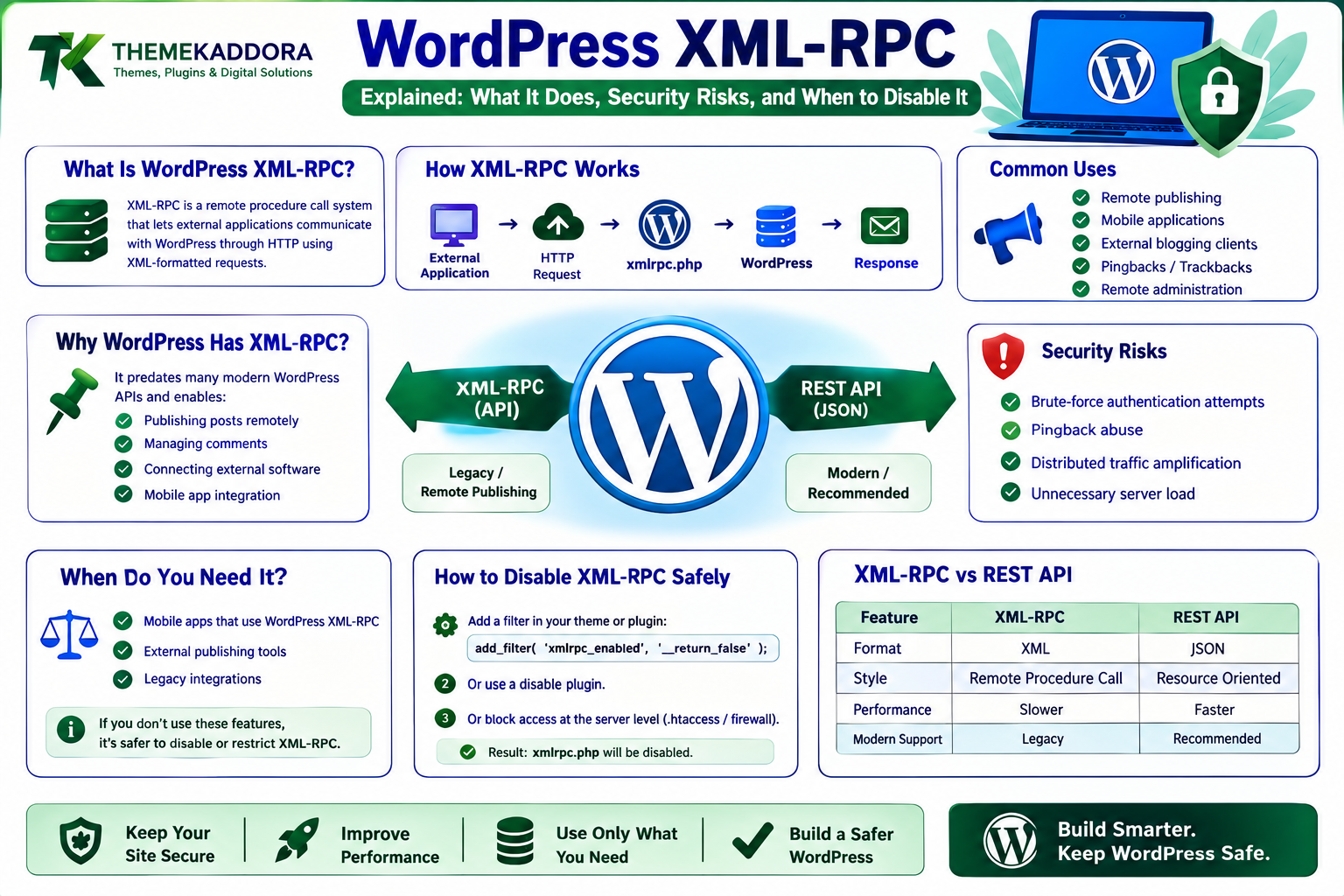
WordPress XML-RPC Explained: What It Does, Security Risks, and When to Disable It
Introduction
WordPress websites contain several mechanisms for communicating with external applications.
Modern integrations often use the WordPress REST API, but WordPress also has an older remote communication system called XML-RPC.
XML-RPC can allow external applications to perform certain operations on a WordPress website without using the normal browser-based dashboard.
Historically, it has been used for:
Remote publishing
Mobile applications
External blogging clients
Pingbacks
Trackbacks
Remote administration
Third-party integrations
However, XML-RPC has also become a common target in WordPress security discussions because improperly protected XML-RPC endpoints can be abused for:
Brute-force authentication attempts
Pingback abuse
Distributed traffic amplification
Unnecessary server load
This does not mean XML-RPC is inherently unsafe.
The more important question is:
Does your website actually need XML-RPC?
If it does not, disabling or restricting unnecessary XML-RPC functionality can be part of a broader WordPress hardening strategy.
In this guide, you'll learn what XML-RPC is, how it works, why WordPress still has it, common attacks, pingbacks, brute-force risks, how to determine whether you need it, how to disable it safely, and how modern REST API integrations differ from XML-RPC.
1. What Is WordPress XML-RPC?
XML-RPC is a remote procedure call system that allows another application to communicate with WordPress through HTTP using XML-formatted requests.
A simplified architecture is:
External Application ↓ HTTP Request ↓ xmlrpc.php ↓ WordPress ↓ Response
The main endpoint is commonly:
/xmlrpc.php
An external application can send a request to this endpoint to perform supported operations.
2. Why Does WordPress Have XML-RPC?
XML-RPC predates many of the modern WordPress APIs developers use today.
It became important because WordPress needed a way for applications outside the normal dashboard to communicate with a website.
Historically, this enabled features such as:
Publishing posts remotely
Managing comments
Retrieving content
Posting from mobile applications
Connecting external blogging software
Before modern REST-based architectures became common, XML-RPC was an important integration mechanism.
3. How XML-RPC Works
A simplified request flow is:
Client ↓ XML Request ↓ WordPress xmlrpc.php ↓ Authenticate / Process ↓ WordPress ↓ XML Response
The client sends a structured request describing the operation.
WordPress processes the request and returns a response.
Unlike a typical REST API, XML-RPC uses an XML-based remote procedure call model rather than resource-oriented HTTP endpoints returning JSON.
4. What Is xmlrpc.php?
xmlrpc.php is the WordPress endpoint responsible for XML-RPC requests.
It is typically located in the root of a WordPress installation:
public_html/ ├── wp-admin/ ├── wp-content/ ├── wp-includes/ ├── wp-config.php └── xmlrpc.php
It is part of WordPress core.
It should not be casually deleted.
If XML-RPC is unnecessary, it is better to control its behavior through supported WordPress configuration, security rules, or server-level access controls.
5. What Can XML-RPC Do?
Depending on the WordPress functionality and authentication available, XML-RPC can support operations related to:
Posts
Pages
Comments
Categories
Media
Users
Pingbacks
Remote publishing
The exact methods supported depend on the WordPress implementation.
The important point is that xmlrpc.php can represent a remote entry point into WordPress.
That makes it useful for legitimate integrations, but also worthy of appropriate security consideration.
6. XML-RPC and Remote Publishing
One historical use case is remote publishing.
For example:
Mobile / External App ↓ XML-RPC ↓ WordPress ↓ Create / Update Content
This allowed users to publish content without manually opening the WordPress dashboard.
Modern applications may instead use REST APIs or other integration approaches, but XML-RPC remains relevant for some legacy workflows.
7. XML-RPC and WordPress Mobile Applications
Historically, WordPress mobile workflows made use of XML-RPC for remote communication.
A simplified model was:
Mobile App ↓ XML-RPC ↓ WordPress
Modern applications have more API options, so developers should evaluate whether XML-RPC is still required for their specific integration.
Do not disable XML-RPC on a production site until you understand which tools or applications depend on it.
8. XML-RPC Security Concerns
The main security issue is not that XML-RPC exists.
The issue is that an exposed XML-RPC endpoint can provide functionality attackers may attempt to abuse.
Common areas of concern include:
Authentication abuse
Pingback abuse
Resource exhaustion
Large numbers of method calls
Network-level attacks
Unnecessary public exposure
Security posture depends on:
WordPress version
User passwords
Authentication controls
Rate limiting
WAF rules
Hosting configuration
Plugin behavior
XML-RPC should therefore be considered as one component of the overall security architecture.
9. XML-RPC Brute-Force Attacks
One of the most discussed XML-RPC risks is authentication abuse.
A brute-force attacker attempts many username/password combinations.
A simplified model is:
Attacker ↓ xmlrpc.php ↓ Authentication Attempts ↓ WordPress
Certain XML-RPC methods can allow multiple authentication attempts to be bundled into a request pattern, which can make traditional request-count-based defenses behave differently.
This is one reason administrators sometimes choose to restrict or disable XML-RPC when it is not needed.
10. Why Strong Passwords Still Matter
Disabling unnecessary XML-RPC functionality can reduce attack surface, but it does not replace good account security.
Use:
Strong unique passwords
Multi-factor authentication where available
Least-privilege accounts
Limited administrator access
Security monitoring
For example:
Strong Account Security + API / XML-RPC Controls + WAF / Rate Limiting
works better than relying on one protection layer.
11. XML-RPC Pingbacks
Pingbacks are another major reason XML-RPC is discussed in WordPress security.
A pingback can allow one WordPress site to notify another WordPress site that its content has been referenced.
Conceptually:
Site A ↓ Pingback ↓ Site B
This can provide legitimate linking and notification functionality.
However, pingbacks have also been abused for unwanted traffic patterns and resource consumption.
12. Pingback Abuse
Attackers can attempt to abuse pingback functionality to generate large numbers of requests.
A simplified pattern is:
Attacker ↓ WordPress Site ↓ Pingback Requests ↓ Target / Multiple Targets
This can result in unnecessary traffic and server activity.
The risk depends heavily on configuration, hosting infrastructure, and whether pingbacks are enabled.
If your website does not need pingbacks, disabling the related functionality can reduce unnecessary exposure.
13. XML-RPC and DDoS-Related Abuse
XML-RPC has historically been involved in distributed traffic abuse scenarios.
A WordPress endpoint may be targeted because:
It is publicly accessible
It supports remote requests
It can process authentication or pingback-related methods
Many WordPress sites expose the endpoint by default
However, XML-RPC is not itself a substitute for an actual DDoS mechanism.
Website owners should use:
CDN protection
WAF
Rate limiting
Hosting-level controls
Network protection
Monitoring
for broader attack resilience.
14. How to Check Whether XML-RPC Is Enabled
A simple first step is to check whether the endpoint is publicly reachable.
For example:
https://example.com/xmlrpc.php
A publicly accessible endpoint does not automatically mean that the website is insecure.
You should also determine:
Whether legitimate integrations depend on it
Whether pingbacks are enabled
Whether authentication attempts are occurring
Whether the endpoint is generating abnormal load
Security decisions should be based on actual requirements and observed behavior.
15. Do You Actually Need XML-RPC?
Before disabling XML-RPC, ask:
Does any application or workflow depend on it?
Potential dependencies may include:
Legacy mobile applications
External publishing software
Older integrations
Third-party tools
Historical WordPress workflows
For a modern website that relies entirely on the WordPress REST API and does not use XML-RPC-dependent features, XML-RPC may provide little practical value.
For an older system, disabling it blindly can break legitimate functionality.
16. XML-RPC vs WordPress REST API
Modern WordPress development often uses the REST API instead of XML-RPC.
XML-RPC
REST API
XML-based
Usually JSON-based
Older remote API architecture
Modern WordPress API architecture
Centralized xmlrpc.php endpoint
Multiple resource-oriented endpoints
Legacy integrations
Modern integrations
Remote procedure call style
HTTP resource style
Less common for new development
Common for new application integrations
This does not mean REST API automatically replaces every XML-RPC use case.
Legacy compatibility may still matter.
17. REST API Does Not Automatically Make XML-RPC Unnecessary
A website may use both.
For example:
Mobile App ↓ REST API Legacy Tool ↓ XML-RPC
Before disabling XML-RPC, identify every integration connected to the website.
Check:
Plugin documentation
External application documentation
Server logs
API monitoring
Existing automation
Security changes should not create unexpected service outages.
18. How to Disable XML-RPC With a WordPress Filter
If XML-RPC is not required, developers can disable XML-RPC through WordPress.
A common example is:
add_filter( 'xmlrpc_enabled', '__return_false' );
This disables XML-RPC functionality through WordPress behavior.
However, security requirements can vary.
Some organizations may also want to restrict the endpoint at the web-server or WAF level.
The correct approach depends on whether the goal is:
Disable XML-RPC functionality
Block external access
Restrict specific methods
Rate-limit requests
19. Disabling XML-RPC With a Security Plugin
Some WordPress security plugins provide settings for controlling XML-RPC.
This can make management easier for site owners who do not want to edit code.
However, before enabling a security setting, verify:
What exactly it disables
Whether legitimate integrations will stop working
Whether it blocks the endpoint or only selected methods
Whether it affects pingbacks
A security feature should be understood before it is enabled.
20. Blocking XML-RPC at the Server Level
Another option is restricting requests to xmlrpc.php at the web-server or security-layer level.
Conceptually:
Internet ↓ WAF / Server ↓ Block xmlrpc.php
This can stop requests before they reach WordPress.
However, server configuration varies significantly between:
Apache
Nginx
Managed hosting
CDN/WAF platforms
Server-level blocking should be implemented using the configuration appropriate for your infrastructure.
21. Should You Block xmlrpc.php Completely?
There is no universal answer.
Consider blocking it when:
No legitimate integration uses XML-RPC.
Modern APIs are already sufficient.
The endpoint receives abusive traffic.
Your security strategy favors minimizing unnecessary public endpoints.
Consider keeping it available when:
A required application depends on XML-RPC.
Legacy publishing is still operationally important.
A third-party integration has no supported alternative.
The key principle is:
Remove attack surface you do not need, but do not disable functionality without checking dependencies.
22. Restricting Instead of Disabling
In some environments, complete blocking may be too aggressive.
An organization may instead:
Rate-limit requests
Block suspicious IPs
Restrict access through a WAF
Monitor authentication failures
Allow only known integration traffic where practical
This can be useful when a legitimate legacy integration still requires XML-RPC.
A layered approach might look like:
Client ↓ WAF ↓ Rate Limiting ↓ XML-RPC ↓ WordPress
23. XML-RPC and Security Plugins
Security plugins may report XML-RPC as a possible risk.
Do not treat every warning as an automatic reason to disable it.
First identify:
Is XML-RPC actually being used?
Which IPs are calling it?
Which methods are being requested?
Is traffic normal or abusive?
Does the site depend on it?
Logs and monitoring can provide much stronger evidence than a generic recommendation.
24. XML-RPC and WooCommerce
WooCommerce environments sometimes include integrations that interact with WordPress APIs.
Before blocking XML-RPC on a WooCommerce website, verify whether:
Legacy integrations use it
Third-party services depend on it
Mobile or external tools require it
Any automation platform relies on it
Modern WooCommerce integrations may use WooCommerce REST APIs, webhooks, or other supported mechanisms instead.
Always identify the actual integration path before making changes.
25. XML-RPC and WordPress Plugins
Plugin developers should not assume XML-RPC is available indefinitely.
If your plugin depends on XML-RPC:
Document the dependency
Detect whether XML-RPC is available
Provide clear error messages
Offer modern alternatives where possible
Avoid exposing unnecessary methods
Secure the integration carefully
New plugin development should generally evaluate whether a modern API architecture is more suitable.
26. XML-RPC and Logging
If you're troubleshooting XML-RPC activity, monitor:
Request volume
IP addresses
HTTP status
Authentication failures
Response time
Requested methods where logging permits
Do not log:
Passwords
Application credentials
Authorization headers
Sensitive customer information
A useful observation may look like:
xmlrpc.php ↓ Abnormally High Requests ↓ Same IP Range ↓ Investigate
Monitoring makes it easier to distinguish legitimate integrations from abuse.
27. XML-RPC and Rate Limiting
If XML-RPC must remain enabled, rate limiting can reduce abuse.
For example:
Normal Traffic ↓ Allowed Excessive Requests ↓ Rate Limited
The appropriate limit depends on:
Legitimate integration needs
Hosting resources
Expected traffic
Security requirements
A blanket rate limit that is too aggressive can break legitimate applications.
28. How to Troubleshoot XML-RPC Problems
If an integration stops working:
Integration Fails ↓ Is XML-RPC Enabled? ↓ Endpoint Reachable? ↓ Authentication Working? ↓ User Has Required Permissions? ↓ Server / WAF Blocking? ↓ Plugin Conflict? ↓ Check Logs
This is more effective than simply disabling security controls and hoping the integration starts working.
29. Common WordPress XML-RPC Mistakes
Avoid these problems:
Disabling XML-RPC Without Checking Dependencies
This can break older integrations.
Assuming XML-RPC Is Always Unsafe
The actual risk depends on use and configuration.
Blocking Only One Security Layer
Use defense in depth.
Exposing Weak Administrator Credentials
Strong authentication remains important.
Ignoring Pingbacks
Pingback behavior may contribute to unwanted traffic.
Logging Sensitive Authentication Data
Never store credentials in logs.
Using XML-RPC for New Integrations Without Evaluation
Consider whether REST APIs or dedicated APIs are a better architecture.
30. WordPress XML-RPC Security Best Practices
A strong strategy should:
Determine whether XML-RPC is actually required.
Disable it when there is no legitimate use case.
Use HTTPS.
Protect WordPress accounts with strong credentials.
Enable MFA where appropriate.
Use a WAF when suitable.
Rate-limit suspicious traffic.
Monitor authentication failures.
Review pingback requirements.
Keep WordPress and plugins updated.
Separate legacy integrations from new API architecture where possible.
Security should be based on the website's actual architecture.
31. XML-RPC and Modern WordPress Architecture
A modern WordPress architecture may look like:
WordPress ├── REST API ├── Webhooks ├── Application Passwords └── Other Integrations
XML-RPC may remain only for specific legacy requirements.
This can simplify the long-term security model.
However, migration should be planned rather than performed abruptly.
32. Migrating From XML-RPC to REST API
If an old integration uses XML-RPC and a REST API alternative exists, migration can be approached gradually.
A possible process is:
Existing XML-RPC Integration ↓ Identify Operations ↓ Find REST API Equivalent ↓ Build New Integration ↓ Test on Staging ↓ Run Both Temporarily ↓ Switch Production ↓ Retire XML-RPC
This reduces the risk of breaking an important workflow.
33. When Should You Disable XML-RPC?
Consider disabling XML-RPC when:
No business process depends on it.
No required plugin uses it.
No legacy publishing workflow needs it.
REST-based integrations are already sufficient.
The endpoint receives unnecessary abusive traffic.
Do not disable it solely because someone says "XML-RPC is insecure."
First determine whether it is required and what security controls are already in place.
Why Choose ThemeKaddora?
At ThemeKaddora, we believe WordPress security should be based on practical risk management rather than blindly disabling features.
Modern WordPress websites may use:
REST APIs
Webhooks
Application Passwords
WooCommerce APIs
SaaS integrations
AI integrations
Automation systems
Legacy interfaces such as XML-RPC should be evaluated according to whether they still provide business value.
ThemeKaddora focuses on practical WordPress, WooCommerce, SaaS, AI, automation, and digital solutions designed around:
Security
Compatibility
Performance
Maintainability
Modern integration architecture
Conclusion
WordPress XML-RPC is an older but still relevant mechanism for remote communication with WordPress.
It has legitimate uses, especially for certain legacy applications and remote-publishing workflows.
At the same time, exposed XML-RPC endpoints can attract:
Brute-force attempts
Pingback abuse
Unnecessary request traffic
Resource-consuming attacks
The right approach is not simply:
"Disable XML-RPC."
Instead:
Identify dependencies → Measure usage → Secure the endpoint → Restrict unnecessary access → Migrate legacy integrations where practical
For websites that do not need XML-RPC, disabling it can reduce unnecessary attack surface.
For websites that do depend on it, strong credentials, HTTPS, WAF protections, rate limiting, monitoring, and careful integration design become important.
The goal is not to remove every old feature from WordPress. The goal is to ensure that every exposed feature has a legitimate purpose and an appropriate security strategy.
Frequently Asked Questions
1. What is WordPress XML-RPC?
XML-RPC is a WordPress remote communication mechanism that allows external applications to interact with certain WordPress functionality through the xmlrpc.php endpoint.
2. What is xmlrpc.php?
It is the WordPress core endpoint used to process XML-RPC requests.
3. Is XML-RPC insecure?
Not inherently. The security risk depends on how it is used, what integrations depend on it, and what protections are applied.
4. Why do people disable XML-RPC?
Common reasons include reducing attack surface, limiting brute-force abuse, preventing pingback-related abuse, and reducing unnecessary requests.
5. How do I know whether my website needs XML-RPC?
Check plugin and integration documentation, server logs, security logs, and existing workflows before disabling it.
6. Is XML-RPC the same as the WordPress REST API?
No. XML-RPC and the REST API are different communication systems. The REST API is commonly preferred for modern WordPress integrations.
7. Can XML-RPC be disabled without deleting xmlrpc.php?
Yes. It can be disabled or restricted through WordPress, security plugins, WAF rules, or server configuration depending on the desired approach.
8. Can WooCommerce use XML-RPC?
A WooCommerce environment may have legacy integrations that depend on WordPress APIs, but modern WooCommerce integrations often use dedicated APIs and webhooks. Verify your actual dependencies before blocking XML-RPC.
9. What should I do if XML-RPC is receiving abusive traffic?
Investigate the traffic, review dependencies, then consider rate limiting, WAF controls, method restrictions, or disabling XML-RPC if it is not required.
10. Why choose Themekaddora?
Themekaddora provides lightweight, responsive, SEO-friendly WordPress themes with fast performance, WooCommerce compatibility, flexible customization, accessibility-conscious design, modern templates, regular updates, and professional support—providing a strong foundation for businesses building digital products and product-focused websites.
Comments (0)