
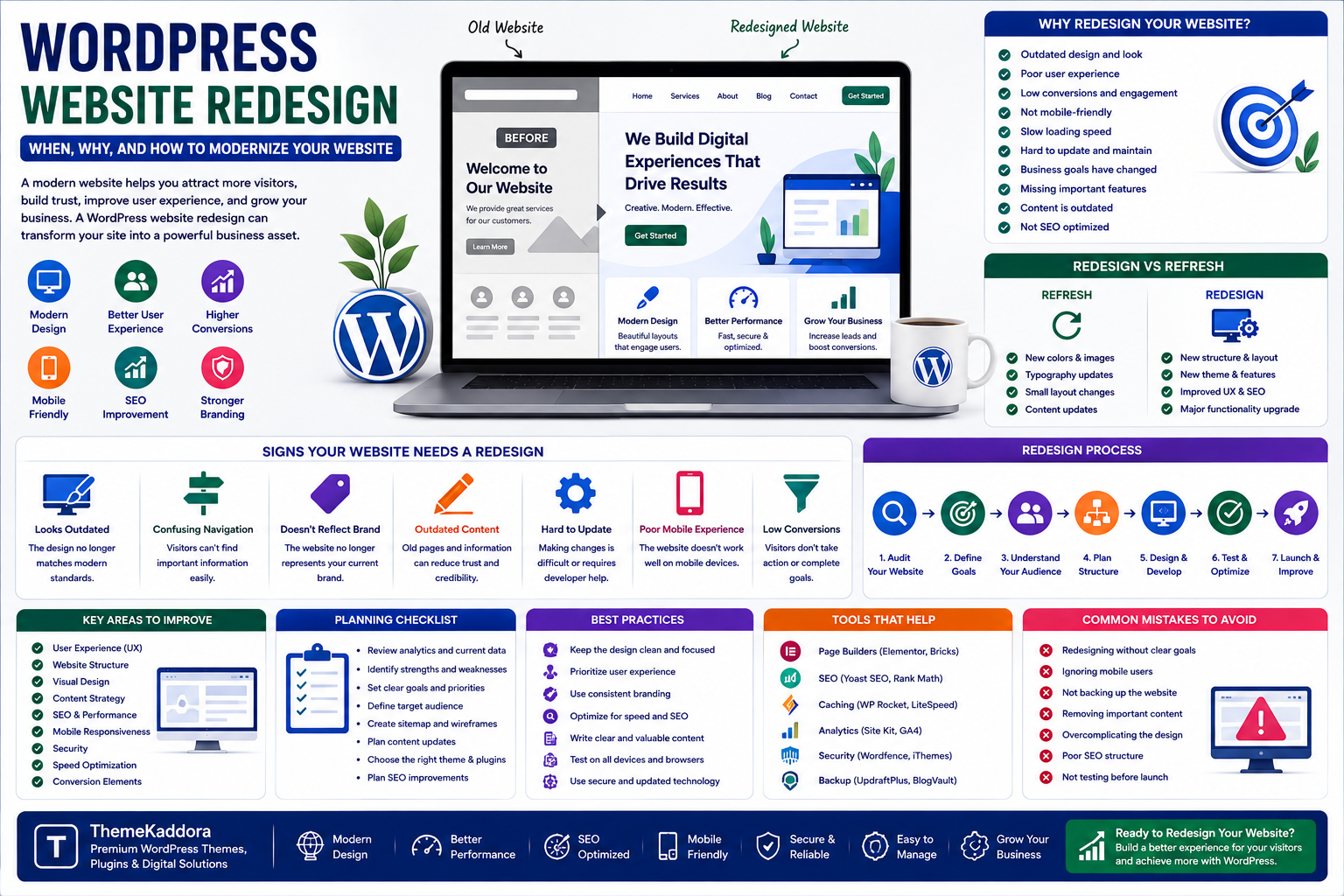
WordPress Website Redesign: When, Why, and How to Modernize Your Website
Introduction
A website can look good when it is first launched and still become outdated after a few years.
Design trends change.
Customer expectations change.
Businesses introduce new products and services.
Search engines evolve.
Technology improves.
Plugins and themes receive new features.
As a result, a website that once worked perfectly may eventually need a complete redesign.
A WordPress website redesign is more than changing colors, fonts, and images. A successful redesign examines the website's structure, content, user experience, branding, functionality, SEO, and business objectives.
For businesses using WordPress, redesigning a website can be an opportunity to improve how the entire digital presence works.
What Is a WordPress Website Redesign?
A WordPress website redesign involves improving or rebuilding an existing website to create a more modern, effective, and useful digital experience.
A redesign can involve:
Website structure
Visual design
Navigation
Content
Branding
WordPress theme
Plugins
Forms
Landing pages
SEO
Mobile experience
Conversion elements
The scope depends on the condition and goals of the existing website.
Sometimes a few design changes are enough.
In other situations, rebuilding the website may be the better option.
Why Do Websites Need a Redesign?
Websites rarely remain effective forever without changes.
A redesign may become necessary when:
The design looks outdated
Navigation is confusing
The website is difficult to manage
Branding has changed
Content is outdated
Mobile experience is poor
Conversions are declining
The business has changed
Important features are missing
The website no longer represents the brand
A redesign should solve real problems rather than happen simply because the website looks old.
Signs Your WordPress Website Needs a Redesign
1. The Website Looks Outdated
Visitors form an impression quickly.
An old visual style can make a business appear less modern than its competitors.
2. Navigation Is Confusing
Visitors should be able to find important information without struggling through complicated menus.
3. The Website Does Not Reflect Your Brand
Businesses evolve.
A website should reflect the current:
Brand identity
Services
Products
Target audience
Business positioning
4. Content Is Outdated
Old information can reduce trust.
Review:
Services
Pricing
Team information
Contact details
Blog posts
Product information
5. The Website Is Difficult to Update
If making a simple change requires complicated technical work, the website's underlying setup may need improvement.
6. Mobile Experience Is Weak
A modern website needs to work effectively across different screen sizes.
7. Conversions Are Poor
If visitors arrive but rarely:
Contact the business
Request a quote
Register
Purchase
Subscribe
the website may need a UX and conversion review.
Redesign vs Refresh
Not every website needs a complete rebuild.
There is a difference between a website refresh and a website redesign.
Website Refresh
A refresh may involve:
New colors
Updated images
Typography improvements
Small layout changes
Content updates
Website Redesign
A redesign can involve:
New structure
New theme
New navigation
New templates
New content strategy
New functionality
New branding
Major UX improvements
Choosing between the two depends on the condition of the existing website.
Start With a Website Audit
Before redesigning anything, analyze the existing website.
Review:
Traffic
Popular pages
Conversion pages
Search visibility
Broken links
Existing content
Plugins
Theme
Forms
Navigation
Mobile experience
The audit helps identify what should be:
Kept
Improved
Removed
Rebuilt
Without an audit, a redesign can accidentally remove valuable elements.
Define the Goal of the Redesign
A redesign should have a clear objective.
For example:
Increase qualified leads.
Or:
Create a better online store experience.
Or:
Modernize the brand.
Or:
Make the website easier to manage.
A single redesign can have several goals, but the priorities should be clear.
Understand Your Target Audience
A website should be designed around its visitors.
Ask:
Who visits the website?
What are they looking for?
What problems are they trying to solve?
What information do they need?
What prevents them from taking action?
A website redesign should be based on customer needs rather than only internal preferences.
Create a Better Website Structure
Website structure determines how information is organized.
A business website might use:
Home
→ About
→ Services
→ Industries
→ Resources
→ Blog
→ Contact
An eCommerce website may require:
Home
→ Categories
→ Products
→ Product Details
→ Cart
→ Checkout
The structure should match the user's journey.
Improve Website Navigation
Navigation should make important information easy to find.
Avoid menus containing too many unrelated options.
Focus on the pages that matter most.
For example, a service business may prioritize:
Services
Solutions
About
Case Studies
Resources
Contact
Navigation should help users move naturally through the website.
Redesign the Homepage
The homepage is often the most important page on a business website.
A strong homepage should quickly communicate:
Who you are
What you offer
Who you help
Why visitors should trust you
What visitors should do next
A typical structure might include:
Hero section
Core benefits
Services or products
Social proof
Key differentiators
Case studies
Content or resources
Call to action
Improve Calls to Action
A website should guide visitors toward useful actions.
Examples include:
Get a Quote
Contact Us
Start a Project
Book a Consultation
View Products
Download Guide
Subscribe
Learn More
Calls to action should be clear and relevant to the visitor's stage in the decision process.
Redesign Your WordPress Theme
The theme is one of the most important components of a WordPress redesign.
When choosing a new theme, consider:
Design flexibility
Mobile support
Customization
Compatibility
Performance
Accessibility
Updates
Documentation
Plugin compatibility
Do not select a theme only because its demo looks attractive.
The theme should support your actual website requirements.
Review Your WordPress Plugins
A redesign is an excellent opportunity to review plugins.
Create three categories:
Keep
Plugins that are essential.
Replace
Plugins that no longer meet requirements.
Remove
Plugins that are unnecessary.
Avoid carrying old plugin clutter into a new website.
Update Your Website Branding
A redesign can be an opportunity to improve brand consistency.
Review:
Logo
Colors
Typography
Photography
Icons
Illustrations
Button styles
Brand messaging
Every major page should feel like part of the same brand.
Improve Website Content
Design alone cannot make a website successful.
Content needs attention too.
Review:
Headlines
Service descriptions
Product information
About pages
Blog articles
FAQs
Calls to action
Remove content that no longer provides value.
Rewrite content that is unclear.
Create new content where important information is missing.
Use a Strong Content Hierarchy
Visitors rarely read every word immediately.
They scan.
Use:
Clear headings
Short paragraphs
Bullet points
Highlighted benefits
Descriptive sections
Strong calls to action
This makes important information easier to discover.
Redesign With SEO in Mind
A redesign should not accidentally damage existing search visibility.
Before changing the website, identify important:
URLs
Search traffic pages
Ranking pages
Backlinks
Metadata
Internal links
If URLs change, appropriate redirects should be planned.
SEO should be part of the redesign from the beginning.
Protect Existing Content
Do not automatically delete old content.
Some older pages may still generate:
Search traffic
Backlinks
Leads
Sales
Brand visibility
Analyze performance before removing pages.
A redesign should preserve valuable assets whenever possible.
Improve Internal Linking
Internal links connect related pages.
For example:
A blog about WordPress themes could link to:
Theme resources
Plugin guides
Website design articles
WordPress tutorials
Internal linking helps visitors discover related content and creates a more organized website structure.
Redesign Your Blog
The blog should not be treated as an afterthought.
A modern blog can include:
Categories
Search
Featured articles
Related posts
Author information
Clear headings
Content filters
For a content-focused brand like Themekaddora, the blog can become an important knowledge hub.
Add Better Search Functionality
Large websites can benefit from effective internal search.
Visitors may already know what they want.
A useful search feature can help them find:
Articles
Products
Themes
Plugins
Resources
Guides
Search becomes increasingly important as a website's content library grows.
Improve Forms
Forms are often responsible for generating leads.
Review:
Contact forms
Quote forms
Newsletter forms
Registration forms
Booking forms
Keep forms simple.
Only request information that is genuinely necessary.
Improve Trust Signals
Visitors need reasons to trust a business.
A redesign can make trust signals more visible.
These may include:
Customer reviews
Testimonials
Case studies
Client logos
Certifications
Awards
Security information
Company information
Trust should appear naturally throughout the customer journey.
Design Better Landing Pages
Landing pages should focus on a specific objective.
For example:
Advertising Campaign
↓
Dedicated Landing Page
↓
Relevant Offer
↓
Clear Call to Action
Avoid sending every marketing campaign to the homepage.
A focused landing page can provide a more relevant experience.
Improve Mobile UX
A redesign should be tested on different screen sizes.
Review:
Navigation
Buttons
Forms
Images
Typography
Spacing
Tables
Popups
Do not assume that a desktop layout will automatically work well on mobile.
Test the New Website Before Launch
Testing should happen before the redesigned website goes live.
Check:
Functionality
Forms
Buttons
Menus
Search
Links
Content
Spelling
Images
Headings
Contact details
SEO
Metadata
URLs
Redirects
Indexing settings
Mobile
Navigation
Layout
Forms
Content
Business
Lead generation
Checkout
Booking
Contact process
Create a Website Redesign Launch Plan
Avoid changing everything without preparation.
A launch plan may include:
Before Launch
Backup website
Test new website
Prepare redirects
Review SEO
Check forms
Launch
Publish redesigned website
Test important pages
Check analytics
Monitor errors
After Launch
Review visitor behavior
Monitor rankings
Fix technical problems
Collect feedback
Improve conversion points
Common WordPress Redesign Mistakes
1. Redesigning Only for Appearance
A beautiful website can still have poor UX.
2. Ignoring Existing SEO
Removing valuable pages can damage search visibility.
3. Changing URLs Without Redirects
This can create broken links and SEO problems.
4. Installing Too Many New Plugins
A redesign should simplify where possible.
5. Copying Competitors
A website should communicate its own value.
6. Ignoring Content
Design and content need to work together.
7. Skipping Testing
Small errors can create major problems after launch.
8. Forgetting Analytics
Without measurement, it becomes difficult to understand whether the redesign worked.
How to Redesign a WordPress Website Step by Step
Step 1: Audit the Existing Website
Understand what is working and what is not.
Step 2: Define Business Goals
Identify what the redesign should accomplish.
Step 3: Research Users
Understand visitor needs and expectations.
Step 4: Plan the Structure
Create the new sitemap and navigation.
Step 5: Review Content
Keep, update, remove, or create pages.
Step 6: Choose the Theme
Select a theme that supports the new strategy.
Step 7: Review Plugins
Keep only useful functionality.
Step 8: Design the New Experience
Create layouts, components, and calls to action.
Step 9: Build and Test
Develop the website and test every important feature.
Step 10: Protect SEO
Handle URLs, redirects, metadata, internal links, and indexing.
Step 11: Launch
Publish the new website carefully.
Step 12: Measure Results
Compare performance before and after the redesign.
How to Measure Redesign Success
A redesign should be evaluated using meaningful metrics.
Depending on the website, monitor:
Organic traffic
Leads
Sales
Conversion rate
Engagement
Form submissions
Page views
Returning visitors
Search visibility
Customer feedback
Do not judge the redesign solely by how attractive it looks.
The real question is:
Does the new website perform better for users and the business?
Why Choose Themekaddora?
1. WordPress-Focused Resources
Themekaddora provides content around WordPress themes, plugins, websites, and digital development.
2. Business-Oriented Insights
The platform connects website decisions with practical business goals.
3. Design and Website Knowledge
Readers can explore topics related to website design, UX, content, and development.
4. SEO and Marketing Topics
Themekaddora also covers areas that help businesses improve their digital presence.
5. Technology Education
The platform explores modern technologies and tools affecting websites and online businesses.
6. Practical Learning
The goal is to help users make more informed decisions when creating and improving WordPress websites.
The Future of WordPress Website Redesign
Website redesign will continue to evolve as user expectations change.
Businesses will increasingly focus on:
Personalized experiences
Better content discovery
Stronger branding
Conversion-focused design
Mobile experiences
Flexible WordPress architectures
Better integrations
Data-driven decisions
But one principle will remain important:
A redesign should solve problems, not simply change appearances.
The best redesigns combine creativity with strategy.
Conclusion
A WordPress website redesign can transform an outdated website into a modern digital experience.
But redesigning a website should involve more than selecting a new theme.
Businesses should evaluate:
Website structure
Branding
Content
Navigation
User experience
SEO
Plugins
Forms
Mobile experience
Conversion goals
A successful redesign begins with research and ends with measurement.
For Themekaddora, website redesign is another important area connecting WordPress technology with business, marketing, design, and digital growth.
Before starting a redesign, ask:
What is not working?
What do visitors need?
What does the business want to achieve?
When these questions guide the process, a redesign becomes more than a visual update.
It becomes an opportunity to build a smarter, clearer, more useful, and more effective WordPress website.
Frequently Asked Questions
1. What is a WordPress website redesign?
A WordPress website redesign involves improving an existing website's design, structure, content, functionality, user experience, and business performance.
2. When should I redesign my WordPress website?
Consider a redesign when the website looks outdated, performs poorly, has confusing navigation, no longer represents the brand, or fails to meet current business and customer needs.
3. Do I need a completely new WordPress website?
Not always. Some websites only need a refresh, while others may benefit from a complete rebuild.
4. Should I change my WordPress theme during a redesign?
It depends on the existing theme. If it cannot support the desired design or functionality, replacing it may be appropriate.
5. Can a website redesign affect SEO?
Yes. Changes to URLs, content, navigation, internal links, and website structure can affect SEO. Proper planning can help protect existing search visibility.
6. Should I delete old blog posts during a redesign?
Not automatically. Analyze their traffic, backlinks, rankings, and business value before removing them.
7. How long does a WordPress redesign take?
The timeline depends on website size, content, functionality, design requirements, integrations, and development resources.
8. How much does a WordPress website redesign cost?
Costs vary significantly depending on whether the project involves a simple visual refresh or a complete redesign with custom development and integrations.
9. What should I test before launching a redesigned website?
Test navigation, forms, links, mobile layouts, content, SEO settings, redirects, analytics, important business processes, and other critical functionality.
10. Why Choose Themekaddora?
Themekaddora combines WordPress resources with educational content covering themes, plugins, design, technology, business, marketing, SEO, and website development.
Comments (0)