
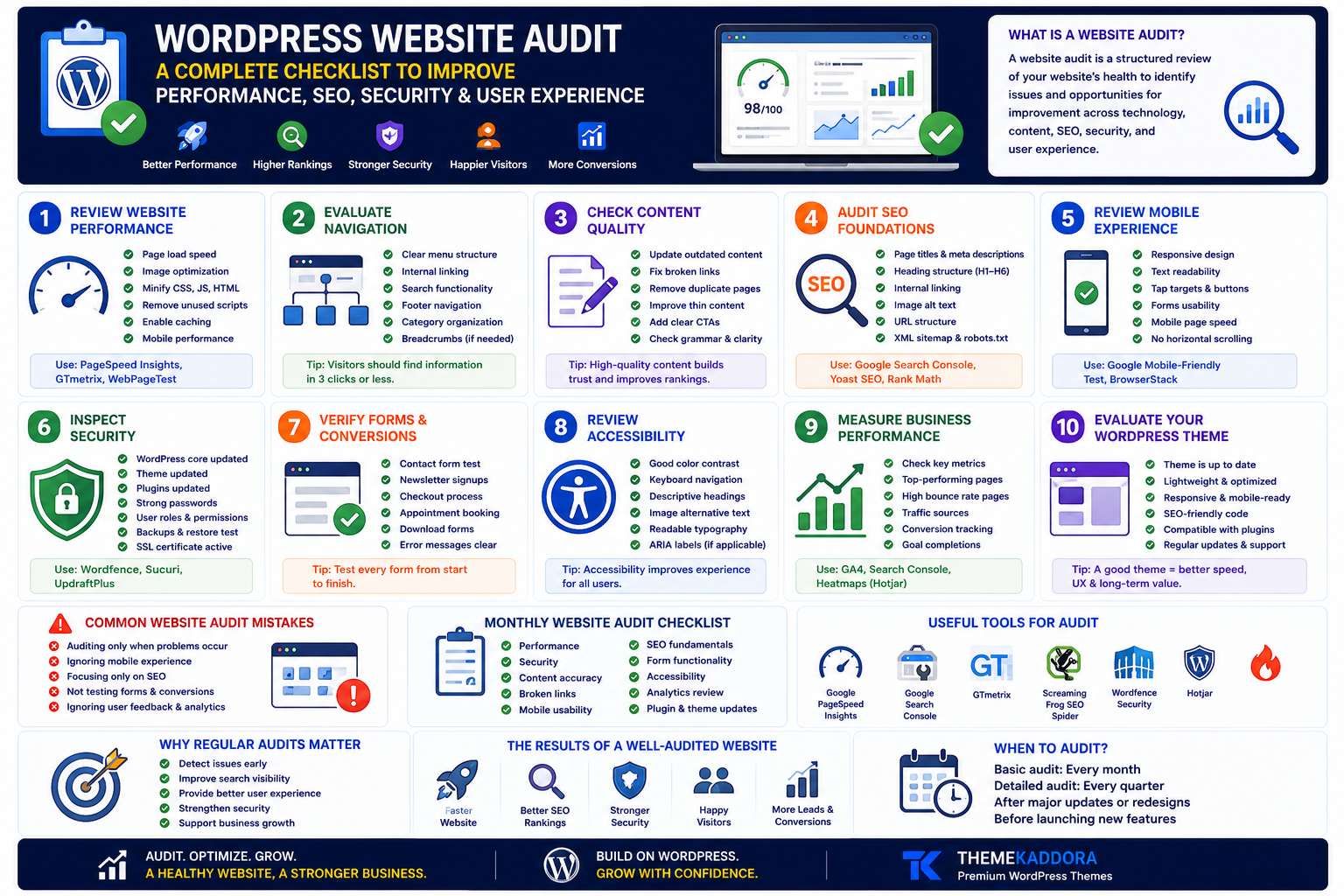
WordPress Website Audit: A Complete Checklist to Improve Performance, SEO, Security, and User Experience
Introduction
Your website may look modern, but is it actually helping your business grow?
Many business owners only notice their website when something goes wrong—a broken contact form, slow loading pages, declining search traffic, or customer complaints.
The most successful websites are not simply launched and forgotten.
They are reviewed regularly.
A WordPress website audit helps identify issues before they affect your visitors, search visibility, or conversions.
Rather than focusing on one area, a complete audit examines how your website performs across technology, content, security, usability, and business objectives.
This guide provides a practical framework you can use to evaluate your WordPress website and identify opportunities for improvement.
What Is a WordPress Website Audit?
A website audit is a structured review of your website's overall health.
It examines:
Performance
Search visibility
Content quality
Security
Accessibility
User experience
Technical configuration
Business effectiveness
The goal isn't to achieve perfection.
The goal is continuous improvement.
Why Every Business Should Audit Its Website
Regular audits help businesses:
Discover technical issues early
Improve customer experience
Increase search visibility
Strengthen security
Reduce maintenance problems
Support long-term growth
A website should evolve alongside your business.
Step 1: Review Website Performance
Ask:
Do pages load quickly?
Are images optimized?
Are unnecessary scripts slowing the website?
Does the website perform well on mobile devices?
Fast websites create better user experiences.
Step 2: Evaluate Navigation
Visitors should locate important information quickly.
Review:
Main menu
Internal links
Search functionality
Footer navigation
Category organization
Simple navigation reduces frustration.
Step 3: Check Content Quality
Review every important page.
Look for:
Outdated information
Duplicate content
Broken links
Thin articles
Missing calls to action
High-quality content remains one of the strongest business assets.
Step 4: Audit SEO Foundations
Evaluate:
Page titles
Meta descriptions
Heading structure
Internal linking
Image alt text
URL structure
Strong technical foundations improve discoverability.
Step 5: Review Mobile Experience
Many visitors browse on smartphones.
Check:
Readability
Button spacing
Navigation
Forms
Page speed
A mobile-friendly experience is essential.
Step 6: Inspect Security
Review:
WordPress updates
Theme updates
Plugin updates
User permissions
Backup procedures
Secure connections
Security requires continuous attention.
Step 7: Verify Forms and Conversions
Test:
Contact forms
Newsletter signups
Checkout pages
Appointment requests
Download forms
Every conversion point should work reliably.
Step 8: Review Accessibility
Accessibility benefits all visitors.
Check:
Color contrast
Keyboard navigation
Descriptive headings
Alternative text
Readable typography
Inclusive websites serve wider audiences.
Step 9: Measure Business Performance
Ask questions such as:
Which pages generate leads?
Which content attracts visitors?
Where do users leave?
Which pages receive little engagement?
Metrics should guide improvements.
Step 10: Evaluate Your WordPress Theme
Your theme influences:
Speed
Responsiveness
Accessibility
SEO
User experience
Long-term maintainability
An outdated theme may limit future improvements.
Common Website Audit Mistakes
Avoid:
Auditing only when problems appear
Ignoring customer feedback
Reviewing only desktop experiences
Focusing solely on SEO
Forgetting business objectives
A balanced audit considers both technology and people.
Monthly Website Audit Checklist
Review:
✅ Performance
✅ Security
✅ Content accuracy
✅ Broken links
✅ Mobile usability
✅ SEO fundamentals
✅ Form functionality
✅ Accessibility
✅ Analytics
✅ Plugin updates
How WordPress Simplifies Website Audits
WordPress makes ongoing maintenance easier by providing:
Centralized content management
Plugin updates
Media management
Revision history
Flexible integrations
Performance optimization opportunities
Regular reviews help websites remain effective as businesses grow.
Why Choose Themekaddora?
Themekaddora WordPress themes are designed for businesses that value long-term website quality.
Our themes provide:
Lightweight architecture
Responsive layouts
SEO-friendly code
WooCommerce compatibility
Fast loading performance
Flexible customization
Modern page templates
Cross-browser compatibility
Regular updates
Professional support
A strong theme makes every future audit easier because the foundation is built for performance and maintainability.
Related Reading
Continue exploring:
Website Governance Explained
Business Automation with WordPress
Digital Trust: The Competitive Advantage Most Businesses Overlook
Digital Assets Every Business Should Own
Why WordPress Is Still the Smartest Choice for Modern Businesses
Together, these resources help businesses create websites that remain secure, useful, and ready for growth.
Conclusion
A website audit is not just a technical exercise.
It is an opportunity to improve how your business communicates, serves customers, and supports growth.
By reviewing performance, content, security, SEO, accessibility, and user experience regularly, you can identify issues before they become expensive problems.
Combined with a modern WordPress theme from Themekaddora, ongoing audits help ensure your website continues delivering value as your business evolves.
Frequently Asked Questions (FAQs)
What is a WordPress website audit?
A WordPress website audit is a comprehensive review of your website's performance, SEO, security, content, accessibility, and user experience to identify improvement opportunities.
How often should I audit my WordPress website?
A basic audit every month and a more detailed review every quarter is a good practice for most business websites.
Why is a website audit important?
Regular audits help detect technical issues, improve search visibility, strengthen security, enhance customer experience, and support business growth.
What should be included in a website audit?
A complete audit should cover performance, SEO, security, content quality, mobile usability, accessibility, forms, analytics, and theme health.
Why choose Themekaddora WordPress themes?
Themekaddora themes combine responsive layouts, lightweight performance, SEO-friendly code, WooCommerce compatibility, and flexible customization to help businesses build WordPress websites that are easier to maintain, optimize, and scale.
Comments (0)