
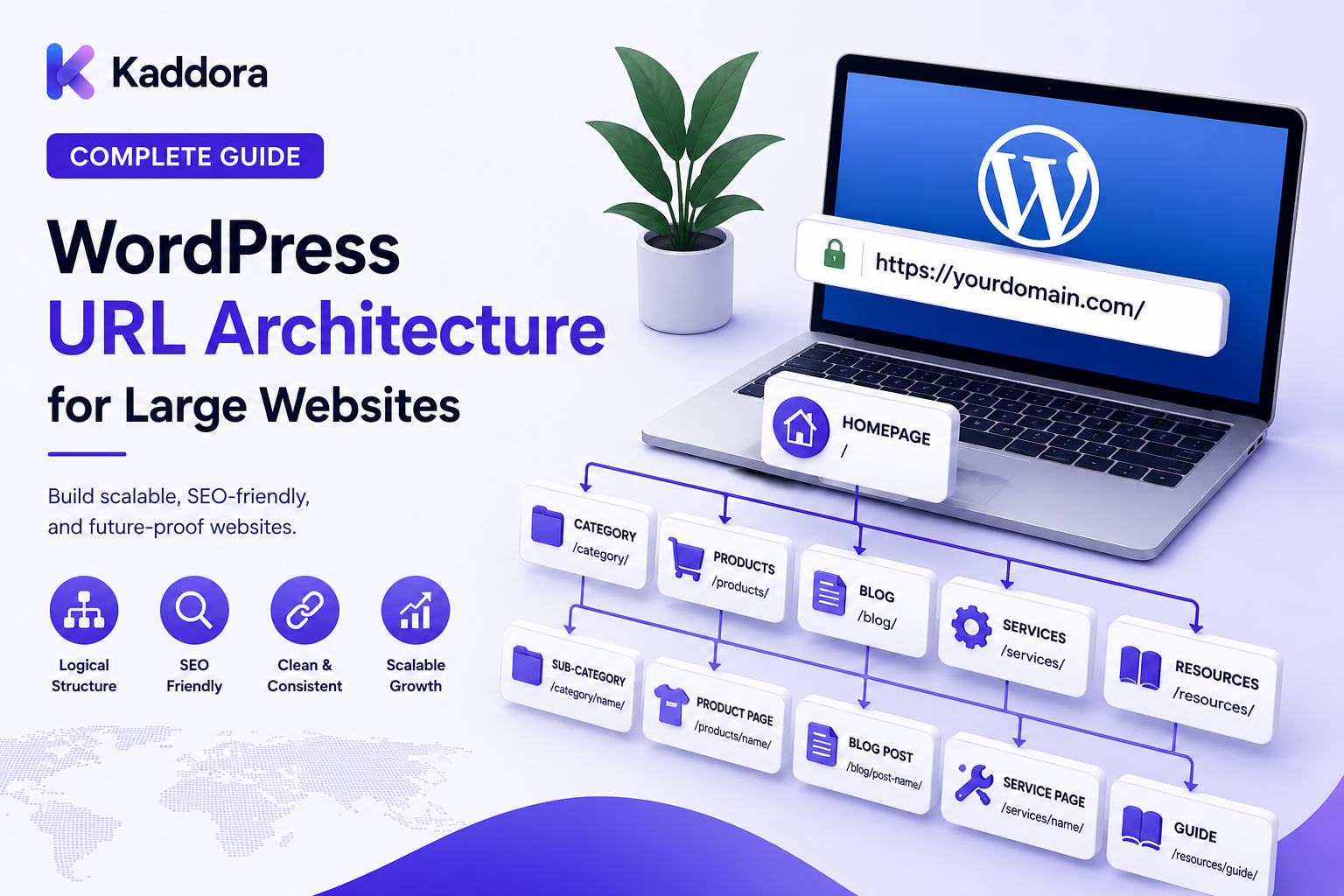
WordPress URL Architecture for Large Websites: Complete Guide
Introduction
A small WordPress website may have only a few dozen URLs.
A large website can have:
Thousands of articles
Tens of thousands of products
Multiple categories
Custom post types
Taxonomies
Documentation
Location pages
Author archives
Search pages
Filtered URLs
Pagination
Regional content
At this scale, URL structure becomes an architectural decision rather than a simple WordPress setting.
Poor URL architecture can create:
Duplicate URLs
Long redirect chains
Broken links
Confusing navigation
Excessive crawlable URLs
Difficult migrations
Weak internal linking
Maintenance problems
A well-designed architecture creates predictable relationships between content and URLs.
A simplified model looks like:
Website ↓ Content Types ↓ URL Rules ↓ Navigation ↓ Internal Links ↓ Search Discovery
For larger WordPress websites, the goal is not to create complicated URLs.
The goal is to create a stable, predictable, scalable URL system that supports users, search engines, developers, editors, and future migrations.
In this guide, you'll learn how to design WordPress URL architecture for large websites, including content types, taxonomies, eCommerce, pagination, parameters, redirects, canonicals, and long-term maintenance.
What Is WordPress URL Architecture?
WordPress URL architecture is the system used to determine how content is represented and organized through URLs.
It includes:
Permalink structure
Post URLs
Page URLs
Category URLs
Tag URLs
Custom post type URLs
Taxonomy URLs
Product URLs
Search URLs
Pagination
Filter parameters
Regional URLs
For example:
/wordpress/ /wordpress/seo/ /wordpress/seo/url-architecture/
This creates an understandable content hierarchy.
Why URL Architecture Matters for Large Websites
As the number of pages grows, URL inconsistencies become expensive.
A large website might contain:
100,000 URLs ↓ 10 URL Patterns ↓ Multiple Content Types ↓ Many Automated Rules
One bad URL rule can therefore affect thousands of pages.
A strong URL architecture helps provide:
Consistency
Predictability
Better maintenance
Easier migrations
Better internal linking
Clear content relationships
URL Architecture vs Information Architecture
These two concepts are related.
Information Architecture
Defines how content is organized.
SEO ↓ Technical SEO ↓ WordPress SEO
URL Architecture
Defines how that content is represented in URLs.
/seo/ /seo/technical-seo/ /seo/wordpress-seo/
The URL structure should support the information architecture, but it does not necessarily need to reproduce every hierarchy level.
Start With Content Types
Large WordPress sites often use multiple content models.
For example:
Posts Pages Products Templates Documentation Case Studies Locations
Each content type should have a predictable URL pattern.
For example:
/blog/ /products/ /templates/ /documentation/ /case-studies/
Clear prefixes make large websites easier to understand and manage.
Design Stable Permalink Patterns
A good URL pattern should remain useful for years.
For example:
/products/product-name/
is generally easier to maintain than a structure based heavily on temporary attributes.
Avoid embedding information that is likely to change.
For example, a URL containing a temporary campaign name may become obsolete later.
Avoid Unnecessary Date-Based URLs
Date-based URLs can make sense for news publishers or archive-heavy websites.
For example:
/2026/09/article-name/
But for evergreen content, dates may create unnecessary maintenance problems when content is updated.
A simpler structure may be:
/article-name/
The appropriate choice depends on the publication model.
Keep URLs Descriptive
A useful URL communicates the page topic.
For example:
/wordpress/url-architecture/
is more understandable than:
/page?id=8293
Descriptive URLs can also make migrations and debugging easier.
Don't Overload URLs With Keywords
SEO-friendly does not mean keyword-stuffed.
Avoid URLs such as:
/best-wordpress-seo-plugin-best-seo-plugin-wordpress/
Prefer concise, descriptive names:
/wordpress-seo-plugins/
A URL should identify the page, not repeat every possible keyword variation.
Avoid Deep URL Structures
Large websites sometimes attempt to reproduce every category level inside the URL.
For example:
/wordpress/seo/technical/on-page/advanced/url-architecture/page/
This can become difficult to maintain.
A hierarchy does not need to be represented entirely in the URL.
A shorter structure may be:
/wordpress/url-architecture/
while internal links and breadcrumbs provide additional context.
Use Logical Content Prefixes
For large websites, prefixes can help separate content types.
Examples:
/products/ /templates/ /plugins/ /documentation/ /resources/
This makes it easier to identify what a URL represents.
It also simplifies technical rules for:
Sitemaps
Redirects
Canonicals
Analytics
Access control
WordPress Pages vs Custom Post Types
Pages are useful for hierarchical site content.
Custom post types are useful when content represents a distinct business entity.
For example:
Pages → About → Contact → Company Products → Product A → Product B Documentation → Guide A → Guide B
Use the content model that best matches the business entity instead of forcing every object into standard pages.
URL Architecture for Products
eCommerce websites need predictable product URLs.
A common model is:
/products/product-name/
Categories can exist separately:
/products/ /products/category-name/
Avoid making the product's URL depend on a category path when products can belong to multiple categories.
For example:
/category-a/product/
may become problematic if the same product moves between categories.
A stable product URL can simplify migrations.
URL Architecture for Documentation
Documentation often benefits from a hierarchy.
For example:
/documentation/ /documentation/getting-started/ /documentation/installation/ /documentation/configuration/
The structure reflects the content system.
Documentation URLs should remain stable because customers and support teams may link to them extensively.
URL Architecture for Templates and Digital Products
A digital marketplace may have multiple product classes.
For example:
/wordpress-themes/ /wordpress-plugins/ /html-templates/ /ui-kits/
This can help users navigate by product category while keeping individual product URLs stable.
The category structure should not force a product to change its URL whenever its classification changes.
Taxonomy URL Architecture
WordPress taxonomies can generate archive URLs.
Examples:
/category/seo/ /tag/wordpress/ /brand/example/
For large websites, decide carefully which taxonomies deserve public URLs.
A taxonomy should exist because it provides meaningful organization.
Creating hundreds of near-duplicate taxonomy archives can increase URL complexity without adding real value.
Avoid Taxonomy URL Explosion
Imagine:
20 Categories 100 Tags 10 Brands 5 Regions
Combining these dimensions can create a huge conceptual URL space.
A large website should distinguish between:
Useful navigational pages
and
technical combinations.
Not every possible combination needs its own indexable URL.
Faceted Navigation and Parameters
ECommerce sites often generate URLs such as:
/products/?brand=example&color=black&size=large
These URLs can multiply rapidly.
Before allowing search visibility, define:
Which filters matter
Which combinations have unique value
Which URLs should be canonicalized
Which should remain non-indexable
Which should not be generated unnecessarily
URL architecture and faceted navigation must be designed together.
Query Parameters
Large sites may generate parameters for:
Tracking
Sorting
Filtering
Pagination
Search
Personalization
For example:
/products/?sort=price /products/?utm_source=email /products/?color=black
Not all parameters have the same purpose.
Separate:
Functional parameters
from
tracking parameters
and
SEO-relevant URL variations.
Treat each category deliberately.
URL Case Sensitivity
URL handling should be consistent.
Avoid situations where:
/Example/ /example/ /EXAMPLE/
all behave as different application paths.
Use a consistent lowercase URL convention wherever practical.
Trailing Slash Consistency
Choose a consistent policy.
For example:
/wordpress-seo/
instead of mixing:
/wordpress-seo /wordpress-seo/
A consistent structure reduces unnecessary redirects and duplicate URL variants.
HTTP vs HTTPS
Modern websites should use HTTPS.
A canonical architecture should avoid maintaining multiple protocol versions:
http://example.com/page https://example.com/page
Redirect the insecure version appropriately and ensure internal links use the preferred protocol.
WWW vs Non-WWW
Choose the preferred host.
For example:
https://example.com/
or:
https://www.example.com/
Avoid allowing both versions to operate independently without a deliberate canonical and redirect strategy.
URL Architecture and International Websites
Large websites may support multiple regions.
Possible structures include:
/in/ /us/ /uk/ /de/
or:
in.example.com us.example.com uk.example.com
The correct architecture depends on the business model, branding, localization, and operational requirements.
Region should be explicit where regional rules significantly affect the website.
URL Architecture for Multilingual Content
Language structures can use patterns such as:
/en/ /fr/ /de/
or language-specific subdomains.
The important part is consistency.
Translated pages should have predictable relationships without creating accidental duplicate paths.
URL Architecture and Canonical URLs
A canonical strategy works with URL architecture.
For example:
URL A URL B URL C ↓ Preferred URL
But canonical tags should not be used to compensate for a fundamentally chaotic URL system.
Fix the architecture first wherever practical.
URL Architecture and Redirects
Changing URLs creates migration work.
For example:
Old URL ↓ 301 Redirect ↓ New URL
A large website may have thousands of redirects.
This is why stable URLs are so valuable.
Avoid changing URL patterns simply because a newer naming convention looks slightly cleaner.
Redirect Chain Risks
Poor migrations can create:
URL A ↓ URL B ↓ URL C ↓ URL D
A large site should redirect old URLs as directly as possible to the final destination.
Maintain redirect rules carefully.
URL Architecture and Internal Links
URLs should work naturally with internal linking.
For example:
SEO Hub ↓ Technical SEO ↓ URL Architecture
When a URL changes, internal links should be updated rather than relying entirely on redirects.
This keeps the site architecture clean.
URL Architecture and Breadcrumbs
Breadcrumbs can expose the logical hierarchy:
Home → Resources → WordPress → SEO → URL Architecture
The breadcrumb hierarchy does not have to exactly match the URL.
The two systems can provide complementary context.
URL Architecture and XML Sitemaps
Sitemaps should reflect the site's intended URL architecture.
For large websites, separate sitemap groups can be useful:
Sitemap Index ├── Products ├── Posts ├── Pages ├── Documentation └── Locations
Only meaningful URLs should be included.
URL Architecture and Robots.txt
Robots.txt can provide crawl guidance for selected paths.
For example:
Disallow: /internal-search/
However, robots.txt should not be used as a substitute for a coherent URL architecture or appropriate indexation controls.
URL Architecture for Search Pages
Internal site search may create URLs such as:
/?s=wordpress
Search result pages are useful for users but may not be intended as search landing pages.
Define a deliberate strategy for search URLs.
Pagination Architecture
Large content collections may require pagination.
For example:
/products/ /products/page/2/ /products/page/3/
Pagination should remain understandable and internally linked.
Avoid generating infinite pagination paths with little or no useful content.
URL Architecture for Large Content Libraries
A large content library might contain:
Resources ├── WordPress ├── SEO ├── Web Development ├── AI └── eCommerce
Supporting articles can then use stable URLs:
/wordpress/seo-architecture/
The content relationship can be communicated through internal links, hubs, breadcrumbs, and navigation.
URL Architecture for Programmatic Pages
Large websites may create pages automatically.
For example:
Location + Service Product + Compatibility Industry + Solution
Programmatic URL creation should be tightly controlled.
Before generating thousands of URLs, ask:
Does every generated page provide unique and useful value?
Automation should not become a source of low-value URL expansion.
URL Architecture for AI-Generated Content
AI systems can make content generation much faster.
However:
AI ↓ 100,000 Generated Pages ↓ URL Explosion
is not a scalable SEO strategy by itself.
AI-generated content should operate within predefined content types, URL rules, editorial controls, and indexation policies.
URL Architecture and Site Migrations
Large website migrations require a URL inventory.
Map:
Old URL ↓ New URL ↓ Redirect ↓ Verification
Important migration tasks include:
URL inventory
Redirect mapping
Internal-link updates
Canonical review
Sitemap updates
Indexation checks
Never redesign thousands of URLs without a migration plan.
URL Architecture for Enterprise Websites
Enterprise websites may have:
Multiple brands
Multiple regions
Multiple product types
Multiple teams
Large content libraries
A strong structure might be:
example.com │ ├── products/ ├── services/ ├── resources/ ├── documentation/ ├── case-studies/ └── locations/
Within each area, use consistent patterns.
Common WordPress URL Architecture Mistakes
Changing URLs Frequently
Stable URLs reduce migration work.
Making URLs Too Long
Keep them descriptive without reproducing the entire taxonomy tree.
Using Temporary Information
Avoid campaign-specific or frequently changing URL components unless the content model requires them.
Indexing Every Taxonomy
Only meaningful archives need search visibility.
Ignoring Query Parameters
Filtering and tracking can create huge URL spaces.
Creating Duplicate Slug Paths
Keep URL naming rules consistent.
Mixing URL Conventions
Don't randomly use different patterns across content types.
Forgetting Redirects During Migrations
URL changes should always include a redirect and verification plan where appropriate.
Relying Only on Canonicals
A canonical tag does not fix every underlying URL architecture problem.
WordPress Large-Site URL Architecture Checklist
Structure
Clear content types
Logical URL prefixes
Consistent hierarchy
Stable permalink rules
URLs
Lowercase URLs
Consistent trailing slash policy
HTTPS
Preferred hostname
Descriptive slugs
Taxonomies
Meaningful categories
Controlled tags
Limited taxonomy archives
Faceted navigation strategy
eCommerce
Stable product URLs
Product/category separation
Filter URL controls
Pagination
SEO
Canonical strategy
Redirect strategy
XML sitemap strategy
Indexation rules
Maintenance
URL inventory
Redirect monitoring
Broken-link monitoring
Migration process
Change tracking
Recommended WordPress URL Architecture
A scalable structure can look like:
DOMAIN │ ┌─────────────────┼──────────────────┐ ↓ ↓ ↓ Products Resources Services │ │ │ Categories Topic Hubs Service Hubs │ │ │ Products Articles Landing Pages │ │ │ └─────────────────┼──────────────────┘ ↓ Internal Link Graph ↓ Canonical / Redirect Layer ↓ XML Sitemaps
Technical URL rules should remain consistent across all content types.
How to Design WordPress URL Architecture for Large Websites
A practical workflow is:
Step 1
Inventory all existing content types and URLs.
Step 2
Define the website's information architecture.
Step 3
Define URL patterns for every major content type.
Step 4
Create consistent permalink conventions.
Step 5
Design taxonomy URLs carefully.
Step 6
Define rules for parameters, filters, pagination, and search.
Step 7
Create stable product and content URLs.
Step 8
Define canonical and redirect ownership.
Step 9
Connect URL structures to internal linking and breadcrumbs.
Step 10
Build sitemap and indexation rules.
Step 11
Test URL generation across templates and plugins.
Step 12
Create monitoring for redirects, broken links, duplicate URLs, and unexpected URL creation.
Why Choose ThemeKaddora?
ThemeKaddora develops WordPress themes, plugins, WooCommerce solutions, HTML templates, UI kits, SaaS products, and business-focused digital solutions.
Large digital platforms may contain multiple content types such as:
WordPress themes
Plugins
Templates
Documentation
Product pages
Blog resources
Case studies
SaaS products
A well-designed URL architecture helps these different content types remain understandable, connected, and easier to scale.
For product-focused websites and digital marketplaces, stable URLs are especially important because products, documentation, customer links, and external references may remain active for years.
Conclusion
WordPress URL architecture becomes increasingly important as a website grows.
A small site can survive with a simple permalink structure.
A large website needs deliberate rules for:
Content Types
↓
Taxonomies
↓
URLs
↓
Internal Links
↓
Canonicalization
↓
Redirects
↓
Sitemaps
The best URL architecture is not necessarily the most detailed.
It is the one that is:
Clear.
Stable.
Predictable.
Scalable.
Easy to maintain.
For large WordPress websites, avoid making URLs depend on information that frequently changes.
Keep product and content URLs stable.
Use meaningful content prefixes.
Control taxonomy archives.
Manage faceted navigation deliberately.
Separate functional parameters from tracking parameters.
Plan redirects before changing URL structures.
Most importantly, remember that a URL is part of the long-term identity of a page.
Changing thousands of URLs can create significant technical work across internal links, redirects, canonicals, sitemaps, analytics, and external references.
A mature architecture therefore treats URLs as infrastructure rather than decoration.
The goal is not simply to create attractive URLs.
The goal is to create a URL system that can support thousands or millions of pages without becoming unpredictable, duplicated, or difficult to manage.
Frequently Asked Questions
What is WordPress URL architecture?
WordPress URL architecture is the system used to organize and represent website content through consistent permalink patterns, content-type paths, taxonomy URLs, pagination, parameters, and related technical rules.
Why is URL architecture important for large websites?
Large websites may contain thousands or millions of URLs. Consistent architecture makes those URLs easier to navigate, maintain, migrate, monitor, and understand.
Should URL structures exactly match the website hierarchy?
Not necessarily. URLs should support the information architecture without becoming unnecessarily deep or fragile.
What makes a WordPress URL SEO-friendly?
A useful URL is generally descriptive, concise, stable, consistent, and aligned with the website's content model.
Should WordPress URLs include dates?
It depends on the publishing model. News sites may benefit from dates, while evergreen content often benefits from stable URLs that are less tied to publication timing.
Should product URLs include categories?
Not always. When products can belong to multiple categories, category-dependent URLs can make migrations and classification changes more difficult.
How should large WordPress websites structure product URLs?
Use a stable product path such as /products/product-name/ or another consistent pattern appropriate to the business.
What is faceted navigation?
Faceted navigation allows users to filter content or products by attributes such as price, brand, color, size, or other criteria. It can generate a very large number of URL combinations.
Should all filtered URLs be indexed?
No. The website should identify which filtered combinations provide meaningful search value and manage the others appropriately.
How should query parameters be handled?
Separate tracking, functional, and potentially search-relevant parameters. Each category should have a deliberate URL and indexation strategy.
Should URLs use lowercase letters?
A consistent lowercase convention is generally easier to manage and helps avoid unnecessary URL variations.
Should URLs always end with a slash?
Choose a consistent policy and use it throughout the site.
Does HTTPS matter for URL architecture?
Yes. Establish one preferred secure protocol and redirect or otherwise control insecure variants appropriately.
Should a website use www or non-www?
Either can work. The important point is to choose a preferred host and maintain consistent redirects, internal links, and canonical signals.
Can plugins create unexpected URLs?
Yes. Plugins can generate custom post types, taxonomies, filters, search pages, parameters, and other routes. These should be included in URL audits.
Can themes affect URL architecture?
Themes can influence navigation, links, templates, pagination, breadcrumbs, and other elements that expose URLs, although core URL generation usually belongs to WordPress and plugins.
What happens when I change a large website's URLs?
URL changes may require redirects, internal-link updates, canonical updates, sitemap changes, analytics adjustments, and extensive testing.
Why are redirects important?
Redirects connect old URLs to their new destinations after URL changes and help preserve access to previously referenced pages.
What is a redirect chain?
A redirect chain occurs when one URL redirects to another URL that redirects again. Large migrations should minimize unnecessary chains.
Can search pages be part of URL architecture?
Yes. Internal search systems often generate URLs, but those pages should have a deliberate crawl and indexation strategy.
How should international WordPress sites structure URLs?
Common approaches include country paths, language paths, subdomains, or separate domains. The right model depends on the organization's regional and localization requirements.
How should multilingual URLs work?
Use consistent language identifiers and clear relationships between translated versions while avoiding accidental duplicate URL paths.
What is a URL inventory?
A URL inventory is a structured list of existing URLs and their attributes, useful for auditing large websites and planning migrations.
How can I monitor unexpected URL creation?
Regularly inspect crawl data, sitemaps, internal links, application logs, plugin behavior, and generated URL patterns.
Can programmatic SEO create URL problems?
Yes. Automatically generated pages can rapidly increase URL volume. Programmatic systems should use strict templates, quality controls, and deliberate indexation rules.
Can AI-generated content create URL problems?
Yes. Uncontrolled AI generation can produce large numbers of low-value pages and URL variations. AI systems should operate within defined content and URL architectures.
Why choose ThemeKaddora?
ThemeKaddora develops WordPress themes, plugins, WooCommerce solutions, templates, UI kits, SaaS products, and digital solutions that can support structured content, scalable websites, product catalogs, documentation systems, and search-friendly digital platforms.
Comments (0)