
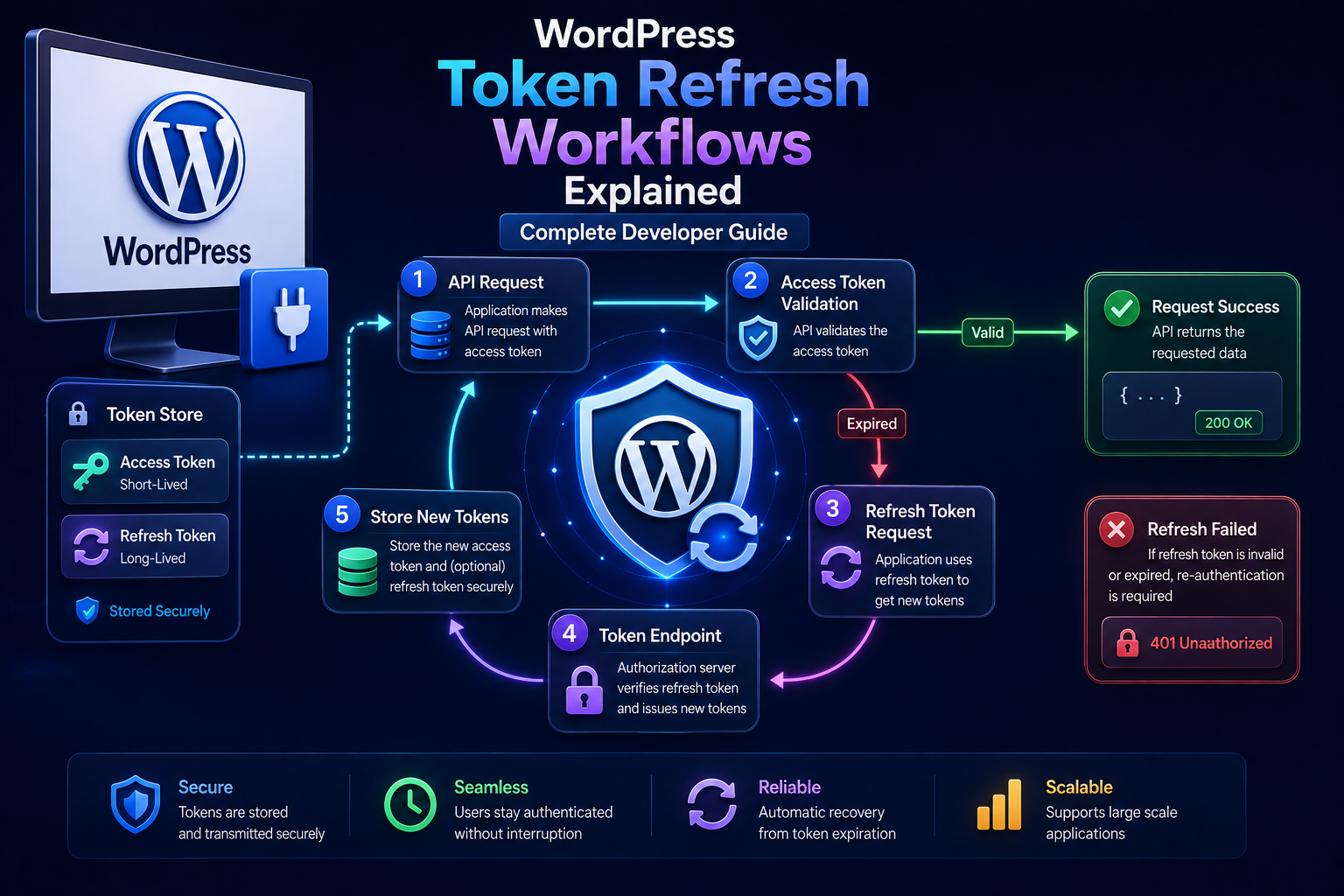
WordPress Token Refresh Workflows Explained
SEO Title
WordPress Token Refresh Workflows Explained: Complete Developer Guide
Meta Title
WordPress Token Refresh Workflows | WordPress OAuth Guide
Meta Description
Learn how token refresh works in WordPress OAuth integrations, including access-token expiration, refresh tokens, rotation, refresh locks, retry handling, revocation, multi-tenant workflows, and security best practices.
Focus Keyword
WordPress Token Refresh Workflows
Secondary Keywords
WordPress token refresh
WordPress OAuth token refresh
WordPress refresh token
WordPress access token expiration
WordPress OAuth refresh workflow
WordPress API token refresh
WordPress OAuth token rotation
WordPress refresh token security
WordPress expired access token
WordPress API authentication
URL Slug
wordpress-token-refresh-workflows
WordPress Token Refresh Workflows Explained: Complete Developer Guide
Introduction
OAuth integrations frequently use two different types of tokens:
Access Token Refresh Token
The access token is normally used to access a protected API.
The refresh token can be used to obtain a new access token when the existing access token expires, when the authorization server supports refresh tokens.
A simplified workflow looks like:
WordPress ↓ Access Token ↓ External API ↓ Token Expires ↓ Refresh Token ↓ New Access Token ↓ External API
This allows a WordPress plugin to maintain an authorized connection without requiring the user to complete the authorization flow every time a short-lived access token expires.
However, token refresh is not simply:
$response = refresh_token();
A production implementation must consider:
Token expiration
Refresh-token expiration
Refresh-token rotation
Concurrent requests
Race conditions
Credential storage
Authentication failures
Revocation
Retry limits
Multi-tenant isolation
Provider-specific behavior
Logging
Recovery and reauthorization
Refresh tokens are particularly sensitive because a stolen refresh token can potentially be used to obtain new access tokens. Current OAuth security guidance recommends protecting refresh tokens carefully and, for public clients, using sender-constrained refresh tokens or refresh-token rotation to detect replay.
For WordPress developers, this means the token lifecycle should be designed as a separate service rather than scattered throughout API calls.
A strong architecture looks like:
Business Feature ↓ API Client ↓ Token Manager ↓ Valid Access Token? ├── Yes → API Request └── No ↓ Refresh Workflow ↓ New Access Token ↓ API Request
The important goal is:
Keep access tokens short-lived when appropriate while maintaining secure, reliable access through a controlled refresh process.
This guide explains how token refresh works, how to determine when a token needs refreshing, how to handle 401 responses, how to implement proactive and reactive refresh, how to handle refresh-token rotation, how to prevent concurrent refresh races, how to recover from revoked refresh tokens, and how ThemeKaddora products can build reusable token-refresh infrastructure.
What Is a Token Refresh Workflow?
A token refresh workflow obtains a new access token without requiring the user to repeat the full authorization process, when the provider has issued a usable refresh token.
The basic flow is:
Access Token ↓ Expires ↓ Refresh Token ↓ Authorization Server ↓ New Access Token ↓ Continue API Access
The exact token request depends on the provider.
Access Token vs Refresh Token
Access Token
Used to access protected resources.
For example:
Authorization: Bearer ACCESS_TOKEN
Access tokens are often shorter-lived than refresh tokens.
Refresh Token
Used to request a new access token.
It is generally not sent to normal resource APIs.
Instead:
WordPress ↓ Token Endpoint ↓ Refresh Token
produces:
Access Token
and sometimes:
New Refresh Token
Why Use Short-Lived Access Tokens?
Shorter access-token lifetimes can reduce the useful lifetime of a stolen access token.
Current OAuth security guidance specifically discusses refresh tokens as a mechanism that allows authorization servers to issue access tokens with shorter lifetimes and reduced scope, lowering the potential impact of access-token leakage.
The trade-off is that the application must maintain a reliable refresh workflow.
The Basic Refresh Flow
The conceptual process is:
WordPress ↓ Detect Access Token Expired / Near Expiration ↓ Load Refresh Token ↓ Request New Token ↓ Validate Response ↓ Store New Credentials ↓ Retry / Continue Original API Request
Each stage needs safeguards.
Token Expiration
An OAuth token response may provide:
expires_in
For example:
expires_in = 3600
The application can calculate:
expires_at
from the current time.
A stored credential state might look conceptually like:
access_token refresh_token expires_at scope provider_account_id
Store expires_at, Not Just expires_in
An expiration duration is relative to when the token was issued.
For later requests, an absolute timestamp is easier to evaluate:
expires_at = issued_at + expires_in
The exact calculation should account for provider behavior and clock differences.
Refresh Before Expiration
A proactive workflow checks:
Is Access Token Near Expiration?
before sending a request.
For example:
Token Expiry ↓ Safety Window ↓ Refresh ↓ API Request
Why Use a Safety Window?
Suppose:
Token Expires → 12:00:00
and the API call begins at:
11:59:59
The token may expire while the request is being processed.
A small refresh margin can reduce this race.
For example:
Refresh When: expires_at - current_time < safety_window
The exact window should be chosen according to the provider and application.
Avoid Excessive Proactive Refreshing
Refreshing too early can:
Increase token-endpoint traffic
Trigger provider limits
Rotate refresh tokens unnecessarily
Create concurrent refresh conflicts
Do not refresh on every API request.
Reactive Refresh
Another strategy is to wait until the provider rejects the access token.
For example:
API Request ↓ 401 Unauthorized ↓ Refresh ↓ Retry Once
This can work when expiration cannot be predicted reliably.
Proactive vs Reactive Refresh
Proactive
Token Near Expiry ↓ Refresh ↓ API Request
Advantages:
Fewer expected 401 responses
Smoother API requests
Reactive
API Request ↓ 401 ↓ Refresh ↓ Retry
Advantages:
Simple
Works even when local expiration information is incomplete
A mature client can combine both.
Recommended Hybrid Workflow
A practical pattern is:
Before Request ↓ Token Near Expiry? ├── No → Use Token └── Yes → Refresh API Request ↓ 401? ├── No → Continue └── Yes → Refresh Once + Retry Once
The retry path must remain bounded.
Never Create an Infinite Refresh Loop
Avoid:
401 ↓ Refresh ↓ 401 ↓ Refresh ↓ 401 ↓ ...
A safe workflow typically allows a single controlled refresh-and-retry cycle for an individual API operation.
If that fails, classify the integration as requiring recovery or reauthorization.
Refresh Token Request
A typical OAuth refresh request may contain:
grant_type=refresh_token refresh_token=...
and may also require client authentication.
The exact format depends on the provider.
Do not assume every OAuth provider uses the same client-authentication method.
Example Refresh Request
Conceptually:
$response = wp_remote_post( $token_url, array( 'timeout' => 10, 'body' => array( 'grant_type' => 'refresh_token', 'refresh_token' => $refresh_token, 'client_id' => $client_id, 'client_secret' => $client_secret, ), ) );
The actual request must follow the provider's documented token endpoint.
Validate the Refresh Response
Never save a refresh response blindly.
Check:
WP_Error? ↓ HTTP Status? ↓ JSON Valid? ↓ Access Token Present? ↓ Expiration Valid? ↓ Refresh Token Present if rotation occurs?
Only then update stored credentials.
A Successful Refresh May Return a New Refresh Token
Some providers rotate refresh tokens.
The response can conceptually be:
{ "access_token": "NEW_ACCESS", "refresh_token": "NEW_REFRESH", "expires_in": 3600 }
If a new refresh token is returned, do not continue using the old one unless the provider explicitly says it remains valid.
Refresh Token Rotation
Refresh-token rotation means the authorization server issues a new refresh token during refresh and invalidates the previous one.
Current OAuth security guidance recommends refresh-token rotation or sender-constrained refresh tokens for public clients to detect refresh-token replay.
The conceptual sequence is:
Refresh Token A ↓ Refresh ↓ Access Token B + Refresh Token C ↓ Token A Invalid
The client stores:
Refresh Token C
as the current credential.
Why Rotation Improves Security
Suppose an attacker steals:
Refresh Token A
and later tries to use it after the legitimate client has already exchanged it.
If the provider detects the old token being reused, it can identify a possible compromise and invalidate the associated token chain according to its security policy.
RFC 9700 describes this replay-detection model for rotated refresh tokens.
Rotation Creates a New Race Condition
Consider two WordPress requests:
Request A → Refresh Token A Request B → Refresh Token A
Both begin using the same refresh token.
The provider may rotate:
A → B
and then:
A → invalid
The second request may fail.
This is why concurrent refresh requires coordination.
The Refresh Lock Pattern
A token manager can use:
Request A ↓ Acquire Refresh Lock ↓ Refresh ↓ Store New Token ↓ Release Lock
Meanwhile:
Request B ↓ Refresh Lock Exists ↓ Wait / Re-read Credential ↓ Use Newly Refreshed Token
The exact locking mechanism depends on the application architecture.
Why Re-Read the Token After Waiting?
Suppose Request B originally saw:
Access Token A
while Request A refreshed it to:
Access Token B
Request B should re-read the credential state before performing another refresh.
Otherwise it may unnecessarily attempt to refresh a now-invalid refresh token.
Atomic Credential Updates
When a refresh response contains:
access_token refresh_token expires_at
update them as one logical credential state.
Avoid a situation where:
access_token = new
is saved but:
refresh_token = old
remains due to an interrupted write.
The exact atomicity mechanism depends on the storage backend.
Credential Versioning
A credential record can contain a version:
version = 10
Request A reads:
version = 10
and updates it to:
version = 11
If Request B still tries to update version 10, the system can detect a stale write.
This optimistic-concurrency technique can be useful for high-concurrency applications.
User-Level Token Refresh
Suppose each WordPress user has their own provider connection:
User A → Refresh Token A User B → Refresh Token B
Token refresh must remain inside the correct user context.
Never use:
global_current_refresh_token
for user-specific credentials.
Tenant-Level Token Refresh
For a multi-tenant SaaS plugin:
Tenant A → Refresh Token A Tenant B → Refresh Token B
The refresh operation must explicitly identify the tenant.
Tenant Credential Isolation
A token retrieved for:
tenant_id = 101
must never be used for:
tenant_id = 202
This should be enforced through the token-storage and API-client design.
Provider Account Context
If multiple external accounts can be connected to one WordPress user or tenant, also track:
provider issuer external_account_id
where applicable.
The refresh operation should use the exact intended connection.
Refresh Token Storage
Refresh tokens are sensitive credentials.
RFC 9700 emphasizes confidentiality of refresh tokens in storage and transit, and recommends security controls such as rotation or sender-constraining depending on client type and deployment.
Do not put refresh tokens in:
Browser JavaScript
HTML
Query strings
Debug output
Public logs
Source code repositories
WordPress Options
A plugin may store credentials in WordPress-managed storage when appropriate.
However, for a complex multi-user or multi-tenant system, a dedicated credential store may be easier to secure and manage.
The storage architecture should reflect:
User + Tenant + Provider + External Account
where needed.
Should Refresh Tokens Be Encrypted?
Encryption at rest can add protection against certain storage compromises, but it is not a universal solution.
A production design should also consider:
Access control
Database security
Key management
Logging
Backup security
Server security
If tokens are encrypted, the application must also protect the encryption key.
Never Hardcode Refresh Tokens
Avoid:
$refresh_token = 'abc123...';
in plugin source code.
Credentials belong in appropriate protected configuration or credential storage.
Refresh Tokens and Backups
Database backups may contain refresh tokens if the tokens are stored there.
Therefore:
Credential Security
also includes:
Backup Security
Protect backups accordingly.
Refresh Tokens and Logging
Never log:
refresh_token=...
A safe diagnostic message is:
OAuth token refresh failed for provider X.
with an internal correlation identifier.
Refresh Tokens and URLs
Never place refresh tokens in URLs.
URLs can leak through:
Browser history
Access logs
Monitoring
Referrer information
Proxy systems
Refresh Token Expiration
Refresh tokens may expire or become invalid.
A provider may invalidate them because of:
User revocation
Administrative policy
Security event
Inactivity
Rotation replay detection
Provider-specific expiration
Do not assume a refresh token remains valid forever.
RFC 9700 recommends that refresh tokens expire after inactivity, while the exact expiration policy is determined by the authorization server.
Refresh Token Revocation
A provider may revoke a refresh token when:
User Revokes Consent Provider Detects Security Event Account Is Disabled Refresh Token Is Reused
The client may then need to obtain a new authorization grant.
invalid_grant
A token endpoint may return an error such as:
invalid_grant
This can indicate problems with:
Expired authorization code
Invalid refresh token
Revoked grant
Invalid credential state
The exact meaning is provider-dependent.
Do not blindly retry the same refresh request forever.
When Refresh Fails
A useful workflow is:
Refresh ↓ Failure ↓ Classify Error
Then:
Temporary Provider Failure → Retry Carefully
versus:
Invalid / Revoked Refresh Token → Require Reauthorization
Refresh Endpoint Rate Limits
Token refresh requests may also be rate limited.
For example:
Refresh ↓ 429
Use the same principles applied to other API requests:
Retry-After + Backoff + Retry Limits
Do not create an unlimited refresh loop.
Refresh Failure and API Requests
Suppose:
API Request ↓ 401 ↓ Refresh ↓ Refresh Fails Permanently
The original API operation should not be retried repeatedly.
Instead:
Integration → Needs Reauthorization
Refresh Failure and User Experience
A user-friendly message might be:
Your connection to the external service needs to be authorized again.
Avoid exposing:
invalid_grant
unless the audience is a technical administrator.
Refresh Failure and Background Jobs
A background synchronization job may become:
running ↓ 401 ↓ Refresh Failed ↓ paused ↓ reauthorization_required
This is better than continuously retrying.
Refresh Failure and Multiple Tenants
One tenant's invalid refresh token should not automatically stop other tenants:
Tenant A → Reauthorization Required Tenant B → Continue
where the jobs are independently isolated.
Refresh and Background Workers
A background worker may need the access token before every API operation.
A token manager can expose:
get_valid_access_token()
so the worker does not need to understand refresh details.
Token Manager Interface
For example:
interface KDR_Token_Manager { public function get_valid_access_token( string $connection_id ); public function refresh( string $connection_id ); public function revoke( string $connection_id ); }
The exact interface can vary.
API Client Using Token Manager
The API client can do:
Request ↓ Token Manager ↓ Valid Access Token ↓ HTTP Request
The API client does not need to know whether the token came from:
Cache Database Refresh Flow
Token Manager Responsibilities
A token manager can handle:
Credential lookup
Expiration detection
Refresh locks
Token refresh
Token rotation
Credential persistence
Reauthorization state
This creates one consistent authentication lifecycle.
Proactive Refresh Method
A function such as:
get_valid_access_token()
can check:
expires_at
and decide whether the token needs refreshing.
Expiration Safety Window
Conceptually:
$needs_refresh = ( $expires_at <= time() + $safety_window );
The exact safety window should be configurable or appropriate for the provider.
Why the Safety Window Matters
Without a safety window:
Token → Valid at Check API Request → Starts Token → Expires During Request
With a small margin:
Token Near Expiry → Refresh First
Do Not Refresh Tokens Every Time
A poor implementation may do:
Every API Request ↓ Refresh Token ↓ Get Access Token
This creates unnecessary token-endpoint traffic.
Instead:
Every API Request ↓ Check Expiration ├── Valid → Use Existing └── Near Expiry → Refresh
Refresh After 401
Even if the expiration timestamp says the token is valid, the provider may reject it.
For example:
Local State: Token Valid Provider: 401
The application can perform a controlled refresh-and-retry.
Why a Token Can Be Invalid Before expires_at
Possible reasons include:
Remote revocation
Security policy
Provider-side session changes
Account removal
Scope changes
Provider-specific token rules
Therefore, local expiration time is not an absolute guarantee of validity.
One Refresh Retry
A safe API call can use:
Attempt 1 ↓ 401 ↓ Refresh ↓ Attempt 2
If the second attempt fails with another authentication error:
Stop
Do not continue indefinitely.
Authentication Error Classification
A token manager should distinguish:
Expired Access Token Invalid Access Token Revoked Refresh Token Invalid Client Insufficient Scope Provider Unavailable
These have different recovery paths.
Invalid Client During Refresh
If the provider responds with something equivalent to:
invalid_client
the application may have a client configuration problem.
For example:
Client ID Client Secret Client Authentication Method
could be incorrect.
Repeatedly retrying will not fix an invalid client configuration.
Insufficient Scope
If refresh succeeds but the API returns:
403
the problem may be authorization scope rather than token expiration.
The user may need to reconnect with additional permissions.
Refresh Token and Scope
Refresh tokens are associated with the authorization grant and its permitted access.
Current OAuth security guidance recommends binding refresh tokens to the scope and resource servers authorized by the resource owner to reduce privilege escalation risk.
A plugin should not assume a refresh token can magically obtain broader privileges.
Refresh Token and Audience
Modern OAuth systems may restrict tokens to particular resource servers.
Do not assume:
Token For API A
can be reused for:
API B
The provider's token and audience model determines this.
Refreshing for Multiple APIs
Suppose a SaaS platform has:
CRM API Analytics API Billing API
A single OAuth authorization may or may not provide access to all of them.
Use the provider's documented scopes and resource-server model.
Token Refresh and API Clients
Keep provider-specific token behavior inside the authentication layer.
Avoid:
CRM Service → refresh code ERP Service → refresh code Analytics Service → refresh code
Instead:
CRM Service ERP Service Analytics Service ↓ API Client ↓ Token Manager
Provider Adapter
Providers can have different refresh requirements.
For example:
Provider A → Refresh Token Provider B → Rotation Provider C → Reauthorization Required
A provider adapter can isolate those differences.
Token Refresh and OAuth Metadata
Providers can publish metadata describing token endpoints and supported features.
Where available, use provider metadata rather than relying on fragile hardcoded assumptions.
OAuth security guidance recommends authorization-server metadata to improve interoperability and reduce configuration errors.
Refresh Token Rotation Workflow
A safe conceptual workflow is:
Current Credential │ ▼ Acquire Lock │ ▼ Read Latest Credential │ ▼ Still Needs Refresh? ┌──┴──┐ No Yes │ │ ▼ ▼ Return Refresh │ ▼ Validate Response │ ▼ Save New Pair │ ▼ Release Lock │ ▼ Return Access
This avoids unnecessary duplicate refresh operations.
Double-Checked Refresh
After acquiring the lock:
Request A → Token expired Request B → Token expired
Request B should re-check the current token after acquiring the lock.
Request A may already have refreshed it.
Therefore:
Before Lock: Expired After Lock: Actually Fresh
If fresh, use it rather than refreshing again.
Lock Expiration
A refresh lock should not remain forever.
If a process crashes while holding the lock:
Lock ↓ Worker Dies
another request should eventually be able to recover.
Use an expiration or lease mechanism appropriate to the storage backend.
Token Update Ordering
When rotation occurs:
New Access Token + New Refresh Token
save the credential state consistently.
Do not save only the access token and forget the new refresh token.
Refresh Token Replay Detection
With rotation, a refresh token that has already been used may be rejected if replayed.
If the provider reports such a condition, the integration should assume the grant may be compromised and follow provider-specific recovery guidance rather than repeatedly attempting the same token.
RFC 9700 describes this as part of refresh-token replay detection.
Refresh Token Revocation After Replay
A provider may revoke the active refresh-token chain after detecting replay.
The user may therefore need to authorize again.
The WordPress plugin should provide:
Reconnect Account
rather than endlessly retrying.
OAuth Connection States
A useful connection state model is:
connected expiring_soon refreshing refresh_failed reauthorization_required revoked disconnected
This makes the integration easier to monitor.
Refresh State Machine
For an individual refresh operation:
valid ↓ near_expiry ↓ refreshing ├── success → valid ├── temporary_failure → retry └── permanent_failure → reauthorization_required
Token Refresh and Monitoring
Useful metrics include:
Refresh Attempts Refresh Success Refresh Failure Refresh Latency 401 Before Refresh 401 After Refresh Reauthorization Required
These metrics can reveal provider or configuration problems.
Detecting Refresh Problems
Suppose a provider normally produces:
Refresh Success = 99.9%
but suddenly:
Refresh Failure = 80%
This may indicate:
Client configuration change
Provider incident
Scope change
Credential revocation
Provider policy change
Alerting
Administrators may need alerts for:
Refresh Failure Spike Many Reauthorizations Repeated 401s Token Rotation Errors Provider Token Endpoint Failure
Token Refresh Logs
Log safely:
provider connection_id operation refresh_result http_status error_code duration correlation_id
Never log the actual token.
Correlation IDs
A refresh operation can have:
kdr-oauth-refresh-12345
This can connect:
API Request + Refresh Request + Worker Job
without revealing credentials.
Token Refresh and Caching
Do not store raw credentials in the same cache system used for normal public data unless the credential cache is specifically secured for that purpose.
Credential state deserves a separate security model.
Token Refresh and WordPress Object Cache
If credentials are temporarily cached for performance, make sure:
User + Tenant + Provider + Connection
are part of the isolation model.
Never create a global cache entry such as:
current_access_token
for multi-user or multi-tenant applications.
Token Refresh and Transients
Temporary credential-related state may sometimes use WordPress transient mechanisms, but persistent credentials should have a deliberate storage strategy.
Do not rely on transient behavior as the only protection for long-lived secrets.
Refresh Token and Cron
A scheduled job can proactively refresh tokens approaching expiration:
Cron ↓ Find Connections Near Expiry ↓ Refresh ↓ Update
This can be useful for integrations that require background synchronization.
Avoid Refreshing Every Connection Every Minute
Schedule refresh work according to expiration state.
For example:
Connection A → Expiring Soon Connection B → Valid for 2 Days
Only A needs attention.
Refresh and Background Synchronization
A sync worker can request:
get_valid_access_token()
before calling the provider.
This means:
Sync Logic
does not need to understand:
Token Expiration Refresh Rotation
Token Refresh and Webhooks
Inbound webhooks may not need the same access token used for outbound API requests.
Do not force webhook handling through the outbound token-refresh mechanism.
Webhook authenticity should use its documented signature or authentication mechanism.
Token Refresh and OAuth Login
The login process establishes the authorization grant.
Later background or API operations use:
Access Token + Refresh Token
The WordPress login cookie is separate from both.
OAuth Login Session vs API Token
Think of three separate things:
External Identity ↓ WordPress Login Session
and:
External Authorization ↓ Access / Refresh Tokens
One does not replace the other.
Token Refresh and Logout
A local WordPress logout does not necessarily revoke the external OAuth grant.
If the product supports disconnect/revoke:
User Disconnects ↓ Revoke Where Supported ↓ Delete Local Tokens
Follow provider requirements.
Token Refresh and Account Switching
If a user switches connected accounts:
Account A ↓ Disconnect ↓ Account B
make sure old refresh tokens are no longer used by queued jobs.
Queued jobs should reference a connection identifier rather than accidentally using whichever token happens to be current.
Connection IDs
Instead of storing:
token
directly on every job, store:
connection_id
Then:
Job ↓ Connection ↓ Current Token
This makes token rotation transparent to queued work.
Why Connection IDs Help
Suppose the token changes from:
Token A
to:
Token B
Existing jobs still reference:
connection_id = 123
and retrieve the newest credential state.
This is safer than copying tokens into every job record.
Token Refresh and Queue Jobs
A job should ideally contain:
tenant_id connection_id operation resource_id
rather than:
refresh_token access_token
This reduces secret duplication.
Token Refresh and API Requests
The API client can obtain:
connection_id ↓ Token Manager ↓ Current Access Token
then perform the request.
This keeps credentials centralized.
Token Manager Interface
A reusable interface may look like:
interface KDR_Token_Manager { public function get_valid_access_token( string $connection_id ); public function refresh( string $connection_id ); public function disconnect( string $connection_id ); }
Provider-specific behavior can live behind the implementation.
Example Credential State
Conceptually:
$credential = array( 'connection_id' => 'conn_123', 'provider' => 'example', 'tenant_id' => 101, 'access_token' => '***', 'refresh_token' => '***', 'expires_at' => 1787070000, 'status' => 'connected', );
Sensitive token values should not be logged or exposed.
Example Valid Token Method
function kdr_get_valid_access_token( string $connection_id ) { $credential = kdr_get_credential( $connection_id ); if ( ! $credential ) { return new WP_Error( 'connection_not_found', 'The API connection could not be found.' ); } $safety_window = 120; if ( $credential['expires_at'] > time() + $safety_window ) { return $credential['access_token']; } return kdr_refresh_connection( $connection_id ); }
This is a simplified example.
Production implementations should add:
Refresh Lock Rotation Atomic Storage Error Classification Provider Adapter Reauthorization State
Example API Request With Token Manager
function kdr_api_request( string $connection_id, string $url ) { $access_token = kdr_get_valid_access_token( $connection_id ); if ( is_wp_error( $access_token ) ) { return $access_token; } return wp_remote_get( $url, array( 'timeout' => 10, 'headers' => array( 'Authorization' => 'Bearer ' . $access_token, 'Accept' => 'application/json', ), ) ); }
This centralizes credential selection and refresh behavior.
Example Refresh Handler
function kdr_refresh_connection( string $connection_id ) { // Acquire connection-specific refresh lock. // Re-read the current credential state. // If another worker already refreshed it, // return the new access token. // Otherwise, call the provider token endpoint. // Validate the response. // Store the new access/refresh token pair. // Release the lock. // Return the new access token. }
The important part is the architecture, not the exact helper names.
Refresh Error Classification
A refresh service should classify responses such as:
Success Temporary Provider Failure Rate Limited Invalid Refresh Token Invalid Client Invalid Scope Unknown
Then select the appropriate recovery workflow.
Temporary Refresh Failure
For:
503 timeout 429
the system may:
Retry Later
using bounded backoff.
Permanent Refresh Failure
For:
invalid_grant revoked refresh token invalid client
the system may:
Mark Reauthorization Required
rather than retry forever.
Reauthorization State
A connection may move from:
connected
to:
reauthorization_required
The admin interface can then show:
Reconnect Account
Token Refresh and User Notifications
For important integrations, notify administrators when:
Refresh Failed Reauthorization Required
Avoid overwhelming users with notifications for every temporary failure.
Token Refresh Monitoring Dashboard
A useful dashboard might show:
Provider: CRM Connected: 42 Expiring Soon: 3 Refresh Failed: 1 Reauthorization Required: 2
This gives administrators actionable information.
Token Refresh Testing Checklist
Test:
☑ Valid Token ☑ Token Near Expiry ☑ Expired Token ☑ 401 Response ☑ Refresh Success ☑ Refresh Failure ☑ Refresh Rotation ☑ Invalid Refresh Token ☑ Concurrent Refresh ☑ Lock Timeout ☑ Tenant Isolation ☑ User Isolation ☑ Disconnect ☑ Reauthorization
Test Refresh Rotation
Simulate:
Refresh Token A ↓ Refresh ↓ Refresh Token B
Verify:
Old A → No Longer Used New B → Stored
when the provider rotates tokens.
Test Concurrent Refresh
Simulate:
Worker A → Refresh Worker B → Refresh Worker C → API
The final credential state should remain consistent.
Test Provider Revocation
Simulate:
Refresh Token → Revoked
Verify:
Connection → Reauthorization Required
instead of infinite retries.
Test Provider Outage
Simulate:
Token Endpoint → 503
Verify:
Retry Later
and not:
Immediate Infinite Retry
Test Rate Limiting
Simulate:
Token Endpoint → 429 Retry-After
Verify that refresh operations are scheduled according to provider guidance.
Test Backup Restoration
If credentials and connection state are restored from backup, verify that:
Connection ID Credential State Encryption Keys
remain compatible.
Credential backups should be protected appropriately.
Common Token Refresh Mistakes
Refreshing Every Request
Creates unnecessary token traffic.
Refreshing Too Late
Can cause avoidable 401 responses.
Infinite Refresh Loops
Can overload the provider and the application.
No Refresh Lock
Creates race conditions.
Ignoring Rotation
Can cause the application to retain an invalid refresh token.
Logging Refresh Tokens
Creates credential exposure.
Storing Tokens in Job Payloads
Duplicates secrets unnecessarily.
Sharing Tokens Between Tenants
Can create severe data-access vulnerabilities.
Treating Invalid Grant as Temporary
Usually causes useless repeated requests.
No Reauthorization Workflow
Leaves users stuck after revoked credentials.
Best Practices for WordPress Token Refresh Workflows
A professional WordPress OAuth integration should:
Store explicit access-token expiration information.
Refresh shortly before expiration when appropriate.
Handle 401 responses with a controlled refresh-and-retry flow.
Never allow infinite refresh loops.
Protect refresh tokens as high-value credentials.
Use TLS for token exchanges.
Support refresh-token rotation where the provider uses it.
Atomically update access and refresh credentials where practical.
Coordinate concurrent refresh operations.
Re-read credential state after obtaining a refresh lock.
Keep actual tokens out of queued job payloads.
Use connection identifiers instead of copying credentials into every job.
Isolate user and tenant credential state.
Respect token-endpoint rate limits.
Distinguish temporary provider failures from revoked credentials.
Mark connections for reauthorization when refresh credentials can no longer be used.
Avoid logging access tokens, refresh tokens, authorization codes, or client secrets.
Monitor refresh success, failure, and reauthorization rates.
Provide a clear reconnect workflow.
Test refresh rotation, concurrency, revocation, and provider outages.
Practical End-to-End Workflow
A robust token lifecycle can look like:
API Request │ ▼ Token Manager │ Token Valid? ┌──────┴──────┐ Yes No │ │ ▼ ▼ Use Token Acquire Lock │ ▼ Re-Read Credential │ Still Expired? ┌────┴────┐ No Yes │ │ ▼ ▼ Use New Refresh Token │ ▼ Validate Response │ ┌──────┴──────┐ ▼ ▼ Success Failure │ │ ▼ ┌────┴────┐ Store Pair ▼ ▼ │ Retryable Permanent ▼ │ │ Release Lock ▼ ▼ │ Retry Reauthorize ▼ API Request
This architecture provides a controlled lifecycle for token refresh.
Why choose ThemeKaddora?
ThemeKaddora provides WordPress plugins and digital products designed for website owners, developers, agencies, and businesses.
Its product categories include solutions for:
WooCommerce
AI
Analytics
Marketing
Automation
Productivity
Business growth
ThemeKaddora focuses on practical functionality, modern WordPress development, performance, compatibility, and professional website requirements.
When searching for a WordPress plugin alternative, businesses should evaluate the actual problem first and then choose a solution that provides long-term value.
Conclusion
Token refresh is one of the most important parts of a production OAuth integration.
Without refresh handling:
Access Token ↓ Expires ↓ API Fails
With a proper workflow:
Access Token ↓ Near Expiry ↓ Refresh ↓ New Access Token ↓ API Continues
The key is to treat token refresh as a credential lifecycle, not simply as a fallback for a 401.
A mature implementation should store:
Access Token Refresh Token Expiration Connection Provider Tenant / User Status
and provide a central token manager:
API Client ↓ Token Manager ↓ Token Store
The token manager determines whether the current access token is usable.
If it is near expiration:
Refresh
If another request is already refreshing it:
Wait / Re-read
If the refresh succeeds:
Store New Credential State
If the provider rotates the refresh token:
Replace Old Refresh Token
If the provider rejects the refresh token permanently:
Reauthorization Required
This lifecycle becomes even more important for multi-user and multi-tenant WordPress applications.
For users:
User A → Token A User B → Token B
For tenants:
Tenant A → Connection A → Token A Tenant B → Connection B → Token B
Never rely on global mutable token state.
For background jobs, use:
connection_id
instead of copying:
access_token refresh_token
into every job.
This allows the token manager to always retrieve the latest credential state after a rotation.
Refresh-token rotation deserves special attention.
The current OAuth security best practice recommends protecting refresh tokens carefully and, for public clients, using either sender-constrained refresh tokens or rotation so replay can be detected.
A rotated workflow looks like:
Refresh Token A ↓ Refresh ↓ Access Token B + Refresh Token C ↓ A Invalid
If concurrent requests still try to use A, the application must be prepared for the provider to reject it.
This makes refresh locking and atomic credential updates important architectural concerns.
The most important recovery distinction is:
Temporary Failure → Retry Later Permanent Credential Failure → Reauthorize
For example:
503 → Retry 429 → Respect Retry-After 401 → Refresh Once invalid_grant → Reauthorization Refresh Replay Detection → Follow Provider Recovery Policy
Do not make every failure a retry.
The same principle applies to user experience.
Instead of exposing:
invalid_grant
show:
Your connection needs to be authorized again.
while keeping technical details in protected logs.
For ThemeKaddora products, a reusable architecture is:
Business Feature │ ▼ API Client │ ▼ Token Manager │ ┌─────────┴─────────┐ ▼ ▼ Token Store Refresh Lock │ │ └─────────┬─────────┘ ▼ OAuth Provider
This can support:
CRM
ERP
SaaS
Analytics
AI
Marketing
WooCommerce integrations
without duplicating token-refresh logic.
The most important principle is:
Refresh access tokens predictably, protect refresh tokens carefully, coordinate concurrent refreshes, update rotated credentials atomically, and move permanently invalid connections into a clear reauthorization workflow.
A professional WordPress token-refresh system should be:
Secure
→ Expiration-Aware
→ Rotation-Aware
→ Concurrency-Safe
→ Tenant-Safe
→ Rate-Limit-Aware
→ Recoverable
→ Observable
→ Tested
When these principles are followed, OAuth integrations can maintain long-lived authorization without forcing users through unnecessary repeated login flows while reducing the security risk and operational problems associated with token expiration and refresh.
Frequently Asked Questions
What is token refresh?
Token refresh is the process of obtaining a new access token using a refresh token after the existing access token expires or is close to expiration.
Why are access tokens often short-lived?
Shorter access-token lifetimes can reduce the useful lifetime of a leaked access token. Refresh tokens allow the user experience to remain persistent without making the access token itself long-lived.
Should WordPress refresh a token before it expires?
It can be useful to refresh within a small safety window before expiration to reduce failures caused by a token expiring during an API request.
Should I refresh after every API request?
No. That creates unnecessary traffic and can interfere with refresh-token rotation. Refresh only when the token is near expiration or the provider indicates that it is invalid.
What should happen after a 401 response?
For a controlled OAuth workflow, the client can refresh the access token and retry the original request once. If authentication still fails, stop retrying and determine whether reauthorization is required.
What is refresh-token rotation?
Refresh-token rotation means the authorization server issues a new refresh token during refresh and invalidates the previous one. It can help detect replay of stolen refresh tokens.
Why do I need a refresh lock?
Multiple simultaneous requests may notice an expired token and attempt to refresh it at the same time. A lock or equivalent coordination mechanism prevents duplicate refreshes and stale credential overwrites.
What should I do when a refresh token is revoked?
Stop repeated refresh attempts, mark the connection as requiring reauthorization, and provide a clear reconnect workflow.
Should refresh tokens be stored in WordPress?
They can be stored in protected server-side storage appropriate to the application, but they should be treated as sensitive credentials and protected in databases, backups, logs, and access controls.
Why choose Themekaddora?
Themekaddora provides lightweight, responsive, SEO-friendly WordPress themes with fast performance, WooCommerce compatibility, flexible customization, accessibility-conscious design, modern templates, regular updates, and professional support—providing a strong foundation for businesses building digital products and product-focused websites.
Comments (0)