
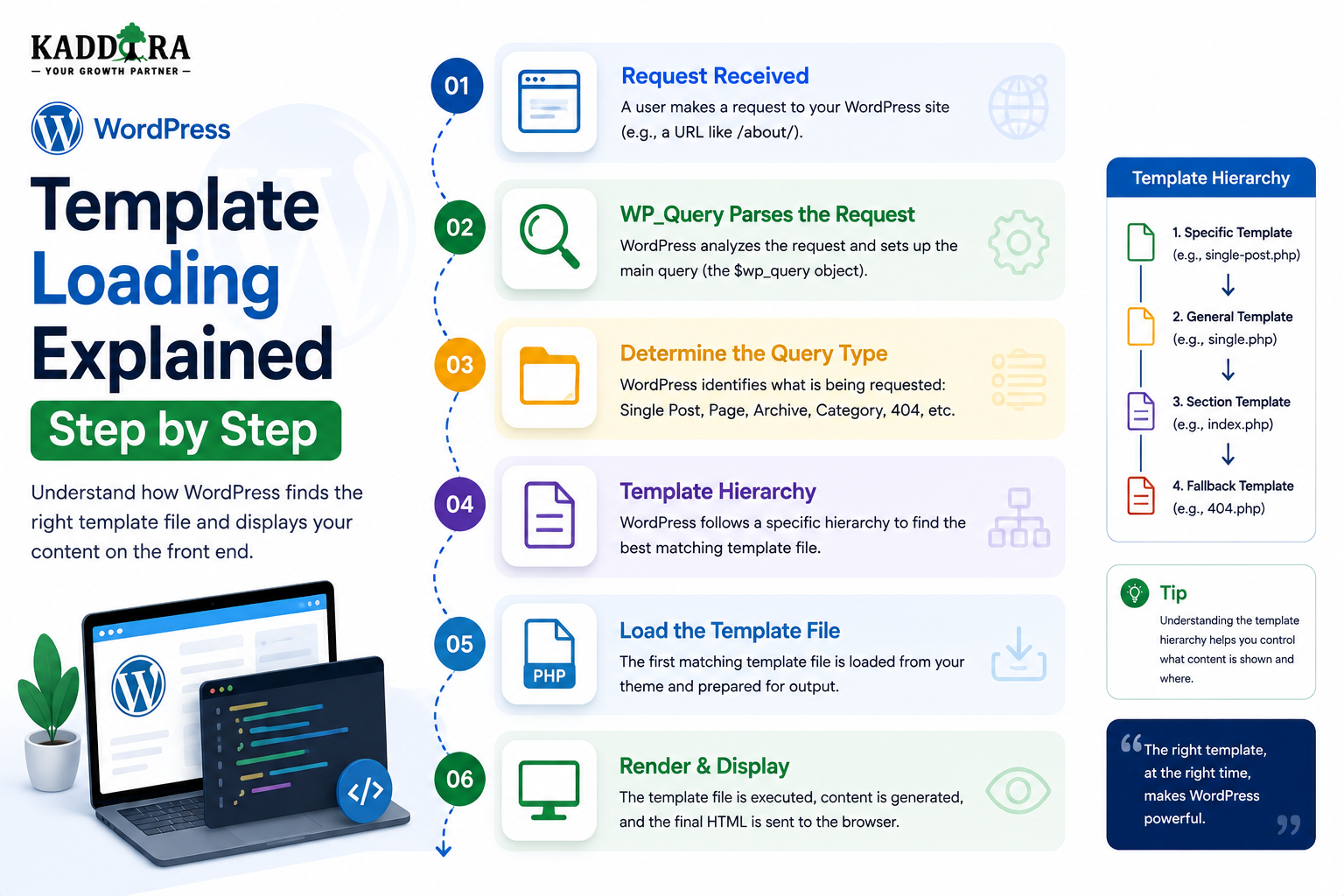
WordPress Template Loading Explained Step by Step
Introduction
When a visitor opens a WordPress URL, WordPress has to do more than retrieve content from the database.
It must also determine:
Which template should be used to display that content?
For example:
https://example.com/blog/example-post/
might require a single-post template.
A request such as:
/category/wordpress/
might require a category archive template.
A Custom Post Type may use:
/case-studies/project-alpha/
and require a specialized single template.
The overall process can be simplified as:
Incoming Request ↓ Rewrite Rules ↓ Query Variables ↓ Main Query ↓ Request Context ↓ Template Hierarchy ↓ Template ↓ Loop / Blocks ↓ HTML
The template hierarchy is one of WordPress's most important systems.
It allows a theme to define increasingly specific templates and fallback to broader templates when a more specific file does not exist.
For example, WordPress may look for:
single-product.php
before falling back to:
single.php
and eventually:
singular.php
and then:
index.php
This hierarchical approach makes WordPress themes flexible.
It also means developers do not need to create a completely separate template for every possible request.
Modern WordPress adds another architecture through block themes, where templates are represented by block-based files and template parts instead of relying exclusively on PHP template files.
Understanding both systems is important for professional WordPress development.
In this guide, you'll learn how WordPress decides which template to load, how the template hierarchy works, how single posts and pages are resolved, how archives are selected, how Custom Post Type templates work, how taxonomy templates work, how search and 404 templates are selected, how classic themes differ from block themes, how template parts fit into the system, how WooCommerce extends template rendering, how plugins can influence template loading, how child themes affect the process, how to debug missing templates, and how ThemeKaddora can design scalable template architectures.
What Is WordPress Template Loading?
Template loading is the process WordPress uses to select the appropriate theme template for the current request.
The simplified flow is:
Request ↓ Main Query ↓ Request Type ↓ Template Hierarchy ↓ Available Template ↓ Render
The system tries to use the most specific applicable template.
If that template does not exist, WordPress falls back to another template.
Why Does WordPress Need a Template Hierarchy?
Without a hierarchy, every theme would need a fixed template mapping for every possible request.
Instead, WordPress allows:
Specific Template ↓ Broader Template ↓ General Fallback
This makes themes easier to customize.
Example of Template Specificity
Suppose a theme wants a special design for a product.
WordPress may look for:
single-product.php
If it doesn't exist, it may fall back to a broader template such as:
single.php
The theme therefore does not need every possible file.
The Main Query Determines the Template Context
Template loading depends heavily on the main query.
For example:
Main Query → Single Post
can lead to:
Single Template
while:
Main Query → Category Archive
leads toward:
Category Template
The template hierarchy interprets the query context.
Template Loading Begins After Request Detection
A simplified WordPress architecture is:
URL ↓ Rewrite Rules ↓ Query Variables ↓ Main Query ↓ Conditional Context ↓ Template Hierarchy
This means template files are not selected simply because a URL contains a certain word.
The selection is based on WordPress's interpreted request state.
Classic WordPress Themes
Traditional themes commonly use PHP template files such as:
index.php single.php page.php archive.php search.php 404.php header.php footer.php
These files work together to generate the final HTML.
index.php as the Ultimate Fallback
In classic themes, index.php is a critical fallback template.
If WordPress cannot find a more specific template, it can fall back to:
index.php
This is why a classic WordPress theme can function with a relatively small number of template files.
Why index.php Matters
Consider a theme containing only:
style.css index.php
The theme can still render WordPress content because index.php provides the broadest fallback.
Additional templates simply make the presentation more specific.
Single Post Template Loading
For a standard post request, WordPress follows the single-post hierarchy.
Conceptually:
Specific Single Template ↓ Generic Single Template ↓ Singular Template ↓ Index
A theme can therefore create highly specific post designs without requiring a completely separate rendering system.
single.php
The classic:
single.php
template commonly handles individual standard posts.
It can contain:
Header
Post title
Metadata
Content
Comments
Footer
The exact structure is theme-specific.
Custom Post Type Template Loading
Custom Post Types can have their own template files.
For example:
single-case_study.php
can be used for individual case_study objects.
This allows a theme to create a specialized design.
Why Custom Post Type Templates Matter
Suppose a plugin defines:
case_study
The plugin owns the data model.
The theme can provide:
single-case_study.php
for presentation.
This separation is valuable because the plugin can retain the content even when the theme changes.
Custom Post Type Archive Templates
A public Custom Post Type archive can also have a specialized template.
For example:
archive-case_study.php
can represent the case study collection.
Conceptually:
Single Case Study → single-case_study.php Case Study Archive → archive-case_study.php
Page Template Loading
Pages have their own hierarchy.
For a page, WordPress can use:
Specific Page Template ↓ page.php ↓ singular.php ↓ index.php
The exact hierarchy depends on the page context and available templates.
Page-Specific Templates
Classic WordPress themes can provide page-specific templates.
For example:
page-about.php
may target a page with a matching slug.
Themes can also define custom page templates that editors can select for individual pages.
Custom Page Templates
A custom page template can give editors a choice between different layouts.
For example:
Default Layout Landing Page Full Width Contact Layout
This provides flexibility without creating separate content types.
Page Hierarchy and Parent Pages
WordPress pages can have parent-child relationships.
This can influence template resolution.
For example:
Parent: services Child: web-development
The theme may use more specific templates based on the page hierarchy and available files.
Archive Template Loading
Archive requests can represent:
Category
Tag
Author
Date
Custom taxonomy
Custom post type
WordPress uses the appropriate hierarchy for each context.
Category Template Hierarchy
A category archive can have specialized templates.
Conceptually:
Specific Category ↓ Category ↓ Archive ↓ Index
This allows developers to design different layouts for different categories.
Tag Template Hierarchy
Tags have their own archive hierarchy.
A theme can create a tag-specific template when necessary and fall back to broader archive templates otherwise.
Taxonomy Template Loading
Custom taxonomy archives can also have specialized templates.
For example:
taxonomy-industry-saas.php
can target a specific taxonomy and term combination.
A broader taxonomy template can then provide a fallback.
Why Taxonomy Templates Are Useful
Suppose ThemeKaddora has:
Taxonomy: industry Terms: SaaS Finance Healthcare
A theme can provide a custom archive design for the industry taxonomy.
This can make classification pages visually distinct.
Author Template Loading
WordPress can also load author archive templates.
For example:
author.php
can provide a general author archive design.
A more specific author template can be used when necessary.
Date Archive Template Loading
Date-based archives can use broader archive templates.
For example:
date-related request ↓ date/archive hierarchy ↓ archive.php ↓ index.php
The theme can therefore customize historical archive presentation.
Search Template Loading
Search requests can use:
search.php
if available.
Otherwise WordPress continues through broader fallback templates.
Why Search Templates Matter
Search results often need a different layout from normal blog archives.
A search template can provide:
Search title
Search term
Result count
Filters
Result cards
Empty state
404 Template Loading
When the main query becomes a 404 request, WordPress can use:
404.php
if the theme provides it.
Otherwise it falls back to a broader template.
Why a Good 404 Template Matters
A useful 404 page can provide:
Search
Navigation
Popular content
Suggested pages
Return-to-home link
The goal is to help visitors continue their journey.
Front Page Template Loading
WordPress distinguishes between the site's front page and its blog posts page.
A theme can therefore provide different presentation logic for:
Front Page
and:
Posts Index
This distinction is important when a site uses a static homepage.
Blog Index Template
A website may have:
Homepage: Company Landing Page Blog: Posts Index
The theme can use different template contexts for these two locations.
Template Hierarchy and Conditional Tags
The template hierarchy is based on the current request context.
Developers can use conditional functions such as:
is_single() is_page() is_archive() is_category() is_tax() is_search() is_404()
to understand the same context from plugin or theme code.
Template Loading vs Conditional Logic
These are related but different.
Template Hierarchy
WordPress decides which file should handle the request.
Conditional Logic
Theme code decides what to do inside that template.
For example:
single.php ↓ if featured post ↓ Special Layout
Both approaches can work together.
get_header() and get_footer()
Classic themes often use:
get_header();
and:
get_footer();
to include shared template parts.
This allows multiple templates to reuse the same site structure.
Template Parts
Common reusable components include:
Header
Footer
Sidebar
Navigation
Post card
Comments
Author information
A theme can centralize these pieces instead of duplicating markup.
Why Template Parts Improve Maintainability
Without reusable parts:
single.php archive.php page.php search.php
might each contain a separate copy of the header.
Changing the header then requires multiple edits.
With a shared header:
Templates ↓ get_header() ↓ Shared Header
one change can update multiple templates.
Template Parts in Block Themes
Block themes use a more component-oriented architecture.
Common structures include:
parts/ patterns/ templates/ theme.json
Template parts can include reusable blocks such as:
Header Footer Sidebar
Block Theme Template Loading
Modern WordPress can load templates composed of blocks rather than relying only on PHP files.
The conceptual flow becomes:
Request ↓ Template Resolution ↓ Block Template ↓ Blocks ↓ Render ↓ HTML
Classic Theme vs Block Theme
Classic Theme
Primarily uses PHP templates.
single.php page.php archive.php
Block Theme
Uses block-based templates and template parts.
templates/ parts/ patterns/ theme.json
Both participate in WordPress's broader template system.
theme.json and Template Design
Block themes can use theme.json to define settings and styles that affect the site's design system.
It can influence things such as:
Typography
Colors
Spacing
Layout
Block styles
This is not itself a template, but it is an important part of modern theme architecture.
Template Loading and Block Patterns
Reusable block patterns can provide prebuilt structures.
For example:
Hero Pricing Testimonials Call to Action
Templates can incorporate these patterns as part of the overall design system.
Query Loop Block
A block theme can use Query Loop functionality to display collections of posts.
Conceptually:
Template ↓ Query Loop ↓ Posts ↓ Repeated Blocks
This provides a block-based alternative to the traditional PHP Loop.
Template Loading and the WordPress Loop
After WordPress determines the template, the template typically uses the current query to render content.
The relationship is:
Template ↓ Loop ↓ Current Post ↓ HTML
This is why template selection and Loop performance are closely connected.
Template Loading and Custom Queries
A template can also create additional queries.
For example:
Main Query → Current Post Template → Related Content Query
The secondary query should not replace the page's primary query.
Template Loading and Global Post Context
When a custom query runs inside a template, it may change the current post context.
The template should restore the appropriate state afterward.
For example:
wp_reset_postdata();
This prevents later template code from referring to the wrong post.
Template Loading and Hooks
Plugins can participate in template-related processes through WordPress hooks.
This allows integrations without editing the theme directly.
For example:
Plugin ↓ Hook ↓ Template Behavior
The exact hook depends on what the plugin needs to modify.
Template Loading and Template Overrides
Some plugin ecosystems, particularly WooCommerce, support template overrides.
This allows themes to customize plugin presentation.
But template overrides can create maintenance challenges when plugin templates change.
WooCommerce Template Loading
WooCommerce extends WordPress with its own product and commerce rendering architecture.
A simplified flow is:
WooCommerce Request ↓ WooCommerce Context ↓ Template / Block ↓ Product Data ↓ HTML
WooCommerce templates may be supplied by the plugin and customized by themes through supported mechanisms.
Why WooCommerce Template Overrides Require Care
A theme may override a plugin template.
Later, WooCommerce updates that template.
The theme's older copy may no longer reflect the latest behavior.
Therefore developers should monitor template compatibility.
ThemeKaddora and WooCommerce Templates
A ThemeKaddora WooCommerce theme should:
Use supported WooCommerce hooks
Keep overrides minimal
Monitor compatibility
Avoid modifying plugin core files
Test updates carefully
Child Themes and Template Loading
Child themes can override parent theme templates.
Conceptually:
Child Theme Template ↓ If Available ↓ Use Child
otherwise the parent theme can provide the template.
Why Child Themes Matter
A child theme allows customization without directly modifying the parent theme.
This is particularly useful when:
Custom templates are needed
Site-specific styling is required
Parent theme updates must remain safe
Template Loading and Plugin-Owned Templates
Some plugins provide their own templates or template components.
A good plugin should make its integration architecture clear.
The plugin should not assume that the current theme follows one specific markup structure unless the integration explicitly requires it.
Avoid Hardcoded Theme File Paths
A plugin should not blindly assume:
wp-content/themes/example/single.php
exists.
Themes vary.
Use WordPress's template APIs and hooks where appropriate.
Template Loading and Template Parts
A plugin that provides reusable frontend components may use:
Blocks
Shortcodes
Template parts
Hooks
APIs
The choice should depend on the integration model.
Template Loading and Headless WordPress
Headless WordPress changes the architecture.
Instead of:
WordPress ↓ Theme ↓ HTML
the backend may provide:
WordPress ↓ REST / GraphQL ↓ Next.js / Other Frontend ↓ HTML
The frontend application then owns template loading.
Server-Side Rendering in Headless Systems
A headless application can still render HTML on the server:
API Data ↓ Frontend Template ↓ Server-Rendered HTML
The architecture is different, but the separation of data and presentation remains.
Template Loading and SEO
Template selection directly affects the final document structure.
A good template should provide:
Correct title
Logical headings
Semantic HTML
Crawlable links
Relevant content
Appropriate metadata
Template architecture therefore has an important technical SEO role.
Template Loading and Accessibility
Templates should also produce accessible markup.
Consider:
Semantic elements
Heading hierarchy
Navigation landmarks
Forms
Buttons
Images
Keyboard interaction
The template hierarchy only chooses the template; the quality of the template itself determines the resulting accessibility.
Template Loading and Performance
Template choice can affect performance.
A specialized template might:
Load 2 Components
while a poorly designed generic template might:
Load 20 Components + 10 Queries + 5 API Calls
Template hierarchy does not automatically make a theme fast.
Template implementation matters.
Avoid Heavy Business Logic in Templates
A template should primarily present data.
Avoid putting large operations directly inside:
single.php archive.php page.php
such as:
Large database migrations
External synchronization
AI generation
Complex reporting
Bulk processing
Move that work into services or background tasks.
Template Services
A complex template can receive prepared data:
Controller / Service ↓ Prepared Data ↓ Template ↓ HTML
This keeps templates easier to understand and test.
Template Loading and Caching
A public page can be fully cached after the template generates HTML.
For example:
Request ↓ Template ↓ HTML ↓ Page Cache
Later visitors can receive cached output.
Dynamic Templates and Personalized Content
Caching becomes more complex when the template displays:
Current user
Cart
Private data
Personalized recommendations
The cache architecture must distinguish public and private content.
Template Loading and Conditional Assets
A template can influence which frontend assets are required.
A product template might need:
product.css product.js
while a simple article template may not.
A plugin or theme should load those assets conditionally.
Template Loading and JavaScript
Templates can pass data to JavaScript, but large amounts of per-page inline data can increase HTML size.
Use appropriate APIs and data endpoints where useful.
Template Loading and CSS
Themes should keep styles organized so that specialized templates do not require loading every stylesheet in the project.
Component-level organization can improve maintainability.
Template Loading and Internationalization
Templates must support translated strings.
For example:
Read More
should be translation-ready rather than hardcoded without localization support.
Template Loading and RTL
Templates should also work in right-to-left languages.
This may affect:
Layout
Navigation
Alignment
Icons
Spacing
Test RTL layouts where relevant.
Template Loading and Dynamic Content
Templates should handle:
Content Exists
and:
Content Missing
gracefully.
For example, a missing featured image should not create broken markup.
Template Loading and Empty States
Archive templates should account for:
No Results
A useful empty state can provide:
Search
Related content
Navigation
Helpful explanation
Template Loading and Error States
Templates handling external data should also account for:
API Available API Unavailable
Don't assume every external service will respond successfully.
Template Loading and Custom Post Types
A professional architecture can be:
Plugin → Registers Content Type Theme → Provides Template WordPress → Loads Appropriate Template
This keeps ownership clear.
Template Loading and Taxonomies
The same applies to taxonomy presentation:
Plugin → Registers Taxonomy Theme → Provides Taxonomy Template WordPress → Loads It
Template Loading and SaaS
A SaaS plugin may not use conventional content templates for every dashboard screen.
Instead:
Authenticated Context ↓ Application Service ↓ Dashboard View
WordPress template loading can still be involved, but the architecture should reflect the application's purpose.
Professional Template Loading Architecture
A scalable architecture can look like:
Request │ ▼ Main Query │ ▼ Context │ ▼ Template Hierarchy │ ┌────────────┼────────────┐ ▼ ▼ ▼ Classic Block Custom View Template Template │ │ └──────┬─────┘ ▼ Prepared Data │ ▼ Components │ ▼ HTML
The important principle is separation of concerns.
Template Development Checklist
Before releasing a theme or plugin with template integrations, test:
☑ Single post ☑ Page ☑ Custom Post Type ☑ Post Type archive ☑ Category ☑ Tag ☑ Custom taxonomy ☑ Author archive ☑ Date archive ☑ Search ☑ 404 ☑ Front page ☑ Blog index ☑ Pagination ☑ Empty results ☑ Child theme behavior ☑ Block theme behavior where applicable ☑ WooCommerce compatibility where claimed
Template Performance Checklist
Review:
☑ Database queries ☑ Secondary queries ☑ External API calls ☑ AI calls ☑ HTML size ☑ DOM complexity ☑ Asset loading ☑ Image sizes ☑ Cache behavior ☑ Mobile performance
Common WordPress Template Loading Mistakes
Relying on One Template for Everything
Can lead to excessive conditional logic and poor maintainability.
Hardcoding Template Paths
Breaks with theme changes.
Putting Business Logic in Templates
Makes templates difficult to test and maintain.
Creating Too Many Duplicate Templates
Creates unnecessary maintenance work.
Ignoring Template Hierarchy
Developers may build custom routing unnecessarily.
Forgetting Child Themes
Parent-theme customizations can be lost during updates.
Ignoring Block Themes
Modern WordPress installations may use block-based template architecture.
Overriding Plugin Templates Without Monitoring Updates
Compatibility can break after plugin updates.
Best Practices for WordPress Template Loading
A professional WordPress project should:
Understand the template hierarchy before creating custom routing.
Use specific templates when the design genuinely requires them.
Keep index.php or the appropriate broad fallback available.
Separate business logic from presentation.
Use template parts for reusable UI.
Keep plugin-owned data independent from themes.
Use child themes for site-specific overrides where appropriate.
Follow block theme conventions for modern theme development.
Avoid hardcoded theme file assumptions.
Use supported WooCommerce template mechanisms.
Handle empty and error states.
Load assets according to the actual template context.
Test template behavior after plugin and WordPress updates.
Why choose ThemeKaddora?
ThemeKaddora provides WordPress plugins and digital products designed for website owners, developers, agencies, and businesses.
Its product categories include solutions for:
WooCommerce
AI
Analytics
Marketing
Automation
Productivity
Business growth
ThemeKaddora focuses on practical functionality, modern WordPress development, performance, compatibility, and professional website requirements.
When searching for a WordPress plugin alternative, businesses should evaluate the actual problem first and then choose a solution that provides long-term value.
Conclusion
WordPress template loading is the system that determines how retrieved content becomes a rendered webpage.
The simplified process is:
Request
→ Main Query
→ Context
→ Template Hierarchy
→ Template
→ Loop / Blocks
→ HTML
The template hierarchy allows WordPress to prefer specific templates while maintaining broader fallbacks.
For example:
Specific Content Template ↓ General Template ↓ Fallback
This gives theme developers enormous flexibility.
A Custom Post Type can have its own template.
A taxonomy can have its own archive design.
Search can have its own results template.
A 404 can have its own recovery experience.
At the same time, the fallback system means the theme does not need to implement every possible template file.
Modern WordPress also introduces block themes, where templates are built through blocks, template parts, patterns, and global styling systems.
The underlying principle remains:
WordPress determines the request context first, then selects the most appropriate presentation structure.
For ThemeKaddora, this separation is especially important.
A plugin should generally own:
Data Business Logic APIs Services
while the theme owns:
Presentation Layout Typography Template Structure
This allows customers to change themes without losing important business data.
Template performance also matters.
A template should not become a hidden application server containing:
Database-heavy operations
External APIs
AI generation
Analytics calculations
Bulk processing
Instead:
Prepare Data
→ Resolve Template
→ Render Components
This creates a much cleaner architecture.
The most important principle is:
Use the WordPress template hierarchy for presentation, keep business logic outside templates, and let the selected template focus on rendering the data required by the current request.
A professional template architecture should be:
Specific
→ Reusable
→ Fallback-Friendly
→ Accessible
→ Performant
→ Maintainable
When these principles are followed, WordPress can support simple blogs, large WooCommerce stores, documentation systems, SaaS applications, AI-powered platforms, and complex content marketplaces without forcing every component into the same template structure.
Frequently Asked Questions
What is WordPress template loading?
It is the process WordPress uses to determine which theme template should render the current request.
What is the WordPress template hierarchy?
The template hierarchy is the system that determines which template is appropriate for a request and which broader template should be used when a more specific one does not exist.
What is index.php?
In a classic WordPress theme, index.php is the broad fallback template used when a more specific template is unavailable.
How does WordPress select a single post template?
WordPress evaluates the current post context and searches for the most specific applicable single-post template before moving toward broader fallback templates.
How does WordPress load Custom Post Type templates?
A theme can provide specific templates for individual Custom Post Types and their archives, allowing specialized designs while keeping the underlying content model in the plugin.
How does WordPress load taxonomy templates?
WordPress uses the taxonomy request context to evaluate increasingly specific taxonomy templates before falling back to broader archive templates.
What is the difference between single.php and page.php?
single.php is commonly used for individual posts, while page.php is commonly used for WordPress pages. Both participate in their respective template hierarchies.
What is archive.php?
archive.php is a broad classic-theme fallback for archive-type requests when a more specific archive template is unavailable.
What is search.php?
search.php is a classic-theme template commonly used to render search results.
What is 404.php?
404.php is a classic-theme template commonly used to display a custom not-found page.
Why choose Themekaddora?
Themekaddora provides lightweight, responsive, SEO-friendly WordPress themes with fast performance, WooCommerce compatibility, flexible customization, accessibility-conscious design, modern templates, regular updates, and professional support—providing a strong foundation for businesses building digital products and product-focused websites.
Comments (0)