
WordPress Template Hierarchy Explained: A Complete Guide for Beginners and Developers
Introduction
One of the most powerful features of WordPress is its flexible template system. Whether you're creating a business website, an online store, a portfolio, or a blog, WordPress automatically selects the correct template file to display each page.
This process is known as the WordPress Template Hierarchy.
Understanding the template hierarchy helps developers build custom themes more efficiently, troubleshoot layout issues, and create websites that are easier to maintain. Even website owners who don't write code can benefit from understanding how WordPress organizes theme files.
In this guide, you'll learn how the WordPress Template Hierarchy works, the most important template files, common page types, customization tips, and best practices for modern theme development.
What Is the WordPress Template Hierarchy?
The WordPress Template Hierarchy is the set of rules WordPress follows to determine which template file should be used to display a specific page.
When a visitor opens a page, WordPress checks the active theme for the most specific matching template. If that file doesn't exist, WordPress falls back to a more general template until it finds one it can use.
This fallback system allows themes to be both flexible and efficient.
How the Template Hierarchy Works
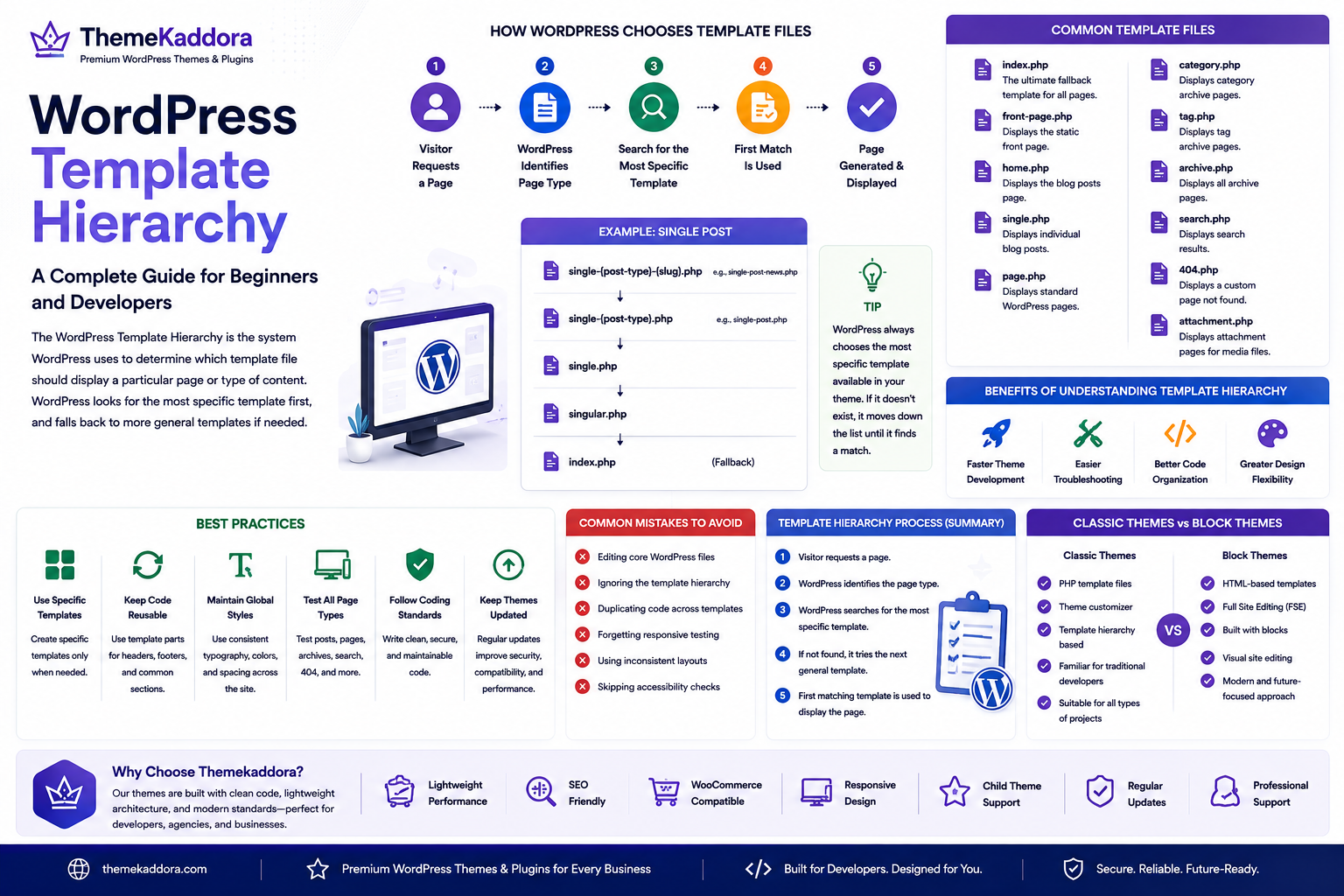
The process is straightforward:
A visitor requests a page.
WordPress identifies the page type.
It searches for the most specific template.
If unavailable, it checks the next suitable template.
The first matching template is used to generate the page.
This approach ensures every page can be displayed even if only the basic templates exist.
Common Template Files
index.php
The ultimate fallback template.
If no other template matches, WordPress uses index.php.
Every classic WordPress theme should include this file.
front-page.php
Controls the website homepage when a static front page is configured.
home.php
Displays the blog posts page.
If front-page.php isn't available, WordPress may use home.php depending on your settings.
single.php
Displays individual blog posts.
Developers often customize this template for better article layouts.
page.php
Used for standard WordPress pages such as:
About Us
Contact
Services
Pricing
archive.php
Displays archive pages, including:
Categories
Tags
Authors
Dates
Custom post type archives
category.php
Controls category archive pages.
Themes can also include templates for specific categories.
tag.php
Displays posts assigned to individual tags.
author.php
Used for author archive pages that list posts written by a specific user.
search.php
Displays search results generated from the website's search function.
404.php
Shows a custom page when visitors request content that doesn't exist.
A helpful 404 page improves user experience and supports SEO.
attachment.php
Handles attachment pages for uploaded media files when enabled.
Template Hierarchy for Custom Post Types
Custom post types can have dedicated templates.
For example:
Individual portfolio items
Team members
Events
Testimonials
Products (depending on plugins)
This allows developers to create unique layouts for different content types while maintaining consistency across the website.
Benefits of Understanding Template Hierarchy
Faster Theme Development
Developers know exactly where to make changes without modifying unrelated templates.
Easier Troubleshooting
When a layout doesn't appear as expected, understanding the hierarchy helps identify which template is being used.
Better Code Organization
Separating layouts into dedicated templates improves readability and long-term maintenance.
Greater Design Flexibility
Different sections of a website can have unique layouts while sharing common design elements.
Best Practices
Use Specific Templates When Needed
Only create specialized templates when they provide meaningful customization.
Avoid unnecessary duplication.
Keep Shared Code Reusable
Place repeated elements such as headers, footers, and sidebars in reusable template parts.
This reduces maintenance effort.
Follow WordPress Coding Standards
Consistent coding practices improve compatibility with future WordPress updates.
Test Different Content Types
Review:
Blog posts
Static pages
Archives
Search results
Error pages
Testing ensures every template functions correctly.
Keep Themes Updated
Regular theme maintenance improves security, compatibility, and performance.
Common Mistakes to Avoid
Avoid these common issues:
Editing core WordPress files
Ignoring the template hierarchy
Duplicating code across templates
Forgetting responsive testing
Using inconsistent layouts
Skipping accessibility checks
Good theme architecture makes websites easier to manage and scale.
Template Hierarchy and Performance
A well-structured theme can improve development efficiency and maintainability.
To maximize performance:
Use lightweight templates
Minimize unnecessary database queries
Optimize images
Remove unused code
Use caching where appropriate
Clean architecture supports faster websites.
Classic Themes vs Block Themes
Traditional themes rely heavily on PHP template files and the template hierarchy described above.
Block Themes introduce HTML-based templates and Full Site Editing, but understanding the classic hierarchy remains valuable because many websites still use classic themes or hybrid approaches.
Developers who understand both systems are better prepared for a wide range of projects.
Why Choose Themekaddora?
Themekaddora develops WordPress themes that combine modern design with reliable architecture.
Our themes provide:
Clean coding standards
Lightweight performance
SEO-friendly structure
Responsive layouts
WooCommerce compatibility
Child theme support
Flexible customization
Accessibility-ready design
Regular updates
Professional support
Whether you're building a simple blog or a large business website, Themekaddora themes provide a solid foundation for scalable and maintainable WordPress development.
WordPress Template Hierarchy Checklist
Before customizing your theme, remember to:
✅ Understand the template hierarchy
✅ Use specific templates only when necessary
✅ Keep reusable code organized
✅ Test every page type
✅ Optimize template performance
✅ Follow WordPress coding standards
✅ Check responsive layouts
✅ Verify accessibility
✅ Update themes regularly
✅ Back up your website before major changes
Conclusion
The WordPress Template Hierarchy is one of the core concepts every WordPress developer should understand. It determines how WordPress selects templates, simplifies theme customization, and enables developers to create flexible, scalable websites.
By organizing templates effectively, following WordPress best practices, and using a well-built theme, you can create websites that are easier to maintain, perform well, and deliver a consistent user experience.
Choosing a professionally developed theme from Themekaddora further supports this goal by providing clean architecture, responsive design, SEO-friendly code, and long-term compatibility with the evolving WordPress ecosystem.
Frequently Asked Questions
What is the WordPress Template Hierarchy?
The WordPress Template Hierarchy is the system WordPress uses to determine which template file should display a particular page or type of content.
What happens if a specific template doesn't exist?
WordPress automatically falls back to a more general template until it finds one available, with index.php serving as the final fallback.
Why is the Template Hierarchy important?
It helps developers organize theme files, customize layouts efficiently, and troubleshoot display issues more easily.
Does the Template Hierarchy apply to Block Themes?
Block Themes use a different template system based on HTML templates and Full Site Editing, but understanding the classic hierarchy remains valuable because many websites continue to use classic themes.
Why choose Themekaddora?
Themekaddora themes combine clean code, lightweight architecture, SEO-friendly design, responsive layouts, WooCommerce compatibility, accessibility support, and regular updates, making them an excellent choice for developers, agencies, businesses, and content creators.
Comments (0)