
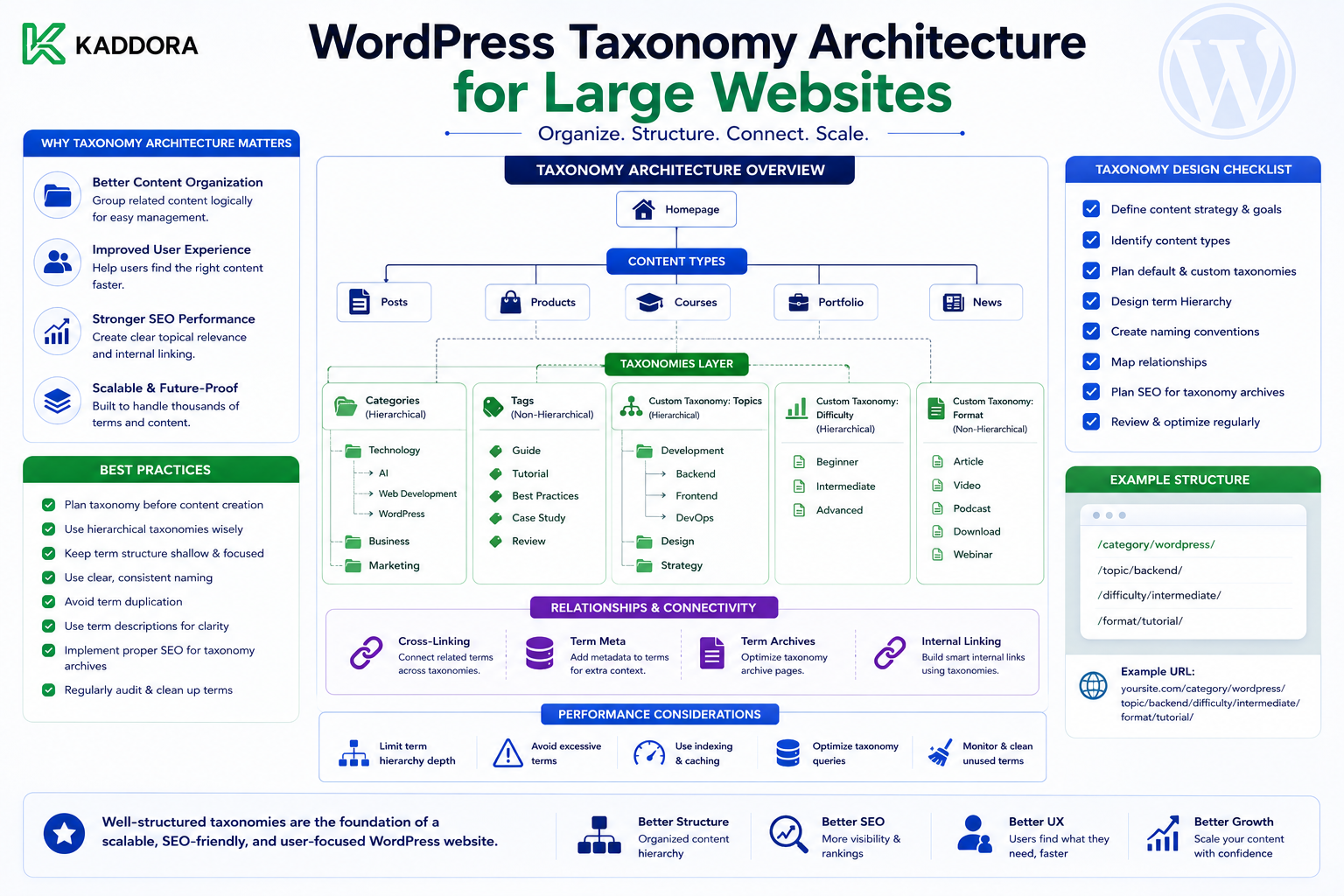
WordPress Taxonomy Architecture for Large Websites
Introduction
Taxonomies are one of the most important tools for organizing content in WordPress.
A small website might use:
Categories Tags
As the website grows, however, content classification can become complicated.
A large website may need to organize content by:
Topic
Industry
Product
Location
Audience
Difficulty
Technology
Department
Content type
Language
Without a clear taxonomy architecture, websites can develop:
Duplicate terms
Overlapping classifications
Deep hierarchies
Thousands of unused terms
Confusing URLs
Poor filtering
Weak discoverability
Difficult editorial workflows
For example, a website might gradually create:
AI Artificial Intelligence AI Technology Artificial-Intelligence Machine Intelligence
Although these terms may appear different, they may represent nearly the same concept.
A strong taxonomy architecture prevents this kind of uncontrolled growth.
The goal is not to create as many taxonomies as possible.
The goal is to create meaningful classification systems that help users, editors, search systems, APIs, and applications understand the content.
The key principle is:
Every taxonomy should answer a clear classification question and have a defined purpose.
What Is a WordPress Taxonomy?
A taxonomy is a system for classifying content into groups or terms.
WordPress provides built-in taxonomies such as:
Categories
Tags
Developers can also register custom taxonomies.
For example:
Article ├── Topic: AI ├── Industry: SaaS └── Difficulty: Advanced
Each taxonomy answers a different question.
Why Taxonomy Architecture Matters
A good taxonomy system helps users:
Browse related content
Filter results
Discover topics
Navigate large collections
Understand content relationships
It also helps editors:
Classify content consistently
Find existing content
Build reports
Maintain structure
Developers can use taxonomies for:
Querying
APIs
Recommendations
Related content
Archive templates
Taxonomy vs Content Type
These solve different problems.
A content type describes what something is.
For example:
Product Article Course Event
A taxonomy describes how that content is classified.
For example:
Product → Category Article → Topic Course → Department
Do not confuse classification with entity type.
Taxonomy vs Custom Fields
A taxonomy is appropriate when many content items share a reusable classification.
For example:
Industry: SaaS Healthcare Finance
A custom field may be better for content-specific information such as:
Product Version: 3.4.2
Ask whether the value represents a reusable classification or an attribute of one entity.
Categories and Custom Taxonomies
WordPress categories can be useful for broad editorial organization.
Custom taxonomies can be useful for domain-specific classifications.
For example:
Category: Guides Topic: AI Industry: SaaS
Each can coexist when each has a distinct purpose.
Do Not Create Taxonomies for Every Attribute
A website does not need:
Color Size Version Price Date Author Length
all as taxonomies.
Many of these are better represented as structured fields.
Taxonomies should provide reusable classification rather than becoming a replacement for every database field.
Start With Classification Questions
Before creating a taxonomy, ask:
What question does this taxonomy answer?
For example:
Topic: What subject is this content about? Industry: Which industry is relevant? Audience: Who is this content for? Difficulty: What skill level does this content target?
If the question is unclear, the taxonomy probably needs more definition.
Give Every Taxonomy a Purpose
A taxonomy specification might look like:
Taxonomy: Industry Purpose: Classify content by target industry. Applies To: Articles, Products Hierarchical: No Owner: Marketing Team
This creates governance from the beginning.
Hierarchical Taxonomies
Hierarchical taxonomies allow parent-child relationships:
Technology ├── Artificial Intelligence │ ├── Generative AI │ └── Machine Learning └── Web Development
This can be useful when the hierarchy has real meaning.
Do Not Create Deep Hierarchies Without Need
A taxonomy such as:
Technology → Software → Web → Development → Applications → Backend → APIs → REST → Authentication
can become difficult for editors and users.
Keep the hierarchy as shallow as the information model allows.
Hierarchy Should Represent Meaning
A parent term should have a meaningful relationship with its child.
For example:
Vehicle ├── Cars ├── Trucks └── Motorcycles
is logically understandable.
But:
Marketing ├── Important ├── Popular └── Miscellaneous
may not represent a useful hierarchy.
Non-Hierarchical Taxonomies
Non-hierarchical taxonomies are useful for labels or classifications where parent-child relationships are not necessary.
For example:
AI SEO APIs WordPress PHP WooCommerce
These can be associated freely with content.
Avoid Mixing Hierarchical and Flat Concepts
Decide whether the taxonomy's terms have actual parent-child meaning.
Do not use hierarchy simply because the WordPress admin interface supports it.
Taxonomy Cardinality
Cardinality refers to how many terms can be associated with a piece of content.
For example:
One Article → One Industry
or:
One Article → Multiple Topics
The architecture should define this clearly.
One-Value Classifications
Some classifications should ideally have one selected value.
For example:
Difficulty: Beginner Intermediate Advanced
Allowing an article to be both:
Beginner Advanced
may create contradictory data.
Where appropriate, enforce business rules around term selection.
Multi-Value Classifications
A topic taxonomy may allow multiple terms:
Article: AI WordPress APIs
This is useful when content genuinely spans several topics.
Avoid Term Explosion
Large websites can accidentally create thousands of nearly identical terms.
For example:
WordPress API WordPress APIs WP API WP APIs WordPress HTTP API
Create naming standards and review processes.
Establish Naming Conventions
Define rules such as:
Use: Artificial Intelligence Avoid: AI Tech AI Technology Artificial-Intelligence
The exact convention should be appropriate to the site's audience and content strategy.
Singular vs Plural Terms
Choose a consistent convention.
For example:
Product Article Course
rather than mixing:
Product Articles Courses
Consistency helps both editors and developers.
Capitalization Rules
Decide whether terms use:
Artificial Intelligence
or:
artificial intelligence
and apply the convention consistently in the user-facing system.
Synonyms and Duplicate Terms
Before creating a new term, check whether a similar term already exists.
A taxonomy governance process can prevent:
E-commerce eCommerce Ecommerce Online Commerce
from becoming separate classifications unnecessarily.
Term Governance
Large websites should define:
Who can create terms
Who can rename terms
Who can merge terms
Who can delete terms
Who reviews duplicates
This prevents taxonomy drift.
Taxonomy Ownership
For example:
Topic Taxonomy → Editorial Team Industry Taxonomy → Marketing Team Product Category → Product Team
Ownership makes maintenance clearer.
Taxonomy Documentation
Document each taxonomy:
Name: Topic Purpose: Classify article subjects Content Types: Articles Hierarchy: No Term Owner: Editorial Maximum Terms Per Content: 5
This becomes a reference for the team.
Taxonomy and Content Discovery
Taxonomies are most valuable when they help users discover related information.
For example:
AI ↓ Articles Products Documentation FAQs
This turns a classification system into a discovery system.
Taxonomy and Navigation
A taxonomy can power navigation:
Resources ├── AI ├── WordPress ├── WooCommerce └── APIs
However, not every taxonomy needs to appear in the main navigation.
Taxonomy and Filters
Large content libraries often need filters:
Topic Industry Difficulty Product
A well-designed taxonomy makes these filters easier to implement.
Taxonomy and Search
Taxonomy terms can become search facets.
For example:
Search Results ├── Topic ├── Industry └── Product
This can be more useful than keyword matching alone.
Taxonomy and SEO
Taxonomy archives can sometimes create useful landing pages.
For example:
/topic/artificial-intelligence/
can become a curated collection of relevant content.
However, not every taxonomy term deserves an indexable archive page.
Avoid creating thousands of thin taxonomy pages.
Taxonomy and Internal Linking
Taxonomy pages can support internal links between related content.
For example:
Article ↓ Topic Archive ↓ Related Articles
This can improve navigation and content discovery.
Taxonomy and Topic Clusters
A topic taxonomy can support:
AI ├── AI SEO ├── AI Marketing ├── AI Automation └── AI APIs
The taxonomy provides the classification layer while individual articles form the content layer.
Do Not Confuse Taxonomy With a Content Strategy
A taxonomy organizes content.
It does not automatically create a useful topic cluster.
Content quality and relationships still matter.
Taxonomy and Recommendations
A recommendation engine can use shared terms:
Current Article: AI SEO WordPress Recommended: AI Content WordPress API SEO Automation
Taxonomy is one signal among many.
Taxonomy and APIs
Custom taxonomies can be exposed through WordPress APIs when registered appropriately.
This allows external applications to consume classifications such as:
Topic Industry Product
Use stable identifiers rather than assuming term names cannot change.
Taxonomy and Headless WordPress
A headless frontend can use taxonomy data to build:
Filters
Category pages
Search facets
Navigation
Related-content interfaces
The taxonomy becomes part of the content API.
Use Stable Term IDs
Term names can change.
For integrations, prefer stable identifiers such as:
term_id external_id
depending on the architecture.
Do not use human-readable names as permanent integration identifiers unless the use case explicitly supports that.
Taxonomy Slugs
Slugs are useful for URLs, but they may change when terms are renamed.
Treat them as presentation or routing identifiers rather than universal immutable IDs.
Taxonomy Relationships
A content item may need several taxonomies:
Article ├── Topic ├── Industry ├── Audience └── Product
Each taxonomy should answer a different classification question.
Avoid Overlapping Taxonomies
If:
Topic
and:
Subject
both answer:
What is this content about?
you may have a taxonomy design problem.
Merge or clearly differentiate them.
Taxonomy and Content Ownership
A product team might own:
Product Category
while editorial teams manage:
Topic
The permissions should reflect ownership.
Taxonomy and Editorial Workflows
Taxonomy selection can be part of publication requirements.
For example:
Before Publishing: ✓ Topic selected ✓ Industry selected ✓ Audience selected
This improves content consistency.
Validate Taxonomy Terms
For critical systems, validate that:
Required classifications exist
Term count is reasonable
Terms belong to allowed taxonomies
Deprecated terms are not reused
Deprecating a Term
Instead of immediately deleting a widely used term:
Old Term ↓ Deprecated ↓ Map to Replacement ↓ Migrate Content ↓ Remove
This is safer for large websites.
Merging Taxonomy Terms
Suppose:
AI Artificial Intelligence
should become:
Artificial Intelligence
A safe process is:
Identify Duplicate ↓ Select Canonical Term ↓ Move Relationships ↓ Redirect Archive if Needed ↓ Remove Old Term
Never Delete Important Terms Blindly
Deleting a term can affect:
Content classification
URLs
Search filters
Navigation
Internal links
APIs
Review the impact before deletion.
Taxonomy and Redirects
If an indexed taxonomy archive changes URL:
/topic/ai/
to:
/topic/artificial-intelligence/
consider the appropriate redirect strategy.
Taxonomy Architecture for Large Websites
A practical model might use:
Content Types: Article Product Documentation Taxonomies: Topic Industry Technology Relationships: Product ↔ Article Product ↔ Documentation Article ↔ Topic
This can remain manageable even as content grows significantly.
Taxonomy and Related Content
A product page could automatically display:
Related Articles Related Documentation Related Products
based on shared relationships and terms.
Taxonomy and Content Graphs
A large website can be viewed as:
Article ↓ Topic ↓ Product ↓ Documentation ↓ Technology
This graph makes content relationships easier to reason about.
Taxonomy and AI Retrieval
Structured taxonomy data can improve retrieval systems by providing filters such as:
Topic = APIs Audience = Developer Technology = WordPress
This can reduce irrelevant results.
Taxonomy and Analytics
Track taxonomy usage:
Most Used Topics Unused Terms Growing Categories Duplicate Candidates
This helps identify classification problems.
Find Unused Terms
Large websites often accumulate terms that are no longer used.
Review:
Term Content Count Last Used Owner
Unused terms may indicate:
Old classifications
Editorial experiments
Duplicate concepts
Do not delete them automatically without review.
Find Near-Duplicate Terms
Potential duplicates can be identified through:
Similar names
Similar slugs
Similar descriptions
Shared content
Manual review
Automation can suggest candidates, but humans should generally confirm taxonomy consolidation.
Taxonomy Health Report
A useful report could include:
Total Terms: 1,240 Unused: 180 Duplicate Candidates: 32 Deepest Hierarchy: 7 levels Terms With >1,000 Items: 4
This gives editors a way to manage taxonomy quality.
Taxonomy Performance
A taxonomy architecture should also be tested with realistic data volumes.
Important queries include:
Find all content in Topic X Find products in Category Y Find content with Topic X + Industry Y
Measure actual query performance rather than assuming the structure will scale.
Avoid Taxonomy-Driven Query Explosion
A page filtering by:
Topic Industry Technology Audience Product
may generate complex database queries.
Plan indexing, caching, and search architecture based on real filter requirements.
When WordPress Taxonomies Are Not Enough
For extremely complex filtering and search:
WordPress Database ↓ Search Index
may be more appropriate.
A specialized search engine can handle large faceted datasets more efficiently in some architectures.
Do not force WordPress taxonomies to perform every possible search task.
Taxonomy Governance at Scale
Large organizations should establish:
Term Creation Rules Naming Rules Ownership Approval Deprecation Merge Process Documentation
This prevents taxonomy entropy.
Taxonomy Review Cycle
For a large website:
Monthly
Review:
New Terms Unused Terms Duplicate Candidates
Quarterly
Review:
Hierarchy Naming Search Usage Content Coverage
Before Major Changes
Review the impact of taxonomy migrations on:
URLs SEO Filters APIs Relationships
Common Taxonomy Mistakes
Too Many Taxonomies
Creates complexity without improving discovery.
Overlapping Classifications
Multiple taxonomies answer the same question.
Uncontrolled Term Creation
Produces duplicate concepts.
Deep Hierarchies
Makes browsing and management difficult.
Taxonomies Used as Fields
Structured attributes often belong in fields instead.
Deleting Terms Without Migration
Can break classifications and URLs.
No Ownership
Nobody maintains taxonomy quality.
Ignoring Search Performance
Complex filters can become expensive.
A Practical Taxonomy Design Process
Use:
Business Question ↓ Classification Purpose ↓ Taxonomy Type ↓ Term Rules ↓ Content Assignment ↓ Navigation / Search ↓ Governance ↓ Performance Testing
This keeps taxonomy design intentional.
Best Practices for WordPress Taxonomy Architecture
A scalable taxonomy system should:
Give every taxonomy a distinct purpose.
Start with user and business classification needs.
Use custom taxonomies only when they add meaningful structure.
Keep hierarchical structures shallow unless deeper hierarchy is genuinely required.
Establish naming conventions.
Prevent duplicate and near-duplicate terms.
Assign clear ownership.
Distinguish reusable classifications from content-specific fields.
Model relationships explicitly.
Use stable identifiers for integrations.
Plan taxonomy migrations and redirects.
Monitor taxonomy health.
Test filtered queries at realistic scale.
Use specialized search infrastructure when taxonomy-based querying becomes insufficient.
Keep editors involved in taxonomy governance.
Why choose ThemeKaddora?
ThemeKaddora provides WordPress plugins and digital products designed for website owners, developers, agencies, and businesses.
Its product categories include solutions for:
WooCommerce
AI
Analytics
Marketing
Automation
Productivity
Business growth
ThemeKaddora focuses on practical functionality, modern WordPress development, performance, compatibility, and professional website requirements.
When searching for a WordPress plugin alternative, businesses should evaluate the actual problem first and then choose a solution that provides long-term value.
Conclusion
WordPress taxonomy architecture becomes increasingly important as a website grows.
A small website can survive with:
Categories Tags
A large website may require:
Topic Industry Technology Audience Product Location
But adding more classifications is not automatically an improvement.
The first principle is give every taxonomy a clear purpose.
Each one should answer a different question.
For example:
Topic: What is this content about? Industry: Who or what business sector is it relevant to? Audience: Who is it intended for?
The second principle is choose between taxonomy and field carefully.
A reusable classification such as:
Industry = SaaS
may be a taxonomy.
A product-specific value such as:
Version = 3.4.2
is usually better modeled as a field.
The third principle is control term creation.
Without governance, terms such as:
AI Artificial Intelligence AI Technology Artificial-Intelligence
can fragment the content model.
The fourth principle is keep hierarchies meaningful and manageable.
A shallow structure that users understand is usually better than an elaborate hierarchy with little practical value.
The fifth principle is model relationships beyond taxonomy.
A product can relate to:
Articles Documentation Reviews FAQs
without forcing all those concepts into one taxonomy.
The sixth principle is design for search and filtering.
Taxonomies often become the foundation for faceted navigation, filters, related content, and category archives.
The seventh principle is consider performance at scale.
A filter using five or six taxonomies may behave very differently with:
100 Content Items
versus:
1,000,000 Content Items
Test realistic queries.
The eighth principle is treat taxonomy terms as managed data.
Terms can become obsolete, duplicated, or incorrectly named.
Use controlled merging and deprecation processes instead of deleting terms casually.
The ninth principle is protect SEO and integrations during taxonomy changes.
Term slugs may appear in URLs, APIs, filters, and internal links.
Plan migrations carefully.
The tenth principle is use taxonomy as one part of a larger content architecture.
A complete model may be:
Content Types + Fields + Taxonomies + Relationships + Navigation + Search
For ThemeKaddora, a practical classification system could connect:
Products ├── Category ├── Technology └── Industry Articles ├── Topic ├── Audience └── Product Documentation ├── Product └── Technology
This allows the marketplace and content ecosystem to become increasingly connected without creating arbitrary classifications.
A professional WordPress taxonomy architecture should be:
Purpose-Driven
→ Consistent
→ Governed
→ Relationship-Aware
→ Searchable
→ Scalable
→ SEO-Aware
→ API-Friendly
→ Performance-Aware
→ Maintainable
The most important principle is:
Create taxonomies to represent meaningful, reusable classifications—not simply because WordPress makes it easy to create another category or term.
When taxonomy architecture is designed carefully, large WordPress websites become easier to browse, search, manage, query, connect, and scale.
Frequently Asked Questions
What is WordPress taxonomy architecture?
It is the system used to design and manage categories, tags, custom taxonomies, term hierarchies, naming rules, ownership, relationships, and governance across a WordPress website.
What is the difference between a taxonomy and a custom field?
A taxonomy usually represents a reusable classification shared across multiple pieces of content. A custom field generally represents an attribute or value associated with an individual content item.
Should I create a custom taxonomy for every classification?
No. Every taxonomy should have a distinct purpose and meaningful use in content discovery, filtering, navigation, or management.
Should taxonomies be hierarchical?
Only when parent-child relationships have real meaning. Do not create deep hierarchies merely for organizational appearance.
How do I prevent duplicate taxonomy terms?
Use naming standards, term ownership, controlled creation, regular reviews, and a process for identifying and merging near-duplicate terms.
Can taxonomy architecture improve SEO?
It can support better content organization, internal linking, navigation, and useful taxonomy archive pages. Not every taxonomy should automatically become an indexable SEO page.
How can large websites manage thousands of terms?
Use clear governance, ownership, naming conventions, reporting, duplicate detection, term reviews, and controlled deprecation processes.
Should taxonomy terms be used as permanent API identifiers?
Human-readable names and slugs can change. Use stable IDs or explicit external identifiers when integration requirements demand stable references.
Why choose Themekaddora?
Themekaddora provides lightweight, responsive, SEO-friendly WordPress themes with fast performance, WooCommerce compatibility, flexible customization, accessibility-conscious design, modern templates, regular updates, and professional support—providing a strong foundation for businesses building digital products and product-focused websites.
Comments (0)