
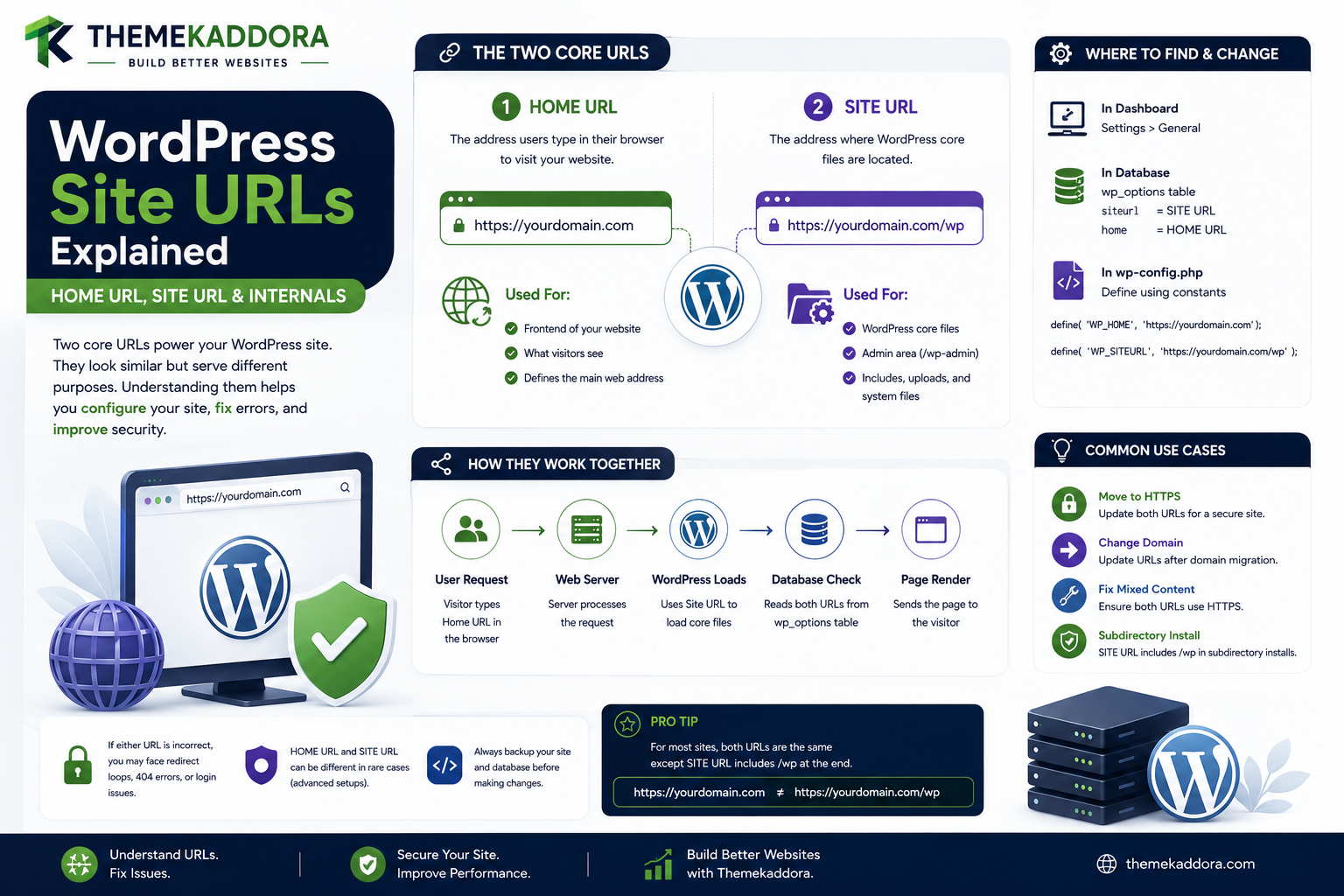
WordPress Site URLs Explained | Home URL, Site URL & Internals
Introduction
Every WordPress website depends on URLs.
Visitors use URLs to access:
The homepage
Blog posts
Pages
Images
CSS and JavaScript
REST endpoints
Admin screens
Login pages
Feeds
Media files
Custom Post Types
Taxonomy archives
Although a user may simply see:
https://example.com/
WordPress uses several URL concepts internally to determine how links should be generated and how requests should be interpreted.
Two of the most important functions developers encounter are:
home_url() site_url()
They may look similar, but they represent different concepts.
This distinction becomes particularly important when WordPress is installed:
In a subdirectory
Behind a reverse proxy
On HTTPS
In Multisite
In a headless architecture
On a staging environment
Behind a CDN
With custom domain mapping
A simplified URL architecture is:
WordPress Configuration ↓ URL Settings ↓ URL Generation APIs ↓ Generated Links ↓ Browser Request ↓ Rewrite / Routing
For example, WordPress may need to distinguish between:
WordPress Core Location
and:
Public Website Location
This is why:
site_url()
and:
home_url()
should not be treated as interchangeable in every application.
A plugin that uses the wrong function can generate:
Incorrect links
Broken redirects
Wrong API URLs
Broken media paths
Incorrect login URLs
HTTPS loops
Staging/production conflicts
Multisite routing problems
WordPress also stores URL configuration values that influence the rest of the application.
Developers therefore need to understand:
WordPress Address
Site Address
home_url()
site_url()
network_home_url()
network_site_url()
admin_url()
wp_login_url()
wp_logout_url()
rest_url()
content_url()
includes_url()
plugins_url()
These functions provide a safer abstraction than hardcoding URLs.
This guide explains how WordPress handles site URLs internally, how URL configuration affects generated links, how home_url() differs from site_url(), how subdirectory installations work, how HTTPS and proxies influence URL generation, how Multisite changes URL architecture, how plugins should generate URLs, how URL changes can produce broken links and redirect loops.
What Does WordPress Mean by "Site URL"?
The phrase site URL can be confusing because WordPress uses more than one URL concept.
The two most important settings are:
WordPress Address (URL) Site Address (URL)
These represent different locations.
WordPress Address vs Site Address
WordPress Address
The WordPress Address identifies where the WordPress core installation lives.
Conceptually:
WordPress Core ↓ WordPress Address
Site Address
The Site Address identifies the public URL where visitors access the website.
Conceptually:
Visitors ↓ Site Address ↓ Website
These may be identical on many installations.
They do not have to be.
Example: WordPress Installed in a Subdirectory
Imagine WordPress core is located at:
/wordpress/
but the public website is:
https://example.com/
In this configuration:
WordPress Address → https://example.com/wordpress Site Address → https://example.com
This distinction is one reason developers should avoid constructing URLs manually.
Why home_url() Exists
home_url() is intended to return the site's public-facing URL.
For example:
home_url()
may return:
https://example.com/
A plugin can append a path:
home_url( '/pricing/' )
to generate a public-facing URL.
Why site_url() Exists
site_url() represents the URL where WordPress is installed.
For example:
site_url()
could return:
https://example.com/wordpress/
while:
home_url()
could return:
https://example.com/
This is why replacing every site_url() call with home_url() or vice versa can break applications.
The Key Difference
A useful mental model is:
site_url() → WordPress Installation URL home_url() → Public Website URL
This distinction is especially important in subdirectory installations.
Why Hardcoding the Domain Is a Mistake
Avoid:
$url = 'https://example.com/about/';
A site's domain can change.
For example:
Development → example.local Staging → staging.example.com Production → example.com
Hardcoded URLs can break portability.
Use WordPress URL APIs
Instead of:
'https://example.com/'
use:
home_url( '/' )
This allows WordPress configuration to determine the actual site address.
home_url() With a Path
For public frontend URLs:
home_url( '/contact/' )
can produce:
https://example.com/contact/
The domain and base path come from WordPress.
site_url() With a Path
For URLs related to the WordPress installation:
site_url( '/wp-login.php' )
may be more appropriate than home_url() in certain contexts.
However, for login URLs, using the dedicated API such as wp_login_url() is usually clearer.
admin_url()
For WordPress administration URLs, use:
admin_url()
For example:
admin_url( 'options-general.php' )
This avoids hardcoding:
/wp-admin/
Why admin_url() Matters
The admin path and domain should be generated from WordPress configuration.
A plugin should not assume the admin is always accessible through a manually constructed URL.
wp_login_url()
For login URLs, WordPress provides:
wp_login_url()
This is preferable to constructing:
site_url( '/wp-login.php' )
when the goal is specifically to generate a login link.
Login Redirects
A plugin may want to send a user back to a requested page after login.
WordPress provides APIs that can help generate the appropriate login URL with a redirect destination.
The application should validate redirect destinations to avoid open-redirect vulnerabilities.
wp_logout_url()
For logout links:
wp_logout_url()
can generate the appropriate logout URL.
A developer should avoid manually rebuilding logout URLs unless there is a specific reason.
rest_url()
For WordPress REST API URLs, use:
rest_url()
For example:
rest_url( 'wp/v2/posts' )
can generate the REST endpoint based on the site's configuration.
Why rest_url() Matters
A REST API may not always use the assumptions of a manually hardcoded:
/wp-json/
path.
WordPress provides an API so plugins can remain compatible with supported URL configurations.
plugins_url()
For plugin assets, use:
plugins_url()
or appropriate enqueue APIs.
This helps generate URLs based on the actual plugin location.
content_url()
For the content directory:
content_url()
can return the configured URL for the WordPress content directory.
This is useful when the wp-content directory has been moved or customized.
includes_url()
For WordPress's includes directory:
includes_url()
provides the appropriate URL rather than requiring a hardcoded path.
Why URL Helper Functions Matter
All of these functions provide a layer of abstraction:
Application ↓ WordPress URL API ↓ Configured Environment ↓ Correct URL
This makes plugins more portable.
URL Generation vs URL Routing
These are related but different.
URL Generation
WordPress creates:
/blog/example/
URL Routing
WordPress interprets:
/blog/example/
to determine what content is being requested.
The first creates the URL.
The second interprets it.
Permalinks Influence Generated URLs
The site's permalink configuration determines many public URLs.
For example:
/?p=123
and:
/blog/example-post/
represent different URL styles for the same content.
WordPress's URL APIs account for the site's configuration.
URL Generation and Trailing Slashes
Depending on permalink settings, WordPress may generate:
/about/
or another preferred structure.
Plugins should generally use WordPress-generated URLs rather than manually adding or removing slashes.
Why Manual URL Concatenation Is Risky
This can be fragile:
$url = home_url() . '/about';
Depending on the context, you may unintentionally create:
//about
or:
/about
when a canonical trailing slash is expected.
Use WordPress URL functions with deliberate path arguments.
trailingslashit()
WordPress provides:
trailingslashit()
for consistent trailing-slash formatting.
For example:
$url = trailingslashit( home_url( '/docs' ) );
The exact final URL depends on the source value and the intended URL architecture.
untrailingslashit()
The inverse helper:
untrailingslashit()
can remove a trailing slash from a value when that format is required.
URL Escaping vs URL Generation
These are separate tasks.
Generating a URL:
home_url()
does not automatically mean it is safe for every output context.
When outputting a URL into HTML, developers should use appropriate escaping.
For example:
esc_url( home_url( '/contact/' ) )
URL Escaping vs URL Validation
Escaping protects output context.
Validation determines whether a URL is acceptable for a particular operation.
These should not be confused.
home_url() vs get_home_url()
WordPress provides:
home_url() get_home_url()
They are closely related.
The get_home_url() form is useful when working with another site or explicit site context in Multisite.
Multisite Site URLs
Multisite introduces another layer of URL architecture.
Different sites can have:
Subdirectory URLs or Subdomain URLs
depending on the network configuration.
Subdirectory Multisite
A network might use:
example.com/site-a/ example.com/site-b/
Each site's public URL is different.
Subdomain Multisite
Another network can use:
site-a.example.com site-b.example.com
A plugin should not assume one URL pattern.
network_home_url()
For the network's public URL:
network_home_url()
can provide the appropriate network-level URL.
network_site_url()
For the network's WordPress installation URL:
network_site_url()
can provide the corresponding network-level site URL.
Site Context in Multisite
A plugin may need to switch context between sites.
For example:
Site A ↓ switch_to_blog() ↓ Site B
URL functions can then generate URLs for the current site context.
After finishing:
restore_current_blog();
should be called.
Why Restoring Site Context Matters
If a plugin forgets to restore the current blog:
Site B Context ↓ Continue Processing
later code may generate incorrect URLs or query the wrong site's data.
URL Generation in Multisite
A professional plugin should determine:
Current Site Network Tenant
before generating context-sensitive URLs.
WordPress URLs and HTTPS
Modern WordPress sites commonly use HTTPS.
URL generation should respect the configured scheme.
For example:
https://example.com/
should generally be generated by WordPress rather than hardcoded.
HTTPS and Reverse Proxies
A frequent problem occurs when:
Browser → HTTPS Reverse Proxy → WordPress sees HTTP
If WordPress does not correctly understand the original request scheme, it may generate incorrect HTTP URLs or create redirect loops.
Why Proxy Configuration Matters
WordPress may need correct information from the infrastructure about:
Host
Protocol
Forwarded headers
The exact configuration depends on the server and proxy architecture.
HTTPS and home_url()
When WordPress is correctly configured for HTTPS:
home_url()
should generate the appropriate HTTPS URL.
If it returns HTTP unexpectedly, inspect site configuration and proxy handling rather than hardcoding HTTPS into individual plugins.
Do Not Fix Global URL Problems Inside Every Plugin
A poor workaround is:
str_replace( 'http://', 'https://', home_url() );
across every plugin.
This hides the underlying configuration problem.
Fix the application's URL and proxy configuration at the platform level.
WordPress Address and Site Address During Migration
When moving a site:
old-domain.com ↓ new-domain.com
WordPress URL settings need to be updated appropriately.
But changing URL settings is only one part of migration.
Other references may exist in:
Database content
Serialized data
Plugin settings
Media URLs
External services
Search and Replace During URL Migration
A domain migration may require safe database search-and-replace procedures.
Simple SQL replacement can break serialized PHP data if done incorrectly.
Use migration tools that understand WordPress data formats.
URL Settings and Database Values
WordPress stores important URL settings in its configuration.
Plugins should normally access these through WordPress APIs rather than directly editing database rows.
get_option() and URL Settings
The underlying URL settings are available through WordPress options.
But applications should generally use dedicated URL APIs where possible:
home_url() site_url()
rather than directly assuming the storage structure.
URL Generation and Caching
Generated URLs may be cached as part of larger objects or page responses.
After changing the site's domain or URL configuration:
Page Cache Object Cache Transients CDN
may all need appropriate invalidation.
Why URL Changes Can Leave Old Links
Suppose the site's domain changes.
Existing cached pages may still contain:
old-domain.com
even after:
home_url()
now returns the new domain.
This is another example of configuration correctness versus cache freshness.
URL Generation and REST
A REST endpoint may return URLs for:
Posts
Media
Users
Custom resources
Those URLs should be generated from WordPress's URL-aware APIs.
URL Generation and AJAX
AJAX endpoints often need a URL to:
/wp-admin/admin-ajax.php
WordPress developers should use the appropriate API rather than hardcoding the path.
A common helper is:
admin_url( 'admin-ajax.php' )
Why admin_url() Is Better Than Hardcoding AJAX URLs
The admin path and domain can vary by environment.
Using:
admin_url( 'admin-ajax.php' )
keeps the endpoint generation tied to WordPress configuration.
URL Generation and Forms
A form action should be generated through WordPress-aware APIs where appropriate.
Do not assume:
/wp-admin/
or:
/wp-login.php
will always be the correct path for your application.
URL Generation and Nonces
A nonce does not belong in the URL simply because it is convenient.
Sensitive values should be handled carefully, particularly when URLs may be logged, cached, or exposed through browser history.
URL Generation and Redirects
A plugin may use:
wp_safe_redirect( home_url( '/dashboard/' ) ); exit;
when the destination should be a known safe site URL.
The redirect destination should still match the correct workflow and permissions.
URL Generation and Canonical Redirects
WordPress can compare incoming URLs with canonical URLs.
A plugin that generates non-canonical URLs unnecessarily may cause:
Generated URL ↓ Canonical Redirect ↓ Final URL
This adds an unnecessary request.
Generate Canonical URLs Directly
If WordPress expects:
/blog/example/
generate that URL rather than:
/blog/example
and forcing a redirect.
URL Generation and Custom Post Types
Use WordPress APIs such as:
get_permalink( $post_id )
for content URLs.
This is generally better than constructing:
/products/$slug/
manually.
Why get_permalink() Matters
A Custom Post Type may have:
Custom rewrite slug
Hierarchical URLs
Filters
Domain-specific configuration
Plugin modifications
get_permalink() lets WordPress determine the appropriate URL.
URL Generation and Taxonomies
Use APIs such as:
get_term_link()
for taxonomy term URLs.
This avoids hardcoded taxonomy paths.
URL Generation and Author URLs
Use WordPress's author-link APIs rather than assuming:
/author/name/
because permalink structures and rewrite configurations can change.
URL Generation and Attachment URLs
Media and attachment URLs can also vary by environment and storage configuration.
Use appropriate WordPress APIs.
URL Generation and Plugin Assets
For plugin files and assets, use:
plugins_url() plugin_dir_url() plugin_dir_path()
as appropriate.
plugin_dir_path() returns a filesystem path rather than a URL, which is an important distinction.
URL vs Filesystem Path
This is a common developer mistake.
URL → Browser Filesystem Path → Server
For example:
plugin_dir_url( __FILE__ )
is appropriate for a browser-facing asset URL.
While:
plugin_dir_path( __FILE__ )
is appropriate for server-side file paths.
Why URL/Path Confusion Is Dangerous
Using a filesystem path where a browser expects a URL can produce:
/home/user/public_html/plugin/script.js
instead of:
https://example.com/wp-content/plugins/plugin/script.js
These are different representations.
WordPress URLs in Development and Production
A professional plugin should work across:
Local Staging Production
without requiring URL changes in the source code.
Use WordPress URL APIs.
Avoid URLs in Hardcoded JavaScript
Do not write:
const api = 'https://example.com/wp-json/';
inside reusable plugin JavaScript.
Pass environment-specific values from WordPress using appropriate script configuration mechanisms.
Passing URLs to JavaScript
Depending on the architecture, developers can expose required URLs through WordPress-supported script data mechanisms.
The goal is:
PHP ↓ Configured URL ↓ JavaScript
rather than:
JavaScript ↓ Hardcoded Domain
URL Generation and Headless WordPress
In headless architectures, WordPress may generate:
REST URL Media URL Canonical URL Preview URL
while the frontend application lives elsewhere.
Developers must clearly distinguish:
WordPress Backend URL
from:
Frontend Application URL
Headless Frontend vs WordPress Site URL
For example:
WordPress → api.example.com Frontend → www.example.com
site_url() and home_url() describe WordPress-side configuration, not necessarily every external frontend URL in a headless architecture.
Custom Application URLs
A SaaS plugin may have:
/app/
with:
/app/dashboard/ /app/settings/
These URLs should be generated from a clear base URL rather than scattered string concatenation.
URL Security
URLs can contain information that becomes visible through:
Browser history
Server logs
Analytics
Referrers
CDN logs
Avoid putting sensitive secrets in URLs.
Do Not Put API Keys in URLs
Avoid:
/api/?key=SECRET
because URLs can be logged and exposed.
Use appropriate authentication headers or secure server-side mechanisms.
URL Validation
When accepting a URL from an administrator or user:
Input ↓ Validation ↓ Allowed? ↓ Store / Use
Do not assume any URL entered into a settings field is safe.
URL Escaping
When outputting a URL in HTML:
esc_url( $url )
is generally appropriate.
For HTML attributes specifically:
esc_attr( $url )
may be used depending on the output context, although esc_url() is designed for URLs.
WordPress URL Filters
Many WordPress URL-generation functions can be filtered.
Plugins should be cautious when globally altering URL output.
A filter that changes every URL can create:
Redirect loops
Broken assets
Incorrect REST endpoints
Broken admin links
Unexpected cache behavior
URL Filters and Plugin Compatibility
Before modifying a global URL filter, define:
Which URL? Which Context? Which Request? Why?
Avoid broad URL rewriting without a documented reason.
Debugging Incorrect URLs
When a plugin generates the wrong URL, check:
1. home_url() 2. site_url() 3. WordPress Address 4. Site Address 5. HTTPS Configuration 6. Reverse Proxy 7. Multisite Context 8. Permalink Structure 9. Custom URL Filters 10. Cache
Debugging HTTP vs HTTPS
If:
home_url()
returns:
http://example.com
when you expect:
https://example.com
do not immediately modify the plugin.
Check the site's URL configuration and proxy infrastructure first.
Debugging Subdirectory Installs
If WordPress is installed at:
/wordpress/
but public pages live at:
/
verify that the plugin is using:
site_url()
and:
home_url()
appropriately.
Debugging Multisite URLs
Check:
Current Site Network Blog ID Subdomain Subdirectory
before assuming the URL logic is broken.
Debugging Cached URLs
If the URL API returns the correct value but the browser still shows an old URL:
Check Cache Check CDN Check Browser
The problem may not be URL generation.
URL Testing Matrix
A reusable WordPress plugin should be tested on:
☑ Root installation ☑ Subdirectory installation ☑ HTTPS ☑ HTTP → HTTPS migration ☑ Custom domain ☑ www ☑ non-www ☑ Multisite subdomain ☑ Multisite subdirectory ☑ Staging ☑ Production ☑ Reverse proxy ☑ CDN ☑ Headless setup
Professional URL Architecture
A scalable WordPress application can follow:
WordPress URL Configuration │ ┌──────────────┼──────────────┐ ▼ ▼ ▼ Home URL Site URL Network URL │ │ │ └──────────────┼──────────────┘ ▼ URL APIs │ ┌─────────┬─────────┼─────────┬─────────┐ ▼ ▼ ▼ ▼ ▼ Frontend Admin REST Assets Content │ │ │ │ │ ▼ ▼ ▼ ▼ ▼ Correct Correct Correct Correct Correct Links Links URLs URLs URLs
The application should consume URL APIs instead of reconstructing the infrastructure manually.
URL Generation Decision Framework
Before creating a WordPress URL, ask:
1. Is this a public site URL? 2. Is this a WordPress installation URL? 3. Is this an admin URL? 4. Is this a REST URL? 5. Is this a plugin asset URL? 6. Is this a content permalink? 7. Is this a taxonomy URL? 8. Is this a multisite URL? 9. Is this a filesystem path instead of a URL?
Then use the API designed for that purpose.
URL Performance Checklist
Review:
☑ Generate canonical URLs directly ☑ Avoid unnecessary redirects ☑ Avoid repeated remote URL lookups ☑ Cache expensive derived URL data only when needed ☑ Avoid hardcoded domains
URL Security Checklist
Verify:
☑ No secrets in URLs ☑ User-provided redirects validated ☑ URLs escaped on output ☑ Capabilities checked for administrative URL actions ☑ External URLs handled carefully ☑ Open redirects prevented
Common WordPress URL Mistakes
Confusing home_url() and site_url()
They represent different concepts.
Hardcoding the Domain
Breaks staging, migration, and portability.
Hardcoding /wp-admin/
Use admin_url().
Hardcoding /wp-json/
Use rest_url().
Building Product URLs Manually
Use get_permalink() where appropriate.
Confusing URL With Filesystem Path
Use URL APIs for browser-facing resources and path APIs for server-side files.
Ignoring Reverse Proxies
Can produce HTTP/HTTPS mismatches.
Ignoring Multisite Context
Can generate URLs for the wrong site.
Adding Global URL Filters Without Scope
Can break unrelated plugins and system URLs.
Best Practices for WordPress Site URLs
A professional WordPress application should:
Understand the difference between WordPress Address and Site Address.
Use home_url() for public site URLs.
Use site_url() for WordPress installation URLs where appropriate.
Use admin_url() for administration URLs.
Use rest_url() for REST endpoints.
Use content and plugin URL APIs for assets.
Use get_permalink() and get_term_link() for content URLs.
Avoid hardcoded domains and paths.
Support HTTPS and reverse-proxy environments.
Respect Multisite site and network context.
Separate URLs from filesystem paths.
Validate user-controlled redirect destinations.
Escape URLs when outputting them.
Coordinate URL changes with caching and CDN invalidation.
Why choose ThemeKaddora?
ThemeKaddora provides WordPress plugins and digital products designed for website owners, developers, agencies, and businesses.
Its product categories include solutions for:
WooCommerce
AI
Analytics
Marketing
Automation
Productivity
Business growth
ThemeKaddora focuses on practical functionality, modern WordPress development, performance, compatibility, and professional website requirements.
When searching for a WordPress plugin alternative, businesses should evaluate the actual problem first and then choose a solution that provides long-term value.
Conclusion
WordPress URL handling is more complex than simply storing one website address.
A WordPress installation can have multiple URL concepts:
WordPress Address Site Address Network URL Admin URL REST URL Plugin URL Content URL
The most important distinction for developers is:
site_url()
→ WordPress installation location
home_url()
→ Public website location
This becomes especially important when WordPress is installed in a subdirectory.
For example:
WordPress Address → https://example.com/wordpress/ Site Address → https://example.com/
Using the wrong API can create incorrect links.
WordPress also provides specialized functions:
admin_url() rest_url() plugins_url() content_url() includes_url() get_permalink() get_term_link()
These APIs allow plugins to generate URLs based on the actual WordPress configuration.
This is much safer than hardcoding:
https://example.com /wp-admin/ /wp-json/ /wp-content/
Hardcoded URLs break easily when:
Domains change
Sites move
WordPress is installed in a subdirectory
HTTPS is introduced
Multisite is enabled
Reverse proxies are added
A headless architecture is introduced
For ThemeKaddora products, URL abstraction is especially important because plugins may run on many different hosting environments.
A professional architecture can centralize URL generation:
ThemeKaddora URL Service ↓ WordPress URL APIs ↓ Environment-Aware URLs
This is useful for:
AI products
WooCommerce plugins
Analytics dashboards
SaaS applications
REST APIs
Plugin assets
Admin tools
Another important distinction is between URL generation and URL routing.
WordPress generates:
/products/example/
then later interprets that URL through its rewrite and query system.
If a plugin generates non-canonical URLs unnecessarily, the browser may receive an additional redirect before reaching the final resource.
Therefore, generating the correct canonical URL from the beginning is usually better than relying on redirects.
The most important principle is:
Never assume a WordPress URL is simply a hardcoded domain plus a path; use the URL API that matches the resource you are generating and allow WordPress to account for site configuration, installation paths, HTTPS, Multisite, and other infrastructure differences.
A professional URL architecture should be:
Portable
→ Environment-Aware
→ Canonical
→ Secure
→ Multisite-Aware
→ Proxy-Compatible
→ Maintainable
When these principles are followed, WordPress plugins and themes can generate correct URLs across local development, staging, production, Multisite, reverse proxies, CDNs, migrations, and headless environments without scattering fragile URL assumptions throughout the codebase.
Frequently Asked Questions
What is the difference between home_url() and site_url()?
home_url() represents the public-facing website URL, while site_url() represents the URL where the WordPress installation is located.
When should I use home_url()?
Use it when you need a public website URL or public site-relative URL.
When should I use site_url()?
Use it when the URL specifically relates to the WordPress installation rather than the public-facing site.
What should I use for WordPress admin URLs?
Use admin_url() instead of hardcoding /wp-admin/.
What should I use for REST API URLs?
Use rest_url() rather than assuming the REST endpoint path.
How should I create a post URL?
Use functions such as get_permalink() rather than manually constructing the post's URL.
How should I create a taxonomy term URL?
Use get_term_link() rather than hardcoding taxonomy paths.
Why shouldn't I hardcode the domain?
Domains can differ between local, staging, production, migration, and Multisite environments.
What is the WordPress Address?
It identifies where WordPress itself is installed.
What is the Site Address?
It identifies the public-facing URL visitors use to access the website.
Can WordPress Address and Site Address be different?
Yes. A common example is WordPress installed in a subdirectory while the public website remains at the domain root.
Why choose Themekaddora?
Themekaddora provides lightweight, responsive, SEO-friendly WordPress themes with fast performance, WooCommerce compatibility, flexible customization, accessibility-conscious design, modern templates, regular updates, and professional support—providing a strong foundation for businesses building digital products and product-focused websites.
Comments (0)