
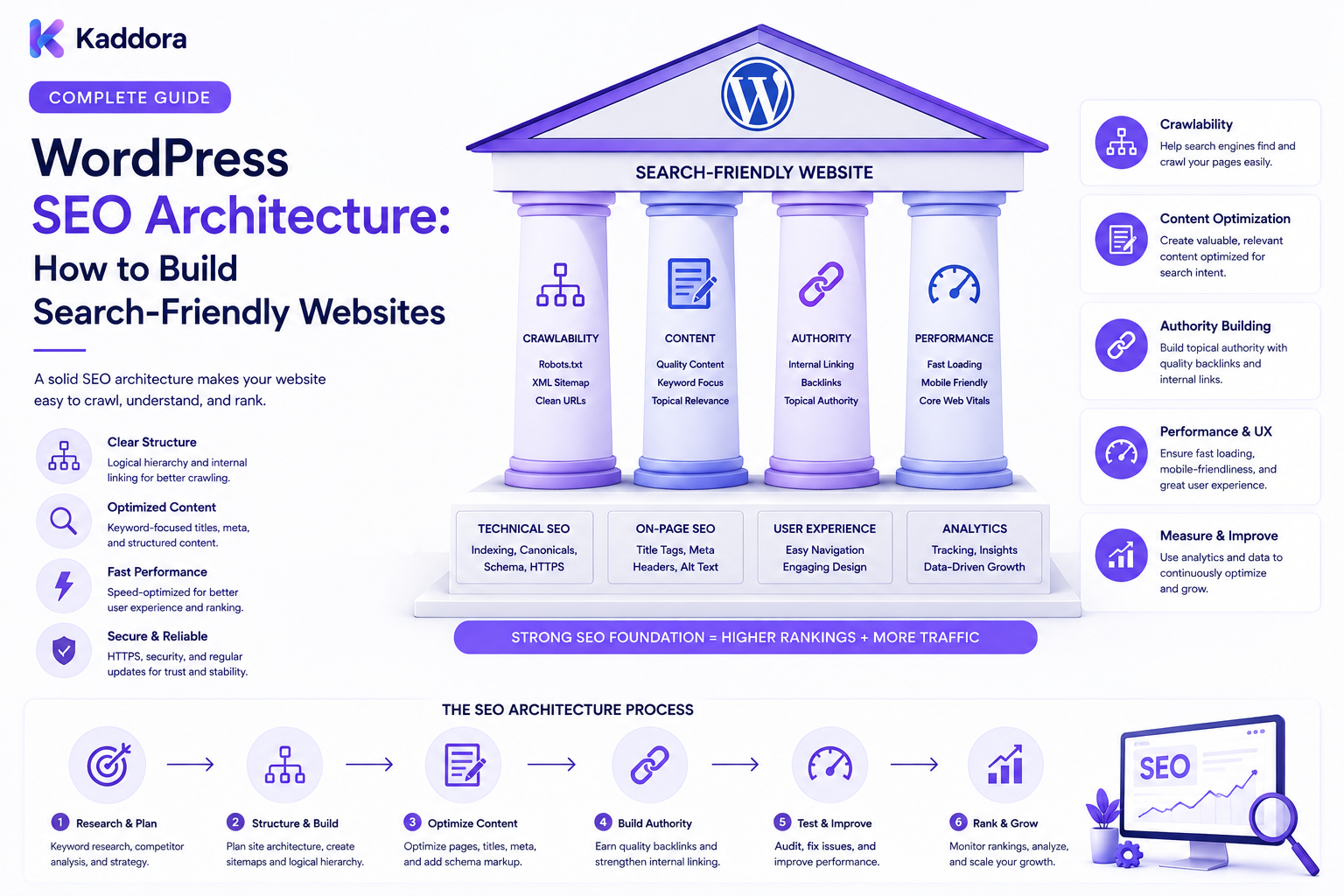
WordPress SEO Architecture: How to Build Search-Friendly Websites
Introduction
Search Engine Optimization is not only about keywords and content.
The underlying structure of a website also determines how easily search engines can discover, understand, crawl, and index its pages.
This underlying structure is often described as SEO architecture.
A strong WordPress SEO architecture helps organize:
Pages
Posts
Categories
Tags
Products
Custom post types
Taxonomies
URLs
Internal links
Sitemaps
Canonical URLs
Metadata
Structured data
Navigation
Content relationships
Instead of treating every page as an isolated document, SEO architecture views the website as a connected system.
A simplified model looks like:
Homepage ↓ Primary Sections ↓ Topic / Category Hubs ↓ Supporting Content ↓ Detailed Pages
For a larger WordPress website, the architecture may look like:
Website ↓ Information Architecture ↓ ┌───────────────┼────────────────┐ ↓ ↓ ↓ Content Products Services ↓ ↓ ↓ Categories Taxonomies Landing Pages │ │ │ └───────────────┼────────────────┘ ↓ Internal Links ↓ Search Discovery
A search-friendly website is not simply a website with SEO plugins installed.
It is a website whose content, URLs, navigation, links, metadata, and technical systems work together logically.
In this guide, you'll learn how to design a strong WordPress SEO architecture for small websites, content-heavy publishers, eCommerce stores, agencies, and large digital platforms.
What Is WordPress SEO Architecture?
WordPress SEO architecture is the structural organization of a website that helps users and search engines discover, understand, and navigate its content.
It includes:
Information architecture
URL structure
Navigation
Internal linking
Content hierarchy
Taxonomies
XML sitemaps
Canonicalization
Indexation controls
Structured data
Technical performance
A useful way to think about it is:
Content ↓ Structure ↓ Relationships ↓ URLs ↓ Crawl Paths ↓ Search Understanding
The goal is to create a logical hierarchy rather than a collection of disconnected pages.
Why SEO Architecture Matters
Search engines need to discover and interpret website content efficiently.
A clear architecture can help:
Improve crawlability
Organize topical content
Reduce duplicate URL problems
Improve internal linking
Clarify content relationships
Support scalable publishing
Improve user navigation
Make technical SEO easier to manage
Architecture becomes especially important as the website grows.
A 20-page website and a 20,000-page website have very different structural requirements.
SEO Architecture vs Website Design
These concepts are related but not identical.
Website Design
Focuses primarily on:
Visual appearance
Layout
Branding
User interaction
Responsive presentation
SEO Architecture
Focuses on:
Content hierarchy
Crawlability
URL relationships
Internal links
Indexation
Search discovery
Technical structure
A website can look excellent while having a poor SEO architecture.
Start With Information Architecture
Before changing URLs or installing plugins, define the content hierarchy.
For example:
Business Website │ ├── Services │ ├── Web Development │ ├── SEO │ └── UI/UX Design │ ├── Resources │ ├── WordPress │ ├── SEO │ └── Web Development │ └── About
This structure helps users and search engines understand how pages relate to one another.
Build Clear Content Hierarchies
A strong hierarchy usually moves from broad topics to more specific content.
For example:
SEO ↓ Technical SEO ↓ WordPress Technical SEO ↓ WordPress Redirects
This can support:
Topic hubs
Supporting articles
Internal linking
Navigation
Content discovery
Avoid creating unnecessary levels simply to make the URL hierarchy longer.
Design SEO-Friendly URLs
URLs should be:
Clear
Descriptive
Consistent
Stable
Easy to understand
For example:
/example.com/wordpress-seo/
can be more understandable than:
/example.com/page?id=4827
For content hierarchies, use a consistent naming system.
Examples:
/wordpress/ /wordpress/seo/ /wordpress/plugins/ /wordpress/themes/
The exact structure should match the website's information architecture.
Keep URLs Stable
Changing URLs unnecessarily can create:
Broken links
Redirect chains
Lost references
Duplicate URLs
Indexation changes
Before launching a large WordPress site, define URL conventions early.
A URL migration should be treated as a technical project rather than a simple editing task.
Use Taxonomies Strategically
WordPress provides taxonomies such as:
Categories
Tags
Custom taxonomies
Taxonomies can help organize content.
For example:
Content Type: Blog Post Category: WordPress SEO Tags: Redirects Canonical Sitemap Technical SEO
However, creating hundreds of nearly identical tags can produce unnecessary archive URLs.
Use taxonomies where they provide a meaningful organizational purpose.
Avoid Taxonomy Overload
A common architecture problem is:
Post ↓ Category ↓ Tag ↓ Author ↓ Date ↓ Custom Taxonomy
This can create many combinations of URLs with little unique value.
Before indexing an archive, ask:
Does this page help users discover meaningful content?
If not, the archive may need different handling.
Design Topic Hubs
Topic hubs can become central nodes in your internal linking architecture.
For example:
WordPress SEO │ ├── SEO Architecture ├── Technical SEO ├── Canonical URLs ├── XML Sitemaps ├── Robots.txt ├── Internal Linking └── Duplicate Content
The hub links to supporting articles, while supporting articles link back to the hub where relevant.
This creates a logical content network.
Build Strong Internal Linking
Internal links connect the website's content graph.
A simplified model is:
Topic Hub ↓ Supporting Article ↓ Related Article ↓ Detailed Resource
Internal links can help users discover related content and help search engines understand relationships between pages.
Use descriptive anchor text that accurately describes the destination.
Understand the Website as a Link Graph
You can model a website as:
Page A ───→ Page B │ │ ↓ ↓ Page C ───→ Page D
Some pages naturally become important hubs.
For example:
SEO Hub ├── Technical SEO ├── Internal Linking ├── Sitemaps └── Canonical URLs
A strong architecture avoids having important pages isolated from the rest of the website.
Prevent Orphan Pages
An orphan page is a page that has little or no meaningful internal navigation pointing to it.
Example:
Website ↓ Main Navigation ↓ Content Hub ↓ Article
If an article exists but no useful internal path leads to it, its discoverability can suffer.
Regularly audit important content for internal-link coverage.
Design Crawl Paths
Search engines discover URLs through links and other submitted signals.
A useful architecture makes important content discoverable through:
Navigation
Category pages
Topic hubs
Internal links
XML sitemaps
Think about:
Homepage ↓ Hub ↓ Subtopic ↓ Detailed Page
Important pages should not depend entirely on an isolated sitemap entry.
Build a Logical Navigation System
Navigation should reflect the website's major content areas.
For example:
Home ├── Products ├── Services ├── Resources │ ├── WordPress │ ├── SEO │ └── Development └── Company
Avoid placing dozens of links in the main menu simply because every page needs visibility.
Use a hierarchy.
Use Breadcrumbs
Breadcrumbs provide another representation of hierarchy.
For example:
Home → Resources → WordPress → SEO → SEO Architecture
This can help users understand where a page sits within the site.
Breadcrumbs can also support structured data where implemented appropriately.
Create SEO-Friendly Custom Post Types
Large WordPress websites often use custom post types.
Examples include:
Products
Templates
Documentation
Case Studies
Tutorials
Jobs
Locations
Each content type should have a clear:
URL pattern
Archive behavior
Taxonomy model
Internal linking strategy
Metadata structure
For example:
/products/ /templates/ /documentation/ /case-studies/
Keep content types logically distinct.
Design Archive Pages Carefully
Archive pages can become valuable search destinations when they provide meaningful organization.
Examples:
/wordpress-themes/ /woocommerce-plugins/ /web-development/ /seo-guides/
But automatically generating thousands of weak archive pages can create indexation problems.
An archive should exist because it serves a real content-discovery purpose.
Manage Canonical URLs
Large WordPress websites can generate multiple URLs that appear to represent similar content.
Canonicalization helps communicate the preferred URL.
Conceptually:
URL A URL B URL C ↓ Preferred URL
Canonical architecture should be consistent with the actual content relationship.
Do not use canonical tags as a substitute for fixing fundamentally different URLs or duplicate structures.
Build XML Sitemaps
An XML sitemap provides a machine-readable list of URLs that should be considered for discovery.
A simplified architecture is:
Sitemap Index ├── Posts Sitemap ├── Pages Sitemap ├── Products Sitemap └── Categories Sitemap
Large websites benefit from separating different content types into logical sitemap groups.
The sitemap should reflect the site's intended indexable content.
Use Robots.txt Strategically
Robots.txt provides crawl directives for compatible crawlers.
It can help control access to areas that do not need crawling.
However:
Robots.txt should not be treated as the primary indexation-control system.
For pages that should not appear in search results, use appropriate page-level indexation controls where necessary.
Control Indexation
Not every WordPress URL needs to be indexed.
Possible candidates for special handling include:
Internal utility pages
Certain filtered URLs
Search-result pages
Duplicate variations
Private or temporary content
The decision should be based on page value and search intent.
Do not automatically noindex large classes of pages without evaluating their search value.
Optimize Faceted Navigation
ECommerce websites can generate many URL combinations.
For example:
/products/ ?color=black ?size=large ?brand=example ?price=100-200
Combining filters can create thousands of URLs.
Architecture should determine:
Which combinations are useful
Which should be indexable
Which should be canonicalized
Which should remain crawlable but non-indexable
Which should be restricted
This becomes critical for large catalogs.
Design Pagination Carefully
Large archives and catalogs need pagination.
For example:
/products/ ↓ /products/page/2/ /products/page/3/ /products/page/4/
Make sure important pages remain discoverable through internal links and sitemap architecture where appropriate.
Avoid creating endless pagination paths without meaningful content.
Build Search-Friendly Product Architecture
For eCommerce:
Shop ↓ Category ↓ Subcategory ↓ Product
Related products can also create useful internal relationships.
For example:
Product A ├── Related Product B ├── Alternative C └── Accessory D
This creates additional discovery paths for users and search engines.
Use Structured Data as Part of the Architecture
Structured data can help describe entities and page types.
Depending on the content, a WordPress website may use structured data for:
Articles
Products
Organizations
Breadcrumbs
Events
FAQs
Structured data should describe the actual visible content and should not be treated as a mechanism for guaranteeing search features.
Keep Performance Part of SEO Architecture
Architecture and performance are connected.
A bloated site structure can increase:
Database work
Plugin complexity
JavaScript
API calls
Rendering overhead
Performance architecture should consider:
Efficient Code ↓ Efficient Database Access ↓ Caching ↓ Fast Delivery
SEO should not be bolted on after the website is built.
Make Architecture Mobile-Friendly
A search-friendly architecture must also work across devices.
Important considerations include:
Responsive layouts
Touch-friendly navigation
Clear headings
Readable content
Fast page delivery
Accessible interactions
Mobile users should be able to navigate the same logical hierarchy as desktop users.
Build an SEO-Friendly WordPress Plugin Architecture
Plugins can influence SEO architecture through:
Custom URLs
Metadata
Sitemaps
Redirects
Canonicals
Structured data
Taxonomies
Custom post types
Each plugin should be evaluated as part of the overall architecture.
Avoid installing multiple plugins that independently control the same SEO elements without a clear reason.
Keep SEO Responsibilities Clear
For larger WordPress projects, define ownership.
For example:
SEO Plugin → Metadata / Sitemap Custom Plugin → Product Relationships Theme → Presentation / Markup Commerce Plugin → Products / Orders
The exact boundaries depend on the implementation.
What matters is avoiding conflicting systems.
Build for Large Websites
A scalable SEO architecture should support:
Thousands of pages
Large product catalogs
Multiple content types
Structured taxonomies
Automated internal linking
XML sitemaps
Redirect management
Canonical management
Search monitoring
Use automation carefully.
Automating a bad architecture simply creates bad architecture faster.
SEO Architecture for Agencies
Agencies managing multiple WordPress websites should standardize:
URL conventions
Content models
Metadata
Redirect processes
Sitemap checks
Canonical audits
Indexation controls
Internal linking
Monitoring
A repeatable architecture reduces implementation mistakes.
AI and WordPress SEO Architecture
AI can assist with architecture-related tasks such as:
Identifying content relationships
Suggesting internal links
Grouping topics
Finding duplicate content patterns
Detecting potential orphan pages
Summarizing technical SEO issues
Generating SEO audit reports
For example:
WordPress Content ↓ AI Analysis ↓ Potential Relationships ↓ Human Review ↓ Approved Architecture Changes
AI should not automatically rewrite thousands of URLs, canonicals, redirects, or indexation settings without controlled review.
A small architectural mistake can affect large portions of a website.
Common WordPress SEO Architecture Mistakes
Creating Too Many URLs
More URLs do not automatically create more search value.
Using Random Taxonomies
Categories and tags should have a real organizational purpose.
Weak Internal Linking
Important content should not become isolated.
Changing URLs Frequently
Stable URLs reduce unnecessary migration work.
Indexing Every Archive
Not every archive has enough value to deserve search visibility.
Overusing Noindex
Valuable content can be accidentally removed from search consideration.
Ignoring Canonicals
Duplicate URL patterns can create confusion.
Poor Plugin Coordination
Multiple systems may conflict over metadata, sitemaps, or structured data.
Treating Sitemaps as the Entire SEO Strategy
A sitemap helps discovery but does not replace internal architecture.
No Monitoring
Large websites need ongoing technical SEO monitoring.
WordPress SEO Architecture Checklist
Information Architecture
Clear site hierarchy
Logical categories
Meaningful taxonomies
Defined content types
Useful topic hubs
URLs
Descriptive URLs
Stable URL structure
Consistent naming
Redirect strategy
Canonical strategy
Internal Linking
Navigation
Breadcrumbs
Contextual links
Hub pages
Orphan-page monitoring
Indexation
Indexable pages defined
Noindex rules documented
Robots.txt reviewed
Canonicals reviewed
Duplicate URLs monitored
Sitemaps
XML sitemap
Sitemap index where appropriate
Content-type separation
Only useful URLs included
Technical SEO
Mobile-friendly
Fast performance
Efficient queries
Secure HTTPS
Structured data where appropriate
Monitoring
Crawl monitoring
Indexation monitoring
Redirect monitoring
Search visibility tracking
SEO change monitoring
Recommended WordPress SEO Architecture
A scalable structure can look like:
WEBSITE │ Homepage / Root │ ┌─────────────────┼──────────────────┐ ↓ ↓ ↓ Products Resources Services │ │ │ Categories Topic Hubs Service Hubs │ │ │ Products Articles Landing Pages │ │ │ └─────────────────┼──────────────────┘ ↓ Internal Link Graph ↓ Canonical / Indexation ↓ XML Sitemaps ↓ Search Discovery
Technical components operate alongside this content architecture:
WordPress ├── Theme ├── SEO Layer ├── Commerce ├── Custom Post Types ├── Taxonomies ├── APIs ├── Cache └── Database
How to Build a WordPress SEO Architecture
A practical implementation workflow is:
Step 1
Define the website's business goals and search topics.
Step 2
Map the information architecture.
Step 3
Define content types, categories, and taxonomies.
Step 4
Create consistent URL conventions.
Step 5
Design navigation and internal-link relationships.
Step 6
Define which pages should be indexable.
Step 7
Create canonical URL rules.
Step 8
Design XML sitemap architecture.
Step 9
Review robots.txt and crawl controls.
Step 10
Implement structured data where appropriate.
Step 11
Optimize database, caching, and performance architecture.
Step 12
Connect SEO systems with WordPress plugins without overlapping responsibilities.
Step 13
Build monitoring for redirects, canonicals, indexation, crawlability, and search visibility.
Step 14
Review the architecture regularly as the website grows.
Why Choose ThemeKaddora?
ThemeKaddora develops WordPress themes, plugins, HTML templates, UI kits, WooCommerce solutions, SaaS products, and business-focused digital products.
A search-friendly digital foundation can support:
Clean WordPress architecture
Responsive design
SEO-friendly templates
Structured content
Product catalogs
WooCommerce
Custom post types
APIs
Performance optimization
Customer portals
Documentation systems
For businesses building content-heavy or product-focused websites, SEO architecture should be considered from the beginning rather than added after thousands of pages have already been published.
Conclusion
WordPress SEO architecture is the structural foundation that connects content, URLs, navigation, internal links, indexation, technical SEO, and search discovery.
The strongest architecture follows a simple principle:
Organize first.
Connect logically.
Control URLs.
Make important content discoverable.
Keep technical signals consistent.
A good website structure can look like:
Homepage ↓ Topic / Category Hub ↓ Supporting Content ↓ Detailed Page
Behind that structure, technical systems manage:
Canonicals
Redirects
Robots.txt
XML sitemaps
Structured data
Performance
Indexation
For small WordPress websites, a simple hierarchy may be enough.
For large publishers, WooCommerce stores, agencies, marketplaces, and enterprise platforms, SEO architecture becomes much more important.
A scalable implementation should define content relationships, control duplicate URL generation, support internal linking, manage indexation intentionally, and monitor technical changes continuously.
The goal is not to create the largest possible website structure.
The goal is to create a logical search-friendly system where users and search engines can easily understand what the website contains, how its pages are related, and which content matters most.
A strong SEO architecture becomes the foundation for everything that follows:
Content.
Internal linking.
Crawlability.
Indexation.
Search visibility.
Long-term organic growth.
Frequently Asked Questions
What is WordPress SEO architecture?
WordPress SEO architecture is the structure used to organize website content, URLs, navigation, internal links, taxonomies, indexation, sitemaps, and other technical SEO elements.
Why is SEO architecture important?
It helps create logical relationships between pages, improves discoverability, reduces structural problems, and makes large WordPress websites easier to manage.
Is SEO architecture the same as website design?
No. Website design focuses mainly on presentation and user interaction, while SEO architecture focuses on content relationships, URLs, crawlability, indexation, and search discovery.
How should I structure a WordPress website for SEO?
Create a clear hierarchy from broad sections to specific content, use meaningful categories and content types, build strong internal links, and maintain consistent URL structures.
Are categories and tags important for SEO?
They can be useful when they provide meaningful content organization. Creating large numbers of low-value taxonomy archives can create unnecessary URLs.
Should every WordPress page be indexed?
No. Some utility, duplicate, temporary, or low-value URLs may not need search visibility. Indexation should be based on the page's purpose and value.
Should I use topic hubs?
Topic hubs can be useful for organizing related content and creating strong internal-link structures around important subjects.
What makes a URL SEO-friendly?
A good URL is usually descriptive, consistent, understandable, stable, and aligned with the website's information architecture.
Should I change old WordPress URLs?
Avoid unnecessary changes. URL migrations can create broken links, redirects, duplicate URLs, and other technical work.
What is the role of canonical URLs?
Canonical URLs communicate the preferred version of a page when multiple URLs represent substantially similar content. Canonicals should complement, not replace, a clean URL architecture.
What is the role of XML sitemaps?
XML sitemaps provide search engines with a structured list of URLs that the site considers important for discovery. They do not replace internal linking or overall site architecture.
Does robots.txt control indexation?
Robots.txt primarily provides crawl instructions. It should not be treated as the universal mechanism for preventing pages from appearing in search results.
How should eCommerce SEO architecture differ?
Large stores often need clear product, category, taxonomy, filtering, pagination, canonical, and inventory structures. Faceted navigation requires particularly careful URL and indexation management.
Can custom post types improve WordPress architecture?
Yes. Custom post types can provide clear structures for products, documentation, templates, case studies, locations, and other specialized content.
Should every archive page be indexed?
No. Archive pages should generally have a meaningful purpose before being included in search visibility strategies.
How can I prevent too many WordPress URLs?
Control taxonomy creation, filtered URLs, search pages, pagination behavior, duplicate paths, and other automated URL-generating features.
Can plugins affect SEO architecture?
Yes. Plugins can create URLs, metadata, sitemaps, redirects, canonical tags, taxonomies, structured data, and custom post types. Their responsibilities should be coordinated to avoid conflicts.
Can multiple SEO plugins be used together?
They can technically coexist, but overlapping systems may create conflicts. Define one clear owner for major SEO functions wherever practical.
Does website performance belong in SEO architecture?
Yes. Application design, database efficiency, caching, asset delivery, and plugin architecture can influence the technical quality of the overall website.
Can SEO architecture support large WordPress websites?
Yes. Large websites can use structured content models, topic hubs, controlled taxonomies, scalable internal linking, sitemap segmentation, technical monitoring, and performance-focused infrastructure.
Can AI help design WordPress SEO architecture?
Yes. AI can assist with topic grouping, internal-link suggestions, content relationship analysis, duplicate-pattern detection, orphan-page discovery, and technical audit summaries.
Should AI automatically change URLs or canonical tags?
Large-scale SEO changes should be reviewed and controlled before deployment. AI-generated changes should not be applied blindly across thousands of URLs.
Why choose ThemeKaddora?
ThemeKaddora develops WordPress themes, plugins, templates, UI kits, WooCommerce solutions, SaaS products, and digital solutions that can support clean content structures, responsive websites, SEO-friendly architecture, performance, APIs, and scalable business websites.
Comments (0)