
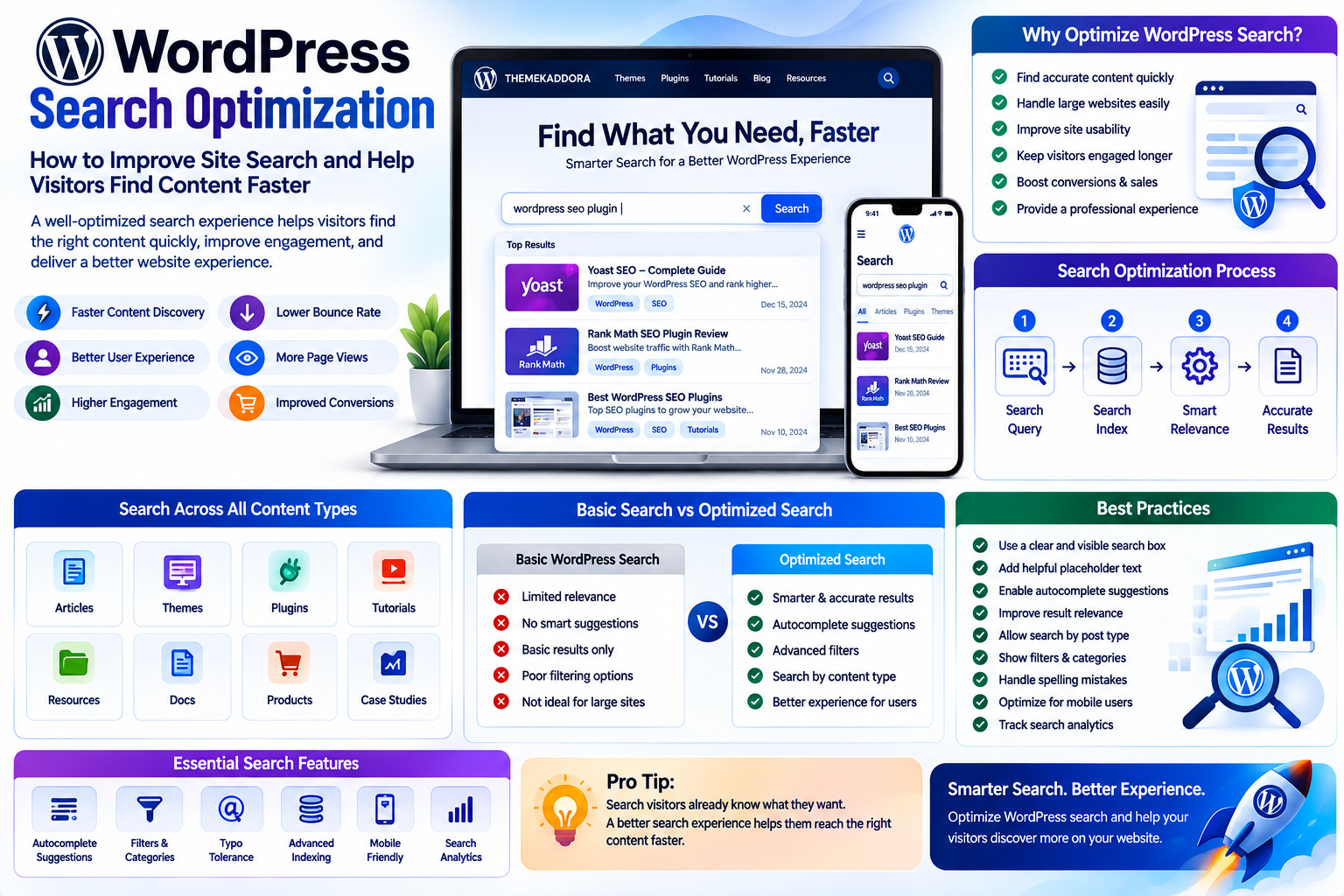
WordPress Search Optimization: How to Improve Site Search and Help Visitors Find Content Faster
Introduction
A website can contain hundreds or thousands of pages, articles, products, resources, and documents.
But having a large amount of content does not automatically mean visitors can find what they need.
Sometimes users know exactly what they are looking for.
They may want to find:
A specific blog post
A product
A tutorial
A documentation page
A resource
A case study
If the website's search experience is poor, visitors may leave before finding the right information.
This makes WordPress search optimization an important part of website usability.
Internal search is often overlooked because businesses focus heavily on Google rankings, homepage design, and content creation.
However, website search serves a different purpose.
Search visitors are already telling you what they want.
A well-designed search experience can help them reach that information faster.
What Is WordPress Search Optimization?
WordPress search optimization means improving the website's internal search experience so visitors can find relevant content quickly and easily.
It can involve:
Search relevance
Search forms
Search suggestions
Filters
Categories
Tags
Search result pages
Product search
Content indexing
Search analytics
The goal is simple:
Help users find the right information with less effort.
Why Is Internal Search Important?
Imagine a website with 1,000 blog posts.
A visitor remembers the topic but not the exact title.
They search:
WordPress AI plugins
If the search system returns unrelated articles, the visitor may become frustrated.
A better search system could prioritize:
Relevant titles
Related keywords
Categories
Popular content
Recent resources
The difference can significantly improve the user experience.
WordPress Search and User Intent
Search queries provide valuable information about user intent.
Consider these searches:
WordPress themes
The visitor may be researching themes.
Best business WordPress theme
The visitor may be comparing options.
How to install WordPress plugin
The visitor needs a tutorial.
WooCommerce checkout problem
The visitor may need troubleshooting help.
These searches represent different stages of the user journey.
Understanding search intent can help businesses improve both their content and search functionality.
The Problem With Basic WordPress Search
WordPress includes built-in search functionality.
For simple websites, it may be sufficient.
However, larger websites may require more advanced search features.
For example, businesses may want:
Better relevance
Custom post type search
Product filtering
Search suggestions
Faceted navigation
Typo tolerance
Search analytics
Custom ranking
As a website grows, basic search may not always provide the experience users expect.
Improve the WordPress Search Box
The search box is one of the most important elements of the search experience.
It should be:
Easy to find
Clearly labeled
Easy to use
Mobile-friendly
Visually recognizable
A simple search field with a clear search button can work well.
For some websites, an icon that expands into a search field may be appropriate.
The right design depends on the website structure.
Use Clear Search Placeholder Text
A search field can provide a useful hint.
Instead of:
Search
you might use:
Search articles, themes, plugins...
This tells users what they can search for.
However, placeholder text should not replace a proper accessible label.
Improve Search Result Relevance
The most important part of search optimization is relevance.
If someone searches for:
WordPress security plugins
the first results should ideally be closely related to that query.
Businesses should consider how their search system handles:
Titles
Content
Categories
Tags
Product names
Custom fields
Search relevance becomes especially important for large websites.
Search by Content Type
A large WordPress website may contain several types of content.
For example:
Articles
Themes
Plugins
Tutorials
Reviews
Resources
A search system can allow users to narrow results by content type.
This makes discovery easier.
Add Filters to WordPress Search
Filters can be extremely useful for content-heavy websites.
For example, a technology website might allow visitors to filter by:
Topic
WordPress
AI
SEO
Marketing
Content Type
Tutorial
Guide
Review
News
Difficulty
Beginner
Intermediate
Advanced
Filters reduce the amount of irrelevant information users need to scan.
WordPress Search for eCommerce
Search becomes even more important for online stores.
A customer may search for:
Black running shoes
Instead of showing every product containing the word "shoes," the search experience could help narrow results by:
Category
Brand
Size
Price
Color
Availability
Rating
Good product search can make shopping much easier.
WooCommerce Search Optimization
WooCommerce stores can benefit from advanced search functionality.
Consider a store with 5,000 products.
Customers should be able to quickly discover relevant products.
Useful features may include:
Product suggestions
Category filters
Attribute filters
Price ranges
Brand filters
Stock availability
Search by SKU
The larger the catalog, the more important search becomes.
Search Suggestions and Autocomplete
Autocomplete can help users find information faster.
As a visitor types:
WordPress plu...
the system might suggest:
WordPress plugin guide
WordPress plugin development
WordPress plugin security
WordPress plugin recommendations
Suggestions can reduce typing and help users discover relevant content.
Search With Typo Tolerance
Users make mistakes.
For example:
Wordpres themes
instead of:
WordPress themes
A sophisticated search system may recognize the intended query.
Typo tolerance can prevent users from seeing an empty results page simply because of a spelling mistake.
The Importance of a Useful "No Results" Page
Sometimes there will be no exact match.
A poor experience says:
No results found.
A better experience can provide:
We couldn't find an exact match. Try these related topics:
WordPress themes
WordPress plugins
WordPress tutorials
You can also provide:
Popular content
Categories
Suggested searches
A contact option
The goal is to keep users moving.
Search Analytics
Search data can reveal what visitors actually want.
Businesses can monitor:
Most searched terms
Searches with no results
Popular categories
Search frequency
Product searches
Content searches
This information can influence content strategy.
For example, if hundreds of visitors search for:
AI WordPress plugins
but the website has limited content on the subject, that search data represents an opportunity.
Search Data and Content Strategy
Internal search can become a content research tool.
Suppose visitors repeatedly search for:
WordPress website speed
This could suggest an opportunity to create:
A detailed guide
A checklist
A tutorial
A plugin comparison
A performance case study
Your visitors are effectively telling you what content they want.
Search Data and Product Strategy
Search analytics can also provide product insights.
For an online store, customers searching for unavailable products may indicate demand.
For a WordPress theme website, repeated searches for a specific category may indicate an opportunity to:
Add more themes
Create new content
Improve category pages
Create comparison guides
Internal search can therefore contribute to business decisions.
WordPress Search and SEO
Internal search and search engine optimization are different systems.
Google search helps users discover your website from outside.
Internal search helps users navigate after they arrive.
Both can contribute to a better overall experience.
However, businesses should avoid automatically indexing every internal search result page in search engines.
Search-result URLs can create unnecessary or low-value pages if not handled properly.
Internal Search and Website Architecture
Search should complement navigation.
A website should still have:
Logical categories
Useful menus
Internal links
Breadcrumbs
Topic pages
Search is particularly useful when visitors know what they want but do not know where it is located.
WordPress Search for Large Content Libraries
Websites with large resource libraries can benefit greatly from advanced search.
Examples include:
Documentation websites
Educational platforms
News websites
Technology blogs
Knowledge bases
Membership websites
Online communities
When content grows, search can become one of the primary navigation tools.
Search for Documentation Websites
Documentation websites often contain hundreds of technical pages.
Users typically want answers quickly.
Useful search features include:
Keyword matching
Version filters
Categories
Search suggestions
Code-related search
Related documentation
The search experience should prioritize useful technical information rather than promotional content.
Search for Knowledge Hubs
A knowledge hub may contain different types of educational resources.
For example, Themekaddora can have content covering:
WordPress
Themes
Plugins
SEO
Marketing
AI
Business
Technology
As the content library expands, visitors need efficient ways to discover relevant articles.
A strong internal search system can connect older content with newer content and improve content discovery.
WordPress Search Plugins
Several types of WordPress plugins can enhance search.
Depending on requirements, businesses may look for plugins that provide:
Advanced indexing
Custom post type search
WooCommerce search
Ajax search
Filters
Autocomplete
Search analytics
Before selecting a plugin, review:
Compatibility
Performance
Update frequency
Documentation
Security
Customization
Support
Do not install multiple search plugins without a clear reason.
Search Performance
Advanced search can sometimes require more server resources.
Large databases and complex queries may affect performance.
Businesses should consider:
Search indexing
Caching
Database optimization
Hosting resources
Query efficiency
A search feature should improve usability without unnecessarily slowing down the website.
Mobile Search Optimization
Mobile visitors may use search differently.
The search experience should provide:
Easy access
Large enough input fields
Clear results
Touch-friendly filters
Simple navigation
Avoid making visitors repeatedly zoom or scroll horizontally.
Voice Search and WordPress
Search behavior continues to evolve.
Some users interact with devices through voice commands.
Voice queries are often more conversational than typed searches.
For example:
Where can I find WordPress plugin tutorials?
rather than:
WordPress plugin tutorials
Websites should focus on useful, naturally written content rather than attempting to optimize only for specific search formats.
AI-Powered WordPress Search
Artificial intelligence can introduce more advanced search experiences.
An AI-powered search system may potentially understand:
Natural language
Related concepts
Context
User intent
Semantic relationships
For example, a visitor might search:
How can I make my WordPress website faster?
Instead of matching only exact keywords, a semantic search system could identify relevant content about:
Caching
Image optimization
Plugins
Hosting
Core Web Vitals
AI search can be powerful, but businesses should monitor accuracy and ensure that results remain trustworthy.
Common WordPress Search Mistakes
1. Hiding the Search Feature
If users cannot find search easily, they may not use it.
2. Returning Irrelevant Results
Poor relevance can quickly frustrate visitors.
3. Ignoring Mobile Search
Search should work well across devices.
4. Showing an Empty Results Page
Give users useful alternatives.
5. Ignoring Search Analytics
Search data can reveal valuable user needs.
6. Installing Too Many Search Plugins
Multiple overlapping tools can create conflicts.
7. Forgetting Performance
Complex search systems can affect website speed.
How to Improve WordPress Search Step by Step
Step 1: Review Existing Search
Perform common searches on your website.
Step 2: Identify Problems
Look for irrelevant results, missing content, or confusing interfaces.
Step 3: Analyze Search Queries
Find out what visitors are searching for.
Step 4: Improve Content Structure
Use clear titles, categories, tags, and content organization.
Step 5: Improve Search Relevance
Configure the search system to prioritize important content.
Step 6: Add Filters Where Necessary
Filters are particularly useful for large catalogs.
Step 7: Improve No-Result Pages
Provide related content and alternative suggestions.
Step 8: Test Mobile Search
Make sure search works well on smaller screens.
Step 9: Monitor Performance
Check whether search affects page speed or server resources.
Step 10: Continue Improving
Search optimization should evolve as your content and users change.
WordPress Search Optimization Checklist
Before finalizing your search experience, check:
Search is easy to find
Search works on mobile
Results are relevant
Important content is indexed
Filters are available where useful
Search suggestions work correctly
Typo handling is considered
No-result pages provide alternatives
Search analytics are monitored
Search does not create unnecessary SEO pages
Search performance is acceptable
Plugins are regularly maintained
Why Choose Themekaddora?
1. WordPress-Focused Content
Themekaddora covers WordPress themes, plugins, websites, and development.
2. Technology and Business Topics
The platform connects technology with practical business applications.
3. Marketing and SEO Resources
Readers can explore SEO, digital marketing, content strategy, and online growth.
4. Practical Website Knowledge
Themekaddora focuses on useful concepts that website owners, developers, marketers, and businesses can apply.
5. Growing Content Ecosystem
As the platform expands, topics can be explored across multiple categories and connected through better content discovery.
6. A Broader Digital Knowledge Hub
Themekaddora brings WordPress, business, technology, marketing, and digital development together.
Conclusion
WordPress search optimization is an often-overlooked part of website strategy.
Businesses spend considerable time creating content and products, but that effort loses value if visitors cannot easily find what they need.
A strong search experience can improve:
Content discovery
User experience
Product discovery
Customer satisfaction
Website engagement
Business conversions
The process begins with understanding what users search for.
From there, businesses can improve search relevance, filters, suggestions, content structure, mobile usability, analytics, and performance.
For Themekaddora, internal search becomes especially valuable as the platform grows across WordPress, themes, plugins, technology, AI, marketing, and business topics.
The goal is not simply to add a search box.
The goal is to build a website where every useful piece of content is easier for the right visitor to discover.
Frequently Asked Questions
1. What is WordPress search optimization?
WordPress search optimization is the process of improving a website's internal search so visitors can find relevant content, products, services, or resources more easily.
2. Is the default WordPress search enough?
It can be sufficient for smaller websites. Larger websites may benefit from more advanced search features and better relevance.
3. Can WordPress search include products?
Yes. WooCommerce websites can provide product-focused search functionality with appropriate configuration or plugins.
4. Can I add filters to WordPress search?
Yes. Advanced search systems can provide filters based on categories, tags, attributes, product types, and other fields.
5. What is Ajax search in WordPress?
Ajax search can display search suggestions or results without requiring the entire page to reload, depending on the implementation.
6. Can WordPress search handle misspellings?
Advanced search solutions may provide typo tolerance or fuzzy matching, although the exact capabilities depend on the search system.
7. Why are search analytics useful?
Search analytics show what visitors are looking for and can reveal content gaps, product demand, and opportunities for website improvements.
8. Can AI improve WordPress search?
AI and semantic search can potentially improve the understanding of natural-language queries and related topics, but results should be monitored for accuracy.
9. Does internal search affect SEO?
Internal search is primarily a user-experience feature. Businesses should also make sure search-result URLs do not create unnecessary indexable pages.
10. Why Choose Themekaddora?
Themekaddora combines WordPress resources with content about themes, plugins, technology, business, marketing, SEO, and website development.
Comments (0)