
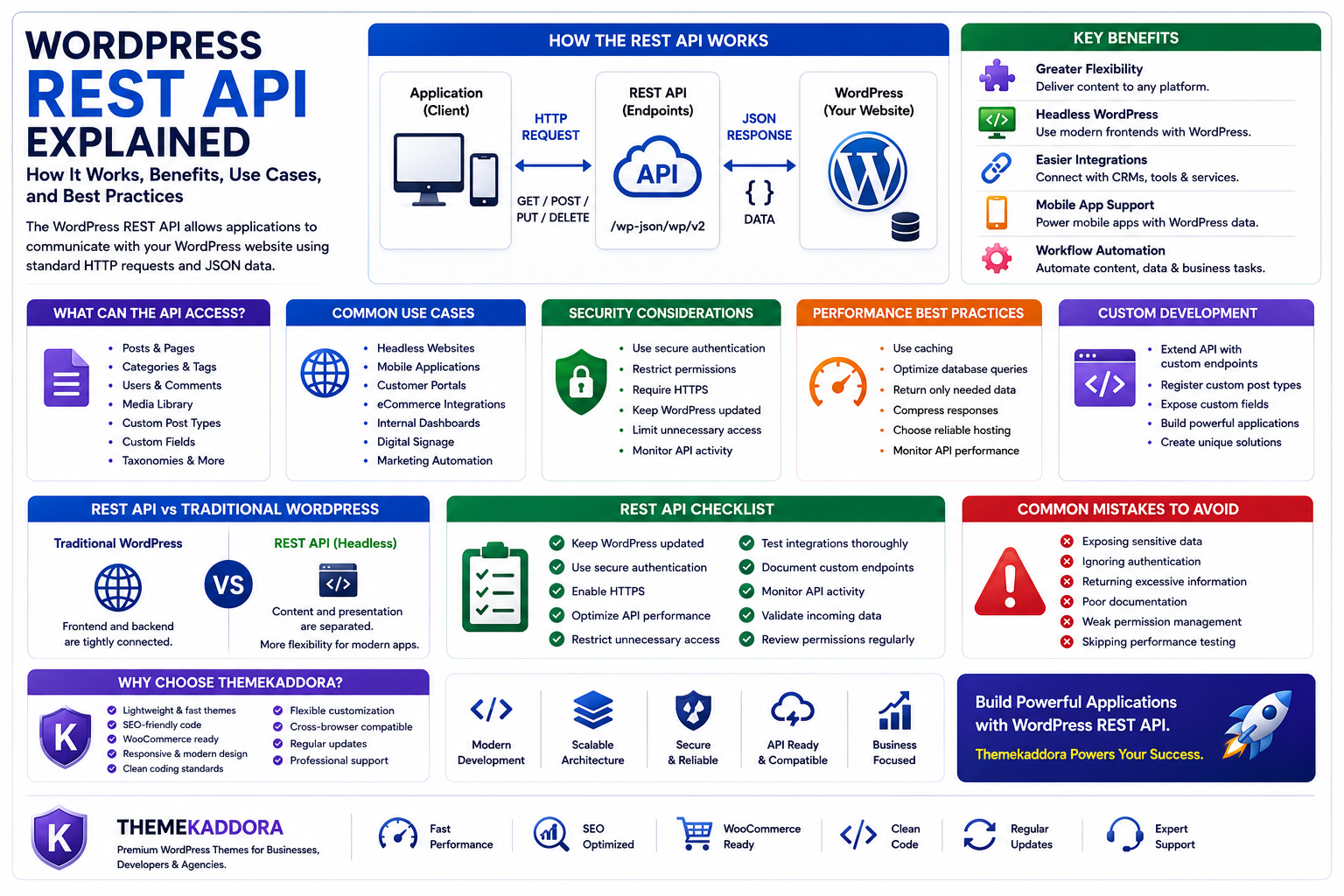
WordPress REST API Explained: How It Works, Benefits, Use Cases, and Best Practices
Introduction
Modern websites rarely exist in isolation. Businesses often connect their websites with mobile apps, CRM platforms, eCommerce systems, marketing tools, analytics platforms, and custom business applications.
To make these connections possible, WordPress provides a powerful feature known as the REST API.
The WordPress REST API allows developers and applications to communicate with a WordPress website using standardized HTTP requests. Instead of interacting directly with the WordPress dashboard, external applications can securely retrieve, create, update, or delete content through API endpoints.
This capability has transformed WordPress from a traditional content management system into a flexible platform for modern web applications.
In this guide, you'll learn what the WordPress REST API is, how it works, its advantages, common business use cases, security considerations, and best practices for implementation.
What Is the WordPress REST API?
The WordPress REST API is an interface that enables applications to exchange data with a WordPress website.
Using HTTP requests such as GET, POST, PUT, and DELETE, applications can interact with WordPress resources in a structured format, typically JSON.
The REST API allows developers to work with:
Posts
Pages
Categories
Tags
Users
Comments
Media
Custom post types
Custom fields
Taxonomies
This makes WordPress an excellent content source for websites, mobile apps, and third-party services.
How the REST API Works
Every REST API request is sent to a specific endpoint.
The endpoint processes the request and returns structured data that another application can understand.
For example, an application might request:
The latest blog posts
Product information
Author details
Categories
Featured images
Likewise, authenticated applications can publish new content, update existing posts, or upload media automatically.
Benefits of the WordPress REST API
1. Greater Flexibility
Developers are no longer limited to traditional WordPress themes.
The REST API allows content to be delivered to websites, mobile applications, kiosks, digital displays, and other platforms.
2. Headless WordPress Development
The REST API enables Headless WordPress, where WordPress manages content while a separate frontend framework handles presentation.
Popular JavaScript frameworks such as React, Vue, and Next.js often use the REST API to retrieve content from WordPress.
3. Easier Third-Party Integrations
Businesses frequently integrate WordPress with services such as:
CRM systems
Marketing automation tools
Customer support platforms
Analytics software
Inventory systems
Learning management systems
The REST API simplifies these integrations.
4. Mobile App Support
Mobile applications can display WordPress content without requiring users to visit the website.
News apps, educational platforms, and company apps commonly retrieve articles and media through the REST API.
5. Workflow Automation
Businesses can automate repetitive tasks such as:
Publishing content
Updating product information
Synchronizing customer records
Importing external data
Automation improves efficiency and reduces manual work.
Common Business Use Cases
The REST API is widely used for:
Headless websites
Mobile applications
Customer portals
Membership platforms
eCommerce integrations
Internal dashboards
Digital signage
Marketing automation
Data synchronization
Its flexibility makes it suitable for organizations of all sizes.
Security Considerations
Because the REST API exposes website functionality, security should be a priority.
Best practices include:
Use secure authentication methods.
Restrict permissions using user roles.
Require HTTPS encryption.
Keep WordPress updated.
Limit unnecessary API access.
Monitor API activity.
A secure implementation protects both website data and connected applications.
Performance Best Practices
High API usage can increase server load.
Improve performance by:
Using caching
Optimizing database queries
Returning only necessary data
Compressing responses
Choosing reliable hosting
Efficient API design improves scalability.
REST API and Custom Development
Developers often extend the REST API to expose custom data.
Examples include:
Custom post types
Business directories
Product catalogs
Booking systems
Course platforms
Event management systems
Custom endpoints allow WordPress to serve highly specialized applications.
Common Mistakes to Avoid
Avoid these common issues:
Exposing sensitive data
Ignoring authentication
Returning excessive information
Poor documentation
Weak permission management
Skipping performance testing
A well-designed API should be secure, efficient, and easy to maintain.
REST API vs Traditional WordPress Development
Traditional WordPress development combines the backend and frontend within the same system.
The REST API separates content management from presentation, enabling developers to build custom frontends while still using WordPress as the content engine.
Both approaches remain valuable depending on project requirements.
Why Choose Themekaddora?
Themekaddora WordPress themes are built with modern WordPress development in mind.
Our themes include:
Lightweight architecture
Responsive layouts
SEO-friendly code
WooCommerce compatibility
Flexible customization
Optimized performance
Clean coding standards
Cross-browser compatibility
Regular updates
Professional support
Whether you're creating a traditional WordPress website or integrating WordPress with external applications, Themekaddora provides a strong and scalable foundation.
WordPress REST API Checklist
Before implementing the REST API, make sure you:
✅ Keep WordPress updated
✅ Use secure authentication
✅ Enable HTTPS
✅ Optimize API performance
✅ Restrict unnecessary access
✅ Test integrations thoroughly
✅ Document custom endpoints
✅ Monitor API activity
✅ Validate incoming data
✅ Review permissions regularly
Conclusion
The WordPress REST API has transformed WordPress into a powerful application platform capable of supporting websites, mobile apps, SaaS products, and enterprise integrations.
By enabling secure communication between WordPress and external systems, it provides developers with greater flexibility while helping businesses automate workflows and deliver content across multiple channels.
When combined with a high-performance WordPress theme from Themekaddora, the REST API empowers businesses to build scalable, future-ready digital experiences.
Frequently Asked Questions
What is the WordPress REST API?
The WordPress REST API is a programming interface that allows external applications to communicate with a WordPress website using HTTP requests and JSON data.
What is the REST API used for?
It is used to build headless websites, mobile applications, third-party integrations, workflow automation, and custom business solutions.
Is the WordPress REST API secure?
Yes, when implemented correctly with HTTPS, proper authentication, role-based permissions, and regular security updates.
Can beginners use the REST API?
Basic usage is straightforward, but creating custom integrations generally requires knowledge of web development and APIs.
Why choose Themekaddora?
Themekaddora themes offer lightweight performance, SEO-friendly architecture, responsive layouts, WooCommerce compatibility, flexible customization, and modern coding standards, making them an ideal foundation for both traditional WordPress websites and API-powered projects.
Comments (0)