
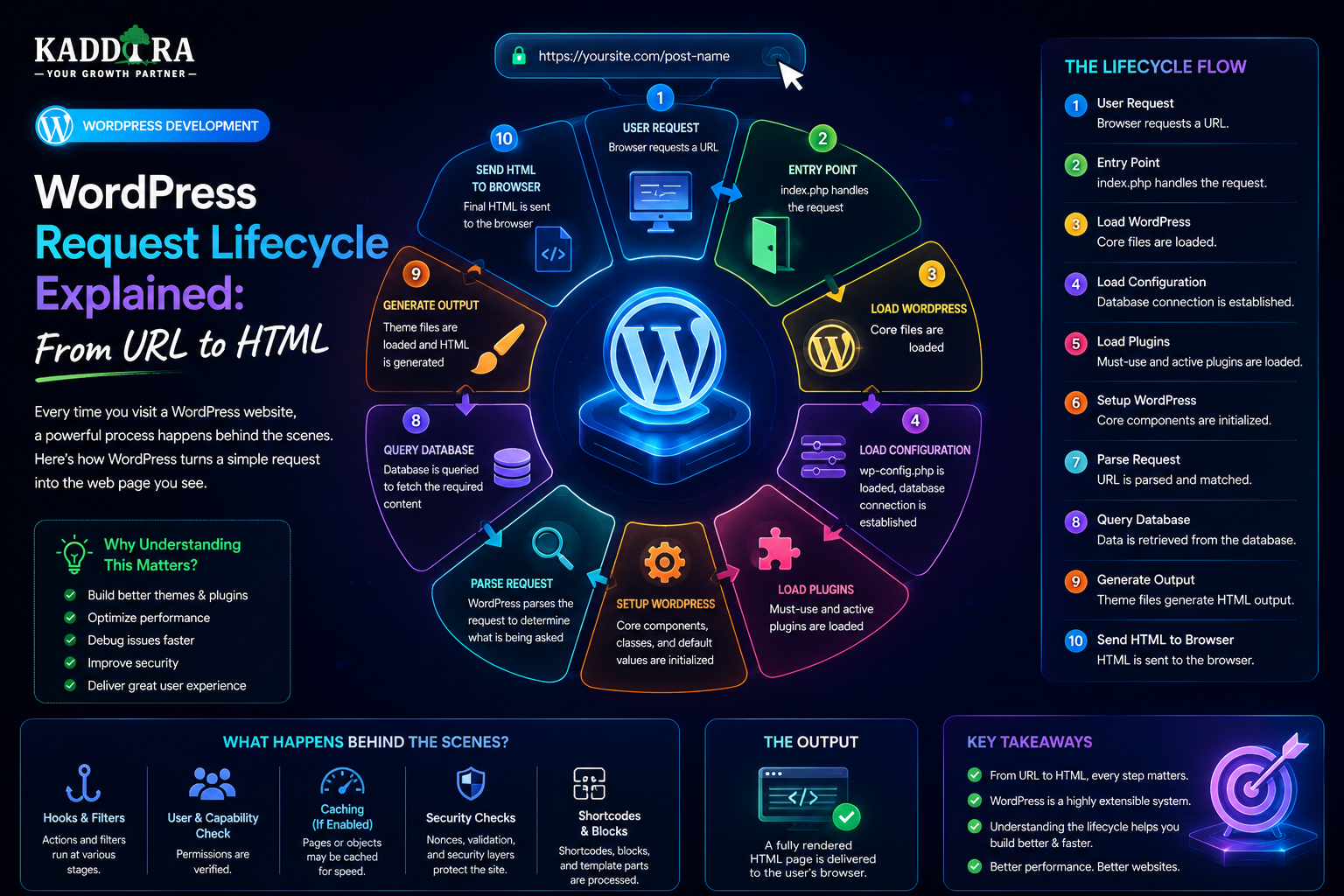
WordPress Request Lifecycle Explained: From URL to HTML
Introduction
When a visitor opens a WordPress page, the browser appears to receive the requested page almost instantly.
But a significant amount of work happens before the final HTML reaches the browser.
For example, when someone visits:
https://example.com/blog/example-article/
the request can pass through a sequence such as:
Browser ↓ DNS ↓ Web Server ↓ PHP ↓ WordPress Bootstrap ↓ Plugins ↓ Request Parsing ↓ Main Query ↓ Database ↓ Template Selection ↓ HTML Generation ↓ Browser
This sequence is called the WordPress request lifecycle.
Understanding it helps developers troubleshoot:
Slow pages
Plugin conflicts
Incorrect redirects
Database problems
Template issues
Authentication bugs
API failures
Performance bottlenecks
Hook timing problems
It also explains why changing a single hook, query, plugin, or template can affect the entire request.
In this guide, you'll learn how a WordPress request travels from the browser to the server, how PHP starts WordPress, how configuration is loaded, how plugins participate in initialization, how WordPress parses the requested URL, how the main query is generated, how database data is retrieved, how the template hierarchy selects the final template, how content becomes HTML, how caching changes the lifecycle, and what happens after the response leaves WordPress.
What Is the WordPress Request Lifecycle?
The WordPress request lifecycle is the sequence of operations that occurs when WordPress receives and processes a request.
A simplified model is:
Request ↓ Bootstrap ↓ Initialize ↓ Parse ↓ Query ↓ Render ↓ Response
The exact path depends on the request type.
A normal frontend page, REST API request, admin request, and cron task do not all follow exactly the same execution path.
The Lifecycle Begins Before WordPress
WordPress is not necessarily the first system involved.
When a visitor enters a domain, infrastructure outside WordPress may process the request first.
A simplified chain is:
Browser ↓ DNS ↓ CDN / Proxy ↓ Web Server ↓ PHP ↓ WordPress
Understanding these layers is important when diagnosing performance and connectivity problems.
Step 1: The Browser Creates the Request
The visitor enters a URL or clicks a link.
The browser constructs an HTTP request containing information such as:
URL
HTTP method
Headers
Cookies
User-agent
Accept information
For a normal page request, the method is commonly:
GET
Step 2: DNS Resolves the Domain
The browser needs to determine where the domain should be reached.
Conceptually:
example.com ↓ DNS ↓ Server / CDN Address
DNS is not part of WordPress itself, but it is part of the overall website request path.
Step 3: CDN or Reverse Proxy May Receive the Request
A website may use:
CDN
Reverse proxy
Web application firewall
Load balancer
Edge cache
before the request reaches the WordPress server.
For example:
Browser ↓ CDN ├── Cache Hit → Response └── Cache Miss ↓ WordPress
A cache hit can bypass much of the WordPress lifecycle.
Cache Hit vs Cache Miss
This distinction is extremely important.
Cache Hit
The requested response already exists.
Request ↓ Cache ↓ HTML
WordPress may not execute at all.
Cache Miss
The cache does not have a suitable response.
Request ↓ Cache ↓ Web Server ↓ PHP ↓ WordPress
The full application lifecycle now becomes relevant.
Step 4: The Web Server Receives the Request
If the request reaches the origin server, software such as Apache or Nginx determines how to handle it.
The server may:
Serve static files
Redirect requests
Apply security rules
Forward PHP requests
Add headers
Apply compression
WordPress normally participates when the requested resource requires PHP processing.
Step 5: PHP Starts Processing WordPress
The PHP runtime executes the relevant WordPress entry point.
For a normal frontend request, the web server typically directs the request into WordPress's bootstrap process.
This begins the application lifecycle.
The WordPress Entry Point
For standard website requests, WordPress commonly uses:
index.php
The entry point loads the WordPress environment.
The important concept is:
The browser does not directly execute WordPress theme templates.
The server runs WordPress first, and WordPress generates the response.
Step 6: WordPress Loads Configuration
WordPress needs environment-specific configuration before it can communicate with the database and initialize the application.
Important configuration includes:
Database connection details
Authentication keys
Debug settings
Custom constants
Environment-specific values
The configuration layer establishes the environment in which WordPress will run.
Step 7: WordPress Loads Core
WordPress starts loading its core systems.
These provide functionality such as:
Hooks
Database access
Query handling
Authentication
Formatting
Localization
HTTP requests
Plugin management
Theme management
The application is now preparing to handle the actual request.
Step 8: WordPress Sets Up the Environment
WordPress establishes important internal state.
This includes preparing:
Global structures
Database access
Current user context
Request information
Core APIs
At this point, the application begins becoming aware of the environment and request it needs to process.
Step 9: WordPress Loads Must-Use Plugins
Must-use plugins are loaded differently from ordinary plugins.
They can provide functionality that should always be available in an environment.
Examples might include:
Hosting-level functionality
Security controls
Enterprise configuration
Environment-specific services
Because they execute early, they can influence the rest of the WordPress lifecycle.
Step 10: Regular Plugins Initialize
Active plugins become part of the application.
Plugins may register:
Actions
Filters
Services
Database functionality
REST routes
Admin menus
Blocks
Shortcodes
Scheduled tasks
For example:
WordPress ↓ Plugin A registers filters ↓ Plugin B registers REST routes ↓ Plugin C registers services
The plugins are now prepared to participate when relevant hooks execute.
Plugin Initialization Does Not Mean Every Feature Runs
A plugin may register functionality during initialization without immediately performing expensive operations.
A good plugin typically separates:
Register
from:
Execute Expensive Work
This helps performance.
Step 11: WordPress Determines Request Context
WordPress needs to understand what kind of request it is processing.
Possible contexts include:
Frontend Admin REST AJAX Cron Login Feed Search 404
This context influences what processing should happen next.
Why Request Context Matters
A plugin may need:
Admin Logic
but not:
Frontend Logic
on an administrator settings page.
Conditional execution reduces unnecessary work.
Step 12: WordPress Parses the URL
For a request such as:
example.com/blog/hello-world/
WordPress needs to interpret what the URL represents.
It considers:
Path
Query variables
Rewrite rules
Post types
Taxonomies
Pages
Archives
Search terms
Rewrite Rules
WordPress uses rewrite rules to translate friendly URLs into query information.
Conceptually:
Readable URL ↓ Rewrite Rules ↓ Query Variables
For example, a URL may ultimately indicate:
Post Name: hello-world
Pretty Permalinks
A visitor sees:
/blog/hello-world/
rather than a less user-friendly query-string URL.
The rewrite system maps the friendly URL to the appropriate WordPress query.
Step 13: WordPress Builds the Main Query
Once the request has been interpreted, WordPress constructs its primary content query.
For example:
Request: Single Blog Post Main Query: Find the requested post
The main query represents the primary purpose of the page.
Main Query Examples
The main query might represent:
Single Post Single Page Category Archive Tag Archive Custom Post Type Author Archive Search 404
Different requests lead to different query states.
Query Variables
WordPress uses query variables to describe what the request is asking for.
These values help determine:
Post type
Object ID
Taxonomy
Search term
Pagination
Archive type
Plugins and themes can sometimes modify query behavior through supported APIs.
Step 14: WordPress Queries the Database
Once WordPress knows what it needs, database queries retrieve the required content.
For a page, this may involve:
Post data
Metadata
Taxonomies
User information
Plugin-specific records
The database becomes one of the most important components of the lifecycle.
Database Query Example
Conceptually:
URL ↓ Main Query ↓ Database Query ↓ Post Record ↓ Post Object
The database result becomes usable WordPress data.
WordPress Builds Objects From Data
WordPress provides abstractions around many database records.
For example:
WP_Post WP_User WP_Term
These objects make application development easier than working directly with raw database rows everywhere.
Metadata Retrieval
The requested content may also need metadata.
For example:
Post ├── Content ├── Featured Image ├── Custom Fields └── Additional Metadata
Plugin functionality often increases the amount of data that needs to be retrieved.
Taxonomy Resolution
WordPress may need to determine:
Categories Tags Custom Taxonomies
These relationships can influence:
Navigation
Related content
Archives
Filtering
Template selection
Step 15: WordPress Determines the Current User
WordPress can establish the current user based on authentication state.
For example:
Visitor → Logged Out Customer → Logged In Administrator → Logged In With High Privileges
This information affects permissions and potentially personalized content.
Authentication Is Different From Authorization
Authentication asks:
Who is this user?
Authorization asks:
What is this user allowed to do?
A plugin must not assume that being logged in gives access to sensitive operations.
Step 16: Hooks Modify the Query and Data
Plugins and themes can use supported filters and actions during the lifecycle.
For example:
Main Query ↓ Plugin Filter ↓ Modified Query
This extensibility is one of WordPress's defining characteristics.
Why Hook Timing Matters
A callback that executes too early may not have the information it needs.
A callback that executes too late may not be able to change the desired result.
This is why understanding the lifecycle is essential when choosing hooks.
Step 17: WordPress Selects the Template
For traditional frontend rendering, WordPress uses the theme's template hierarchy to determine which file or template should render the request.
For example:
Requested Post ↓ Specific Template ↓ Fallback Template
The exact chain depends on the request type.
Single Post Rendering
A single article may ultimately be rendered using a template such as:
single.php
or a more specific template where applicable.
Archive Rendering
A category archive may use:
category.php
or another appropriate archive template.
Page Rendering
A page can use a specific page template, a page-type template, or a broader fallback depending on the theme.
Step 18: Template Parts Are Loaded
Themes often break pages into reusable components.
For example:
Header Navigation Content Sidebar Footer
These components can be loaded through theme mechanisms and template parts.
Step 19: Plugins Can Modify the Output
Even after template selection, plugins can influence frontend output through:
Filters
Actions
Shortcodes
Blocks
Dynamic components
For example:
Post Content ↓ Plugin Filter ↓ Modified Content ↓ Template
Shortcodes During Rendering
A shortcode can represent dynamic functionality inside content.
For example:
Page Content ↓ Shortcode ↓ Plugin Function ↓ Generated HTML
The function can then contribute to the final output.
Block Rendering
Block-based content follows a more modular rendering model.
The page may contain:
Heading Block Paragraph Block Image Block Custom Block
The editor stores block structures, and WordPress renders them into frontend output according to their definitions.
Dynamic Blocks
A dynamic block may execute server-side logic during page rendering.
For example:
Custom Block ↓ PHP Rendering ↓ Database ↓ HTML
This means dynamic blocks can also affect request performance.
Step 20: The Final HTML Is Generated
At this stage, WordPress and the theme have combined the required content and functionality.
Conceptually:
Data + Plugins + Theme + Blocks + Filters = HTML
The server now has a response to send to the browser.
Step 21: WordPress Sends the Response
The generated output is returned through PHP and the web server.
The browser receives:
HTTP Response ↓ HTML
The response may also include headers such as:
Content type
Cache information
Security headers
Cookies
Redirect information
Step 22: The Browser Parses the HTML
The browser now begins its own rendering process.
It discovers:
CSS files
JavaScript
Images
Fonts
Other resources
The page continues loading beyond the initial WordPress response.
WordPress Does Not Generate Everything the Browser Needs
The HTML is only one part of the final experience.
The browser may make additional requests for:
CSS JavaScript Images Fonts API Requests
This is why frontend performance needs to be analyzed separately from PHP performance.
Critical Rendering Path
The browser must perform work before the visitor can fully interact with the page.
Theme and plugin assets can therefore affect:
Rendering
Interaction
Visual stability
WordPress performance is not only about database speed.
Where Caching Changes the Lifecycle
Caching can drastically shorten the request lifecycle.
Instead of:
Browser ↓ PHP ↓ WordPress ↓ Database ↓ Theme ↓ HTML
a cached page may use:
Browser ↓ Page Cache ↓ HTML
This is one reason caching can produce large performance improvements.
Object Cache in the Lifecycle
Object caching can shorten individual operations:
WordPress ↓ Object Cache ├── Hit → Data └── Miss → Database
The request still executes WordPress, but some expensive database work may be avoided.
Database Query Caching
Some systems can cache database-derived results.
The effectiveness depends on:
Query pattern
Cache strategy
Invalidation
Data freshness
Caching is not automatically beneficial for every query.
External API Calls in the Lifecycle
Suppose a plugin retrieves an exchange rate:
WordPress ↓ Plugin ↓ External API ↓ Response ↓ Page Rendering
If the API takes two seconds, the page may wait for it unless the plugin uses caching or asynchronous processing.
Why Remote Calls Should Be Controlled
A plugin should avoid:
Every Visitor ↓ External API
when the data can safely be cached.
A better design may be:
Scheduled Sync ↓ Local Data ↓ Visitor
Background Jobs and the Request Lifecycle
Some operations should be removed from normal visitor requests.
For example:
Visitor ↓ Start Report ↓ Background Job ↓ Process Data ↓ Report Ready
This prevents long-running tasks from blocking the page.
REST API Lifecycle
A REST API request follows a related but different path.
For example:
Client ↓ HTTP Request ↓ WordPress ↓ REST Route ↓ Permission Check ↓ Validation ↓ Service ↓ Database / API ↓ JSON Response
The theme may not be involved in generating a normal webpage.
REST Request vs Frontend Request
Frontend
Request ↓ Main Query ↓ Template ↓ HTML
REST
Request ↓ Route ↓ Permission ↓ Controller / Service ↓ JSON
This distinction matters when developing APIs.
Admin Request Lifecycle
An admin request typically follows:
Browser ↓ WordPress Admin ↓ Authentication ↓ Capability Check ↓ Admin Page ↓ Plugin / Core Logic ↓ HTML
The theme's public frontend templates are not the main rendering mechanism.
AJAX Request Lifecycle
An AJAX request may look like:
JavaScript ↓ AJAX Request ↓ WordPress ↓ Action ↓ Validation ↓ Service ↓ Response
The request should enforce appropriate security controls.
Cron Lifecycle
A scheduled task may run as:
Scheduler ↓ WordPress Cron ↓ Scheduled Hook ↓ Plugin Callback ↓ Database / API
There may be no human browser involved.
Lifecycle and Error Handling
Failures can occur at every stage.
For example:
DNS Failure Server Failure PHP Failure Plugin Failure Database Failure API Failure Template Failure Browser Failure
This is why troubleshooting should start by identifying which layer failed.
Lifecycle and Debugging
Suppose a page is slow.
A structured investigation is:
CDN? ↓ Server? ↓ PHP? ↓ Plugin? ↓ Database? ↓ External API? ↓ Theme? ↓ Browser?
This is much better than changing random settings.
Lifecycle and Performance Profiling
Measure the time spent in:
Server response
PHP execution
Database queries
External APIs
Rendering
Asset loading
The bottleneck determines the optimization strategy.
Lifecycle and Security
Security checks should appear at appropriate boundaries.
For example:
Request ↓ Authentication ↓ Authorization ↓ Validation ↓ Business Logic ↓ Output
Don't assume a request is safe simply because it came through WordPress.
Lifecycle and Plugin Conflicts
Two plugins may attach callbacks to the same hook.
For example:
Content Filter ├── Plugin A ├── Plugin B └── Plugin C
Execution order and transformations can influence the final result.
Understanding hooks and priorities helps diagnose these problems.
Lifecycle and Memory Usage
A request can accumulate memory from:
Large queries
Large arrays
API responses
Image processing
Plugin objects
This is why loading entire datasets during one request can cause failures.
Lifecycle and Large Queries
A request like:
Load 100,000 Records
may consume significant memory and CPU.
Pagination and batch processing are generally safer for large datasets.
Lifecycle and WordPress Cron Scale
A small site may handle cron tasks easily.
A large site with thousands of scheduled events may experience:
Long execution times
Overlapping jobs
Increased database load
Monitoring becomes important as the website grows.
Lifecycle and WooCommerce
An e-commerce request may involve:
WordPress ↓ WooCommerce ↓ Customer ↓ Product ↓ Cart ↓ Session ↓ Payment
Checkout requests can therefore be more complex than ordinary content pages.
Lifecycle and AI Plugins
An AI-powered request might be:
Visitor ↓ WordPress ↓ AI Plugin ↓ Prompt Preparation ↓ AI Provider ↓ Response Validation ↓ Cache ↓ HTML / JSON
The remote model can become the slowest component.
Lifecycle and SaaS Applications
A WordPress SaaS request can add:
Tenant ↓ Authentication ↓ Authorization ↓ Service ↓ Database ↓ External API
Multi-tenant systems must preserve tenant scope throughout the lifecycle.
Request Lifecycle and Caching Strategy
Different parts of the lifecycle can have different caches:
CDN ↓ Page Cache ↓ Object Cache ↓ Database ↓ External API
A mature architecture uses each layer for an appropriate purpose.
Request Lifecycle and Cache Invalidation
When underlying data changes:
Data Updated ↓ Invalidate Relevant Cache ↓ Next Request ↓ Fresh Data
Without proper invalidation, visitors may receive stale information.
Lifecycle and Client-Side Navigation
Modern WordPress experiences can reduce complete page reloads through client-side navigation and interactive interfaces.
This can change how frequently the entire backend lifecycle runs.
However, the architecture must still handle:
Data freshness
Authentication
Errors
Browser state
Lifecycle and Headless WordPress
In a headless architecture:
Browser ↓ Frontend App ↓ WordPress API ↓ Database
The frontend and WordPress lifecycles become separate systems.
This means developers must monitor both.
Lifecycle and Static Generation
A statically generated page can move much of the work out of the visitor request.
For example:
WordPress ↓ Build ↓ Static HTML ↓ CDN ↓ Visitor
The content-generation lifecycle happens before the visitor arrives.
Why Lifecycle Knowledge Matters
Without understanding the lifecycle, developers may ask:
Why didn't my hook run?
or:
Why isn't my database change visible?
or:
Why is this API making the page slow?
The answer often lies in where the operation occurs in the request lifecycle.
Common WordPress Request Lifecycle Mistakes
Running Heavy Work Too Early
Expensive processing occurs during every request.
Using the Wrong Hook
The required data does not exist yet.
Ignoring Cache Layers
The code never executes because cached content is being served.
Forgetting REST and AJAX Contexts
Code assumes every request is a normal frontend page.
Calling External APIs During Rendering
Remote latency blocks the response.
Loading Entire Datasets
Memory and database usage grow unnecessarily.
Ignoring Background Processing
Long operations remain inside visitor requests.
Best Practices for WordPress Request Handling
A professional WordPress application should:
Identify request context before performing specialized work.
Register functionality without immediately performing expensive operations.
Use appropriate lifecycle hooks.
Keep the main request lightweight.
Optimize database queries.
Cache expensive reusable data.
Move long tasks to background processing.
Validate and authorize sensitive operations.
Handle external API failures gracefully.
Monitor the request path in production.
Test with realistic workloads.
Professional WordPress Request Architecture
A practical architecture can be visualized as:
Browser │ ▼ CDN / Proxy │ ┌─────────┴─────────┐ │ │ Cache Hit Cache Miss │ │ ▼ ▼ Response Web Server │ ▼ PHP │ ▼ WordPress Bootstrap │ ┌────────┼────────┐ ▼ ▼ ▼ Plugins Query User │ │ │ └────────┼────────┘ ▼ Database │ ▼ Rendering │ ▼ Response
This model makes it easier to understand where performance and reliability problems can originate.
Why choose ThemeKaddora?
ThemeKaddora provides WordPress plugins and digital products designed for website owners, developers, agencies, and businesses.
Its product categories include solutions for:
WooCommerce
AI
Analytics
Marketing
Automation
Productivity
Business growth
ThemeKaddora focuses on practical functionality, modern WordPress development, performance, compatibility, and professional website requirements.
When searching for a WordPress plugin alternative, businesses should evaluate the actual problem first and then choose a solution that provides long-term value.
Conclusion
The WordPress request lifecycle explains what happens between:
A Visitor Opening a URL
and:
The Browser Receiving HTML
A simplified lifecycle is:
Browser
→ DNS
→ CDN / Server
→ PHP
→ WordPress Bootstrap
→ Plugins
→ Request Parsing
→ Main Query
→ Database
→ Template
→ HTML
→ Browser
But modern WordPress applications can introduce additional components:
REST APIs
AJAX
Caching
Background jobs
WooCommerce
AI services
SaaS logic
External APIs
Understanding where each component participates is critical.
For example, an API request is not the same as a frontend page request.
A cached page may not execute WordPress at all.
A background job may execute WordPress without a visitor.
A headless frontend may execute its own lifecycle before requesting WordPress data.
This is why WordPress developers should think in terms of request context and execution flow, not simply individual PHP files.
For ThemeKaddora products, this becomes particularly important when developing:
Plugins
WooCommerce extensions
AI systems
Analytics platforms
SaaS applications
REST APIs
Automation systems
The most important principle is:
Know what executes, when it executes, and why it executes.
Once you understand that, performance optimization becomes more precise.
Security becomes easier to design.
Plugin conflicts become easier to diagnose.
API integrations become easier to structure.
And large WordPress applications become easier to scale.
A WordPress website is ultimately a sequence of interconnected operations.
Professional development means controlling that sequence deliberately.
Frequently Asked Questions
What is the WordPress request lifecycle?
It is the sequence of operations through which WordPress receives, interprets, processes, queries, renders, and responds to a request.
Does every WordPress request run the full lifecycle?
No. Cached responses, static files, REST requests, AJAX requests, admin requests, and cron tasks can follow different execution paths.
What happens before WordPress starts?
The browser may communicate with DNS, a CDN, reverse proxy, firewall, or web server before the request reaches PHP and WordPress.
What happens after WordPress receives a request?
WordPress loads its environment, initializes core and plugins, determines the request context, parses the request, queries required data, selects the appropriate rendering path, and generates a response.
What is the main query?
The main query represents the primary content requested by a frontend page, such as a post, page, archive, search result, or custom post type.
Why do WordPress hooks matter in the request lifecycle?
Hooks allow plugins and themes to execute or modify behavior at specific points in the WordPress lifecycle.
Can plugins slow down the request lifecycle?
Yes. Plugins can add database queries, PHP processing, remote API calls, assets, and other work.
How does caching affect the WordPress lifecycle?
A cache hit can return a previously generated response without running the entire WordPress application for every visitor.
Do REST API requests use the theme?
A REST request generally follows an API-specific execution path and does not need to render a normal theme page.
How does WooCommerce affect the request lifecycle?
WooCommerce adds commerce-related processing involving products, customers, sessions, carts, orders, checkout, payments, and other business operations.
How do AI plugins affect request processing?
AI plugins may add prompt preparation, external API requests, response validation, usage checks, caching, and storage. Remote AI latency can become a significant part of the request.
Why choose Themekaddora?
Themekaddora provides lightweight, responsive, SEO-friendly WordPress themes with fast performance, WooCommerce compatibility, flexible customization, accessibility-conscious design, modern templates, regular updates, and professional support—providing a strong foundation for businesses building digital products and product-focused websites.
Comments (0)