
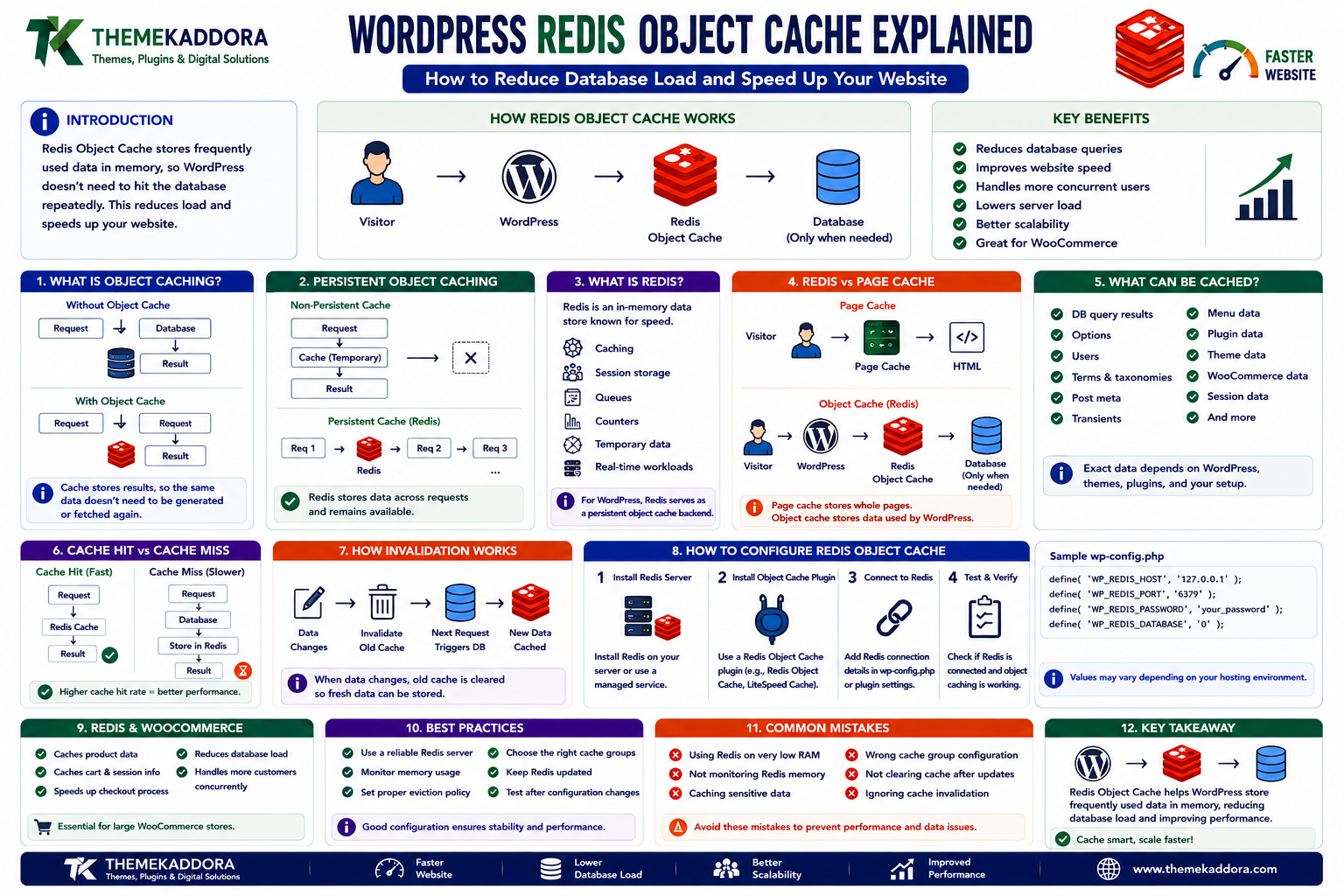
WordPress Redis Object Cache Explained: How to Reduce Database Load and Speed Up Your Website
Introduction
A WordPress website can become slow even when the theme is lightweight and the hosting server is reasonably powerful.
One common reason is repeated database work.
A typical dynamic WordPress request may involve:
Visitor ↓ WordPress ↓ Database Queries ↓ PHP Processing ↓ HTML Response
Now imagine hundreds or thousands of visitors repeatedly requesting similar information.
The same database operations may happen again and again.
For example:
Visitor 1 → Database Visitor 2 → Database Visitor 3 → Database Visitor 4 → Database
This repeated work can increase:
Database CPU usage
PHP processing
Response time
Server load
Infrastructure costs
This is where object caching becomes useful.
Object caching stores frequently accessed application data so it can be reused instead of being regenerated or retrieved from the database repeatedly.
Redis is one of the technologies commonly used as a persistent object-cache backend for WordPress.
A simplified architecture looks like:
Visitor ↓ WordPress ↓ Object Cache ↓ Redis ↓ Database only when necessary
This does not mean Redis magically makes every WordPress website faster.
The benefit depends on:
Query patterns
Plugin architecture
Traffic
Cache hit rate
Database workload
Hosting configuration
Redis deployment
Application behavior
In this guide, you'll learn what WordPress object caching is, how Redis works, how persistent object caching differs from page caching, how Redis can help WooCommerce and high-traffic websites, what cache groups mean, how invalidation works, how to configure Redis safely, and the most common mistakes to avoid.
1. What Is Object Caching?
Object caching stores frequently used data in a cache so WordPress can retrieve it without repeatedly performing the same expensive operation.
Consider:
Without Object Cache Request ↓ Database ↓ Result
and then another request:
Request ↓ Database ↓ Same Result
With object caching:
First Request ↓ Database ↓ Store Result in Cache Next Request ↓ Cache ↓ Result
The cache may contain:
Database query results
WordPress objects
Options
User information
Term information
Plugin-generated data
The exact data cached depends on the application and WordPress caching behavior.
2. What Is Persistent Object Caching?
A key distinction is whether the cache survives between PHP requests.
A non-persistent cache may exist only during one request:
Request ↓ Cache ↓ Request Ends ↓ Cache Gone
A persistent object cache stores information in an external system that remains available across requests:
Request 1 ↓ Redis ↓ Request 2 ↓ Redis ↓ Request 3
This can make object caching much more useful on busy WordPress websites.
Redis is commonly used for this purpose.
3. What Is Redis?
Redis is an in-memory data store designed for very fast data access.
It can be used for:
Caching
Session storage
Queues
Counters
Temporary application data
Real-time workloads
For WordPress, Redis can serve as a persistent object-cache backend.
Conceptually:
WordPress ↓ Object Cache API ↓ Redis ↓ Cached Data
WordPress does not need to know every detail of Redis's internal storage implementation.
The cache integration provides an abstraction layer.
4. Redis Object Cache vs Page Cache
These two forms of caching solve different problems.
Page Cache
Stores generated page responses.
Visitor ↓ Page Cache ↓ HTML
This can avoid running WordPress and PHP for a cached page.
Object Cache
Stores application data.
WordPress ↓ Object Cache ↓ Redis
WordPress and PHP may still execute, but repeated database operations can be avoided.
The two can work together:
CDN / Page Cache ↓ WordPress ↓ Redis Object Cache ↓ Database
A complete performance strategy often uses several caching layers rather than relying on one.
5. Why Redis Can Help WordPress
Redis can help when WordPress repeatedly requests the same data.
Examples include:
Site options
User data
Taxonomy information
Expensive query results
Plugin-generated data
WooCommerce-related lookups
The biggest potential benefit is reducing repeated database access.
For example:
Database Query ↓ Result ↓ Redis ↓ Reuse Result
This can be particularly helpful when the database is a measurable bottleneck.
6. Does Every WordPress Website Need Redis?
No.
A small website with:
Low traffic
Simple content
Lightweight plugins
Good hosting
Effective page caching
may receive little benefit from adding Redis.
Redis becomes more attractive when you have:
High traffic
Large databases
WooCommerce
Complex plugins
Many logged-in users
Dynamic dashboards
Expensive repeated queries
High database utilization
Start with measurement rather than installing Redis simply because it is popular.
7. How WordPress Uses the Object Cache API
WordPress provides an object-cache abstraction.
Applications can use functions such as:
wp_cache_get(); wp_cache_set(); wp_cache_delete();
Conceptually:
Plugin ↓ WordPress Cache API ↓ Redis
This allows plugin and theme code to use caching without directly depending on the Redis implementation.
That abstraction is important for portability.
8. Basic Object Cache Example
A simplified example looks like:
$key = 'kaddora_report'; $group = 'kaddora'; $data = wp_cache_get( $key, $group ); if ( false === $data ) { $data = expensive_report_calculation(); wp_cache_set( $key, $data, $group, 10 * MINUTE_IN_SECONDS ); } return $data;
The exact cache behavior depends on the available object-cache backend.
The application checks the cache first and only performs the expensive operation when necessary.
9. Cache Keys and Groups
A good cache design uses clear keys and groups.
For example:
Group: kaddora Keys: sales_summary top_products customer_stats
Conceptually:
Redis └── kaddora ├── sales_summary ├── top_products └── customer_stats
Namespacing reduces the risk of collisions between plugins and makes cache management easier.
Avoid generic keys such as:
data result cache stats
Unique prefixes are safer.
10. Cache Hits and Cache Misses
Two important terms are:
Cache Hit
The requested data already exists in Redis.
Request ↓ Redis ↓ Found ↓ Cache Hit
Cache Miss
The requested data is not available.
Request ↓ Redis ↓ Not Found ↓ Database / Generate
A healthy caching strategy aims for useful cache hits without serving stale or incorrect data.
11. What Is Cache Hit Rate?
Cache hit rate measures how often requested data is found in the cache.
Conceptually:
Cache Hit Rate = Cache Hits ÷ Total Cache Requests
For example:
1,000 Cache Requests 900 Hits 100 Misses Hit Rate = 90%
A high hit rate can indicate that caching is useful.
However, a high hit rate is not automatically good if the cached data is incorrect or causes memory problems.
Performance should be evaluated alongside correctness.
12. Redis Memory Usage
Redis stores data in memory, so available memory matters.
Suppose:
Redis ↓ 1 GB Available
and the cache grows beyond that capacity.
Redis must follow its configured memory policy.
Potential outcomes depend on configuration.
A WordPress deployment should therefore monitor:
Redis memory usage
Evictions
Key count
Cache hit rate
Connection count
Do not assume that Redis memory usage will remain constant.
13. Redis Eviction Policies
When Redis reaches its configured memory limit, its eviction policy determines what happens to stored keys.
The appropriate policy depends on the application's use case.
For a cache, an eviction strategy may intentionally remove older or less useful entries to make room for new data.
The key principle is:
Your WordPress application must be able to regenerate data when a cached value disappears.
Never treat Redis cache entries as permanent business data.
14. Redis Cache Invalidation
Cache invalidation means removing or updating cached data when the underlying source changes.
For example:
Product Updated ↓ Old Cache Invalid ↓ Delete / Refresh ↓ New Data
If a product price changes but the old value remains cached, customers could see outdated information.
A good cache design considers:
What changes the data?
When should the cache be cleared?
Which keys depend on the changed data?
Cache invalidation is often more important than simply adding caching.
15. Time-Based Cache Expiration
Some cached data can use an expiration period.
For example:
Sales Summary ↓ Cache 5 Minutes
After expiration:
Cache Expired ↓ Regenerate
Shorter expiration improves freshness but may reduce the benefit of caching.
Longer expiration increases cache efficiency but can increase the risk of stale data.
Choose expiration based on the actual data requirements.
16. Redis and WooCommerce
WooCommerce can benefit from object caching because stores often perform many dynamic lookups.
Potentially cacheable information can include:
Product data
Taxonomy information
Configuration
Reports
Frequently requested application data
However, WooCommerce also contains highly dynamic information such as:
Cart
Checkout
Customer session
Inventory
Order data
These areas require careful cache design.
Do not cache personalized or rapidly changing data as if it were public content.
17. Redis and WooCommerce Product Catalogs
A large product catalog may contain:
100,000+ Products
and many related lookups.
Redis can help cache frequently requested application data so the database does not have to repeatedly perform the same work.
For example:
Product Lookup ↓ Redis ├── Hit → Return └── Miss → Database → Store Cache
This can be valuable for:
Product pages
Category data
Related product calculations
Attribute lookups
The actual benefit should be measured on the specific store.
18. Be Careful With Personalized Data
Consider two customers:
Customer A Customer B
If the application stores personalized output under one shared cache key:
customer_dashboard
Customer A's data could potentially be reused for Customer B.
That is a serious design problem.
Use cache keys that represent the appropriate scope:
customer_dashboard_1001 customer_dashboard_1002
or use a cache strategy that correctly isolates users.
Cache isolation is a security requirement, not just a performance concern.
19. Redis and Logged-In Users
Page caching becomes more complicated for logged-in users because their responses may be personalized.
Object caching can still be useful.
For example:
Logged-In User ↓ WordPress ↓ Redis ↓ User-Specific Data
However, developers must ensure cached data is correctly scoped.
Public and private data should never be mixed accidentally.
20. Redis and WordPress Options
WordPress stores many settings in the wp_options table.
Object caching can reduce repeated retrieval of options and other application data.
For example:
Plugin Setting ↓ WordPress Option ↓ Redis
However, Redis should not be treated as a replacement for the database.
The database remains the durable source of configuration.
Redis is the temporary performance layer.
21. Redis and Expensive Database Queries
Suppose a plugin performs:
10-table query ↓ Aggregation ↓ Sort ↓ Report
on every dashboard request.
Instead:
Dashboard Request ↓ Redis Cache ↓ Hit → Return Report
This can significantly reduce repeated processing.
However, the underlying query should still be reviewed.
Caching a fundamentally inefficient query can hide the problem rather than solve it.
22. Redis and Transients
The WordPress Transients API and Redis can work together.
Conceptually:
Plugin ↓ Transients API ↓ Object Cache ↓ Redis
The exact behavior depends on the caching implementation and hosting environment.
This allows plugins to use WordPress's standard transient API while benefiting from persistent object caching where configured.
Developers should continue using WordPress APIs rather than hardcoding Redis operations when a standard abstraction is sufficient.
23. Redis vs Transients
These are not direct alternatives.
Transients
A WordPress API for temporary data with expiration.
Redis
A data store that can act as a persistent cache backend.
A simplified architecture is:
Plugin ↓ Transient ↓ Redis
Using the WordPress API provides better portability than directly coupling every plugin to Redis.
24. Redis and Database Load
One of Redis's potential benefits is reducing repeated database operations.
For example:
Without Redis 1,000 Requests ↓ Database ↓ Repeated Work
With Redis:
1,000 Requests ↓ Redis ↓ Most Requests Served From Cache ↓ Fewer Database Operations
This can help when database load is the actual bottleneck.
If CPU, PHP execution, network latency, or external APIs are the real problem, Redis may have less impact.
25. Redis and High-Traffic WordPress
High-traffic websites often benefit from layered caching.
A possible architecture is:
Visitor ↓ CDN ↓ Page Cache ↓ WordPress ↓ Redis Object Cache ↓ Database
Each layer handles a different type of workload.
For example:
CDN → Static delivery
Page cache → Generated HTML
Redis → Application objects
Database → Persistent storage
This layered architecture can support much higher traffic than relying on the database alone.
26. Redis and API-Heavy WordPress Plugins
Consider a plugin that calls:
External Analytics API
Caching the API response with Redis can reduce repeated remote requests.
For example:
First Request ↓ External API ↓ Redis Next Requests ↓ Redis
This can reduce:
API latency
External API usage
Rate-limit risk
Repeated network traffic
However, API-specific caching requirements should be respected.
27. Redis and Background Jobs
Redis can also be used in application architectures involving background processing.
For example:
WordPress ↓ Queue ↓ Worker ↓ Redis / Other Storage
However, using Redis for queues is an architectural decision separate from using Redis as WordPress's object cache.
Do not mix unrelated Redis workloads without understanding:
Memory requirements
Persistence
Eviction policy
Isolation
Failure behavior
28. Redis Failure Handling
What happens if Redis becomes unavailable?
A properly designed WordPress site should have a graceful fallback strategy.
Ideally:
WordPress ↓ Redis Available? ├── Yes → Cache └── No → Continue Using Database
The exact behavior depends on the object-cache implementation and hosting configuration.
The important principle is that Redis should normally be a performance layer, not a single point of failure for permanent business data.
29. Redis and Cache Stampede
A cache stampede can occur when a popular cache value expires and many requests simultaneously regenerate it.
For example:
100 Requests ↓ Cache Expired ↓ 100 Database Queries
This can create a sudden database spike.
Possible techniques include:
Locking
Staggered expiration
Background refresh
Request coalescing
Graceful stale-cache strategies
The appropriate solution depends on the workload.
30. Redis and Cache Warming
Cache warming means populating important cache values before visitors need them.
For example:
Deployment ↓ Warm Important Data ↓ Visitors Arrive ↓ Redis Cache Already Populated
This can be useful for:
Popular products
Dashboard statistics
Frequently accessed configuration
High-demand API data
Cache warming should be used selectively.
There is no need to populate the cache with data nobody requests.
31. Redis and WordPress Multisite
Multisite environments require careful cache scoping.
For example:
Site A ↓ Redis Site B ↓ Redis
Both sites may share one Redis instance.
Therefore, cache keys and groups need to prevent data collisions.
A robust Multisite-compatible implementation should distinguish site-specific data appropriately.
32. Redis Security
Redis should not be exposed unnecessarily to the public internet.
A typical architecture is:
WordPress Server ↓ Private Network ↓ Redis
Security considerations include:
Network isolation
Authentication where supported
Firewall rules
Secure credentials
TLS where appropriate
Access restrictions
Monitoring
The Redis service should be reachable only by the systems that actually need it.
33. Redis Monitoring
A production Redis deployment should be monitored.
Useful metrics include:
Memory usage
Cache hit rate
Evictions
Key count
Connections
Commands per second
Latency
Errors
For example:
Redis Health Memory: 420 MB Hit Rate: 94% Evictions: Low Latency: Healthy
Monitoring helps identify whether Redis is actually improving the application.
34. How to Tell Whether Redis Is Helping
Do not install Redis and assume success.
Measure before and after.
Useful metrics include:
Database CPU
Query count
Query time
PHP response time
TTFB
Object-cache hit rate
Redis memory usage
Page-generation time
For example:
Before Redis DB CPU → 85% TTFB → 900ms After Redis DB CPU → 45% TTFB → 550ms
Actual results will vary considerably.
The important thing is measuring the workload.
35. Common WordPress Redis Mistakes
Avoid these problems:
Installing Redis Without Measuring
The bottleneck may be somewhere else.
Treating Redis as Permanent Storage
Cache data must be rebuildable.
Caching Personalized Data Globally
This can create serious privacy problems.
No Memory Limit
Redis can consume more memory than expected.
No Monitoring
Problems may remain unnoticed.
Public Redis Exposure
This creates unnecessary security risk.
Caching Dynamic WooCommerce Data Incorrectly
Cart, checkout, and customer data require careful isolation.
Ignoring Cache Invalidation
Users can receive outdated information.
36. WordPress Redis Best Practices
A strong Redis object-cache strategy should:
Measure database performance first.
Use the WordPress object-cache abstraction.
Use meaningful cache keys and groups.
Keep personalized data isolated.
Set appropriate expiration where necessary.
Invalidate stale data when source data changes.
Monitor Redis memory.
Monitor cache hit rate.
Keep Redis off the public internet.
Test failure behavior.
Use staging before production changes.
Avoid treating Redis as permanent storage.
Review WooCommerce cache behavior carefully.
Caching should improve performance without changing application correctness.
37. A Practical WordPress Redis Workflow
A safe implementation can look like:
Measure Website ↓ Identify Database Bottleneck ↓ Install / Enable Redis ↓ Configure Object Cache ↓ Verify Cache Connectivity ↓ Measure Hit Rate ↓ Test WordPress ↓ Test WooCommerce ↓ Monitor Memory + Latency ↓ Optimize Further
Do not skip the measurement step.
38. When Should You Use Redis for WordPress?
Redis is worth considering when:
Database workload is high.
Website traffic is substantial.
WooCommerce is large or dynamic.
Plugins perform repeated expensive queries.
Many logged-in users access dynamic content.
External integrations require frequent repeated data.
Page caching alone does not solve the bottleneck.
It may be unnecessary when:
The site is small.
Database load is low.
Excellent page caching already handles most traffic.
The hosting environment already provides sufficient caching.
There is no measurable bottleneck.
Use infrastructure according to workload.
Why Choose ThemeKaddora?
At ThemeKaddora, we believe WordPress performance should be based on architecture rather than one-click optimization.
Modern WordPress and WooCommerce platforms may combine:
Page caching
CDNs
Redis
Databases
APIs
Background jobs
Object caching
Performance plugins
Redis can be an important part of that architecture when database access is a measurable bottleneck.
ThemeKaddora focuses on practical WordPress, WooCommerce, SaaS, AI, automation, and digital solutions designed around:
Performance
Security
Compatibility
Scalability
Maintainability
Conclusion
Redis object caching can be a powerful addition to WordPress, especially for high-traffic websites, WooCommerce stores, and applications with repeated database workloads.
But the real value comes from understanding what Redis is actually solving.
The ideal architecture is not:
"Install Redis because WordPress is slow."
It is:
Measure → Identify Database Bottleneck → Add Object Cache → Test → Monitor
Redis can reduce repeated database work, improve response times, and help WordPress scale more efficiently.
But it must be configured carefully.
You need to consider:
Cache keys
Cache groups
Expiration
Invalidation
Memory
Personalized data
WooCommerce behavior
Security
Failure handling
Monitoring
The goal is not to move everything into Redis. The goal is to cache the right data so WordPress performs less unnecessary work while the database remains the reliable source of permanent information.
Frequently Asked Questions
1. What is Redis object caching in WordPress?
Redis object caching stores frequently accessed WordPress application data in Redis so it can be retrieved without repeatedly querying the database.
2. Is Redis the same as page caching?
No. Page caching stores generated page responses, while object caching stores application data used while WordPress processes requests.
3. Does every WordPress website need Redis?
No. Redis is most useful when database workload, traffic, or repeated application queries create a measurable performance bottleneck.
4. Can Redis speed up WooCommerce?
Yes, it can help with appropriate object-cache workloads, but dynamic areas such as cart, checkout, sessions, and personalized data require careful cache design.
5. Is Redis a replacement for the WordPress database?
No. Redis should generally be treated as a cache layer. The database remains the durable source of application data.
6. What happens if Redis goes down?
A well-designed setup should handle cache unavailability gracefully and continue using the underlying database where the integration supports that behavior.
7. What is a cache hit?
A cache hit occurs when the requested data is already available in the object cache, allowing the application to avoid regenerating or retrieving it from the database.
8. What is cache invalidation?
Cache invalidation is the process of removing or refreshing cached data when the underlying source data changes.
9. Can Redis create security problems?
Yes, if it is exposed publicly, improperly configured, or used to mix data between users or sites. Redis should be appropriately isolated and secured.
10. Why choose Themekaddora?
Themekaddora provides lightweight, responsive, SEO-friendly WordPress themes with fast performance, WooCommerce compatibility, flexible customization, accessibility-conscious design, modern templates, regular updates, and professional support—providing a strong foundation for businesses building digital products and product-focused websites.
Comments (0)