
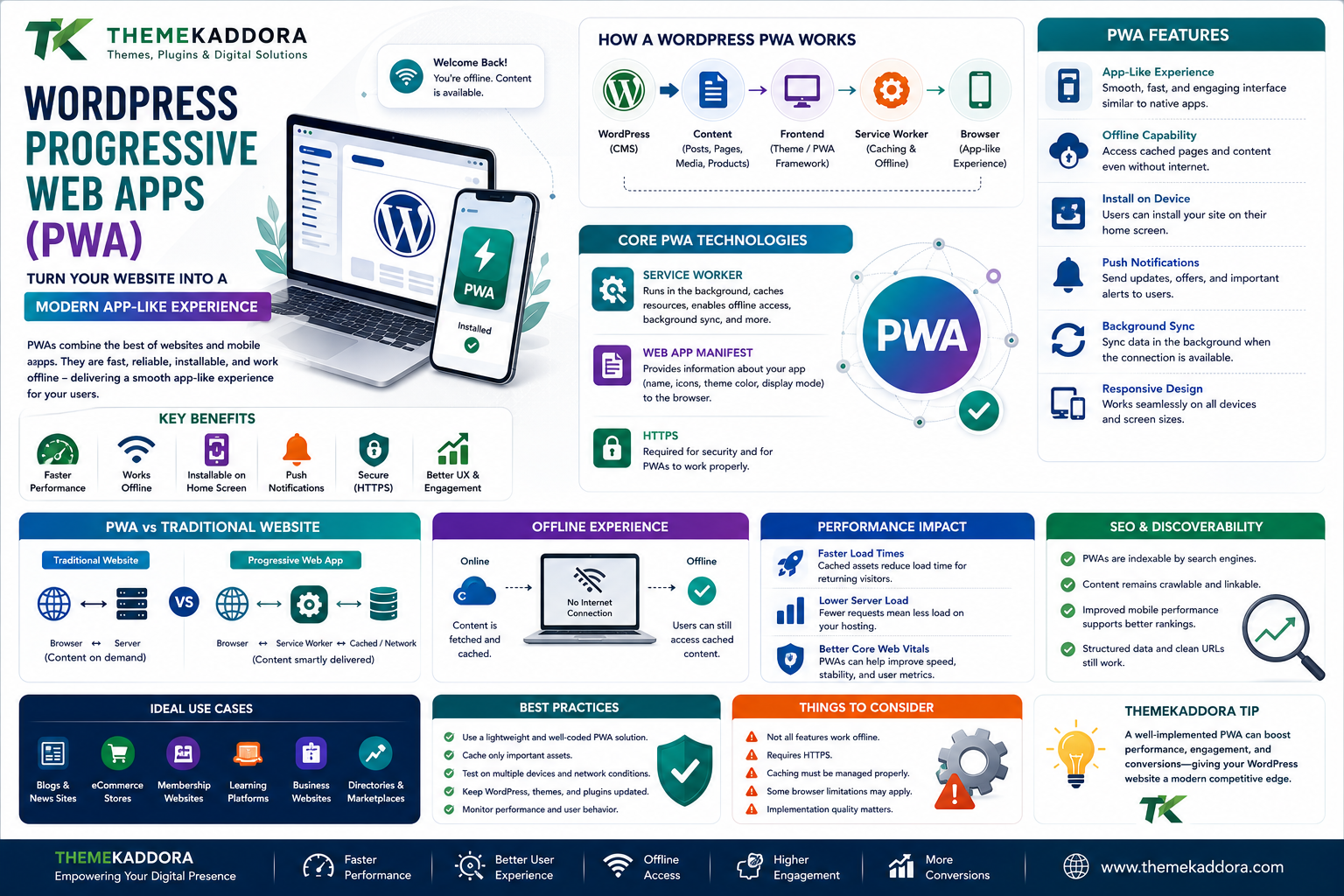
WordPress Progressive Web Apps (PWA): How to Turn a Website Into a Modern App-Like Experience
Introduction
People increasingly expect websites to work quickly and smoothly on mobile devices.
Traditional websites can provide excellent mobile experiences, but modern web technologies have made it possible to create websites that behave more like applications.
One of these technologies is the Progressive Web App, commonly known as a PWA.
A Progressive Web App combines capabilities associated with websites and applications. Depending on implementation and platform support, users may be able to install a web experience, access cached content, receive notifications, and interact with a website in an app-like environment.
For WordPress users, PWAs open interesting possibilities.
A WordPress website can remain the content management system while modern web technologies provide a more application-like experience.
What Is a Progressive Web App?
A Progressive Web App is a web application designed to provide a more app-like experience while remaining accessible through web technologies.
PWAs can use technologies such as:
Service workers
Web app manifests
HTTPS
Browser caching
Responsive design
Modern JavaScript
Network-aware strategies
A PWA does not necessarily mean creating a traditional mobile application.
Instead, it enhances the web experience.
How Is a PWA Different From a Traditional Website?
A traditional website generally depends heavily on the browser requesting resources from the server.
A PWA can use additional technologies to improve the experience.
For example:
Traditional Website
Browser → Server → Content
PWA
Browser → Service Worker → Cached/Network Content
The exact behavior depends on how the application is designed.
How Does a WordPress PWA Work?
A typical architecture can look like:
WordPress
↓
Content
↓
Frontend
↓
Service Worker
↓
Browser
↓
App-Like Experience
WordPress can continue managing posts, pages, media, products, and other content while the frontend and browser technologies handle PWA functionality.
What Is a Service Worker?
A service worker is a background browser technology that can intercept certain network requests and manage resources according to defined rules.
It can support features such as:
Caching
Offline experiences
Background processing
Network strategies
Some notification functionality
Service workers are an important part of many PWAs.
What Is a Web App Manifest?
A web app manifest provides information about how a web application should appear when installed or launched in supported environments.
It can define things such as:
Application name
Short name
Icons
Start URL
Display mode
Theme information
This helps browsers understand the intended app-like presentation.
Why Use a PWA for WordPress?
A PWA can be useful when a website needs a more engaging mobile experience.
Potential advantages include:
App-like interaction
Improved repeat usage
Faster loading of cached resources
Offline capabilities
Installability where supported
Better mobile engagement
Reduced dependence on traditional app distribution
However, not every WordPress website needs PWA functionality.
WordPress PWA and Performance
Performance is one of the major reasons businesses explore PWA technology.
A service worker can cache selected resources so that returning users do not always need to download everything again.
A well-designed PWA can combine:
Caching
Optimized images
Efficient JavaScript
Fast hosting
CDN delivery
Responsive layouts
However, simply adding a service worker does not automatically make a website fast.
Poor caching strategies or oversized assets can still create performance problems.
Offline Experiences
One of the most interesting PWA capabilities is offline or limited-connectivity functionality.
Imagine opening a content website while traveling.
If previously cached resources are available, some parts of the experience may continue to work even when the network connection is unavailable.
The exact offline experience depends on what developers choose to cache.
A fully offline website is not automatic.
Offline WordPress Content
Content-heavy WordPress websites can potentially provide selected offline experiences.
For example:
Article
↓
Cached on Device
↓
User Opens Article Later
↓
Previously Cached Content Loads
This can be useful for:
Blogs
News websites
Documentation
Educational resources
Reference websites
Dynamic information may still require an active network connection.
PWA and Mobile Users
Mobile users often experience:
Unstable networks
Limited bandwidth
Switching between Wi-Fi and mobile data
Low battery
Different screen sizes
A carefully designed PWA can account for some of these conditions.
This makes PWAs particularly interesting for mobile-first digital experiences.
PWA Installation
One advantage of a PWA is that supported browsers and operating systems may allow users to install or add the web experience to their device.
The user can then access it more like an application.
However, installation behavior varies by browser and platform.
Businesses should not assume that every device will provide exactly the same installation experience.
Push Notifications
Some PWAs can support push notifications where the relevant platform and browser capabilities allow them.
Possible use cases include:
New article notifications
Order updates
Breaking news
Event reminders
Promotional messages
Account notifications
Notifications should be used carefully.
Sending too many notifications can annoy users and lead them to disable notifications.
WordPress PWA for News Websites
News websites can benefit from fast mobile experiences.
A possible workflow could be:
New Article Published
↓
WordPress
↓
PWA / Notification System
↓
User Notification
↓
Article Opened
This can help publishers engage returning visitors.
WordPress PWA for eCommerce
A WooCommerce-powered store can potentially use PWA concepts to improve its mobile experience.
Possible areas include:
Product browsing
Product caching
Faster navigation
Cart experiences
Notifications
Repeat purchases
However, shopping carts, payments, inventory, and account functionality often require live network connections.
Offline caching should never be used carelessly for sensitive transactional information.
WordPress PWA for Educational Websites
Educational platforms can use PWA technology for content access.
Potential use cases include:
Course materials
Articles
Learning resources
Study guides
Reference content
Previously cached learning materials could potentially remain available in limited-connectivity situations.
WordPress PWA for Blogs
Blogs are another natural use case.
A PWA-enabled blog can potentially provide:
Faster repeat visits
Cached articles
Installable experiences
Notifications
Mobile-friendly navigation
For content publishers, these features can create additional engagement opportunities.
PWA and SEO
A PWA does not automatically improve search rankings.
SEO still requires:
Crawlable content
Proper URLs
Metadata
Internal links
Structured data where appropriate
Good performance
Mobile usability
Correct indexing
Developers should make sure important content remains discoverable by search engines.
PWA and Core Web Vitals
Performance metrics can influence how users experience a website.
A PWA implementation should consider:
Loading performance
Visual stability
Interaction responsiveness
Image optimization
JavaScript execution
Caching
Caching can help returning users, but it should be implemented carefully.
PWA and Responsive Design
A PWA is not a replacement for responsive design.
The website should still work across:
Smartphones
Tablets
Laptops
Desktop computers
A PWA enhances the web experience; it does not remove the need for good responsive design.
PWA Security
Security is important because service workers can influence how web resources are handled.
A secure PWA should consider:
HTTPS
Secure authentication
Cache management
Sensitive data handling
Service worker scope
Third-party scripts
Update strategies
Sensitive information should not be cached without careful consideration.
Cache Strategies
Different content may require different caching approaches.
Cache First
Useful for resources that do not change frequently.
Network First
Useful when fresh information is more important.
Stale While Revalidate
Can provide cached content quickly while checking for an updated version.
Network Only
Useful for operations that require a live connection.
The correct strategy depends on the type of content.
Updating a PWA
Websites change.
New WordPress content is published.
Plugins are updated.
Designs change.
Code changes.
The PWA therefore needs an update strategy.
Service workers may continue using cached resources until a new version is properly activated.
Poor update handling can result in users seeing outdated content.
WordPress Plugins and PWAs
Some WordPress plugins can simplify parts of PWA implementation.
However, plugin selection should be based on:
Compatibility
Maintenance
Security
Performance
Documentation
WordPress compatibility
Theme compatibility
A plugin should not be installed simply because it adds a PWA label.
Headless WordPress and PWA
Headless WordPress can also be combined with PWA architecture.
For example:
WordPress
↓
API
↓
Modern Frontend
↓
PWA Features
This can provide a highly customized application experience.
However, headless development also increases technical complexity.
PWA and AI
AI can add another layer to PWA experiences.
For example:
WordPress Content
↓
PWA
↓
AI Search
↓
Personalized Results
Possible features could include:
AI-powered search
Content recommendations
Intelligent FAQs
Personalized article suggestions
AI assistants
AI functionality should be designed with privacy, accuracy, and security in mind.
PWA for Business Websites
Businesses can use PWA technology when repeat mobile engagement matters.
For example:
Customer visits website
↓
Uses mobile experience
↓
Adds web app to device
↓
Returns later
↓
Receives relevant updates
This can create a stronger relationship between a website and returning visitors.
PWA for SaaS Businesses
SaaS companies can use progressive web technologies to create application-like experiences without necessarily requiring separate native applications for every platform.
Possible features include:
Dashboards
Account management
Notifications
Offline interfaces
Application shells
For complex SaaS products, PWA technology may become part of a broader application architecture rather than simply a WordPress feature.
PWA vs Native Mobile App
A PWA and native application are not identical.
PWA
Uses web technologies
Accessible through a browser
Can provide app-like features
May be installable on supported platforms
Can share web infrastructure
Native App
Built specifically for a mobile operating system
Can access platform-specific capabilities
Distributed through app stores in many cases
May require separate development for different platforms
The right choice depends on the product's requirements.
Common WordPress PWA Mistakes
1. Assuming Every Website Needs a PWA
PWA technology should solve a real user or business problem.
2. Caching Everything
Sensitive or frequently changing information should not be cached blindly.
3. Ignoring Updates
Users should receive updated resources reliably.
4. Forgetting Offline UX
An offline experience should clearly communicate what users can and cannot do.
5. Ignoring SEO
PWA features should not interfere with search visibility.
6. Overusing Notifications
Notifications should provide genuine value.
7. Installing Unmaintained Plugins
Outdated plugins can create security and compatibility problems.
How to Create a WordPress PWA
Step 1: Define the Goal
Determine why the website needs PWA functionality.
Step 2: Identify Important User Journeys
Decide which pages and actions should benefit from the experience.
Step 3: Review the Existing WordPress Website
Check theme, plugins, performance, responsiveness, and technical architecture.
Step 4: Plan Caching
Determine which resources should be cached and which should always require the network.
Step 5: Configure the Manifest
Define application metadata and supported presentation settings.
Step 6: Implement the Service Worker
Create appropriate caching and network strategies.
Step 7: Optimize Performance
Improve images, scripts, fonts, CSS, and server performance.
Step 8: Plan Updates
Make sure cached resources can be updated reliably.
Step 9: Test Offline Behavior
Test different network conditions.
Step 10: Test Mobile Devices
Check different screen sizes and supported browsers.
Step 11: Review SEO
Make sure important content remains crawlable and indexable.
Step 12: Monitor the Experience
Track performance, errors, engagement, and user feedback.
WordPress PWA Checklist
Website is responsive
HTTPS is enabled
PWA purpose is clearly defined
Web app manifest is configured
Service worker is implemented correctly
Caching strategy is planned
Sensitive information is protected
Offline experience is tested
Update strategy is configured
Performance is optimized
SEO is reviewed
Notifications are used responsibly
Plugins are maintained
Mobile browsers are tested
Analytics and monitoring are configured
Why choose Themekaddora?
Themekaddora focuses on WordPress, themes, plugins, technology, AI, SEO, marketing, and business.
Progressive Web Apps connect these subjects in a practical way.
WordPress manages content.
Modern web technologies create application-like experiences.
Performance improves usability.
AI can add intelligent features.
SEO helps users discover content.
Marketing can use notifications and engagement strategies.
Business teams can evaluate whether a PWA improves customer experiences.
For Themekaddora, PWA technology demonstrates how WordPress can participate in modern web experiences that go beyond the traditional website model.
Conclusion
Progressive Web Apps provide an interesting way to extend WordPress beyond the traditional website experience.
With appropriate implementation, a WordPress PWA can provide capabilities such as:
App-like experiences
Installability where supported
Caching
Limited offline functionality
Faster repeat visits
Notifications where supported
Mobile-focused experiences
However, PWAs require careful planning.
Caching, security, SEO, updates, performance, and browser compatibility all need to be considered.
Not every WordPress website needs PWA functionality.
For websites where mobile engagement, repeat usage, offline content, or application-like experiences are important, however, PWA technology can be a valuable option.
For Themekaddora, Progressive Web Apps represent another example of how WordPress can connect with modern web technologies and evolve from a traditional publishing platform into part of a broader digital experience.
The future of the web is not simply about choosing between websites and applications.
It is increasingly about creating experiences that combine the strengths of both.
Frequently Asked Questions
1. What is a WordPress PWA?
A WordPress PWA is a WordPress-powered web experience enhanced with progressive web technologies to provide features such as app-like behavior, caching, and potentially installation or notifications on supported platforms.
2. Can a WordPress website become a PWA?
Yes. Depending on the website's architecture, PWA functionality can be implemented using appropriate web technologies, plugins, or custom development.
3. Does a PWA work offline?
A PWA can provide offline or limited-connectivity functionality when the required resources have been appropriately cached.
4. Does a WordPress PWA need HTTPS?
Secure contexts are required for important PWA capabilities such as service workers, so HTTPS is an essential part of a production PWA.
5. Can a PWA send push notifications?
Some PWA implementations can support notifications where the relevant browser and platform provide the required capabilities and the user has granted permission.
6. Does a PWA improve SEO?
A PWA does not automatically improve SEO. Search visibility still depends on crawlability, content, technical SEO, performance, and other ranking factors.
7. Is a PWA better than a mobile app?
Neither is universally better. PWAs can provide broad web accessibility, while native apps may offer deeper platform-specific capabilities.
8. Can WooCommerce work with a PWA?
Yes, PWA technology can be used with WooCommerce, but transactional features such as checkout and payments generally require careful handling of live data and network connectivity.
9. Can AI be integrated into a WordPress PWA?
Yes. AI-powered search, recommendations, assistants, and content features can potentially be integrated through APIs and modern application architectures.
10. Does every WordPress website need a PWA?
No. A PWA should be considered when its capabilities solve a genuine user or business requirement.
11. Why Choose Themekaddora?
Themekaddora combines WordPress knowledge with content about technology, AI, SEO, marketing, themes, plugins, and modern web development.
Comments (0)