
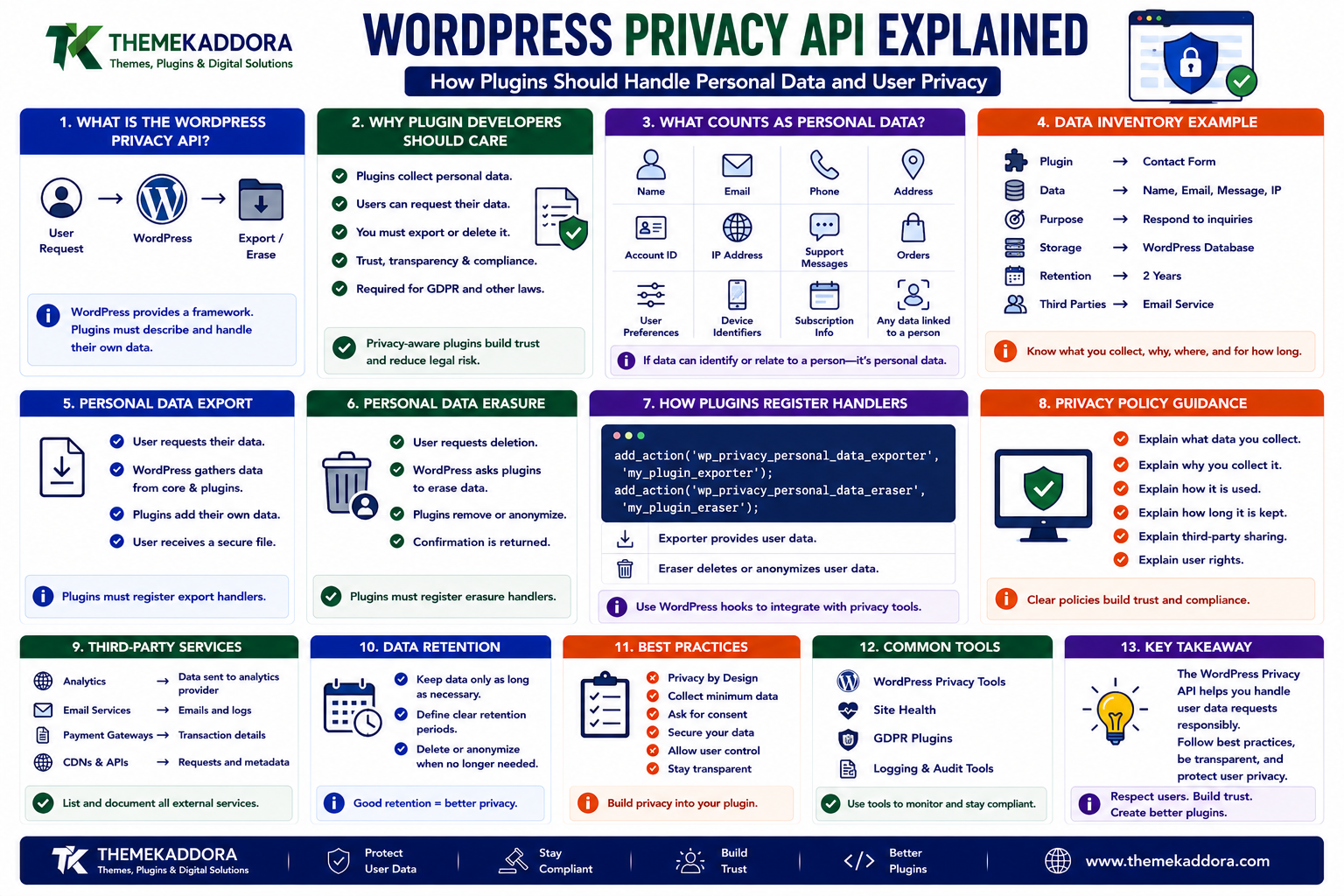
WordPress Privacy API Explained: How Plugins Should Handle Personal Data and User Privacy
Introduction
Modern WordPress websites collect more information than many site owners realize.
A typical website may process:
Names
Email addresses
User accounts
IP addresses
Contact-form submissions
Orders
Support requests
Comments
Analytics data
Subscription information
Customer preferences
External service identifiers
Plugins can add even more data collection.
For example, an eCommerce plugin may process:
Customer ↓ Order ↓ Billing Information ↓ Shipping Information ↓ Payment References
A marketing plugin may store:
Email ↓ Campaign Activity ↓ Subscription Status ↓ Marketing Preferences
An AI plugin might process:
User Input ↓ AI Service ↓ Generated Response
This creates an important development question:
What happens when a user asks what personal data the website stores about them?
And another:
What happens when they ask for that data to be deleted?
WordPress provides privacy-related functionality to help website owners respond to these requests.
The goal is not simply to add a privacy policy page.
A professional WordPress plugin should understand:
Collect → Store → Use → Export → Retain → Delete
and should document each stage.
In this guide, you'll learn what WordPress privacy tools do, how personal-data export and erasure work, how plugins can register their own privacy handlers, how data retention should be designed, how third-party services complicate privacy, how WooCommerce and forms affect user data, and how developers can build privacy-aware WordPress products.
1. What Is the WordPress Privacy API?
WordPress includes privacy-related mechanisms that help site administrators respond to personal-data requests.
These capabilities are designed to support workflows such as:
Personal data export
Personal data erasure
Privacy policy guidance
User privacy requests
Plugin-specific data handling
A simplified workflow is:
User ↓ Privacy Request ↓ WordPress ↓ Registered Plugin Data Handlers ↓ Export / Erase ↓ Result
The important idea is that WordPress provides a framework, while individual plugins remain responsible for describing and handling the data they collect.
2. Why Plugin Developers Need to Care About Privacy
A plugin may store personal information even when its primary purpose is something else.
For example:
Analytics Plugin
May store:
IP-related data
User identifiers
Event history
Form Plugin
May store:
Name
Message
WooCommerce Extension
May store:
Customer identifiers
Order-related information
Delivery information
Membership Plugin
May store:
Membership status
Account history
Subscription information
CRM Integration
May store:
External CRM IDs
Lead information
Customer status
The plugin developer should know exactly what is being collected.
3. What Counts as Personal Data?
The exact legal definition depends on the applicable privacy law, but developers should think broadly about information that can identify or relate to a person.
Examples can include:
Name
Phone number
Address
Account ID
Customer ID
IP-related information
Device-related identifiers
Support messages
Order information
User preferences
A useful engineering question is:
Could this data be associated with a specific individual?
If the answer may be yes, it deserves privacy consideration.
4. Create a Data Inventory
Before building privacy functionality, create a data map.
For example:
Plugin ├── User Email ├── Order ID ├── External CRM ID ├── API Logs ├── Support Messages └── Analytics Events
Then document:
Data
Stored Where
Why Collected
Retention
User meta
Account
As required
CRM ID
User meta
Sync
Business-defined
Logs
Custom table
Diagnostics
Limited
Support Message
Database
Support
Business-defined
This makes privacy decisions much easier.
5. Data Minimization
One of the strongest privacy principles is:
Do not collect information you do not actually need.
Suppose a plugin only needs an email address.
There may be little justification for also storing:
Full address
Birth date
IP history
Device information
unless those fields are necessary for the specific feature.
A smaller data footprint generally means:
Less security risk
Easier privacy management
Lower storage requirements
Simpler deletion
Simpler export
6. WordPress Personal Data Export
WordPress provides an administrator workflow for handling personal-data export requests.
Conceptually:
User Requests Data ↓ Administrator Processes Request ↓ WordPress Collects Exportable Data ↓ Plugins Contribute Their Data ↓ Export Created
A plugin that stores personal data should consider registering its data for this process.
Otherwise, the site administrator may not have a complete picture of the information the plugin stores.
7. Why Plugins Should Register Export Data
Imagine a site using:
WordPress + WooCommerce + CRM Plugin + Form Plugin + AI Plugin
A user requests their data.
If only WordPress core contributes information:
Export ↓ Core Data Only
the result may be incomplete.
A better architecture is:
WordPress ├── Core Data ├── WooCommerce Data ├── CRM Data ├── Form Data └── AI Plugin Data
Every plugin should understand what information it contributes to the privacy workflow.
8. Personal Data Erasure
Export is only one side of privacy management.
Users may also request deletion of personal information when applicable.
A simplified workflow is:
User Request ↓ Administrator Review ↓ Plugin Data Identified ↓ Erase Eligible Data ↓ Record Result
Again, plugins should participate where their data is associated with the user.
9. Erasure Does Not Always Mean Delete Everything
This is an important architectural distinction.
Some information may need to be retained for legitimate business or legal reasons depending on the jurisdiction and use case.
For example:
Customer Data ├── Data Eligible for Erasure └── Data Required to Retain
Developers should therefore avoid building a simplistic:
Delete Everything
button.
Retention rules should be documented and based on the applicable requirements.
10. Data Retention Policies
Every plugin that stores personal data should ask:
How long do we actually need this information?
For example:
Contact Submission → 90 days Debug Log → 30 days Customer Account → While Account Exists Transactional Record → According to Business / Legal Requirements
The exact periods depend on the data and applicable requirements.
The important principle is:
Don't retain personal data indefinitely without a reason.
11. Temporary Data Should Expire
Temporary information should have a lifecycle.
Examples include:
Verification tokens
Temporary login challenges
Cached user data
One-time links
Import records
Debug information
A useful model is:
Create ↓ Use ↓ Expire ↓ Delete
This reduces unnecessary data accumulation.
WordPress tools such as transients can help with temporary application data, although sensitive information requires additional security considerations.
12. Privacy and WordPress Logs
Logs can accidentally become a major source of personal data.
A developer may log:
User Email IP Address Request Data API Response Customer ID
for debugging.
The problem appears when those logs remain indefinitely.
A better strategy is:
Log only what is necessary
Avoid secrets
Minimize personal data
Set retention periods
Restrict access
Delete old logs
Debug logging should never become an uncontrolled personal-data archive.
13. Privacy and API Integrations
Third-party APIs introduce another data boundary.
For example:
WordPress ↓ Customer Email ↓ CRM API
or:
WordPress ↓ User Prompt ↓ AI API
The plugin developer should know:
What data is transmitted
Why it is transmitted
Where it goes
Whether the provider stores it
How long it is retained
Whether the user has been informed
The privacy responsibility does not end at the WordPress database.
14. Document External Services
A professional plugin should document external services that receive user data.
For example:
Plugin ↓ External CRM ↓ Email Provider ↓ AI Provider
For each service, document:
Service name
Purpose
Data shared
When data is sent
Relevant privacy documentation
This makes the plugin easier for administrators to evaluate.
15. Privacy and AI Plugins
AI introduces unique data considerations.
Consider a customer support plugin where a user enters:
"My order #1234 has not arrived."
The plugin might send the entire message to an AI service.
That can involve:
Customer information
Order information
Product information
Potentially sensitive messages
A privacy-aware design should minimize the information sent.
For example:
Full Database Record ↓ Too Much Data Required Context Only ↓ Better Data Minimization
Send only what the AI system actually needs.
16. Privacy and WooCommerce
WooCommerce sites naturally process customer-related information.
Examples include:
Customer accounts
Orders
Addresses
Emails
Shipping details
Product purchases
A WooCommerce extension should avoid creating unnecessary copies of this information.
For example:
WooCommerce Customer ↓ Plugin ↓ Duplicate Customer Database
may create additional privacy and security responsibilities.
When possible, use established WooCommerce data structures and retrieve data when needed rather than duplicating everything.
17. Privacy and Contact Forms
Contact forms are one of the simplest ways to accidentally collect too much data.
A form might request:
Name Email Phone Company Address Message Birth Date Job Title
Ask whether every field is actually required.
A leaner form:
Name Email Message
may reduce unnecessary collection.
Less data means less to protect and less to manage later.
18. Consent vs Notification
Developers should distinguish between:
Consent
The user actively agrees to a specific processing activity where consent is the appropriate legal basis.
Notice
The user is informed about how information is processed.
These are not interchangeable concepts.
A checkbox that says:
"I agree"
does not automatically make every type of processing lawful.
Privacy architecture should be designed around the actual processing purpose and applicable requirements.
19. Don't Bundle Unrelated Consent
A common UX mistake is:
☑ I agree to: Terms Marketing Analytics AI Processing Third-Party Sharing Everything
These activities may have different requirements.
Where consent is required, make the purpose clear and avoid forcing unrelated choices into one vague checkbox.
The exact implementation should reflect applicable law and the website's privacy design.
20. Privacy Policy Integration
Plugins can provide useful information for the site's privacy policy.
For example:
Plugin ↓ Collects Email ↓ Sends Data to CRM ↓ Stores Sync ID
This should be documented clearly.
A privacy policy should accurately describe relevant data processing.
Do not tell users:
"We do not collect personal information."
if the plugin stores names and emails.
21. WordPress Privacy Policy Tools
WordPress provides tools that help administrators create and manage privacy-policy content.
Plugins can provide suggested information about:
Data collected
Cookies
External services
Retention
User requests
This can help site owners understand plugin data practices.
However, automatically generated suggestions should not be treated as a substitute for reviewing the site's actual configuration and legal requirements.
22. Cookies and Privacy
Cookies can contain or support information related to:
Sessions
Authentication
Preferences
Analytics
Marketing
A plugin should document cookies it creates or relies upon where appropriate.
For example:
Cookie ↓ Purpose ↓ Duration ↓ Required or Optional
Avoid setting unnecessary cookies.
23. Privacy and User Metadata
Plugins often store information in user metadata.
For example:
user_meta ├── crm_id ├── favorite_category ├── subscription_status └── external_account
Each field should have a documented purpose.
If user metadata is no longer needed, the plugin should have a strategy for cleaning it up.
24. Privacy and Custom Tables
A plugin with custom database tables may store significant personal data.
For example:
wp_plugin_contacts ├── id ├── user_id ├── email ├── message └── created_at
Custom tables require explicit privacy architecture.
Developers should know:
Which fields contain personal data
How records are linked to users
How exports identify records
How erasure removes eligible data
How retention is enforced
Moving data to a custom table does not remove privacy responsibilities.
25. Privacy and Anonymous Data
Not all information is necessarily personal data.
For example, a plugin may store aggregated information:
Daily Visits = 10,240
without retaining individual identities.
However, developers should be careful about claiming data is anonymous when it can still be linked back to individuals through other information.
Privacy design should consider the complete data environment.
26. Privacy and Pseudonymization
Sometimes data can be represented using identifiers rather than obvious personal details.
For example:
Customer Email ↓ Internal ID ↓ Analytics Event
This can reduce exposure in some workflows.
But pseudonymized data may still be personal data depending on whether it can be linked back to an individual.
Do not treat pseudonymization as automatic anonymization.
27. Privacy and Data Encryption
Sensitive information should be protected appropriately.
Depending on the use case, this may include:
HTTPS in transit
Encrypted connections to APIs
Secure credential storage
Database protection
Restricted access
Not every piece of data requires custom application-level encryption.
The important principle is to assess the risk and use appropriate protections.
28. Privacy and User Access
Not every administrator should have access to every piece of personal data.
For example:
Support Staff → Customer Support Information Finance → Billing Information HR → Employee Information
WordPress capabilities and application-level permissions can help separate access.
Use least privilege wherever practical.
29. Privacy and Debug Mode
A common development mistake is leaving verbose debugging enabled on production.
For example:
APP_DEBUG WP_DEBUG Detailed Logs
can expose information that should not be public.
Production environments should use carefully controlled debugging and logging policies.
Never expose:
Passwords
API secrets
Full database records
Personal customer information
through visible errors.
30. Privacy by Design
Privacy should be considered before development rather than after launch.
A practical design process is:
Feature ↓ What Data Is Needed? ↓ Why Is It Needed? ↓ Where Is It Stored? ↓ Who Can Access It? ↓ Who Receives It? ↓ How Long Is It Kept? ↓ How Is It Exported? ↓ How Is It Deleted?
This is privacy by design in practical engineering terms.
31. Privacy Testing
Privacy functionality should be tested like any other feature.
For example:
Export Test
User Request ↓ Export ↓ Plugin Data Included?
Erasure Test
User Request ↓ Erase ↓ Plugin Data Removed?
Access Test
Unauthorized User ↓ Private Data ↓ Denied
Third-Party Test
External API ↓ Only Intended Data Sent?
Privacy should be verified, not assumed.
32. Privacy and Backups
Deleting information from the live database does not necessarily erase every copy.
Data may also exist in:
Backups
Logs
Caches
Staging environments
External services
Email systems
A real data-retention strategy must consider the complete lifecycle.
For backups, organizations should define appropriate retention and recovery policies that align with their obligations.
33. Privacy and Staging Environments
Developers often copy production data into staging.
This can create a significant privacy risk.
For example:
Production ↓ Real Customer Data ↓ Staging ↓ Developers
A safer approach may use:
Production Data ↓ Sanitize / Anonymize ↓ Staging Dataset
Do not copy sensitive production data into development environments unnecessarily.
34. Privacy and Test Data
Good plugin development can use synthetic test data.
For example:
test@example.com Example Customer Test Order
This avoids exposing real customer information during development.
Where realistic data is necessary, use controlled and appropriately protected environments.
35. Privacy and Data Breach Preparation
Security and privacy are connected.
A plugin should consider what happens if:
Database access is compromised
API credentials leak
Customer data is exposed
Logs become publicly accessible
A mature organization should have:
Monitoring
Access controls
Backups
Incident procedures
Credential rotation
Documentation
Privacy planning should include response preparation.
36. Common WordPress Privacy Mistakes
Avoid these problems:
Collecting Too Much Data
Every extra field increases responsibility.
No Data Inventory
Developers do not know what the plugin stores.
No Export Support
User requests become difficult to fulfill.
No Erasure Strategy
Old data remains indefinitely.
Sending Excessive Data to Third Parties
AI, CRM, and analytics integrations may receive more information than necessary.
Copying Production Data to Staging
Real customer information becomes available in development environments.
Logging Personal Data Indefinitely
Debug logs become uncontrolled data stores.
Treating Privacy Policy Text as the Whole Solution
Documentation cannot replace correct technical behavior.
37. WordPress Privacy Best Practices
A privacy-aware plugin should:
Document what data it collects.
Minimize collected information.
Store data only where necessary.
Register appropriate export functionality.
Support eligible erasure workflows.
Define retention periods.
Avoid unnecessary duplicate data.
Protect external API transfers.
Restrict administrator access.
Minimize logs.
Avoid sensitive production data in development.
Review cookies and tracking.
Keep third-party disclosures accurate.
Test privacy workflows regularly.
Privacy should be part of the product architecture.
38. A Practical Privacy Workflow for WordPress Plugins
A strong development workflow can look like:
Define Feature ↓ Identify Personal Data ↓ Minimize Collection ↓ Define Storage ↓ Define Access ↓ Define Retention ↓ Define Export ↓ Define Erasure ↓ Document External Services ↓ Implement Security ↓ Test ↓ Monitor
This makes privacy much easier to manage as the plugin grows.
39. When Should You Review a Plugin's Privacy Architecture?
Review it when:
Adding a new feature
Adding an external API
Introducing AI
Adding analytics
Adding user accounts
Adding subscriptions
Adding customer profiles
Creating a new database table
Changing retention
Preparing a major release
Privacy should evolve alongside the product.
Why Choose ThemeKaddora?
At ThemeKaddora, we believe professional WordPress products should treat privacy as an engineering requirement rather than an afterthought.
Modern WordPress and WooCommerce products may connect with:
CRM systems
AI services
Payment providers
Email platforms
Analytics tools
SaaS applications
A privacy-aware product should make it clear:
What data is collected → Why it is collected → Where it goes → How long it remains → How users can manage it
ThemeKaddora focuses on practical WordPress, WooCommerce, AI, SaaS, automation, themes, plugins, and digital solutions designed around:
Security
Privacy
Compatibility
Performance
Maintainability
Conclusion
WordPress privacy is much bigger than adding a privacy-policy page.
A professional plugin should understand the complete data lifecycle:
Collect → Store → Use → Share → Export → Retain → Delete
The WordPress privacy framework provides useful building blocks, but developers remain responsible for understanding the data their products actually process.
The most important principles are:
Collect only what is needed.
Know where personal data is stored.
Document external services.
Support appropriate export and erasure workflows.
Define retention rules.
Protect private information.
Avoid unnecessary duplication.
Keep staging and development data safe.
Test privacy behavior instead of assuming it works.
For AI, WooCommerce, CRM, ERP, membership, and SaaS-connected WordPress products, privacy becomes even more important because more systems may process customer information.
The goal is not simply to make a plugin "privacy compliant." The goal is to design a product where privacy is built into the way data is collected, processed, stored, shared, and eventually removed.
Frequently Asked Questions
1. What is the WordPress Privacy API?
It is a set of WordPress privacy-related mechanisms that help administrators handle personal-data export and erasure requests and manage privacy information.
2. What is personal data in WordPress?
It can include information associated with individuals, such as names, email addresses, user identifiers, customer information, and other data that may relate to a person.
3. Should every plugin support personal-data export?
Plugins that store personal data should evaluate and implement the appropriate WordPress privacy integrations so their stored information can be handled during export requests.
4. Can WordPress delete all user data automatically?
Not necessarily. Plugins and external systems may store additional information, and some data may have legitimate retention requirements. The complete data lifecycle must be considered.
5. Should plugins store as little personal data as possible?
Yes. Data minimization reduces security, storage, maintenance, and privacy risks.
6. Are plugin logs personal data?
They can be. Logs may contain emails, IP information, user IDs, requests, or other identifiable information, so logging should be minimized and managed with retention rules.
7. What happens to personal data sent to external APIs?
It may be processed or stored by the external provider. Developers should document what is sent, why it is sent, and how the third party handles the information.
8. Should real customer data be used on staging?
Avoid it where possible. Use synthetic or appropriately sanitized data for development and testing environments.
9. Does a privacy policy make a WordPress plugin privacy-safe?
No. The software must actually implement appropriate data handling, security, retention, export, and erasure practices.
10. Why choose Themekaddora?
Themekaddora provides lightweight, responsive, SEO-friendly WordPress themes with fast performance, WooCommerce compatibility, flexible customization, accessibility-conscious design, modern templates, regular updates, and professional support—providing a strong foundation for businesses building digital products and product-focused websites.
Comments (0)