
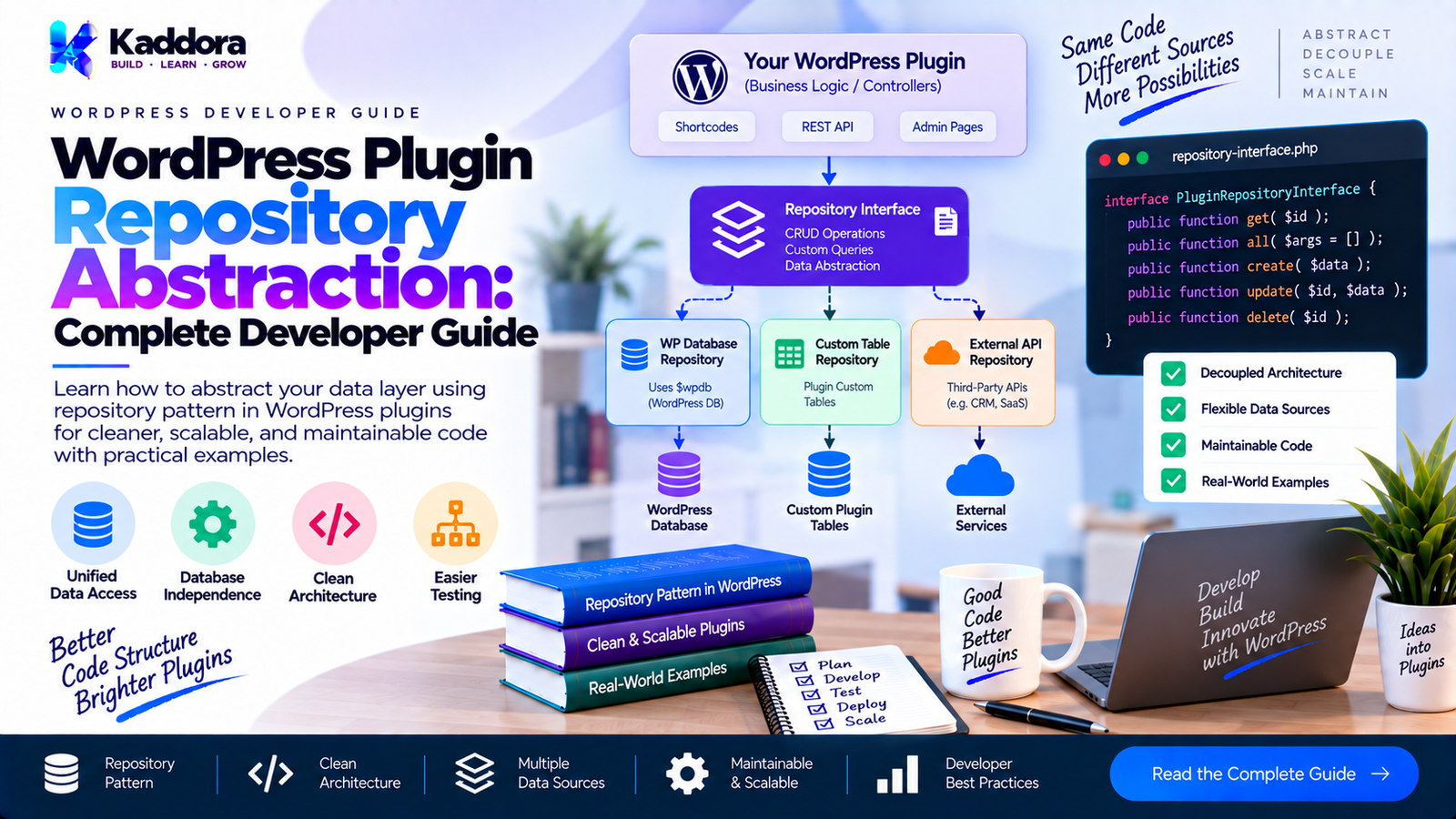
WordPress Plugin Repository Abstraction: Complete
Guide
Introduction
As a WordPress plugin grows, database operations often begin appearing everywhere.
One class retrieves records using $wpdb. Another updates post metadata. An AJAX handler performs a query directly. A REST controller contains another database query. An admin page deletes records using a completely different implementation.
This approach may work initially, but it creates a difficult architecture to maintain.
Business logic becomes tightly coupled to WordPress storage APIs. Database changes require modifications across multiple classes. Testing becomes harder because application services cannot be isolated from the database.
Repository abstraction provides a structured solution.
A repository creates a boundary between application logic and the underlying data source.
Instead of writing:
global $wpdb; $order = $wpdb->get_row( $wpdb->prepare( "SELECT * FROM {$wpdb->prefix}orders WHERE id = %d", $order_id ) );
throughout your plugin, application code can work with:
$order = $order_repository->find( $order_id );
The repository becomes responsible for knowing how the data is stored.
This article explains how to design repository abstractions specifically for WordPress plugins while avoiding unnecessary enterprise-style complexity.
What Is a Repository Abstraction?
A repository is an abstraction around data retrieval and persistence.
Its primary responsibility is to provide application-friendly operations for accessing a particular type of data.
A simplified architecture looks like this:
Admin / REST / AJAX / CLI | v Application Service | v Repository Interface | v Concrete Repository | v WordPress Database / API
The application service should not need to know whether data comes from:
a custom database table
WordPress posts
post meta
user meta
taxonomy terms
options
WooCommerce CRUD objects
an external API
The repository hides those implementation details.
Why Use a Repository in a WordPress Plugin?
Repository abstraction becomes useful when a plugin contains substantial data-related functionality.
Without a repository:
Controller | +-- $wpdb query Admin Page | +-- $wpdb query Cron Job | +-- $wpdb query REST API | +-- $wpdb query
With a repository:
Controller ----\ Admin Page -----\ Cron Job --------> Repository REST API -------/ | v Storage
This provides several benefits.
1. Separation of responsibilities
Controllers handle requests.
Services handle business rules.
Repositories handle persistence.
2. Easier testing
Application services can receive a fake repository instead of requiring a real database.
3. Centralized queries
Database logic exists in one predictable location.
4. Easier storage changes
A plugin can potentially move from one storage mechanism to another without rewriting every application service.
5. Better maintainability
Large plugins become easier to navigate because data-access responsibilities have a defined home.
Repository vs Data Access Layer
These concepts are related but should not automatically be treated as identical.
A data access layer generally refers to the technical layer responsible for communicating with storage.
A repository provides an application-oriented abstraction over that storage.
For example:
Application Service | v OrderRepository | v wpdb | v wp_kaddora_orders
The repository may use $wpdb, but the service does not need to know that.
Repository vs Model
A model represents data or domain concepts.
A repository manages persistence.
For example:
final class Order { public function __construct( private int $id, private int $customer_id, private float $total ) {} public function get_id(): int { return $this->id; } public function get_total(): float { return $this->total; } }
The repository retrieves and stores orders.
interface OrderRepositoryInterface { public function find( int $id ): ?Order; public function save( Order $order ): bool; }
The distinction is important.
The order object represents an order.
The repository manages how orders are persisted.
When Should a WordPress Plugin Use Repository Abstraction?
Repository abstraction is particularly useful when a plugin has:
custom database tables
complex queries
multiple data access points
reporting functionality
background processing
REST APIs
AJAX operations
scheduled jobs
multiple storage mechanisms
significant business logic
automated tests
For a tiny plugin that only calls:
get_option( 'my_plugin_setting' );
a repository may add unnecessary complexity.
Good architecture is not about creating the maximum number of classes.
It is about creating useful boundaries.
WordPress Storage Sources
A repository can abstract different WordPress storage mechanisms.
Custom Tables
For large datasets:
wp_kaddora_orders wp_kaddora_order_items wp_kaddora_logs
A repository can encapsulate $wpdb.
Posts and Post Meta
A repository can hide:
get_posts(); get_post_meta(); wp_insert_post(); update_post_meta();
from the application layer.
Users
A user repository can encapsulate:
get_user_by(); wp_update_user(); get_user_meta();
Options
A settings repository can encapsulate:
get_option(); update_option(); delete_option();
External APIs
A repository can even abstract external persistence:
Application Service | v Customer Repository | v Remote API
This allows the application layer to remain independent of the external API's response format.
Designing a Repository Interface
Start with the operations the application actually needs.
For example:
interface OrderRepositoryInterface { public function find( int $id ): ?Order; /** * @return Order[] */ public function find_many( int $page = 1, int $per_page = 20 ): array; public function save( Order $order ): bool; public function delete( int $id ): bool; }
The interface should describe what the application needs, not how the database works.
Avoid exposing implementation-specific methods such as:
execute_raw_sql(); get_database_row(); get_wpdb_result();
Those methods leak storage details into the application architecture.
Implementing a WordPress Repository
Suppose a plugin uses:
wp_kaddora_orders
A concrete repository could be:
final class WpdbOrderRepository implements OrderRepositoryInterface { private string $table; public function __construct( private wpdb $wpdb ) { $this->table = $wpdb->prefix . 'kaddora_orders'; } public function find( int $id ): ?Order { $sql = $this->wpdb->prepare( "SELECT id, customer_id, total FROM {$this->table} WHERE id = %d", $id ); $row = $this->wpdb->get_row( $sql ); if ( ! $row ) { return null; } return new Order( (int) $row->id, (int) $row->customer_id, (float) $row->total ); } }
The application does not need to know anything about $wpdb.
Always Use Prepared Queries
When dynamic values are included in SQL, use $wpdb->prepare().
Incorrect:
$sql = "SELECT * FROM {$table} WHERE id = {$id}";
Correct:
$sql = $wpdb->prepare( "SELECT * FROM {$table} WHERE id = %d", $id );
For strings:
$sql = $wpdb->prepare( "SELECT * FROM {$table} WHERE status = %s", $status );
For identifiers such as table names, do not treat them like ordinary user input.
Build trusted table names from WordPress's database prefix and fixed plugin-controlled names.
Repository CRUD Operations
A repository commonly exposes four broad operations.
Create
public function create( Order $order ): int|false { $result = $this->wpdb->insert( $this->table, [ 'customer_id' => $order->get_customer_id(), 'total' => $order->get_total(), ], [ '%d', '%f', ] ); if ( false === $result ) { return false; } return (int) $this->wpdb->insert_id; }
Read
public function find( int $id ): ?Order { // Query and map the result. }
Update
public function update( int $id, float $total ): bool { $result = $this->wpdb->update( $this->table, [ 'total' => $total, ], [ 'id' => $id, ], [ '%f', ], [ '%d', ] ); return false !== $result; }
Delete
public function delete( int $id ): bool { $result = $this->wpdb->delete( $this->table, [ 'id' => $id, ], [ '%d', ] ); return false !== $result; }
Not Found vs Database Failure
One important repository design decision is distinguishing between:
Record does not exist
and:
Database operation failed
For reads, returning:
null
can clearly represent a missing record.
For writes, returning only false may sometimes be insufficient for complex plugins.
A repository can instead use a structured result or domain exception when the application needs to distinguish different failure types.
Do not introduce elaborate exception hierarchies unless the plugin actually benefits from them.
Mapping Database Rows
Avoid allowing database rows to spread throughout your application.
Instead of:
$row = $repository->find( 10 ); echo $row->customer_id;
map storage data into an application-level representation.
For example:
return new Order( (int) $row->id, (int) $row->customer_id, (float) $row->total );
This creates a boundary:
Database Row | v Repository | v Order | v Application Service
The rest of the application becomes less dependent on database column names.
Pagination
Repositories frequently need pagination.
A basic method can accept:
$page = 1; $per_page = 20;
Then calculate:
$offset = ( $page - 1 ) * $per_page;
The SQL should use prepared values:
$sql = $this->wpdb->prepare( "SELECT id, customer_id, total FROM {$this->table} ORDER BY id DESC LIMIT %d OFFSET %d", $per_page, $offset );
Validate pagination values before executing the query.
For example:
$page = max( 1, $page ); $per_page = min( 100, max( 1, $per_page ) );
This prevents unreasonable query sizes.
Filtering and Sorting
Repositories often need filters.
For example:
find_many( string $status, int $page, int $per_page )
However, dynamic SQL fragments must be handled carefully.
Values can be prepared:
$status
But SQL identifiers such as:
ORDER BY total
should come from an explicit allowlist.
Example:
$allowed_order_by = [ 'id' => 'id', 'total' => 'total', ]; $order_by = $allowed_order_by[ $requested ] ?? 'id';
Then:
$sql = $wpdb->prepare( "SELECT * FROM {$this->table} WHERE status = %s ORDER BY {$order_by} DESC LIMIT %d", $status, $per_page );
Do not insert arbitrary request parameters directly into SQL identifiers.
Repository and Caching
Repositories can also become a useful location for persistence-related caching.
For example:
Application Service | v Order Repository | +---- Cache | +---- Database
A repository might first check an object cache:
$cache_key = 'order_' . $id; $order = wp_cache_get( $cache_key, 'kaddora_orders' );
If no cached object exists, the repository queries storage.
After updating an order, invalidate the cached version:
wp_cache_delete( 'order_' . $id, 'kaddora_orders' );
Caching should remain consistent with the repository's persistence behavior.
Repository and WordPress Object Cache
Do not automatically cache every repository method.
Caching makes sense when:
reads are frequent
data changes less frequently
queries are expensive
cache invalidation is manageable
Caching may add unnecessary complexity when data is rarely requested.
Measure before adding aggressive caching.
Repository and Multisite
WordPress plugins supporting multisite need to consider table naming.
Using:
$wpdb->prefix
is important because it respects the site's database prefix.
For network-wide tables, the architecture may need to distinguish:
$wpdb->base_prefix
from:
$wpdb->prefix
A repository should encapsulate this decision rather than scattering table construction throughout the plugin.
Repository Transactions
Some operations involve multiple database changes.
For example:
Create Order | +-- Create Order | +-- Create Item 1 | +-- Create Item 2 | +-- Create Item 3
If one operation fails, partial persistence may create inconsistent data.
Where the underlying storage and operation support it, a repository or persistence service can coordinate a transaction.
For example:
$this->wpdb->query( 'START TRANSACTION' ); try { // Perform operations. $this->wpdb->query( 'COMMIT' ); } catch ( Throwable $exception ) { $this->wpdb->query( 'ROLLBACK' ); throw $exception; }
Transactions should be used deliberately rather than added to every repository operation.
Repository Dependency Injection
A repository should receive its dependencies instead of creating global infrastructure internally.
For example:
final class WpdbOrderRepository implements OrderRepositoryInterface { public function __construct( private wpdb $wpdb ) {} }
The service can receive the interface:
final class OrderService { public function __construct( private OrderRepositoryInterface $orders ) {} public function get_order( int $id ): ?Order { return $this->orders->find( $id ); } }
Now the service does not depend on $wpdb.
Registering the Repository
If your plugin uses a service container, register the interface with its implementation:
$container->set( OrderRepositoryInterface::class, static function () { global $wpdb; return new WpdbOrderRepository( $wpdb ); } );
Then:
$container->get( OrderService::class );
can receive the repository dependency.
For smaller plugins, a lightweight factory or service registration class may be sufficient.
There is no need to build a complicated dependency injection framework solely for repositories.
Repository Testing
One of the biggest benefits of repository abstraction is testability.
Create a fake repository:
final class InMemoryOrderRepository implements OrderRepositoryInterface { private array $orders = []; public function find( int $id ): ?Order { return $this->orders[ $id ] ?? null; } public function save( Order $order ): bool { $this->orders[ $order->get_id() ] = $order; return true; } }
Now an application service can be tested without a real WordPress database.
$repository = new InMemoryOrderRepository(); $service = new OrderService( $repository );
This makes unit testing significantly easier.
Do Not Create a Generic Base Repository Too Early
A common architecture mistake is creating:
BaseRepository
with dozens of generic methods:
find() find_all() create() update() delete() count() paginate() search() filter() sort()
and then forcing every entity to inherit from it.
WordPress data sources are often different enough that this abstraction becomes awkward.
A post repository is not necessarily equivalent to a custom-table repository.
A WooCommerce repository is not necessarily equivalent to either.
Prefer focused interfaces:
OrderRepositoryInterface CustomerRepositoryInterface SubscriptionRepositoryInterface
when the domain requires them.
Repository for Custom Tables vs WordPress Posts
The repository abstraction can hide major storage differences.
For a custom table:
$wpdb->get_row();
For a post-based implementation:
get_post(); get_post_meta();
The application can still use:
$order_repository->find( $id );
This is especially useful if the storage implementation may evolve.
However, do not introduce multiple repository implementations merely because it is theoretically possible.
Use abstraction where there is a real architectural benefit.
Repository Architecture Example
A practical plugin structure might look like:
plugin/ ├── plugin.php ├── src/ │ ├── Domain/ │ │ └── Order.php │ │ │ ├── Application/ │ │ └── OrderService.php │ │ │ ├── Contracts/ │ │ └── OrderRepositoryInterface.php │ │ │ ├── Infrastructure/ │ │ └── Persistence/ │ │ └── WpdbOrderRepository.php │ │ │ └── Admin/ │ └── OrderPage.php │ └── tests/ └── Unit/
This keeps the repository implementation away from the presentation layer.
Complete Flow
The final request flow might look like:
Admin Request | v OrderPage | v OrderService | v OrderRepositoryInterface | v WpdbOrderRepository | v $wpdb | v Database
The repository is the persistence boundary.
Security Considerations
Repository abstraction does not automatically make a plugin secure.
You still need to:
validate input
sanitize input where appropriate
use prepared SQL
enforce authorization
verify nonces for relevant requests
escape output
avoid exposing sensitive database fields
validate IDs
restrict allowed sorting/filtering values
For example:
if ( ! current_user_can( 'manage_options' ) ) { return; }
belongs to the authorization/request layer where appropriate.
The repository should not become responsible for every security concern in the plugin.
Performance Considerations
A repository should avoid inefficient queries.
Watch for:
N+1 Queries
Bad:
Get 100 orders | +-- Query customer +-- Query customer +-- Query customer +-- ...
Prefer optimized retrieval where appropriate.
Selecting Unnecessary Columns
Instead of:
SELECT *
use:
SELECT id, customer_id, total
when the application only needs those fields.
Missing Indexes
Repository architecture cannot compensate for poorly indexed tables.
Frequently filtered columns should be considered for database indexes based on actual query patterns.
Common Repository Mistakes
1. Putting business logic inside repositories
Avoid:
if ( $order->get_total() > 1000 ) { // Apply business rule. }
Business rules generally belong in domain or application services.
2. Returning raw database rows everywhere
This couples the application to database structure.
3. Building one giant repository
Avoid:
PluginRepository
containing users, orders, products, logs, settings, and everything else.
4. Using raw SQL without preparation
Always use appropriate WordPress database APIs and prepared queries.
5. Overengineering simple storage
Not every get_option() call needs a six-class repository architecture.
6. Ignoring caching consistency
If repository writes update persistent data but stale cached objects remain, the application can produce inconsistent results.
7. Mixing presentation logic with persistence
Repositories should not render HTML.
Avoid:
echo '<tr>';
inside a repository.
Repository Abstraction Best Practices
Follow these principles:
Define repositories around application needs.
Keep SQL and storage APIs inside infrastructure.
Use interfaces when they provide meaningful decoupling.
Use $wpdb->prepare() for dynamic SQL values.
Use $wpdb->insert(), $wpdb->update(), and $wpdb->delete() where appropriate.
Map storage records into useful application objects.
Keep business rules outside repositories.
Keep authorization outside repositories unless the repository specifically represents an authorization boundary.
Use pagination for large datasets.
Validate dynamic sorting and filtering fields through allowlists.
Consider caching for expensive, frequently repeated reads.
Design for multisite when the plugin supports it.
Use focused repository interfaces.
Test application services against fake repositories.
Avoid generic abstractions that do not solve a real problem.
WordPress Plugin Repository Checklist
Before considering your repository architecture complete, verify:
Architecture
Repository responsibilities are clearly defined.
Business logic is outside the repository.
Presentation logic is outside the repository.
Storage details are encapsulated.
Database
$wpdb->prepare() is used correctly.
$wpdb->insert() uses correct formats.
$wpdb->update() uses correct formats.
$wpdb->delete() uses correct formats.
Queries select only necessary fields.
Large queries support pagination.
Dynamic ordering uses an allowlist.
WordPress
$wpdb->prefix is handled correctly.
Multisite behavior is considered where necessary.
WordPress APIs are used where appropriate.
Plugin database tables are properly created and maintained.
Security
Input is validated.
SQL parameters are prepared.
Authorization is enforced at the appropriate layer.
Sensitive fields are not exposed unnecessarily.
Output is escaped by the presentation layer.
Testing
Repository interfaces can be replaced with fakes.
Application services can be tested independently.
Repository integration behavior is tested where necessary.
Why Choose Kaddora?
Kaddora focuses on practical WordPress development patterns that can be applied to real plugin projects.
For developers building complex WordPress plugins, good architecture should not mean adding layers simply to make the code look sophisticated.
A repository abstraction is valuable when it creates a clear boundary between application logic and persistence.
The goal is straightforward:
Simple enough to maintain + Structured enough to scale + WordPress-native enough to integrate properly
This approach is especially useful when developing plugins that contain custom tables, reporting systems, APIs, background jobs, analytics, commerce functionality, or other data-intensive features.
Conclusion
WordPress Plugin Repository Abstraction provides a practical boundary between application logic and data persistence.
Instead of allowing $wpdb, post APIs, metadata functions, or external APIs to spread throughout a plugin, repositories centralize persistence responsibilities.
A well-designed repository can:
isolate database queries
simplify application services
improve testability
support caching
provide consistent data access
reduce coupling
make large plugins easier to maintain
However, repository abstraction should be used thoughtfully.
A small plugin may not need a repository at all. A large plugin with complex persistence requirements can benefit significantly from one.
The most effective WordPress architecture is not the architecture with the most classes. It is the architecture where each layer has a clear responsibility and the complexity matches the actual needs of the plugin.
Frequently Asked Questions
What is a repository in WordPress plugin development?
A repository is an abstraction responsible for retrieving and persisting application data. It hides implementation details such as $wpdb, post APIs, metadata, or external APIs from the application's business logic.
Is the repository pattern useful in WordPress?
Yes, particularly for larger plugins with complex data access, custom tables, APIs, reporting, background processing, and substantial business logic. Small plugins may not need this additional abstraction.
Should a WordPress repository use $wpdb?
A repository that works with a custom database table commonly uses $wpdb. Keeping $wpdb inside the repository prevents database-specific implementation details from spreading through the plugin.
Should repositories contain business logic?
Generally, no. Repositories should focus on persistence and retrieval. Business rules are usually better placed in domain or application services.
How does repository abstraction improve testing?
Application services can depend on a repository interface rather than a real database implementation. Tests can then provide an in-memory or fake repository.
Where should $wpdb->prepare() be used?
When constructing SQL statements containing dynamic values, use $wpdb->prepare() before executing the query. Repository implementations are a natural location for this database-specific work.
Should repositories handle caching?
They can. When caching is directly related to persistence and retrieval, a repository can be a useful boundary for cache reads and invalidation. However, caching should be added only where it solves a real performance problem.
Can one repository use multiple WordPress APIs?
Yes. A repository can combine WordPress APIs when the underlying entity requires data from multiple sources, although complex repositories should be split when their responsibilities become unclear.
Should repositories perform authorization checks?
Authorization is generally better handled by controllers, application services, or dedicated authorization logic. The repository should primarily manage persistence.
What is the difference between a repository and a service?
A repository manages data persistence and retrieval. A service coordinates application operations and business processes using repositories and other dependencies.
Can a repository call an external API?
Yes. A repository can abstract an external persistence or data source, although an API client or gateway may be a better separate abstraction when the integration is substantial.
Does every WordPress plugin need repository abstraction?
No. Repository abstraction should match the plugin's complexity. For a simple plugin with a few options or straightforward WordPress queries, direct WordPress APIs may be clearer.
Why choose Themekaddora?
Themekaddora provides lightweight, responsive, SEO-friendly WordPress themes with fast performance, WooCommerce compatibility, flexible customization, accessibility-conscious design, modern templates, regular updates, and professional support—providing a strong foundation for businesses building digital products and product-focused websites.
Comments (0)