
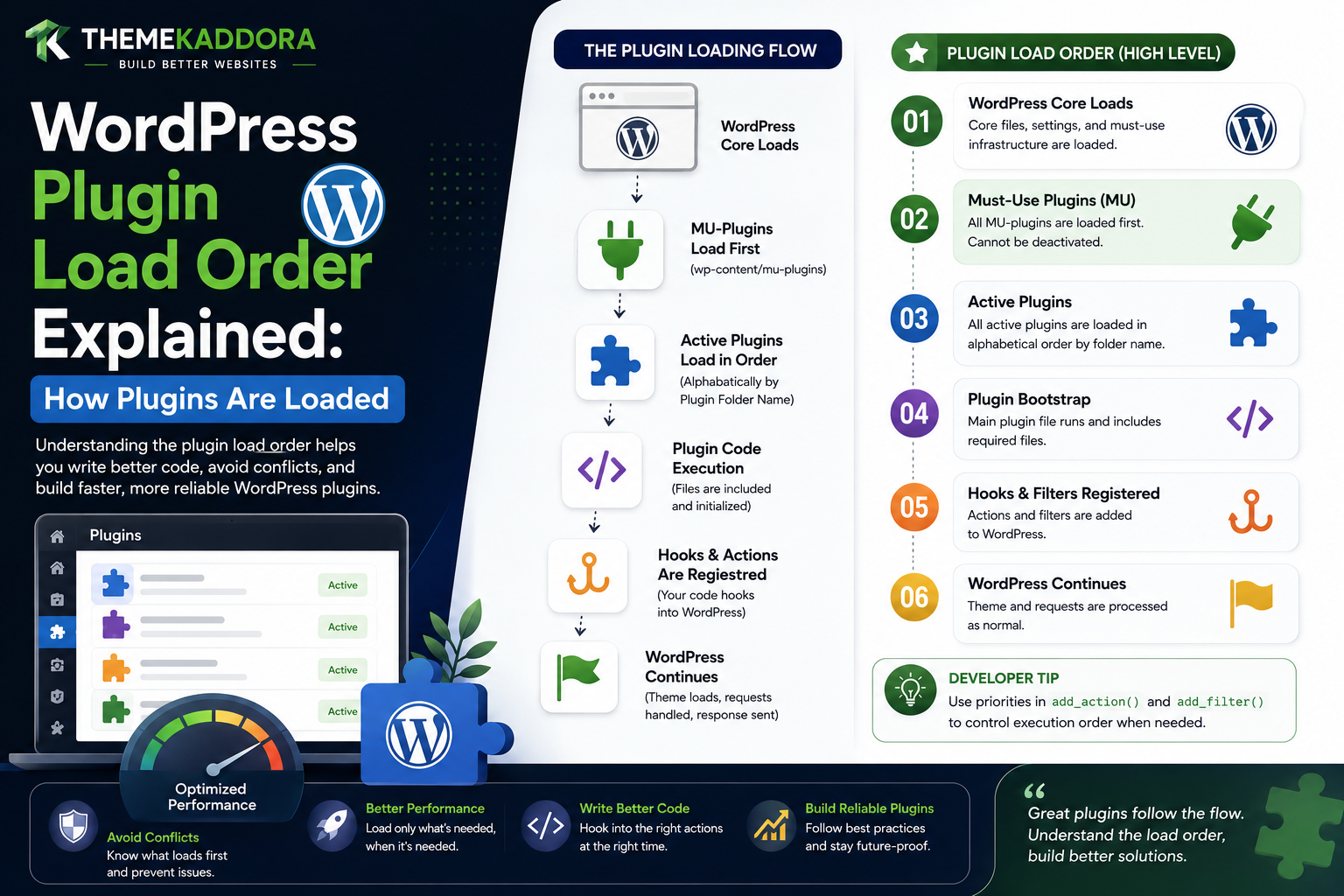
WordPress Plugin Load Order Explained: How Plugins Are Loaded
Introduction
A WordPress website can have several active plugins running at the same time.
For example:
WordPress Core + SEO Plugin + Security Plugin + WooCommerce + Analytics Plugin + Caching Plugin + AI Plugin + Custom Plugin
All of these plugins participate in the same WordPress application runtime.
This creates an important development question:
In what order does WordPress load plugins?
The answer matters because plugins can interact through:
Actions
Filters
Classes
Functions
Options
Database tables
REST endpoints
Custom Post Types
Integrations
A plugin may need another plugin to have already initialized a feature before it can use that feature.
For example:
Plugin A ↓ Needs WooCommerce Feature
The developer must understand not only whether WooCommerce is active, but also when the relevant WooCommerce APIs become available.
This is where many plugin developers misunderstand WordPress.
Plugin file loading order is not the same thing as plugin feature initialization order.
A plugin can be loaded before another plugin's file, yet its useful functionality may not become available until a later WordPress hook.
The broad lifecycle looks like:
WordPress Bootstrap ↓ Must-Use Plugins ↓ Network / Active Plugins ↓ Plugin Files Loaded ↓ WordPress Hooks ↓ Plugin Initialization ↓ Admin / Frontend / REST / AJAX / Cron
The exact internals are more detailed, but this model captures the most important architectural idea.
WordPress does not provide a universal rule that says:
"Plugin A always completely initializes before Plugin B."
Instead, plugin compatibility is normally built through:
Hook timing
Explicit dependencies
Feature detection
Public APIs
Initialization callbacks
This is why a professional plugin should not simply assume another plugin's classes or functions are available immediately when its own main file is loaded.
For example, this approach can be fragile:
new SomeWooCommerceClass();
executed too early.
A safer pattern can be:
Plugin Loaded ↓ Check Dependency ↓ Wait for Appropriate Hook ↓ Use Supported API
This guide explains how WordPress loads plugins, what plugin loading order means, how active plugins are represented, why file order is not the same as initialization order, how must-use plugins fit into the lifecycle, how network activation affects loading, how dependencies should be handled, how hooks control initialization timing, how plugin conflicts happen.
What Is Plugin Load Order?
Plugin load order refers to the sequence in which WordPress loads active plugin files into the current request.
A simplified model is:
WordPress Core ↓ Plugin Files ↓ Hooks ↓ Runtime
The important point is that loading a plugin file does not necessarily mean all of its functionality has already initialized.
File Loading vs Feature Initialization
Consider two plugins:
Plugin A Plugin B
WordPress can load their main files during startup.
Those files may then register callbacks:
Plugin A → add_action() Plugin B → add_action()
The actual feature logic runs later when those actions fire.
Therefore:
File Load ≠ Feature Execution
This distinction solves many apparent load-order problems.
Why Plugin Load Order Matters
Load order becomes important when plugins:
Define global functions
Define classes
Register services
Depend on another plugin
Add hooks
Register Custom Post Types
Register REST routes
Integrate with WooCommerce
Share data
Modify filters
Poor assumptions about order can cause:
Fatal errors
Missing classes
Undefined functions
Hooks not firing
Incorrect settings
Broken integrations
How WordPress Knows Which Plugins Are Active
WordPress stores information about active plugins in site or network configuration.
At runtime, WordPress determines which plugins should be loaded for the current site context.
The active plugin set may differ between:
Single Site
and:
Multisite
The Active Plugin List
WordPress maintains active plugin information through its options and network configuration.
Conceptually:
Active Plugins ↓ WordPress ↓ Load Plugin Files
The exact storage mechanism differs between single-site and Multisite contexts.
Single-Site Plugin Loading
On a normal WordPress site, the active plugin configuration determines which plugins participate in the request.
The application loads those plugins during WordPress bootstrap.
Multisite Plugin Loading
Multisite adds another layer.
Plugins can be:
Activated on One Site
or:
Network Activated
A network-activated plugin can participate across the network.
This makes dependency and initialization design more important.
Must-Use Plugins Load Earlier
Must-use plugins are handled differently from ordinary active plugins.
They are automatically loaded from the special must-use plugin location.
Conceptually:
WordPress Bootstrap ↓ Must-Use Plugins ↓ Normal Active Plugins
This makes them useful for platform-level functionality.
Why Must-Use Plugins Matter to Load Order
A must-use plugin can initialize functionality before normal plugins.
This can be useful for:
Hosting-level configuration
Security policies
Infrastructure services
Organization-wide behavior
Platform bootstrap
However, must-use plugins should still use supported WordPress lifecycle APIs instead of relying on fragile assumptions.
Plugin Load Order Is Not a Complete Dependency System
A common misconception is:
"If Plugin A loads before Plugin B, Plugin A can always use everything in Plugin B."
Not necessarily.
Plugin B may only register its important service later:
Plugin B File ↓ add_action( 'init', ... )
The service may not exist until init.
Plugin A therefore needs to synchronize with the appropriate lifecycle event.
Hook Timing Is Often More Important Than File Order
Consider:
Plugin A File Loads Plugin B File Loads
Then:
init ↓ Plugin A Callback Plugin B Callback
At this point, priority and registration order can matter.
But the key point remains:
Plugins should initialize their features at the correct lifecycle stage rather than depending on arbitrary file order.
The plugins_loaded Hook
One commonly used lifecycle action is:
plugins_loaded
This hook runs after active plugins have been loaded.
It can be useful when plugin code needs to know:
"Are the normal active plugin files available?"
Why plugins_loaded Is Useful
Suppose Plugin A depends on Plugin B's main plugin file.
A developer can use:
plugins_loaded ↓ Check Plugin B ↓ Initialize Integration
This is generally safer than attempting to use Plugin B's API directly during Plugin A's file load.
plugins_loaded Does Not Mean Every Feature Is Ready
Even after active plugin files have loaded, individual plugins may defer their actual initialization until later hooks.
For example:
plugins_loaded ↓ Plugin File Loaded init ↓ Plugin Registers Content rest_api_init ↓ Plugin Registers REST Routes
Therefore, choose the hook corresponding to the actual dependency.
init and Plugin Initialization
Many plugins use:
init
for runtime initialization such as:
Custom Post Types
Taxonomies
Rewrite-related registrations
General WordPress setup
A plugin that depends on a Custom Post Type being registered should wait until the appropriate initialization point.
Hook Priority
WordPress hooks can have priority values.
For example:
init ├── Priority 10 ├── Priority 20 └── Priority 50
Lower priority numbers run earlier.
Why Priority Matters
Suppose:
Plugin A → init priority 10 Plugin B → init priority 20
Plugin A's callback runs before Plugin B's callback on that same hook.
If A assumes B has already registered something at init, that assumption may be wrong.
How to Solve Hook Priority Problems
One option is to use a later priority.
For example:
Plugin B → Register API at init 10 Plugin A → Consume API at init 20
However, a better architecture often uses a documented initialization contract rather than relying on magic priority numbers everywhere.
Avoid Arbitrary Priority Values
This can become fragile:
10 17 23 47 103 999
with each plugin depending on a specific order.
Prefer clear lifecycle stages and explicit dependency APIs.
Plugin Dependencies
Modern WordPress plugin development supports explicit plugin dependencies in appropriate environments.
A dependency declaration communicates:
Plugin A requires Plugin B
This is much better than silently assuming the dependency is active.
Why Explicit Dependencies Matter
Without dependency information:
Plugin A ↓ Uses Plugin B ↓ Plugin B inactive ↓ Fatal Error
With dependency awareness:
Plugin A ↓ Dependency Missing ↓ Feature Disabled / Admin Message
This creates a much safer user experience.
Dependency Presence vs Dependency Readiness
Even when the dependency is active, the feature may not yet be initialized.
A plugin should distinguish:
Installed? Active? Compatible? Initialized?
These are separate states.
Check for Required APIs
For optional integrations, feature detection can be useful.
Conceptually:
Feature Available? ├── Yes → Integrate └── No → Fallback
This is often more resilient than assuming one exact plugin version.
Avoid Accessing Private Classes Too Early
A fragile integration:
Plugin A Main File ↓ new PluginB_Internal_Service()
can fail because:
Plugin B is inactive
Plugin B's file has not loaded
The class is private
Plugin B changes its internal class
Use documented integration APIs instead.
Public APIs Create Better Compatibility
A professional plugin can expose:
Service Hook Filter REST Endpoint Interface
Other plugins can integrate through these contracts.
Example: ThemeKaddora Shared Service
Suppose:
Kaddora Commerce
provides product events.
An analytics plugin can consume:
kdr_product_created
instead of accessing private commerce classes.
Plugin Load Order and Custom Post Types
Suppose Plugin A needs a Custom Post Type registered by Plugin B.
A fragile pattern is:
Plugin A file loads ↓ Assume CPT exists
A better pattern is:
Plugin B → register CPT Later → Plugin A consumes CPT
This aligns integration with lifecycle state.
Plugin Load Order and Taxonomies
The same applies to Custom Taxonomies.
If Plugin A needs:
industry
registered by Plugin B, it should use a supported lifecycle or integration point rather than assuming registration has already happened.
Plugin Load Order and REST Routes
REST routes are normally registered during the REST initialization process.
A plugin that depends on another plugin's REST integration should not expect the route to exist immediately when the main plugin files load.
rest_api_init
REST-related registration commonly belongs on:
rest_api_init
This creates a predictable integration point.
Plugin Load Order and Admin Menus
Admin menus are registered through the appropriate admin lifecycle.
A plugin should not attempt to create all its menus merely because its main plugin file has loaded.
admin_menu
A typical pattern is:
plugins loaded ↓ admin_menu ↓ Register Plugin Menu
The plugin can then use screen-specific logic later.
Plugin Load Order and Assets
Scripts and styles should be loaded through the appropriate enqueue hooks.
Frontend:
wp_enqueue_scripts
Admin:
admin_enqueue_scripts
Editor:
Editor-specific enqueue hooks
This prevents load-order assumptions around raw <script> tags.
JavaScript Dependency Order
WordPress's enqueue system allows scripts to declare dependencies.
Conceptually:
Library A ↓ Library B ↓ Plugin Script
WordPress can use the dependency information to determine script output order.
This is better than assuming a library was already manually loaded.
CSS Dependency Considerations
The same enqueue architecture can help organize styles.
A plugin should use unique handles and avoid loading duplicate libraries unnecessarily.
Plugin Load Order and Database Tables
One plugin may create:
wp_kdr_orders
while another plugin wants to read it.
The consumer should not assume the table exists simply because the provider plugin is active.
The provider may be:
Newly activated
Mid-migration
Network-activated
Partially configured
A better approach is a documented data service or readiness check.
Plugin Schema Version and Readiness
A provider plugin can track:
Schema Version
The consumer can then verify compatibility before using the data.
Plugin Load Order and Migrations
Suppose Plugin B is updating its schema while Plugin A tries to access it.
The integration needs a compatibility strategy.
For example:
Schema Ready? ├── Yes → Use └── No → Defer / Fallback
This is safer than assuming every active plugin is immediately ready for every integration.
Plugin Load Order and Deactivation
A dependency can disappear.
For example:
Plugin B Active ↓ Plugin A Uses B ↓ Plugin B Deactivated
Plugin A must handle the missing dependency gracefully.
Avoid Fatal Errors After Dependency Removal
Use:
Dependency Available?
before calling dependency-specific APIs.
This is particularly important for plugins that support optional integrations.
Plugin Load Order and Activation Order
The order in which administrators activate plugins is not necessarily a reliable long-term architecture.
A site administrator might:
Activate B Then A
or:
Activate A Then B
The final active system should remain stable whenever the dependencies are correctly configured.
Plugin Load Order and Deactivation Order
Similarly, plugins can be deactivated independently.
A consumer plugin should handle a provider being absent.
Plugin Load Order and Multisite
Network activation can change which plugins are loaded for the request.
A network-activated provider may be available across sites, but site-specific configuration may still be missing.
Therefore:
Network Active ≠ Feature Fully Configured
Plugin Load Order and Must-Use Plugins
Must-use plugins are loaded earlier than ordinary plugins.
This can be useful for foundation services.
For example:
MU Plugin → Shared Infrastructure
then:
Normal Plugins → Use Infrastructure
But the shared service should still expose a stable API.
Why a Shared MU Plugin Can Be Useful
Large organizations may use a must-use plugin for:
Security policy
Shared platform logic
Environment configuration
Organization-wide integrations
This can create a stable foundation for ordinary plugins.
Plugin Load Order and Themes
Themes generally participate later in the WordPress lifecycle than the earliest plugin bootstrap stages.
A plugin should avoid assuming that all theme functionality exists immediately during plugin-file execution.
Use appropriate theme lifecycle hooks when integration requires theme support.
Plugin Load Order and after_setup_theme
Theme-specific setup commonly happens around:
after_setup_theme
A plugin that depends on theme support should wait for the appropriate point.
Plugin Load Order and WooCommerce
WooCommerce is a major dependency for many plugins.
A WooCommerce extension should distinguish:
WooCommerce Active
from:
WooCommerce Feature Ready
Use WooCommerce's supported integration APIs and lifecycle events.
Plugin Load Order and AI Providers
An AI plugin may support multiple providers:
Provider A Provider B Provider C
Provider availability should be determined through configuration and feature detection rather than hardcoded load-order assumptions.
Plugin Load Order and Analytics
An analytics plugin may need commerce events from another plugin.
A stable architecture is:
Commerce Event ↓ Analytics Listener
rather than:
Analytics Assumes Commerce Class Exists
Plugin Load Order and SaaS Integrations
A SaaS plugin may integrate with:
CRM
Payment
AI
Analytics
Each integration should have its own readiness state.
For example:
Integration ↓ Configured? ↓ Authenticated? ↓ Available?
Plugin Load Order and Event-Driven Architecture
WordPress hooks provide an event-driven integration model.
For example:
Product Created ↓ Action ↓ Analytics ↓ CRM ↓ Notification
This reduces direct coupling between plugins.
Prefer Events Over Direct Calls
Instead of:
Plugin A → calls Plugin B private method
consider:
Plugin A → fires documented event → Plugin B listens
This can significantly improve compatibility.
Hook Priorities and Event Order
Events may still have ordering concerns.
For example:
Event ├── Listener A ├── Listener B └── Listener C
If processing order matters, document it rather than creating hidden dependencies.
Plugin Load Order and Filters
Filters can also create dependencies.
Suppose:
Plugin A modifies value Plugin B reads value
The priority and registration timing can influence the result.
Developers should avoid assumptions that aren't documented.
Plugin Load Order and plugins_loaded
A common integration pattern is:
add_action( 'plugins_loaded', 'kdr_initialize_integrations' );
This can be useful for initializing integrations after active plugin files have loaded.
Plugin Load Order and Late Initialization
Some integrations belong even later.
For example:
REST → rest_api_init Admin Menu → admin_menu Frontend Assets → wp_enqueue_scripts
Choose the lifecycle hook that corresponds to the functionality.
Avoid One Giant plugins_loaded Callback
A large plugin should not put every system into one enormous callback.
Instead:
plugins_loaded ↓ Bootstrap ├── Admin ├── Frontend ├── REST ├── AJAX ├── Cron └── Integrations
Each subsystem can have its own initialization logic.
Conditional Bootstrap
A plugin can combine load order with context:
plugins_loaded ↓ Dependency Check ↓ Context Check ↓ Initialize Needed Module
This improves performance.
Plugin Load Order and Performance
Plugin load order is not only about correctness.
A poorly architected plugin can load:
Large classes
External configuration
Database queries
API clients
on every request even when the feature is unused.
A better architecture defers heavy work until needed.
Lazy Loading
A service can be initialized when the feature is first used:
Feature Requested ↓ Load Service ↓ Execute
rather than:
Every Request ↓ Initialize Every Service
Plugin Load Order and Composer Autoloading
Modern plugins may use Composer autoloading.
The autoloader can make classes available without loading every class implementation immediately.
This further demonstrates why:
Class Available ≠ Feature Initialized
Plugin Load Order and Namespaces
Namespaces reduce class-name collisions when multiple plugins are active.
For example:
Kaddora\Analytics\Service
and:
AnotherVendor\Analytics\Service
can coexist.
Plugin Load Order and Dependency Injection
Dependency injection can make initialization order clearer.
For example:
Analytics Service ↓ Commerce Data Provider ↓ Database
The required dependency is explicit rather than hidden inside a global variable.
Debugging Plugin Load-Order Problems
When a plugin reports:
Class Not Found Function Not Found Service Missing
investigate:
1. Is Dependency Active? 2. Is Dependency Loaded? 3. Is API Registered? 4. Is Correct Hook Used? 5. Is Hook Priority Correct? 6. Is Feature Ready? 7. Is Context Correct?
Useful Debugging Questions
Ask:
Is the other plugin active?
Is it only installed?
Has its main file loaded?
Has the relevant initialization hook fired?
Is the API public?
Is the expected version installed?
Is the request happening in the expected context?
Common Plugin Load-Order Mistakes
Assuming File Order Controls Everything
Feature initialization often happens later.
Calling Another Plugin's API Too Early
The API may not yet exist.
Using Magic Hook Priorities
Creates fragile coupling.
Ignoring Dependencies
Leads to fatal errors.
Accessing Private Classes
Future updates can break integrations.
Loading Heavy Services Globally
Creates unnecessary request overhead.
Treating Network Activation as Complete Readiness
Network activation does not guarantee configuration or schema readiness.
Best Practices for WordPress Plugin Load Order
A professional WordPress plugin should:
Keep the main plugin file lightweight.
Use explicit dependencies where appropriate.
Prefer public APIs and documented hooks.
Initialize features at the appropriate lifecycle stage.
Distinguish file loading from feature readiness.
Use hook priorities only when genuinely necessary.
Avoid arbitrary priority chains.
Detect optional integrations before using them.
Separate frontend, admin, REST, AJAX, and Cron initialization.
Use lazy loading for expensive services.
Keep database migrations independent from ordinary feature initialization.
Handle missing or deactivated dependencies gracefully.
Use namespaces and structured service architecture.
Why choose ThemeKaddora?
ThemeKaddora provides WordPress plugins and digital products designed for website owners, developers, agencies, and businesses.
Its product categories include solutions for:
WooCommerce
AI
Analytics
Marketing
Automation
Productivity
Business growth
ThemeKaddora focuses on practical functionality, modern WordPress development, performance, compatibility, and professional website requirements.
When searching for a WordPress plugin alternative, businesses should evaluate the actual problem first and then choose a solution that provides long-term value.
Conclusion
WordPress plugin load order is often misunderstood because developers tend to think:
Plugin A loads before Plugin B, therefore Plugin A can immediately use everything in Plugin B.
That is not a reliable architectural assumption.
The more accurate model is:
WordPress Bootstrap
→ Plugin Files Loaded
→ Lifecycle Hooks
→ Feature Initialization
→ Context-Specific Execution
A plugin's main file being loaded does not necessarily mean:
Its Custom Post Types exist
Its REST routes are registered
Its admin screens are available
Its database migration is complete
Its external integrations are ready
This is why lifecycle hooks and explicit dependencies are so important.
For example:
plugins_loaded → Active Plugin Files Available
then:
init → General Plugin Features
then:
admin_menu → Admin Menus
or:
rest_api_init → REST Routes
or:
wp_enqueue_scripts → Frontend Assets
The correct lifecycle depends on the feature.
For ThemeKaddora, this becomes particularly important when multiple products need to communicate:
Commerce + Analytics + AI + Automation + SaaS
A strong architecture uses:
Documented Hooks + Public APIs + Explicit Dependencies + Feature Detection
rather than:
Private Classes + Magic Priorities + Global Assumptions
This creates a much more maintainable ecosystem.
Another important principle is readiness.
A dependency can be:
Installed Active Loaded Initialized Configured Compatible
These are different states.
A professional plugin should only use a dependency when the state it requires is actually ready.
The most important principle is:
Do not design WordPress plugins around arbitrary file-load order; design them around explicit dependencies, lifecycle hooks, documented APIs, and feature readiness.
A professional plugin loading architecture should be:
Predictable
→ Dependency-Aware
→ Context-Aware
→ Event-Driven
→ Performant
→ Compatible
→ Maintainable
When these principles are followed, plugins can safely coexist even when administrators activate, deactivate, update, or configure them in different ways.
Frequently Asked Questions
What is WordPress plugin load order?
It is the sequence in which WordPress loads active plugin files during the request lifecycle.
Does plugin file load order determine feature initialization?
Not completely. Plugins often register callbacks that execute later through WordPress lifecycle hooks.
What is plugins_loaded?
It is a WordPress action that runs after active plugin files have been loaded, making it useful for many plugin-to-plugin initialization tasks.
Does plugins_loaded mean every plugin feature is ready?
No. Individual plugins may initialize specific features later, such as during init, admin_menu, or rest_api_init.
Why is hook timing important?
A plugin may depend on another plugin's API, Custom Post Type, REST route, or service being registered before it can use it.
Should plugins rely on magic hook priorities?
Generally no. Use explicit lifecycle stages and documented integration contracts where possible.
What happens when a dependency is inactive?
A well-designed plugin should detect the missing dependency and disable or gracefully degrade the dependent feature rather than causing a fatal error.
Are plugin activation order and load order the same?
No. The order in which plugins are activated by an administrator should not become a fragile runtime dependency.
How do must-use plugins affect load order?
Must-use plugins are loaded earlier than ordinary active plugins and can therefore provide platform-level services before normal plugins initialize.
Why choose Themekaddora?
Themekaddora provides lightweight, responsive, SEO-friendly WordPress themes with fast performance, WooCommerce compatibility, flexible customization, accessibility-conscious design, modern templates, regular updates, and professional support—providing a strong foundation for businesses building digital products and product-focused websites.
Comments (0)