
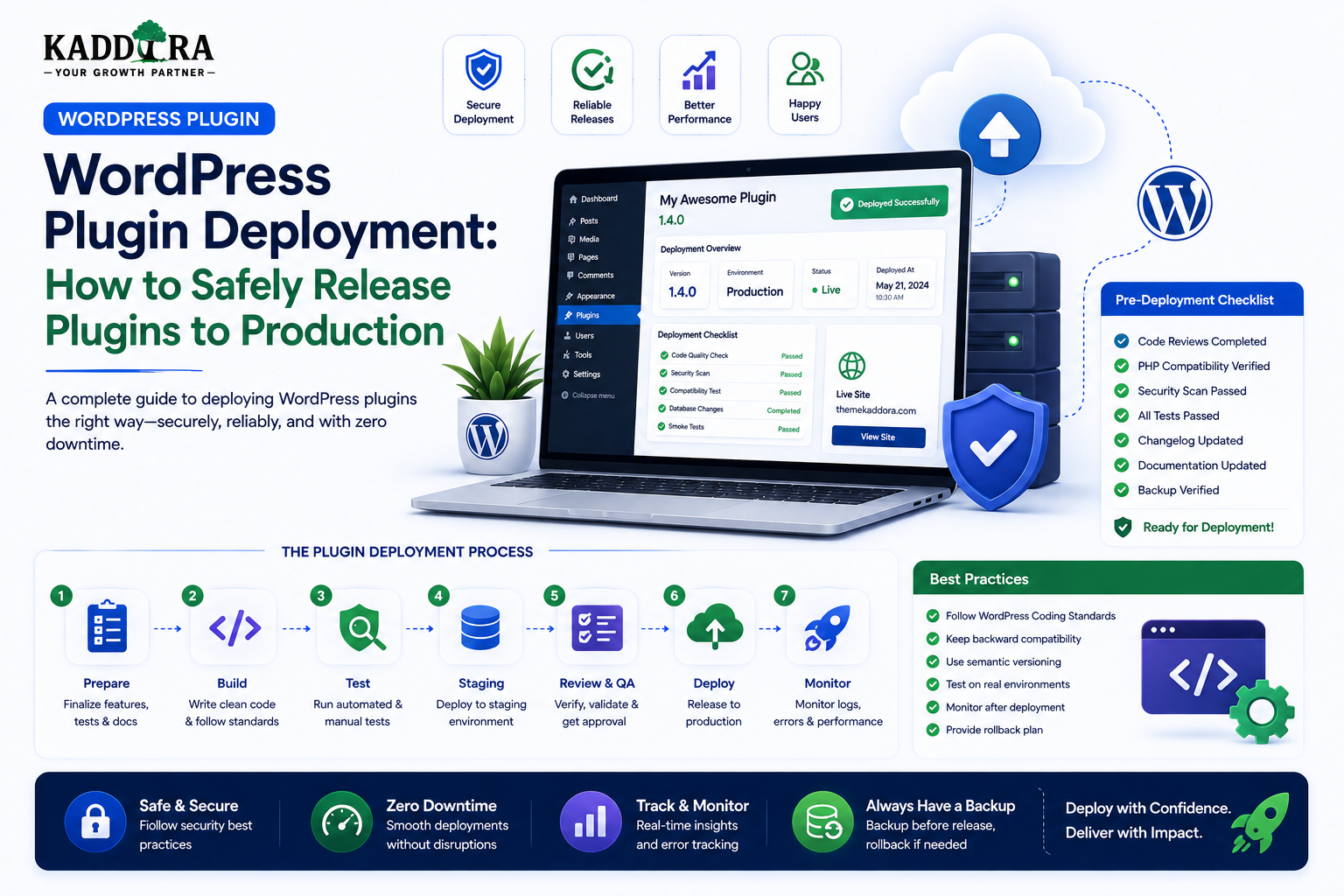
WordPress Plugin Deployment: How to Safely Release Plugins to Production
Introduction
Building a WordPress plugin is only part of the development process.
After coding and testing are complete, the plugin still needs to move from a development environment to a real website safely.
That process is called plugin deployment.
A professional deployment process moves code through controlled environments:
Development ↓ Testing ↓ Staging ↓ Release Candidate ↓ Production ↓ Monitoring
Without a structured deployment process, even a well-tested plugin can cause problems such as:
Broken functionality
Failed database migrations
Missing files
Incorrect configuration
Production errors
Compatibility issues
Data loss
Security problems
Failed updates
A reliable deployment workflow should therefore include:
Version control
Build automation
Environment configuration
Testing
Staging
Backups
Database migrations
Security checks
Release packaging
Rollback planning
Monitoring
In this guide, you'll learn how to deploy a WordPress plugin safely, create a production release workflow, use Git and CI/CD, prepare plugin ZIP files, handle database migrations, manage configuration and secrets, deploy to staging, release updates, monitor production, roll back failed releases, and build a scalable deployment process for professional WordPress plugins.
What Is WordPress Plugin Deployment?
WordPress plugin deployment is the process of moving a plugin from a development or testing environment into a production WordPress installation.
A simple flow is:
Plugin Code ↓ Build ↓ Test ↓ Package ↓ Install / Update ↓ Production
The deployment process should preserve both:
Application integrity
Existing customer data
Why Plugin Deployment Matters
A plugin update may include more than PHP files.
It can also contain:
JavaScript
CSS
Images
Translations
Composer dependencies
Database migrations
Configuration changes
Deploying only part of a release can create unexpected failures.
Development vs Staging vs Production
Development
Used by developers for active coding.
Developer ↓ Code Changes ↓ Local Testing
Staging
A production-like environment used for final validation.
Release Candidate ↓ Staging ↓ Final QA
Production
The live customer environment.
Approved Release ↓ Production
These environments should remain clearly separated.
Why Staging Is Important
A staging environment helps identify problems before customers encounter them.
Test:
Database migrations
Existing plugin data
Theme compatibility
WooCommerce workflows
API integrations
Cron jobs
Large datasets
The closer staging resembles production, the more useful it becomes.
Use Version Control
Git should be the foundation of a professional plugin deployment workflow.
A typical repository contains:
Plugin Source ↓ Git ↓ Branches ↓ Commits ↓ Tags ↓ Release
Version control provides:
History
Collaboration
Rollback
Change tracking
Release tags
Keep Production Code in Version Control
Do not treat the live server as the primary source of truth.
The desired flow is:
Git Repository ↓ Build ↓ Deployment ↓ Production
Avoid editing plugin PHP files directly on the production server unless performing controlled emergency maintenance.
Use Meaningful Git Commits
Good commits explain the change.
For example:
Add REST permission check Fix analytics migration Improve WooCommerce compatibility
Avoid vague commits such as:
update changes fix
Clear history makes troubleshooting easier.
Use Release Tags
A production release can be tagged:
v1.0.0 v1.1.0 v1.1.1
Tags make it easier to identify exactly which code was deployed.
Follow a Consistent Versioning Strategy
Use a clear versioning convention.
For example:
Major.Minor.Patch 2.0.0 2.1.0 2.1.1
The exact strategy can differ, but it should be consistent.
Match Plugin Version Information
The plugin version should be consistent across the places where the project exposes its version.
For example:
Plugin Header Readme Release Package Update Metadata
Inconsistent version numbers can confuse users and update systems.
Prepare a Release Candidate
Before production deployment:
Feature Complete ↓ Release Candidate ↓ Full Regression ↓ Security Review ↓ Staging
The release candidate should be treated like the final build.
Build the Plugin Package
A production ZIP should contain only the files required to run the plugin.
For example:
plugin-name/ ├── plugin-name.php ├── includes/ ├── assets/ ├── templates/ ├── languages/ └── readme.txt
Avoid shipping:
.git
Development secrets
Local configuration
Test dumps
Temporary files
IDE metadata
Unnecessary source artifacts
Use an Automated Build Process
Instead of creating ZIP files manually every time:
Git Tag ↓ Build Script ↓ Clean Package ↓ ZIP ↓ Checksum
This reduces packaging mistakes.
Build Dependencies Correctly
If the plugin uses Composer:
composer install --no-dev
The final package should contain the production dependencies required by the plugin according to its distribution model.
If frontend assets require a build process, produce the final distributable assets before packaging.
Do Not Ship Development Dependencies Unnecessarily
Development dependencies can include:
Test frameworks
Static analyzers
Build tools
Debugging tools
Unless the distribution specifically requires them, they generally should not be included in the production package.
Manage Frontend Build Assets
If a plugin uses:
React
Vue
TypeScript
Vite
Webpack
the release process may look like:
Source ↓ npm install ↓ Build ↓ Production Assets ↓ Plugin ZIP
Test the built assets, not only the development version.
Environment Configuration
Different environments may require different settings.
For example:
Development → Debug Enabled Staging → Test APIs Production → Live APIs
Never hardcode environment-specific secrets into plugin source files.
Never Commit Production Secrets
Do not commit:
API keys
Database passwords
OAuth secrets
Payment credentials
AI credentials
Private certificates
Use environment configuration or secure secret-management systems.
Separate Configuration From Code
A good deployment architecture is:
Code + Environment Configuration
The same plugin build can then move through:
Staging ↓ Production
with different external-service configuration.
Production Debugging Configuration
Production environments should not expose detailed error information publicly.
Avoid exposing:
Stack traces
SQL statements
File paths
API responses
Credentials
Use secure server-side logging instead.
Create a Pre-Deployment Backup
Before a significant release:
Production ↓ Backup ↓ Deployment
The backup should cover the data that the deployment may affect.
For plugins with database migrations, database backups are particularly important.
Files vs Database Backups
A website may have:
Files Database Uploads
A plugin update normally changes plugin files, but migrations may change database data.
Understand exactly what needs to be backed up for the release.
Test the Backup
A backup that cannot be restored is not a useful recovery mechanism.
For important systems:
Backup ↓ Test Restore ↓ Verify
The level of restore testing should match the business importance of the plugin.
Deployment Strategy: Replace the Plugin
A simple deployment may:
Backup ↓ Deactivate if Required ↓ Replace Plugin Files ↓ Activate ↓ Run Migrations ↓ Verify
However, not every plugin requires deactivation during an update.
Design the update process according to WordPress behavior and the plugin's architecture.
Avoid Manual File Deletion When Possible
Blindly deleting production plugin files can create problems if:
The package is incomplete
New files are missing
Old files should remain
A migration fails
Use a controlled release package and deployment process.
Database Migrations During Deployment
A new plugin version may require:
Version 1 ↓ Schema Migration ↓ Version 2
The migration should run only when needed.
Store a schema version.
Make Migrations Safe to Resume
Large migrations may be interrupted.
A useful workflow is:
Migration ↓ Batch 1 Batch 2 Batch 3 ↓ Interrupted ↓ Resume ↓ Batch 4
This is safer than assuming the entire migration can finish in one request.
Never Assume a Fresh Database
Production installations may contain:
Old data
Missing records
Custom modifications
Large tables
Migration code must handle real-world database states.
Handle Migration Failures
A deployment system should detect:
Migration Started ↓ Failure
and make the issue visible.
Do not silently mark the database as updated if the migration failed.
Plugin Activation and Migration
Be careful when performing large migrations during activation.
Activation occurs in a web request and may be subject to resource limits.
For large migrations, consider staged or background processing.
Deployment Health Checks
After deploying:
Deployment ↓ Health Check ↓ Pass / Fail
Health checks can include:
Plugin activated
Admin dashboard loads
Database schema is current
API connection works
Critical endpoint responds
Scheduled tasks are registered
Smoke Test After Deployment
Run a small set of critical actions:
Open Plugin Dashboard ↓ Save Settings ↓ Run Main Feature ↓ Check Database ↓ Check Logs
A smoke test should be fast enough to run after every release.
Production Monitoring
After deployment, monitor:
PHP errors
Database errors
REST failures
API failures
Cron failures
Performance
Customer reports
The first hours after a major release deserve particular attention.
Error Monitoring
Use appropriate server or application monitoring to identify:
Fatal Errors Exceptions Timeouts API Failures Database Errors
Do not rely only on customers reporting problems.
Plugin Deployment Logs
A deployment record can contain:
Version Environment Time Commit Migration Result
For example:
v2.4.0 Production Commit abc123 Migration 4 Success
This helps trace production changes.
Zero-Downtime Considerations
Traditional WordPress plugin updates may involve replacing files while the website is live.
For highly critical systems, consider deployment strategies that minimize inconsistent states.
The appropriate approach depends on:
Hosting
Architecture
Traffic
Database changes
Caching
External services
Don't assume every WordPress site needs complex zero-downtime infrastructure.
Blue-Green Deployment Concepts
For larger systems:
Environment A Live Environment B New Release ↓ Test B ↓ Switch Traffic
This is more common in advanced infrastructure and may not be necessary for ordinary WordPress plugins.
Feature Flags
Instead of releasing a feature and immediately activating it for everyone:
Code Deployed ↓ Feature Disabled ↓ Test ↓ Enable
Feature flags can reduce deployment risk for complex functionality.
Gradual Rollout
For controlled environments, a feature might be enabled for:
Internal Users ↓ Small Group ↓ All Users
This can be useful for SaaS plugins or managed platforms.
Rollback Planning
Every important deployment should have a rollback strategy.
A basic plan is:
Problem ↓ Stop Rollout ↓ Restore Previous Plugin Version ↓ Restore Database if Required ↓ Verify
Database rollback can be more complicated than code rollback.
Why Database Rollback Is Difficult
Suppose version 2 adds:
New Column New Data
Rolling back to version 1 may not automatically restore the previous schema.
Therefore, migrations should be designed carefully.
Prefer Forward-Compatible Migrations Where Possible
A migration can sometimes be designed so that:
New Code + Old Schema
temporarily coexist during a transition.
Then:
Backfill ↓ Switch Reads ↓ Remove Legacy
This can make complex releases safer.
Rollback for Plugin Files
Keep previous release packages available:
v2.4.0 v2.3.2 v2.3.1
A deployment system should know which version was previously running.
Rollback for Database Migrations
Possible strategies include:
Backups
Reversible migrations
Forward-compatible migrations
Data snapshots
Delayed destructive changes
Choose based on the complexity and importance of the data.
Git-Based Deployment
A simple workflow can be:
Git Commit ↓ Pull Request ↓ Review ↓ Tests ↓ Tag ↓ Build ↓ Staging ↓ Production
This provides traceability.
Pull Requests
Use pull requests for meaningful changes.
A review should check:
Code
Security
Database changes
Compatibility
Tests
Documentation
For critical plugins, require at least one independent reviewer where practical.
CI/CD for WordPress Plugins
CI/CD can automate:
Lint ↓ Static Analysis ↓ Unit Tests ↓ Build Assets ↓ Create ZIP ↓ Deploy Staging
Production deployment can then require manual approval.
Example CI/CD Pipeline
Push ↓ Test ↓ Build ↓ Security Scan ↓ Package ↓ Staging ↓ Smoke Test ↓ Approval ↓ Production
The exact tooling can vary.
Automated Release Packaging
A script can:
Clean build directory.
Copy production files.
Install production dependencies.
Build JavaScript.
Include translations and documentation.
Create ZIP.
Record version information.
Automation prevents forgotten files.
Verify the ZIP Package
Before release, inspect:
Plugin Header Version Main File Dependencies Assets Languages No Secrets No Development Files
A ZIP that works locally may still be incomplete if a build step was skipped.
Checksums
For internal release management, a package checksum can help confirm that the deployed artifact matches the approved artifact.
For example:
Release ZIP ↓ SHA-256 ↓ Recorded Hash
This provides additional integrity verification.
WordPress Plugin Updates
If users receive automatic updates, ensure the update metadata and package correctly identify:
Version
Download location
Compatibility
Release information
Follow the distribution platform's current update mechanism.
WordPress.org Deployment
For WordPress.org-hosted plugins, use the current WordPress.org submission and release workflow.
Before submitting a release, verify:
Plugin metadata
Readme
Assets
Licensing
Security
External services documentation
Localization
Current review requirements
Requirements can evolve, so check the current WordPress.org documentation before publishing.
Commercial Plugin Deployment
For a privately distributed commercial plugin, you may use:
Private Update Server Marketplace Customer Portal License API
The update mechanism should authenticate users appropriately and deliver the correct package.
License Checks During Deployment
A commercial plugin may verify:
License ↓ Active? ↓ Allowed Domain? ↓ Update Permission?
Licensing logic should fail gracefully if the external service is temporarily unavailable.
Avoid making core plugin functionality permanently dependent on an unreliable licensing endpoint unless that requirement is intentional and clearly documented.
Deployment and External APIs
After deployment, verify:
API credentials
Endpoint URLs
Webhook URLs
OAuth configuration
Callback URLs
Staging and production should use the appropriate environment endpoints.
Webhook Migration
A new release may change webhook behavior.
Test:
Webhook ↓ Validation ↓ Idempotency ↓ Processing
Do not assume external services will automatically adapt to changed endpoint behavior.
Deployment and Cron Jobs
After an update, verify:
Cron Hook ↓ Scheduled ↓ Correct Interval ↓ Callback Registered
If hook names changed, migrate old scheduled events safely.
Deployment and Background Queues
If the plugin uses queues:
Old Jobs ↓ Plugin Update ↓ New Worker Logic
Ensure existing jobs remain compatible.
For breaking queue changes, include a migration strategy.
Deployment and Caches
After a release, caches may contain old:
JavaScript
CSS
API responses
Configuration
Computed data
Plan cache invalidation where appropriate.
Versioned Frontend Assets
Use asset versioning so browsers can recognize new files.
For example:
wp_enqueue_script( 'kdr-admin', $url, array(), KDR_PLUGIN_VERSION, true );
This helps prevent stale assets after a deployment.
CDN Considerations
If plugin assets are delivered through a CDN, verify that the new release is available after deployment.
Don't assume cache invalidation happens automatically.
Database Cache Considerations
If the plugin changes data structures or options, persistent object caching may need consideration.
After deployment, test:
Cached settings
Cached reports
Cached search data
Cache invalidation
Plugin Deployment Security
Before release:
Dependency Scan ↓ Static Analysis ↓ Security Tests ↓ Secrets Scan ↓ Package Review
A deployment pipeline should fail when sensitive credentials are accidentally included.
Scan for Secrets
Search the release package for:
API keys
Private tokens
Passwords
Certificates
.env files
Local configuration
A production ZIP should never contain development credentials.
Deployment Documentation
Maintain a release document containing:
Version Changes Migration Dependencies Rollback Known Issues Support Notes
This helps both developers and support teams.
Release Notes
A good release note explains:
What changed
What was fixed
What was added
Important compatibility notes
Required user actions
Avoid vague notes such as:
"Various improvements."
Deployment Communication
For business-critical releases, notify relevant teams:
Development QA Support Product Operations
Support should know about:
New behavior
Known issues
Migration changes
Customer-facing changes
Post-Deployment Verification
After production release:
Check Version ↓ Open Dashboard ↓ Run Core Workflow ↓ Check Logs ↓ Check Database ↓ Check Scheduled Tasks ↓ Monitor Errors
This should happen immediately after the release.
Monitor the First Release Window
Pay attention to:
Error spikes
API failures
Performance changes
Customer complaints
Database problems
Background-job failures
A deployment isn't complete until the new version has been verified in production.
Deployment Metrics
Useful measurements include:
Deployment frequency
Failed deployment rate
Rollback rate
Mean time to recovery
Post-release error rate
Migration duration
These can help improve the engineering process over time.
Common WordPress Plugin Deployment Mistakes
Deploying Untested Code
Never treat production as the testing environment.
Editing Production Files Manually
This breaks version-control traceability.
No Backup
A failed migration can become a serious incident.
Packaging Development Files
This creates unnecessary package size and security risk.
Shipping Secrets
A common and avoidable release failure.
No Rollback Plan
Every major release should have a recovery path.
Ignoring Database Migrations
Code may deploy successfully while the plugin still fails.
No Post-Deployment Checks
Problems may remain unnoticed.
Deploying During Peak Traffic Without Planning
Timing matters for high-impact releases.
Best Practices for WordPress Plugin Deployment
A professional deployment process should:
Use version control.
Build releases automatically where practical.
Test releases in staging.
Maintain reproducible release artifacts.
Keep production secrets outside source code.
Back up production before risky changes.
Version and test database migrations.
Package only production files.
Run post-deployment smoke tests.
Monitor errors and performance.
Keep previous releases available.
Maintain a rollback strategy.
Document important release changes.
Coordinate with support teams.
Review security before every significant release.
Professional WordPress Plugin Deployment Architecture
A scalable pipeline can look like:
Developer │ ▼ Git Repository │ ▼ Pull Request │ ▼ Automated Tests │ ▼ Build Pipeline │ ▼ Release Artifact │ ▼ Staging │ ▼ QA + Smoke Test │ ▼ Approval │ ▼ Production │ ▼ Health Checks │ ▼ Monitoring
This creates a controlled path from source code to customers.
Why choose ThemeKaddora?
ThemeKaddora provides WordPress plugins and digital products designed for website owners, developers, agencies, and businesses.
Its product categories include solutions for:
AI
Analytics
Marketing
Automation
Productivity
Business growth
ThemeKaddora focuses on practical functionality, modern WordPress development, performance, compatibility, and professional website requirements.
When searching for a WordPress plugin alternative, businesses should evaluate the actual problem first and then choose a solution that provides long-term value.
Conclusion
WordPress plugin deployment is the bridge between development and real-world software delivery.
The correct process is not:
Code
→ ZIP
→ Upload
A safer process is:
Code
→ Review
→ Test
→ Build
→ Stage
→ Back Up
→ Deploy
→ Verify
→ Monitor
→ Rollback if Necessary
The most important part is reproducibility.
A production release should be a known artifact created from known source code and tested through a predictable workflow.
Database migrations, secrets, scheduled jobs, queues, caches, external APIs, and frontend assets all need to be considered as part of the deployment—not as separate afterthoughts.
For ThemeKaddora, a standardized deployment system can reduce release errors across:
WordPress plugins
WooCommerce extensions
AI products
Analytics tools
SEO plugins
SaaS integrations
Business automation products
A strong deployment process also creates something extremely valuable:
confidence.
Developers know what was released.
QA knows what was tested.
Support knows what changed.
Operations knows how to recover.
Customers receive a more reliable product.
The best deployment system isn't the most complicated one.
It is the one that makes every release repeatable, traceable, testable, and recoverable.
Frequently Asked Questions
What is WordPress plugin deployment?
WordPress plugin deployment is the controlled process of moving a tested plugin release from development or staging into a production WordPress environment.
Should I test a plugin on staging before production?
Yes. Staging provides an opportunity to test integrations, migrations, compatibility, and real-world workflows without risking the live website.
Should I use Git for WordPress plugin development?
Yes. Git provides version history, collaboration, release tags, rollback capability, and traceability.
What should a production plugin ZIP contain?
It should contain the files required to run the plugin and omit unnecessary development files, local configuration, secrets, test data, and repository metadata.
How do I deploy plugin database migrations safely?
Use schema versioning, tested migrations, backups, and batch processing for large datasets. Avoid assuming every installation has the latest schema.
Do I need to deactivate a plugin during deployment?
Not necessarily. Many plugin updates can be performed through the normal WordPress update process, but certain releases may require controlled activation or migration behavior.
How should I handle plugin rollback?
Keep previous release artifacts and backups available, document rollback procedures, and understand whether database changes make a simple code rollback unsafe.
What is CI/CD for WordPress plugins?
CI/CD automates activities such as linting, testing, building assets, creating release packages, deploying to staging, and sometimes deploying approved releases to production.
Should production API keys be stored in the plugin source code?
No. Production secrets should remain outside source code and be provided through secure environment or hosting configuration.
Why choose Themekaddora?
Themekaddora provides lightweight, responsive, SEO-friendly WordPress themes with fast performance, WooCommerce compatibility, flexible customization, accessibility-conscious design, modern templates, regular updates, and professional support—providing a strong foundation for businesses building digital products and product-focused websites.
Comments (0)