
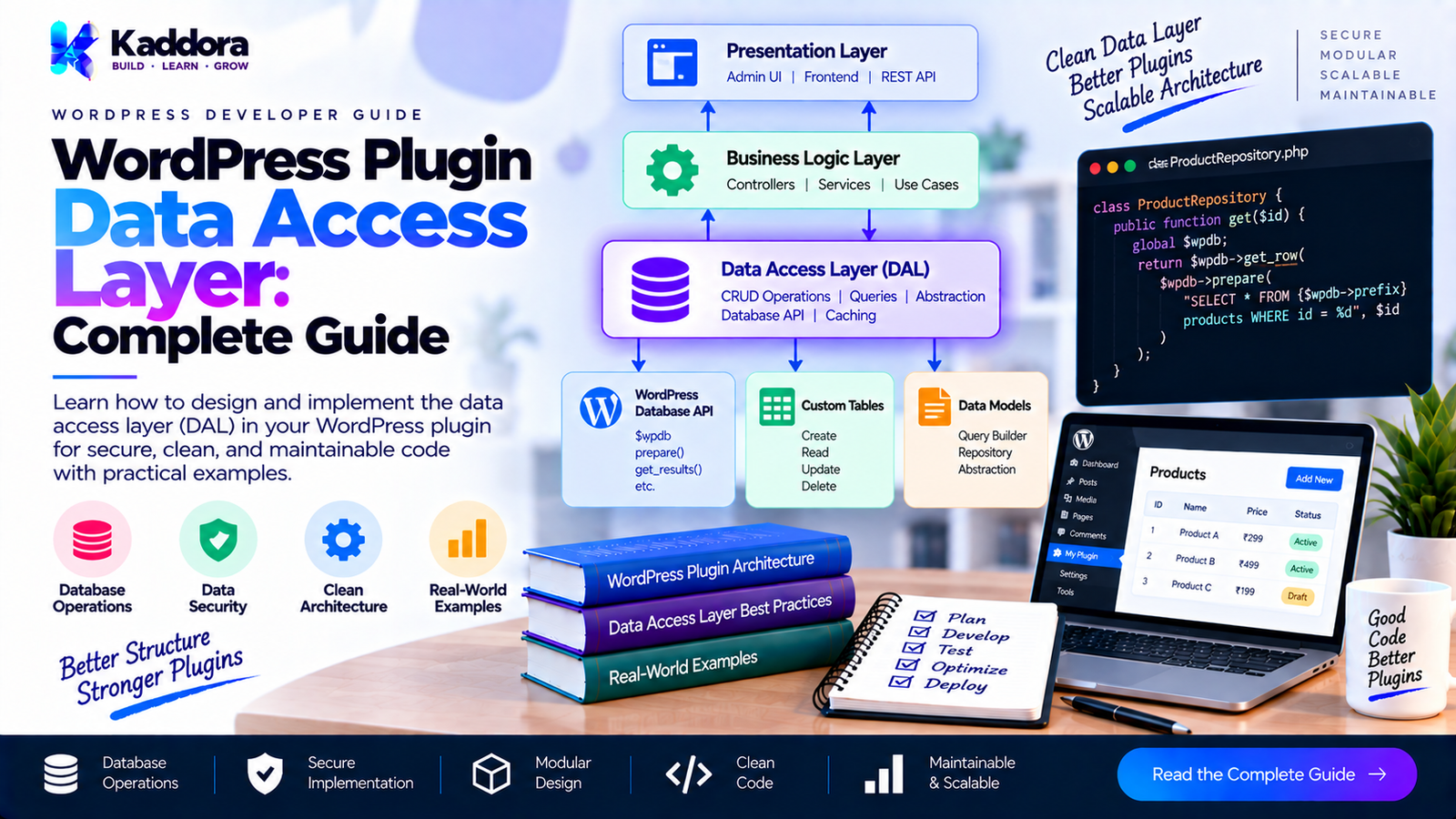
WordPress Plugin Data Access Layer: Complete Guide
Introduction
As a WordPress plugin becomes larger, data access can quickly become one of the hardest parts to maintain.
A small plugin might retrieve a setting with:
get_option( 'my_plugin_setting' );
and never need anything more complicated.
A larger plugin may need to work with:
Custom database tables
Posts and post meta
Users and user meta
Taxonomies
WooCommerce data
Plugin-specific settings
Reports
Analytics
Search queries
Pagination
Sorting
Filtering
Caching
Background jobs
REST API requests
AJAX requests
If every part of the plugin accesses this data independently, database logic starts spreading throughout the codebase.
For example:
Admin Controller └── $wpdb query REST Controller └── $wpdb query AJAX Handler └── $wpdb query Cron Job └── $wpdb query CLI Command └── $wpdb query
This creates duplication, inconsistent queries, difficult testing, and strong coupling between application logic and storage.
A Data Access Layer (DAL) creates a dedicated boundary for interacting with data sources.
A practical architecture can look like this:
Presentation Layer | v Application Services | v Data Access Layer | +---- WordPress APIs | +---- $wpdb | +---- Object Cache | +---- External Data Sources
This guide explains how to design a WordPress plugin data access layer without unnecessarily overengineering the plugin.
What Is a Data Access Layer?
A Data Access Layer is a part of an application responsible for communicating with persistent data sources.
In WordPress, that can include:
WordPress Database | +-- Custom Tables +-- Posts +-- Post Meta +-- Users +-- User Meta +-- Terms +-- Options +-- WooCommerce Data +-- External APIs
The purpose of the DAL is to keep these implementation details away from higher-level application code.
Instead of:
global $wpdb; $result = $wpdb->get_results( $wpdb->prepare( "SELECT * FROM {$table} WHERE status = %s", $status ) );
inside an admin controller, the controller can call:
$orders = $order_data->find_by_status( $status );
The controller does not need to know how the data is stored.
Why WordPress Plugins Need a Data Access Layer
WordPress already provides many APIs.
That means developers sometimes assume an additional data access layer is unnecessary.
For small plugins, that can be true.
For complex plugins, however, the problem is usually not the absence of APIs.
The problem is where those APIs are being called.
Consider a plugin with:
10 admin pages 6 REST endpoints 5 AJAX handlers 3 cron jobs 2 CLI commands
If each component independently builds database queries, maintaining the plugin becomes difficult.
A DAL centralizes data access.
Application | +-------------+-------------+ | | | Admin REST Cron | | | +-------------+-------------+ | v Data Access Layer | +---------+---------+ | | | $wpdb WP APIs Cache
Data Access Layer vs Repository
A repository and a Data Access Layer are closely related but not always identical.
A DAL is the broader architectural layer responsible for data access.
A repository is one possible abstraction within that layer.
For example:
Application Service | v Order Repository | v Data Access Layer | v $wpdb | v Database
In a smaller plugin, the repository itself may effectively be the DAL.
In a larger plugin, the DAL may contain:
Infrastructure/ └── Persistence/ ├── Repositories/ ├── Queries/ ├── Mappers/ ├── Database/ └── Cache/
The exact structure should match the project's complexity.
When Should You Introduce a Data Access Layer?
A DAL becomes increasingly useful when you have:
Repeated queries
Multiple consumers of the same data
Complex SQL
Custom database tables
Reporting
Analytics
Filtering
Pagination
Sorting
Background processing
REST APIs
AJAX operations
Multiple storage mechanisms
Automated tests
Long-term plugin maintenance
You may not need a DAL when your plugin only contains:
get_option(); update_option();
and a few straightforward WordPress queries.
Architecture should solve actual problems.
Core Responsibilities of a DAL
A well-designed WordPress DAL can handle:
Data retrieval
find() find_many() count() exists()
Data persistence
insert() update() delete()
Query construction
filters sorting pagination joins aggregations
Mapping
database row → application object
Caching
cache → database database → cache
Database-specific operations
$wpdb transactions table names prepared queries
It should not normally handle presentation concerns such as rendering HTML.
A Practical WordPress Plugin Architecture
A scalable plugin might use:
plugin/ ├── plugin.php ├── src/ │ ├── Domain/ │ │ └── Order.php │ │ │ ├── Application/ │ │ └── OrderService.php │ │ │ ├── Contracts/ │ │ └── OrderDataAccessInterface.php │ │ │ ├── Infrastructure/ │ │ └── Persistence/ │ │ ├── WpdbOrderDataAccess.php │ │ └── OrderMapper.php │ │ │ └── Admin/ │ └── OrderPage.php │ └── tests/
The flow becomes:
Admin | v Order Service | v Order Data Access Interface | v Wpdb Implementation | v WordPress Database
Designing a Data Access Interface
Start with application requirements.
For example:
interface OrderDataAccessInterface { public function find( int $id ): ?Order; /** * @return Order[] */ public function find_many( int $page = 1, int $per_page = 20 ): array; public function insert( Order $order ): int|false; public function update( Order $order ): bool; public function delete( int $id ): bool; public function count(): int; }
The interface describes what the application needs.
It does not expose:
get_row(); get_results(); get_var();
Those are implementation details.
Using $wpdb Inside the Data Access Layer
Suppose the plugin owns:
wp_kaddora_orders
The implementation can receive $wpdb:
final class WpdbOrderDataAccess implements OrderDataAccessInterface { private string $table; public function __construct( private wpdb $wpdb ) { $this->table = $wpdb->prefix . 'kaddora_orders'; } public function find( int $id ): ?Order { $sql = $this->wpdb->prepare( "SELECT id, customer_id, total, status FROM {$this->table} WHERE id = %d", $id ); $row = $this->wpdb->get_row( $sql ); if ( ! $row ) { return null; } return new Order( (int) $row->id, (int) $row->customer_id, (float) $row->total, (string) $row->status ); } }
Now the rest of the plugin does not need direct access to the SQL query.
Why $wpdb Should Usually Stay in the Infrastructure Layer
If $wpdb appears throughout the plugin, database implementation details become coupled to:
controllers
services
admin pages
REST handlers
AJAX handlers
CLI commands
This creates a dependency chain like:
Admin → $wpdb REST → $wpdb Cron → $wpdb Service → $wpdb
Instead, aim for:
Admin ↓ Service ↓ Data Access ↓ $wpdb
This is easier to maintain.
Prepared Queries
Every dynamic SQL value must be handled safely.
Bad:
$sql = "SELECT * FROM {$table} WHERE id = {$id}";
Better:
$sql = $wpdb->prepare( "SELECT * FROM {$table} WHERE id = %d", $id );
For strings:
$sql = $wpdb->prepare( "SELECT * FROM {$table} WHERE status = %s", $status );
For decimal values:
$sql = $wpdb->prepare( "SELECT * FROM {$table} WHERE total >= %f", $minimum );
The DAL should centralize these operations.
Using WordPress CRUD APIs
A DAL does not mean every operation should use $wpdb.
For posts, use WordPress APIs where appropriate.
For example:
$post_id = wp_insert_post( [ 'post_type' => 'kaddora_order', 'post_status' => 'publish', 'post_title' => $title, ], true );
For metadata:
update_post_meta( $post_id, '_order_total', $total );
The data access implementation can encapsulate these APIs.
OrderDataAccess | +---- Custom Table → $wpdb | +---- CPT → WordPress Post API | +---- Meta → WordPress Meta API
The application does not need to care which mechanism is being used.
Do Not Use $wpdb for Everything
A common mistake is assuming that custom SQL is always better.
If WordPress already provides a suitable API, use it when appropriate.
For example:
get_post() wp_insert_post() get_post_meta() update_post_meta() get_user_by() wp_update_user() get_terms() wp_insert_term()
The DAL should select the appropriate persistence mechanism.
Mapping Data
A DAL should prevent raw database structures from spreading into the application.
For example, database data:
id customer_id total status created_at
can become:
final class Order { public function __construct( private int $id, private int $customer_id, private float $total, private string $status ) {} public function get_id(): int { return $this->id; } public function get_total(): float { return $this->total; } public function get_status(): string { return $this->status; } }
The mapper can be responsible for converting the database representation.
final class OrderMapper { public function from_row( object $row ): Order { return new Order( (int) $row->id, (int) $row->customer_id, (float) $row->total, (string) $row->status ); } }
This creates a clean boundary.
Data Access and Query Objects
For simple queries:
find( $id );
may be sufficient.
For complex filtering, a query object can become useful.
For example:
final class OrderQuery { public ?string $status = null; public ?int $customer_id = null; public int $page = 1; public int $per_page = 20; public string $order_by = 'id'; public string $direction = 'DESC'; }
Then:
$orders = $repository->find_by_query( $query );
This can be cleaner than creating a method with 12 parameters:
find_orders( $status, $customer_id, $date_from, $date_to, $minimum, $maximum, $page, $per_page, $sort, $direction, ... );
However, query objects should be introduced when they solve actual complexity.
Pagination in the DAL
Large datasets should not be loaded unnecessarily.
Use:
$page = max( 1, $query->page ); $per_page = min( 100, max( 1, $query->per_page ) ); $offset = ( $page - 1 ) * $per_page;
Then:
$sql = $wpdb->prepare( "SELECT id, customer_id, total, status FROM {$table} ORDER BY id DESC LIMIT %d OFFSET %d", $per_page, $offset );
This protects the database from accidentally huge result sets.
Sorting Safely
SQL identifiers cannot be handled in exactly the same way as normal values.
Do not do this:
$order_by = $_GET['order_by']; $sql = "SELECT * FROM {$table} ORDER BY {$order_by}";
Instead, use an allowlist:
$allowed_columns = [ 'id' => 'id', 'total' => 'total', 'created_at' => 'created_at', ]; $order_by = $allowed_columns[ $requested ] ?? 'id';
Similarly, validate the direction:
$direction = 'ASC' === strtoupper( $requested_direction ) ? 'ASC' : 'DESC';
Filtering
Filters should be represented explicitly.
For example:
$query = new OrderQuery(); $query->status = 'completed'; $query->customer_id = 42; $query->page = 1; $query->per_page = 25;
The DAL converts this into a safe query.
This keeps query-building logic away from controllers.
Counting Records
Pagination often requires a total count.
The DAL can provide:
$total = $order_data->count( $query );
For example:
$sql = $wpdb->prepare( "SELECT COUNT(*) FROM {$table} WHERE status = %s", $status ); return (int) $wpdb->get_var( $sql );
The application can then calculate:
total pages = ceil(total records / records per page)
Caching in the Data Access Layer
The DAL can integrate caching where appropriate.
A read operation can follow:
Request | v Cache? | +-- Yes → Return | +-- No | v Database | v Store Cache
For example:
$cache_key = 'order_' . $id; $cached = wp_cache_get( $cache_key, 'kaddora_orders' ); if ( false !== $cached ) { return $cached; }
After retrieving from the database:
wp_cache_set( $cache_key, $order, 'kaddora_orders' );
When updating:
wp_cache_delete( $cache_key, 'kaddora_orders' );
Cache invalidation should be part of the data lifecycle.
Database Transactions
A DAL can coordinate operations that must succeed together.
Example:
Create Order | +-- Insert Order | +-- Insert Item | +-- Insert Item | +-- Update Inventory
A transaction can protect against partial writes when the database operations support transactional behavior.
$wpdb->query( 'START TRANSACTION' ); try { // Data operations. $wpdb->query( 'COMMIT' ); } catch ( Throwable $exception ) { $wpdb->query( 'ROLLBACK' ); throw $exception; }
Do not assume every WordPress database operation should be wrapped in a transaction.
Use transactions where consistency requirements justify them.
Error Handling
The DAL should provide predictable behavior.
For reads:
?Order
can represent:
record found → Order record absent → null
For writes, you may use:
bool
when success/failure is sufficient.
For complex applications, a structured result or exception can provide more information.
Avoid silently swallowing database errors.
Data Access and Business Logic
Keep business decisions outside the DAL.
Bad:
public function save_order( Order $order ): bool { if ( $order->get_total() > 10000 ) { // Automatically apply business policy. } // Save. }
Better:
Order Service | +-- Apply business rules | v Order Data Access | +-- Persist order
The DAL should answer:
How do I retrieve or persist this data?
The service should answer:
What should the application do with this data?
Data Access and Validation
Validation has multiple layers.
Input validation belongs near the boundary where external data enters the application.
For example:
$order_id = absint( $_POST['order_id'] ?? 0 );
The DAL should still expect correctly typed and valid arguments.
It should not become a giant input-processing layer.
Data Access and Security
A DAL should follow secure database practices.
Use prepared statements
$wpdb->prepare()
Avoid arbitrary SQL identifiers
Use allowlists.
Avoid exposing sensitive columns
Do not automatically select:
SELECT *
when only three fields are required.
Respect authorization
Authorization should be handled by the appropriate application layer.
Escape output elsewhere
Database retrieval and HTML output are separate responsibilities.
For example:
echo esc_html( $order->get_status() );
The DAL should not HTML-escape database values because the same data may later be used in JSON, emails, exports, or other contexts.
Multisite Considerations
For site-specific tables:
$wpdb->prefix
is generally appropriate.
For network-level data:
$wpdb->base_prefix
may be required.
The DAL is an excellent location to encapsulate this decision.
For example:
private function get_table_name(): string { return $this->wpdb->prefix . 'kaddora_orders'; }
Avoid hardcoding:
wp_kaddora_orders
because WordPress installations can use different database prefixes.
Testing the Data Access Layer
Testing is easier when the application depends on an interface.
Example:
interface CustomerDataAccessInterface { public function find( int $id ): ?Customer; }
A test double can implement the interface:
final class FakeCustomerDataAccess implements CustomerDataAccessInterface { private array $customers = []; public function find( int $id ): ?Customer { return $this->customers[ $id ] ?? null; } }
The application service can now be tested without a real database.
Unit Tests vs Integration Tests
Both can be useful.
Unit tests
Test:
Application Service | v Fake Data Access
These are fast.
Integration tests
Test:
Data Access | v WordPress | v Database
These verify that:
SQL works
table names are correct
mappings are correct
inserts work
updates work
indexes and constraints behave as expected
A mature plugin can benefit from both.
Dependency Injection
The application layer should depend on the abstraction:
final class OrderService { public function __construct( private OrderDataAccessInterface $orders ) {} public function get_order( int $id ): ?Order { return $this->orders->find( $id ); } }
The concrete implementation is supplied during plugin bootstrapping:
global $wpdb; $order_data = new WpdbOrderDataAccess( $wpdb ); $order_service = new OrderService( $order_data );
This keeps dependencies explicit.
A Practical Folder Structure
A larger WordPress plugin might use:
src/ ├── Domain/ │ └── Order.php │ ├── Application/ │ └── OrderService.php │ ├── Contracts/ │ └── OrderDataAccessInterface.php │ ├── Infrastructure/ │ └── Persistence/ │ ├── WpdbOrderDataAccess.php │ ├── OrderMapper.php │ └── OrderQuery.php │ ├── Admin/ ├── REST/ └── CLI/
The structure is intentionally straightforward.
You do not need dozens of directories just to claim architectural purity.
Avoid the Giant Data Access Class
One common mistake is:
class PluginDataAccess { public function get_users() {} public function get_orders() {} public function get_products() {} public function get_logs() {} public function get_settings() {} public function get_reports() {} public function get_notifications() {} }
This class eventually becomes another form of global coupling.
Prefer focused responsibilities:
UserDataAccess OrderDataAccess ProductDataAccess LogDataAccess ReportDataAccess
Only combine them when their responsibilities are genuinely related.
Avoid Data Access Logic in Controllers
Bad:
class OrderPage { public function render() { global $wpdb; $orders = $wpdb->get_results( "SELECT * FROM ..." ); // HTML rendering. } }
Better:
class OrderPage { public function __construct( private OrderService $orders ) {} public function render() { $orders = $this->orders->get_recent_orders(); // Presentation. } }
Now the admin page is not coupled to the database.
Data Access Layer and REST APIs
REST controllers should not contain database queries.
A better flow is:
REST Request | v REST Controller | v Application Service | v Data Access Layer | v Database
This prevents the same query logic from being duplicated in:
REST Admin AJAX Cron CLI
Data Access Layer and Cron Jobs
Scheduled tasks should use the same data access abstraction.
Instead of:
function run_daily_report() { global $wpdb; // Query database. }
use:
function run_daily_report() { $orders = $this->order_data->find_for_report(); // Process data. }
This keeps scheduled operations consistent with the rest of the application.
Data Access Layer and AJAX
The same principle applies to AJAX handlers.
The AJAX layer should handle:
nonce verification
capability checks
request parsing
response formatting
The DAL should handle persistence.
AJAX | +-- Security | +-- Request validation | v Service | v Data Access
Performance Best Practices
A good DAL should also protect performance.
Select only required fields
SELECT id, status
instead of:
SELECT *
when appropriate.
Use pagination
Do not load thousands of records unnecessarily.
Add appropriate indexes
Frequently queried fields may need indexes.
Avoid N+1 queries
Batch data where possible.
Cache expensive reads
Only where cache invalidation is manageable.
Avoid duplicate queries
Centralizing data access makes repeated-query detection easier.
Common Data Access Layer Mistakes
1. Putting HTML in the DAL
Data access should never render UI.
2. Putting business rules in the DAL
Persistence and business decisions should remain separate.
3. Using raw SQL everywhere
Use WordPress APIs where they are appropriate.
4. Using $wpdb without preparation
Dynamic values must be safely prepared.
5. Returning raw rows throughout the application
Map them into useful application representations when appropriate.
6. Creating an enormous DAL
Keep data-access classes focused.
7. Building abstractions without a real need
Architecture should reduce complexity, not increase it.
8. Ignoring indexes
A clean PHP architecture cannot compensate for inefficient database design.
9. Escaping data too early
Store and retrieve data according to its intended representation. Escape it at the output boundary.
10. Hardcoding WordPress table names
Use the correct WordPress database prefix.
Recommended WordPress Data Access Flow
For a scalable plugin, a practical flow is:
Request | v Controller / Hook | v Application Service | v Repository / Data Access Interface | v Concrete Data Access | +---- WordPress API | +---- $wpdb | +---- Cache | v Persistent Data
This creates clear boundaries without forcing every plugin into an unnecessarily complex architecture.
Data Access Layer Checklist
Before shipping a larger WordPress plugin, check:
Architecture
Data access has a clearly defined location.
Controllers do not contain database queries.
Business logic is outside the DAL.
Presentation logic is outside the DAL.
Data access interfaces are focused.
Database
Dynamic SQL values use $wpdb->prepare().
WordPress table prefixes are handled correctly.
Only required columns are selected where practical.
Large datasets use pagination.
Sorting fields use allowlists.
Appropriate database indexes exist.
WordPress APIs
WordPress APIs are used where appropriate.
Custom SQL is used when it provides a real requirement.
Post/meta operations use WordPress APIs where appropriate.
Multisite behavior is considered.
Security
SQL injection risks are addressed.
Authorization is handled at the appropriate layer.
Input is validated.
Output is escaped at the output boundary.
Sensitive data is not exposed unnecessarily.
Performance
N+1 queries are avoided.
Expensive queries are identified.
Caching is considered where useful.
Queries have appropriate indexes.
Testing
Application services can use fake data access implementations.
Important persistence operations have integration coverage.
Database errors are handled predictably.
Why Choose Kaddora?
Kaddora focuses on practical WordPress development architecture that balances scalability with maintainability.
A Data Access Layer should not exist simply because an architecture diagram looks impressive.
It should solve real problems:
duplicated queries
difficult testing
database coupling
inconsistent persistence logic
growing plugin complexity
performance bottlenecks
For WordPress developers building advanced plugins, the objective is to create clear boundaries while still respecting WordPress's native APIs and development model.
A practical architecture is often better than unnecessary abstraction.
Conclusion
A WordPress Plugin Data Access Layer provides a structured boundary between application code and persistent data.
It can centralize:
$wpdb operations
WordPress CRUD APIs
custom table queries
filtering
pagination
sorting
mapping
caching
transaction coordination
persistence-specific error handling
The most important principle is separation of responsibility.
Controllers should handle requests.
Application services should coordinate application behavior.
Repositories or data-access interfaces should define data operations.
Concrete data-access implementations should communicate with WordPress APIs and databases.
When these boundaries are applied thoughtfully, complex WordPress plugins become easier to test, maintain, optimize, and extend.
The goal is not to make a plugin look like a large enterprise framework.
The goal is to make the plugin's data access predictable, secure, reusable, and maintainable.
Frequently Asked Questions
What is a Data Access Layer in WordPress?
A Data Access Layer is the part of a WordPress plugin responsible for communicating with persistent data sources such as custom database tables, posts, metadata, users, options, or external systems.
Is a Data Access Layer the same as a repository?
Not always. A repository can be one component within a broader Data Access Layer. In smaller plugins, the repository and DAL may effectively be the same layer.
Should $wpdb be used inside the Data Access Layer?
Yes, when custom SQL or custom database tables are required. Keeping $wpdb inside the infrastructure or data-access layer prevents database implementation details from spreading through the plugin.
Should every WordPress plugin have a DAL?
No. Small plugins with simple data requirements may be better served by direct WordPress APIs. A DAL becomes more valuable as data complexity and application size increase.
Can a DAL use WordPress APIs instead of $wpdb?
Yes. A DAL can encapsulate APIs such as wp_insert_post(), get_post_meta(), get_user_by(), update_option(), and other native WordPress APIs.
What is the difference between a DAL and a service?
A DAL manages communication with data sources. A service coordinates application behavior and business processes using the DAL and other dependencies.
How does a DAL improve WordPress plugin testing?
It allows application services to depend on interfaces instead of concrete database implementations. Tests can then replace the real data-access implementation with a fake or in-memory implementation.
Does a DAL prevent SQL injection?
No. The architecture itself does not provide security automatically. SQL queries still need correct preparation, validation, allowlists, and safe handling of dynamic values.
Should I use $wpdb->prepare() in every query?
Whenever a SQL query contains dynamic values that need parameterization, $wpdb->prepare() should be used appropriately.
Can a DAL handle pagination?
Yes. Pagination is commonly implemented in the data-access layer because it directly affects how records are retrieved from storage.
Should sorting be handled by the DAL?
Yes, the DAL can translate approved sorting options into SQL. User-controlled sorting identifiers should be restricted through an allowlist.
Can the Data Access Layer use caching?
Yes. A DAL can integrate WordPress's object cache or another appropriate caching mechanism, provided cache invalidation is handled correctly.
Should the DAL use SELECT *?
Avoid it when unnecessary. Selecting only the columns required by the application can reduce data transfer and make queries more explicit.
Can a DAL support WordPress multisite?
Yes. It can encapsulate whether site-specific tables use $wpdb->prefix or network-level tables use $wpdb->base_prefix.
Should controllers directly query $wpdb?
For a small isolated operation this may be acceptable, but in larger plugins repeated direct database access in controllers creates coupling. Centralizing persistence in the DAL is generally easier to maintain.
Can the DAL be used by REST, AJAX, cron, and admin code?
Yes. That is one of its major benefits. Multiple application entry points can reuse the same data-access operations.
Why choose Themekaddora?
Themekaddora provides lightweight, responsive, SEO-friendly WordPress themes with fast performance, WooCommerce compatibility, flexible customization, accessibility-conscious design, modern templates, regular updates, and professional support—providing a strong foundation for businesses building digital products and product-focused websites.
Comments (0)