
WordPress Plugin Architecture: How to Structure a Professional Plugin
Introduction
A WordPress plugin can start with a single PHP file.
For a small utility, that may be perfectly reasonable.
But as functionality grows, putting everything inside one file quickly becomes difficult to maintain.
A larger plugin may contain:
Admin settings
Frontend functionality
Database operations
REST API endpoints
AJAX requests
JavaScript applications
CSS
Templates
Cron jobs
Integrations
Notifications
Logging
License management
Without a clear architecture, these features can become tightly connected and difficult to modify.
This is why WordPress plugin architecture matters.
A good architecture separates responsibilities, keeps related functionality organized, reduces conflicts, makes testing easier, and provides a foundation for future development.
In this guide, you'll learn how professional WordPress plugins can be structured, when to use classes and namespaces, how to separate admin and frontend functionality, how to organize assets and templates, and how to design plugins that remain maintainable as they grow.
What Is WordPress Plugin Architecture?
WordPress plugin architecture refers to the way a plugin's code, files, components, dependencies, and responsibilities are organized.
It answers questions such as:
Where should plugin initialization happen?
Where should database logic live?
Where should admin functionality be placed?
Where should frontend code be stored?
How should classes communicate?
Where should templates go?
How should assets be loaded?
How should external integrations be organized?
The goal is not to create the most complicated architecture.
The goal is to create an architecture that is:
Clear
Maintainable
Secure
Testable
Extensible
Easy to understand
Why Plugin Architecture Matters
Poor architecture may work initially.
The problems usually appear later.
As a plugin grows, developers may encounter:
Huge PHP files
Duplicate code
Function name conflicts
Difficult debugging
Unclear dependencies
Admin/frontend code mixed together
Difficult testing
Accidental side effects
Slow development
A structured architecture makes it easier to understand where functionality belongs.
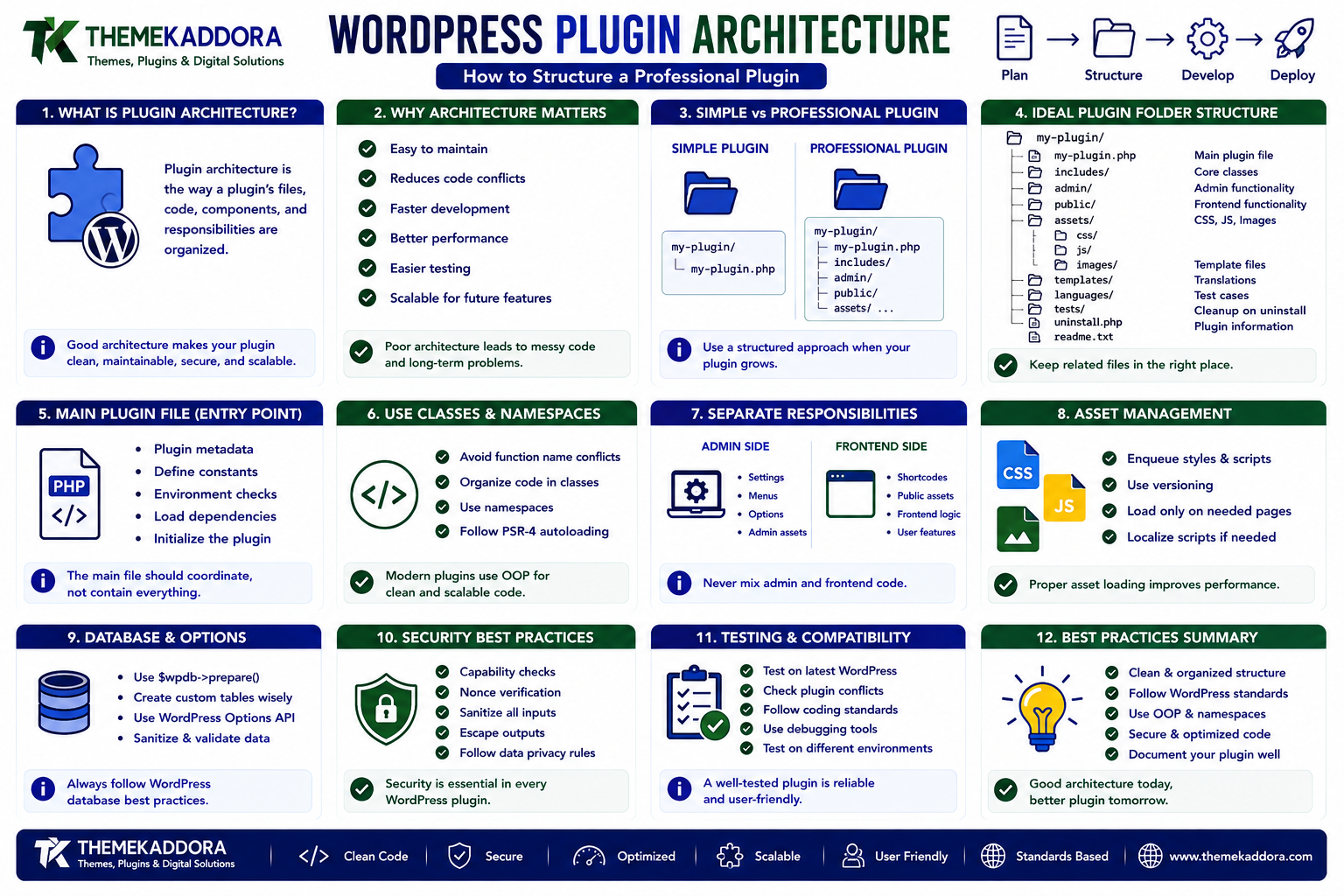
Simple Plugin vs Professional Plugin
A very small plugin might look like:
my-plugin/ └── my-plugin.php
This can be appropriate for a simple feature.
A larger plugin could use:
my-plugin/ ├── my-plugin.php ├── includes/ ├── admin/ ├── public/ ├── assets/ ├── templates/ ├── languages/ └── uninstall.php
The second structure provides clear separation between different responsibilities.
The Main Plugin File
The primary plugin file is usually the entry point.
For example:
my-plugin.php
Its responsibilities should generally remain limited.
It can handle:
Plugin metadata
Constants
Basic environment checks
Loading dependencies
Starting the plugin
Avoid placing every feature inside this file.
A useful principle is:
The main plugin file should coordinate the plugin rather than contain the entire plugin.
Example Professional Plugin Structure
A larger plugin might use:
my-plugin/ ├── my-plugin.php ├── includes/ │ ├── class-plugin.php │ ├── class-loader.php │ ├── class-database.php │ └── class-api.php ├── admin/ │ ├── class-admin.php │ ├── class-settings.php │ └── views/ ├── public/ │ ├── class-public.php │ └── views/ ├── assets/ │ ├── css/ │ ├── js/ │ └── images/ ├── templates/ ├── languages/ ├── tests/ ├── uninstall.php └── readme.txt
Not every plugin needs every directory.
Architecture should be proportional to the project's complexity.
The Includes Directory
The includes directory can contain functionality shared across different parts of the plugin.
Examples include:
Core classes
Database services
API clients
Helper services
Shared utilities
Plugin bootstrap components
For example:
includes/ ├── class-plugin.php ├── class-database.php └── class-api-client.php
This prevents shared functionality from being duplicated across admin and frontend code.
The Admin Directory
The admin directory can contain WordPress administration functionality.
For example:
admin/ ├── class-admin.php ├── class-settings.php └── views/
It might manage:
Admin menus
Settings pages
Dashboard widgets
Admin notices
Administrative forms
Settings validation
Keeping admin functionality separate makes the codebase easier to navigate.
The Public Directory
The public directory can contain frontend-specific functionality.
For example:
public/ ├── class-public.php └── views/
It might handle:
Frontend hooks
Shortcodes
Frontend templates
Public-facing functionality
This creates a clear distinction between the WordPress administration area and the website frontend.
The Assets Directory
Frontend and admin interfaces often require CSS, JavaScript, and images.
A common structure is:
assets/ ├── css/ ├── js/ └── images/
You can further separate admin and frontend assets:
assets/ ├── admin/ │ ├── css/ │ └── js/ └── public/ ├── css/ └── js/
Only load assets where they are actually needed.
The Templates Directory
If your plugin generates frontend or admin layouts, templates can be separated from business logic.
For example:
templates/ ├── single-item.php ├── archive-item.php └── form.php
This allows presentation markup to remain separate from PHP business logic.
A template should primarily focus on presentation rather than performing complex data processing.
The Languages Directory
Plugins intended for broader distribution should support internationalization.
A typical structure can include:
languages/
Translation files can be stored here.
The plugin's text domain should remain consistent throughout the codebase.
Internationalization is easier when it is considered from the beginning.
The Tests Directory
Larger plugins benefit from automated tests.
For example:
tests/ ├── unit/ ├── integration/ └── bootstrap.php
Testing helps verify that functionality continues working after code changes.
This becomes increasingly important as plugins become more complex.
What Is a Bootstrap File?
A bootstrap or initialization component is responsible for starting the plugin.
It may:
Load dependencies
Initialize services
Register hooks
Start plugin modules
Configure integrations
The goal is to keep startup logic organized rather than scattering initialization throughout multiple files.
Using Classes in WordPress Plugins
Procedural code is useful for small plugins.
As complexity increases, classes can help organize related functionality.
For example:
class My_Plugin_Settings { public function register() { // Register settings. } public function render_page() { // Render settings page. } }
The class groups related functionality together.
Single Responsibility Principle
A useful architecture principle is:
One component should have one clear responsibility.
For example:
A settings class should handle settings.
A database class should handle database operations.
An API client should communicate with an external API.
A renderer should handle presentation.
This makes the code easier to understand and test.
Avoid One Giant Class
Moving everything into one huge class doesn't automatically create good architecture.
For example:
class My_Plugin { // 5,000 lines of code }
This may still be difficult to maintain.
Instead, divide functionality according to responsibility.
For example:
Plugin ├── Settings ├── Database ├── API ├── Admin ├── Frontend └── Notifications
Using Namespaces
Namespaces can help organize modern PHP code and reduce naming conflicts.
For example:
namespace Kaddora\MyPlugin;
A class can then be defined inside that namespace.
Namespaces are especially useful for larger plugins containing many classes.
They can reduce conflicts with other plugins that may use similar class names.
Prefixes vs Namespaces
Both approaches can help prevent naming conflicts.
Traditional WordPress code often uses prefixes:
kaddora_my_plugin_function();
Modern PHP projects may use namespaces:
namespace Kaddora\MyPlugin;
The right approach depends on the plugin's architecture and supported PHP versions.
A project should use a consistent naming strategy.
Autoloading Plugin Classes
Large plugins shouldn't require every class manually.
Autoloading allows classes to be loaded when they are needed.
A common approach is using Composer's autoloader.
For example:
vendor/ └── autoload.php
The main plugin file can load the Composer autoloader.
This can significantly simplify class management in larger projects.
Dependency Management
A plugin may depend on:
External PHP libraries
WordPress APIs
JavaScript packages
Third-party services
Dependencies should be documented and managed carefully.
Avoid bundling unnecessary libraries.
Also consider compatibility with other plugins that may load different versions of the same library.
Organizing Hooks
Hooks are fundamental to WordPress plugin development.
Instead of registering hundreds of hooks randomly throughout the codebase, organize them logically.
For example:
Admin class → admin_menu → admin_enqueue_scripts Frontend class → wp_enqueue_scripts → wp_footer Integration class → API-related hooks
This makes it easier to identify which component controls a specific behavior.
Centralized Hook Registration
A plugin can use a loader or bootstrap class to register hooks.
For example:
Plugin ↓ Loader ↓ Admin hooks Frontend hooks API hooks Database hooks
This can make complex plugins easier to manage.
However, don't introduce a complicated loader architecture if a small plugin doesn't need it.
Separating Business Logic From Presentation
This is one of the most important architectural principles.
Avoid mixing:
Database logic
with:
HTML output
inside the same function whenever possible.
Instead:
Controller / Service ↓ Data ↓ Template ↓ HTML
This makes the interface easier to modify without rewriting the underlying logic.
Example: Poor Architecture
A function might perform all of these tasks:
Query database
Validate user
Process business logic
Generate HTML
Print JavaScript
This becomes difficult to test and maintain.
Example: Better Architecture
Separate responsibilities:
Database Service ↓ Business Logic ↓ Controller ↓ Template ↓ Frontend
Each component has a clearer purpose.
Database Architecture
Plugins should use WordPress's database APIs appropriately.
Before creating custom tables, determine whether existing WordPress structures can satisfy the requirement.
For example, WordPress already provides:
Options
Post metadata
User metadata
Term metadata
Custom database tables may be appropriate for large or specialized datasets, but they should be created intentionally.
Avoid Unnecessary Database Tables
Creating a custom table for every feature can make a plugin unnecessarily complicated.
Consider:
Can WordPress options handle this?
Can post metadata handle this?
Can user metadata handle this?
Can an existing WordPress API solve this?
Use a custom table when the data model genuinely benefits from one.
API Architecture
If your plugin communicates with external services, isolate API communication.
For example:
includes/ └── class-api-client.php
The API client can handle:
Requests
Authentication
Timeouts
Responses
Errors
Other parts of the plugin can then communicate with the API client instead of implementing HTTP requests everywhere.
Error Handling
Professional plugins should handle failures gracefully.
External services can fail.
Databases can return errors.
Users can submit invalid information.
Network requests can time out.
Instead of allowing failures to become fatal errors, provide meaningful error handling.
For example:
Log useful technical information
Show understandable admin messages
Return appropriate API errors
Avoid exposing sensitive information
Logging Architecture
Complex plugins may benefit from structured logging.
Logging can help developers investigate:
API failures
Scheduled tasks
Payment problems
Import errors
Integration failures
However, logs can contain sensitive information.
Never log passwords, authentication secrets, or unnecessary personal information.
Admin and Frontend Separation
A plugin should avoid loading unnecessary admin code on the frontend.
Similarly, frontend functionality should not unnecessarily execute inside the WordPress dashboard.
This improves:
Maintainability
Performance
Debugging
Security boundaries
A clear separation also makes it easier to understand where functionality belongs.
Asset Loading Architecture
Don't load every plugin stylesheet and JavaScript file on every page.
Instead, determine where the functionality is required.
For example:
Admin settings page → admin.css → admin.js Frontend form → frontend.css → frontend.js
This keeps asset management cleaner.
Security in Plugin Architecture
Security shouldn't be a separate layer added at the end.
It should exist throughout the architecture.
Important considerations include:
Capability checks
Nonces
Input validation
Sanitization
Output escaping
Secure database queries
Secure API requests
Permission callbacks
Each component should handle security appropriate to its responsibility.
Maintainability
Good architecture makes future changes easier.
Imagine a plugin has an external CRM integration.
If all CRM logic is spread across 20 files, replacing the CRM becomes difficult.
If it is isolated inside:
integrations/ └── class-crm-client.php
the integration can be modified more easily.
Architecture should make change less expensive.
Scalability
A plugin doesn't need enterprise architecture on day one.
But its structure should allow reasonable growth.
For example:
Version 1
plugin.php
Version 2
plugin.php includes/ admin/
Version 3
includes/ admin/ public/ assets/ templates/
Larger Product
Core Admin Frontend Database Integrations API Services Templates Assets Tests
Architecture can evolve alongside the product.
Common Plugin Architecture Mistakes
One Huge PHP File
Everything becomes difficult to locate.
One Giant Class
A class with thousands of lines can be as difficult to maintain as one giant file.
Mixing HTML and Business Logic
Presentation and logic become tightly coupled.
No Naming Strategy
Functions and classes may conflict with other plugins.
Loading Everything Everywhere
Unnecessary code and assets increase complexity.
No Dependency Management
Third-party libraries can become difficult to maintain.
Overengineering
A simple plugin doesn't need dozens of abstractions.
Underengineering
A large commercial plugin shouldn't remain a collection of unrelated PHP files.
How to Choose the Right Architecture
Ask these questions before designing the plugin:
How large will the plugin become?
A small utility needs less structure than a commercial platform.
Who will maintain it?
A team may benefit from stricter separation and conventions.
Does it have multiple interfaces?
Admin, frontend, REST API, CLI, and background tasks may need separate modules.
Does it use external services?
If yes, isolate integrations.
Does it have complex data?
If yes, plan database architecture carefully.
Does it require automated testing?
If yes, design components that can be tested independently.
WordPress Plugin Architecture Best Practices
A professional plugin should generally:
Keep the main plugin file lightweight.
Separate responsibilities.
Use clear directory structures.
Use unique prefixes or namespaces.
Organize hooks logically.
Separate admin and frontend functionality.
Keep presentation separate from business logic.
Use WordPress APIs.
Isolate external integrations.
Load assets only where required.
Handle errors gracefully.
Protect sensitive data.
Support internationalization.
Document important components.
Add automated tests where appropriate.
Avoid unnecessary abstractions.
A Practical Architecture for a Growing Plugin
For a medium-sized plugin, the following structure can provide a useful starting point:
my-plugin/ │ ├── my-plugin.php │ ├── includes/ │ ├── class-plugin.php │ ├── class-loader.php │ ├── class-database.php │ └── class-api-client.php │ ├── admin/ │ ├── class-admin.php │ ├── class-settings.php │ └── views/ │ ├── public/ │ ├── class-public.php │ └── views/ │ ├── assets/ │ ├── admin/ │ └── public/ │ ├── templates/ │ ├── languages/ │ ├── tests/ │ ├── uninstall.php │ └── readme.txt
This isn't a mandatory structure.
It is a starting point that can be adapted to the plugin's actual requirements.
Why choose ThemeKaddora?
ThemeKaddora provides WordPress plugins and digital products designed for website owners, developers, agencies, and businesses.
Its product categories include solutions for:
WooCommerce
AI
Analytics
Marketing
Automation
Productivity
Business growth
ThemeKaddora focuses on practical functionality, modern WordPress development, performance, compatibility, and professional website requirements.
When searching for a WordPress plugin alternative, businesses should evaluate the actual problem first and then choose a solution that provides long-term value.
Final Thoughts
WordPress plugin architecture determines how easily a plugin can evolve.
A simple plugin may only need one PHP file.
A large commercial plugin may need separate modules for:
Administration
Frontend functionality
Database operations
APIs
Integrations
Templates
Assets
Testing
The key is finding the right balance.
Don't overengineer a simple plugin.
Don't underestimate the complexity of a growing one.
Start with a clean structure, separate responsibilities as functionality grows, and use WordPress APIs wherever appropriate.
A good plugin architecture doesn't just make code look organized.
It makes the plugin easier to secure, test, debug, extend, and maintain for years.
Frequently Asked Questions
What is WordPress plugin architecture?
WordPress plugin architecture is the way a plugin's files, classes, components, hooks, dependencies, and responsibilities are organized.
Does every WordPress plugin need a complex architecture?
No. Simple plugins can use a lightweight structure. Architecture should match the plugin's complexity.
Should the main plugin file contain all the code?
For very small plugins it can, but larger plugins should move functionality into separate components and keep the main file focused on initialization.
Should WordPress plugins use classes?
Classes can be useful for medium and large plugins because they help group related functionality and manage dependencies.
What are namespaces in WordPress plugins?
PHP namespaces organize classes and functions and help reduce naming conflicts between different pieces of code.
Should I use Composer for a WordPress plugin?
Composer can be useful for larger plugins that depend on external PHP libraries or use modern PHP development workflows. It isn't necessary for every plugin.
Should admin and frontend code be separated?
Yes. Separating admin and frontend functionality generally makes a plugin easier to maintain and helps avoid loading unnecessary code.
Where should plugin CSS and JavaScript be stored?
A dedicated assets directory is commonly used, often with separate admin and frontend asset directories.
Should a plugin create its own database tables?
Only when the plugin's data requirements genuinely justify custom tables. Existing WordPress data structures should be considered first.
Why choose Themekaddora?
Themekaddora provides lightweight, responsive, SEO-friendly WordPress themes with fast performance, WooCommerce compatibility, flexible customization, accessibility-conscious design, modern templates, regular updates, and professional support—providing a strong foundation for businesses building digital products and product-focused websites.
Comments (0)