
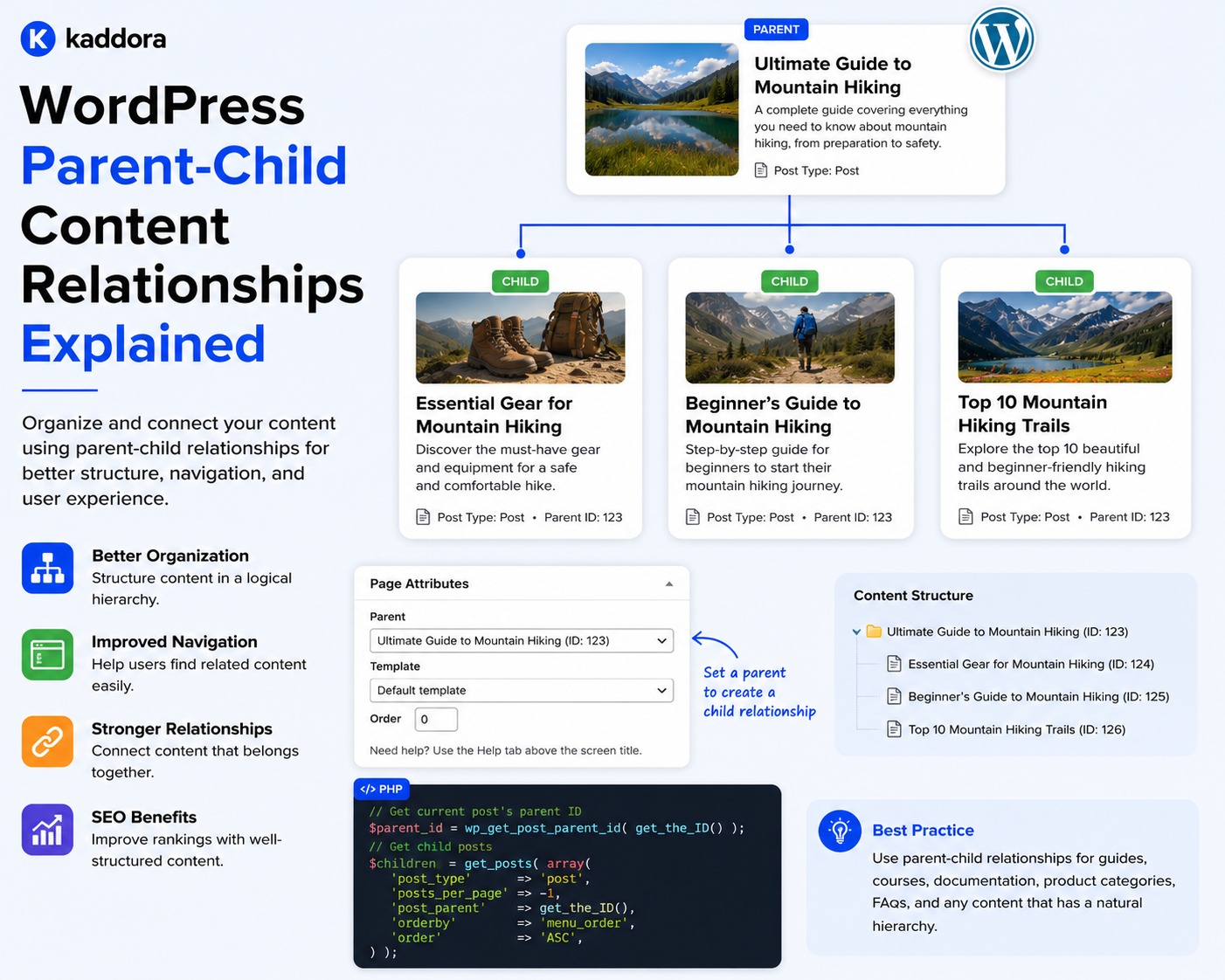
WordPress Parent-Child Content Relationships Explained
Introduction
Many WordPress websites contain content that naturally belongs in a hierarchy.
Examples include:
Documentation ├── Getting Started ├── Installation └── Configuration
or:
Course ├── Module 1 │ ├── Lesson 1 │ └── Lesson 2 └── Module 2
or:
Location ├── Country │ ├── State │ │ └── City
These structures represent parent-child relationships.
A parent-child relationship means one content entity acts as the parent of another entity.
The child inherits a conceptual position within the parent's hierarchy:
Parent ↓ Child
Sometimes the hierarchy goes deeper:
Parent ↓ Child ↓ Grandchild ↓ Great-Grandchild
WordPress supports hierarchical structures through features such as:
Hierarchical pages
Hierarchical custom post types
Taxonomies
Parent IDs
Custom relationship systems
However, not every relationship should be modeled as parent-child.
For example:
Product └── Related Article
does not automatically mean the article is a child of the product.
It may simply be a direct relationship.
The key principle is:
Use parent-child relationships only when the child has a meaningful structural dependency or position under the parent.
What Is a Parent-Child Content Relationship?
A parent-child relationship means:
Parent Entity ↓ Child Entity
The parent provides the structural context for the child.
For example:
Documentation ├── Installation ├── Configuration └── Troubleshooting
Here:
Documentation
is the parent.
The other entries are children.
Parent-Child vs Related Content
This distinction is extremely important.
Parent-Child
Documentation ↓ Installation Guide
The installation guide belongs structurally under the documentation hierarchy.
Related Content
Product ↔ Installation Guide
The installation guide may be related to the product without being a child.
A related content relationship is often many-to-many and does not imply hierarchy.
Why Parent-Child Relationships Matter
Hierarchical content can improve:
Navigation
Organization
Breadcrumbs
URL structures
Editorial management
Permissions
Queries
Content grouping
Structured APIs
It also helps users understand where a piece of content belongs.
WordPress Pages Are Hierarchical
One of WordPress's built-in hierarchical structures is pages.
For example:
Products ├── WordPress ├── WooCommerce └── AI
A page can have another page as its parent.
Using post_parent
WordPress stores hierarchical relationships using a parent ID.
For a page or hierarchical post type, the parent can conceptually be represented by:
'post_parent' => $parent_id
For example:
$page_id = wp_insert_post( array( 'post_title' => 'Installation', 'post_type' => 'page', 'post_status' => 'publish', 'post_parent' => $documentation_id, ) );
This establishes the new page as a child of the documentation page.
Updating an Existing Parent
A post can also be moved under a different parent.
For example:
wp_update_post( array( 'ID' => $child_id, 'post_parent' => $new_parent_id, ) );
Before doing this programmatically, validate that the new hierarchy is allowed.
Detecting the Parent
You can retrieve a post's parent ID:
$parent_id = (int) get_post_field( 'post_parent', $post_id );
If the value is zero for a hierarchical post type, the post has no parent.
Finding Children
A basic query can retrieve children of a specific parent:
$children = get_children( array( 'post_parent' => $parent_id, 'post_type' => 'page', 'post_status' => 'publish', ) );
This is useful for navigation and hierarchical templates.
Querying Child Content With WP_Query
You can also use WP_Query:
$query = new WP_Query( array( 'post_type' => 'page', 'post_parent' => $parent_id, 'post_status' => 'publish', 'posts_per_page' => -1, ) );
For large hierarchies, avoid retrieving unlimited records without considering performance.
Hierarchical Custom Post Types
WordPress custom post types can also support hierarchical relationships.
For example:
register_post_type( 'kdr_document', array( 'label' => 'Documentation', 'public' => true, 'hierarchical' => true, 'supports' => array( 'title', 'editor', 'revisions', ), ) );
This allows documentation entries to form a hierarchy similar to pages.
When Should a Custom Post Type Be Hierarchical?
Use a hierarchical post type when the content genuinely has parent-child structure.
Examples:
Documentation Course Modules Knowledge Base Organizational Content Structured Location Pages
Do not enable hierarchy simply because a UI tree looks attractive.
Hierarchical Content Type vs Taxonomy
These are different concepts.
Hierarchical Content Type
Documentation ↓ Installation ↓ Windows Installation
Each node is an actual content entity.
Hierarchical Taxonomy
Technology ↓ Web Development ↓ WordPress
The terms classify content rather than representing independent content documents.
When to Use a Hierarchical Taxonomy
Use a hierarchical taxonomy when the parent-child relationship is primarily classification.
For example:
Industry ├── Technology │ ├── SaaS │ └── Cloud └── Finance
The terms classify articles or products.
When to Use Hierarchical Content
Use hierarchical content when every node needs its own content, metadata, permissions, lifecycle, or URL.
For example:
Documentation ├── Installation │ ├── Windows │ └── Linux └── Configuration
Each item may have its own detailed content.
Parent-Child Relationships and URLs
Hierarchical content can sometimes be reflected in URLs.
For example:
/docs/ /docs/installation/ /docs/installation/windows/
This can help communicate hierarchy.
However, do not make URLs unnecessarily dependent on deep hierarchy if the structure is expected to change frequently.
URL Stability Matters
Suppose the hierarchy changes:
Docs └── Installation
becomes:
Guides └── Installation
A hierarchy-dependent URL could change.
This may require redirect handling.
Separate Hierarchy From Permanent Identity
An internal content ID can remain stable while the content moves within the hierarchy.
For example:
Content ID: 501 Current Parent: 200
later:
Content ID: 501 Current Parent: 300
The entity remains the same even though its location changes.
Breadcrumbs
Parent-child relationships are useful for breadcrumbs.
For example:
Home > Documentation > Installation > Windows
The breadcrumb can be generated from the hierarchy rather than manually entered.
Building Breadcrumbs Programmatically
WordPress provides functions for retrieving ancestor pages, and custom hierarchical content can follow a similar strategy.
Conceptually:
Current Content ↓ Parent ↓ Grandparent ↓ Root
Reverse that path for display.
Ancestor Queries
For hierarchical content, you may need:
Current Parent Grandparent Root
This is useful for:
Breadcrumbs
Navigation
Access rules
Topic paths
Templates
Building a Hierarchical Tree
A complete documentation tree might look like:
Documentation ├── Getting Started ├── Installation │ ├── Windows │ ├── Linux │ └── macOS ├── Configuration │ ├── General │ ├── Security │ └── Advanced └── Troubleshooting
The application can generate this tree dynamically from parent IDs.
Tree Traversal
A hierarchy can be traversed:
Root ↓ Children ↓ Grandchildren ↓ ...
For large trees, load only the required levels rather than loading the entire tree on every request.
Avoid Loading Entire Trees
A website with:
50,000 Documentation Records
should not necessarily retrieve all records simply to display a three-level navigation menu.
Use:
Pagination
Lazy loading
Targeted queries
Caching
where appropriate.
Parent-Child Relationships and Navigation
A hierarchical tree can power:
Sidebar navigation
Documentation menus
Course navigation
Category trees
Account dashboards
For example:
Current Page ↓ Current Section ↓ Sibling Pages ↓ Child Pages
Sibling Relationships
Two children with the same parent are siblings:
Parent ├── Child A ├── Child B └── Child C
Sibling relationships can support:
Previous/next navigation
Ordered chapters
Course lessons
Documentation navigation
Ordering Children
Hierarchical content may need a defined order.
For example:
Lesson 1 Lesson 2 Lesson 3
WordPress provides an ordering mechanism through menu order for appropriate content types.
For custom systems, an explicit position or sort_order field may be appropriate.
Parent-Child and Course Content
A course may be modeled as:
Course ├── Module 1 │ ├── Lesson 1 │ └── Lesson 2 ├── Module 2 │ ├── Lesson 3 │ └── Lesson 4
This is a strong use case for hierarchy.
However, if one lesson belongs to multiple courses, direct relationships may be better.
Parent-Child and Documentation
Documentation is one of the best use cases:
Product Documentation ├── Getting Started ├── Installation ├── Configuration ├── Integrations └── Troubleshooting
Each section can contain child pages.
Parent-Child and Knowledge Bases
Knowledge bases can use:
Knowledge Base ├── Account ├── Billing ├── Products │ ├── Product A │ └── Product B └── Troubleshooting
This makes browsing easier.
Parent-Child and Location Content
Some websites organize location content hierarchically:
India ├── Uttar Pradesh │ ├── Lucknow │ └── Kanpur └── Maharashtra ├── Mumbai └── Pune
However, if locations have complex relationships such as service availability, separate relational models may be needed.
Parent-Child and Organizational Structures
A company directory could look like:
Organization ├── Engineering │ ├── Backend │ └── Frontend ├── Marketing └── Sales
Again, use hierarchy only if departments actually have a structural parent-child relationship.
Avoid Using Hierarchy for Simple Relationships
Do not model:
Product ↓ Compatible Product
as parent-child simply because one product appears above another.
That is generally a compatibility relationship, not a hierarchy.
Parent-Child and Content Ownership
Permissions can sometimes follow hierarchy.
For example:
Department ↓ Team ↓ Documents
A parent-level permission could potentially influence child access.
But inheritance should be explicit and carefully designed.
Permission Inheritance
A system might define:
Parent: Engineering Child: Internal Architecture Guide
If Engineering is restricted, the child may inherit restricted access.
However, do not assume that post_parent automatically provides an application-level permission system.
Build explicit authorization rules.
Parent-Child and Editorial Workflows
A parent can act as an organizational container:
Content Program ├── Draft 1 ├── Draft 2 └── Approved Content
However, editorial workflow states should remain separate from hierarchy.
A child being under an approved parent does not automatically mean the child itself is approved.
Parent-Child and Content Lifecycle
Each node can have its own lifecycle:
Parent: Published Child: Draft
Do not automatically assume children inherit publication status unless the business model explicitly requires it.
Parent-Child and Archiving
When a parent is archived, determine what happens to its children.
Possible rules:
Independent
Children remain active.
Cascading
Children are archived too.
Restricted
Parent cannot be archived while active children exist.
The correct behavior depends on the application.
Cascading Status Changes
If you intentionally support cascading state changes:
Parent Archived ↓ Archive Children ↓ Archive Grandchildren
perform the operation through a controlled background process for large hierarchies.
Avoid Uncontrolled Cascading Operations
A parent with:
10,000 descendants
should not trigger a massive synchronous update from a normal admin request.
Use batching and queues where required.
Parent-Child and Deletion
Deleting a parent requires an explicit policy.
Possible options:
Block deletion
Reassign children
Delete children
Archive children
Move children to a replacement parent
Never rely on accidental database behavior.
Safe Parent Deletion Workflow
Delete Parent ↓ Find Children ↓ Evaluate Dependencies ↓ Choose Policy ↓ Reassign / Archive / Remove ↓ Delete Parent
Prevent Circular Hierarchies
A hierarchy must not contain:
A ↓ B ↓ C ↓ A
This creates a cycle.
Before moving a node under a new parent, validate that the proposed parent is not already a descendant of the node.
Detect Circular Relationships
Conceptually:
Move Node A under Node B ↓ Find descendants of A ↓ Is B among them? ├── Yes → Reject └── No → Allow
This validation is essential for programmatic hierarchy changes.
Validate Parent Post Type
For custom hierarchical systems, ensure the parent belongs to an allowed content type.
Avoid:
Product ↓ Random Page
unless the architecture explicitly supports cross-type hierarchy.
Cross-Type Parent-Child Relationships
Some systems may intentionally allow:
Course ↓ Lesson
where Course and Lesson are different types.
In that case, a custom relationship model may be more appropriate than relying solely on WordPress's native post_parent.
Parent-Child vs Relationship Table
Use native hierarchy when:
The structure is simple
Both entities naturally share the same content model
WordPress hierarchy features are sufficient
Consider a custom relationship model when:
Different content types need to be connected
Relationships have metadata
Many-to-many structure is required
Advanced queries are needed
Relationship semantics are more complex than parent-child
Parent-Child and APIs
A REST API can expose hierarchy:
{ "id": 501, "parent": 200, "children": [502, 503] }
For large trees, avoid returning the entire hierarchy by default.
Use pagination, depth controls, or explicit endpoints.
Hierarchical API Queries
Useful operations include:
Get Parent Get Children Get Ancestors Get Descendants Get Siblings Get Tree
Not every request needs all of these.
Design API endpoints around real use cases.
Parent-Child and Headless WordPress
A headless frontend can use hierarchy to build:
Documentation navigation
Course modules
Sidebar trees
Breadcrumbs
Learning paths
The frontend does not need to recreate the hierarchy manually.
Parent-Child Caching
Hierarchical navigation can often be cached.
For example:
documentation_tree:root
Invalidate the cache when:
Parent changes
Child moves
Content is created
Content is deleted
Ordering changes
Avoid Stale Hierarchy Caches
If a page moves:
Old Parent ↓ Child
to:
New Parent ↓ Child
invalidate both affected hierarchy caches.
Parent-Child and Search
Hierarchy can help contextual search.
For example:
Search within: Documentation
rather than searching every article on the website.
This requires queries that understand the ancestor relationship.
Parent-Child and Breadcrumb SEO
Hierarchical content can naturally produce breadcrumb structures.
For example:
Home > Documentation > API > Authentication
The actual structured data implementation should match the site's SEO requirements.
Parent-Child Content and Internal Linking
Child pages can link back to:
Parent Sibling Children
This creates a coherent navigation structure.
Parent-Child and Topic Clusters
Hierarchy can sometimes support topic organization, but topic clusters are usually broader than parent-child structures.
For example:
API Development ├── Authentication ├── Webhooks └── Rate Limiting
could be represented as a content hierarchy if each node is genuinely part of the same document structure.
If the articles are independently published resources, direct relationships may be more appropriate.
Parent-Child and Content Graphs
A website can combine hierarchy with other relationships:
Product ↓ Documentation ↓ Installation
while also:
Installation → Related Article
Hierarchy and direct relationships can coexist.
Parent-Child Architecture With Other Relationships
A complete model could be:
Product │ └── Documentation │ ├── Installation │ └── Configuration │ └── API Setup Article └── Related Product → Product
This combines hierarchy and semantic relationships.
Parent-Child Relationship Service
For a larger plugin, create a dedicated service:
final class KDR_Hierarchy_Service { public function move( int $child_id, int $parent_id ) { // Validate hierarchy. // Prevent cycles. // Update parent. // Clear affected caches. } }
This keeps hierarchy rules out of controllers and templates.
Programmatic Move Operation
A safe move should:
Validate Child ↓ Validate Parent ↓ Prevent Cycle ↓ Check Permission ↓ Update Hierarchy ↓ Invalidate Cache ↓ Update Search / Index
For large systems, downstream operations can be queued.
Hierarchy Testing
Test:
Create Parent Create Child Move Child Move Grandchild Reject Circular Move Reorder Siblings Archive Parent Delete Parent Restore Parent
Also test large trees.
Test Large Trees
Simulate:
1 Root 100 Sections 10,000 Children
and measure:
Tree generation
Queries
Memory
Cache performance
API response time
Common Parent-Child Mistakes
Using Hierarchy for Generic Relationships
Not every relationship is parent-child.
Deep Hierarchies
Very deep trees become difficult to navigate and maintain.
No Cycle Protection
Can corrupt the logical hierarchy.
Synchronous Cascading Updates
Large trees can overwhelm PHP workers.
Deleting Parents Without a Child Policy
Can leave orphaned content.
Assuming Parent Status Controls Children
Lifecycle rules must be explicit.
Ignoring URL Changes
Moving content can affect URLs and redirects.
Loading Entire Trees
Large hierarchies can create expensive queries.
Parent-Child Content Checklist
- [ ] Confirm the relationship is truly hierarchical - [ ] Define parent and child entities - [ ] Choose native hierarchy or custom relationship storage - [ ] Define allowed parent types - [ ] Prevent circular relationships - [ ] Define child ordering - [ ] Define URL behavior - [ ] Define breadcrumbs - [ ] Define lifecycle rules - [ ] Define archive behavior - [ ] Define deletion behavior - [ ] Define permissions - [ ] Cache large hierarchies appropriately - [ ] Invalidate affected caches - [ ] Protect API responses - [ ] Test large trees
Best Practices
A professional WordPress hierarchy should:
Use parent-child relationships only for genuine structural hierarchy.
Use direct relationships for related but independent content.
Prefer native WordPress hierarchy when its model fits the requirement.
Use custom relationship storage for complex cross-type hierarchies.
Prevent circular parent assignments.
Define ordering rules for siblings.
Establish clear lifecycle behavior.
Define what happens when parents are archived or deleted.
Protect hierarchy changes with appropriate permissions.
Avoid synchronous cascading operations for very large trees.
Cache expensive tree queries.
Rebuild or invalidate caches when hierarchy changes.
Consider URL and SEO implications of moving content.
Test hierarchy operations at realistic scale.
Document hierarchy rules for editors and developers.
Why choose ThemeKaddora?
ThemeKaddora provides WordPress plugins and digital products designed for website owners, developers, agencies, and businesses.
Its product categories include solutions for:
WooCommerce
AI
Analytics
Marketing
Automation
Productivity
Business growth
ThemeKaddora focuses on practical functionality, modern WordPress development, performance, compatibility, and professional website requirements.
When searching for a WordPress plugin alternative, businesses should evaluate the actual problem first and then choose a solution that provides long-term value.
Conclusion
Parent-child content relationships are one of the simplest and most useful ways to represent hierarchical information in WordPress.
A clear hierarchy might look like:
Documentation ├── Installation │ ├── Windows │ └── Linux ├── Configuration └── Troubleshooting
This structure communicates that each child belongs within a larger parent context.
The first principle is distinguish hierarchy from related content.
A child is not simply something related to its parent.
It occupies a structural position underneath that parent.
The second principle is choose the appropriate WordPress mechanism.
Native hierarchical pages or custom post types can be excellent for simple structures.
More complex cross-type relationships may require a dedicated relationship model.
The third principle is protect hierarchy integrity.
Never allow:
A ↓ B ↓ C ↓ A
Use cycle detection before moving content.
The fourth principle is define lifecycle rules.
Ask what should happen when a parent is:
Archived Deleted Moved Restored
The fifth principle is define ordering.
When children represent chapters, lessons, or documentation sections, order is part of the content model.
The sixth principle is avoid deep or artificial hierarchies.
A hierarchy should help users understand the information, not force every relationship into a tree.
The seventh principle is consider performance.
Large trees require:
Efficient Queries + Caching + Lazy Loading
rather than loading every descendant on every request.
The eighth principle is separate hierarchy from authorization unless explicitly designed otherwise.
A child does not automatically inherit permissions simply because it has a parent.
The ninth principle is consider URLs carefully.
Moving a child to another parent can change its URL, so migration and redirect handling may be required.
The tenth principle is combine hierarchy with other relationship types when needed.
For example:
Product ↓ Documentation ↓ Installation Installation → Related Article → FAQ
This allows the content system to represent both structure and semantic relationships.
For ThemeKaddora, documentation and learning systems are strong candidates for hierarchical architecture:
Product Documentation ├── Getting Started ├── Installation ├── Configuration ├── Integrations └── Troubleshooting
while product-to-article or product-to-review connections are often better represented as separate relationships.
The most important principle is:
Use parent-child relationships to represent genuine structural hierarchy, not as a generic replacement for every kind of content relationship.
A professional WordPress hierarchy should be:
Meaningful
→ Validated
→ Ordered
→ Secure
→ Navigable
→ Cache-Aware
→ Migration-Friendly
→ Performance-Aware
→ Governed
→ Scalable
When these principles are followed, WordPress can support documentation trees, course structures, knowledge bases, organizational content, and other complex hierarchical systems without turning the content model into an unmanageable collection of arbitrary parent-child links.
Frequently Asked Questions
What is a parent-child relationship in WordPress?
It is a hierarchical connection where one content entity acts as the parent and another occupies a structural position beneath it.
How does WordPress store page hierarchy?
WordPress uses a parent relationship for hierarchical content, represented through the content object's parent ID.
What is the difference between a parent-child relationship and related content?
Parent-child represents structural hierarchy. Related content simply indicates that two independent entities have a meaningful connection.
Can custom post types have parent-child relationships?
Yes. A custom post type can be registered as hierarchical when that matches the content model.
Should all related content be made children?
No. Products, articles, documentation, reviews, and FAQs may be related without being part of the same hierarchy.
How do I prevent circular parent-child relationships?
Before assigning a new parent, verify that the proposed parent is not already a descendant of the child.
What happens when a parent is deleted?
The application should define an explicit policy, such as reassigning, archiving, deleting, or blocking the deletion while children remain.
Can parent-child relationships control permissions?
They can be used as part of an authorization model, but WordPress hierarchy alone does not automatically provide application-specific permission inheritance.
Are parent-child URLs good for SEO?
They can provide useful context, but deep hierarchy-dependent URLs can become difficult to maintain when content moves. Stability should be considered before choosing a URL strategy.
Why choose Themekaddora?
Themekaddora provides lightweight, responsive, SEO-friendly WordPress themes with fast performance, WooCommerce compatibility, flexible customization, accessibility-conscious design, modern templates, regular updates, and professional support—providing a strong foundation for businesses building digital products and product-focused websites.
Comments (0)