
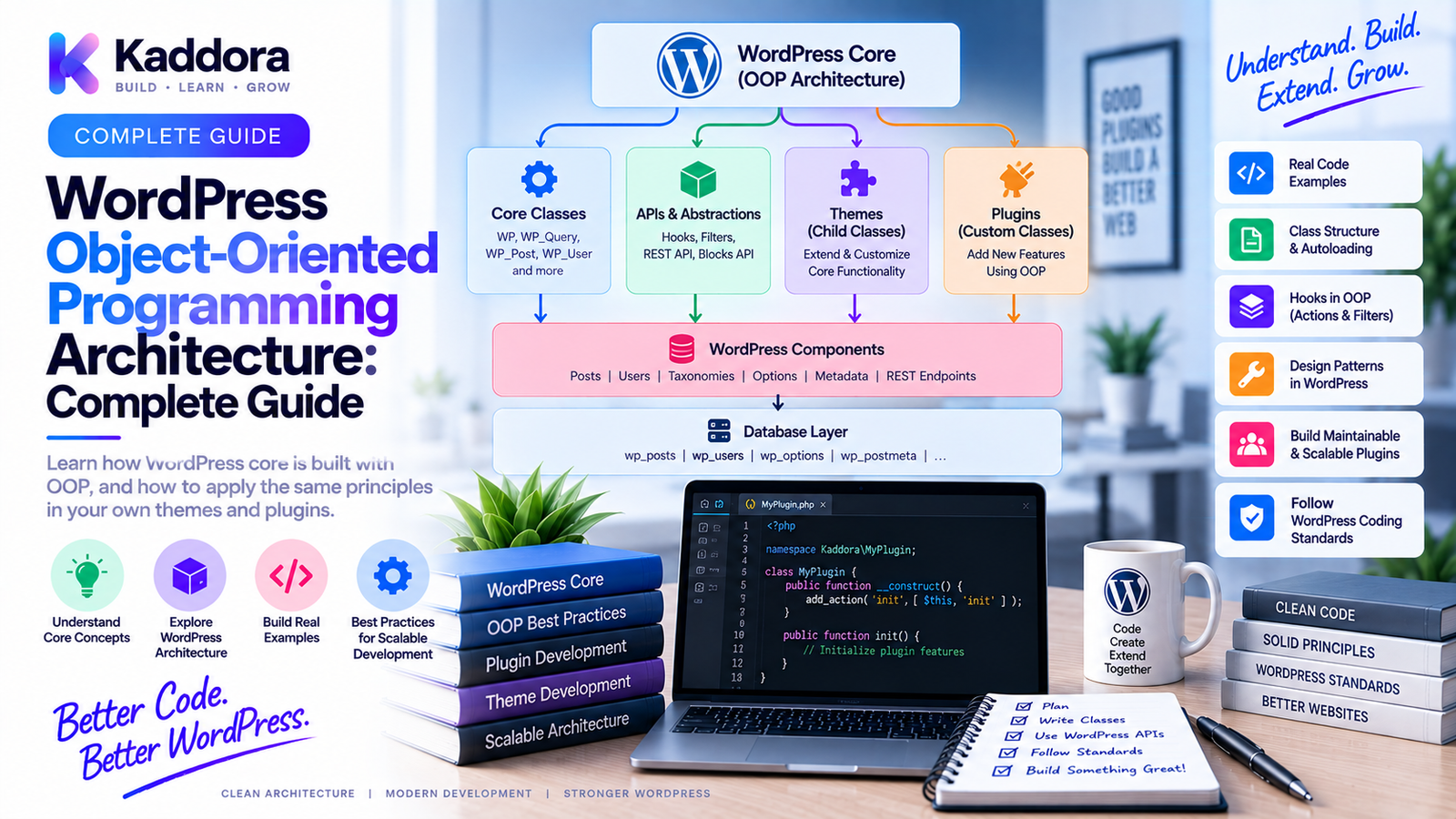
WordPress Object-Oriented Programming Architecture Explained
Introduction
WordPress started with a relatively simple procedural programming style, but modern WordPress plugins can become large software systems containing APIs, dashboards, background jobs, integrations, databases, automation, analytics, and complex business logic.
As plugin complexity increases, putting everything into one PHP file or a collection of procedural functions becomes difficult to maintain.
This is where Object-Oriented Programming (OOP) becomes valuable.
Object-oriented programming allows developers to organize software into classes and objects with clearly defined responsibilities.
Instead of placing every operation inside a giant plugin bootstrap file, a modern architecture can separate:
Plugin Bootstrap ↓ Services ↓ Business Logic ↓ Repositories ↓ Infrastructure ↓ WordPress / External APIs
This structure makes large plugins easier to extend, test, refactor, and maintain.
In this guide, you'll learn what WordPress OOP architecture means, how to structure an object-oriented plugin, how classes and interfaces work together, how hooks fit into OOP, how to use services and repositories, common mistakes, and how to design a scalable architecture for production WordPress plugins.
What Is Object-Oriented Programming?
Object-Oriented Programming is a programming approach that organizes software around objects and classes.
A class defines behavior and structure.
For example:
namespace Kaddora\MyPlugin; class ProductService { public function getProductName(int $productId): string { return 'Example Product'; } }
The class contains behavior related to products.
Instead of exposing unrelated global functions, functionality is grouped into meaningful components.
What Is WordPress OOP Architecture?
WordPress OOP architecture means structuring WordPress themes or plugins using classes, namespaces, interfaces, services, and other object-oriented concepts.
A basic architecture might look like:
MyPlugin │ ├── Plugin ├── Admin ├── Services ├── Repositories ├── Contracts ├── Integrations └── Infrastructure
Each part has a specific responsibility.
The goal is not to use classes simply because they are modern.
The goal is to create clear boundaries between responsibilities.
Why Use OOP in WordPress Plugins?
For small plugins, procedural PHP can be perfectly reasonable.
As the plugin grows, however, OOP can provide several advantages:
Better separation of concerns
Reduced global namespace pollution
Easier testing
Better dependency management
Reusable components
Clearer architecture
Easier refactoring
Improved team collaboration
Better long-term maintainability
OOP becomes especially valuable when a plugin contains multiple modules or integrations.
Procedural vs OOP WordPress Architecture
A procedural plugin might look like:
plugin.php functions.php admin.php ajax.php api.php
All files may contain global functions.
A more structured plugin could look like:
src/ ├── Admin/ ├── Api/ ├── Contracts/ ├── Domain/ ├── Infrastructure/ ├── Repositories/ ├── Services/ └── Plugin.php
The second structure provides clearer boundaries.
Core Principles of WordPress OOP Architecture
A good architecture often follows several principles.
Single Responsibility
A class should have one clear reason to change.
For example:
ProductRepository
should focus on product persistence rather than email delivery.
Encapsulation
Internal implementation details should remain inside the appropriate class.
Other components should interact through clear methods.
Abstraction
Interfaces can define contracts without forcing consumers to depend on a specific implementation.
Composition
Complex services can be built by combining smaller objects.
For example:
OrderService │ ├── OrderRepository ├── PaymentGateway └── NotificationService
Dependency Inversion
High-level business logic should depend on abstractions where appropriate instead of tightly coupling itself to concrete infrastructure.
A Typical WordPress OOP Plugin Structure
A production plugin can use:
my-plugin/ │ ├── my-plugin.php ├── composer.json ├── composer.lock │ ├── src/ │ ├── Admin/ │ ├── Api/ │ ├── Contracts/ │ ├── Domain/ │ ├── Integrations/ │ ├── Infrastructure/ │ ├── Repositories/ │ ├── Services/ │ └── Plugin.php │ ├── tests/ │ ├── Unit/ │ └── Integration/ │ └── vendor/
The main plugin file should remain lightweight.
The Plugin Bootstrap
The plugin bootstrap is the entry point.
A simple example:
<?php defined( 'ABSPATH' ) || exit; require_once __DIR__ . '/vendor/autoload.php'; use Kaddora\MyPlugin\Plugin; $plugin = new Plugin(); $plugin->register();
The bootstrap should avoid containing the application's entire business logic.
Its primary responsibility is initialization.
The Main Plugin Class
The main plugin object can coordinate application startup.
namespace Kaddora\MyPlugin; class Plugin { public function register(): void { // Register services and WordPress integrations. } }
For larger systems, this class can receive dependencies rather than constructing everything itself.
Services in WordPress OOP
Services represent application-level operations.
For example:
namespace Kaddora\MyPlugin\Services; use Kaddora\MyPlugin\Repositories\ProductRepository; class ProductService { public function __construct( private ProductRepository $repository ) { } public function createProduct(array $data): int { return $this->repository->create($data); } }
The service coordinates business behavior.
It should not become a dumping ground for every function in the plugin.
Repositories in WordPress OOP
Repositories can isolate data-access logic.
For example:
namespace Kaddora\MyPlugin\Repositories; class ProductRepository { public function find(int $productId): ?array { global $wpdb; // Query database and return product data. return null; } }
Now the service does not need to know how data is retrieved.
ProductService ↓ ProductRepository ↓ Database
This creates a useful separation.
Interfaces and Contracts
Interfaces define expected behavior.
For example:
namespace Kaddora\MyPlugin\Contracts; interface PaymentGatewayInterface { public function charge( int $amount, string $currency ): bool; }
An implementation can then be:
namespace Kaddora\MyPlugin\Integrations; use Kaddora\MyPlugin\Contracts\PaymentGatewayInterface; class StripeGateway implements PaymentGatewayInterface { public function charge( int $amount, string $currency ): bool { return true; } }
The rest of the application can depend on the interface rather than the vendor-specific implementation.
Dependency Injection
Dependency Injection means providing dependencies to a class instead of creating them internally.
Avoid:
class OrderService { public function process(): void { $repository = new OrderRepository(); $repository->save(); } }
Prefer:
class OrderService { public function __construct( private OrderRepository $repository ) { } public function process(): void { $this->repository->save(); } }
This makes testing and replacement easier.
WordPress Hooks With OOP
Object-oriented classes work naturally with WordPress hooks.
For example:
namespace Kaddora\MyPlugin; class Frontend { public function register(): void { add_action( 'wp_enqueue_scripts', [ $this, 'enqueueAssets' ] ); } public function enqueueAssets(): void { // Enqueue assets. } }
The hook registration remains familiar while functionality is encapsulated inside a class.
Static Hook Callbacks vs Instance Methods
Static callbacks can be convenient:
add_action( 'init', [ SomeClass::class, 'register' ] );
But instance methods are often easier to use when the class has dependencies:
add_action( 'init', [ $this, 'register' ] );
Dependency-aware architecture generally benefits from objects instead of relying heavily on static state.
Organizing Hooks
Large plugins can separate hook registration from business logic.
For example:
Hooks ├── AdminHooks ├── FrontendHooks ├── CronHooks └── RestHooks
Alternatively, services may register their own hooks.
There is no universal requirement.
Choose the simpler approach that keeps responsibilities understandable.
WordPress OOP and Namespaces
Namespaces are an important companion to OOP architecture.
For example:
namespace Kaddora\MyPlugin\Services; class ProductService { }
The complete class name becomes:
Kaddora\MyPlugin\Services\ProductService
This reduces class-name collisions with other plugins.
A predictable namespace structure also works well with Composer PSR-4 autoloading.
Composer and PSR-4
A typical Composer configuration might contain:
{ "autoload": { "psr-4": { "Kaddora\\MyPlugin\\": "src/" } }, "autoload-dev": { "psr-4": { "Kaddora\\MyPlugin\\Tests\\": "tests/" } } }
Then:
composer dump-autoload
can generate the required class autoloader.
Domain Layer
A domain layer represents business concepts.
For example:
Domain/ ├── Product.php ├── Order.php ├── Customer.php └── Subscription.php
The domain should represent what the business does rather than how WordPress stores data.
This helps keep business concepts separate from implementation details.
Infrastructure Layer
Infrastructure contains technical integrations.
For example:
Infrastructure/ ├── Database/ ├── Cache/ ├── Http/ ├── Filesystem/ └── Queue/
These components interact with technical systems.
Separating infrastructure from business logic makes the architecture easier to change.
API Layer
A REST API layer can expose application functionality.
For example:
Rest/ ├── ProductController.php ├── OrderController.php └── SettingsController.php
A controller should generally coordinate input and output rather than containing the application's entire business logic.
A typical request path becomes:
HTTP Request ↓ REST Controller ↓ Service ↓ Repository ↓ Database
AJAX Architecture
Older or existing WordPress plugins may use AJAX extensively.
The same separation can apply:
AJAX Handler ↓ Request Validation ↓ Service ↓ Repository ↓ Response
This avoids placing database operations and business rules directly in AJAX callbacks.
Admin Architecture
Administrative functionality can be separated into:
Admin/ ├── SettingsPage.php ├── Menu.php ├── Notices.php └── Dashboard.php
For example:
class SettingsPage { public function register(): void { add_options_page( 'My Plugin', 'My Plugin', 'manage_options', 'my-plugin', [ $this, 'render' ] ); } }
WordPress-specific UI logic stays within the admin boundary.
Background Jobs and Cron
Large plugins often perform scheduled operations.
Use dedicated classes rather than anonymous blocks inside the bootstrap.
For example:
Cron/ ├── CleanupJob.php ├── ReportJob.php └── SyncJob.php
The scheduler triggers the job, while the job delegates actual work to services.
WP-Cron ↓ SyncJob ↓ SyncService ↓ External API
Event-Driven Architecture With WordPress Hooks
WordPress hooks can act as an event mechanism.
For example:
do_action( 'kaddora_myplugin_order_completed', $orderId );
Another service can listen:
add_action( 'kaddora_myplugin_order_completed', [ $this, 'sendNotification' ] );
This allows components to communicate without becoming tightly coupled.
Custom hooks should have distinctive names.
Object-Oriented Security Architecture
Security should be treated as an architectural concern.
A plugin can use dedicated components such as:
Security/ ├── CapabilityChecker.php ├── NonceValidator.php ├── InputValidator.php └── AuthorizationService.php
For example:
if ( ! current_user_can( 'manage_options' ) ) { wp_die( 'Unauthorized.' ); }
The exact security design depends on the operation.
OOP does not automatically make a plugin secure.
Database Access and WordPress OOP
When using $wpdb, keep database access isolated.
For example:
class OrderRepository { public function find(int $orderId): ?array { global $wpdb; $table = $wpdb->prefix . 'my_orders'; $row = $wpdb->get_row( $wpdb->prepare( "SELECT * FROM {$table} WHERE id = %d", $orderId ), ARRAY_A ); return $row ?: null; } }
The repository owns the query.
The service owns the application behavior.
Avoid a God Class
One of the biggest OOP mistakes is creating a giant class:
PluginManager ├── Admin ├── API ├── Database ├── Email ├── Reports ├── WooCommerce ├── Security ├── Cron └── Everything Else
Such a class becomes difficult to understand and test.
Instead, split responsibilities into smaller components.
Avoid Excessive Abstraction
OOP does not mean every five-line operation needs:
Interface
Abstract class
Factory
Repository
Manager
Handler
Adapter
Architecture should solve real complexity.
Overengineering can make a plugin harder to maintain.
WordPress OOP and Global Functions
WordPress core provides many global functions:
\add_action(); \get_option(); \update_option(); \wp_enqueue_script(); \wp_remote_get();
These can still be used from namespaced classes.
For clarity, prefixing global WordPress functions with \ is often useful.
WordPress core classes can similarly be referenced explicitly:
\WP_Error \WP_Query
or imported:
use WP_Error; use WP_Query;
Service Container Considerations
A service container can create and manage dependencies.
For example:
Container ├── ProductRepository ├── ProductService ├── PaymentGateway └── NotificationService
Containers can be useful in large plugins but aren't mandatory.
A small plugin may be easier to maintain with manual dependency wiring.
Use a container because it solves a real dependency-management problem, not merely because the project is object-oriented.
Recommended Dependency Flow
A healthy dependency direction might look like:
Controller ↓ Service ↓ Repository / Contract ↓ Infrastructure
For external providers:
Business Logic ↓ Interface ↓ Provider Implementation
The goal is to keep business logic from becoming tightly coupled to infrastructure.
Testing WordPress OOP Architecture
OOP makes isolated testing easier.
For example:
$repository = $this->createMock( ProductRepository::class ); $service = new ProductService( $repository );
The service can be tested without requiring every external dependency.
Typical testing categories include:
Unit Tests ↓ Integration Tests ↓ WordPress Runtime Tests ↓ End-to-End Tests
Use the appropriate level for each behavior.
Static Analysis
Static analysis can detect architecture problems before runtime.
Tools such as PHPStan can help identify:
Invalid types
Incorrect method calls
Missing classes
Invalid dependencies
Namespace issues
Dead or unreachable code
Strong type declarations can make OOP code easier to reason about.
Coding Standards
A WordPress plugin should also follow consistent coding standards.
Useful checks can cover:
Naming
Formatting
Documentation
Escaping
Internationalization
WordPress API usage
PHP compatibility
PHPCS and WordPress coding standards can be integrated into CI.
OOP Architecture and Performance
Using OOP does not automatically make a plugin faster.
A poorly designed object-oriented plugin can still be slow.
Performance depends more on:
Database queries
API requests
Hook execution
Caching
Object creation
JavaScript and CSS
Background processing
The architecture should optimize for clarity first and performance through measurement.
OOP Architecture for WooCommerce Plugins
A complex WooCommerce extension might use:
Kaddora\Commerce\ │ ├── Admin ├── Analytics ├── Customers ├── Orders ├── Products ├── Pricing ├── Repositories ├── Services └── Integrations
A typical order flow could be:
WooCommerce Event ↓ Order Listener ↓ Order Service ↓ Order Repository ↓ Analytics / CRM / Notification
This design keeps WooCommerce integration separate from core application behavior.
OOP Architecture for AI Plugins
AI plugins can also benefit from layered architecture.
For example:
AI Request ↓ Chat Controller ↓ AI Service ↓ Provider Interface ↓ OpenAI / Other Provider
A provider contract can allow multiple AI implementations without changing the business layer.
OOP Architecture for REST API Integrations
A scalable API integration can use:
Controller ↓ Application Service ↓ Provider Interface ↓ Provider Adapter ↓ External API
This prevents vendor-specific HTTP logic from spreading throughout the plugin.
WordPress OOP Architecture for Large Teams
For a team-managed plugin, define conventions for:
Namespace roots
Directory structure
Class naming
Interfaces
Services
Repositories
Hook registration
Testing
Documentation
Dependency management
A predictable architecture reduces the amount of time developers spend figuring out where code belongs.
Recommended Production Architecture
A mature WordPress plugin can use:
plugin/ │ ├── plugin.php ├── composer.json │ ├── src/ │ ├── Admin/ │ ├── Api/ │ ├── Contracts/ │ ├── Domain/ │ ├── Hooks/ │ ├── Infrastructure/ │ ├── Integrations/ │ ├── Repositories/ │ ├── Security/ │ ├── Services/ │ └── Plugin.php │ ├── tests/ │ ├── Unit/ │ └── Integration/ │ └── vendor/
A typical flow is:
WordPress │ ┌───────────────┼───────────────┐ ↓ ↓ ↓ Admin REST Hooks │ │ │ └───────────────┼───────────────┘ ↓ Services ↓ Domain Logic ↓ Contracts / Interfaces ↓ ┌───────────┴───────────┐ ↓ ↓ Repositories Integrations ↓ ↓ Database External APIs
This is a practical foundation for larger plugin systems.
Step-by-Step: How to Design a WordPress OOP Plugin
Step 1: Define the Plugin Responsibilities
List what the plugin actually does.
Step 2: Choose a Namespace
Create a distinctive root namespace.
Step 3: Configure Composer
Set up PSR-4 autoloading.
Step 4: Create the Bootstrap
Keep the main plugin file lightweight.
Step 5: Identify Services
Move application operations into focused service classes.
Step 6: Isolate Data Access
Use repositories or focused data-access components where appropriate.
Step 7: Add Contracts
Introduce interfaces when multiple implementations or decoupling provide real value.
Step 8: Separate Integrations
Keep external APIs behind dedicated adapters or providers.
Step 9: Organize Hooks
Register WordPress hooks through appropriate application components.
Step 10: Add Security Boundaries
Centralize reusable validation, authorization, and capability logic where appropriate.
Step 11: Add Tests
Write unit and integration tests for critical behavior.
Step 12: Add Automated Quality Checks
Run:
composer validate composer dump-autoload -o vendor/bin/phpstan analyse vendor/bin/phpcs vendor/bin/phpunit
Step 13: Test in WordPress
Verify the plugin with the supported WordPress and PHP versions.
Common WordPress OOP Architecture Mistakes
One Huge Plugin Class
Everything becomes tightly coupled.
Too Many Static Methods
Static state makes dependencies and testing harder.
Creating Dependencies Internally
Classes become difficult to replace and mock.
Repositories Containing Business Logic
Repositories should primarily handle persistence concerns.
Services Containing Database SQL Everywhere
This mixes responsibilities.
Overengineering
Too many abstractions make simple features difficult.
Ignoring WordPress Conventions
OOP should work with WordPress rather than fighting the platform.
No Namespace Strategy
Generic class names can still collide.
No Automated Tests
Refactoring becomes risky.
No Documentation
New developers cannot understand architectural boundaries.
WordPress OOP Architecture Checklist
Architecture
Distinctive namespace
Clear module boundaries
Single-responsibility classes
Controlled dependency direction
WordPress Integration
Hooks organized
REST endpoints separated
Admin functionality separated
Cron jobs isolated
Dependencies
Composer configured
PSR-4 enabled
Dependencies injected where useful
Interfaces used where justified
Quality
PHPUnit tests
PHPStan analysis
PHPCS checks
CI validation
Supported PHP/WordPress versions tested
Security
Capability checks
Nonce validation
Input validation
Output escaping
API authentication
How AI Can Help Improve WordPress OOP Architecture
AI can assist developers with architectural analysis.
For example:
Existing Classes ↓ Dependency Analysis ↓ Responsibility Detection ↓ Architecture Suggestions ↓ Developer Review ↓ Refactoring
AI can help identify:
God classes
Duplicate responsibilities
Circular dependencies
Weak abstractions
Namespace inconsistencies
Candidate services
Repository candidates
Opportunities for dependency injection
However, AI-generated refactoring should always be reviewed.
A mechanically generated architecture can accidentally change public APIs, hooks, database behavior, backward compatibility, or plugin lifecycle behavior.
Why Choose ThemeKaddora?
At ThemeKaddora, modern WordPress plugins, themes, WooCommerce products, AI solutions, HTML templates, UI kits, and SaaS-oriented digital products can benefit from maintainable object-oriented architecture.
A scalable ThemeKaddora plugin architecture can be organized around:
Product Namespace ↓ Domain ↓ Services ↓ Contracts ↓ Repositories ↓ Integrations ↓ WordPress / External APIs
This approach supports:
Modular development
Composer autoloading
Dependency injection
API integrations
Testing
Static analysis
CI/CD
Long-term maintenance
For products that evolve over time, architecture should be designed with future extensions in mind without introducing unnecessary complexity.
Conclusion
WordPress Object-Oriented Programming architecture provides a practical way to structure complex plugins and applications.
The goal is not simply to convert every function into a class.
The goal is to create meaningful boundaries between responsibilities.
A healthy architecture might follow:
Bootstrap ↓ Hooks / Controllers ↓ Services ↓ Domain ↓ Contracts ↓ Repositories / Integrations ↓ Infrastructure
The most important principles are:
Keep classes focused.
Inject dependencies when useful.
Separate business logic from infrastructure.
Use namespaces consistently.
Keep database access controlled.
Treat WordPress hooks as part of the architecture.
Use interfaces where they provide meaningful flexibility.
Test important behavior.
Automate code quality checks.
Avoid unnecessary abstraction.
For small plugins, a lightweight object-oriented structure may be enough.
For larger products, OOP becomes increasingly valuable as the number of features, integrations, developers, and business requirements grows.
The strongest WordPress architectures combine object-oriented PHP with WordPress-native APIs rather than attempting to replace WordPress conventions entirely.
When OOP is combined with namespaces, Composer, PSR-4, dependency injection, service architecture, repositories, automated testing, static analysis, and CI/CD, it provides a strong foundation for building professional WordPress software.
The objective is simple:
Make the code easier to understand, safer to change, easier to test, and ready to grow.
Frequently Asked Questions
What is WordPress OOP architecture?
WordPress OOP architecture is a way of building themes or plugins using classes, objects, namespaces, interfaces, services, repositories, and clear dependency boundaries.
Is OOP necessary for every WordPress plugin?
No. Small plugins can often remain simple and procedural. OOP becomes more useful as complexity, integrations, team size, and long-term maintenance requirements increase.
What are the benefits of OOP in WordPress?
OOP can improve separation of concerns, maintainability, testing, dependency management, code reuse, and namespace organization.
What should the main WordPress plugin file contain?
The bootstrap should generally handle plugin initialization, environment checks, autoloading, and application startup rather than containing all business logic.
Why use interfaces in WordPress plugins?
Interfaces define contracts and can allow multiple implementations without tightly coupling business logic to a particular technical implementation.
Should WordPress plugins use namespaces?
Namespaces are strongly useful for larger PHP plugins because they reduce naming collisions and provide clear structural boundaries.
Should every WordPress plugin use a service container?
No. A service container can be useful for complex dependency graphs, but small plugins may be easier to maintain with explicit dependency wiring.
Can OOP work with WordPress hooks?
Yes. WordPress hooks work naturally with class methods and can be used to connect object-oriented components to WordPress lifecycle events.
Does OOP improve WordPress performance?
Not automatically. OOP mainly improves organization and maintainability. Performance depends on database queries, caching, API requests, hooks, object creation, and overall application design.
How should database queries be handled in OOP WordPress plugins?
Database access can be isolated in repositories or dedicated data-access components, keeping SQL and persistence details away from application services.
Can WooCommerce plugins use OOP architecture?
Yes. Complex WooCommerce plugins can use services, repositories, integrations, domain components, and event listeners to separate business functionality from WooCommerce-specific implementation details.
Can AI plugins use OOP architecture?
Yes. AI plugins can use provider interfaces, services, controllers, repositories, and integration adapters to support multiple AI providers and keep application logic maintainable.
Should all WordPress code be converted into OOP?
No. WordPress itself contains many procedural APIs, and using those APIs from well-structured classes is normal. OOP should organize your application's code rather than force every WordPress function into a class.
Can OOP reduce global namespace conflicts?
Yes. Namespaces combined with classes significantly reduce the risk of generic class-name collisions between plugins.
What tools support WordPress OOP development?
Common tools include Composer, PHPUnit, PHPStan, PHPCS, Git, and CI/CD platforms such as GitHub Actions.
How should a production WordPress OOP plugin be tested?
Use a combination of unit tests, integration tests, WordPress runtime testing, static analysis, coding standards checks, and compatibility testing.
Can AI refactor a WordPress plugin into OOP?
AI can assist with identifying responsibilities and proposing classes or services, but developers should review every architectural change for compatibility, hooks, public APIs, database behavior, and security.
Why choose ThemeKaddora?
ThemeKaddora develops WordPress themes, plugins, WooCommerce solutions, AI products, HTML templates, UI kits, and business-focused digital products with modern development practices, maintainable architecture, responsive design, performance considerations, API integrations, and professional engineering workflows.
Comments (0)