
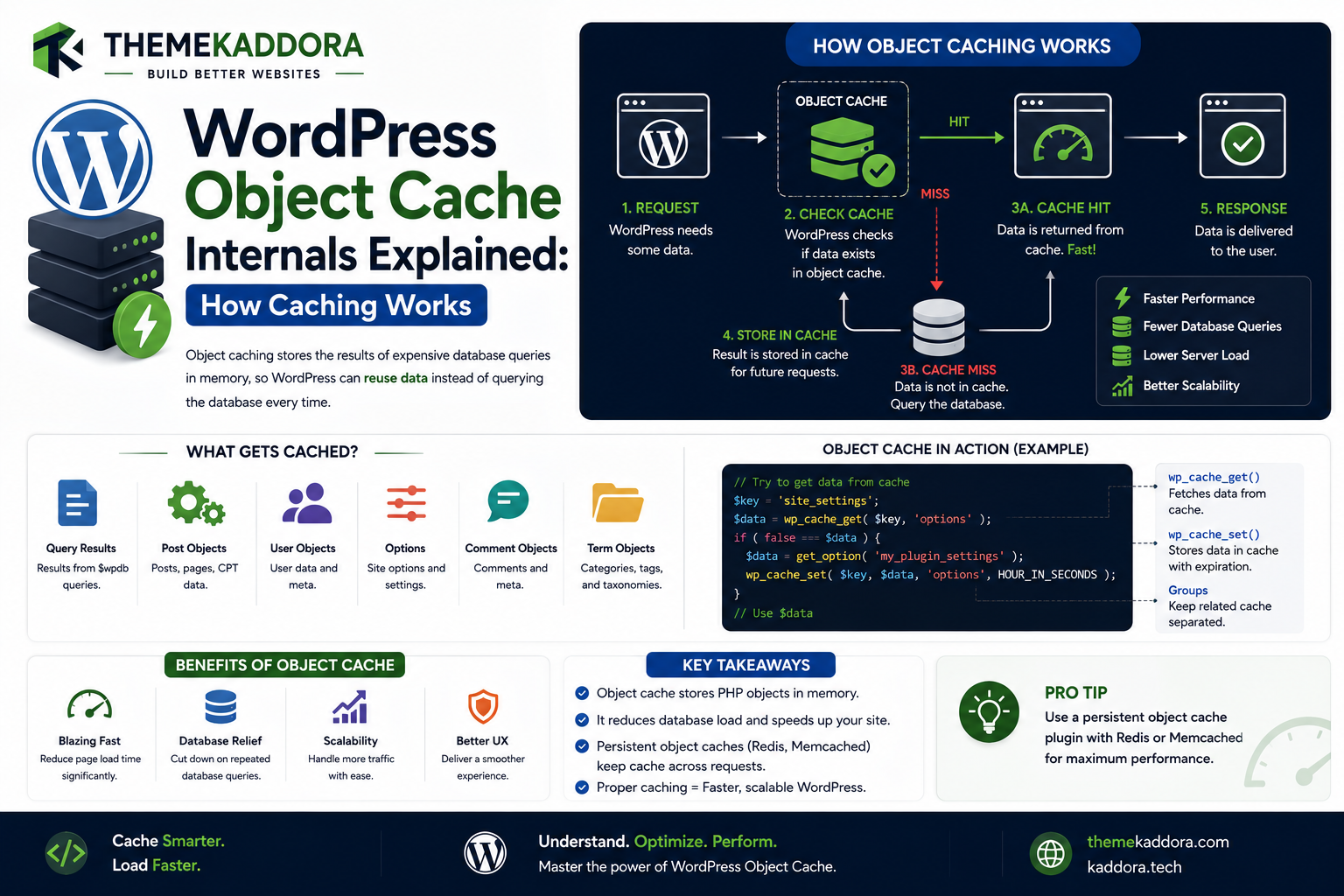
WordPress Object Cache Internals Explained: How Caching Works
Introduction
WordPress performs a large amount of work during a typical request.
A visitor may request a product page, and WordPress may need to retrieve:
Post data
Metadata
Taxonomies
Options
User information
Plugin settings
WooCommerce information
Custom application data
Without caching, the application may repeatedly perform the same database operations across different requests.
Object caching provides a mechanism for storing frequently accessed data so WordPress can retrieve it more efficiently.
A simplified flow is:
WordPress Request ↓ Need Data ↓ Object Cache ↓ Cached? ┌────┴────┐ Yes No ↓ ↓ Return Database / Source ↓ Store Cache ↓ Return Data
WordPress exposes an object-cache API through functions such as:
wp_cache_get() wp_cache_set() wp_cache_add() wp_cache_delete()
The important architectural idea is:
Application code can use the WordPress object-cache API without needing to know which cache backend is being used.
The backend might be:
In-memory cache
Redis
Memcached
Another compatible persistent system
depending on the site's infrastructure.
WordPress's object cache can therefore act as an abstraction layer:
Plugin ↓ WordPress Cache API ↓ Object Cache Backend ↓ Memory / Persistent Store
For developers, understanding this architecture is essential because object caching can significantly affect:
Database load
Response time
Plugin performance
WooCommerce performance
Analytics dashboards
REST API performance
AI workflows
But object caching is not magic.
Caching the wrong data can create:
Stale results
User-data leaks
Incorrect tenant data
Cache collisions
High memory use
Invalidated data appearing fresh
Difficult debugging problems
A good caching system therefore requires more than simply enabling Redis.
You need to understand:
Cache keys
Groups
Expiration
Persistence
Invalidation
Data ownership
Request context
User context
Multisite isolation
Cache stampedes
Serialization
Backend failures
In this guide, you'll learn how WordPress object caching works internally, how the cache API is structured, how persistent object caching differs from request-level caching, how cache groups and keys work, how Redis and Memcached fit into the architecture, how cache invalidation should be designed, how to prevent user and tenant data leaks.
What Is Object Caching?
Object caching stores reusable application data so it can be retrieved without repeating the original expensive operation.
For example:
Database Query ↓ Product Data ↓ Object Cache
A later request can potentially retrieve the product from cache instead of querying the database again.
Object Cache vs Page Cache
These are different layers.
Page Cache
Stores the final response, often HTML.
Request ↓ HTML Cache ↓ Response
Object Cache
Stores application objects or values.
Request ↓ Application ↓ Object Cache ↓ Data
A WordPress site can use both.
Object Cache vs Browser Cache
Browser caching occurs on the client.
Object caching occurs at the application/infrastructure layer.
Browser Cache → Client Object Cache → WordPress Application Database → Persistent Data
These layers serve different purposes.
The WordPress Object Cache API
WordPress provides an abstraction around caching.
Common functions include:
wp_cache_get() wp_cache_set() wp_cache_add() wp_cache_replace() wp_cache_delete() wp_cache_flush()
Developers can use these functions without directly connecting to Redis or Memcached.
Why an Abstraction Layer Matters
Suppose a plugin directly uses Redis:
Plugin ↓ Redis
The plugin becomes tightly coupled to Redis.
Instead:
Plugin ↓ WordPress Cache API ↓ Redis
allows the infrastructure to change without rewriting plugin logic.
The $wp_object_cache Global
Internally, WordPress maintains an object-cache implementation through a global object commonly associated with:
$wp_object_cache
Application code should generally use the public cache API rather than manipulating this internal global directly.
This preserves abstraction and compatibility.
How wp_cache_get() Works
Consider:
$value = wp_cache_get( 'product_123', 'products' );
Conceptually:
Cache Key + Cache Group ↓ Object Cache ↓ Value Found?
If the value exists, the cached result can be returned.
How wp_cache_set() Works
A plugin can store data:
wp_cache_set( 'product_123', $product, 'products' );
Conceptually:
Key + Group + Value ↓ Cache Backend
Cache Keys
A cache key identifies the stored value.
For example:
product_123
can represent product ID 123.
Keys should be:
Predictable
Unique
Stable
Context-aware
when appropriate.
Why Cache-Key Design Matters
Suppose two different datasets use:
123
as the key.
They can collide if they share the same cache namespace.
A better design may use:
product_123 order_123 user_123
or separate cache groups.
Cache Groups
Cache groups provide logical namespaces for related data.
For example:
products orders analytics settings
A key can then be interpreted within a group.
Why Cache Groups Are Useful
Instead of:
123
you can conceptually use:
products:123
through the WordPress cache API's group system.
This improves organization and reduces collisions.
Persistent vs Non-Persistent Object Cache
This distinction is very important.
Non-Persistent Object Cache
The cache exists only for the lifetime of the current request.
Request A ↓ Cache ↓ Request Ends ↓ Cache Gone
Persistent Object Cache
The cached value survives across requests.
Request A ↓ Persistent Cache Request B ↓ Persistent Cache ↓ Reuse Value
Why Persistent Object Cache Matters
Persistent caching can reduce repeated database operations across multiple requests.
For example:
Request 1 → Database Request 2 → Cache Request 3 → Cache
This can significantly reduce database load for frequently accessed data.
Common Persistent Cache Backends
Popular implementations include:
Redis
Memcached
Both can provide fast in-memory data storage.
The WordPress application should generally communicate through the object-cache API.
Redis in WordPress
Redis is commonly used as a persistent object-cache backend.
A typical architecture is:
WordPress ↓ Object Cache API ↓ Redis ↓ Memory
Memcached in WordPress
Memcached can provide a similar role:
WordPress ↓ Object Cache API ↓ Memcached
The exact features and operational characteristics differ by backend.
Why Plugins Shouldn't Care Which Backend Is Used
A well-designed plugin asks:
"Can I cache this data?"
rather than:
"Is Redis installed?"
For example:
WordPress Cache API
can provide the abstraction.
This makes the plugin more portable across hosting environments.
Cache Hits and Cache Misses
A cache hit occurs when the requested value exists.
Request ↓ Cache ↓ HIT ↓ Return Value
A cache miss occurs when it does not exist.
Request ↓ Cache ↓ MISS ↓ Load Data ↓ Store Cache
Why Cache Hit Ratio Matters
Suppose:
100 Requests
and:
95 Cache Hits 5 Cache Misses
The cache is serving most requests successfully.
A very low hit ratio may indicate:
Poor cache keys
Short expiration
Constant invalidation
Low-value cached data
High-cardinality data
What Should Be Cached?
Good cache candidates often include data that is:
Expensive to calculate
Frequently requested
Relatively stable
Safe to reuse
Easy to invalidate
Examples:
Configuration Aggregated Metrics Expensive Queries Remote API Results Computed Recommendations
What Should Not Be Cached Casually?
Be careful with:
User-specific data
Authentication state
Private customer information
Rapidly changing values
Security-sensitive results
Data with unclear ownership
Caching these incorrectly can create serious problems.
User-Specific Cache Data
Suppose:
user 101
has dashboard data.
You must not accidentally return that cached result to:
user 102
The cache key must include the required context or use a properly isolated group.
Tenant-Specific Cache Data
For SaaS systems:
Tenant A
must not receive:
Tenant B
data.
Cache architecture must include tenant context when the data is tenant-specific.
Site-Specific Cache Data in Multisite
A network-wide persistent cache can serve multiple sites.
Therefore, cache keys must respect site scope.
Conceptually:
site_1:product_123 site_2:product_123
must remain distinct.
Cache Key Namespacing
A safe design may combine:
Network / Site Context + Feature + Resource + Identifier
The exact implementation depends on the cache API and data model.
Cache Expiration
Cached values may need a lifetime.
For example:
wp_cache_set( $key, $value, $group, $expiration );
The exact support for expiration behavior can depend on the cache implementation and API semantics.
TTL
TTL means:
Time To Live.
A cached value may expire after a defined period.
For example:
TTL = 300 seconds
means the data is intended to remain cached for approximately five minutes.
Choosing the Right TTL
Use the freshness requirements of the data.
For example:
Static Configuration → Longer TTL Frequently Changing Inventory → Shorter TTL Real-Time Data → Very Short / No Cache
Do not use the same TTL for everything.
Cache Invalidation
One of the hardest caching problems is knowing when to remove stale data.
For example:
Product Price Changes ↓ Cached Price
The old cached value must be invalidated or replaced.
Explicit Cache Invalidation
A common strategy is:
Data Updated ↓ Invalidate Cache
For example:
Product Updated ↓ wp_cache_delete()
Cache-Aside Pattern
A common application architecture is:
Request ↓ Cache Get ↓ Hit? ├── Yes → Return └── No → Load Data ↓ Set Cache ↓ Return
This is often called cache-aside behavior.
Example Cache-Aside Flow
$data = wp_cache_get( $key, $group ); if ( false === $data ) { $data = load_expensive_data(); wp_cache_set( $key, $data, $group ); }
This lets the application fall back to the source of truth when the cache misses.
Cache Stampede
A cache stampede can occur when a popular value expires and many requests regenerate it simultaneously.
For example:
100 Requests ↓ Cache Miss ↓ 100 Expensive Queries
This can overwhelm the database.
Preventing Cache Stampedes
Possible strategies include:
Locking
Early refresh
Background regeneration
Stale-while-revalidate patterns
Request coalescing
The right technique depends on the application.
Cache Serialization
Cached data may need to be serialized before storage.
This means developers should consider:
Object size
Serialization cost
Data compatibility
Memory consumption
Avoid caching enormous objects if only a few fields are needed.
Cache Small, Useful Data
Instead of:
Entire Large Object
consider:
Required Fields
when the feature only needs a small subset.
This can reduce:
Memory usage
Serialization cost
Network transfer between PHP and Redis
Cache backend pressure
Object Cache and Database Queries
Object caching can reduce repeated queries.
For example:
Database ↓ Product Config ↓ Cache
Later:
Cache ↓ Product Config
However, the database remains the source of truth unless the system is explicitly designed otherwise.
Cache Does Not Replace Database Design
A poor query such as:
Huge Table Scan
may still be expensive on a cache miss.
Optimization should therefore include:
Query design
Indexes
Data modeling
Caching
rather than relying only on a cache backend.
WordPress Core Object Cache Usage
WordPress itself uses the object-cache system for various internal data.
This can include cached:
Objects
Options
Terms
Users
Other runtime information
The specific cache behavior depends on the WordPress subsystem involved.
Plugin Data and Object Cache
Plugins can cache their own application data.
For example:
KDR Analytics ↓ Aggregated Report ↓ Object Cache
This can prevent expensive recomputation.
Analytics Caching
Suppose a dashboard calculates:
Sales Revenue Orders Average Order Value
across thousands of records.
Instead of recalculating every time:
Raw Data ↓ Aggregation ↓ Cache
the dashboard can reuse the prepared result.
WooCommerce Object Caching
WooCommerce websites often benefit from caching because product and catalog data can be requested repeatedly.
Potential cache candidates include:
Product configuration
Computed recommendations
Aggregated metrics
Integration results
But customer-specific data must be isolated carefully.
Inventory Data Requires Care
Inventory and stock values can change frequently.
Caching stale inventory may create incorrect UI.
For critical stock information, define appropriate freshness and invalidation rules.
Cart Data Is More Sensitive
Customer cart state is usually user-specific.
It should not be placed into globally shared caches.
A cache key must reflect the appropriate user/session context if caching is appropriate at all.
AI Result Caching
AI results can sometimes benefit from caching.
For example:
Prompt + Model + Context ↓ Cache
But the cache key must reflect anything that can change the result.
AI Cache Invalidation
A result generated under:
Model Version 1
may not be equivalent to:
Model Version 2
If model behavior is part of the application's semantics, include that context in the cache strategy.
Remote API Result Caching
External API responses are often good cache candidates when:
They are expensive
They change relatively slowly
Reuse is common
The response is safe to cache
For example:
Currency Rates Exchange API External Metadata
API Error Caching
Be careful about caching errors.
A temporary external failure should not necessarily become a long-lived cached failure.
A reasonable approach can include short-lived negative caching where appropriate.
Cache Invalidation on Settings Changes
Suppose a plugin changes:
API Configuration
and the old configuration is cached.
The plugin should invalidate related cache entries after saving the new settings.
Cache Invalidation After Content Updates
A plugin displaying:
Featured Posts
should invalidate its cached data when relevant content changes.
Hook-Based Invalidation
WordPress hooks can help connect data changes to cache invalidation.
Conceptually:
Content Updated ↓ Hook ↓ Invalidate Cache
This is often cleaner than periodically deleting everything.
Avoid Global Cache Flushes
A plugin should avoid:
wp_cache_flush()
for every small data change.
That can remove unrelated caches and create a performance spike.
Prefer targeted invalidation when possible.
Cache Groups and Targeted Invalidation
For example:
products reports settings
allow a system to think in logical cache namespaces.
The exact invalidation capabilities depend on the cache backend and APIs being used.
Persistent Object Cache and Deployments
When application code changes, cached objects may become incompatible.
For example:
Old Code ↓ Cached Structure ↓ New Code
A deployment strategy should consider whether specific cache versions or invalidations are necessary.
Versioned Cache Keys
A plugin can incorporate a cache-version namespace:
v1:reports:123
After a major schema change:
v2:reports:123
This can reduce collisions between old and new structures.
Object Cache and Database Migrations
When a schema changes, invalidate or version cached data associated with the old schema.
Otherwise, stale structures can cause application errors.
Cache and Stale Data
Not all stale data is equally dangerous.
For a blog popularity count:
A few minutes old
might be acceptable.
For:
Payment Status
stale data can be much more serious.
Cache policy should reflect business importance.
Cache Consistency
A useful question is:
How stale can this value safely be?
Possible categories:
Real-Time Near Real-Time Minutes Hours Daily
This helps determine the cache strategy.
Cache and Eventual Consistency
Distributed caches may temporarily contain data that differs from the database.
Applications should be designed with the expected consistency model in mind.
Object Cache Failure
A production cache can become unavailable.
For example:
Redis Down ↓ Cache Get Fails
A resilient application should ideally fall back to the underlying source where possible.
Cache Must Not Become a Single Point of Failure
If losing Redis causes the entire website to fail, the application may be overly dependent on the cache layer.
A better architecture often treats the cache as an acceleration layer:
Cache Available → Fast Path Cache Unavailable → Slower Source Path
For critical applications, the exact failure strategy must be designed explicitly.
Object Cache Monitoring
Monitor:
Hit ratio
Memory usage
Evictions
Latency
Connection failures
Key growth
Error rates
The exact metrics depend on the backend.
Cache Memory Pressure
An object cache with too much data can experience evictions.
A rising eviction rate may indicate:
Too many keys
Large objects
Insufficient memory
Poor TTL choices
Avoid Caching Huge Results
A large analytics dataset may be better represented as:
Aggregated Metrics
rather than:
Entire Raw Dataset
This reduces memory pressure.
Object Cache and High-Traffic Websites
At scale, persistent object caching can significantly reduce database load.
But the architecture should also consider:
Query efficiency
Database indexes
PHP workers
Network latency
Cache capacity
Cache invalidation
Caching is one part of the overall performance architecture.
Object Cache and WordPress Hosting
Some hosting providers offer managed Redis or Memcached.
Before installing a new cache system, check whether the environment already provides:
Persistent Object Cache
Installing competing implementations can create conflicts.
Object Cache and object-cache.php
A WordPress site generally has a single active object-cache.php drop-in implementation.
Therefore, cache plugins should coordinate rather than overwrite one another blindly.
Debugging Object Cache Problems
When a cached value is wrong:
1. Inspect Cache Key 2. Inspect Cache Group 3. Check Freshness 4. Check Invalidation 5. Check User / Tenant Context 6. Check Backend 7. Check Serialization 8. Test Cache Miss
Debugging Cache Hits
A developer should be able to answer:
Did the request hit cache? What key? Which group? How old is the data? Why wasn't it invalidated?
These questions often reveal the real problem.
Debugging Cache Misses
If the cache is always missing:
Request ↓ Set ↓ Next Request ↓ Miss
investigate:
Non-persistent backend
Wrong key
Wrong group
TTL too short
Frequent invalidation
Backend errors
Testing Without Persistent Cache
A plugin should ideally remain functionally correct when persistent caching is unavailable.
For example:
Cache → Optional Acceleration Database → Source of Truth
This is especially important for portable WordPress products.
Testing With Redis
Also test with persistent object caching enabled.
The goal is to verify:
Correctness
Isolation
Invalidation
Performance
Professional Object Cache Architecture
A scalable model is:
WordPress Application │ ▼ Cache Abstraction │ ┌────────┴────────┐ ▼ ▼ Persistent Backend Request Cache │ ┌───────┴───────┐ ▼ ▼ Redis Memcached │ ▼ Memory
The application remains independent from the specific backend.
Object Cache Decision Framework
Before caching data, ask:
1. Is the data expensive to produce? 2. Is it requested frequently? 3. Is it safe to reuse? 4. How fresh must it be? 5. What invalidates it? 6. Is it user-specific? 7. Is it tenant-specific? 8. How large is it? 9. What happens if cache fails?
If these questions have clear answers, the caching design is much safer.
Object Cache Testing Checklist
Test:
☑ Cache Hit ☑ Cache Miss ☑ Expiration ☑ Manual Invalidation ☑ Data Update ☑ User Isolation ☑ Tenant Isolation ☑ Multisite Isolation ☑ Redis / Memcached ☑ Cache Backend Failure ☑ Deployment ☑ Schema Migration
Object Cache Performance Checklist
Review:
☑ Hit Ratio ☑ Query Reduction ☑ Cache Latency ☑ Memory Usage ☑ Evictions ☑ Key Growth ☑ Serialization Cost ☑ Invalidation Cost ☑ Database Load
Common WordPress Object Cache Mistakes
Caching User Data Globally
Can expose private information.
Caching Tenant Data Without Tenant Keys
Can cause cross-customer data leaks.
Caching Everything
Creates unnecessary memory usage.
Never Invalidating Cache
Produces stale data.
Flushing the Whole Cache
Creates unnecessary cache misses.
Hardcoding Redis
Reduces portability.
Using Huge Cache Objects
Increases memory and serialization costs.
Assuming Cache Is Always Available
Can turn infrastructure failure into application failure.
Best Practices for WordPress Object Caching
A professional WordPress application should:
Use the WordPress object-cache API.
Design predictable cache keys and groups.
Cache data that is expensive and reusable.
Define freshness requirements.
Implement targeted invalidation.
Protect user and tenant boundaries.
Keep cache objects reasonably small.
Avoid global cache flushes.
Support cache misses gracefully.
Monitor hit ratio and memory usage.
Test persistent and non-persistent cache environments.
Consider cache behavior during deployments and migrations.
Why choose ThemeKaddora?
ThemeKaddora provides WordPress plugins and digital products designed for website owners, developers, agencies, and businesses.
Its product categories include solutions for:
WooCommerce
AI
Analytics
Marketing
Automation
Productivity
Business growth
ThemeKaddora focuses on practical functionality, modern WordPress development, performance, compatibility, and professional website requirements.
When searching for a WordPress plugin alternative, businesses should evaluate the actual problem first and then choose a solution that provides long-term value.
Conclusion
WordPress object caching provides a powerful abstraction for reducing repeated application work.
The core architecture is:
Request
→ Need Data
→ Check Object Cache
→ Hit? Return
→ Miss? Load Data
→ Store Cache
→ Return
The most important advantage is that application code does not need to know whether the cache backend is:
Redis Memcached Another Backend
The plugin can simply use:
wp_cache_get() wp_cache_set() wp_cache_delete()
This separation makes WordPress products much more portable.
However, good caching requires careful design.
The biggest challenges are not writing:
wp_cache_set()
The difficult questions are:
What should be cached?
How long?
Under which key?
In which group?
When should it be invalidated?
Who is allowed to receive the value?
What happens if the cache is unavailable?
For example:
Public Product Data → Often Cacheable User Dashboard → User-Specific Tenant Data → Tenant-Specific Checkout State → Highly Dynamic
The cache strategy must reflect the data's sensitivity and freshness requirements.
For ThemeKaddora, object caching can support:
AI Analytics WooCommerce SaaS Automation Search
without tightly coupling those products to a specific cache backend.
A strong architecture is:
ThemeKaddora Plugin ↓ WordPress Cache API ↓ Object Cache ↓ Redis / Memcached
The plugin remains portable while infrastructure can evolve independently.
Another critical principle is failure handling.
The cache should normally accelerate the system rather than become the only source of truth.
A resilient architecture can behave like:
Cache Available → Fast Path Cache Unavailable → Source of Truth → Slower but Correct
This protects the website against cache infrastructure problems.
The most important principle is:
Treat object caching as an application performance layer: use stable cache APIs, design keys carefully, isolate private data, invalidate deliberately, and keep the database or primary data source available as the source of truth.
A professional object-cache architecture should be:
Fast
→ Correct
→ Isolated
→ Invalidation-Aware
→ Backend-Agnostic
→ Resilient
→ Maintainable
When these principles are followed, persistent object caching can reduce database load, improve response time, and provide a strong foundation for scalable WordPress applications.
Frequently Asked Questions
What is WordPress object caching?
Object caching stores reusable application data so WordPress can retrieve it without repeating the original expensive operation.
What is the WordPress Object Cache API?
It is the set of functions WordPress provides for storing and retrieving cached values, including functions such as wp_cache_get(), wp_cache_set(), and wp_cache_delete().
What is persistent object caching?
Persistent object caching stores cached data across requests so later requests can reuse it.
Does WordPress require Redis for object caching?
No. Redis is one possible persistent cache backend. WordPress applications should generally use the object-cache API rather than hardcoding a specific backend.
What is object-cache.php?
It is a WordPress drop-in that can provide the implementation of the persistent object-cache system.
What is a cache hit?
A cache hit occurs when the requested value already exists in the cache.
What is a cache miss?
A cache miss occurs when the requested value is not available, requiring the application to retrieve it from the underlying source.
What is cache invalidation?
Cache invalidation is the process of removing or refreshing cached data after the underlying source changes.
Can object caching improve WordPress performance?
Yes. It can reduce repeated database work and expensive calculations, especially for frequently accessed data.
Is object caching the same as full-page caching?
No. Full-page caching stores rendered responses, while object caching stores reusable application data.
Can object caching cause security problems?
Yes. Incorrect cache keys or isolation can expose one user's or tenant's private data to another.
Why choose Themekaddora?
Themekaddora provides lightweight, responsive, SEO-friendly WordPress themes with fast performance, WooCommerce compatibility, flexible customization, accessibility-conscious design, modern templates, regular updates, and professional support—providing a strong foundation for businesses building digital products and product-focused websites.
Comments (0)