
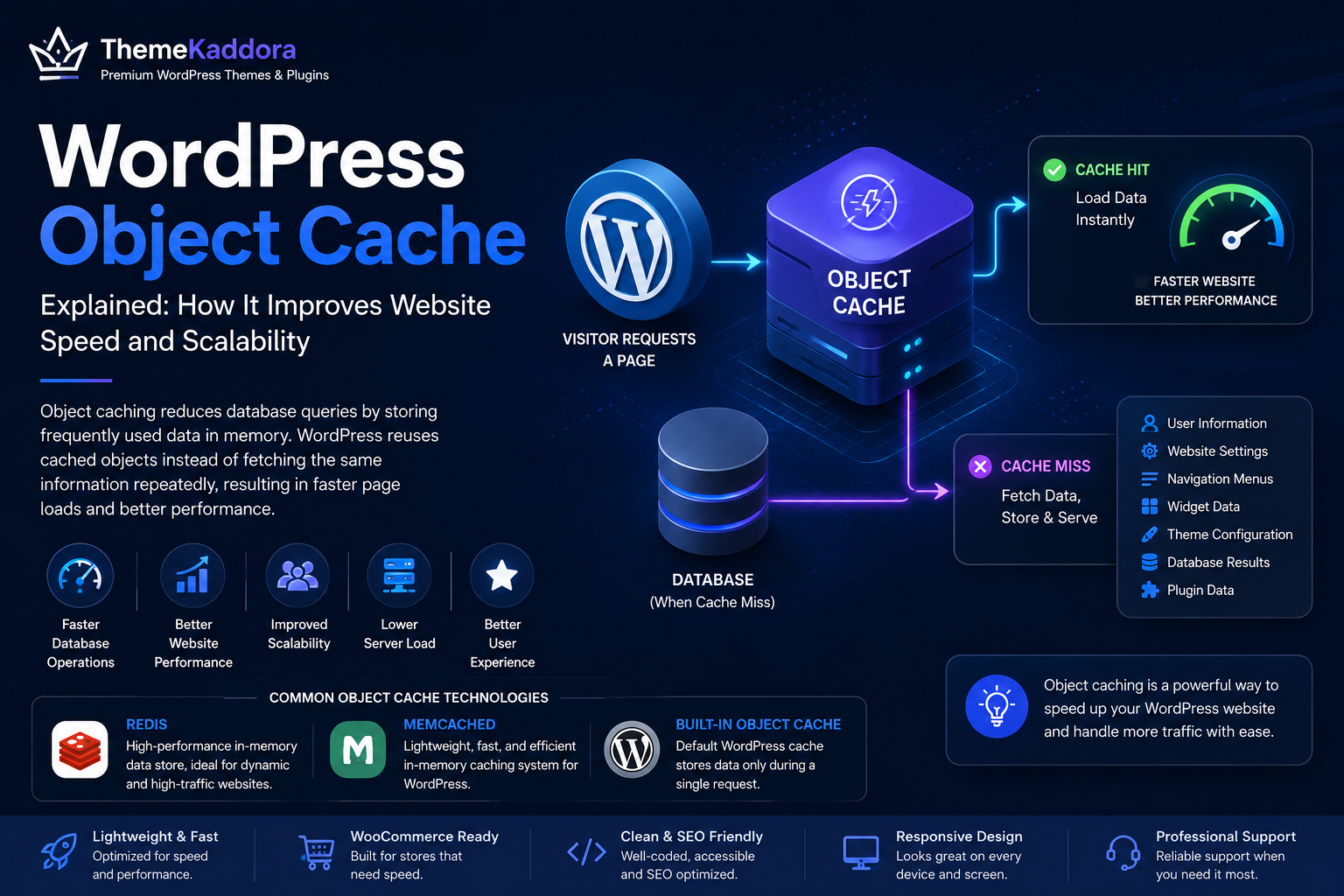
WordPress Object Cache Explained: How It Improves Website Speed and Scalability
Introduction
Website speed has become one of the most important factors in delivering a great user experience. Visitors expect pages to load quickly, and search engines reward fast websites with better rankings and improved crawl efficiency.
While image optimization, page caching, and content delivery networks (CDNs) receive much of the attention, another powerful performance feature often works behind the scenes—WordPress Object Cache.
Object caching reduces the number of repeated database queries by temporarily storing frequently requested data in memory. Instead of retrieving the same information from the database every time a page loads, WordPress can reuse cached objects, reducing processing time and improving overall performance.
For websites with growing traffic, complex functionality, or dynamic content, object caching can significantly improve scalability and responsiveness.
In this guide, you'll learn how WordPress Object Cache works, its benefits, common technologies, implementation considerations, and best practices.
What Is WordPress Object Cache?
WordPress Object Cache is a performance feature that stores frequently used PHP objects and database query results in memory.
When WordPress needs the same data again, it retrieves the cached version instead of running another database query.
Examples of cached objects include:
User information
Website settings
Navigation menus
Widget data
Theme configuration
Database query results
Plugin-generated data
This reduces unnecessary database activity and speeds up page generation.
How Object Cache Works
A typical request follows this process:
A visitor requests a page.
WordPress checks whether the required data already exists in the object cache.
If available, WordPress loads the cached data immediately.
If not available, WordPress retrieves the information from the database, processes it, and stores it in the cache for future requests.
This simple workflow helps reduce server workload and improve response times.
Object Cache vs Page Cache
These two caching methods solve different problems.
Page Cache:
Stores data objects
Reduces database queries
Helpful for dynamic websites
Works behind the scenes
Object Cache:
Stores complete HTML pages
Reduces PHP processing
Best for static content
Serves ready-made pages
Many high-performance WordPress websites use both technologies together.
Benefits of WordPress Object Cache
Faster Database Operations
Repeated database queries consume server resources.
Object caching minimizes redundant queries by reusing stored data.
Better Website Performance
Reducing database activity shortens page generation time and creates a faster browsing experience.
Improved Scalability
As traffic increases, object caching helps websites handle more visitors without placing excessive strain on the database server.
Lower Server Load
Caching frequently requested information decreases CPU and database usage, allowing hosting resources to be used more efficiently.
Better User Experience
Visitors benefit from:
Faster page loads
Smoother navigation
More responsive search results
Improved account dashboards
Better WooCommerce performance
Performance improvements often translate into higher engagement and conversions.
Common Object Cache Technologies
Several technologies support persistent object caching in WordPress.
Redis
Redis stores cached data in memory and is widely used for high-performance WordPress websites.
It is especially effective for WooCommerce stores, membership sites, and applications with frequent database activity.
Memcached
Memcached is another popular in-memory caching system designed for fast data retrieval.
It is lightweight and well suited for many business websites.
Built-in WordPress Object Cache
WordPress includes a default object cache that stores data only during a single request.
Persistent caching solutions like Redis or Memcached extend these benefits across multiple requests.
When Object Cache Is Most Useful
Object caching provides the greatest benefits for:
WooCommerce stores
Membership websites
Learning management systems
Community forums
News websites
High-traffic blogs
Business portals
SaaS dashboards
These websites often generate many database queries during each visit.
Best Practices
Use Reliable Hosting
Persistent object caching performs best on hosting platforms designed for WordPress performance.
Keep Plugins Updated
Caching plugins and object cache integrations should always remain compatible with the latest WordPress version.
Monitor Performance
Measure website speed before and after enabling object caching to verify improvements.
Track metrics such as:
Page generation time
Database queries
Server response time
Memory usage
Clear Cache When Needed
After major updates, clearing the object cache ensures visitors receive the latest data and prevents outdated information from being served.
Combine with Other Optimizations
Object caching works best alongside:
Page caching
Image optimization
CDN services
Database optimization
Efficient hosting
Modern PHP versions
A comprehensive performance strategy delivers the best results.
Common Mistakes to Avoid
Avoid these common issues:
Assuming object cache replaces page cache
Ignoring compatibility testing
Forgetting to clear caches after major updates
Using outdated caching plugins
Overlooking hosting limitations
Failing to monitor performance
Proper implementation ensures maximum benefits.
Object Cache and WooCommerce
WooCommerce websites often perform thousands of database queries daily.
Object caching helps improve:
Product pages
Shopping carts
Customer accounts
Order history
Product searches
This leads to a faster shopping experience and better scalability during high-traffic periods.
Why a High-Quality Theme Matters
Even with object caching, a poorly coded theme can reduce performance.
Choose themes that offer:
Lightweight architecture
Efficient database usage
Responsive layouts
SEO-friendly code
Accessibility support
Regular updates
WooCommerce compatibility
A well-built theme complements caching and other optimization techniques.
Why Choose Themekaddora?
Themekaddora WordPress themes are engineered for speed, flexibility, and long-term performance.
Our themes provide:
Lightweight codebase
Fast-loading layouts
SEO-friendly architecture
WooCommerce compatibility
Responsive design
Clean development standards
Cross-browser compatibility
Flexible customization
Regular updates
Professional support
Whether you're optimizing a small business website or a high-traffic online store, Themekaddora themes help you build a fast, scalable WordPress experience.
WordPress Object Cache Checklist
Before enabling object caching, make sure you:
✅ Use reliable WordPress hosting
✅ Keep WordPress updated
✅ Test compatibility with plugins
✅ Monitor database performance
✅ Clear caches after major updates
✅ Combine with page caching
✅ Optimize images
✅ Review server resources
✅ Track website speed regularly
✅ Maintain regular backups
Conclusion
WordPress Object Cache is a powerful performance optimization technique that reduces database queries, lowers server load, and improves page generation times.
While it works quietly behind the scenes, its impact becomes increasingly valuable as websites grow in size and traffic.
Combined with page caching, optimized hosting, and a lightweight theme like those from Themekaddora, object caching helps create faster, more scalable, and more reliable WordPress websites that deliver an excellent experience for both visitors and administrators.
Frequently Asked Questions
What is WordPress Object Cache?
WordPress Object Cache temporarily stores frequently requested data in memory, reducing repeated database queries and improving website performance.
Is Object Cache the same as Page Cache?
No. Object Cache stores data objects and query results, while Page Cache stores complete HTML pages for faster delivery.
Which websites benefit most from Object Cache?
WooCommerce stores, membership platforms, LMS websites, forums, SaaS dashboards, and other database-intensive websites benefit the most.
Do I need Redis or Memcached?
For many growing or high-traffic websites, persistent caching with Redis or Memcached provides better performance than WordPress's default request-based object cache.
Why choose Themekaddora?
Themekaddora themes combine lightweight performance, clean code, responsive layouts, SEO-friendly architecture, WooCommerce compatibility, and regular updates, providing an excellent foundation for performance-focused WordPress websites.
Comments (0)