
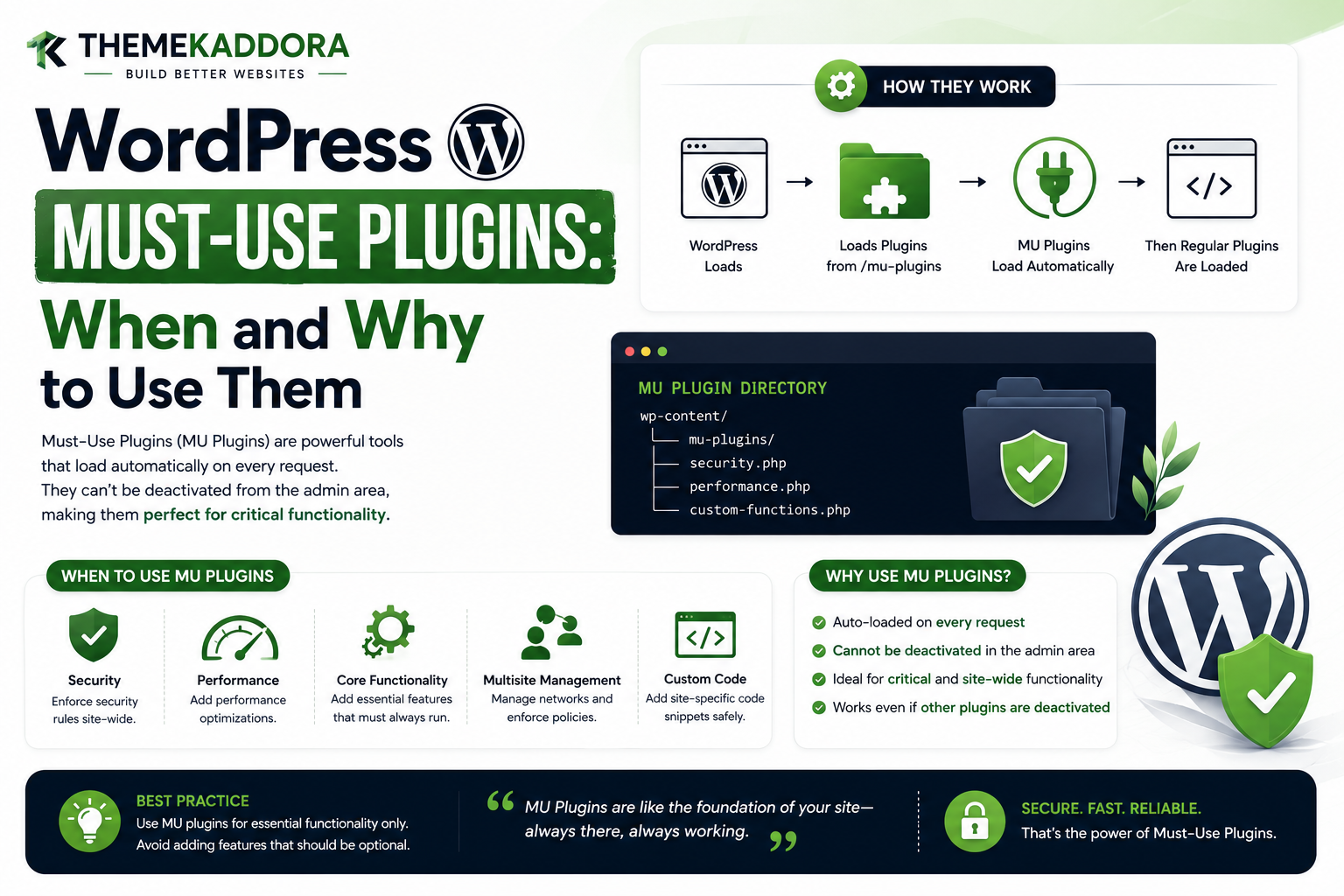
WordPress Must-Use Plugins: When and Why to Use Them
Introduction
WordPress plugins normally follow a familiar lifecycle:
Install ↓ Activate ↓ Run
But not every WordPress feature should depend on a site administrator manually activating a plugin.
For infrastructure-level functionality, WordPress provides Must-Use Plugins, commonly called MU plugins.
These plugins are placed in:
wp-content/mu-plugins/
and are automatically loaded by WordPress.
This creates a different architectural model:
Normal Plugin → Optional / Manageable Feature MU Plugin → Required / Infrastructure-Level Feature
That distinction is more important than simply understanding how MU plugins are loaded.
The real question developers should ask is:
When should a feature actually be implemented as a must-use plugin?
The answer depends on the role the feature plays in the platform.
An MU plugin can be a good fit for:
Shared infrastructure
Security policies
Environment configuration
Platform bootstrapping
Organization-wide controls
Shared logging
Common services
Hosting integrations
Network-wide functionality
It is usually a poor fit for:
Optional UI features
Customer-facing modules that users should be able to disable
Frequently changing business features
Features that depend heavily on ordinary plugins
Large application systems that administrators need to manage independently
A must-use plugin is powerful because it is difficult to accidentally deactivate.
That same property is also its biggest risk.
If an ordinary plugin becomes broken, an administrator can usually deactivate it from the Plugins screen.
If an MU plugin breaks the application, the normal admin interface may not be available for disabling it.
Therefore, MU plugins should be treated as platform infrastructure, not simply as "plugins that should always be on."
A useful architecture is:
WordPress Platform │ ▼ MU Infrastructure │ ├── Security ├── Environment ├── Logging └── Shared Services │ ▼ Normal Plugins │ ├── AI ├── Analytics ├── WooCommerce ├── Automation └── SaaS
In this guide, you'll learn what must-use plugins are, when they are appropriate, when they should not be used, their advantages and disadvantages, security implications, performance considerations, Multisite use cases, deployment strategies, dependency design, testing, rollback planning.
What Is a Must-Use Plugin?
A must-use plugin is a WordPress plugin that WordPress automatically loads from the special MU plugin directory.
The standard directory is:
wp-content/mu-plugins/
Unlike ordinary plugins, MU plugins do not normally require activation through the WordPress Plugins screen.
Why Were Must-Use Plugins Created?
The concept is useful when a site requires functionality that should always be present.
For example:
Organization Security Policy
should not disappear because someone accidentally deactivated a plugin.
An MU plugin can provide that infrastructure automatically.
The Core Idea
A normal plugin represents:
A feature the site can choose to enable or disable.
An MU plugin represents:
A part of the platform that should normally remain active.
This is the most useful mental model.
When Should You Use an MU Plugin?
An MU plugin is worth considering when the functionality is:
Platform-level
Shared across multiple plugins
Required for site operation
Required across a network
Infrastructure-oriented
Controlled by developers or hosting teams
Not intended to be disabled casually
Use Case 1: Security Infrastructure
Suppose a company wants a security rule that should apply to every request.
Examples might include:
Security Headers Request Filtering Environment Restrictions
An MU plugin can provide the platform layer.
Why Security Can Be a Good MU Use Case
If a security feature is critical, relying on manual activation introduces operational risk.
For example:
Security Plugin ↓ Accidentally Deactivated ↓ Security Policy Missing
An infrastructure MU plugin can make the policy harder to disable accidentally.
Security Still Requires Care
Automatically loaded does not mean automatically secure.
An MU plugin should still use:
Input validation
Capability checks
Safe output
Secure database operations
Controlled external requests
A vulnerability in an MU plugin can affect the entire site.
Use Case 2: Environment Configuration
A hosting environment may need to distinguish:
Development Staging Production
A shared MU layer can expose this information to other plugins.
For example:
MU Platform ↓ Environment Service ↓ Plugins
This avoids every plugin implementing its own environment detection.
Why Shared Environment Services Help
Without a shared service:
Plugin A → Detect Environment Plugin B → Detect Environment Plugin C → Detect Environment
Each plugin may produce slightly different logic.
With a shared service:
MU Plugin ↓ Environment API ↓ Plugin A Plugin B Plugin C
the platform behavior becomes more consistent.
Use Case 3: Shared Logging
Large WordPress installations may contain many custom plugins.
A common logging layer can provide:
Request ID Event Severity Timestamp Context
An MU plugin can expose a shared logging interface.
Why Shared Logging Can Belong in MU
Logging is often infrastructure rather than a business feature.
If:
AI Plugin Commerce Plugin Analytics Plugin SaaS Plugin
all need the same logging system, a shared platform layer may make sense.
Use Case 4: Platform-Wide Request Context
A large application may need common context such as:
Request ID
Current environment
Site ID
Tenant ID
Correlation ID
A must-use platform layer can establish this context early.
Use Case 5: Multisite Infrastructure
MU plugins can be especially useful in WordPress Multisite.
For example:
Network ├── Site A ├── Site B ├── Site C └── Site D
A shared security or logging system can be loaded automatically across the network.
Network-Wide Policies
A network may require:
Common Security Common Logging Common Environment Common Integration
An MU plugin can provide this foundation.
Use Case 6: Hosting-Level Integrations
A managed WordPress platform may need to add:
Cache integration
Monitoring
Environment controls
Deployment hooks
Hosting-specific optimization
An MU plugin can provide a bridge between WordPress and the platform.
Use Case 7: Shared Internal APIs
A company may maintain multiple WordPress plugins that need common services.
For example:
MU Platform API ↓ Commerce Analytics AI Automation
The common layer can provide stable interfaces.
Use Case 8: Platform-Level Feature Flags
A platform may need feature flags such as:
feature_ai feature_analytics feature_new_checkout
A shared MU service can provide consistent feature-flag access.
Use Case 9: Organization-Wide Defaults
An organization managing many sites may want standard defaults for:
Security
Logging
Integrations
User restrictions
Environment behavior
An MU plugin can enforce these policies consistently.
When You Should NOT Use an MU Plugin
Must-use plugins are powerful, but they are not appropriate for every feature.
Avoid using an MU plugin simply because:
"I never want users to turn this off."
That alone is not always a sufficient architectural reason.
Poor Use Case: Optional UI Feature
Suppose a plugin provides:
Testimonials Widget
This is normally an ordinary plugin feature.
There is little reason to make it an MU plugin.
Poor Use Case: Marketing Feature
A feature such as:
Popup Builder
is generally a user-controlled feature.
It belongs in a normal plugin.
Poor Use Case: Large Business Application
A complex system containing:
Orders
CRM
Analytics
AI
Billing
usually benefits from being a normal plugin or application module that administrators can manage.
Making the entire product an MU plugin can reduce operational flexibility.
Poor Use Case: Frequently Updated Feature
If a feature changes frequently and needs:
Easy rollback
Frequent activation testing
Optional upgrades
Administrator control
a normal plugin is often easier to manage.
Poor Use Case: Heavy Plugin Dependencies
Suppose:
MU Plugin ↓ WooCommerce ↓ Another Plugin ↓ Five More Dependencies
This can create fragile bootstrap relationships.
MU plugins are usually strongest when their dependencies are minimal.
Advantages of Must-Use Plugins
MU plugins provide several useful characteristics.
Automatic Loading
They do not depend on normal activation.
Early Availability
They participate early in the plugin lifecycle.
Infrastructure Stability
Critical platform logic can remain enabled.
Network-Wide Use
They can be useful for Multisite-wide systems.
Administrator Independence
Critical infrastructure is less likely to be accidentally disabled.
Disadvantages of Must-Use Plugins
They also have important disadvantages.
Harder to Disable
The standard Plugins screen does not provide the same activation controls.
Higher Operational Risk
A bug can affect the whole site.
Less User Visibility
Ordinary administrators may not see MU plugins in the same way as normal plugins.
Dependency Complexity
Early loading can make dependencies more difficult.
Deployment Responsibility
Version control and rollback become more important.
MU Plugin vs Normal Plugin
Requirement
Normal Plugin
MU Plugin
Optional feature
Excellent
Usually unnecessary
Critical infrastructure
Possible
Strong fit
Manual activation
Yes
No
Easy disable
Yes
No
Shared platform service
Possible
Strong fit
Network-wide policy
Possible
Strong fit
Frequent admin control
Better
Less suitable
Infrastructure bootstrap
Possible
Strong fit
MU Plugin vs Theme
It is also important to distinguish MU plugins from themes.
A theme controls:
Presentation Layout Templates Styles
An MU plugin should usually control:
Infrastructure Shared Services Policies Platform Logic
The same separation remains:
Theme = how the site looks. Plugin = what the site does. MU plugin = what the platform must always provide.
MU Plugin vs Normal Plugin Architecture
A useful model is:
MU Plugin → Foundation Normal Plugin → Feature Theme → Presentation
This creates a layered WordPress architecture.
Layered ThemeKaddora Architecture
For a larger ThemeKaddora ecosystem:
Platform Layer ↓ MU Infrastructure ↓ Product Plugins ↓ Theme ↓ Frontend
This can provide strong separation of concerns.
MU Plugin and Plugin Dependencies
A must-use plugin should preferably have few dependencies.
For example:
MU Platform → WordPress Core
is simpler than:
MU Platform → WooCommerce → SEO Plugin → Membership Plugin → Another Plugin
The second architecture is much more fragile.
What If an MU Plugin Needs Another Plugin?
First ask:
Could this integration be moved to a normal plugin?
If the dependency is optional or feature-specific, the answer may be yes.
If the dependency is genuinely part of platform infrastructure, build a clear readiness check.
Dependency Readiness
Do not assume:
Dependency Active
means:
Dependency Ready
A dependency may still need to:
Register services
Register post types
Run migrations
Initialize APIs
Use appropriate lifecycle events.
MU Plugin and Lifecycle Hooks
Important lifecycle points can include:
muplugins_loaded plugins_loaded init admin_init admin_menu rest_api_init wp_enqueue_scripts
The correct hook depends on what the feature needs.
MU Plugin and muplugins_loaded
This hook is useful for detecting that the MU plugin-loading phase has completed.
It is not a substitute for understanding later WordPress lifecycle stages.
MU Plugin and plugins_loaded
After normal active plugins load, broader plugin integrations can become available.
A platform service may use later hooks to interact with normal plugins.
MU Plugin and init
WordPress runtime features such as:
Custom Post Types
Taxonomies
General registration
often belong on init.
An MU plugin should use the same lifecycle principles as other plugins.
MU Plugin and Admin Features
If an MU plugin provides an admin screen, it should initialize that screen through normal admin-specific hooks.
Do not build the complete dashboard inside the initial MU bootstrap.
MU Plugin and Frontend Features
Similarly, a frontend component should load only in the appropriate frontend context.
An MU plugin does not need to become a theme.
MU Plugin and REST Features
REST-specific code should remain on REST lifecycle hooks.
This prevents unnecessary API registration or processing during ordinary page requests.
MU Plugin and Cron
Scheduled processing should be deferred until the scheduled task executes.
The MU plugin bootstrap should not perform the job itself.
MU Plugin Performance
Performance is one of the most important considerations.
Because an MU plugin loads automatically, its startup cost can affect:
Frontend Admin REST AJAX Cron
Potentially every request.
Avoid Global Database Queries
Bad:
MU Bootstrap ↓ SELECT thousands of rows
Better:
Feature Requested ↓ Query Data
Avoid Remote API Calls During Bootstrap
Bad:
Every Request ↓ Remote API
Better:
Required Feature ↓ Cached / Async API
Use Lazy Services
A shared service can initialize only when needed:
Feature Called ↓ Initialize Service
This keeps startup lightweight.
Use Background Processing
Heavy operations should run through:
Cron
Queues
Batch processing
External workers
rather than blocking every WordPress request.
MU Plugin Security
Because MU plugins are difficult to disable through the normal UI, they need strong security practices.
Important considerations include:
Strict input validation
Capability checks
Secure output
Prepared SQL
Safe redirects
Protected secrets
Secure HTTP requests
Proper error handling
Never Assume MU Means Trusted Input
An MU plugin still receives data from:
Users
Browsers
REST clients
AJAX
Forms
External systems
All input must be treated appropriately.
MU Plugin Secrets
Do not expose:
API keys
Passwords
Tokens
Private credentials
through frontend HTML or JavaScript.
Infrastructure credentials should remain server-side.
MU Plugin Deployment
Because MU plugins are always loaded, deployment should be more disciplined.
A good process is:
Development ↓ Testing ↓ Staging ↓ Backup ↓ Production ↓ Monitor ↓ Rollback if Needed
Why Rollback Is Critical
A broken normal plugin can often be disabled from the admin interface.
A broken MU plugin may prevent the admin area from working properly.
Therefore, deployment must include a recovery path.
Use Version Control
Store MU plugin code in version control.
For example:
Git ↓ Release ↓ Deployment
This makes rollback much safer.
MU Plugin Loader Pattern
A scalable MU architecture can use:
mu-plugins/ └── kdr-platform.php
as a small loader.
The loader can then load:
mu-plugins/kdr-platform/ ├── src/ ├── vendor/ └── config/
This improves organization without relying on WordPress automatically discovering arbitrary nested PHP files.
Testing MU Plugins
Test:
Frontend Admin REST AJAX Cron CLI Multisite
before deployment.
Also test:
Theme Changes Plugin Updates PHP Updates WordPress Updates
because MU infrastructure can interact with all of them.
MU Plugins and Site Recovery
A production platform should document how to disable or roll back an MU plugin outside the normal WordPress admin interface.
This is an operational requirement.
MU Plugins and Maintenance Windows
Because an MU plugin can affect every request, larger infrastructure changes may deserve:
Staging testing
Maintenance windows
Database backups
Rollback plans
especially when schema changes are involved.
MU Plugin and Multisite Strategy
A network-level MU plugin should clearly document:
Network Data Site Data User Data
and define exactly where each belongs.
Network-Level Configuration
Examples:
Global API Endpoint Security Policy Network Logging
can be appropriate for network-level storage.
Site-Level Configuration
Examples:
Site Feature Flags Site Integration Site Branding
may belong to individual sites.
MU Plugin and Tenant Architecture
For SaaS-like WordPress systems:
Network ↓ Site ↓ Tenant ↓ User
must remain clearly separated.
An MU plugin can establish the shared context but should not blur these boundaries.
ThemeKaddora MU Infrastructure
ThemeKaddora could use an MU layer for:
Request IDs Environment Detection Shared Logging Security Policies Tenant Context Shared Configuration
while normal plugins provide:
AI Analytics Commerce Automation SaaS
ThemeKaddora AI Architecture
For example:
MU Platform → Shared AI Configuration AI Plugin → AI Features Theme → AI Interface
This keeps the product layers separate.
ThemeKaddora Analytics Architecture
MU Platform → Shared Event Infrastructure Analytics Plugin → Reports and Insights Theme → Dashboard Presentation
ThemeKaddora Commerce Architecture
MU Platform → Shared Logging / Context Commerce Plugin → Business Logic Theme → Store Presentation
ThemeKaddora SaaS Architecture
MU Platform → Environment / Tenant Context SaaS Plugin → Business Application Theme → Public Presentation
Professional MU Plugin Decision Framework
Before converting a normal plugin into an MU plugin, ask:
1. Is this infrastructure? 2. Must it always run? 3. Should administrators be unable to disable it? 4. Does it have minimal dependencies? 5. Is its bootstrap lightweight? 6. Do we have rollback procedures? 7. Is it tested across all request contexts? 8. Is it appropriate for Multisite?
If the answer to several questions is no, a normal plugin may be a better choice.
MU Plugin Decision Matrix
Requirement
MU Plugin Fit
Shared platform infrastructure
Excellent
Critical security policy
Strong
Environment configuration
Strong
Shared logging
Strong
Network-wide controls
Strong
Optional UI feature
Poor
Marketing widget
Poor
Large business application
Usually poor
Frequent admin-controlled feature
Usually poor
Heavy remote integration
Risky
MU Plugin Testing Checklist
Before deployment:
☑ Fresh environment ☑ Existing production-like environment ☑ Frontend ☑ Admin ☑ REST ☑ AJAX ☑ Cron ☑ WP-CLI ☑ Multisite ☑ Plugin dependency failures ☑ Theme changes ☑ PHP compatibility ☑ WordPress compatibility ☑ Database migration ☑ Rollback ☑ Cache behavior
MU Plugin Security Checklist
Verify:
☑ Capability checks ☑ Input validation ☑ Safe SQL ☑ Protected secrets ☑ Secure redirects ☑ External request validation ☑ Error handling ☑ File access controls ☑ Tenant isolation ☑ Network/site boundaries
MU Plugin Performance Checklist
Review:
☑ Bootstrap time ☑ Memory usage ☑ Database queries ☑ HTTP requests ☑ Object creation ☑ Lazy initialization ☑ Cache usage ☑ Background processing
Common Must-Use Plugin Mistakes
Making Every Feature an MU Plugin
This defeats the purpose of optional plugin architecture.
Hiding a Large Application in MU
Makes deployment and recovery harder.
Depending on Many Ordinary Plugins
Creates fragile bootstrap relationships.
Performing Database Work on Every Request
Creates global performance overhead.
No Rollback Plan
Can leave administrators unable to manage the site.
Assuming Administrators Understand MU Plugins
Operational documentation is important.
Mixing Infrastructure and Business Features
Makes the platform harder to maintain.
Best Practices for WordPress Must-Use Plugins
A professional MU architecture should:
Use MU plugins for infrastructure rather than optional features.
Keep the bootstrap lightweight.
Minimize dependencies.
Expose stable APIs and hooks.
Separate platform logic from business logic.
Avoid heavy work during every request.
Use lazy loading and background processing.
Protect sensitive data.
Respect request context and capabilities.
Support Multisite deliberately.
Use version control and deployment procedures.
Maintain a documented rollback strategy.
Test across WordPress execution contexts.
Why choose ThemeKaddora?
ThemeKaddora provides WordPress plugins and digital products designed for website owners, developers, agencies, and businesses.
Its product categories include solutions for:
WooCommerce
AI
Analytics
Marketing
Automation
Productivity
Business growth
ThemeKaddora focuses on practical functionality, modern WordPress development, performance, compatibility, and professional website requirements.
When searching for a WordPress plugin alternative, businesses should evaluate the actual problem first and then choose a solution that provides long-term value.
Conclusion
Must-use plugins are best understood as a platform layer inside WordPress.
They are useful when functionality must be:
Always Available
→ Infrastructure-Oriented
→ Shared
→ Centrally Controlled
Examples include:
Security infrastructure
Environment configuration
Shared logging
Request context
Hosting integrations
Network-wide policies
Common platform services
They are less appropriate for:
Optional UI features
Marketing tools
Frequently changed business functionality
Large user-managed applications
The key difference is not simply:
"Can I make this plugin an MU plugin?"
The better question is:
"Should this functionality be part of the platform foundation?"
A strong architecture might look like:
MU Plugin → Platform Normal Plugins → Features Theme → Presentation
For a ThemeKaddora ecosystem, this can provide a reliable foundation for multiple products.
For example:
MU Infrastructure ↓ Shared Context Shared Logging Shared Security Shared Environment ↓ AI Analytics WooCommerce Automation SaaS
But the MU layer should remain small.
Every request may pay its initialization cost.
Every deployment carries greater operational responsibility.
Every dependency can make recovery more difficult.
Therefore, the strongest MU plugins are usually:
Small
Stable
Well-Tested
Low-Dependency
Infrastructure-Focused
The most important principle is:
Use a must-use plugin when the functionality genuinely belongs to the WordPress platform foundation and should remain active independently of optional site features.
An MU plugin should not become a dumping ground for functionality simply because the developer wants it to be impossible to disable.
The result of good MU architecture is not merely "always-on code."
It is a stable foundation that allows ordinary plugins and themes to evolve independently.
Frequently Asked Questions
When should I use a WordPress must-use plugin?
Use one when functionality is genuinely platform-level, shared, infrastructure-oriented, or required to remain active across the site or network.
When should I use a normal plugin instead?
Use a normal plugin for optional features, customer-facing tools, frequently changed functionality, and business applications that administrators should be able to activate or deactivate.
Are MU plugins automatically loaded?
Yes. WordPress automatically loads appropriate MU plugin files from the MU plugin directory.
Can administrators deactivate an MU plugin from the Plugins screen?
Normally no. This is one of the characteristics that makes MU plugins suitable for infrastructure but less suitable for optional features.
Are MU plugins more secure?
Not automatically. Automatic loading can make a security policy harder to disable, but MU plugin code must still follow normal security practices.
Are MU plugins faster?
Not inherently. Their automatic loading means poorly optimized MU code can actually increase the cost of many requests.
Can I use an MU plugin for a SaaS application?
It is usually better to keep the main SaaS business functionality in a normal plugin or application layer. An MU plugin can provide shared infrastructure such as tenant context, logging, or environment configuration.
Can MU plugins work on Multisite?
Yes. They are particularly useful for network-wide infrastructure, provided site-level and network-level data are designed correctly.
Can MU plugins depend on normal plugins?
They can, but this is generally less desirable because MU plugins load earlier. Infrastructure should minimize dependencies and use explicit readiness checks.
Why choose Themekaddora?
Themekaddora provides lightweight, responsive, SEO-friendly WordPress themes with fast performance, WooCommerce compatibility, flexible customization, accessibility-conscious design, modern templates, regular updates, and professional support—providing a strong foundation for businesses building digital products and product-focused websites.
Comments (0)