
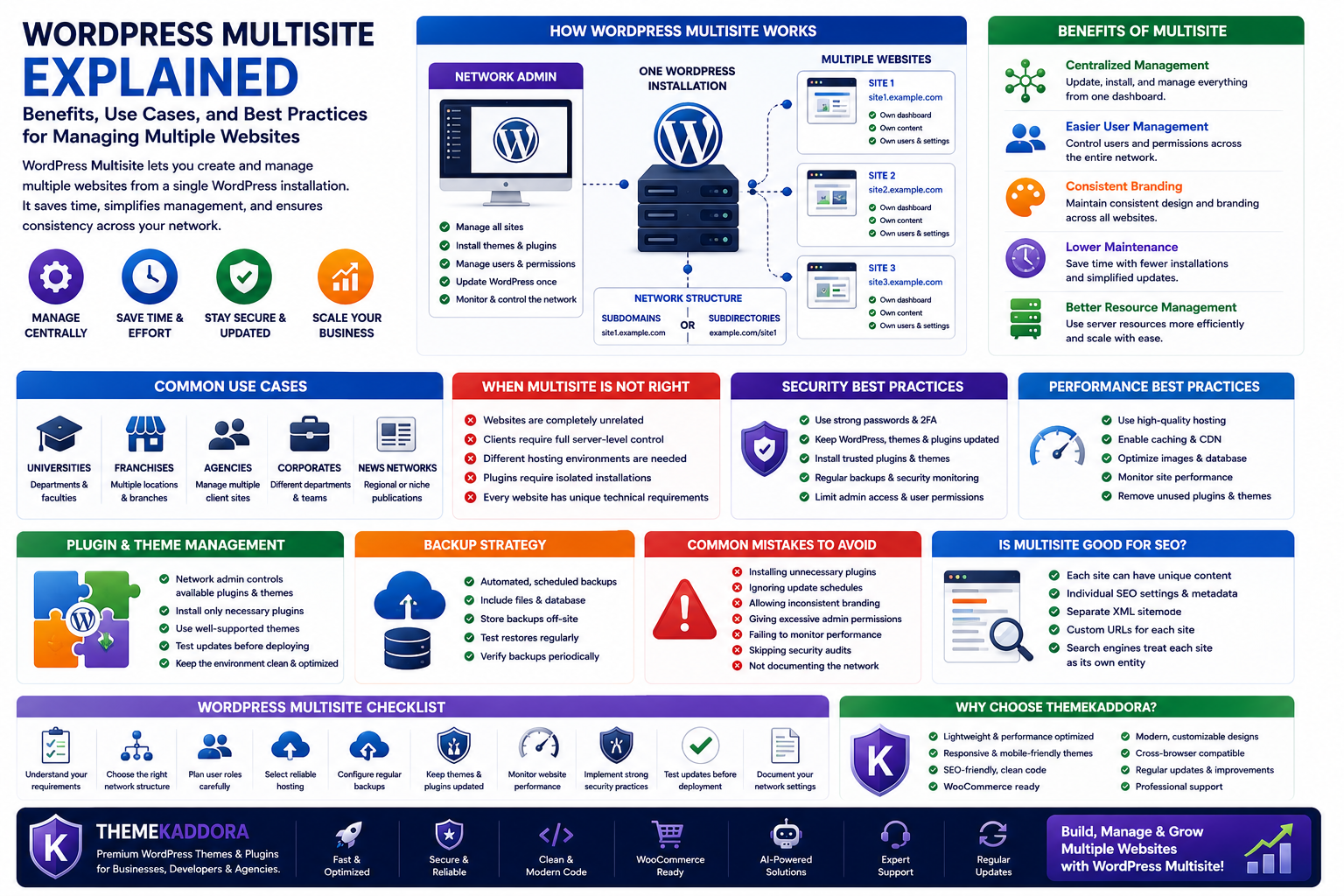
WordPress Multisite Explained: Benefits, Use Cases, and Best Practices for Managing Multiple Websites
Introduction
Managing multiple WordPress websites individually can become time-consuming as your business grows. Logging into separate dashboards, updating plugins one website at a time, and maintaining different user accounts quickly increases administrative work.
Fortunately, WordPress offers a powerful solution called WordPress Multisite.
WordPress Multisite allows you to create and manage multiple websites from a single WordPress installation. Instead of maintaining separate installations for every project, you can centralize administration while giving each website its own content, users, and settings.
For businesses, educational institutions, agencies, franchises, and organizations with multiple websites, Multisite can significantly simplify management.
This guide explains how WordPress Multisite works, its advantages, limitations, common use cases, and best practices.
What Is WordPress Multisite?
WordPress Multisite is a feature that enables one WordPress installation to host multiple websites, known as a network.
Each website in the network has:
Its own dashboard
Individual content
Separate media library
Different users and permissions
Unique themes and plugins (depending on network settings)
At the same time, all websites are managed from a single WordPress installation by a Network Administrator.
How WordPress Multisite Works
Instead of installing WordPress multiple times, you install it once and activate Multisite.
The Network Administrator controls the overall network while individual site administrators manage their own websites.
A Multisite network can be configured using:
Subdomains (site.example.com)
Subdirectories (example.com/site)
The best option depends on your branding and hosting requirements.
Benefits of WordPress Multisite
1. Centralized Management
The biggest advantage of Multisite is centralized administration.
You can:
Update WordPress once
Install plugins once
Manage themes centrally
Control user permissions
Monitor multiple websites from one dashboard
This reduces repetitive maintenance tasks.
2. Easier User Management
Users can access different websites within the network according to their assigned roles.
Instead of maintaining separate accounts across multiple installations, administrators can manage permissions more efficiently.
3. Consistent Branding
Organizations often want multiple websites that follow the same design standards.
Multisite makes it easier to reuse approved themes, layouts, and branding across every website while allowing each site to publish unique content.
4. Lower Maintenance Overhead
Instead of maintaining ten independent WordPress installations, you maintain one network.
This simplifies:
Core updates
Theme management
Plugin updates
Security monitoring
Backup strategies
5. Better Resource Management
Shared hosting resources can often be used more efficiently because websites operate within one installation rather than several independent environments.
Common Use Cases
WordPress Multisite works well for organizations that manage multiple related websites.
Examples include:
Universities
Each department can manage its own website while following institutional branding guidelines.
Franchise Businesses
Every location can have an individual website while sharing a common design system.
Agencies
Development teams can manage multiple client projects more efficiently.
Corporate Organizations
Different departments can operate independent websites within one centralized network.
News Networks
Regional publications can share infrastructure while publishing local content.
When Multisite Is Not the Right Choice
Although powerful, Multisite isn't suitable for every project.
Avoid it when:
Websites are completely unrelated.
Clients require full server-level control.
Different hosting environments are needed.
Plugins require isolated installations.
Every website has unique technical requirements.
In these situations, separate WordPress installations may provide greater flexibility.
Security Considerations
Because all websites share one WordPress installation, security becomes especially important.
Recommended practices include:
Strong administrator passwords
Two-factor authentication
Regular updates
Reliable backups
Security monitoring
Trusted plugins and themes
A security issue affecting the network can potentially impact multiple websites, making proactive maintenance essential.
Performance Best Practices
A growing Multisite network should be optimized carefully.
Focus on:
High-quality hosting
Caching
Image optimization
Database maintenance
CDN integration
Performance monitoring
As more websites join the network, infrastructure becomes increasingly important.
Plugin and Theme Management
Network Administrators decide which plugins and themes are available across the network.
Best practices include:
Installing only necessary plugins
Removing unused extensions
Choosing well-supported themes
Testing updates before deployment
Keeping the software environment clean improves both performance and security.
Backup Strategy
Because one installation powers multiple websites, backups become even more valuable.
An effective backup plan should include:
Automated backups
Off-site storage
Regular restore testing
Scheduled backup verification
Never rely solely on hosting backups.
Common Mistakes to Avoid
Avoid these mistakes when managing a Multisite network:
Installing unnecessary plugins
Ignoring update schedules
Allowing inconsistent branding
Giving excessive administrator permissions
Failing to monitor performance
Skipping security audits
Not documenting network settings
A well-managed network is easier to scale and maintain.
Is WordPress Multisite Good for SEO?
Yes—when implemented correctly.
Each website can have:
Unique content
Individual metadata
Separate XML sitemaps
Custom URLs
Independent SEO strategies
Search engines treat each website as its own entity while benefiting from a well-managed infrastructure.
Why Choose Themekaddora?
Themekaddora WordPress themes are designed for businesses that require performance, scalability, and long-term maintainability.
Our themes provide:
Lightweight architecture
Responsive layouts
SEO-friendly code
WooCommerce compatibility
Modern page templates
Fast loading performance
Cross-browser compatibility
Flexible customization
Regular updates
Professional support
Whether you're managing a single business website or an entire WordPress Multisite network, Themekaddora themes deliver a reliable foundation for professional websites.
WordPress Multisite Checklist
Before enabling Multisite, ensure you:
✅ Understand your website requirements
✅ Choose the correct network structure
✅ Plan user roles carefully
✅ Select reliable hosting
✅ Configure regular backups
✅ Keep themes and plugins updated
✅ Monitor website performance
✅ Implement strong security practices
✅ Test updates before deployment
✅ Document your network configuration
Conclusion
WordPress Multisite is an excellent solution for organizations managing multiple related websites from a single installation.
By centralizing administration, simplifying updates, and improving consistency, it reduces maintenance while supporting long-term growth.
However, Multisite isn't the right choice for every project. Understanding its strengths and limitations will help you decide whether it's the best solution for your organization.
When paired with well-optimized WordPress themes from Themekaddora, a Multisite network becomes a scalable, efficient, and future-ready platform for managing multiple professional websites.
Frequently Asked Questions
What is WordPress Multisite?
WordPress Multisite is a feature that allows multiple websites to run from one WordPress installation while being managed through a centralized network.
Who should use WordPress Multisite?
It's ideal for universities, franchises, agencies, corporations, and organizations managing several related websites.
Can each website have different content?
Yes. Every website has its own pages, posts, media library, users, and settings while sharing the same WordPress installation.
Is WordPress Multisite better than separate installations?
It depends on your requirements. Multisite simplifies centralized management but may not be suitable when websites require complete independence.
Why choose Themekaddora?
Themekaddora themes combine lightweight performance, responsive layouts, SEO-friendly architecture, WooCommerce compatibility, flexible customization, and regular updates, making them an excellent choice for both single WordPress websites and Multisite networks.
Comments (0)