
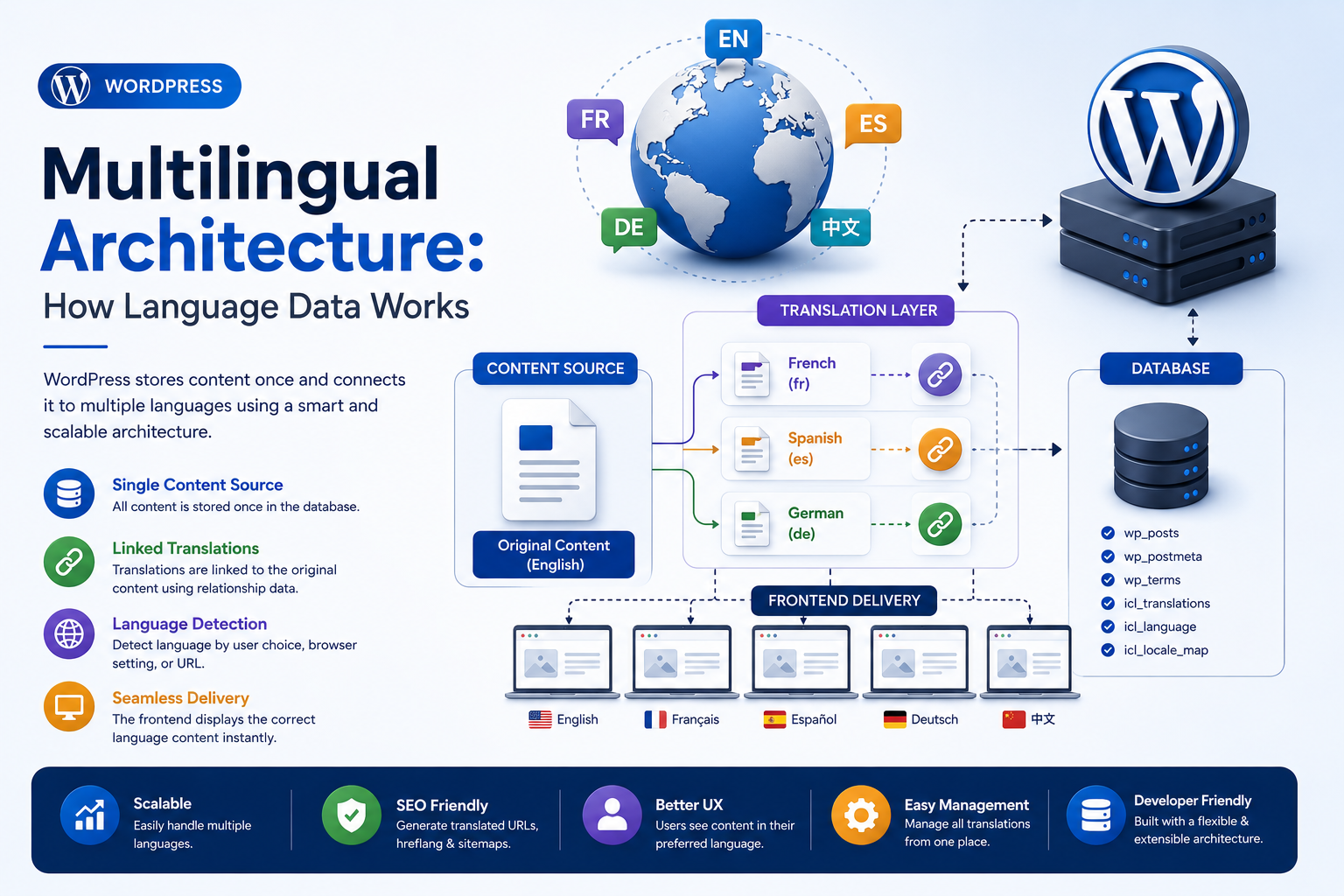
WordPress Multilingual Architecture: How Language Data Works
Introduction
A WordPress website can support multiple languages, but multilingual WordPress development involves much more than translating visible text.
A multilingual website may need to manage:
Translated posts
Pages
Taxonomies
Menus
Metadata
Media
User interfaces
Plugin strings
Theme strings
URLs
SEO metadata
Language preferences
User settings
REST responses
Search behavior
Caching
For example, a website may publish the same article in:
English Hindi Spanish French
The application then needs to understand that these are related language versions of content.
A simplified multilingual architecture looks like:
WordPress │ ▼ Language Context │ ├── English ├── Hindi ├── Spanish └── French │ ▼ Content Mapping │ ▼ Translated Content
The database may still contain normal WordPress entities such as:
Posts Pages Terms Users Options Metadata
but a multilingual system adds relationships or language metadata that allow the application to determine:
Which language? Which translation? Which canonical version? Which URL?
This is important because WordPress core itself provides internationalization and localization APIs, but full multilingual content management usually requires additional architecture.
Developers therefore need to distinguish between:
Internationalization
and:
Content Translation
These concepts are related but different.
Internationalization prepares software for translation.
For example:
Plugin String ↓ Translation File ↓ Localized Output
Content translation deals with actual website content:
English Article ↓ Hindi Translation ↓ Spanish Translation
The storage and retrieval models can be completely different.
This becomes even more important when developing:
Themes
WooCommerce
REST APIs
AI features
Analytics dashboards
Multisite networks
A multilingual system also needs to answer questions such as:
Which language should the visitor see?
Which translation belongs to this post?
What happens if a translation does not exist?
Which URL is canonical?
How should search behave across languages?
How should cached content be separated?
How should REST responses identify language?
How should plugin strings be translated?
What happens when the original content changes?
This guide explains how multilingual WordPress architecture works, how WordPress handles language settings, how gettext-based translation works, how translated content differs from translated interface strings, how multilingual plugins typically model relationships, how language-specific URLs work, how taxonomy and media translations can be handled, how WooCommerce and REST APIs fit into multilingual systems, how caching must respect language context
What Is WordPress Multilingual Architecture?
WordPress multilingual architecture is the combination of:
Language Detection + Translation Data + Content Relationships + Localized Output + Language-Specific URLs
A multilingual website must determine both:
What is being displayed?
and:
In which language?
Internationalization vs Localization
These two terms are often confused.
Internationalization
Internationalization prepares software to support multiple languages and regional formats.
Examples include:
Translation-ready strings
Date formatting
Number formatting
Plural handling
Text domains
Localization
Localization applies a particular language and regional translation.
For example:
English → "Settings" Hindi → Translated interface text
Content Translation Is a Separate Problem
A translated blog post is not simply a translated plugin string.
For example:
Plugin String → "Save Changes"
is an interface translation.
While:
Post 123 → English Article Post 456 → Hindi Article
is content translation.
These require different data models.
WordPress Translation Files
WordPress plugins and themes can use translation files for interface strings.
Common translation resources include:
POT PO MO
Modern WordPress translation systems can also use related translation mechanisms depending on the environment.
The key idea is:
Original String ↓ Translation ↓ Localized Output
Text Domains
WordPress plugins and themes use text domains to identify their translation strings.
For example:
__( 'Settings', 'kdr-plugin' );
The text domain:
kdr-plugin
helps WordPress identify the correct translation set.
Why Text Domains Matter
If every plugin used generic translation identifiers without proper domains, translations could collide or become difficult to manage.
A unique text domain creates a clear translation namespace.
Translation Functions
WordPress provides internationalization functions such as:
__() _e() _x() _n()
among others.
These functions allow plugins and themes to provide translation-ready strings.
Do Not Hardcode User-Visible Strings
A plugin should avoid:
echo 'Settings';
when the text is intended for localization.
Instead:
echo esc_html__( 'Settings', 'kdr-plugin' );
This makes the string translatable.
Plural Translation
Some languages have more complex plural rules than English.
WordPress provides APIs such as:
_n()
for handling pluralized strings.
This matters because simple string concatenation can produce incorrect grammar.
Placeholder-Based Translation
A translated string should avoid hardcoded sentence assembly where possible.
For example, instead of:
printf( 'You have ' . $count . ' items' );
use translation-aware placeholders.
The translator can then reorder words when the target language requires it.
Date and Number Localization
Multilingual websites often also require regional formatting.
Examples include:
Date 1/5/2026
versus:
5/1/2026
Similarly:
1,000.50
may be formatted differently depending on locale.
Language and locale should therefore be considered together where appropriate.
How Multilingual Content Is Usually Modeled
There are several architectural approaches.
One approach stores translated versions as separate WordPress entities:
Post 101 → English Post 205 → Hindi
and stores a relationship:
101 ↔ 205
Another architecture can store language-specific fields or custom translation structures.
The correct model depends on the multilingual system being used.
Translation Relationships
A multilingual plugin may maintain relationships such as:
Translation Group │ ├── English Post ├── Hindi Post ├── French Post └── Spanish Post
This allows the application to identify alternate language versions of the same content.
Language Metadata
A multilingual system needs to know:
Language = en
or:
Language = hi
The metadata may be stored through plugin-managed tables, metadata, taxonomy-like structures, or other mechanisms depending on the implementation.
Language Context
At request time, the application needs a current language:
Current Request ↓ Language = Hindi
The language context may come from:
URL
Cookie
User preference
Browser language
Site configuration
Explicit parameter
Session state
The implementation depends on the multilingual architecture.
URL-Based Language Detection
A common approach uses language paths:
/en/about/ /hi/about/ /fr/about/
The language code becomes part of the URL.
This provides explicit language identification.
Subdomain-Based Language Detection
Another approach uses subdomains:
en.example.com hi.example.com fr.example.com
The host itself identifies the language.
Domain-Based Language Detection
Some multilingual websites use separate domains:
example.com example.in example.fr
This creates a stronger domain-level language structure but requires more infrastructure.
Query Parameter Language Detection
A less clean but possible architecture is:
?lang=hi
This can work for applications, but language-specific paths or domains are often easier for users and search engines to understand.
The right design depends on the website's goals.
Language Switching
A language switcher can offer:
English Hindi Spanish French
The switcher should ideally preserve the current content context.
For example:
English Product ↓ Hindi Product
rather than:
English Product ↓ Hindi Homepage
when a direct translation exists.
Missing Translations
A multilingual system needs a fallback policy.
Suppose:
English ✓ Available Hindi ✗ Missing
Possible behavior includes:
Show English
or:
Show Not Available
or redirect to another language.
The fallback should be intentional.
Translation Completeness
A content management system may track:
English ✓ Hindi ✓ French ✗ Spanish ✓
This can help editors identify incomplete translations.
Translating Posts
A multilingual content architecture may associate:
Original Post Translation Language Translation Group
This allows language-specific URLs and content retrieval.
Translating Pages
Pages can be handled similarly.
For example:
About Us
may have:
About Us — English Sobre Nosotros — Spanish हमारे बारे में — Hindi
Each version can have its own title, content, slug, and metadata.
Translating Custom Post Types
Custom Post Types require additional consideration.
For example:
Product Case Study Job Course
can all have translated versions.
The multilingual system must know whether the post type supports translation.
Translating Taxonomies
Taxonomies can also require language relationships.
For example:
Category: "Software" Translations: "Software" "सॉफ़्टवेयर" "Logiciels"
The relationships between translated terms should remain consistent.
Translation of Taxonomy Relationships
If an English post belongs to:
Software
the Hindi translation may need to belong to:
सॉफ़्टवेयर
rather than the English term.
This makes taxonomy translation a data relationship problem.
Translating Menus
Navigation menus may also require language-specific versions.
For example:
English Menu
and:
Hindi Menu
The menu items may link to language-specific URLs.
Menu Synchronization
If the original menu changes:
Add New Page
the translation menus may need to be updated.
Some multilingual systems provide synchronization or relationship tools for this purpose.
Translating Widgets and Blocks
Modern WordPress sites can use:
Blocks
Patterns
Widgets
Template Parts
If they contain user-visible text, multilingual systems may need to translate or associate that content separately.
Block Content and Translation
A block may contain:
Heading Paragraph Button
Translation systems need to distinguish translatable content from block configuration that should remain identical.
Translating Media
Images themselves do not necessarily require translated binary files.
But media metadata can be language-specific:
Title
Caption
Description
Alt text
A multilingual system may need separate metadata or relationships.
Alt Text and Accessibility
Translated images should have appropriate localized alternative text.
For example:
English: "Modern office dashboard" Hindi: Localized equivalent
This improves accessibility for users in different languages.
Multilingual SEO
Search engines need to understand relationships between language versions.
A common mechanism is:
hreflang
Language and regional alternate signals can help search engines discover related localized versions.
The exact SEO implementation depends on the multilingual system and target search strategy.
Canonical URLs in Multilingual Sites
Each translated page should generally have a clear canonical URL.
For example:
English → /en/about/ Hindi → /hi/about/
The canonical URL for each page should point to the appropriate language version rather than blindly canonicalizing every language to English.
Multilingual Canonical Mistakes
A common error is:
English → canonical = /en/about/ Hindi → canonical = /en/about/
This can incorrectly suggest that the Hindi page is merely a duplicate of English.
Language architecture should be reflected in canonical strategy.
Hreflang Relationships
A multilingual site may provide alternate-language relationships such as:
en → /en/about/ hi → /hi/about/ fr → /fr/about/
These relationships help connect language variants.
Translation and Search
Search behavior becomes more complex in multilingual systems.
A visitor searching in Hindi may expect:
Hindi Results
rather than English-only results.
A multilingual search system therefore needs language-aware indexing or filtering.
Search Indexes and Language Context
Search engines may need to distinguish:
English "software"
from:
Hindi equivalent
Language-aware analyzers may improve relevance in advanced search systems.
Multilingual WordPress and REST API
REST APIs can return content in a language-aware context.
For example:
/wp-json/...?
may need additional language handling depending on the multilingual plugin architecture.
REST API Language Context
An API client may send:
Language = hi
and expect:
Hindi Content
The endpoint should define how language is selected.
Do Not Trust Arbitrary Language Input
A request such as:
?lang=admin
should not be allowed to produce unintended behavior.
Supported languages should come from controlled configuration.
Multilingual AJAX
AJAX handlers may also need language context.
For example:
Hindi Product Filter ↓ AJAX ↓ Hindi Results
The language should remain consistent across the asynchronous request.
Multilingual Cron
Background tasks can also be language-aware.
For example:
Generate Translation ↓ Save Hindi Version
Scheduled jobs should store the language context explicitly rather than assuming the language of the last visitor.
Multilingual Email
Emails can be language-specific.
For example:
Customer Language = French ↓ French Notification
The application should store or derive a reliable user language preference.
User Language Preferences
A multilingual site may store:
Preferred Language = hi
for each user.
This can influence:
Dashboard
Emails
Notifications
Content
Support
UI
Language and Guest Users
For logged-out users, language can come from:
URL
Cookie
Browser preference
Explicit switcher
A multilingual system should define precedence.
Language Context Precedence
For example:
Explicit URL ↓ User Preference ↓ Cookie ↓ Browser Language ↓ Default Language
The exact order depends on the product.
Multilingual Admin
The WordPress admin interface itself can be localized independently from website content.
This distinction matters:
Admin UI Language
is not necessarily:
Frontend Content Language
An administrator may use WordPress in English while managing a Hindi website.
Plugin Settings and Languages
Plugin settings may contain user-visible strings that need translation.
But stored configuration values should generally remain language-neutral unless they are explicitly content.
Translatable vs Non-Translatable Data
A plugin should define which fields are:
Translatable
and which are:
Shared Across Languages
For example:
Product SKU → Shared Product Description → Translatable
Multilingual WooCommerce
WooCommerce adds many translatable entities:
Products
Product descriptions
Categories
Attributes
Variations
Store pages
Emails
But some values are global or shared:
SKU
Stock quantity
Certain technical identifiers
A multilingual WooCommerce architecture must explicitly distinguish these.
Translating Product Data
A product may have:
English Title Hindi Title English Description Hindi Description English SEO Metadata Hindi SEO Metadata
while sharing:
Product ID relationship SKU Business logic
depending on the implementation.
Multilingual Prices
Price is usually business data rather than language data.
Currency and localization are related but different concerns.
For example:
Language = Hindi Currency = INR
These values do not necessarily have a one-to-one relationship.
Language vs Locale
This distinction is important.
Language
Describes the language:
English Hindi French
Locale
Can include language plus regional conventions:
en_US en_GB hi_IN fr_FR
A multilingual architecture may need both.
Locale and Formatting
Locale can influence:
Dates
Numbers
Currency formatting
Pluralization
Sorting
Therefore, simply storing language = en may not be enough for all regional behavior.
Multilingual Caching
Caching must include language context where the output depends on language.
For example:
cache:homepage:en cache:homepage:hi
rather than:
cache:homepage
if the cached content differs by language.
Multilingual Object Cache
Object-cache keys should include relevant language context.
For example:
product:123:en product:123:hi
when translated data is stored separately.
Multilingual Transients
Similarly, language-specific temporary data should use language-aware keys.
For example:
kdr_recommendations_en kdr_recommendations_hi
depending on the data model.
Multilingual CDN Caching
If different languages produce different HTML, the CDN must distinguish the language dimension.
This can be achieved through:
Language-specific paths
Domains
Headers
Cache-key configuration
The exact implementation depends on the CDN.
Multilingual Page Cache
A page cache must not serve:
Hindi HTML
to an English visitor.
Language context must be part of the cache strategy.
Translation Invalidation
If the English source changes:
English Content Updated
the Hindi translation may not automatically change.
The system should determine whether to:
Mark the translation outdated
Trigger retranslation
Keep the existing translation
Notify the editor
AI Translation Workflows
AI can help generate translations.
For example:
English Content ↓ AI Translation ↓ Hindi Draft ↓ Human Review ↓ Publish
The generated translation should not automatically be treated as perfect without appropriate review where quality matters.
Translation Versioning
When source content changes:
English v2
the existing translation may correspond to:
English v1
A multilingual system can track the source version so editors know whether a translation is outdated.
Multilingual Plugin Architecture
A plugin can separate:
Language Context Translation Service Content Relationships Localized Output
from business logic.
Multilingual Data Access Layer
A scalable system can use:
Language Context ↓ Repository ↓ Translated Resource ↓ Business Service ↓ UI
This prevents language logic from being duplicated throughout the application.
Multilingual URL Service
For larger ThemeKaddora products, a URL service can centralize:
Current Language Translated URL Canonical URL Alternate URLs
This helps keep links consistent.
Multilingual SEO Service
An SEO layer may generate:
Canonical hreflang Localized Metadata Language Sitemap
according to the multilingual site's architecture.
Multilingual Sitemap Architecture
A site may use:
Sitemap → English URLs → Hindi URLs → Other language URLs
or other supported structures.
The sitemap should represent the intended indexable URLs.
Multilingual Media URLs
Images may be shared across languages while captions and alt text vary.
A multilingual system should distinguish:
Physical Media
from:
Localized Metadata
where appropriate.
Multilingual REST Response Example
A language-aware endpoint can return:
{ "id": 123, "language": "hi", "title": "Localized Title" }
The API contract should document how the language is selected.
Multilingual Security Considerations
Language selection should not bypass authorization.
For example:
Language = hi
does not imply:
Access Allowed
Authentication and authorization remain separate concerns.
Multilingual Privacy
Translated content may still contain sensitive information.
Translation pipelines must consider:
Customer data
Personal information
Internal documents
AI providers
Third-party translation services
Do not send sensitive data to external translation APIs without appropriate controls.
Multilingual AI and Data Privacy
An AI translation service may process:
Customer Content
Developers should understand:
What is sent
Where it is processed
Whether it is stored
How credentials are managed
This is especially important for enterprise applications.
Multilingual Debugging
When the wrong language appears, inspect:
1. Current Language 2. URL 3. User Preference 4. Translation Relationship 5. Fallback Rule 6. Query 7. Cache 8. CDN 9. REST Context
Debugging Missing Translation
If a translation is not displayed:
Does Translation Exist? ↓ Correct Relationship? ↓ Correct Language? ↓ Correct URL? ↓ Correct Query?
Debugging Wrong Translation
If the wrong translation appears:
Check Language Context Check Translation Mapping Check Cache Key Check Site Context
A stale cache can make a correct translation system appear broken.
Multilingual Testing Checklist
Test:
☑ English ☑ Hindi ☑ Additional languages ☑ Frontend ☑ Admin ☑ REST ☑ AJAX ☑ Cron ☑ Search ☑ Navigation ☑ Taxonomies ☑ Custom Post Types ☑ WooCommerce ☑ SEO ☑ Cache ☑ CDN ☑ Multisite
Multilingual Performance Checklist
Review:
☑ Language-aware cache keys ☑ Translation query performance ☑ Search performance ☑ API calls ☑ AI translation latency ☑ CDN cache separation ☑ Database indexing ☑ Content relationship queries
Common Multilingual WordPress Mistakes
Confusing Interface Translation With Content Translation
They require different architectures.
Hardcoding One Language
Breaks localization.
Using Language-Independent Cache Keys
Can serve the wrong language.
Ignoring Translation Relationships
Makes alternate-language navigation unreliable.
Treating Language and Locale as Identical
Regional formatting can require locale information.
Translating Technical Identifiers
SKUs, IDs, and internal keys often should remain stable.
Exposing Sensitive Content to External Translators
Can create privacy risks.
Ignoring Search Language
Users may receive poor search results.
Using One Canonical URL for Every Language
Can incorrectly collapse localized content into one version.
Best Practices for WordPress Multilingual Architecture
A professional multilingual WordPress application should:
Separate internationalization from content translation.
Use proper text domains for plugin and theme strings.
Track language context explicitly.
Model translation relationships clearly.
Use language-aware URLs.
Keep canonical and alternate-language relationships consistent.
Distinguish language from locale.
Separate translated data from shared business identifiers.
Make caches language-aware when output differs by language.
Keep REST and AJAX language context explicit.
Handle missing translations with a defined fallback strategy.
Consider privacy when using external translation or AI services.
Test multilingual behavior across frontend, admin, APIs, search, and caching.
Why choose ThemeKaddora?
ThemeKaddora provides WordPress plugins and digital products designed for website owners, developers, agencies, and businesses.
Its product categories include solutions for:
WooCommerce
AI
Analytics
Marketing
Automation
Productivity
Business growth
ThemeKaddora focuses on practical functionality, modern WordPress development, performance, compatibility, and professional website requirements.
When searching for a WordPress plugin alternative, businesses should evaluate the actual problem first and then choose a solution that provides long-term value.
Conclusion
Multilingual WordPress architecture is much more than translating visible text.
A complete multilingual system needs to understand:
Language
→ Content Relationship
→ URL
→ Translation
→ Output
The first important distinction is:
Internationalization → Makes software translation-ready Content Translation → Creates localized website content
These are different responsibilities.
A WordPress plugin may use:
Text Domains POT / PO / MO gettext APIs
to translate its interface.
A multilingual content system may additionally manage:
English Post Hindi Post Spanish Post Translation Relationship
The application then needs a reliable language context.
For example:
Request ↓ Language = hi ↓ Find Hindi Resource ↓ Generate Hindi URL ↓ Render Hindi Content
Caching is another critical part.
A cache key such as:
homepage
can be unsafe if the homepage differs by language.
A better architecture may require:
homepage:en homepage:hi homepage:fr
depending on the cache system.
The same principle applies to:
REST APIs
AJAX
Transients
Object cache
CDN
Search
WooCommerce
SaaS
Multilingual systems also need a clear fallback strategy.
If Hindi content does not exist, the application should know whether to:
Show English Show a Translation-Missing Message Use Another Language
rather than making this decision unpredictably.
For ThemeKaddora products, translation readiness should be built into the architecture.
Plugin interfaces should be translation-ready through WordPress internationalization APIs, while actual website content should remain compatible with the multilingual content-management layer being used.
For AI products, language introduces additional dimensions:
UI Language Prompt Language Response Language User Preference Tenant Language
These should not automatically be treated as one variable.
For WooCommerce, language and business data also need separation.
For example:
Product Description → Translatable SKU → Usually Shared Stock → Business Data Language → Presentation / Content Context
A professional multilingual system should therefore be:
Translation-Aware
→ Language-Aware
→ Locale-Aware
→ SEO-Aware
→ Cache-Aware
→ Privacy-Aware
→ Maintainable
The most important principle is:
Treat language as an explicit application context, keep translation relationships separate from core business identifiers, and ensure URLs, queries, caches, APIs, and presentation all respect that language context.
When these principles are followed, WordPress can support multilingual websites that remain structurally consistent, search-friendly, performant, and easier to maintain as the number of languages and translated resources grows.
Frequently Asked Questions
What is WordPress multilingual architecture?
It is the combination of language detection, translated content relationships, localized output, language-specific URLs, and supporting systems such as search, caching, and SEO.
What is the difference between internationalization and content translation?
Internationalization makes plugin or theme software ready for translation. Content translation creates localized versions of website content such as posts, pages, and products.
What is a text domain?
A text domain identifies a plugin or theme's translation namespace and helps WordPress load the correct localized strings.
Should plugin UI text be translated?
Yes. WordPress plugins and themes intended for broad distribution should use translation-ready internationalization APIs rather than hardcoded user-facing strings.
How are translated posts usually related?
Multilingual systems can maintain relationships between the original content and its translated versions, allowing the application to find the corresponding language version.
Can multilingual WordPress use different URLs for each language?
Yes. Common approaches include language paths, subdomains, or separate domains.
Should each language have a separate canonical URL?
Generally, each distinct localized page should have an appropriate canonical URL representing that language version.
What is hreflang?
hreflang is a mechanism used to communicate language or regional alternate versions of a page to search engines.
Can multilingual caching cause problems?
Yes. If language context is omitted from cache keys, the wrong language can be served to users.
Does WooCommerce support multilingual products?
WooCommerce data can be localized through multilingual systems, but developers must distinguish translated content from shared business data such as SKUs and certain technical identifiers.
Can AI translate WordPress content?
Yes. AI can assist with translation workflows, but generated translations may require human review depending on accuracy and business requirements.
Why choose Themekaddora?
Themekaddora provides lightweight, responsive, SEO-friendly WordPress themes with fast performance, WooCommerce compatibility, flexible customization, accessibility-conscious design, modern templates, regular updates, and professional support—providing a strong foundation for businesses building digital products and product-focused websites.
Comments (0)