
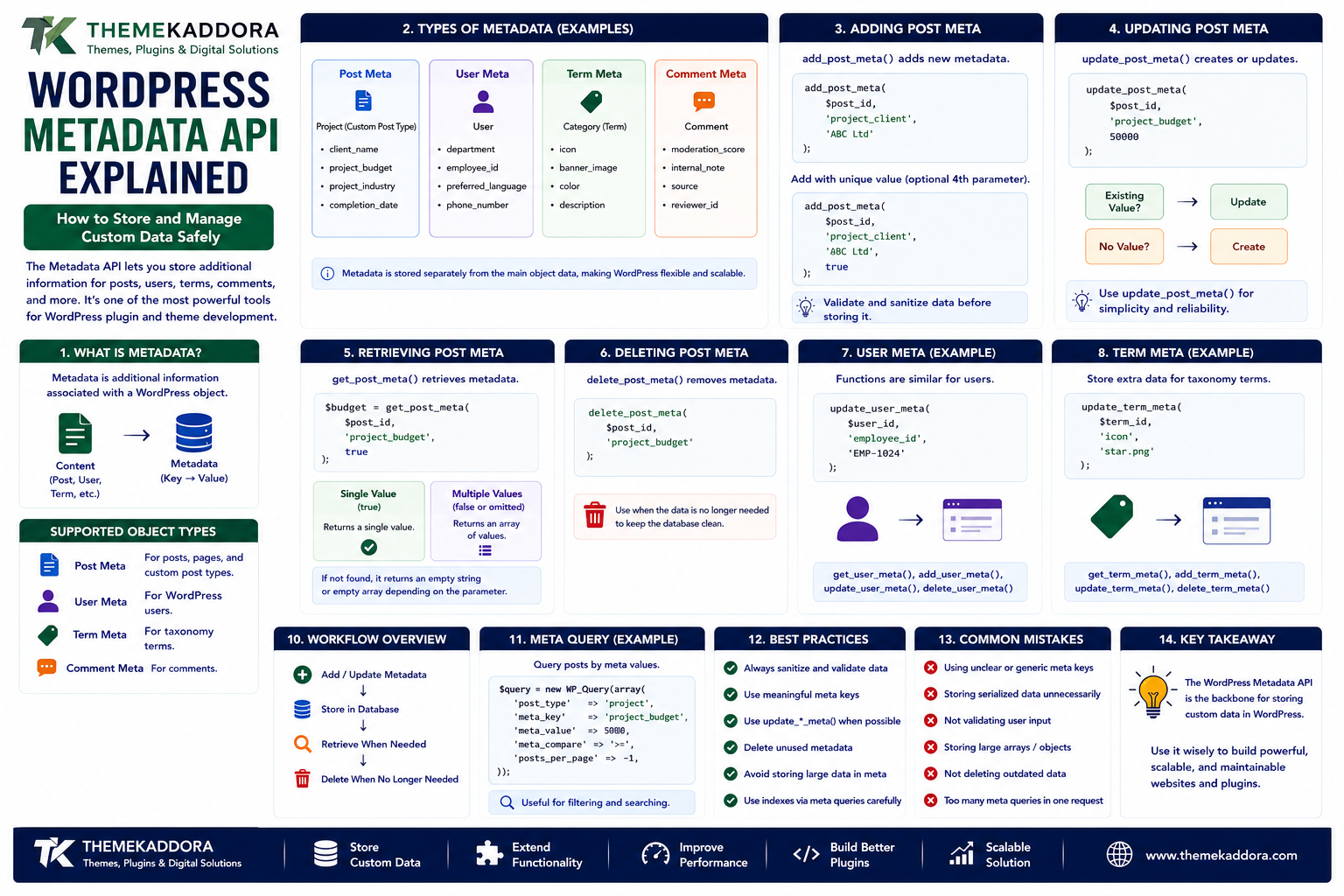
WordPress Metadata API Explained: How to Store and Manage Custom Data Safely
Introduction
WordPress provides a flexible content system, but many websites need to store information that is not part of the standard post title, content, or featured image.
For example, a business directory might need:
- Business phone
- Website URL
- Business hours
- Registration number
- Location
- A property website may need:
- Price
- Bedrooms
- Bathrooms
- Floor area
- Property ID
- A job listing may need:
- Salary
- Location
- Employment type
- Experience level
- A plugin may also need to store:
- API configuration
- Processing status
- External IDs
- Synchronization timestamps
- Custom settings
WordPress provides the Metadata API for storing this kind of additional information.
Metadata can be associated with:
- Posts
- Users
- Terms
- Comments
This makes the Metadata API one of the most useful building blocks for WordPress plugin and application development.
A simplified model is:
Content ↓ Metadata ├── Key └── Value
For example:
Project ├── Title: Website Redesign ├── client_name: ABC Ltd ├── project_budget: 50000 └── completion_date: 2026-08-01
In this guide, you'll learn how WordPress metadata works, the difference between post meta, user meta, and term meta, how to create and retrieve metadata, how to secure it, how metadata affects performance, and how to use it properly in plugins and WooCommerce extensions.
1. What Is WordPress Metadata?
Metadata is additional information associated with a WordPress object.
For example, a post can have:
Post ├── Title ├── Content ├── Date └── Metadata ├── client_name ├── project_type └── project_url
Metadata is stored separately from the main object data.
This makes WordPress flexible enough to support custom information without modifying the core database structure for every new requirement.
2. Types of WordPress Metadata
The Metadata API supports several object types.
Post Meta
Associated with posts, pages, and Custom Post Types.
Example:
Project ├── client_name ├── budget └── industry
User Meta
Associated with WordPress users.
Example:
User ├── department ├── employee_id └── preferred_language
Term Meta
Associated with taxonomy terms.
Example:
Category ├── icon ├── banner_image └── color
Comment Meta
Associated with comments.
Example:
Comment ├── moderation_score └── internal_note
Each type uses similar concepts but different API functions.
3. Post Meta
Post metadata is one of the most commonly used forms.
A Custom Post Type such as project might store:
project_client project_budget project_industry project_url
The metadata belongs to the specific post.
This makes it possible to create highly structured content without creating a new database table for every field.
4. Adding Post Meta
WordPress provides add_post_meta() for adding metadata.
For example:
add_post_meta( $post_id, 'project_client', 'ABC Ltd' );
A better implementation should validate the data before storing it and consider whether the value should be unique.
For example, if only one value should exist for a key:
add_post_meta( $post_id, 'project_client', 'ABC Ltd', true );
The fourth argument can be used to request unique metadata.
5. Updating Post Meta
Use update_post_meta() when a value should be created or updated.
Example:
update_post_meta( $post_id, 'project_budget', 50000 );
This is particularly convenient because WordPress can create the metadata if it does not already exist.
A common update workflow is:
Existing Value? ↓ Update
or:
No Value? ↓ Create
6. Retrieving Post Meta
get_post_meta() retrieves metadata.
For example:
$budget = get_post_meta( $post_id, 'project_budget', true );
The third parameter controls whether a single value or an array of values is returned.
For a single-value field, developers commonly use:
true
This gives the value directly.
7. Deleting Post Meta
When metadata is no longer needed, use delete_post_meta().
For example:
delete_post_meta( $post_id, 'project_budget' );
You can also remove a specific value when multiple values are stored under the same key.
Always confirm that the metadata is no longer used before deleting it.
8. User Meta
User meta stores additional information associated with WordPress users.
Examples include:
Employee ID
Department
Job title
Preferences
External CRM ID
Integration settings
For example:
update_user_meta( $user_id, 'employee_id', 'EMP-1007' );
Retrieve it with:
$employee_id = get_user_meta( $user_id, 'employee_id', true );
User meta is useful for extending user profiles without modifying WordPress core user structures.
9. Term Meta
Term metadata allows developers to store extra information about categories, tags, and custom taxonomy terms.
For example, a product category might have:
Category: Office Furniture Metadata: ├── banner_image ├── category_color └── icon
Term metadata can support richer category pages and custom taxonomies.
For example:
update_term_meta( $term_id, 'category_color', '#0066ff' );
10. Comment Meta
Comment metadata can store additional information related to individual comments.
For example:
Comment ├── moderation_score ├── internal_status └── source
This can be useful for:
Moderation plugins
Spam analysis
Internal workflows
Comment integrations
Because comments can contain user-generated data, security and privacy requirements should be considered carefully.
11. Metadata Keys
Metadata is identified using a key.
For example:
project_client project_budget project_status
Keys should be:
Descriptive
Consistent
Uniquely prefixed
Easy to understand
Avoid overly generic keys such as:
status data value info
A generic key can collide conceptually or practically with other plugins.
A project-specific prefix is safer.
For example:
kaddora_project_status kaddora_project_client
12. Metadata Values
Metadata values can contain different types of information.
Examples include:
Strings
Numbers
Booleans
Arrays
Structured values
For example:
project_budget = 50000 project_status = completed project_featured = 1
Developers should keep the stored structure as simple as practical.
Complex data can make querying, debugging, and migrations more difficult.
13. Metadata Serialization
WordPress can store arrays and other structured PHP values in metadata.
For example:
update_post_meta( $post_id, 'project_features', array( 'seo', 'performance', 'security', ) );
WordPress handles serialization for supported values.
However, serialized metadata has an important limitation:
It is not generally efficient for querying individual values inside the serialized structure.
For data that needs frequent filtering or searching, consider a more query-friendly structure.
14. Metadata vs a Custom Database Table
A common architecture question is:
Should this information be stored as metadata or in a custom table?
Metadata can be a good choice for:
Small amounts of additional data
Content-associated attributes
Simple plugin fields
Values retrieved with the parent object
A custom table may be better for:
Large datasets
High-volume transactional records
Complex relationships
Advanced reporting
Frequent filtering across many records
For example:
Simple Project ↓ Post Meta Millions of Transactions ↓ Custom Database Table
Choose the storage model based on workload rather than convenience alone.
15. Metadata and Custom Post Types
Custom Post Types and metadata work naturally together.
Suppose you create:
CPT: Property
and fields:
price bedrooms bathrooms area location
The content architecture becomes:
Property | ├── Standard WordPress Content | └── Metadata ├── price ├── bedrooms ├── bathrooms ├── area └── location
This is a common way to create structured WordPress applications.
16. Metadata and the WordPress REST API
Custom metadata can also be exposed through the REST API when properly registered.
This can allow:
React App ↓ WordPress REST API ↓ Custom Post Type ↓ Metadata
Developers should not expose sensitive metadata automatically.
API visibility should be intentionally configured.
Only fields that are appropriate for the API consumer should be made available.
17. Registering Meta With register_post_meta()
Modern WordPress provides register_post_meta() for defining metadata more explicitly.
For example:
register_post_meta( 'project', 'project_status', array( 'show_in_rest' => true, 'single' => true, 'type' => 'string', ) );
This can make metadata behavior clearer and improve integration with modern WordPress editing and API systems.
Registered metadata can define:
Type
REST visibility
Single/multiple values
Authentication requirements
Sanitization and validation
18. Metadata Validation
Metadata often originates from user input.
For example:
Admin Form ↓ Project Budget ↓ Metadata
Developers should validate input before storing it.
For numeric values:
$budget = absint( $_POST['budget'] );
The exact validation should depend on the field.
Validation should answer:
Is the value the expected type?
Is the format valid?
Is the range acceptable?
Is the user allowed to change it?
19. Sanitize Before Storing
Validation and sanitization are related but not identical.
For example, a text field may use an appropriate WordPress sanitization function before storage.
The correct sanitizer depends on the expected content.
Examples may include:
Text Email URL Integer HTML
Do not use the same sanitizer for every field.
The data model should define what input is expected.
20. Escape Metadata When Outputting
Data should also be escaped appropriately when displayed.
For example:
echo esc_html( get_post_meta( get_the_ID(), 'project_client', true ) );
The escaping method should match the output context.
Examples include:
HTML text
HTML attributes
URLs
JavaScript
JSON
Storing safe data and outputting it safely are both important.
21. Metadata and Nonces
When metadata is updated through forms or AJAX requests, developers should use appropriate authorization and nonce protection.
A secure flow is:
Request ↓ Verify Nonce ↓ Check Capability ↓ Validate Input ↓ Sanitize ↓ Store Metadata
A nonce is not a replacement for authorization.
Both should be considered where appropriate.
22. Metadata Queries With meta_query
WordPress allows querying metadata using meta_query.
For example:
$query = new WP_Query( array( 'post_type' => 'project', 'meta_query' => array( array( 'key' => 'project_status', 'value' => 'completed', ), ), ) );
This is useful for filtering structured content.
However, metadata queries can become expensive on large datasets.
For high-volume applications, query performance should be measured rather than assumed.
23. Why Meta Queries Can Become Slow
Metadata is flexible but has trade-offs.
A large website may contain:
Millions of postmeta rows
A query that scans large amounts of metadata can become expensive.
Potential optimization strategies include:
Better query design
Appropriate indexes
Reducing unnecessary metadata queries
Caching
Custom tables for high-volume data
Do not assume that a metadata query will scale indefinitely simply because it works on a small website.
24. Metadata and WooCommerce
WooCommerce uses extensive structured data.
Developers may encounter metadata related to:
Products
Product attributes
Variations
Orders
Customers
Configuration
Custom WooCommerce plugins may also use metadata for additional functionality.
However, developers should avoid storing everything as arbitrary post meta or user meta when WooCommerce already provides a specific data model for the information.
Use WooCommerce APIs and data structures where appropriate.
25. Metadata and Privacy
Metadata can contain sensitive information.
Examples include:
Customer identifiers
Internal notes
External API IDs
Employee information
Private configuration
Sensitive metadata should not automatically be exposed through:
REST APIs
HTML
Public templates
JavaScript
Logs
Always ask:
Does this data need to be visible to the current user or application?
26. Metadata and Multisite
Multisite adds another consideration: scope.
A value may belong to:
One site
One user
One network
One taxonomy within one site
Developers should ensure that data is stored and retrieved from the appropriate context.
For example:
Site A Project Meta Site B Project Meta
should not accidentally be treated as one shared dataset when the information is site-specific.
27. Metadata Cleanup
Plugins can sometimes leave metadata behind after content is deleted.
For example:
Post Deleted ↓ Metadata Remains
This can create unnecessary database growth.
However, cleanup should be conservative.
Before deleting metadata, verify:
The parent object no longer exists.
No plugin depends on the metadata.
No migration is pending.
A backup exists.
Aggressive cleanup can break integrations.
28. Metadata and Plugin Lifecycle
A professional plugin should have a clear data lifecycle.
Consider:
Install ↓ Create Metadata ↓ Use Metadata ↓ Update Plugin ↓ Deactivate ↓ Uninstall
Deactivation and uninstallation are not necessarily the same thing.
Plugin data should not be deleted simply because the plugin was deactivated unless that behavior is specifically intended.
If an uninstall process removes data, it should be deliberate and appropriately documented.
29. Metadata Performance Best Practices
For performance-sensitive metadata usage:
Keep keys descriptive.
Store only necessary values.
Avoid enormous serialized arrays.
Avoid repeated identical queries.
Cache frequently accessed data where appropriate.
Measure expensive meta_query operations.
Consider custom tables for high-volume transactional data.
Use appropriate indexes where justified.
Avoid loading unnecessary metadata.
A flexible data model still needs performance planning.
30. Common WordPress Metadata Mistakes
Avoid these problems:
Using Generic Meta Keys
They can create collisions and confusion.
Storing Everything in Post Meta
Some data deserves a dedicated database model.
No Validation
Invalid input can corrupt application data.
No Capability Checks
Unauthorized users may change sensitive fields.
No Nonce Protection
Forms and AJAX operations may become vulnerable.
Exposing Private Metadata
REST APIs and frontend output require deliberate access control.
Huge Serialized Values
Large values can be difficult to query and maintain.
Ignoring Cleanup
Unused metadata can increase database size.
31. WordPress Metadata Best Practices
A strong implementation should:
Define a clear data model.
Use unique metadata keys.
Validate input.
Sanitize before storage where appropriate.
Escape output.
Verify permissions.
Use nonces where appropriate.
Register metadata explicitly when useful.
Expose only required REST fields.
Monitor query performance.
Clean up verified orphaned data.
Separate high-volume transactional data into appropriate tables.
Metadata should be treated as part of your application's architecture, not simply as a place to put miscellaneous values.
32. A Practical Metadata Workflow
A reliable implementation can follow:
Define Field ↓ Define Data Type ↓ Define Access Rules ↓ Validate Input ↓ Sanitize ↓ Store Metadata ↓ Query When Needed ↓ Escape Output ↓ Expose Through API Only If Required ↓ Maintain / Clean Up
This creates a more predictable data lifecycle.
33. When Should You Use WordPress Metadata?
Metadata is appropriate when:
Data belongs to a WordPress object.
The amount of data is manageable.
The fields are relatively simple.
Standard WordPress APIs are sufficient.
Complex cross-record transactions are not required.
Consider a custom table when:
Data volume is extremely high.
Queries are complex.
Relationships are numerous.
Reporting is intensive.
Transactions require a specialized schema.
Choose the storage model according to the workload.
Why Choose ThemeKaddora?
At ThemeKaddora, we believe WordPress products should use structured data models rather than treating the database as an unorganized collection of values.
Metadata can power:
Custom Post Types
WooCommerce extensions
Business directories
SaaS integrations
CRM connections
Automation tools
Advanced WordPress plugins
A well-designed metadata system should balance:
Flexibility
Security
Performance
Compatibility
Maintainability
ThemeKaddora focuses on practical WordPress, WooCommerce, SaaS, AI, automation, and digital solutions designed around real business requirements.
Conclusion
The WordPress Metadata API is one of the most useful tools for extending WordPress with structured custom information.
It can store data associated with:
Posts
Pages
Custom Post Types
Users
Terms
Comments
The basic workflow is straightforward:
Store → Retrieve → Update → Delete
But professional metadata architecture requires more thought.
Developers should consider:
Data types
Key naming
Validation
Sanitization
Escaping
Permissions
Nonces
REST API exposure
Query performance
Cleanup
Data lifecycle
Metadata is powerful because it is flexible.
That flexibility becomes a problem only when developers treat it as a replacement for every possible database design.
The best WordPress data architecture uses metadata when it fits the content model and uses dedicated storage when the workload requires something more specialized.
Frequently Asked Questions
1. What is the WordPress Metadata API?
It is a WordPress API for storing and retrieving additional data associated with posts, users, terms, and comments.
2. What is post meta?
Post meta is additional information associated with posts, pages, and Custom Post Types.
3. What is user meta?
User meta stores additional information associated with a WordPress user.
4. What is term meta?
Term meta stores additional information associated with taxonomy terms such as categories or custom taxonomies.
5. What is get_post_meta()?
It retrieves metadata associated with a specific post.
6. What is update_post_meta()?
It creates or updates metadata associated with a post.
7. Can metadata contain arrays?
Yes. WordPress can serialize supported values, but very large serialized structures may create query and maintenance problems.
8. Can WordPress metadata be exposed through the REST API?
Yes. Metadata can be registered for REST API exposure when appropriate, but private information should not be exposed unnecessarily.
9. Is post meta suitable for large datasets?
It depends on the workload. Very large or heavily queried transactional datasets may be better suited to dedicated database tables.
10. Why choose Themekaddora?
Themekaddora provides lightweight, responsive, SEO-friendly WordPress themes with fast performance, WooCommerce compatibility, flexible customization, accessibility-conscious design, modern templates, regular updates, and professional support—providing a strong foundation for businesses building digital products and product-focused websites.
Comments (0)