
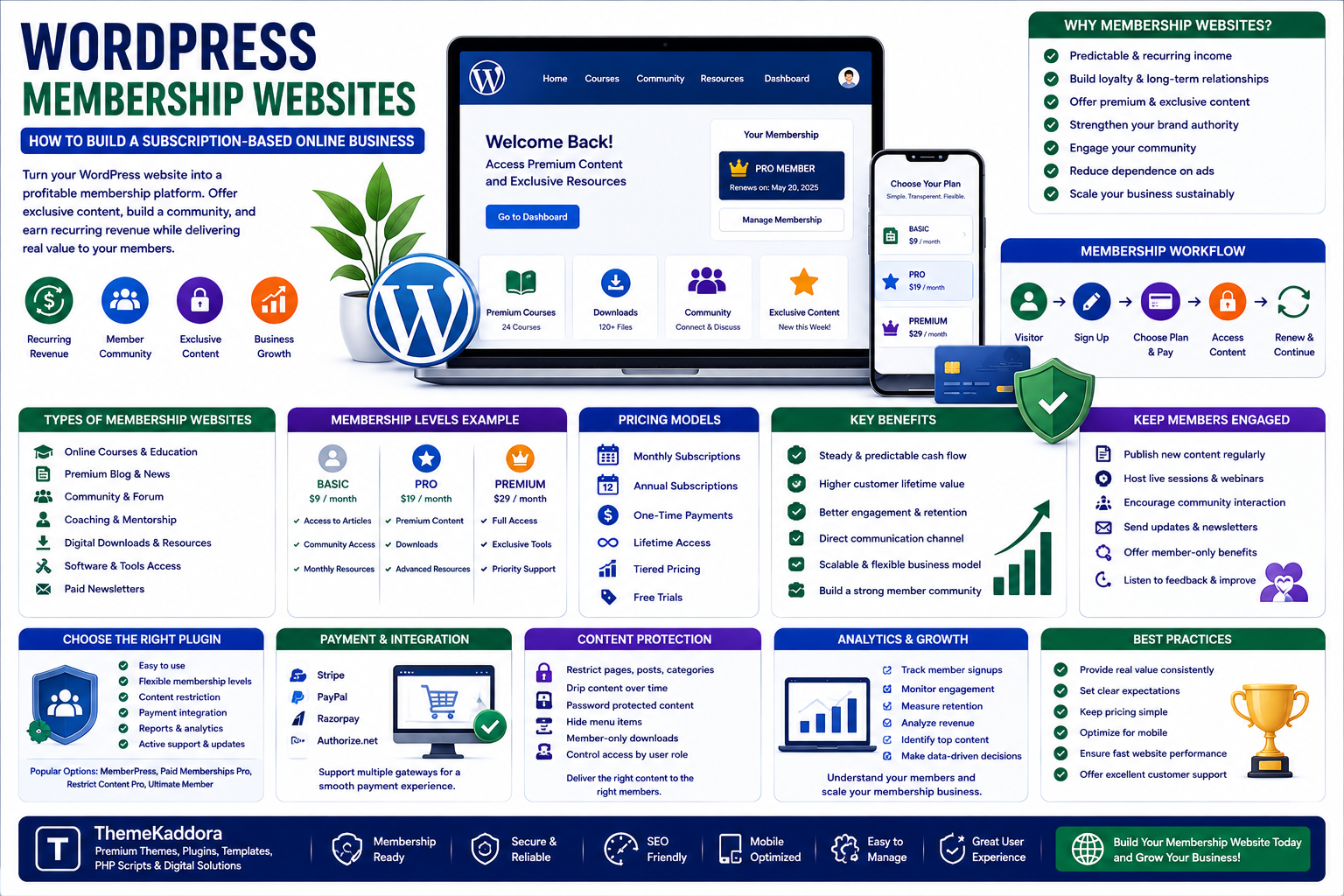
WordPress Membership Websites: How to Build a Subscription-Based Online Business
The traditional website model is simple: publish information and wait for visitors to arrive.
But modern businesses are increasingly building websites around memberships, subscriptions, communities, and premium digital experiences.
Instead of relying only on one-time purchases or advertising, a business can create a membership model where users pay regularly for access to valuable content, tools, services, or communities.
WordPress provides a flexible foundation for building these types of websites.
With the right combination of a WordPress theme, membership functionality, payment system, content strategy, and marketing, a website can become a complete membership platform.
Membership websites can be used for:
Online courses
Premium blogs
Digital communities
Coaching programs
Professional resources
Software access
Exclusive content
Paid newsletters
Download libraries
Business networks
What Is a WordPress Membership Website?
A WordPress membership website allows users to create accounts and access content or features based on their membership level.
For example:
Visitor
↓
Views Public Content
↓
Creates Account
↓
Chooses Membership
↓
Makes Payment
↓
Accesses Premium Content
↓
Renews Subscription
The website can control what different users are allowed to access.
Why Build a Membership Website?
A membership model can create a more direct relationship between a business and its audience.
Instead of depending entirely on search traffic or advertising, businesses can build a community of registered customers.
Potential benefits include:
Recurring revenue
Customer loyalty
Exclusive content
Community building
Predictable business opportunities
Better customer relationships
Direct communication
However, a membership website only works when members continue receiving meaningful value.
Types of WordPress Membership Websites
Membership websites can take many forms.
Premium Content Website
Users pay to access articles, guides, reports, or resources.
Online Learning Platform
Members receive access to courses, lessons, and educational materials.
Community Website
Members interact with one another through discussions, profiles, or groups.
Coaching Website
Customers purchase access to coaching programs or resources.
Digital Download Website
Members receive access to templates, files, graphics, documents, or other resources.
Professional Resource Platform
Businesses provide premium tools and industry resources to subscribers.
Free vs Paid Memberships
Not every membership needs to be paid.
A website can offer:
Free Membership
Users create an account and access basic resources.
Paid Membership
Users pay for premium features or content.
Freemium Model
Basic content is free while advanced content requires payment.
The freemium approach can be useful when businesses want to build an audience before introducing paid offerings.
Membership Levels
A membership website can offer different levels.
For example:
Basic
Selected articles
Community access
Monthly resources
Professional
Premium content
Downloads
Advanced resources
Premium
Full library
Exclusive tools
Priority support
Special benefits
Different membership levels allow businesses to serve customers with different needs.
How Membership Pricing Works
Pricing should reflect the value provided.
Common models include:
Monthly subscriptions
Annual subscriptions
One-time memberships
Lifetime access
Tiered pricing
Free trials
A business should choose a pricing model based on its content, audience, costs, and long-term strategy.
Recurring Revenue and Memberships
One of the biggest attractions of memberships is recurring revenue.
A one-time sale may generate revenue once.
A subscription can generate revenue repeatedly as long as the customer remains subscribed.
For example:
100 members × monthly subscription
can create a recurring revenue base.
But recurring revenue also creates an ongoing responsibility.
The business must continue providing value.
The Importance of Member Retention
Getting a new member is only the beginning.
The business also needs to keep members engaged.
Retention can be improved through:
New content
Community activity
Member-only resources
Regular communication
Exclusive events
Product updates
Personalized experiences
A membership business should continuously answer one question:
Why should the member stay?
Choosing a WordPress Membership Plugin
A membership plugin provides many of the features required to manage members.
When choosing one, consider:
Membership levels
Subscription management
Payment support
Content restriction
User accounts
Registration
Email integration
Reporting
WooCommerce compatibility
Course compatibility
Developer support
Plugin updates
Do not choose a plugin only because it has the longest feature list.
Choose a solution that matches the actual business model.
Protecting Premium Content
Membership websites often need to restrict certain resources.
For example:
Public Visitor
→ Free Articles
Basic Member
→ Selected Premium Articles
Premium Member
→ Complete Resource Library
Content restriction allows businesses to control access.
Protected resources might include:
Blog posts
Videos
Courses
Downloads
Tutorials
Templates
Documents
Membership and WooCommerce
WooCommerce can be useful when membership businesses need eCommerce functionality.
Depending on the setup, a website can combine:
Products
Subscriptions
Memberships
This can create a more complete online business ecosystem.
For example, a customer might purchase a product and receive access to a member-only resource library.
Subscription Payments
Payment processing is a critical part of membership websites.
A website may need to support:
Credit cards
Debit cards
Digital payment methods
Regional payment options
Recurring payments
Payment availability depends on the chosen payment provider and target market.
Businesses should also clearly communicate:
Pricing
Billing frequency
Renewal terms
Cancellation policies
Refund policies
Create a Simple Registration Process
Registration should not feel complicated.
A basic process might include:
Choose membership
Create account
Enter payment information
Confirm purchase
Access member dashboard
Avoid asking for unnecessary information.
The more complicated the registration process becomes, the greater the potential for users to abandon it.
Build a Useful Member Dashboard
After logging in, members should quickly understand what they can do.
A dashboard may include:
Profile
Membership status
Available content
Downloads
Courses
Orders
Billing
Support
Account settings
The dashboard should prioritize the most important actions.
Member Profiles
Some membership websites benefit from user profiles.
Profiles can include:
Name
Photo
Biography
Interests
Professional information
Community-focused websites may use profiles to help members connect.
However, businesses should collect only information that is actually necessary and handle member data responsibly.
Community Features
Memberships and communities often work well together.
Community features may include:
Discussions
Groups
Member directories
Comments
Private areas
Events
A community creates an additional reason for users to remain members.
However, communities require moderation and active management.
Membership Websites for Online Courses
Education is one of the strongest use cases for memberships.
A WordPress learning website can provide:
Courses
Lessons
Quizzes
Certificates
Progress tracking
Member accounts
Businesses can sell courses individually or include them within membership plans.
Membership Websites for Digital Resources
A membership website can create a library of downloadable resources.
For example:
Design Resources
Business Templates
Marketing Guides
WordPress Resources
Premium Documents
Members can receive access to the library as part of their subscription.
The value of the membership increases as the resource collection becomes more useful.
Membership Websites for Agencies
Agencies can use membership models to provide clients with ongoing resources.
For example, an agency might offer:
Marketing templates
SEO resources
Training
Reports
Tutorials
Strategy guides
This can turn a one-time service relationship into a longer-term customer relationship.
Membership Websites for Coaches
Coaches can create membership communities around their expertise.
A membership may include:
Weekly lessons
Group sessions
Private resources
Community discussions
Recorded sessions
Q&A events
The website becomes a central platform for the customer experience.
Membership Websites for Creators
Content creators can monetize their audience through memberships.
They may provide:
Exclusive articles
Videos
Podcasts
Behind-the-scenes content
Downloads
Private communities
This gives creators another revenue option beyond advertising and sponsorships.
Membership Content Strategy
A membership website needs a content plan.
Content can be divided into:
Free Content
Designed to attract new visitors.
Member Content
Designed to deliver ongoing value.
Premium Content
Designed to encourage higher-level subscriptions.
This creates a natural content funnel.
Free Content as a Marketing Tool
Free content can introduce potential members to the business.
For example:
Free Blog Article
↓
Helpful Resource
↓
Free Account
↓
Premium Membership
The free content demonstrates expertise and builds trust.
The premium membership then provides additional value.
Member-Only Content
Premium content should feel meaningfully different from free content.
Examples include:
Detailed tutorials
Templates
Exclusive reports
Advanced guides
Premium videos
Private discussions
Simply placing average content behind a paywall is unlikely to create strong retention.
Email Marketing for Membership Websites
Email can help keep members engaged.
Useful emails include:
Welcome emails
New content notifications
Upcoming events
Product updates
Renewal reminders
Personalized recommendations
Communication should provide value rather than becoming excessive.
Reduce Membership Churn
Churn refers to members who cancel their subscriptions.
Businesses can reduce churn by understanding why customers leave.
Possible reasons include:
Lack of new content
Poor user experience
Pricing concerns
Difficult navigation
Insufficient value
Technical problems
Exit surveys can help identify recurring problems.
Make Cancellation Simple
Businesses should avoid making cancellation unnecessarily difficult.
A clear cancellation process can create a better customer experience.
It may also improve trust.
Customers who know they can leave easily may feel more comfortable joining in the first place.
Membership Website Security
Membership websites handle user accounts and potentially payment-related information.
Security should therefore be taken seriously.
Businesses should consider:
Secure hosting
Strong passwords
Regular updates
Reliable plugins
Appropriate access controls
Backups
HTTPS
Account protection
Security practices should be part of ongoing website management.
Membership Website Performance
Membership websites can become technically complex.
They may contain:
User accounts
Personalized dashboards
Payment integrations
Member databases
Restricted content
Community features
Performance should be monitored as the membership grows.
The website should remain responsive for both members and visitors.
Membership Website Accessibility
Membership experiences should also be accessible.
Consider:
Navigation
Forms
Buttons
Typography
Contrast
Keyboard support
Media captions
Accessibility is especially important when the website provides educational or professional resources.
Membership Analytics
Businesses should monitor more than website traffic.
Useful membership metrics include:
New registrations
Active members
Subscription revenue
Renewal rates
Cancellation rates
Popular content
Member engagement
These metrics can help businesses understand what members value.
Membership Marketing Strategy
A membership website needs a strong acquisition strategy.
Potential channels include:
SEO
Content marketing
Email marketing
Social media
Partnerships
Webinars
Free resources
Referral programs
The objective is to attract the right audience rather than simply maximizing registrations.
How to Launch a WordPress Membership Website
Step 1: Define the Audience
Determine exactly who the membership is for.
Step 2: Define the Value
Decide what members receive that they cannot get elsewhere.
Step 3: Choose the Business Model
Select free, paid, freemium, subscription, or another appropriate structure.
Step 4: Choose WordPress Tools
Select a theme, membership solution, payment system, and supporting plugins.
Step 5: Build Core Pages
Create:
Homepage
Membership page
Pricing
Registration
Login
Account dashboard
Support
Terms and policies
Step 6: Create Premium Content
Prepare valuable resources before launch.
Step 7: Test Payments
Test registration, payment, renewal, cancellation, and access controls.
Step 8: Test Member Experience
Use the website as a real member would.
Step 9: Launch Marketing
Use content, email, social media, and other channels to attract members.
Step 10: Improve Continuously
Use feedback and analytics to improve the membership experience.
Common WordPress Membership Mistakes
1. Building Without a Clear Value Proposition
Visitors need to understand why they should become members.
2. Creating Too Little Content
A membership needs enough value to justify the price.
3. Complicated Registration
Too many steps can reduce conversions.
4. Poor Member Experience
Members should easily find what they purchased.
5. Ignoring Retention
Acquiring members is not enough.
6. Using Too Many Plugins
Unnecessary plugins can increase complexity.
7. Ignoring Support
Members may need help with accounts, payments, or content.
8. Failing to Test Billing
Subscription workflows should be thoroughly tested before launch.
Why Choose Themekaddora?
1. WordPress Expertise
Themekaddora focuses on WordPress themes, plugins, websites, and digital resources.
2. Business-Focused Topics
The platform explores how websites can support real business models.
3. Technology Resources
Users can learn about tools and technologies that shape modern websites.
4. Marketing Knowledge
Content can cover SEO, digital marketing, content strategy, and online growth.
5. Practical Website Guidance
Themekaddora aims to make complex WordPress concepts easier to understand.
6. Broader Digital Ecosystem
The platform connects WordPress with business, technology, marketing, eCommerce, and digital entrepreneurship.
The Future of WordPress Membership Websites
Membership businesses are likely to continue evolving.
Future membership platforms may combine:
Courses
Digital Products
Subscriptions
Personalized Experiences
Mobile Experiences
Businesses may also use new technologies to improve member discovery, engagement, support, and content delivery.
But technology alone will not make a membership successful.
The most important factor will remain value.
People continue paying when a membership consistently solves problems, provides useful resources, saves time, teaches valuable skills, or creates meaningful experiences.
Conclusion
WordPress membership websites provide businesses with a flexible way to create recurring-revenue models and build stronger relationships with customers.
They can support:
Premium content
Online courses
Communities
Digital resources
Coaching
Professional services
Subscription businesses
Success depends on more than installing a membership plugin.
Businesses need:
- A clear audience
- A strong value proposition
- Useful content
- Simple user experience
- Reliable payments
- Effective marketing
- Ongoing member engagement
For Themekaddora, membership websites represent another important part of the WordPress and business ecosystem.
WordPress gives businesses the foundation.
Plugins provide the membership functionality.
Content creates value.
Marketing attracts customers.
And ongoing engagement gives people a reason to stay.
A successful membership website is not simply a website with restricted content.
It is a digital experience that continuously gives members a reason to return.
Frequently Asked Questions
1. What is a WordPress membership website?
A WordPress membership website allows users to create accounts and access specific content, features, services, or communities based on their membership level.
2. Can WordPress create a subscription website?
Yes. WordPress can support subscription-based websites through suitable membership, payment, and subscription solutions.
3. What can a WordPress membership website be used for?
Membership websites can be used for courses, premium content, communities, coaching, digital downloads, professional resources, and subscription-based services.
4. Do I need a membership plugin?
A dedicated membership solution can simplify account management, content restriction, subscriptions, payments, and membership levels.
5. Can WooCommerce be used with memberships?
Yes. WooCommerce can be combined with appropriate membership and subscription solutions for eCommerce-oriented membership businesses.
6. How do membership websites make money?
They can generate revenue through monthly subscriptions, annual plans, one-time memberships, premium tiers, courses, digital products, or other paid offerings.
7. How can I reduce membership cancellations?
Businesses can improve retention by consistently providing valuable content, improving the member experience, communicating with members, and understanding why customers cancel.
8. What should a membership website include?
Common components include registration, login, member dashboards, membership plans, protected content, payment functionality, account management, support, and clear policies.
9. Are membership websites secure?
They can be, but businesses must use appropriate security practices, reliable plugins, secure hosting, updates, backups, HTTPS, and proper access controls.
10. Why Choose Themekaddora?
Themekaddora combines WordPress resources with educational content about themes, plugins, technology, business, marketing, eCommerce, and digital website development.
Comments (0)