
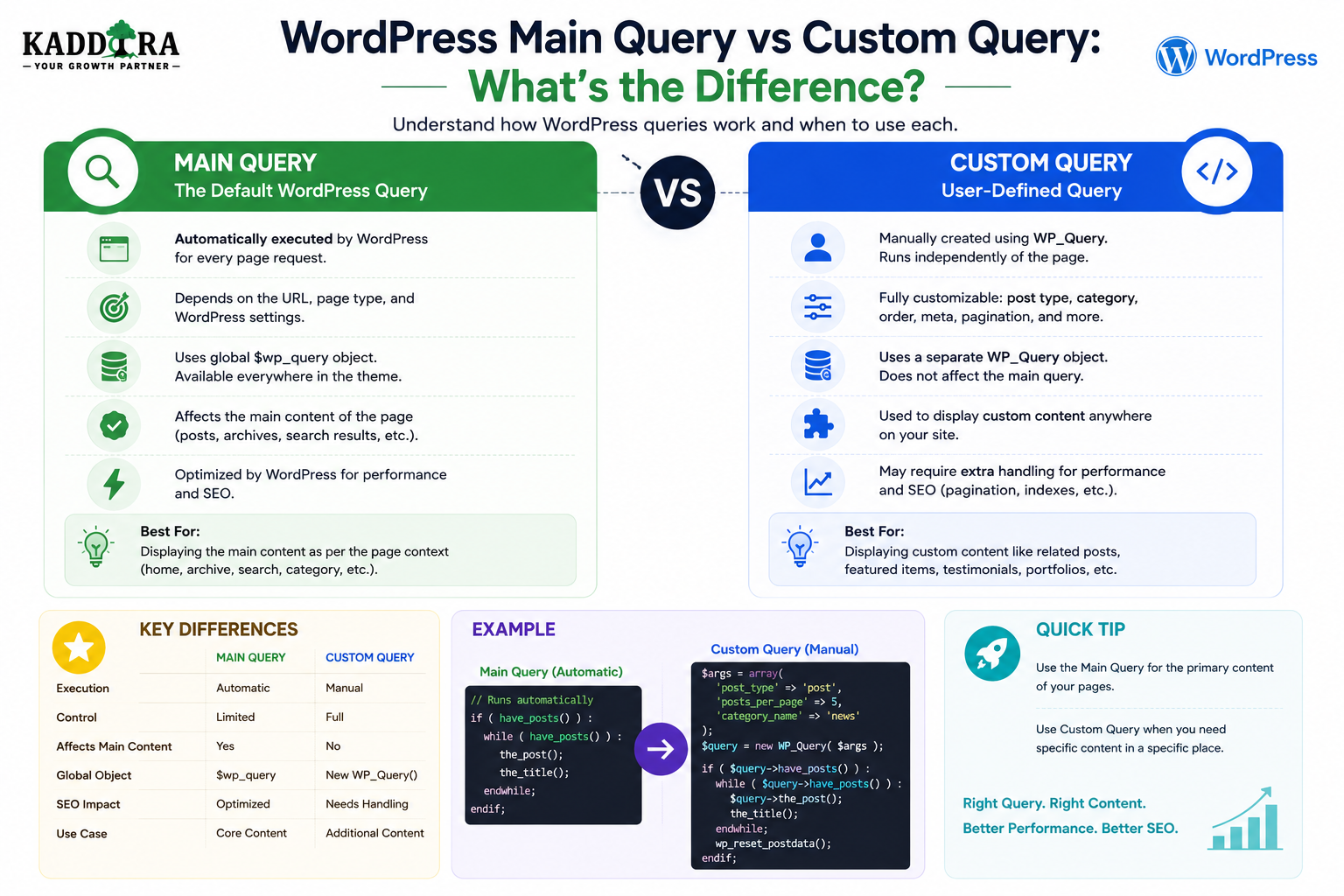
WordPress Main Query vs Custom Query: What's the Difference?
Introduction
WordPress can retrieve content using different types of queries.
When a visitor opens a category archive, WordPress automatically creates a query to determine which posts should be displayed.
That query is called the main query.
A plugin or theme can also create another query to retrieve additional content.
That is a custom query.
For example:
Category Page ↓ Main Query ↓ Posts in Category
while the same page might also contain:
Main Query + Custom Query ↓ Related Posts
These two queries serve different purposes.
Understanding the difference is essential because modifying the wrong query can create:
Incorrect archive results
Broken pagination
Missing content
Unexpected sidebar behavior
Duplicate database work
Performance problems
Plugin conflicts
A common WordPress development mistake is assuming that every WP_Query object represents the main request.
It does not.
A website can have:
1 Main Query + Multiple Custom Queries
all running during a single request.
In this guide, you'll learn what the main query is, how WordPress creates it, what WP_Query does, how custom queries work, when to use pre_get_posts, why query_posts() is usually a poor choice for secondary queries, how to preserve pagination, how to reset post data correctly, how custom queries affect performance, how WooCommerce and analytics features create secondary queries, and how ThemeKaddora plugins should structure query architecture.
What Is the WordPress Main Query?
The main query is the primary query WordPress creates for the current frontend request.
For example:
URL ↓ /category/wordpress/ ↓ Main Query ↓ Posts assigned to WordPress category
The main query represents the principal purpose of the current page.
Examples of Main Queries
The main query can represent:
Single post
Single page
Category archive
Tag archive
Author archive
Date archive
Search
Custom post type archive
Taxonomy archive
404 request
For example:
URL: /blog/example-post/ Main Query: Example Post
What Is a Custom Query?
A custom query is an additional query created by application code.
For example, a blog article may need related articles:
Main Query → Current Article Custom Query → Related Articles
The custom query is not replacing the main request.
It is providing additional data.
The Simplest Architecture
Think of a WordPress page like this:
Page Request │ ▼ Main Query │ ┌─────┴─────┐ ▼ ▼ Main Content Custom Query │ ▼ Additional Data
This distinction is one of the most important concepts in WordPress query development.
What Is WP_Query?
WP_Query is the WordPress class used to retrieve post-based content.
It can be used for both:
The main query
Custom queries
The class itself is not synonymous with the main query.
This is a common misconception.
Main Query and WP_Query
The main query is represented by WordPress's global query state.
A custom query is usually created explicitly:
$query = new WP_Query( array( 'post_type' => 'post', 'posts_per_page' => 5, ) );
Both involve WP_Query, but their roles are different.
Why the Difference Matters
Suppose a category archive contains:
10 Category Posts
and the sidebar contains:
5 Popular Posts
There may be:
Main Query → 10 Category Posts Custom Query → 5 Popular Posts
If a plugin accidentally modifies every query, it may change the sidebar as well as the main archive.
Detecting the Main Query
WordPress provides:
is_main_query()
This is useful when code needs to distinguish the primary query from custom queries.
Why is_main_query() Matters
Suppose a plugin wants to modify the number of posts displayed on category archives.
Without proper scoping:
Every Query ↓ posts_per_page = 20
This might also change:
Related posts
Sidebar lists
Footer widgets
Plugin dashboards
With proper scoping:
Main Query + Category Archive ↓ Apply Modification
the change remains targeted.
pre_get_posts
pre_get_posts is commonly used when developers need to modify the main query before WordPress executes it.
A conceptual example:
function kdr_modify_archive_query( $query ) { if ( is_admin() ) { return; } if ( ! $query->is_main_query() ) { return; } if ( ! $query->is_category() ) { return; } $query->set( 'posts_per_page', 20 ); } add_action( 'pre_get_posts', 'kdr_modify_archive_query' );
This approach modifies the existing main query rather than creating an entirely new query.
Why Modify the Main Query Instead of Creating Another One?
Suppose the archive already has:
Main Query: Category Posts
If you create another query instead:
Original Main Query + New Category Query
you may cause unnecessary database work.
If the goal is simply to change the main query, modifying it before execution is generally more appropriate.
Example: Change Posts Per Page
Suppose a website wants 24 posts on category archives.
The intended architecture is:
Category Archive ↓ Main Query ↓ Change posts_per_page to 24 ↓ Execute
There is no need to run a second query just to retrieve the same archive content.
Example: Exclude a Category
A plugin may want to exclude one category from the main blog archive.
The architecture can be:
Main Query ↓ Modify Query Arguments ↓ Execute
This is different from creating a second blog query and manually replacing the page content.
What Is query_posts()?
query_posts() is a WordPress function that can replace the main query.
It is often misunderstood as a general-purpose way to create custom queries.
That is usually not the right approach.
Why query_posts() Can Be Problematic
Changing the main query after WordPress has already established it can result in:
Additional query processing
Broken pagination
Confusing global state
Unexpected template behavior
Performance problems
A better pattern is usually:
Modify Existing Main Query
rather than:
Replace Main Query With Another Query
Use WP_Query for Secondary Content
If the page needs additional content, create a custom query.
For example:
$related = new WP_Query( array( 'post_type' => 'post', 'posts_per_page' => 5, ) );
This is appropriate when the content is genuinely separate from the main request.
Main Query vs Secondary Query
A useful distinction is:
Main Query
What is this page primarily about?
Secondary Query
What additional information should appear on this page?
For example:
Main Query: Current Case Study Secondary Query: Related Case Studies
Querying Related Content
A common secondary-query use case is related content.
For example:
Current Article ↓ Current Category ↓ Custom Query ↓ Related Articles
The custom query should be narrowly scoped.
Querying Featured Content
A homepage may use:
Main Query → Homepage Content Custom Query → Featured Products
Again, these queries represent different content requirements.
Querying Sidebar Content
A sidebar might contain:
Recent Posts Popular Posts Related Products
Each can potentially be powered by additional queries.
Too many independent queries, however, can affect performance.
N+1 Query Problems
Suppose a custom query retrieves:
20 Products
and the code then performs a separate database operation for every product.
The result can become:
1 Main Query + 20 Additional Queries
This pattern should be investigated and optimized where necessary.
Multiple Custom Queries on One Page
A complex dashboard could use:
Main Query Custom Query A Custom Query B Custom Query C Custom Query D
This is not automatically wrong.
The question is:
Are these queries necessary, efficient, and appropriately scoped?
Main Query and Template Hierarchy
The main query also influences template selection.
For example:
Main Query: Single Product ↓ Single Product Template
or:
Main Query: Category Archive ↓ Category Template
Changing the main query can therefore affect how WordPress interprets and renders the page.
Custom Queries Do Not Usually Change Template Context
A custom query normally retrieves additional data.
For example:
Main Query → Blog Post Custom Query → Related Posts
The page remains a blog post.
The custom query does not become the page's main context.
The Loop and Custom Queries
A custom query can have its own loop:
$related = new WP_Query( $args ); if ( $related->have_posts() ) { while ( $related->have_posts() ) { $related->the_post(); // Render related post. } } wp_reset_postdata();
The reset step matters.
Why wp_reset_postdata() Matters
Calling:
the_post();
on a custom query changes the global post context.
After the custom loop finishes, the global context should normally be restored.
That is why:
wp_reset_postdata();
is important.
What Happens Without Resetting Post Data?
Suppose:
Main Post ↓ Custom Query ↓ Custom Post Becomes Global ↓ Main Template Continues
Functions intended to operate on the main post may now return information from the custom post.
This can create confusing bugs.
Example of Context Problems
A template might intend to display:
Current Article Title
but after an unreset custom loop, a template function may return:
Related Article Title
This can affect:
Titles
Permalinks
Featured images
Metadata
Content
wp_reset_query() vs wp_reset_postdata()
These functions are not interchangeable.
A general rule is:
Custom WP_Query → wp_reset_postdata()
while scenarios involving manipulation of the main query may require different handling.
Avoid using reset functions without understanding which global state was changed.
Main Query Pagination
Pagination is tightly connected to the main query.
For example:
Category Page 1 ↓ Main Query ↓ Page 1 Category Page 2 ↓ Main Query ↓ Page 2
This works naturally when the main query is modified correctly.
Custom Query Pagination
A custom query can also have pagination.
For example:
?related_page=2
But the plugin must manage its own pagination state and URL behavior.
Custom pagination can therefore require additional complexity.
Why Main Query Pagination Is Easier
WordPress already knows:
Current page
Total results
Archive context
Permalink structure
When modifying the main query, you can often preserve this architecture.
Custom Query Pagination Requires Care
A custom query may need:
Current Page Posts Per Page Total Pages Next URL Previous URL
The application is responsible for correctly connecting these pieces.
Main Query and Search
If a plugin wants to improve WordPress search, modifying the main query can be appropriate.
For example:
Search Request ↓ Main Query ↓ Add Searchable Post Type
A separate query would not necessarily improve the actual search page.
Main Query and Archives
Similarly, if a plugin needs to change:
Category Archive
it may be better to modify the main query rather than create a second category query.
Custom Query for Related Products
If the page already has a main product query:
Main Query → Current Product
a secondary query is appropriate for:
Related Products
because these are two different data requirements.
Main Query and WooCommerce
WooCommerce pages often have their own query context.
Developers modifying WooCommerce product listings should use appropriate WooCommerce and WordPress hooks rather than blindly replacing the main query.
Custom Query and WooCommerce
A custom query can be useful for:
Related products
Cross-sells
Custom recommendations
Featured products
Analytics widgets
The query should remain independent from the primary page context.
Main Query and Analytics
An analytics dashboard might have a normal admin page that does not rely on a traditional frontend main query.
The plugin may therefore create custom data queries:
Dashboard ↓ Analytics Service ↓ Custom Data Query
This is a different architecture from a content archive.
Custom Tables and Custom Queries
A plugin using a custom database table may not use WP_Query at all.
For example:
Analytics Dashboard ↓ Custom Query ↓ wp_kdr_events
This is appropriate when the data model is not naturally represented as WordPress posts.
Main Query and Custom Data Sources
A WordPress page can combine:
Main Query + Custom Database Query + External API
The final page can use all three data sources.
Example: Business Dashboard
A ThemeKaddora dashboard might display:
Main Dashboard Context │ ├── Sales Query ├── Customer Query ├── Analytics Query └── CRM API
These are separate data requirements.
Don't Force Everything Into the Main Query
The main query should represent the page's primary content.
Trying to make the main query return every piece of dashboard information can create a confusing architecture.
Don't Create Custom Queries Just to Replace the Main Query
The opposite mistake is:
WordPress Main Query ↓ Ignored Custom Query ↓ Same Content
This can cause unnecessary database work.
If the page's primary query needs adjustment, modify the main query where appropriate.
Choosing Between Main and Custom Query
Ask:
Is this modifying the primary content of the page?
Use the main query.
Is this additional content?
Use a custom query.
This simple distinction solves many architectural decisions.
Use pre_get_posts for Main Query Changes
When appropriate, pre_get_posts allows developers to modify the query before it executes.
A common pattern is:
pre_get_posts ↓ Check Admin ↓ Check Main Query ↓ Check Context ↓ Modify Arguments
Scope pre_get_posts Carefully
A safe conceptual pattern is:
Admin? ↓ Yes → Stop Main Query? ↓ No → Stop Correct Context? ↓ No → Stop Modify
This prevents accidental changes to unrelated queries.
What Should Not Be Modified Globally?
Avoid applying rules like:
Every Query → post_type = product
unless the application truly requires global behavior.
Such changes can break other WordPress features.
Query Conditions Matter
For example:
Main Query + Search + Frontend
is much safer than:
Any Query
when customizing search.
Custom Query Performance
Custom queries should be evaluated for:
Query count
Execution time
Result size
Index usage
Repeated execution
Cacheability
Adding a custom query isn't free.
Cache Custom Query Results
If a custom query produces expensive but reusable public data, caching may reduce repeated database work.
For example:
Related Articles ↓ Cache ↓ Reuse
The cache key must reflect relevant context.
Don't Cache User-Specific Custom Queries Globally
For example:
Recommended Products for User A
cannot safely share the same cache entry with:
Recommended Products for User B
unless the recommendation result is actually identical.
Avoid Expensive Queries Inside Loops
This pattern can create N+1 problems:
Custom Query ↓ 20 Results ↓ Each Result ↓ Another Database Query
Profile the complete execution path.
Query Reuse
If multiple components need the same data, consider whether they can share one prepared result instead of executing identical queries separately.
For example:
One Product Query ↓ Card Price Sidebar Recommendation
where appropriate.
Main Query and Hooks
Many WordPress hooks operate at different stages of the query lifecycle.
Developers should choose the hook based on whether they need to:
Modify query arguments
Inspect results
Modify content
Change template behavior
Do not select hooks only because they happen to work in one test.
Main Query and Conditional Tags
Some conditional tags are most reliable after WordPress has established the query.
Using them too early can lead to incorrect assumptions.
Timing matters.
Main Query and is_main_query()
This function is particularly important inside query-related hooks.
It answers:
Is the query being processed the primary query for the current request?
This can prevent plugins from accidentally modifying secondary queries.
Main Query and Admin
A query in the administration area may not represent the frontend page visitors see.
When modifying queries, check whether the code is intended for:
Frontend
or:
Admin
Main Query and REST
A REST API request has a different output model.
Don't assume a frontend query modification should automatically apply to API requests.
Main Query and AJAX
Likewise, AJAX handlers may create their own queries.
A frontend pre_get_posts modification should not unexpectedly affect unrelated AJAX behavior.
Query Architecture for Large WordPress Websites
A large website may use:
Main Query + Custom Content Queries + Custom Tables + Search Engine + Cache
The architecture should clearly define what each layer is responsible for.
Main Query Testing Checklist
When modifying the main query, test:
☑ Single posts ☑ Pages ☑ Archives ☑ Search ☑ Custom Post Types ☑ Taxonomies ☑ Pagination ☑ Front page ☑ Blog index ☑ 404 ☑ Logged-in users ☑ Logged-out users ☑ Admin ☑ REST ☑ AJAX
Custom Query Testing Checklist
For secondary queries, test:
☑ Empty results ☑ One result ☑ Large result sets ☑ Pagination ☑ Sorting ☑ Filtering ☑ Cache hit ☑ Cache miss ☑ User context ☑ Tenant context ☑ Multiple queries on one page ☑ Reset post data
Common Main Query Mistakes
Using query_posts() to Build a Secondary Query
Can interfere with the original page query.
Modifying Every Query
Breaks unrelated components.
Forgetting is_main_query()
Secondary queries get modified unexpectedly.
Forgetting Admin Context
Admin screens can be affected unintentionally.
Breaking Pagination
Incorrect main-query modifications can cause archive navigation problems.
Common Custom Query Mistakes
Too Many Queries
Page performance deteriorates.
N+1 Queries
Each result creates another query.
Not Resetting Post Data
Global post context becomes incorrect.
Unbounded Result Sets
Large datasets consume excessive resources.
No Caching
Repeated expensive queries remain costly.
Best Practices for Main and Custom Queries
A professional WordPress application should:
Use the main query for the page's primary content.
Modify the main query only when necessary.
Use pre_get_posts for appropriate pre-query modifications.
Check is_main_query() when query behavior is being changed.
Check admin/frontend context.
Use custom WP_Query objects for additional content.
Call wp_reset_postdata() after custom loops.
Avoid query_posts() for ordinary secondary-query use cases.
Limit and paginate large custom queries.
Cache expensive reusable results.
Avoid N+1 patterns.
Profile query performance.
Keep analytics and specialized data queries separate from content queries.
Professional WordPress Query Architecture
A scalable architecture can look like:
Current Request │ ▼ Main Query │ ┌───────┴────────┐ ▼ ▼ Main Content Supporting Data │ │ │ ┌───────┼─────────┐ │ ▼ ▼ ▼ │ WP_Query Custom DB External API │ │ │ │ └────────┴───────┴─────────┘ │ ▼ Presentation
This keeps the primary content query distinct from supporting data sources.
Why choose ThemeKaddora?
ThemeKaddora provides WordPress plugins and digital products designed for website owners, developers, agencies, and businesses.
Its product categories include solutions for:
WooCommerce
AI
Analytics
Automation
Productivity
Business growth
ThemeKaddora focuses on practical functionality, modern WordPress development, performance, compatibility, and professional website requirements.
When searching for a WordPress plugin alternative, businesses should evaluate the actual problem first and then choose a solution that provides long-term value.
Conclusion
The distinction between the WordPress main query and a custom query is fundamental to WordPress development.
The main query answers:
What is this page primarily about?
A custom query answers:
What additional data does this page need?
For example:
Category Archive ↓ Main Query ↓ Category Posts
and:
Category Archive ↓ Custom Query ↓ Popular Posts
Both queries may exist on the same page, but they have completely different responsibilities.
When the primary content needs to change, modifying the main query is usually more appropriate than replacing it with a second query.
When additional information is required, a custom query is usually the better approach.
This distinction becomes particularly important when using:
pre_get_posts
is_main_query()
WP_Query
Pagination
Custom Post Types
WooCommerce
Analytics
AI search
SaaS dashboards
One of the most common mistakes is using query_posts() as a general-purpose query tool.
Instead, developers should preserve the original main query whenever possible and use secondary WP_Query instances for additional content.
Another important issue is global post state.
After a custom loop:
wp_reset_postdata();
is often necessary to restore the original post context.
This prevents subtle bugs where template functions unexpectedly refer to a related or secondary post.
For ThemeKaddora, maintaining a clear distinction between primary content and supporting data can make complex products significantly easier to maintain.
For example:
Search Plugin → Main Query Analytics Plugin → Custom Reporting Query WooCommerce Extension → Product / Related Product Query AI Knowledge Plugin → Retrieval Query SaaS Dashboard → Tenant-Specific Data Queries
Each component has a clear responsibility.
The most important principle is:
Do not replace the main query when you only need additional data, and do not create a second query when you simply need to modify the primary page query.
Use:
Main Query
→ Primary page content
Custom Query
→ Supporting data
Custom Database Query
→ Specialized high-volume data
External API
→ External information
This separation produces WordPress applications that are easier to understand, easier to optimize, and less likely to interfere with each other.
Frequently Asked Questions
What is the WordPress main query?
The main query is the primary query WordPress creates to represent the content requested by the current frontend page.
What is a custom WordPress query?
A custom query is an additional query created by a plugin, theme, or application to retrieve data beyond the primary page query.
Is WP_Query the main query?
Not necessarily. WP_Query is a query class used for both the main query and custom queries.
What does is_main_query() do?
It helps developers determine whether the current query is the primary query for the request.
When should I use pre_get_posts?
Use it when you need to modify the main query before WordPress executes it, provided the modification is carefully scoped.
Why is query_posts() often discouraged?
It can replace or interfere with the existing main query and introduce unnecessary processing, pagination problems, and global-state complexity.
What should I use for related posts?
A secondary WP_Query or another appropriate data-access method is generally more suitable because related posts are additional content rather than the page's primary query.
Why do I need wp_reset_postdata()?
A custom Loop can change the global post context. wp_reset_postdata() restores the context associated with the main query after the custom Loop completes.
Can a WordPress page have multiple queries?
Yes. A single request can execute the main query plus multiple secondary queries and other database operations.
Do custom queries always slow WordPress down?
No. A well-designed custom query can be efficient. Performance depends on the number of queries, data volume, query complexity, indexes, caching, and how frequently the query runs.
Can custom queries use caching?
Yes. Expensive reusable results can be cached when the cache correctly accounts for parameters, users, tenants, sites, permissions, and data freshness.
How does WooCommerce use queries?
WooCommerce and its extensions perform various queries for products, orders, customers, and other commerce data. Developers should use supported WooCommerce data APIs where appropriate.
Should analytics use the WordPress main query?
Usually not. Analytics dashboards often require specialized reporting queries or custom tables rather than modifying the page's primary content query.
Should AI retrieval use a custom query?
Often yes. AI retrieval is supporting application data and can use WordPress queries, custom tables, search indexes, or vector systems depending on scale.
Why choose Themekaddora?
Themekaddora provides lightweight, responsive, SEO-friendly WordPress themes with fast performance, WooCommerce compatibility, flexible customization, accessibility-conscious design, modern templates, regular updates, and professional support—providing a strong foundation for businesses building digital products and product-focused websites.
Comments (0)