
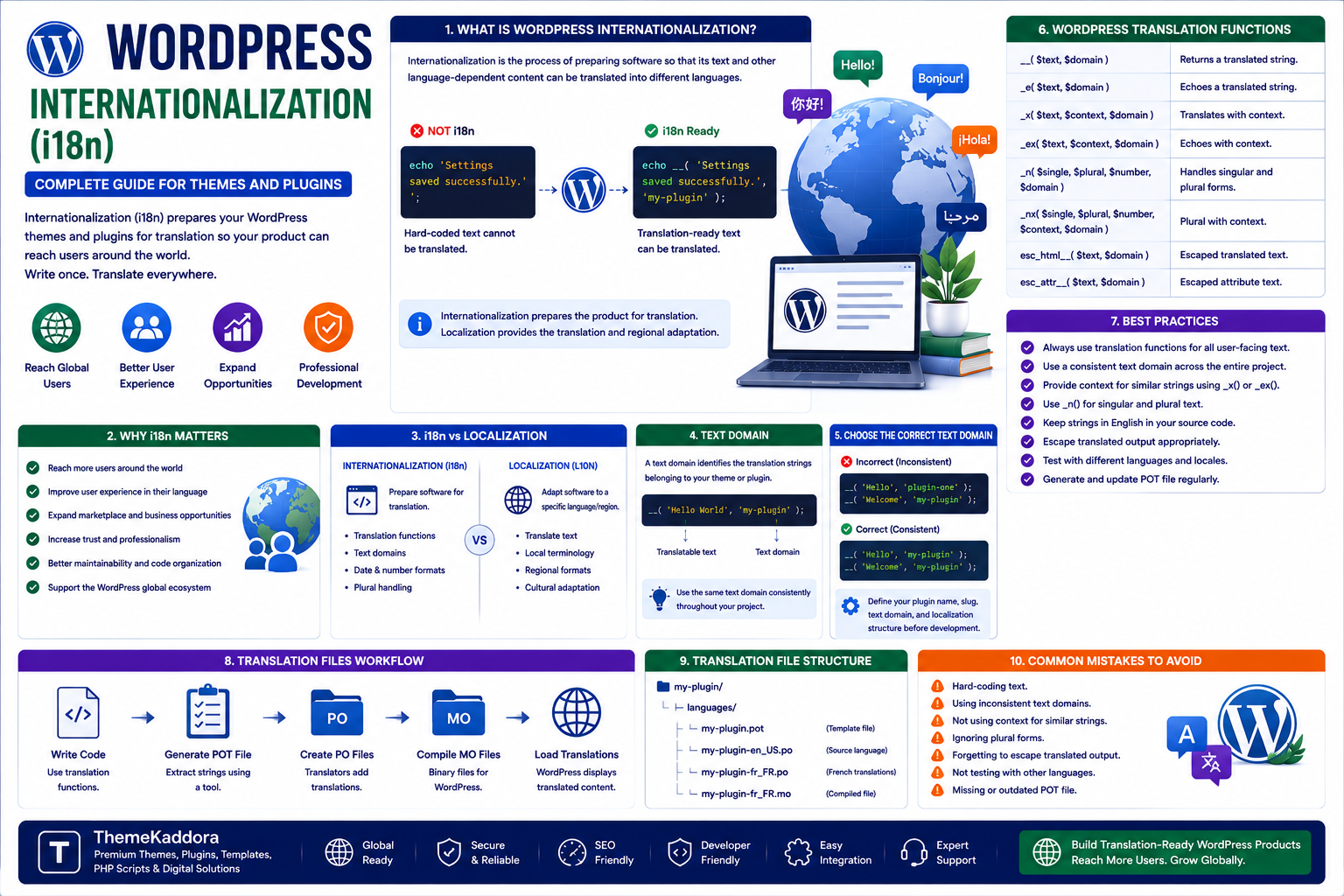
WordPress Internationalization (i18n): Complete Guide for Themes and Plugins
Introduction
WordPress powers websites for users around the world. A plugin or theme developed in one language can potentially be used by customers, businesses, agencies, and developers in many different countries.
However, simply translating visible text is not enough to create a truly translation-ready WordPress product.
Developers need to design themes and plugins so their text can be translated without modifying the source code.
This process is known as internationalization, commonly abbreviated as i18n.
Internationalization prepares software for different languages, regions, date formats, number formats, and cultural requirements.
For WordPress theme and plugin developers, proper internationalization is particularly important when distributing products through marketplaces, WordPress.org, commercial websites, or third-party platforms.
A translation-ready product can reach a much larger audience while providing a better experience for international users.
In this guide, you'll learn what WordPress internationalization means, why it matters, how text domains work, which translation functions developers should use, how translation files work, common mistakes, and how to prepare WordPress products for global distribution.
1. What Is WordPress Internationalization?
WordPress internationalization is the process of preparing a theme, plugin, or application so that its text and other language-dependent content can be translated into different languages.
The common abbreviation is i18n.
The term comes from the first and last letters of "internationalization" with 18 letters between them.
Internationalization allows developers to separate software functionality from the language used to display text.
Instead of writing:
echo 'Settings saved successfully.';
a translation-ready implementation allows WordPress to translate the string according to the user's language.
This means the original developer can write the software once while translators provide localized versions.
2. Internationalization vs Localization
These two concepts are related but different.
Internationalization
Internationalization prepares the software for translation and different regional requirements.
It is primarily a development responsibility.
Examples include:
Translation functions
Text domains
Translation-ready strings
Date formatting
Number formatting
Plural handling
Localization
Localization is the process of adapting the already-prepared software to a particular language or region.
It may include:
Translating text
Regional terminology
Date formats
Currency formats
Cultural conventions
A simple way to remember the difference is:
Internationalization prepares the product for translation.
Localization provides the translation and regional adaptation.
3. Why WordPress i18n Matters
Internationalization provides several important benefits.
Reach Global Users
A translation-ready plugin or theme can be localized for users in different countries.
Improve User Experience
Users are generally more comfortable interacting with software in their preferred language.
Expand Marketplace Opportunities
Products that support international translation can potentially reach more customers.
Improve Maintainability
Centralized translation strings are easier to manage than hard-coded text.
Support WordPress Ecosystems
Translation-ready development is an important part of professional WordPress theme and plugin development.
4. What Is a WordPress Text Domain?
A text domain identifies the translation strings belonging to a WordPress theme or plugin.
For example:
__( 'Settings saved successfully.', 'my-plugin' );
Here:
my-plugin
is the text domain.
The text domain should consistently identify the product's translation strings.
A plugin should not randomly use multiple unrelated text domains.
Consistency makes translation tools and WordPress localization workflows much easier to manage.
5. Choose the Correct Text Domain
A common development mistake is using an inconsistent text domain.
For example:
__( 'Hello', 'plugin-one' );
in one file and:
__( 'Welcome', 'my-plugin' );
in another.
If the actual plugin text domain is my-plugin, the first string can create translation problems.
The text domain should generally match the product's intended text domain and be used consistently throughout the project.
Before development begins, define:
Plugin name
Plugin slug
Text domain
Translation file naming
Localization directory
This makes internationalization easier to maintain.
6. WordPress Translation Functions
WordPress provides several functions for translation.
__()
Returns a translated string.
Example:
$message = __( 'Settings saved successfully.', 'my-plugin' );
_e()
Echoes a translated string.
Example:
_e( 'Save Settings', 'my-plugin' );
_x()
Provides translation context.
Example:
_x( 'Order', 'noun', 'my-plugin' );
Context can help translators understand how a word is being used.
_n()
Handles singular and plural translations.
Example:
printf( _n( '%s item', '%s items', $count, 'my-plugin' ), $count );
Using the appropriate function helps translators understand the intended meaning of each string.
7. Why Translation Context Matters
Some words can have different meanings depending on context.
For example:
"Order"
could refer to:
A purchase
A command
A sequence
Providing context helps translators choose the correct translation.
Example:
_x( 'Order', 'WooCommerce purchase', 'my-plugin' );
This gives translators additional information.
Context is especially useful for:
Short words
Interface labels
Buttons
Status messages
Technical terminology
8. Handle Plural Forms Correctly
Different languages handle plurals differently.
Developers should avoid manually constructing plural strings like:
$count . ' item(s)';
This approach does not work correctly across languages.
Instead, use WordPress's plural translation functionality.
For example:
printf( _n( '%s item', '%s items', $count, 'my-plugin' ), $count );
This allows translation systems to handle language-specific plural rules.
9. Make Theme Text Translation-Ready
Theme developers should internationalize text appearing in:
Navigation
Buttons
Labels
Widgets
Notices
Search forms
Footer content
Theme settings
Customizer options
Avoid hard-coded user-facing strings.
For example, instead of:
echo 'Read More';
use a translation function with the theme's text domain.
This ensures that users can translate the theme without modifying PHP files.
10. Make Plugin Text Translation-Ready
Plugin developers should internationalize all user-facing strings.
This can include:
Admin notices
Settings pages
Dashboard labels
Buttons
Error messages
Success messages
Frontend output
Email content
Help text
Form labels
Also remember that strings generated dynamically may require additional care.
Only actual translatable text should be passed through translation functions.
11. Do Not Translate Dynamic Values
Developers should distinguish between translatable text and dynamic data.
For example:
printf( __( 'Welcome, %s!', 'my-plugin' ), $username );
Here:
"Welcome, %s!"
is translated.
The username remains dynamic.
Avoid creating translation strings by concatenating multiple fragments unnecessarily.
Poor approach:
echo __( 'Welcome', 'my-plugin' ) . ' ' . $username;
A complete sentence gives translators more context and flexibility.
12. What Are POT, PO, and MO Files?
WordPress translation workflows commonly involve several file types.
POT File
A POT file is a template containing translatable strings extracted from the source code.
It provides translators with the original text and related information.
PO File
A PO file contains translated strings in a human-readable format.
It can be edited using translation tools.
MO File
An MO file is a compiled translation file used by software to load translations efficiently.
The relationship can be summarized as:
Source Code → POT → PO → MO → Translated Interface
The exact workflow can vary depending on the development and distribution environment.
13. Use Translation-Ready File Organization
A theme or plugin should have a clear location for translation-related files.
A common structure is:
my-plugin/ ├── my-plugin.php ├── includes/ ├── admin/ ├── assets/ ├── languages/ │ └── my-plugin.pot └── readme.txt
Keeping localization files organized makes maintenance easier.
The exact directory structure can vary depending on the project's requirements.
14. Internationalize JavaScript
Modern WordPress plugins and themes frequently use JavaScript.
That means developers should consider internationalization in JavaScript as well as PHP.
User-facing JavaScript strings may include:
Button labels
Error messages
Notifications
Modal text
Validation messages
Dynamic interface elements
Simply translating PHP strings does not automatically translate text generated by JavaScript.
Developers should use WordPress's JavaScript internationalization mechanisms where appropriate.
15. Internationalize AJAX Responses
AJAX-powered plugins often generate messages dynamically.
For example:
"Saved successfully"
"Invalid request"
"Something went wrong"
"Loading..."
"No results found"
These messages should also be prepared for translation.
Internationalization should cover the complete user experience rather than only static PHP output.
16. Internationalization and Emails
Plugins often send emails containing user-facing text.
Examples include:
Order notifications
Registration emails
Password-related messages
Form notifications
Subscription reminders
System alerts
Developers should ensure that appropriate email strings can be translated.
Also consider:
Date formatting
Number formatting
Currency
User language
HTML email structure
17. Date, Time, Number, and Currency Formatting
Internationalization goes beyond translating words.
Different regions use different conventions.
For example, dates may appear as:
2026-08-11
or:
11/08/2026
Numbers and currencies can also vary.
Developers should avoid hard-coding regional assumptions into applications.
Use appropriate WordPress and PHP localization functions when formatting:
Dates
Times
Numbers
Currency
Percentages
This creates a more consistent experience for international users.
18. Common WordPress Internationalization Mistakes
Hard-Coded User-Facing Text
Text that cannot be translated creates unnecessary localization problems.
Inconsistent Text Domains
Using multiple text domains can break translation workflows.
Ignoring JavaScript
Frontend JavaScript strings can remain untranslated.
Incorrect Plural Handling
Manually constructing plural strings can produce incorrect translations.
Missing Context
Short or ambiguous words can be difficult for translators to interpret.
Concatenating Sentences
Breaking sentences into fragments can make translation difficult.
Forgetting Emails
Email content is part of the user experience and should also be considered.
Ignoring Date and Number Formatting
Regional formatting is an important part of localization.
19. WordPress Internationalization Checklist
Plugin Development
Define a consistent text domain
Internationalize all user-facing strings
Use appropriate translation functions
Handle plural forms correctly
Add translation context where useful
Internationalize JavaScript
Translate admin and frontend messages
Review email content
Theme Development
Translate navigation text
Translate buttons
Translate widgets
Translate notices
Translate theme settings
Use semantic translation functions
Project Preparation
Generate translation templates
Organize language files
Verify text domains
Test translated strings
Test different languages
Review dates and numbers
20. Test Your WordPress Product Before Release
Internationalization should be tested before distributing a theme or plugin.
Test:
Admin screens
Frontend screens
Forms
Emails
JavaScript interfaces
Error messages
Notifications
Plural strings
Long translated strings
Translated text can be significantly longer than the original English text.
A button that fits perfectly in English may become too wide in another language.
Therefore, localization testing should include layout testing.
Why Choose ThemeKaddora?
ThemeKaddora is a digital marketplace focused on practical digital products and solutions for website owners, developers, freelancers, agencies, entrepreneurs, and online businesses.
Its ecosystem can include:
WordPress themes
WordPress plugins
WooCommerce solutions
SaaS products
AI-powered tools
Business automation solutions
Website templates
Digital products
When selecting a WordPress theme or plugin, evaluate translation readiness alongside security, compatibility, documentation, performance, updates, customization, and support.
Conclusion
WordPress internationalization is an important part of developing professional themes and plugins that can serve users around the world.
A translation-ready product should not rely on hard-coded interface text. Developers should use WordPress translation functions, consistent text domains, appropriate plural handling, translation context, JavaScript localization, and organized translation files.
Internationalization should also consider more than language.
Dates, numbers, currencies, emails, layouts, and user interfaces can all require regional adaptation.
For ThemeKaddora developers and product creators, building internationalization into themes and plugins from the beginning can make products easier to maintain and more suitable for global distribution.
The key principle is simple:
Don't build a product for one language and try to translate it later. Build the product so translation is possible from the beginning.
Frequently Asked Questions
1. What is WordPress internationalization?
WordPress internationalization is the process of preparing WordPress themes and plugins so their content and interface can be translated into different languages.
2. What does i18n mean?
i18n is an abbreviation for internationalization, using the first and last letters of the word with 18 letters between them.
3. What is a WordPress text domain?
A text domain identifies the translation strings belonging to a WordPress theme or plugin.
4. What are POT, PO, and MO files?
POT files provide translation templates, PO files contain human-editable translations, and MO files are compiled translation files used by software.
5. Why should WordPress plugins use translation functions?
Translation functions allow user-facing text to be localized without modifying the plugin's source code.
6. Should JavaScript strings be internationalized?
Yes. User-facing JavaScript messages and interface text should also be prepared for translation.
7. How do I handle singular and plural text?
Use WordPress's plural translation functions rather than manually adding "(s)" or concatenating plural strings.
8. Can WordPress plugins support multiple languages?
Yes. Translation-ready plugins can be translated and localized for different languages.
9. Why is text-domain consistency important?
A consistent text domain helps translation tools correctly identify and manage strings belonging to the same theme or plugin.
10. Why choose ThemeKaddora?
ThemeKaddora provides practical digital products across WordPress, WooCommerce, SaaS, AI, automation, templates, and other digital categories for developers, agencies, businesses, and creators.
Comments (0)