
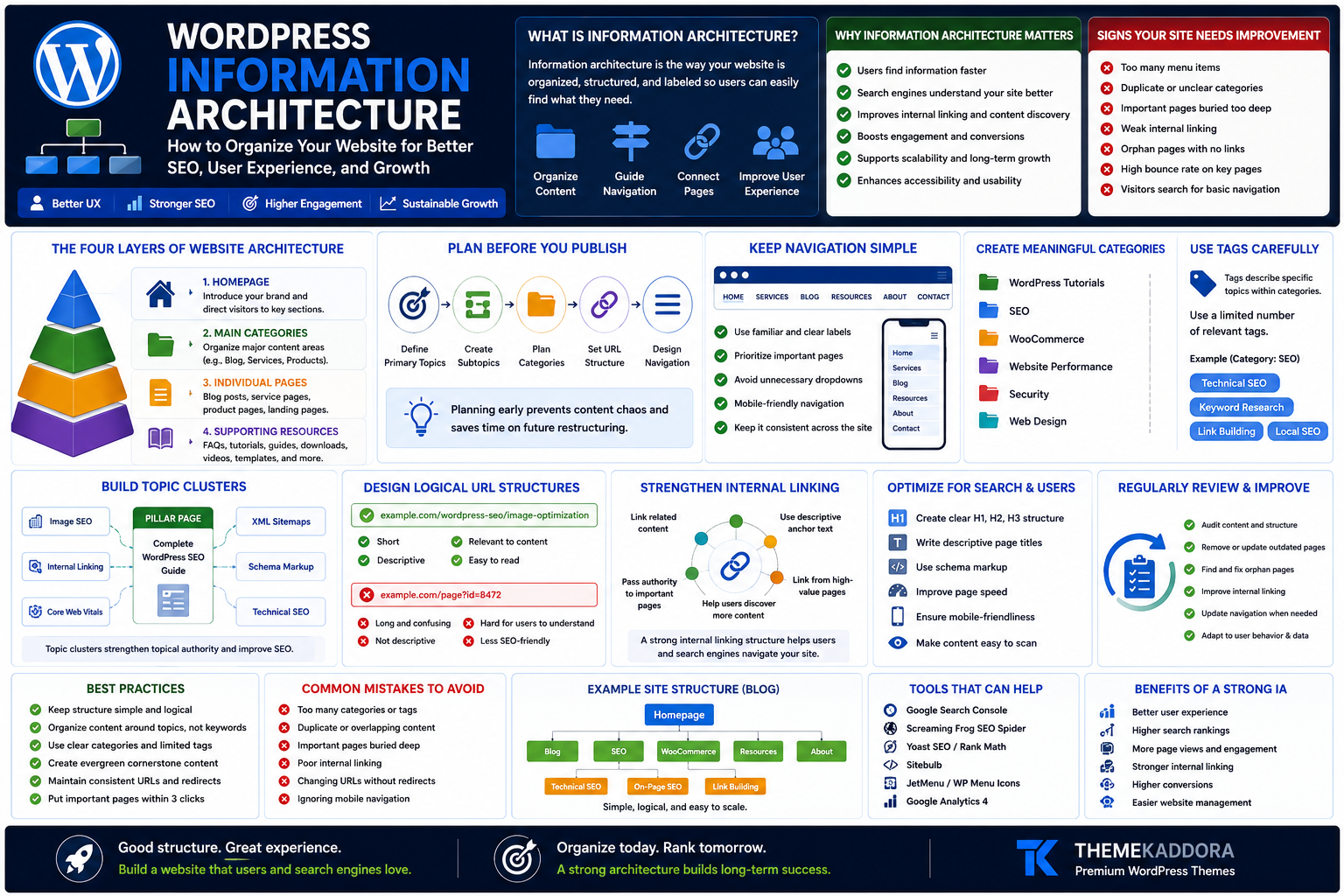
WordPress Information Architecture: How to Organize Your Website for Better SEO, User Experience, and Growth
Introduction
A beautiful website is only valuable if visitors can quickly find what they need.
Many WordPress websites invest in attractive designs, premium plugins, and high-quality content but still struggle with poor navigation and confusing layouts. Visitors arrive, click around for a few seconds, and leave because the information they need is difficult to locate.
This problem is often caused by poor information architecture.
Information architecture (IA) is the way your website is organized. It determines how pages, blog posts, categories, menus, products, and internal links work together to create a logical experience.
A well-structured website benefits everyone:
Visitors find information faster.
Search engines understand content relationships more easily.
Businesses improve engagement and conversions.
Website owners simplify long-term content management.
Whether you're building a blog, portfolio, agency website, SaaS platform, educational website, or WooCommerce store, a strong information architecture provides the foundation for sustainable growth.
What Is Information Architecture?
Information architecture is the process of organizing, labeling, and structuring website content so users can easily understand and navigate it.
It answers questions like:
What pages should exist?
How should pages be grouped?
Which content belongs together?
What should appear in the navigation menu?
How should visitors move through the website?
Think of your website like a library.
Without shelves, categories, and clear signs, visitors would struggle to find the book they need.
Why Information Architecture Matters
A well-organized website improves:
User experience
Search engine crawling
Internal linking
Content discovery
Navigation
Accessibility
Website scalability
Conversion paths
Instead of creating isolated pages, you build a connected system.
Signs Your Website Structure Needs Improvement
Many websites show warning signs such as:
Too many menu items
Duplicate categories
Orphan pages
Broken navigation
Important pages buried several clicks deep
Weak internal linking
Inconsistent page naming
Confusing URLs
Visitors using search for basic navigation
High exit rates on important pages
These problems often grow over time as more content is published.
The Four Layers of Website Architecture
A typical WordPress website consists of four structural layers.
1. Homepage
The homepage introduces your brand and directs visitors toward important sections.
It should clearly communicate:
What you offer
Who it's for
Primary navigation paths
2. Main Categories
Categories organize major content areas.
Examples:
Blog
Services
Products
Resources
Documentation
Support
Each category should have a clear purpose.
3. Individual Pages
These include:
Blog posts
Product pages
Service pages
Landing pages
Case studies
Each page should fit naturally within a category.
4. Supporting Resources
Supporting content may include:
FAQs
Tutorials
Glossaries
Downloads
Videos
Templates
These resources strengthen topical authority and help visitors solve specific problems.
Plan Before You Publish
One of the biggest mistakes is creating pages without a long-term structure.
Before publishing new content, define:
Primary topics
Subtopics
Categories
URL structure
Navigation hierarchy
Internal linking opportunities
Planning early prevents future cleanup.
Keep Navigation Simple
Navigation should guide visitors—not overwhelm them.
A good menu should:
Use familiar labels
Prioritize important pages
Avoid unnecessary dropdowns
Work well on mobile
Remain consistent across the website
If visitors need to think about where to click, navigation may need improvement.
Create Meaningful Categories
Categories should group related content logically.
For example, a WordPress website could use categories such as:
WordPress Tutorials
SEO
WooCommerce
Website Performance
Security
Web Design
Avoid creating dozens of categories with only one article each.
Use Tags Carefully
Tags can describe specific topics within a category.
Example:
Category:
SEO
Tags:
Technical SEO
Keyword Research
Link Building
Local SEO
Too many tags create clutter instead of organization.
Build Topic Clusters
Instead of publishing unrelated articles, organize content into topic clusters.
Example:
Pillar Page
Complete WordPress SEO Guide
Supporting Articles:
Image SEO
Internal Linking
Core Web Vitals
XML Sitemaps
Schema Markup
Technical SEO
This creates stronger topical relationships.
Design Logical URL Structures
A URL should be readable and descriptive.
Good example:
example.com/wordpress-seo/image-optimization
Less helpful example:
example.com/page?id=8472
Keep URLs:
Short
Relevant
Consistent
Avoid changing URLs unnecessarily.
Strengthen Internal Linking
Internal links connect related pages.
Benefits include:
Better navigation
Content discovery
Context for search engines
Longer sessions
Link naturally where it helps readers.
Avoid excessive linking simply for SEO.
Reduce Click Depth
Important pages should not require many clicks.
A practical goal is to keep key pages within a few logical steps from the homepage.
If visitors struggle to reach important information, reconsider the structure.
Create Helpful Category Pages
Category pages should provide value beyond listing articles.
Include:
Introduction
Featured content
Helpful links
Related resources
Well-designed category pages improve usability.
Build a Strong Footer Navigation
The footer supports visitors who reach the end of a page.
Include links to:
About
Contact
Privacy Policy
Services
Popular Articles
Product Categories
Avoid turning the footer into an overwhelming sitemap.
Improve Searchability
Large websites benefit from strong internal search.
Optimize search by:
Using descriptive titles
Clear headings
Accurate categories
Relevant tags
Helpful metadata
Search should complement navigation—not replace it.
Organize WooCommerce Stores
Online stores require additional planning.
Group products by:
Category
Collection
Brand
Product type
Use case
Avoid placing all products into a single category.
Plan for Future Growth
Good information architecture should scale.
Ask:
Can new categories be added easily?
Will future products fit naturally?
Can navigation remain simple?
A flexible structure reduces future redesigns.
Common Information Architecture Mistakes
Avoid:
Too many menu items
Duplicate pages
Empty categories
Broken internal links
Confusing labels
Overlapping content
Excessive tags
Deep navigation
Poor mobile menus
Unplanned content expansion
Small structural issues become larger over time.
Information Architecture Audit Checklist
Review your website regularly.
Check whether:
✅ Navigation is simple
✅ Categories make sense
✅ Tags are useful
✅ URLs are consistent
✅ Internal links connect related content
✅ Important pages are easy to reach
✅ Category pages provide value
✅ Mobile navigation works well
✅ Search functions properly
✅ New content follows the same structure
How Information Architecture Supports SEO
A logical structure helps search engines understand:
Content relationships
Topic relevance
Page importance
Internal link flow
While architecture alone doesn't guarantee rankings, it creates a stronger technical and organizational foundation for search visibility.
Why Your WordPress Theme Matters
Even the best architecture needs the right foundation.
A high-quality WordPress theme should provide:
Clean navigation
Responsive layouts
Flexible menus
Fast performance
SEO-friendly code
WooCommerce compatibility
Easy customization
These features make it easier to maintain a well-organized website as it grows.
Why Choose Themekaddora?
Themekaddora WordPress themes are designed for businesses, agencies, bloggers, creators, and online stores that need flexibility and performance.
Key features include:
Lightweight architecture
Responsive design
SEO-friendly code
WooCommerce support
Fast loading speed
Flexible customization
Clean HTML5 and CSS3 standards
Cross-browser compatibility
Regular updates
Professional support
Whether you're launching a new website or reorganizing an existing one, Themekaddora themes provide a solid foundation for scalable information architecture.
Conclusion
Information architecture is one of the most overlooked aspects of website success.
A well-organized website helps visitors find answers, supports search engine understanding, simplifies content management, and creates a better overall experience.
Instead of continuously adding new pages without a plan, focus on building a logical structure that grows with your business.
With thoughtful planning, clear navigation, meaningful categories, strong internal linking, and a flexible WordPress theme, your website can remain organized and effective for years to come.
Themekaddora provides responsive, lightweight, SEO-friendly WordPress themes that help businesses build websites designed for long-term growth and usability.
Frequently Asked Questions (FAQs)
What is information architecture in WordPress?
Information architecture is the way content, pages, categories, menus, and internal links are organized to help visitors and search engines navigate a website efficiently.
Why is information architecture important for SEO?
A logical structure improves content organization, internal linking, crawlability, and user experience, creating a stronger foundation for search visibility.
How many categories should a WordPress website have?
There is no fixed number. Use only the categories needed to organize your content logically and avoid creating many categories with very few posts.
Should I use WordPress tags?
Tags can be useful for grouping related topics, but they should be used consistently and only when they provide genuine value.
What is a topic cluster?
A topic cluster consists of a comprehensive pillar page supported by related articles that explore specific subtopics and link back to the main resource.
Why choose Themekaddora WordPress themes?
Themekaddora themes offer lightweight performance, responsive layouts, SEO-friendly code, WooCommerce compatibility, and flexible customization, making them ideal for building well-structured WordPress websites.
Comments (0)