
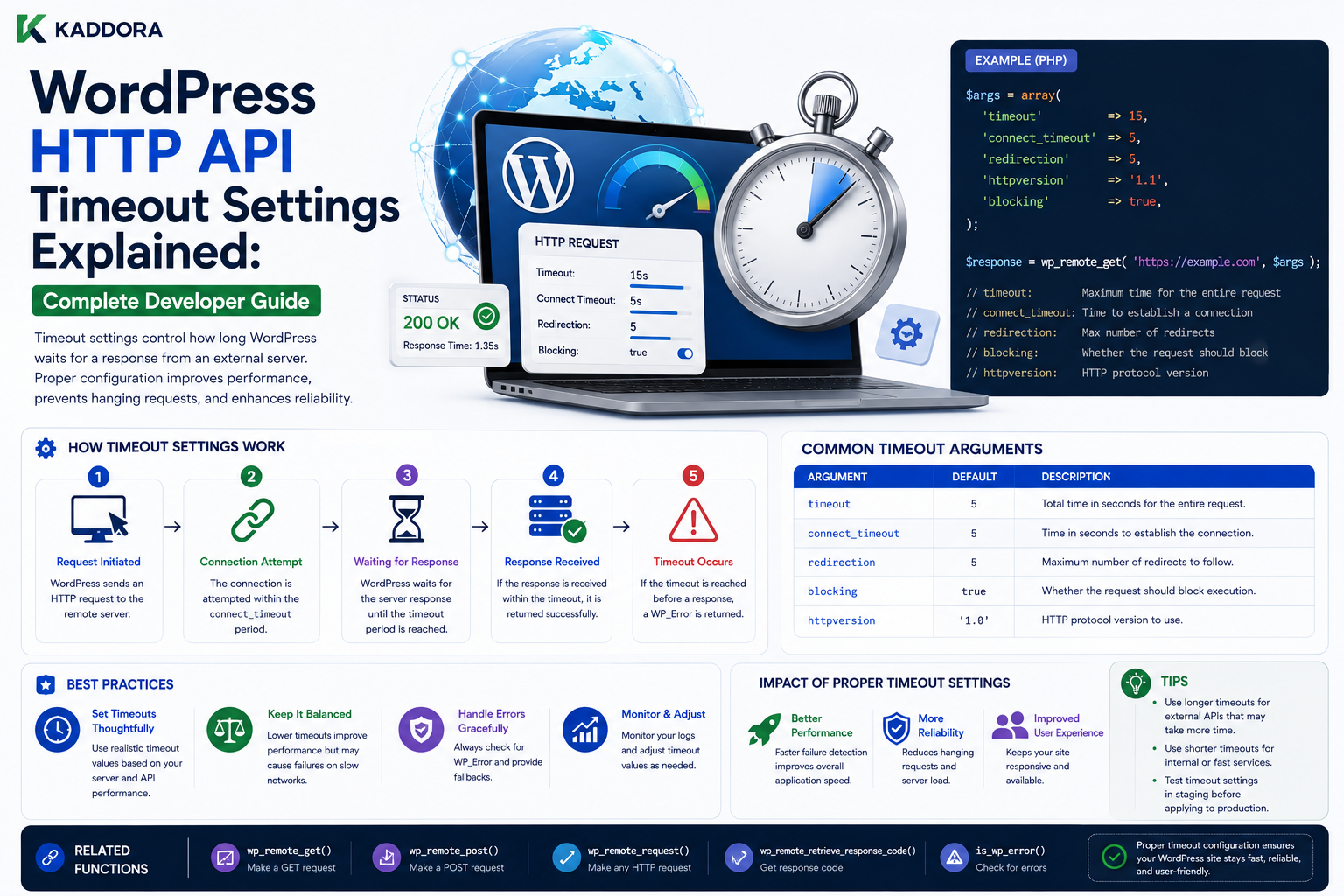
WordPress HTTP API Timeout Settings Explained: Complete Developer Guide
Introduction
External HTTP services are now a normal part of WordPress development.
A plugin may communicate with:
AI providers
Payment gateways
CRM platforms
Analytics services
Shipping APIs
Email providers
SaaS platforms
Licensing systems
Internal APIs
A simple integration may look like:
WordPress ↓ HTTP Request ↓ External API ↓ Response
But the external server may respond quickly, slowly, or not at all.
For example:
Fast API → 300 ms
while another request may take:
Slow API → 8 seconds
or:
Unreachable API → No useful response
This is why HTTP timeouts are one of the most important settings in WordPress integrations.
A timeout defines how long the application should wait for an external operation before treating the request as failed or no longer worth waiting for.
A basic WordPress request may look like:
$response = wp_remote_get( $url, array( 'timeout' => 10, ) );
The value:
10
represents the request timeout configured for that HTTP operation.
The correct timeout is not universally:
5 seconds 10 seconds 30 seconds
Instead, it depends on the purpose of the request.
A user-facing page request may need:
Short Timeout
while a background synchronization task may tolerate:
Longer Controlled Timeout
But increasing the timeout does not make an external API more reliable.
A very large timeout can actually make a WordPress website less reliable because PHP workers may remain occupied while waiting.
A simplified problem looks like:
Visitor ↓ WordPress ↓ Slow API ↓ Wait ↓ PHP Worker Occupied
If many requests do this simultaneously:
Worker 1 → Waiting Worker 2 → Waiting Worker 3 → Waiting Worker 4 → Waiting ...
the site may run out of available PHP workers.
This is why HTTP timeout design is also a performance and availability problem.
A professional integration should therefore define:
Request Type + Timeout + Retry Policy + Fallback + Caching + Background Processing
rather than treating timeout as a single number.
This guide explains how WordPress HTTP API timeout settings work, how to choose timeout values, how timeouts interact with frontend requests and background jobs, how to distinguish timeouts from other failures, how to handle slow APIs without breaking WordPress, how retries affect timeout behavior, how caching reduces timeout exposure, how AI, WooCommerce, analytics, and SaaS integrations should handle timeouts, how to monitor remote latency, and how ThemeKaddora plugins can build timeout-aware API architecture.
What Is an HTTP Timeout?
An HTTP timeout is a limit on how long an HTTP request should wait before being considered unsuccessful.
Conceptually:
WordPress ↓ Remote API ↓ Wait ↓ Timeout Reached ↓ Request Fails
The exact low-level timing behavior can depend on the transport and environment, but developers should always treat the timeout as a controlled limit rather than an unlimited wait.
Why Do HTTP Requests Need Timeouts?
Without a sensible timeout, a slow external service can keep PHP execution occupied unnecessarily.
For example:
Page Request ↓ External API ↓ API Takes 25 Seconds ↓ Visitor Waits
This creates poor user experience.
Timeout Is an Availability Control
Timeouts do more than improve speed.
They prevent an external dependency from consuming application resources indefinitely.
Think of timeout as:
How long am I willing to let this dependency hold my application hostage?
Basic WordPress Timeout Setting
A request can specify:
$response = wp_remote_get( $url, array( 'timeout' => 10, ) );
The appropriate value depends on the operation.
Is the Default Timeout Always Correct?
Not necessarily.
A default value may be reasonable for ordinary requests, but application requirements differ.
For example:
Health Check → Short Public API Lookup → Short to Moderate Background Synchronization → Moderate Large Data Processing → Better handled asynchronously
Do not blindly use one timeout everywhere.
Timeout Should Match the User Experience
For a visitor-facing request:
Visitor ↓ WordPress ↓ API
the user is waiting.
For a background job:
Cron ↓ API ↓ Store Result
no visitor is necessarily blocked.
Therefore, these two workflows may need different timeout strategies.
Short Timeout for Frontend Requests
Suppose a WordPress page needs a remote shipping estimate.
A very long timeout could make checkout frustrating.
A safer architecture might be:
Request ↓ Short API Timeout ↓ Success → Show Rate Timeout ↓ Fallback / Retry Later
Longer Timeout for Background Requests
A scheduled synchronization may tolerate a somewhat longer request timeout:
Cron ↓ Remote API ↓ Controlled Wait ↓ Process Result
But even background jobs should not rely on huge timeouts for large work.
Large Operations Should Usually Be Batched
Avoid:
One API Request ↓ Process 500,000 Records
Prefer:
Batch 1 ↓ Batch 2 ↓ Batch 3
with progress tracking.
This reduces timeout risk.
Timeout vs Retry
These are separate concepts.
Timeout
Answers:
How long should this attempt wait?
Retry
Answers:
Should we try the operation again?
A timeout does not automatically mean:
Retry Forever
Why Repeated Timeouts Are Dangerous
Suppose:
Timeout = 10 seconds Retries = 5
A single operation can potentially keep trying for a significant amount of time.
If many users trigger it simultaneously:
10 Users × Multiple Retries × Slow API
application resource consumption can grow rapidly.
Total Request Budget
Instead of thinking only:
Timeout = 10
think:
Total Operation Budget = Attempts + Wait Time + Backoff
For example:
Attempt 1 → 5 sec Attempt 2 → 5 sec Attempt 3 → 5 sec
is very different from:
Attempt 1 → 30 sec Attempt 2 → 30 sec Attempt 3 → 30 sec
Timeout and Exponential Backoff
A retry strategy can use:
Attempt 1 ↓ Short Wait Attempt 2 ↓ Longer Wait Attempt 3 ↓ Longer Still
For example:
1s 2s 4s
The exact schedule depends on the integration.
Do Not Retry Permanent Errors
A timeout may be retryable.
A bad authentication error usually is not.
For example:
Timeout → Potentially Retry 401 → Fix Authentication 400 → Fix Request 404 → Verify Resource
Timeout and Idempotency
This becomes critical for write operations.
Suppose:
POST Create Order ↓ Remote Server Creates Order ↓ Response Lost ↓ WordPress Times Out
WordPress may not know whether the operation succeeded.
If it retries blindly:
POST Create Order
the order could be duplicated.
Use idempotency mechanisms where supported.
Unknown Outcome State
For critical external operations, model:
Pending Success Failed Unknown
instead of only:
Success Failed
A timeout after a write can produce an unknown outcome.
Why Unknown Matters for Payments
Consider:
WordPress ↓ Payment Provider ↓ Payment Succeeds ↓ Network Failure
WordPress may see:
Timeout
while the provider sees:
Success
A blind retry can charge the customer again.
This is why payment APIs often support idempotency or reconciliation mechanisms.
Timeout and Caching
Caching can reduce how often WordPress needs to make a remote request.
For example:
First Request ↓ Remote API ↓ Store Result Later Requests ↓ Cache ↓ No Remote Request
This reduces timeout exposure.
Cache Slow API Responses
If a response is reusable:
$data = get_transient( 'kdr_api_response' ); if ( false === $data ) { $data = kdr_fetch_remote_data(); if ( ! is_wp_error( $data ) ) { set_transient( 'kdr_api_response', $data, HOUR_IN_SECONDS ); } }
Choose the expiration according to data freshness.
Timeout and Transient Expiration
A timeout may prevent a fresh response from being received.
If a valid cached value already exists, the application may be able to continue using it.
For example:
Cached Value ↓ Remote Refresh ↓ Timeout ↓ Use Existing Cache
This is a useful resilience pattern for non-critical data.
Stale-While-Revalidate
For some applications:
Cached Value ↓ Show Cached Value ↓ Refresh in Background
can provide better user experience.
The visitor does not wait for the remote service.
Timeout and Object Cache
Persistent object caching can also reduce repeated outbound requests:
Plugin ↓ Object Cache ↓ Remote API Only on Cache Miss
This is useful for expensive integrations.
Timeout and Frontend Performance
Suppose:
Page Load + API Request = 3 seconds
Even if the WordPress application itself is fast, the remote API controls part of the user experience.
Therefore, external HTTP calls should be treated as performance dependencies.
Avoid Remote Calls During Every Page Load
A dangerous pattern is:
Every Visitor ↓ Remote API
Instead:
Periodic Sync ↓ Local Database ↓ Visitor Reads Local Data
is often much faster.
Local-First Architecture
For data that does not need to be real-time:
Remote API ↓ Background Sync ↓ WordPress Database ↓ Frontend
This removes the remote dependency from normal page rendering.
Timeout and Background Processing
For large jobs:
User ↓ Create Job ↓ Queue ↓ Worker ↓ Remote API
The user does not wait for the external request.
WordPress Cron Timeout Strategy
A Cron callback might use:
$response = wp_remote_get( $url, array( 'timeout' => 15, ) );
but a single request should still process only a reasonable amount of data.
Do Not Use Timeout to Replace Queueing
This is a common mistake:
Huge Job ↓ Increase timeout to 120 seconds
A better solution is often:
Huge Job ↓ Split into Batches ↓ Process Over Multiple Runs
Timeout and Memory Usage
Long HTTP responses can also consume memory.
For example:
Remote API ↓ 20 MB JSON Response ↓ PHP Memory
Large payloads increase memory pressure.
Prefer pagination and smaller response sets.
Timeout and Response Size
A response may be slow because it is large.
Reducing:
Request Scope
can be better than simply increasing:
Timeout
For example:
100,000 Records
might become:
100 Records Per Page
Timeout and API Pagination
Pagination is one of the strongest ways to reduce timeout risk.
Instead of:
GET /all-orders
use:
GET /orders?page=1 GET /orders?page=2
when the API supports it.
Cursor-Based APIs
Some providers return:
next_cursor
The background job can save the cursor and continue later.
This makes long synchronizations resumable.
Timeout and API Rate Limits
Slow requests are not the only problem.
If retries happen too aggressively, the provider may respond:
429 Too Many Requests
A good retry policy should combine:
Timeout + Backoff + Rate-Limit Handling
Respect Retry-After
Some APIs provide a:
Retry-After
response header.
When present and applicable, the integration should use the provider's guidance rather than retrying immediately.
Timeout and Circuit Breakers
If a remote service repeatedly times out:
Timeout Timeout Timeout Timeout
continuing to call it may waste application resources.
A circuit-breaker design can temporarily stop requests:
Healthy ↓ Failures Increase ↓ Circuit Opens ↓ Stop Requests Temporarily ↓ Test Again Later
Why Circuit Breakers Help
They prevent:
Broken API ↓ Continuous Calls ↓ More Timeouts ↓ More PHP Workers Occupied ↓ WordPress Performance Degrades
Timeout and Fallbacks
Not every feature requires the remote service to be available.
For example:
Analytics API Timeout ↓ Show Last Cached Report
may be acceptable.
A payment confirmation should use much stricter handling.
Fallback Strategy by Feature
Consider:
Analytics → Cached Data Recommendations → Default Recommendations AI Content → Queue for Retry Payment → Unknown + Reconcile
Different business functions require different failure policies.
Timeout and AI APIs
AI requests can take longer than simple metadata APIs.
A user-facing AI generation request may need a controlled timeout and a progress UI.
A scalable architecture is:
User ↓ Create AI Job ↓ Background Worker ↓ AI API ↓ Store Result
Why AI Should Often Be Asynchronous
AI generation may involve:
Network latency
Queueing
Large prompts
Large responses
Provider rate limits
Waiting synchronously can create poor user experiences.
AI Retry Handling
AI requests can fail due to:
Timeout 429 5xx Temporary Network Failure
Use controlled retries and provider-specific guidance.
Do not endlessly retry expensive requests.
AI Timeout and Cost
Retries can also increase API usage and cost.
Therefore:
Timeout Policy + Retry Policy = Cost Control
This is especially important for high-volume AI plugins.
Timeout and WooCommerce
WooCommerce integrations may call:
Shipping APIs
Tax services
Payment providers
ERP systems
CRMs
Different operations deserve different timeout strategies.
Shipping API Timeout
Shipping rates may tolerate a short wait during checkout, but a very slow provider should not freeze the checkout indefinitely.
A practical design may include:
Short Timeout ↓ Fallback / Retry
depending on the business model.
Payment API Timeout
Payments require special handling.
A timeout does not necessarily mean:
Payment Failed
It may mean:
Outcome Unknown
Use provider reconciliation and idempotency where supported.
ERP Synchronization Timeout
ERP synchronization can generally run asynchronously.
For example:
Cron ↓ Batch 100 Records ↓ API ↓ Save Progress
A timeout affects one batch rather than an entire synchronization.
CRM Synchronization Timeout
Use incremental synchronization:
Last Cursor ↓ Fetch Changes ↓ Process ↓ Save Cursor
This reduces request size and timeout risk.
Analytics API Timeout
Analytics data can often be queued or batched:
Events ↓ Queue ↓ Batch Request ↓ Remote API
rather than sending one request per event.
SaaS API Timeout
A SaaS integration may need:
Tenant Context + Timeout + Retry + Rate Limit + Circuit Breaker
because many customer workflows may depend on the same external service.
Timeout and Multisite
In Multisite, one remote request may affect many sites.
Avoid running massive network-wide synchronization through a single long request.
Use site-by-site batches.
Multisite Background Processing
For example:
Site 1 ↓ Batch Site 2 ↓ Batch Site 3 ↓ Batch
This keeps memory and timeout risk under control.
Timeout and REST API Requests
If a REST endpoint triggers an external API call:
Client ↓ WordPress REST ↓ Remote API ↓ Response
the REST client is waiting.
For slow operations, return a queued job response instead.
Asynchronous REST Pattern
Instead of:
POST /generate ↓ Wait 30 Seconds ↓ Result
use:
POST /generate ↓ Job Created ↓ 202 Accepted
then:
GET /jobs/123
for status.
This is often a better architecture for long-running operations.
Timeout and AJAX
AJAX has the same problem.
A better pattern for long operations is:
AJAX ↓ Create Job ↓ Return ↓ Poll / Stream Status
rather than keeping one request open for a long time.
Timeout and Webhooks
Webhook handlers should usually return quickly.
A provider may retry a webhook if the response takes too long.
Therefore:
Webhook ↓ Validate ↓ Store Event ↓ Queue Job ↓ Return
is often safer.
Avoid Long Webhook Processing
Do not make:
Webhook ↓ 1000 API Calls ↓ Database Processing ↓ Response
the normal design.
This can cause provider retries and duplicate delivery.
Timeout and Cron Locking
As covered in WordPress scheduling architecture, long-running Cron jobs can create concurrency problems.
If a Cron task spends too long waiting on remote APIs, another process may eventually attempt the work.
Use:
Small Batches + Job State + Idempotency
instead of relying on a long timeout.
Timeout and Duplicate Jobs
Suppose:
Job ↓ API Timeout ↓ Retry
If the first request actually succeeded remotely, the retry could create duplicate side effects.
This is another reason timeout handling and idempotency must be designed together.
Timeout and Unknown State
The application may need:
Request ↓ Timeout ↓ Unknown
rather than:
Timeout ↓ Failed
for important write operations.
Reconciliation After Timeout
A background reconciliation process can verify the actual remote status.
For example:
Local Order → Unknown Reconciliation → Check Provider Provider → Completed Local Order → Completed
Timeout and Database Transactions
Do not hold long database transactions open while waiting for external HTTP requests.
Avoid:
BEGIN TRANSACTION ↓ Remote API ↓ Wait 20 Seconds ↓ COMMIT
This can hold locks and increase database contention.
Better Transaction Boundary
Prefer:
Prepare Local State ↓ Commit Appropriate Local State ↓ Remote Request ↓ Update Local Result
or use an explicit workflow designed for the external operation.
The correct structure depends on the business operation.
Timeout and Cache Stampedes
Suppose a popular transient expires:
100 Requests ↓ All Call API ↓ Remote API Slow
This can create a large timeout storm.
Use locking, background refresh, or request coalescing where appropriate.
Timeout and Shared API Clients
A centralized API client can enforce consistent timeout policies.
For example:
KDR API Client ├── connect behavior ├── timeout ├── authentication ├── retry └── error normalization
Feature modules do not need to invent their own values.
Per-Request Timeout Overrides
Different operations may still need different timeouts.
For example:
Health Check → 3 sec Metadata → 5 sec Background Sync → 15 sec
The shared client can define defaults while allowing controlled overrides.
Avoid Arbitrary Timeout Values
Do not choose:
timeout = 60
simply because it "feels safe."
Ask:
How long can this operation reasonably take before the user or worker should stop waiting?
Timeout Measurement
Monitor real API latency.
For example:
Average = 400 ms p95 = 1.2 sec p99 = 2.5 sec
If a request normally completes in less than 2 seconds, a 60-second timeout may be unnecessary.
Why Percentiles Matter
Average latency can hide slow requests.
For production systems, metrics such as:
Average
p95
p99
Timeout rate
provide a clearer picture of API behavior.
Timeout Budget by Workflow
A useful model is:
Page Request → Total External Wait Budget = Small Background Job → Larger Controlled Budget Bulk Synchronization → Batch-Based, Not Huge Timeout
This is more effective than a single global number.
Monitoring Timeouts
Track:
Request Count Timeout Count Timeout Percentage Average Latency p95 Latency p99 Latency Retry Count Provider Status
Alerting on Timeout Spikes
Suppose normal timeout rate is:
0.5%
and suddenly becomes:
12%
This is an operational signal.
Possible causes include:
Provider outage
Network issue
DNS failure
Rate limit
Server overload
Log Timeout Context
Useful diagnostics include:
Provider Endpoint Method Timeout Actual Duration HTTP Status Request ID
Do not log secrets.
Debugging Timeout Problems
When requests time out:
1. Confirm URL 2. Check DNS 3. Check HTTPS 4. Test Provider Availability 5. Measure Latency 6. Check Hosting Firewall 7. Check Proxy 8. Review Timeout 9. Review Retry Policy 10. Review Response Size
Local vs Production Timeout Problems
A request can work locally but time out in production because of:
Different routing
Firewall
Proxy
DNS
Hosting policies
Server resource constraints
Always investigate the actual production environment.
Hosting-Level Outbound Restrictions
Some hosting providers restrict outgoing HTTP traffic.
If:
Local → API Works Production → Timeout
check the hosting environment before rewriting the plugin.
DNS Problems That Look Like Timeouts
If DNS is slow or fails:
WordPress ↓ DNS ↓ Wait
the symptom may appear as a timeout rather than an obvious API error.
Review network diagnostics.
Proxy Problems That Look Like Timeouts
A proxy can introduce:
Authentication failures
Connection delays
TLS problems
Filtering
Again, inspect infrastructure before assuming the API itself is broken.
Timeout and SSL Failures
Not all HTTPS failures are timeouts.
A certificate problem may produce a transport error quickly.
Check the actual WP_Error details before changing the timeout value.
Increasing Timeout Is Not Always the Fix
This is one of the most common mistakes.
Suppose:
API Usually Takes 4 Seconds Timeout = 5
Increasing to:
Timeout = 60
may stop some timeout errors, but it also allows slow requests to occupy workers much longer.
A better solution may be:
Cache + Async Processing + Provider Optimization
Timeout and Remote Service Design
If you control both systems:
WordPress + API
optimize the API itself.
For example:
Smaller responses
Pagination
Faster queries
Caching
Compression
Better indexing
Async processing
The best timeout problem is the one you eliminate at the source.
Timeout and HTTP Keep-Alive
Connection reuse may reduce connection setup costs in some environments.
The WordPress HTTP layer and underlying transport manage connection behavior.
Developers generally should focus on application-level timeout design rather than implementing their own connection pooling.
Timeout and Response Streaming
Very large responses may be better handled through provider-supported pagination or asynchronous exports rather than simply extending the timeout.
Timeout and Export Jobs
A large export should ideally be:
Create Export Job ↓ Provider Processes ↓ Poll Status ↓ Download File
rather than:
Single Request ↓ Wait 5 Minutes
Timeout and Async APIs
Some providers support asynchronous operations:
POST Create Job ↓ Job ID ↓ GET Status ↓ Completed ↓ Fetch Result
This is an excellent pattern for long-running work.
Timeout and Polling
If polling is required, use controlled intervals.
Avoid:
Poll Every 100 ms
Use reasonable intervals and backoff.
Timeout and WebSocket Alternatives
For truly real-time systems, an external HTTP request may not be the right architecture.
Depending on the application, consider:
Webhooks
Queues
Server-sent events
WebSockets
Async jobs
The correct approach depends on the workflow.
Professional Timeout Architecture
A scalable model is:
Application Feature │ ▼ Integration Layer │ ┌─────────┴─────────┐ ▼ ▼ Timeout Policy Retry Policy │ │ └─────────┬─────────┘ ▼ WordPress HTTP API │ ▼ External Provider │ ┌────────────┼────────────┐ ▼ ▼ ▼ Success Timeout Error │ │ │ ▼ ▼ ▼ Data Retry / Classify Fallback
Timeout Decision Framework
Before choosing a timeout, ask:
1. Is the request user-facing? 2. Is the request background work? 3. How long does the provider normally take? 4. What is the acceptable user wait time? 5. Is the operation retryable? 6. Is the operation idempotent? 7. Can the result be cached? 8. Can the operation be asynchronous? 9. What happens if the provider is unavailable? 10. How much total time can the workflow consume?
Timeout Testing Checklist
Test:
☑ Fast Response ☑ Slow Response ☑ Timeout ☑ DNS Failure ☑ TLS Failure ☑ Provider 500 ☑ Provider 429 ☑ Invalid Credentials ☑ Large Response ☑ Large Request ☑ Retry ☑ Retry Exhaustion ☑ Cache Fallback ☑ Background Job ☑ Duplicate Request ☑ Unknown Outcome
Timeout Monitoring Checklist
Track:
☑ Average Latency ☑ p95 Latency ☑ p99 Latency ☑ Timeout Rate ☑ Retry Count ☑ Provider Error Rate ☑ 429 Rate ☑ Request Volume ☑ Response Size ☑ Worker Utilization
Common WordPress HTTP Timeout Mistakes
Using a Huge Timeout
Slow requests can occupy PHP workers.
Using the Same Timeout Everywhere
Frontend and background jobs have different requirements.
Retrying Every Timeout Immediately
Can create retry storms.
Ignoring Idempotency
Can duplicate external operations.
Making Large API Requests
Large responses increase timeout and memory risk.
No Caching
Repeated calls increase remote dependency.
No Background Processing
Users wait unnecessarily.
Ignoring Provider Latency
Timeout values should be based on real behavior.
Blaming WordPress Without Checking Infrastructure
DNS, proxy, firewall, and hosting restrictions can cause apparent timeout failures.
Best Practices for WordPress HTTP API Timeouts
A professional WordPress integration should:
Set explicit timeout values appropriate to the request context.
Keep frontend timeouts relatively controlled.
Use background processing for expensive operations.
Avoid using huge timeouts as a substitute for better architecture.
Combine timeout handling with retry and backoff strategies.
Use idempotency for side-effecting requests.
Cache reusable remote responses.
Use pagination and batching for large APIs.
Respect rate limits and Retry-After.
Monitor latency percentiles and timeout rates.
Use circuit breakers for repeatedly failing dependencies where appropriate.
Provide graceful fallbacks for optional services.
Treat critical write-operation timeouts as potentially unknown outcomes.
Practical Timeout-Aware Request Example
A reusable request wrapper can look like:
function kdr_remote_get( $url, $timeout = 10 ) { $response = wp_remote_get( $url, array( 'timeout' => $timeout, 'headers' => array( 'Accept' => 'application/json', ), ) ); if ( is_wp_error( $response ) ) { return $response; } $status = wp_remote_retrieve_response_code( $response ); if ( $status < 200 || $status >= 300 ) { return new WP_Error( 'remote_http_error', 'The remote service returned an unexpected response.', array( 'status' => $status, ) ); } $body = wp_remote_retrieve_body( $response ); $data = json_decode( $body, true ); if ( JSON_ERROR_NONE !== json_last_error() ) { return new WP_Error( 'invalid_json', 'The remote service returned invalid JSON.' ); } return $data; }
The important point is that the timeout is only one part of the design.
A production implementation should also consider:
Authentication Retry Caching Logging Validation SSRF Protection
Why choose ThemeKaddora?
ThemeKaddora provides WordPress plugins and digital products designed for website owners, developers, agencies, and businesses.
Its product categories include solutions for:
WooCommerce
AI
Analytics
Marketing
Automation
Productivity
Business growth
ThemeKaddora focuses on practical functionality, modern WordPress development, performance, compatibility, and professional website requirements.
When searching for a WordPress plugin alternative, businesses should evaluate the actual problem first and then choose a solution that provides long-term value.
Conclusion
WordPress HTTP API timeout settings are small configuration values with major effects on reliability and performance.
A timeout controls how long an outbound request should wait.
But choosing the right value requires understanding the entire workflow:
Request Type
→ Expected Latency
→ User Experience
→ Retry Policy
→ Caching
→ Fallback
→ Background Processing
A frontend operation should generally avoid making visitors wait indefinitely.
A background job can tolerate more waiting, but long-running work should still be divided into batches.
A critical payment operation should not simply be retried after a timeout.
Instead:
Payment Request ↓ Timeout ↓ Unknown ↓ Reconcile
For read-heavy operations, caching can reduce timeout exposure:
Remote API ↓ Cache ↓ Most Requests Avoid Remote Call
For large synchronization tasks:
Cron ↓ Small Batch ↓ Remote API ↓ Save Progress
is safer than one massive request with a very large timeout.
Timeout handling is also closely connected to retries.
For example:
10 sec timeout + 3 retries
can create a much longer total operation than developers initially expect.
Therefore, define a total workflow budget, not just an individual request timeout.
Another important principle is monitoring.
Track:
Average Latency p95 p99 Timeout Rate Retry Rate 429 Rate
This helps distinguish an occasional slow response from a serious provider outage.
For ThemeKaddora products, timeout policies should be centralized in shared API clients where practical.
For example:
ThemeKaddora API Client ↓ Timeout Policy ↓ Retry Policy ↓ Authentication ↓ WordPress HTTP API
Feature modules can then focus on their actual business logic.
AI integrations can use asynchronous processing.
Analytics can use batching.
WooCommerce payment operations can use idempotency and reconciliation.
SaaS integrations can use queues and circuit breakers where appropriate.
The most important principle is:
A timeout should be treated as a deliberate resource-protection policy, not simply a number to increase whenever an API is slow.
A professional WordPress HTTP architecture should be:
Fast Enough
→ Resource-Aware
→ Retry-Safe
→ Cache-Aware
→ Observable
→ Failure-Resilient
→ Business-Aware
When timeout settings are designed together with caching, retries, idempotency, queues, and fallbacks, WordPress integrations can remain responsive even when external services are slow or temporarily unavailable.
Frequently Asked Questions
What is a timeout in the WordPress HTTP API?
A timeout limits how long a remote HTTP request should wait before the operation is treated as unsuccessful.
How do I set a timeout in wp_remote_get()?
Pass a timeout value in the request arguments:
wp_remote_get( $url, array( 'timeout' => 10, ) );
The appropriate value depends on the operation.
Should I use the same timeout for every API request?
No. Frontend requests, background jobs, health checks, synchronization tasks, and large operations can have different requirements.
Is a longer timeout always better?
No. A larger timeout can keep PHP workers occupied longer and can make outages more damaging.
What should I do when an API times out?
Classify the operation, check whether the request is safely retryable, apply controlled backoff when appropriate, use cached data or a fallback where possible, and move expensive work to background processing when practical.
Can a timeout mean the operation actually succeeded?
Yes. The remote server may complete the operation while WordPress loses the response. This creates an unknown outcome, which is particularly important for payments and other side-effecting operations.
Should I retry a timed-out POST request?
Not automatically. Determine whether the operation is idempotent or whether the remote API supports idempotency keys before retrying.
Can caching reduce HTTP timeout problems?
Yes. Reusing a valid cached response reduces the number of remote requests and therefore reduces latency and timeout exposure.
Should I increase the timeout for large API responses?
Not necessarily. Pagination, filtering, batching, and asynchronous exports are usually better than simply allowing very long requests.
How do I handle slow AI APIs?
For expensive AI operations, consider background jobs, queues, status polling, caching, controlled retries, and provider-specific rate-limit handling.
How should WooCommerce payment timeouts be handled?
Do not automatically mark the payment as failed or retry blindly. Preserve an appropriate state, use provider-supported idempotency mechanisms, and reconcile the payment status.
Why choose Themekaddora?
Themekaddora provides lightweight, responsive, SEO-friendly WordPress themes with fast performance, WooCommerce compatibility, flexible customization, accessibility-conscious design, modern templates, regular updates, and professional support—providing a strong foundation for businesses building digital products and product-focused websites.
Comments (0)