
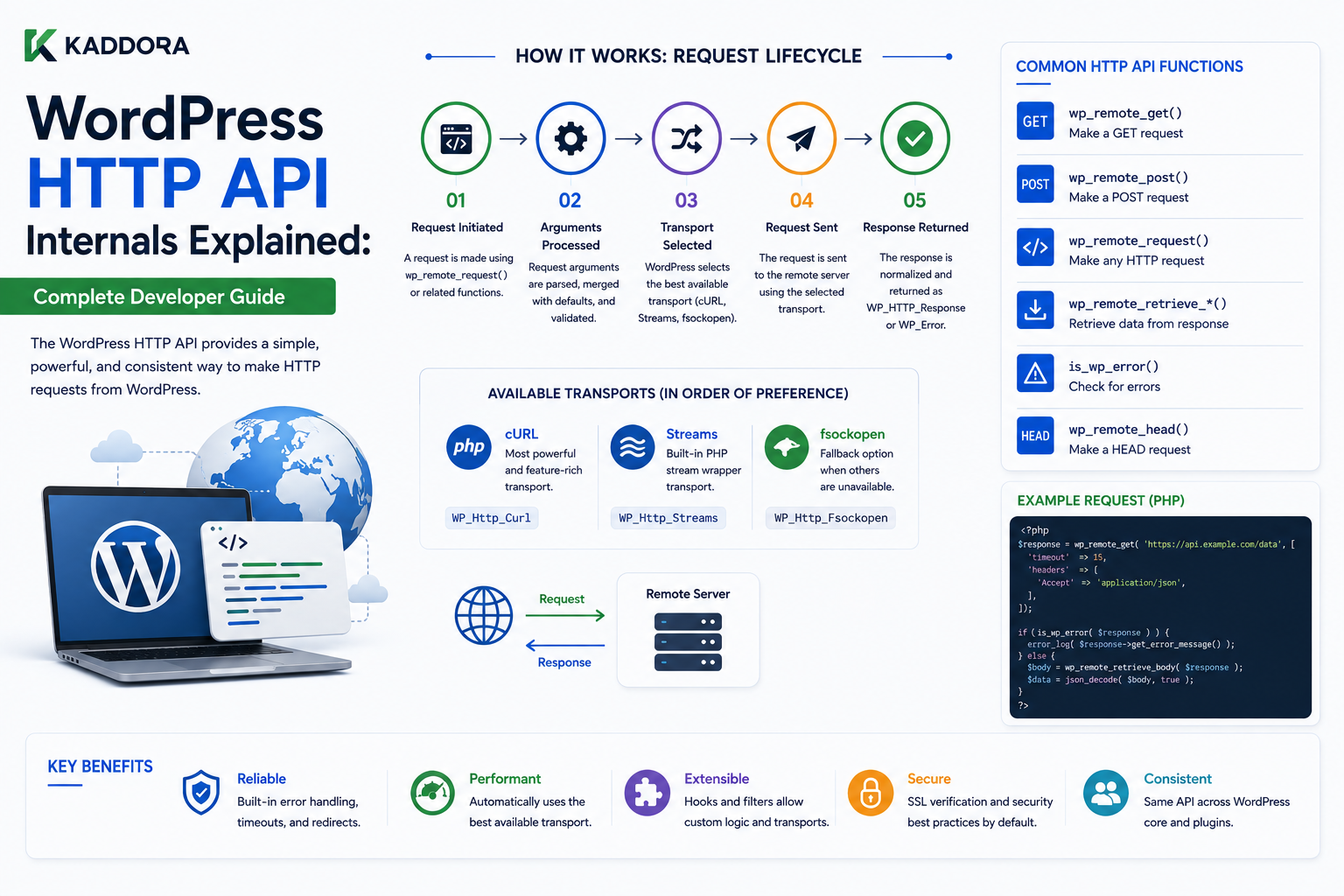
WordPress HTTP API Internals Explained: Complete Developer Guide
Introduction
Modern WordPress plugins rarely operate entirely inside WordPress.
They often communicate with external services such as:
Payment providers
Email services
Analytics platforms
AI providers
Shipping systems
Cloud services
Licensing servers
SaaS platforms
Internal APIs
For example:
WordPress Plugin ↓ External API ↓ JSON Response ↓ WordPress ↓ Database / Cache ↓ User Interface
To make these connections easier, WordPress provides the HTTP API.
The HTTP API allows developers to send HTTP requests without writing provider-specific low-level networking code for every plugin.
Common functions include:
wp_remote_get() wp_remote_post() wp_remote_request() wp_remote_head() wp_remote_retrieve_body() wp_remote_retrieve_response_code()
A simplified request flow looks like:
Plugin ↓ WordPress HTTP API ↓ HTTP Transport ↓ Remote Server ↓ HTTP Response ↓ WordPress HTTP API ↓ Plugin
This abstraction is important because the plugin does not need to directly manage every underlying transport detail.
The WordPress HTTP API can handle common concerns such as:
Request methods
Headers
Query parameters
Request bodies
Timeouts
SSL verification
Authentication headers
Response parsing
Transport selection
Error handling
However, using the HTTP API does not automatically make an integration safe or efficient.
A poorly designed remote request can still create:
Slow page loads
API rate-limit problems
Authentication failures
SSRF vulnerabilities
Timeout cascades
Duplicate requests
Large memory usage
Broken Cron jobs
Production outages
For ThemeKaddora products, this becomes especially important because plugins may connect to:
AI Analytics WooCommerce CRM Automation SaaS Payment
A good architecture therefore treats external HTTP communication as a carefully controlled subsystem.
In this guide, you'll learn what the WordPress HTTP API is, how remote requests work, how GET and POST requests differ, how headers and request bodies are handled, how WordPress processes responses, how HTTP errors differ from WP_Error, how timeouts and retries should be designed, how authentication should be handled, how SSL verification protects requests, how caching can reduce API traffic, how to prevent SSRF vulnerabilities, how Cron and REST integrations should use the HTTP API, how to debug failed requests, and how ThemeKaddora plugins can build resilient external-service integrations.
What Is the WordPress HTTP API?
The WordPress HTTP API is a collection of functions that allows WordPress code to communicate with remote HTTP services.
Instead of writing custom socket or transport code, developers can use functions such as:
$response = wp_remote_get( $url );
or:
$response = wp_remote_post( $url, $args );
This creates a consistent programming interface.
Why WordPress Provides an HTTP Abstraction
Without an HTTP abstraction, every plugin might implement:
DNS TLS Sockets Headers Redirects Timeouts Response Parsing
independently.
The HTTP API centralizes common request behavior.
The architecture becomes:
Plugin ↓ HTTP API ↓ Transport
rather than:
Plugin ↓ Custom HTTP Implementation
HTTP API vs WordPress REST API
These concepts are easy to confuse.
WordPress HTTP API
Used by WordPress to make outgoing HTTP requests.
WordPress ↓ External Service
WordPress REST API
Used by clients to communicate with WordPress.
External Client ↓ WordPress REST API
The direction is different.
Example Difference
HTTP API:
WordPress Plugin → Stripe API
REST API:
Mobile App → WordPress
A plugin can also use both in the same application.
wp_remote_get()
For a GET request:
$response = wp_remote_get( $url );
A GET request is commonly used when retrieving information.
Examples include:
GET Product Data GET CRM Customer GET Currency Rates GET AI Provider Status
wp_remote_post()
For a POST request:
$response = wp_remote_post( $url, $args );
POST is commonly used when sending data to another system.
Examples:
Create Customer Create Order Send Event Generate AI Content Submit Form
wp_remote_request()
When you need more control over the method:
$response = wp_remote_request( $url, $args );
This can be useful for methods such as:
PUT PATCH DELETE
when the remote API supports them.
wp_remote_head()
A HEAD request can retrieve response headers without retrieving the complete response body in the same way as a GET request.
It can be useful in certain resource-checking workflows.
Request Arguments
WordPress HTTP requests can accept arguments such as:
method headers body timeout redirection blocking sslverify data_format
The exact arguments should match the requirements of the API being called.
HTTP Method
The method determines what operation the client is asking the server to perform.
Common methods include:
GET POST PUT PATCH DELETE HEAD
The remote API defines which methods are supported.
Request Headers
Headers provide metadata about the request.
For example:
$args = array( 'headers' => array( 'Authorization' => 'Bearer ' . $token, 'Accept' => 'application/json', ), );
Headers are commonly used for:
Authentication
Content type
API version
Correlation IDs
User-agent information
Content-Type
When sending JSON:
Content-Type: application/json
is commonly required.
The request body should then contain valid JSON.
Sending JSON
A typical pattern can be:
$body = wp_json_encode( array( 'name' => 'Example', ) ); $response = wp_remote_post( $url, array( 'headers' => array( 'Content-Type' => 'application/json', ), 'body' => $body, ) );
The exact format depends on the remote API.
data_format
WordPress can also support request-body handling through HTTP API arguments that influence how data is transmitted.
When integrating with an API, follow that API's documented request format rather than assuming every POST accepts JSON.
Authentication
Remote APIs can use different authentication mechanisms.
Common approaches include:
API keys
Bearer tokens
Basic authentication
OAuth
Signed requests
The integration should follow the provider's documented security model.
Never Put Secrets in URLs
Avoid:
https://api.example.com/data?api_key=SECRET
when the API provides a safer authentication mechanism.
URLs can appear in:
Logs
Browser history
Monitoring
Proxy records
Use appropriate headers when supported.
Bearer Token Authentication
A common pattern is:
Authorization: Bearer TOKEN
The token should remain server-side.
Do not expose it to frontend JavaScript unnecessarily.
API Keys
If an API uses a key header:
X-API-Key: SECRET
store the key securely.
Do not hardcode live credentials into a publicly distributed plugin.
OAuth
OAuth-based integrations often involve:
Authorization ↓ Access Token ↓ HTTP API
The access token should be stored and refreshed securely.
Request Timeouts
Every external HTTP request should have an intentional timeout.
For example:
$args = array( 'timeout' => 10, );
The correct value depends on the use case.
Why Timeouts Matter
Without reasonable timeouts:
WordPress Request ↓ Remote API ↓ Slow Response ↓ PHP Worker Waits
This can make the entire page slow.
Never Assume Remote APIs Are Fast
An API may be slow because of:
Network congestion
Provider load
Database issues
Rate limits
DNS problems
Regional latency
Temporary outages
Design accordingly.
Blocking vs Non-Blocking Requests
The HTTP API supports request behavior where the caller can either wait for a response or continue without waiting for a complete response.
A synchronous workflow might be:
Request ↓ API ↓ Wait ↓ Response
A non-blocking workflow can be useful for fire-and-forget operations.
However, non-blocking does not mean the application has guaranteed delivery.
Use it only when losing the response is acceptable.
Blocking Requests
Blocking requests are appropriate when the application needs the result.
For example:
Get Exchange Rate ↓ Need Value ↓ Wait for API
Non-Blocking Requests
Non-blocking requests can be appropriate for low-priority telemetry or asynchronous triggers where the response is not required immediately.
For business-critical operations, use a reliable queue or job system rather than assuming a non-blocking HTTP request guarantees success.
Response Structure
A successful HTTP API call typically returns a response structure containing information such as:
Headers Body Response Code
But a request can also fail and return a WP_Error.
Always Check for WP_Error
A safe pattern is:
$response = wp_remote_get( $url ); if ( is_wp_error( $response ) ) { // Handle transport error. }
Do not assume every return value is a successful HTTP response.
WP_Error vs HTTP Error
These are different.
A WP_Error generally means WordPress could not complete the request successfully at the transport or API-wrapper level.
An HTTP response such as:
404
or:
500
is still an HTTP response.
For example:
Request ↓ Remote Server ↓ HTTP 500
is not necessarily represented as WP_Error.
Developers need to check both.
Check the Response Code
WordPress provides:
$status = wp_remote_retrieve_response_code( $response );
Then the application can handle:
2xx 3xx 4xx 5xx
appropriately.
Success Is Not Just "No WP_Error"
This is a common mistake:
if ( ! is_wp_error( $response ) ) { // Assume success. }
The remote server might have returned:
401 Unauthorized
or:
500 Internal Server Error
Always inspect the response code.
Retrieve Response Body
For the body:
$body = wp_remote_retrieve_body( $response );
The body format depends on the remote API.
JSON Response Handling
If the API returns JSON:
$data = json_decode( wp_remote_retrieve_body( $response ), true );
Validate that decoding succeeded and that the expected structure exists.
Use wp_json_encode() for JSON Requests
When sending JSON from WordPress, prefer:
wp_json_encode()
for WordPress-aware JSON generation.
Validate Remote Response Structure
Do not assume:
{ "data": { "id": 123 } }
will always be returned.
An API may return:
{ "error": "invalid_token" }
or:
{ "message": "Service unavailable" }
The integration should validate the response before using it.
HTTP Redirects
Remote services can respond with redirects.
The HTTP API supports redirect behavior through request arguments.
Developers should avoid following arbitrary redirects when the destination can be controlled by untrusted input.
Redirect Security
Consider:
Trusted API ↓ Unexpected Redirect ↓ Internal Resource
Blindly following redirects can create security risks in certain architectures.
SSRF and the WordPress HTTP API
Server-Side Request Forgery (SSRF) occurs when an attacker can influence a server into making requests to unintended destinations.
For example:
User Input ↓ wp_remote_get() ↓ http://internal-service/
This can expose internal services.
Never Pass Untrusted URLs Directly to wp_remote_get()
This is dangerous:
$url = $_POST['url']; wp_remote_get( $url );
Instead:
User Input ↓ Validate / Allowlist ↓ Safe Destination ↓ HTTP API
URL Allowlisting
If a plugin needs to connect to known services:
api.example.com crm.example.com
allowlist the expected hosts rather than accepting arbitrary domains.
Validate Schemes
For many server-to-server API integrations, accepted schemes should be limited to secure protocols such as HTTPS unless there is a legitimate reason otherwise.
SSL Verification
WordPress HTTP requests support SSL verification.
Developers should not disable SSL verification casually.
Avoid:
'sslverify' => false
in production integrations unless there is a documented and controlled reason.
Why SSL Verification Matters
SSL verification helps ensure that:
WordPress ↓ HTTPS ↓ Expected Server
rather than silently accepting an invalid or intercepted certificate.
Disabling verification weakens transport security.
HTTP API and Custom Certificates
Some enterprise environments use custom certificate authorities.
The correct solution is proper certificate configuration rather than globally disabling SSL verification.
HTTP Authentication and Secret Storage
API credentials should be stored in an appropriate secure configuration location.
Avoid putting:
API Secret
into:
Public JavaScript
HTML
URLs
Debug logs
Query strings
HTTP API and WordPress Options
A plugin may store an API configuration through WordPress settings:
API Endpoint API Key Account ID
The API key should be protected in administrative interfaces and never unnecessarily displayed.
HTTP API and Environment Configuration
As discussed in the environment architecture topic:
Development → Test API Staging → Staging API Production → Production API
The integration should load the appropriate configuration.
Never Hardcode Production Endpoints
Avoid:
$url = 'https://api.production.example.com/';
inside reusable plugin logic.
Use configuration.
HTTP API and API Versioning
Some APIs expose versions such as:
/v1/ /v2/
The plugin should explicitly define the API version it supports.
HTTP API and User-Agent
A clear User-Agent can help remote service providers identify your application.
For example:
ThemeKaddora-Plugin/1.0
The exact format should follow provider requirements and project conventions.
Correlation IDs
For distributed debugging, a request can include a correlation ID:
X-Request-ID: abc123
The remote service and WordPress logs can then be connected.
HTTP API and Retries
A failed request may be temporary.
Possible temporary failures include:
Timeout 502 503 Rate Limit Network Failure
Retries can help, but they must be controlled.
Do Not Retry Every Error
Some errors are permanent:
401 Unauthorized 400 Invalid Request 404 Resource Not Found
Blindly retrying them wastes time and can worsen rate limits.
Exponential Backoff
A retry strategy can increase delays:
Attempt 1 → Immediate Attempt 2 → Short Delay Attempt 3 → Longer Delay
This reduces pressure on an unhealthy API.
Idempotency and Retries
Retries are especially dangerous for operations such as:
Create Payment Create Order Send Email Create Customer
If the first request succeeded but the response was lost, blindly retrying can create duplicates.
Use provider-supported idempotency keys where available.
HTTP API and Cron
External synchronization is often better handled by background processing:
Cron ↓ HTTP API ↓ External Service ↓ Save Result
rather than making every visitor wait for the external API.
HTTP API and Frontend Requests
Avoid making slow external HTTP calls directly during public page rendering when possible.
For example:
Visitor ↓ WordPress ↓ AI API ↓ Wait 5 Seconds ↓ Page
can create a poor experience.
Use caching or asynchronous processing where appropriate.
Cache External API Responses
If the response can safely be reused:
API ↓ Response ↓ Transient / Object Cache
Then later requests can avoid another API call.
HTTP API and Cache Expiration
Choose TTL based on data freshness.
For example:
Currency Rates → Short TTL Static Metadata → Longer TTL
Do not use an identical lifetime for unrelated API data.
HTTP API and Cache Invalidation
If remote data changes through a webhook:
External Update ↓ Webhook ↓ Invalidate Cache
This can be more accurate than waiting for expiration.
HTTP API and Webhooks
A webhook can notify WordPress when the external service changes.
The webhook endpoint should:
Authenticate
Validate
Process safely
Return quickly
Queue heavy work
Do Not Perform Heavy Webhook Processing Synchronously
A better pattern is:
Webhook ↓ Validate ↓ Store Event ↓ Queue ↓ Respond ↓ Worker Processes
This reduces timeout risk.
HTTP API and REST Endpoints
A WordPress REST endpoint can act as an integration layer:
External System ↓ WordPress REST API ↓ Plugin Service ↓ HTTP API ↓ Remote Service
Each layer should have its own authentication and validation.
HTTP API and AJAX
AJAX should not expose secrets or blindly proxy arbitrary external URLs.
For example, avoid creating:
?action=proxy&url=...
without strict URL validation.
This can create an SSRF vulnerability.
HTTP API and Admin Screens
An admin dashboard may need to test an API connection.
For example:
Admin Clicks "Test Connection" ↓ WordPress HTTP API ↓ External Service ↓ Display Result
The response should avoid exposing sensitive credentials.
HTTP API and Settings Validation
API credentials can be tested when a user saves settings or clicks a test button.
But avoid making a slow remote call on every normal admin request.
HTTP API and External Licensing
A commercial plugin may contact a licensing server.
The integration should handle:
License Valid License Expired Server Unavailable Invalid Credentials
as distinct states.
Do Not Make Licensing Calls Block Every Request
A licensing API outage should not automatically make the website unusable unless the product has an explicit architectural requirement.
Cache license status where appropriate and design failure behavior carefully.
HTTP API and Analytics
Analytics plugins may send events externally:
WordPress ↓ Event ↓ Analytics API
For high-traffic sites, batch or queue events rather than making one HTTP request per visitor interaction.
HTTP API and AI
AI integrations can be expensive and slow.
A good architecture may be:
User Action ↓ Queue ↓ Background Worker ↓ AI API ↓ Store Result ↓ UI Reads Result
instead of synchronous page requests for expensive operations.
HTTP API and WooCommerce
Commerce integrations often call:
Shipping APIs
Tax APIs
Payment APIs
CRM APIs
ERP APIs
These calls should have carefully selected timeouts and failure handling.
Payment API Requests
Payment operations are business-critical.
Use:
HTTPS
Secure authentication
Provider-supported idempotency
Clear error classification
Audit logging
Retry controls
Do not blindly retry payment requests.
Shipping API Requests
Shipping rates may tolerate some retry behavior because they are usually read operations.
Caching can also reduce repeated calls for identical requests when appropriate.
HTTP API and SaaS Integrations
A SaaS integration may exchange:
Users Orders Subscriptions Events
with another service.
Synchronization should be:
Incremental
Idempotent
Resumable
Observable
HTTP API and Pagination
External APIs often paginate data.
A synchronization process should retrieve manageable pages:
Page 1 ↓ Store ↓ Page 2 ↓ Store
rather than downloading an enormous response.
Cursor-Based APIs
Some APIs use cursors:
next_cursor
Store the cursor in job state so synchronization can resume after a failure.
HTTP API and Rate Limiting
Providers may return:
429 Too Many Requests
The application should recognize rate limiting and respect the provider's retry guidance.
HTTP API and Response Headers
Response headers may contain useful information such as:
Retry-After Rate Limit Content-Type ETag
The application can use these headers to make smarter integration decisions.
Conditional HTTP Requests
Some APIs support conditional requests with headers such as:
If-None-Match If-Modified-Since
This can reduce unnecessary data transfer when supported.
ETags and Caching
If an external API provides an ETag:
ETag: "abc123"
a client may use conditional requests to determine whether the resource changed.
This is an advanced optimization and should follow the remote provider's documentation.
HTTP Compression
Remote APIs may support compressed responses.
The underlying HTTP layer may negotiate appropriate compression depending on transport configuration.
Developers generally do not need to manually implement compression for normal API usage.
Large Response Bodies
Do not assume remote API responses are small.
A large response can consume:
Memory
CPU
Network bandwidth
PHP execution time
Use pagination and request filters where possible.
Limit Response Scope
Prefer:
GET /products?status=active&limit=100
when the provider supports it over:
GET /all-products
that returns millions of records.
HTTP API and Timeouts by Use Case
Different operations can justify different timeouts.
For example:
Quick Status Check → Short Timeout Report API → Longer Timeout Background Sync → Controlled Timeout
Do not use a large timeout everywhere.
HTTP API and PHP Workers
Each synchronous HTTP request occupies a PHP worker while waiting.
If:
10 PHP Workers
are all waiting on slow external APIs, the website can become unavailable even if the database is healthy.
This is why asynchronous architecture is important for expensive integrations.
HTTP API and Circuit Breakers
Large systems may use a circuit-breaker concept:
API Healthy → Requests Allowed API Failing Repeatedly → Temporarily Stop Calls Recovery Window → Test Again
This prevents an unhealthy external service from repeatedly consuming application resources.
HTTP API and Fallbacks
A resilient integration should define what happens if the external service is unavailable.
For example:
Shipping API Down ↓ Use Cached Rate / Fallback
where appropriate.
Or:
AI API Down ↓ Mark Job Pending ↓ Retry Later
HTTP API and Data Validation
Never trust external API responses completely.
Validate:
Data type
Required fields
IDs
URLs
Status values
Numeric ranges
before storing or using the response.
External IDs
Store external identifiers separately from local WordPress IDs.
For example:
WordPress Product ID = 123 External Product ID = ext_987
Do not assume the IDs are interchangeable.
HTTP API and Database Transactions
When an operation involves both a remote request and a database write:
API Call ↓ Database Update
think carefully about failure ordering.
External APIs generally cannot participate in your local database transaction.
Use state machines or compensating actions when necessary.
Remote Request and Local Transaction Example
A payment workflow might be:
Create Local Payment Record ↓ Send External Request ↓ Receive Result ↓ Update Local State
The local state should capture whether the remote operation was:
Pending Succeeded Failed Unknown
The Unknown state can be important when a network failure occurs after the remote service may have accepted the request.
HTTP API and Unknown Outcomes
Suppose:
WordPress ↓ Payment API ↓ Payment Succeeded ↓ Network Connection Lost
WordPress may see:
Timeout
while the payment provider sees:
Success
Blindly retrying can duplicate the transaction.
This is why idempotency and reconciliation processes matter.
HTTP API and Reconciliation
A periodic job can reconcile local records:
Local Payment = Pending ↓ Check Provider ↓ Provider = Success ↓ Update Local Record
This is safer than assuming every timeout means failure.
HTTP API and Environment Isolation
Development, staging, and production should use appropriate external endpoints and credentials.
A staging test should not accidentally call a production payment API.
HTTP API and Proxy Configuration
A server may access external APIs through:
Direct Internet
Proxy
Firewall
Hosting network
Connection failures may therefore originate outside WordPress.
HTTP API Debugging Workflow
When an external request fails:
1. Validate URL 2. Validate DNS 3. Test HTTPS 4. Check Credentials 5. Check Timeout 6. Inspect WP_Error 7. Inspect HTTP Status 8. Inspect Response Headers 9. Validate Response Body 10. Check Provider Logs
Inspect WP_Error
When a request returns:
WP_Error
inspect the error code and message.
Do not simply display the entire object to visitors.
Log useful diagnostics securely.
Inspect HTTP Status
Different classes of errors mean different things:
2xx → Success 3xx → Redirect 4xx → Request / Authentication / Resource Problem 5xx → Provider / Server Problem
Handle 429 Separately
A 429 response means the client is being rate limited.
Treat it differently from:
400
or:
401
because retries may be appropriate after a delay.
Handle 401 Separately
A 401 commonly indicates authentication problems.
Repeatedly retrying an invalid token usually does not help.
Refresh authentication or notify the administrator.
Handle 403 Separately
A 403 can indicate that the credentials are recognized but the operation is not permitted.
Review permissions and API scopes.
Handle 404 Separately
A 404 may mean:
Wrong Endpoint Wrong Resource ID Deleted Resource
Repeatedly retrying may be pointless.
Handle 500-Series Errors
Temporary 5xx responses can sometimes be retried with controlled backoff.
However, not every 5xx guarantees that repeating the operation is safe.
HTTP API Logging
A useful integration log can record:
Request Type Endpoint Host Status Duration Error Code Correlation ID
Avoid logging:
API Key Bearer Token Password Private Customer Data
HTTP API Performance Monitoring
Track:
Request count
Average latency
Error rate
Timeout rate
Rate-limit events
Response size
Cache hit rate
Retry count
This makes remote-service bottlenecks visible.
HTTP API and Query Monitor
Query Monitor can help identify outgoing HTTP requests during WordPress requests.
This is especially helpful when a page unexpectedly waits several seconds for an external service.
HTTP API and Background Processing
For expensive external services:
Visitor ↓ Create Job ↓ Return Quickly Worker ↓ HTTP API ↓ External Service ↓ Save Result
This often provides a much better user experience.
Professional HTTP API Architecture
A scalable model is:
Application Feature │ ▼ Integration Service │ ▼ HTTP Client │ ▼ WordPress HTTP API │ ┌────────┴────────┐ ▼ ▼ Authentication Transport │ │ └────────┬────────┘ ▼ External Service │ ▼ Response │ ┌────────┴────────┐ ▼ ▼ Validation Logging │ ▼ Cache / DB
This keeps transport details separate from business logic.
HTTP API Decision Framework
Before making an external request, ask:
1. Is this request necessary? 2. Can the result be cached? 3. Does it need to be synchronous? 4. What is the timeout? 5. Can it be retried? 6. Is the operation idempotent? 7. How is authentication handled? 8. Is the URL trusted? 9. What happens if the provider fails? 10. What data should be logged?
HTTP API Testing Checklist
Test:
☑ Successful GET ☑ Successful POST ☑ Invalid Credentials ☑ 400 ☑ 401 ☑ 403 ☑ 404 ☑ 429 ☑ 500 ☑ Timeout ☑ DNS Failure ☑ Invalid JSON ☑ Empty Response ☑ Redirect ☑ SSL Failure ☑ Cache Hit ☑ Cache Miss ☑ Retry ☑ Duplicate Request
HTTP API Security Checklist
Verify:
☑ HTTPS ☑ SSL Verification ☑ URL Allowlisting ☑ SSRF Protection ☑ Secure Credentials ☑ No Secrets in URLs ☑ Response Validation ☑ Capability Checks ☑ Authentication ☑ Safe Logging
HTTP API Performance Checklist
Review:
☑ Timeout ☑ Request Frequency ☑ Response Size ☑ Cache Hit Rate ☑ Batch Requests ☑ Retry Volume ☑ PHP Worker Usage ☑ External Latency
Common WordPress HTTP API Mistakes
Calling External APIs on Every Page
Creates unnecessary latency.
No Timeout
A slow provider can block PHP workers.
Checking Only WP_Error
HTTP 4xx and 5xx responses still require handling.
Disabling SSL Verification
Weakens transport security.
Passing User URLs Directly
Can introduce SSRF vulnerabilities.
Sending Secrets in URLs
URLs can be logged or exposed.
Retrying Every Error
Permanent failures should not be retried indefinitely.
Blindly Retrying Payment Requests
Can create duplicate transactions.
Ignoring Rate Limits
Can result in blocked API access.
Processing Huge Responses
Can exhaust PHP memory.
Best Practices for WordPress HTTP API
A professional WordPress integration should:
Use the WordPress HTTP API instead of unnecessary custom HTTP implementations.
Set appropriate timeouts.
Check both WP_Error and HTTP response codes.
Validate response bodies before using them.
Keep SSL verification enabled.
Store credentials securely.
Never accept arbitrary user-controlled URLs without validation.
Use allowlists for trusted external hosts where appropriate.
Cache reusable external responses.
Use retries only for appropriate temporary failures.
Use idempotency for side-effecting requests.
Move expensive operations into background processing.
Respect provider rate limits.
Log useful diagnostics without exposing secrets.
Separate transport logic from business logic.
Why choose ThemeKaddora?
ThemeKaddora provides WordPress plugins and digital products designed for website owners, developers, agencies, and businesses.
Its product categories include solutions for:
WooCommerce
AI
Analytics
Marketing
Automation
Productivity
Business growth
ThemeKaddora focuses on practical functionality, modern WordPress development, performance, compatibility, and professional website requirements.
When searching for a WordPress plugin alternative, businesses should evaluate the actual problem first and then choose a solution that provides long-term value.
Conclusion
The WordPress HTTP API is one of the most important abstractions for building connected WordPress applications.
It allows plugins to communicate with external services through a consistent interface:
Plugin ↓ WordPress HTTP API ↓ Transport ↓ External Service ↓ Response
Instead of implementing networking logic separately, plugins can use:
wp_remote_get() wp_remote_post() wp_remote_request()
and related response helpers.
But the most important part is not simply knowing these functions.
A reliable HTTP integration must also handle:
Timeouts
→ Authentication
→ SSL
→ Rate Limits
→ Retries
→ Response Validation
→ Caching
→ Concurrency
→ Failure Recovery
Security deserves particular attention.
Never accept an arbitrary user URL and pass it directly to:
wp_remote_get()
That can create SSRF vulnerabilities.
Likewise, do not disable:
sslverify
simply because an HTTPS request is failing.
Fix the certificate or infrastructure problem instead.
For business-critical operations, reliability matters just as much.
Suppose:
WordPress ↓ Payment Provider ↓ Success ↓ Network Timeout
WordPress may not know whether the payment succeeded.
A blind retry can create a duplicate payment.
The solution is a stronger workflow using:
Idempotency + State Tracking + Reconciliation
For ThemeKaddora products, external API architecture should be centralized.
Instead of:
Plugin Feature A → wp_remote_post() Plugin Feature B → wp_remote_post() Plugin Feature C → wp_remote_post()
prefer:
Integration Service ↓ HTTP Client ↓ WordPress HTTP API
This allows authentication, retries, logging, timeouts, and response validation to be implemented consistently.
For AI products, expensive requests should usually move to background processing:
User Action ↓ Create Job ↓ Worker ↓ AI API ↓ Save Result ↓ User Retrieves Result
For analytics, batching can dramatically reduce HTTP overhead.
For WooCommerce, payment, shipping, CRM, and ERP integrations should be designed around explicit failure states.
The most important principle is:
Treat every external HTTP request as an unreliable network operation: validate the destination, secure the connection, set a timeout, classify the response, retry only when safe, cache when appropriate, and design a recovery path for failures.
A professional WordPress HTTP architecture should be:
Secure
→ Timeout-Aware
→ Rate-Limit-Aware
→ Retry-Safe
→ Cache-Aware
→ Observable
→ Resilient
When these principles are followed, the WordPress HTTP API becomes a strong foundation for building reliable integrations across AI, analytics, WooCommerce, SaaS, CRM, payment, automation, and other external services.
Frequently Asked Questions
What is the WordPress HTTP API?
It is WordPress's abstraction for making outbound HTTP requests to external services.
What is wp_remote_get()?
It is a WordPress function commonly used to make HTTP GET requests.
What is wp_remote_post()?
It is a WordPress function commonly used to make HTTP POST requests and send data to remote services.
What is wp_remote_request()?
It provides a more general request interface when developers need control over the HTTP method and request arguments.
What is the difference between the HTTP API and REST API?
The HTTP API is primarily used by WordPress to make outbound requests. The REST API allows external clients to communicate with WordPress.
What should I check after making an HTTP request?
Check for WP_Error, inspect the HTTP response code, validate the response body, and confirm that the returned data matches the expected schema.
Is a 500 response a WP_Error?
Not necessarily. A remote server can return an HTTP 500 response successfully at the transport level. Your application must inspect the response code separately.
Should SSL verification be disabled?
Generally no. Keep SSL verification enabled and fix certificate or server configuration problems rather than weakening TLS validation.
Can the WordPress HTTP API create SSRF vulnerabilities?
Yes, when untrusted user input controls the destination URL. Validate and allowlist destinations when appropriate.
Should API credentials be placed in query parameters?
Prefer secure authentication headers or the provider's recommended mechanism. URLs may appear in logs and monitoring systems.
Should every external API request have a timeout?
Yes. An intentional timeout prevents slow providers from blocking PHP workers indefinitely.
Should failed HTTP requests always be retried?
No. Retry only temporary or safe-to-repeat failures. Authentication, validation, and resource errors usually require a different response.
Why choose Themekaddora?
Themekaddora provides lightweight, responsive, SEO-friendly WordPress themes with fast performance, WooCommerce compatibility, flexible customization, accessibility-conscious design, modern templates, regular updates, and professional support—providing a strong foundation for businesses building digital products and product-focused websites.
Comments (0)