
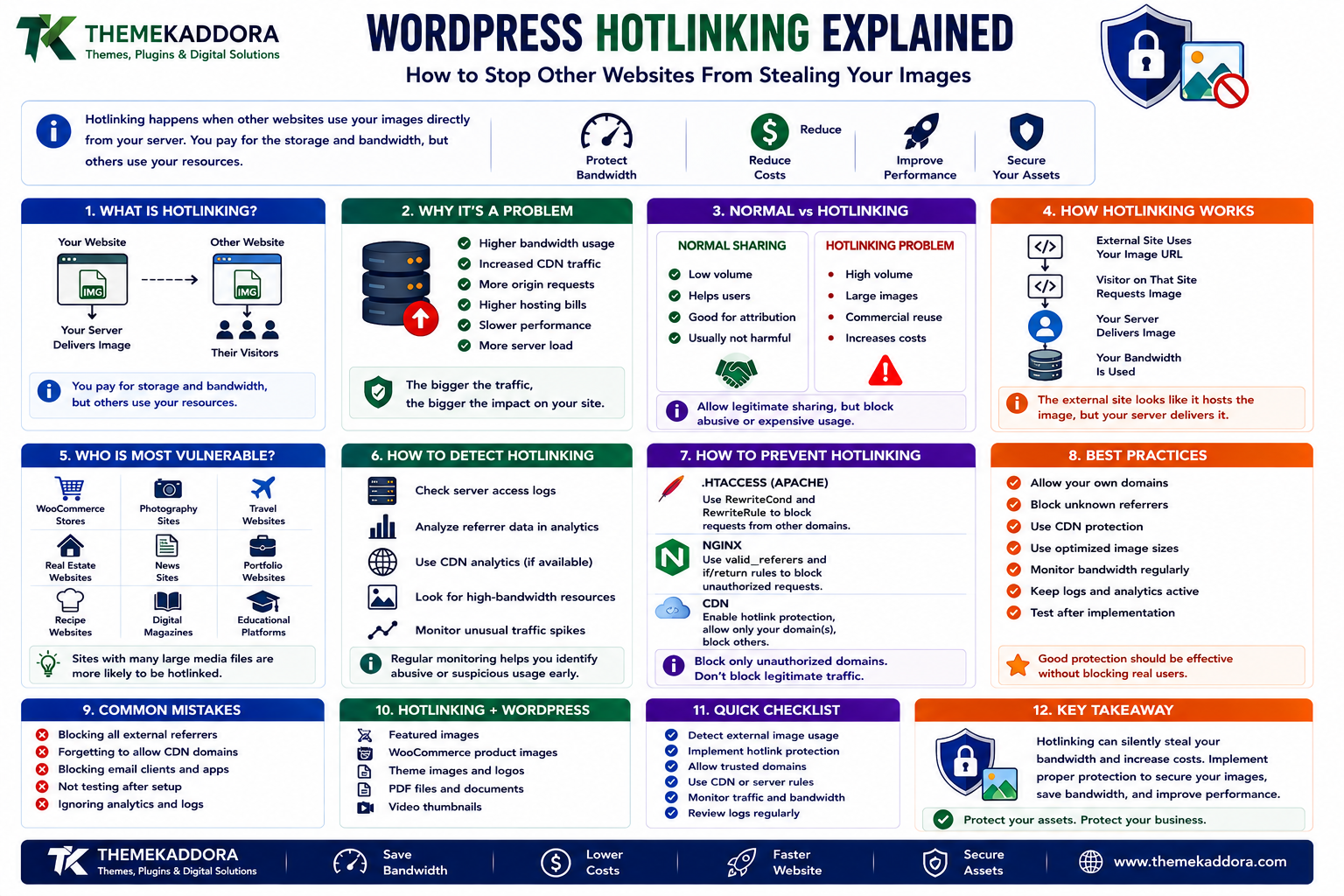
WordPress Hotlinking Explained: How to Stop Other Websites From Stealing Your Images
Introduction
A WordPress website can lose bandwidth without receiving any additional visitors.
It sounds strange, but it happens when other websites use your images directly from your server.
For example, imagine your website hosts:
https://example.com/wp-content/uploads/product-chair.jpg
Another website places this directly in its HTML:
<img src="https://example.com/wp-content/uploads/product-chair.jpg">
Their visitors are now downloading the image from your server.
You created the content.
You pay for the storage.
You pay for the bandwidth.
But another website is using your infrastructure to deliver it.
This practice is known as hotlinking.
Hotlinking is not always malicious. Some websites may legitimately embed publicly available images. However, when large amounts of external traffic repeatedly load your files, it can increase:
Bandwidth usage
CDN requests
Server load
Hosting costs
Image delivery traffic
Origin-server requests
For WooCommerce stores, the problem can become even more expensive because product catalogs may contain thousands of images.
In this guide, you'll learn what WordPress hotlinking is, how it works, how to detect it, when it becomes a problem, how to prevent it with CDNs and server rules, how to protect WooCommerce images, and how to avoid blocking legitimate traffic.
1. What Is WordPress Hotlinking?
Hotlinking happens when another website embeds a file hosted on your website instead of hosting a copy of that file itself.
The most common example is an image.
Your Website ↓ Image File ↓ Other Website ↓ Their Visitors ↓ Your Server Delivers Image
The external website may appear to host the image visually, but the browser is actually requesting it from your server.
2. Why Hotlinking Can Be a Problem
A single external image request may not matter.
The problem occurs at scale.
Suppose another website embeds a product image from your WooCommerce store.
Your Image ↓ 10,000 External Views ↓ 10,000 Image Requests
Those requests consume your infrastructure resources.
Potential consequences include:
Higher bandwidth usage
Increased CDN traffic
More origin requests
Higher hosting bills
Slower performance under heavy load
Increased server resource consumption
The actual impact depends on your hosting and CDN architecture.
3. Hotlinking vs Normal Image Sharing
Not every external image reference is automatically a problem.
For example, someone linking to your image in a legitimate article may be:
Low volume
Helpful to users
Valuable for attribution
The main issue is resource consumption.
Hotlinking becomes more concerning when:
External traffic is very high.
Large images are embedded repeatedly.
Product images are reused commercially.
Your bandwidth costs increase.
Your origin server handles unnecessary requests.
The goal should not be to block every external reference.
The goal is to control abusive or unnecessarily expensive usage.
4. How Hotlinking Works
The process is simple.
Your Website
example.com/uploads/shoe.jpg
Another Website
<img src="https://example.com/uploads/shoe.jpg">
Visitor
External Website ↓ Browser Requests Image ↓ Your Server ↓ Returns Image
The external site does not need to copy the image.
Your server delivers it every time the visitor requests it.
5. Why Image-Heavy Websites Are More Vulnerable
Hotlinking is particularly relevant for websites with many large media files.
Examples include:
WooCommerce stores
Photography websites
Travel websites
Real estate websites
Portfolio websites
Recipe websites
News sites
Digital marketplaces
A product page may contain:
Main Image Gallery Image 1 Gallery Image 2 Gallery Image 3 Variation Images
If these are heavily hotlinked, bandwidth consumption can increase quickly.
6. How to Detect Image Hotlinking
Detection should start with measurement.
Useful sources include:
CDN analytics
Hosting bandwidth reports
Server access logs
Referrer statistics
Security dashboards
Image-request analytics
Look for unusual patterns such as:
Image Request Volume ↑ ↓ Traffic From Unexpected Sources ↓ Large Repeated Image Requests
For example, if one product image receives far more requests than the corresponding product page, investigate where those requests originate.
7. Referrer Data Can Help
Some hotlinking requests may include an HTTP Referer header showing the page that triggered the request.
Conceptually:
Request ↓ Image ↓ Referer: otherwebsite.com
This can help identify websites embedding your images.
However, referrer data is not perfect.
It may be:
Missing
Stripped
Altered
Privacy-controlled
Therefore, use it as one signal rather than absolute proof.
8. Check CDN Analytics
If your site uses a CDN, image requests may be visible in its analytics.
Useful metrics may include:
Requests by URL
Requests by country
Cache hits
Origin requests
Bandwidth by asset
Referrer information where available
A useful investigation might reveal:
Top Image: product-chair.webp Requests: 2.4M Origin Requests: 320K
This could indicate a caching pattern, but external usage should still be investigated if the volume is unusual.
9. Hotlinking Can Increase CDN Costs Too
A common assumption is that a CDN makes hotlinking irrelevant.
It doesn't.
A CDN can reduce the load reaching your origin server, but external websites may still consume:
CDN bandwidth
CDN request quota
Image transformation resources
Depending on your provider and pricing model, excessive external image traffic can still create costs.
CDNs reduce some infrastructure pressure.
They do not automatically make unauthorized asset consumption free.
10. Hotlinking and WooCommerce Product Images
WooCommerce stores deserve special attention.
Product images often appear on:
Product pages
Category pages
Search results
Related products
Email campaigns
Comparison sites
External blogs
Suppose a competitor copies an image reference:
<img src="https://store.com/wp-content/uploads/product.jpg">
Every visitor to their page may generate a request to your infrastructure.
For large product catalogs, even a small amount of unauthorized traffic can become significant.
11. Hotlinking vs Image Copying
These are different.
Hotlinking
Other Site ↓ Uses Your URL ↓ Your Server Delivers Image
Copying
Other Site ↓ Downloads Your Image ↓ Uploads Their Own Copy
Hotlink protection generally controls the first problem.
It does not prevent someone from downloading and re-uploading your image elsewhere.
Copyright and content ownership issues are separate from technical hotlink protection.
12. Hotlink Protection at the CDN Layer
Many CDN and edge-security platforms can control which requests are allowed to retrieve assets.
A conceptual rule might be:
Request Image ↓ Check Request Context ↓ Allowed? ├── Yes → Serve └── No → Block / Challenge
This can be more scalable than handling every request inside WordPress.
The exact implementation depends on the CDN provider.
13. Why WordPress Should Not Handle Every Image Security Rule
Images are static assets.
If every image request reaches:
Browser ↓ PHP ↓ WordPress ↓ Database ↓ Image
the website is already inefficient.
Ideally:
Browser ↓ CDN / Web Server ↓ Image
Static-asset protection is generally better handled at the edge or web-server level where possible.
This reduces the amount of work reaching PHP and WordPress.
14. Hotlink Protection With Apache
On Apache-based hosting, hotlink protection can sometimes be implemented using server rewrite rules.
A conceptual example is:
RewriteEngine On RewriteCond %{HTTP_REFERER} !^$ RewriteCond %{HTTP_REFERER} !^https://(www\.)?example\.com [NC] RewriteRule \.(jpg|jpeg|png|gif|webp|avif)$ - [F,NC]
This is only an example.
Before using server rules, test:
Your own website
Admin previews
CDN behavior
Mobile traffic
External legitimate integrations
Image URLs
Caching layers
A poorly configured rule can block legitimate users.
15. Hotlink Protection With Nginx
Nginx provides different mechanisms for controlling static asset access.
A conceptual configuration may use request headers or location rules to determine whether an image request should be served.
The exact syntax depends on:
Nginx configuration
CDN setup
Origin architecture
Proxy configuration
Do not copy an Apache rule into Nginx.
Server configuration must match the actual web-server environment.
16. Using a Watermark as an Alternative
Some websites use watermarks instead of aggressively blocking hotlinks.
For example:
Product Image ↓ Brand Watermark ↓ External Use ↓ Brand Still Visible
Watermarking can provide:
Branding
Attribution
Reduced value of unauthorized reuse
However, watermarks do not stop bandwidth theft.
The external site may still request the original file unless protection is applied separately.
17. Use Smaller Images for Public Embedding
Another strategy is to control the size and quality of publicly accessible assets.
For example:
Original 3000 × 3000 Public Preview 800 × 800
This can reduce the cost of unauthorized usage.
However, this should be part of the broader image-delivery architecture, not a replacement for hotlink protection.
18. Signed URLs for Sensitive Assets
Some applications contain files that should not be publicly available.
Examples include:
Paid downloads
Private documents
Membership resources
Customer files
For these assets, ordinary public URLs may be inappropriate.
A more controlled model can use signed or temporary URLs:
User Authorized ↓ Signed URL ↓ Temporary Access ↓ File
This is more appropriate for protected resources than traditional hotlink blocking.
19. Hotlinking and Referrer Blocking Limitations
Referrer-based blocking has limitations.
Some browsers, privacy tools, proxies, and applications may send no referrer.
For example:
Request Referer: none
If your rule blocks all requests without a referrer, legitimate visitors may also be affected.
This is why hotlink protection should be designed carefully.
Do not assume:
No Referer = Malicious
20. Do Not Block Search Engines Accidentally
A badly configured hotlink rule can interfere with legitimate crawlers or image discovery systems.
Always test:
Search-engine access
Social sharing
Open Graph images
Email clients
RSS readers
CDN requests
A security rule that saves bandwidth but breaks legitimate content discovery is not necessarily a successful optimization.
21. Social Media and External Preview Services
Social networks and messaging platforms may request images to generate previews.
For example:
Your Article ↓ Social Platform ↓ Fetch Preview Image
If you block all external image requests, social previews may stop working.
Before deploying hotlink protection, identify legitimate external consumers such as:
Social networks
Search engines
Email services
Feed readers
Business integrations
Allow only what is actually needed.
22. RSS and Hotlinked Images
Your WordPress RSS feed may contain image URLs.
Feed readers and external services may fetch those images from your server.
This can look like hotlinking even though the behavior is legitimate.
For example:
RSS Feed ↓ Feed Reader ↓ Image Request ↓ Your CDN
Do not block feed-related asset access without considering how your publishing ecosystem works.
23. Hotlinking and Browser Caching
Browser caching can reduce repeated image downloads for the same user.
However, it does not eliminate external traffic.
A user visiting the external website for the first time may still request the image.
Similarly, cache expiration can cause subsequent requests.
Hotlink protection and caching solve different problems:
Caching → Reduces repeated downloads Hotlink Protection → Controls who can request assets
They can be used together.
24. Hotlinking and Image Optimization
Even if you block unauthorized requests, your own website should still optimize images.
Use:
Appropriate dimensions
WebP or AVIF where practical
Compression
Responsive images
Lazy loading where appropriate
CDN delivery
A secure image system should also be a performant image system.
25. Monitor Bandwidth After Enabling Protection
After applying hotlink protection, compare:
Before Bandwidth: High After Bandwidth: Lower
Also check:
Image load failures
CDN cache hit rate
Legitimate traffic
Search visibility
Social previews
WooCommerce product pages
Optimization should be measured after deployment.
26. Hotlink Protection and WordPress Plugins
Plugin developers should be careful when creating asset-protection features.
A plugin may register:
Images
CSS
JavaScript
Downloads
Documents
Before blocking external access, determine whether the assets need to be publicly accessible.
Static asset protection should not break:
REST API consumers
Mobile apps
CDNs
Email templates
Public embeds
Configuration should be explicit rather than hidden.
27. Hotlinking and Digital Downloads
Downloadable products introduce a different problem.
Suppose a paid PDF is available at:
https://example.com/wp-content/uploads/paid-guide.pdf
If that file is directly public, anyone with the URL may be able to access it.
Hotlink protection alone is not enough.
Paid or private downloads need:
Authentication
Authorization
Protected storage
Signed URLs
Expiring access
Appropriate download controls
Use access-control architecture for protected content.
28. Common WordPress Hotlinking Mistakes
Avoid these problems:
Blocking All External Referrers
Legitimate services may break.
Relying Only on Referer Headers
They can be missing or changed.
Handling Protection in PHP
Static requests should ideally be handled earlier.
Ignoring CDN Behavior
Edge caching may change what your origin sees.
Forgetting Social Previews
Open Graph images may stop loading.
Protecting Public Files Like Private Files
Not every asset needs aggressive access control.
Assuming Hotlinking Stops Copyright Theft
It only controls direct asset requests; it does not prevent copying.
29. WordPress Hotlink Protection Best Practices
A reliable strategy should:
Monitor bandwidth before making changes.
Identify actual hotlinking patterns.
Use CDN or web-server controls where practical.
Allow legitimate external consumers.
Avoid relying entirely on referrer headers.
Keep important public assets accessible.
Use authentication for genuinely private files.
Optimize images regardless of hotlinking.
Monitor traffic after deploying protection.
Test WooCommerce and social previews.
Document the protection rules.
The goal is controlled asset delivery, not indiscriminate blocking.
30. A Practical Hotlink Protection Workflow
Use this process:
Monitor Bandwidth ↓ Identify High-Usage Assets ↓ Inspect Referrers / Request Patterns ↓ Separate Legitimate vs Unwanted Traffic ↓ Choose CDN / Server Strategy ↓ Configure Protection ↓ Test Website ↓ Test Search / Social / Feeds ↓ Monitor Results
This reduces the chance of accidentally breaking legitimate integrations.
31. When Should You Enable Hotlink Protection?
Consider it when:
Bandwidth usage is unusually high.
External websites repeatedly embed your images.
Image delivery is increasing hosting costs.
Your WooCommerce product images are heavily reused.
A CDN shows large volumes of unexpected image requests.
It may be unnecessary when:
Traffic is small.
Bandwidth is inexpensive.
External image sharing is part of your strategy.
The asset is intentionally designed for public embedding.
The decision should be based on measurable business impact.
Why Choose ThemeKaddora?
At ThemeKaddora, we believe website assets should be optimized for both performance and responsible delivery.
Modern WordPress websites may contain:
Product images
Blog graphics
Downloads
Marketing assets
Documentation
Media libraries
WooCommerce catalogs
A complete media strategy should consider:
Performance
CDN delivery
Caching
Security
Accessibility
Storage
Bandwidth
User experience
ThemeKaddora focuses on practical WordPress, WooCommerce, SaaS, AI, automation, and digital solutions designed around real website and business requirements.
Conclusion
WordPress hotlinking is easy to overlook because your website may continue working normally while another website consumes your bandwidth.
The core problem is simple:
Another website embeds your file → Their visitor requests it → Your infrastructure delivers it.
Hotlink protection can help control this behavior, especially for image-heavy websites and large WooCommerce stores.
But the best approach is not to block every external request.
Instead:
Measure → Identify → Allow legitimate consumers → Protect unnecessary usage → Monitor
Use CDN or web-server controls where practical, consider signed URLs for private files, and continue optimizing your images regardless of hotlinking.
The goal is not merely to stop other websites from using your images. The goal is to ensure your media infrastructure is delivering assets efficiently, securely, and according to your actual business requirements.
Frequently Asked Questions
1. What is WordPress hotlinking?
Hotlinking occurs when another website embeds a file hosted on your WordPress website and its visitors download that file directly from your server or CDN.
2. Does hotlinking increase WordPress hosting costs?
It can, particularly when external websites generate large amounts of image or file traffic.
3. How can I detect image hotlinking?
Review CDN analytics, hosting bandwidth reports, server logs, and referrer information where available.
4. Can a CDN prevent hotlinking?
Many CDN and edge platforms can provide access-control or hotlink-protection features, depending on the service.
5. Does hotlink protection prevent people from copying my images?
No. It primarily controls direct requests to your hosted files. It does not prevent someone from downloading and re-uploading an image.
6. Should I block every external image request?
No. Search engines, social platforms, RSS readers, and other legitimate services may need to fetch public images.
7. Can hotlink protection break social media previews?
Yes, poorly designed rules can interfere with external preview fetches. Test social sharing after enabling protection.
8. Is referrer blocking enough?
No. Referrer headers can be absent or altered, so they should not be treated as the only security signal.
9. How can I protect private WordPress downloads?
Use authentication, authorization, protected storage, signed URLs, or another access-control mechanism rather than relying only on hotlink protection.
10. Why choose Themekaddora?
Themekaddora provides lightweight, responsive, SEO-friendly WordPress themes with fast performance, WooCommerce compatibility, flexible customization, accessibility-conscious design, modern templates, regular updates, and professional support—providing a strong foundation for businesses building digital products and product-focused websites.
Comments (0)