
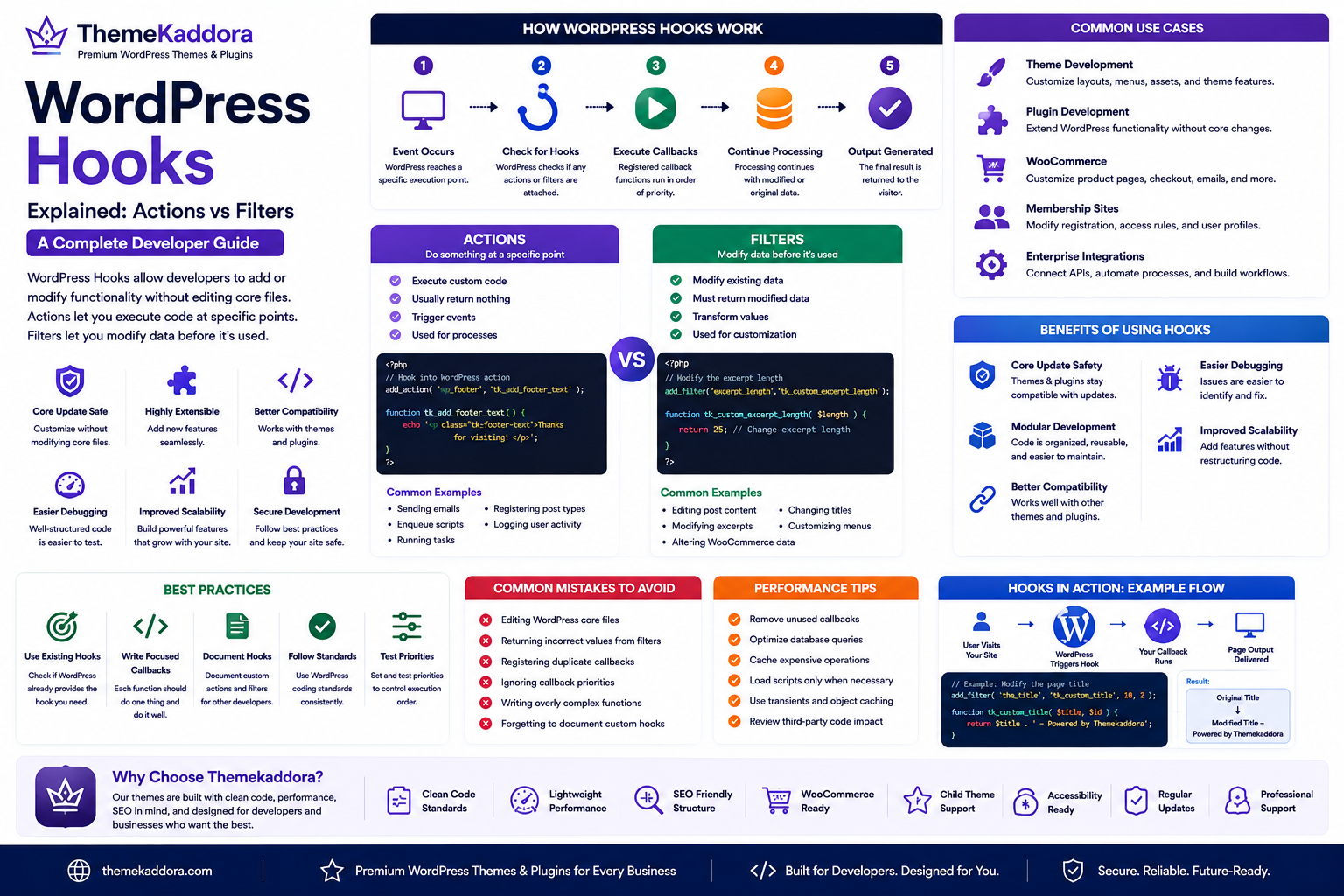
WordPress Hooks Explained: Actions vs Filters – A Complete Developer Guide
Introduction
One of the biggest reasons WordPress is so flexible is its powerful Hook System. Instead of modifying WordPress core files, developers can add new functionality or modify existing behavior using Actions and Filters.
Hooks are used everywhere in WordPress. Core features, plugins and themes rely on them to extend functionality while remaining compatible with future updates.
Whether you're creating a custom plugin, building a theme, or integrating third-party services, understanding hooks is an essential skill.
This guide explains what WordPress Hooks are, how Actions and Filters differ, practical use cases, and best practices for writing maintainable code.
What Are WordPress Hooks?
Hooks are predefined points in WordPress where developers can insert custom code without editing the core software.
They allow themes and plugins to interact with WordPress safely and efficiently.
The two main types are:
Actions – Execute custom code at a specific point during page execution.
Filters – Modify data before it is displayed, stored, or processed.
This event-driven architecture is one of the foundations of WordPress development.
How Hooks Work
The typical workflow is:
WordPress reaches a specific execution point.
It checks whether any hooks are attached.
Registered callback functions run in order.
Processing continues with the modified or original data.
This makes WordPress highly extensible without changing core files.
Understanding Actions
Actions allow developers to perform a task when a specific event occurs.
Common examples include:
Sending an email after a form submission.
Creating custom database records.
Logging user activity.
Registering custom post types.
Loading JavaScript or CSS files.
Running scheduled maintenance tasks.
Actions execute code but do not modify the data being passed.
Understanding Filters
Filters allow developers to change information before WordPress uses or displays it.
Common examples include:
Editing post content.
Changing page titles.
Modifying excerpt length.
Customizing image attributes.
Adjusting navigation menus.
Altering WooCommerce product information.
Filters always receive data, modify it if needed, and return the result.
Actions vs Filters
Actions:
Execute custom functionality
Usually return nothing
Trigger events
Used for processes
Filters:
Modify existing data
Must return modified data
Transform values
Used for customization
Understanding the distinction helps developers write cleaner, more predictable code.
Common Use Cases
Hooks are widely used in:
Theme Development
Customize layouts, enqueue assets, register menus, and extend theme functionality.
Plugin Development
Integrate with WordPress without changing core behavior.
WooCommerce
Customize product pages, checkout processes, pricing displays, and customer emails.
Membership Websites
Modify user registration workflows, access rules, and profile information.
Enterprise Websites
Connect external APIs, automate business processes, and implement custom workflows.
Benefits of Using Hooks
Core Update Safety
Because hooks avoid editing WordPress core files, updates can be applied without losing customizations.
Modular Development
Features remain organized and easier to maintain.
Better Compatibility
Plugins and themes can interact without directly modifying one another.
Easier Debugging
Separating functionality into hooks makes troubleshooting simpler.
Improved Scalability
Large projects become easier to maintain as new functionality can be added without restructuring the entire codebase.
Best Practices
Use Existing Hooks
Before creating custom solutions, check whether WordPress already provides an appropriate hook.
Write Focused Callback Functions
Each callback should perform one clearly defined task.
Document Custom Hooks
When building plugins or themes, document custom actions and filters for other developers.
Follow Coding Standards
Consistent naming, formatting, and documentation improve maintainability.
Test Hook Priority
Multiple callbacks can run on the same hook. Verify that execution order produces the expected results.
Common Mistakes to Avoid
Avoid these common issues:
Editing WordPress core files instead of using hooks.
Returning incorrect values from filters.
Registering duplicate callbacks.
Ignoring callback priorities.
Writing overly complex callback functions.
Forgetting to document custom hooks.
Hooks and Website Performance
Hooks themselves are lightweight, but excessive or poorly optimized callbacks can affect performance.
To keep websites fast:
Remove unused callbacks.
Optimize database queries.
Cache expensive operations.
Load scripts only when necessary.
Review third-party plugin behavior.
Efficient hook usage contributes to maintainable and high-performing websites.
Why Choose Themekaddora?
Themekaddora builds WordPress themes with developers and businesses in mind.
Our themes feature:
Clean coding standards
Lightweight architecture
SEO-friendly structure
Responsive layouts
WooCommerce compatibility
Child theme support
Accessibility-ready design
Flexible customization
Regular updates
Professional support
These qualities make Themekaddora themes an excellent foundation for developers who rely on WordPress hooks to extend functionality safely.
WordPress Hooks Checklist
Before adding custom functionality:
✅ Use hooks instead of editing core files
✅ Choose Actions or Filters appropriately
✅ Keep callback functions focused
✅ Document custom hooks
✅ Follow WordPress coding standards
✅ Test callback priority
✅ Optimize performance
✅ Remove unused code
✅ Back up your website
✅ Test changes on a staging environment
Conclusion
The WordPress Hook System is one of the platform's greatest strengths. By understanding the difference between Actions and Filters, developers can build plugins and themes that are flexible, maintainable, and compatible with future WordPress updates.
Whether you're extending WooCommerce, creating a custom theme, or integrating business applications, hooks provide a clean and scalable way to customize WordPress without modifying its core.
Combined with developer-friendly themes from Themekaddora, WordPress Hooks enable professional, future-ready websites that are easier to maintain and grow.
Frequently Asked Questions
What are WordPress Hooks?
Hooks are predefined locations in WordPress where developers can add or modify functionality without editing core files.
What is the difference between Actions and Filters?
Actions execute custom code when an event occurs, while Filters receive data, modify it, and return the updated value.
Why are hooks important?
Hooks make WordPress extensible, update-safe, and easier to maintain by allowing plugins and themes to customize behavior without altering the core system.
Can beginners use hooks?
Basic hooks can be learned with some PHP knowledge, while advanced hooks are commonly used by WordPress developers.
Why choose Themekaddora?
Themekaddora themes combine clean code, responsive design, SEO-friendly architecture, WooCommerce compatibility, child theme support, accessibility readiness, and regular updates—making them ideal for developers building custom WordPress solutions.
Comments (0)