
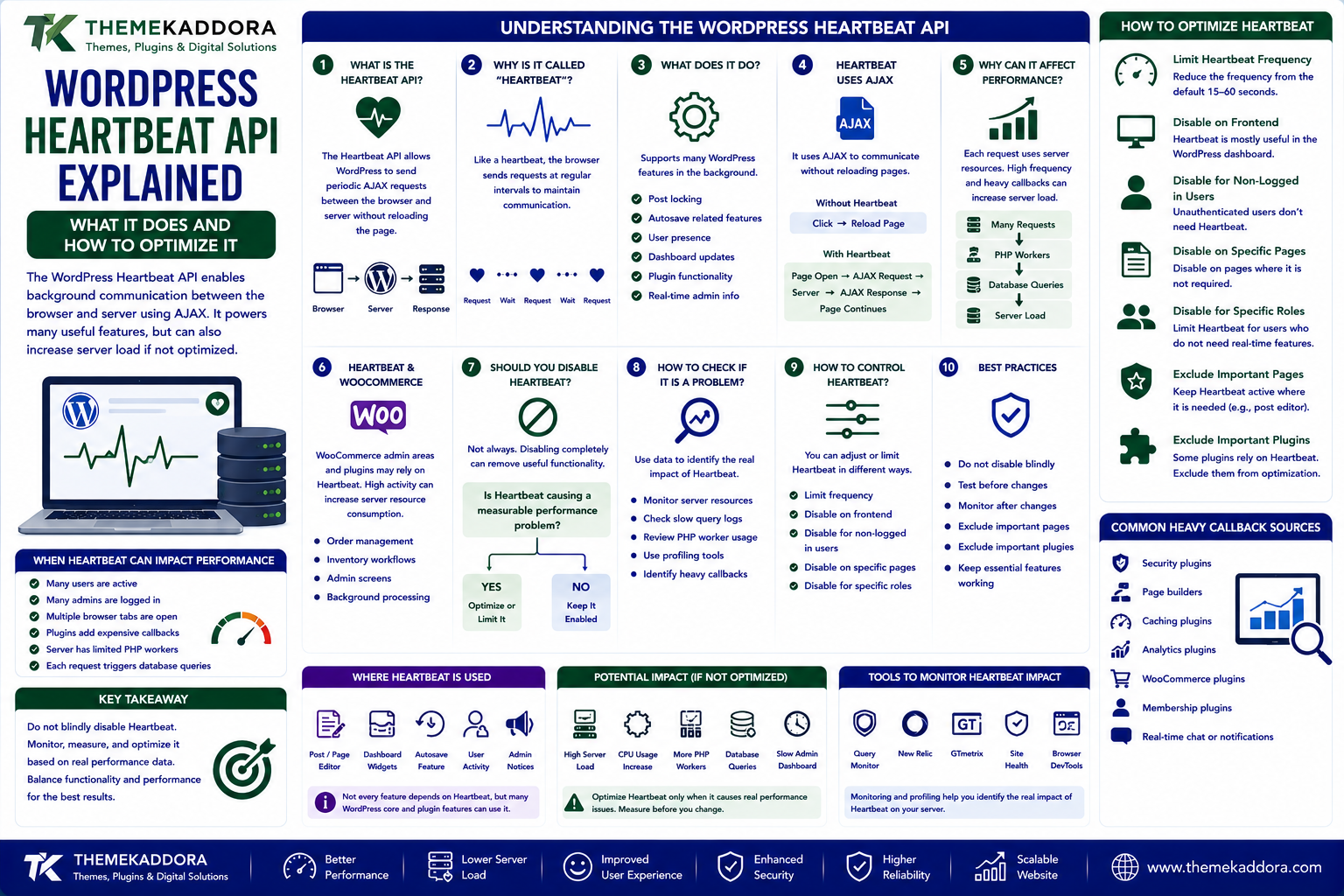
WordPress Heartbeat API Explained: What It Does and How to Optimize It
Introduction
WordPress websites perform many actions in the background that visitors may never notice.
The WordPress dashboard may automatically save information, display user activity, update certain interface elements, and communicate with the server without requiring a full page reload.
One technology that enables some of these background interactions is the WordPress Heartbeat API.
The Heartbeat API allows the WordPress dashboard and other WordPress components to send periodic requests to the server using AJAX.
This can provide useful functionality, but it can also generate additional server requests.
On a heavily used website, poorly configured background requests may contribute to increased:
CPU usage
PHP worker usage
Database queries
Server requests
Hosting resource consumption
This is especially important for:
WooCommerce stores
Membership websites
Large WordPress installations
Shared hosting environments
Websites with many administrators
Plugins that use frequent AJAX requests
The solution is not necessarily to disable Heartbeat completely.
The better approach is to understand what it does, determine whether it is creating a real performance problem, and optimize it appropriately.
In this guide, you'll learn what the WordPress Heartbeat API is, how it works, where it is used, why it can affect performance, how to control it, and best practices for WordPress administrators and plugin developers.
1. What Is the WordPress Heartbeat API?
The WordPress Heartbeat API is a feature that allows WordPress to perform periodic background communication between the browser and the server.
It uses AJAX requests to send and receive information without requiring the user to reload the entire page.
A simplified process looks like:
WordPress Dashboard ↓ Periodic AJAX Request ↓ WordPress Server ↓ Process Request ↓ Response ↓ Dashboard
The purpose is to allow certain WordPress features to communicate with the server while the user remains on the page.
2. Why Is It Called "Heartbeat"?
The name comes from the idea of periodic signals.
The browser sends a request at regular intervals, similar to a heartbeat that confirms that communication is still occurring.
For example:
Request ↓ Wait ↓ Request ↓ Wait ↓ Request ↓ Wait
The exact behavior depends on the page, WordPress configuration, and the code using the API.
3. What Does the Heartbeat API Do?
The Heartbeat API can support several WordPress features.
Depending on the context, it can help with:
Post locking
Autosave-related functionality
User presence
Dashboard updates
Plugin functionality
Real-time administrative information
One of the important uses is helping prevent multiple users from editing the same content without awareness of the conflict.
For example:
Administrator A ↓ Editing Post Administrator B ↓ Opens Same Post Heartbeat ↓ Detects Editing Activity
This can help WordPress coordinate editing activity.
4. Heartbeat Uses AJAX
The Heartbeat API operates through asynchronous HTTP requests.
Instead of:
Click ↓ Reload Entire Page
the browser can communicate in the background:
Page Open ↓ AJAX Request ↓ Server ↓ AJAX Response ↓ Page Continues
This makes background communication possible without forcing users to reload pages.
However, every request still consumes server resources.
5. Why Heartbeat Can Affect Performance
A single Heartbeat request is usually not a major concern.
The problem can appear when:
Many users are active
Many administrators are logged in
Multiple browser tabs are open
Plugins add expensive Heartbeat callbacks
The server has limited PHP workers
Each request triggers database queries
For example:
20 Admin Users ↓ Multiple Periodic Requests ↓ PHP Workers ↓ Database Queries ↓ Server Load
The exact impact depends on how WordPress, plugins, hosting, and server resources are configured.
6. Heartbeat and WooCommerce
WooCommerce stores can be more sensitive to background requests because eCommerce websites often have more active administrative and transactional processes.
Potential areas of concern include:
Order management
Dashboard activity
Inventory workflows
Plugin integrations
Administrative screens
Background processing
WooCommerce also has other scheduled and background systems, so Heartbeat should not be blamed automatically when a store experiences server load.
Performance investigations should measure which requests are actually consuming resources.
7. Should You Disable WordPress Heartbeat?
Not always.
Disabling Heartbeat completely can remove useful functionality.
Instead, ask:
Is Heartbeat actually causing a measurable performance problem?
If the answer is yes, consider reducing its frequency or limiting it to specific areas.
Possible approaches include:
Keep Heartbeat in the editor
Reduce activity in the dashboard
Disable it on frontend pages where it is unnecessary
Optimize plugins that use Heartbeat
Replace unnecessary polling with better background mechanisms
Optimization is usually safer than blindly disabling functionality.
8. Heartbeat Frequency
Heartbeat requests can occur periodically.
The request frequency may vary by context.
A higher frequency means:
More Requests ↓ More Server Activity
A lower frequency means:
Fewer Requests ↓ Lower Request Frequency
However, reducing frequency too aggressively can affect features that depend on timely communication.
The appropriate interval should therefore be based on the feature using Heartbeat and the actual performance requirements.
9. Controlling Heartbeat With WordPress Filters
WordPress provides mechanisms for modifying Heartbeat behavior.
For example, plugin or theme code can use the heartbeat_settings filter.
Conceptually:
add_filter( 'heartbeat_settings', function ( $settings ) { $settings['interval'] = 30; return $settings; } );
The exact implementation should consider the WordPress context and avoid unnecessarily changing behavior across the entire website.
Performance-sensitive customization should be tested carefully.
10. Disable Heartbeat on Specific Areas
Instead of changing the Heartbeat behavior everywhere, a more targeted approach may be appropriate.
For example:
WordPress Editor ↓ Heartbeat Enabled Frontend ↓ Heartbeat Reduced or Disabled
This approach preserves useful administrative functionality while reducing unnecessary requests elsewhere.
The exact implementation depends on the use case.
11. Heartbeat API and Plugins
Plugins can use Heartbeat to exchange information between JavaScript and the WordPress server.
For example:
Plugin JavaScript ↓ Heartbeat Request ↓ WordPress Hook ↓ Plugin Processing ↓ Response
A plugin might use this for:
Dashboard status
Processing progress
Notifications
Real-time information
Administrative tools
However, plugin developers should avoid performing expensive work during frequent Heartbeat requests.
12. The Problem With Expensive Heartbeat Callbacks
Suppose a plugin hooks into Heartbeat and performs a heavy database query every time.
For example:
Heartbeat ↓ Plugin Callback ↓ Large Database Query ↓ Process Thousands of Rows ↓ Response
If this happens repeatedly, the server may experience unnecessary load.
A better design may be:
Heartbeat ↓ Lightweight Status Check ↓ Background Processing
Heavy work should generally be separated from frequent polling requests.
13. How to Diagnose Heartbeat Performance Problems
Before changing Heartbeat settings, identify whether it is actually causing the problem.
Look for:
Frequent admin-ajax.php requests
High PHP worker activity
Slow AJAX responses
Large database query volume
Repeated Heartbeat requests
Plugin callbacks triggered by Heartbeat
Browser developer tools can help identify AJAX requests.
Server-side monitoring can then reveal whether those requests are consuming significant CPU, memory, database, or PHP resources.
14. Using Browser Developer Tools
You can inspect requests through the browser's developer tools.
A typical workflow is:
Open Browser DevTools ↓ Network Tab ↓ Filter AJAX / Fetch / XHR ↓ Observe Requests ↓ Identify admin-ajax.php ↓ Inspect Request Frequency
Look for:
Request frequency
Response time
Status codes
Payload size
Repeated requests
This can help determine whether background AJAX activity is contributing to a performance problem.
15. Monitoring Server Impact
Browser tools show what the browser is doing.
Server monitoring helps determine what those requests actually cost.
Useful metrics include:
PHP worker usage
CPU
Memory
Database queries
Request duration
Concurrent requests
admin-ajax.php activity
For example:
AJAX Requests ↑ ↓ PHP Workers ↑ ↓ Response Time ↑
This provides stronger evidence than simply seeing that Heartbeat requests exist.
16. Heartbeat vs WP-Cron
Heartbeat and WP-Cron solve different problems.
Heartbeat
Provides periodic browser-to-server communication, particularly in WordPress administrative contexts.
WP-Cron
Handles scheduled events and background tasks.
For example:
Heartbeat Browser ↔ WordPress
while:
WP-Cron Scheduled Event → WordPress
They should not be treated as interchangeable systems.
If a plugin needs scheduled background processing, WP-Cron or an appropriate job queue may be more suitable than repeatedly using Heartbeat.
17. Heartbeat vs Polling
Heartbeat is itself a form of periodic communication.
A generic polling approach might be:
Every 10 seconds ↓ Check Server ↓ Any Updates?
Heartbeat provides WordPress-specific infrastructure for periodic communication.
If a plugin creates its own AJAX polling in addition to Heartbeat, the website could end up generating unnecessary overlapping requests.
Plugin developers should avoid creating multiple polling mechanisms for the same purpose.
18. Heartbeat and Post Locking
One useful application of Heartbeat is helping WordPress manage editing activity.
Suppose:
Administrator A Editing Post 100
and another user opens the same post.
WordPress can use background communication to help identify active editing behavior.
This reduces the likelihood of users accidentally overwriting each other's work.
Disabling or heavily modifying Heartbeat without understanding these use cases can affect administrative functionality.
19. Heartbeat and Autosave
WordPress has autosave functionality that helps preserve editing changes.
Heartbeat can participate in the communication involved in certain administrative interactions.
This means performance optimization should consider the editor experience carefully.
A configuration that reduces server load but interferes with editing reliability can create a worse overall result.
20. WordPress Heartbeat and Shared Hosting
Shared hosting environments often have stricter resource limits.
A website with many background AJAX requests may consume:
CPU
PHP processes
Database resources
On shared hosting, this can sometimes contribute to resource-limit warnings.
However, site owners should still identify the actual source of the load.
Possible contributors include:
Plugins
WooCommerce
WordPress Heartbeat
Cron
External API requests
Poor database queries
Heartbeat may be one component rather than the entire problem.
21. Heartbeat and High-Traffic Websites
A typical public visitor does not necessarily need frequent WordPress administrative Heartbeat communication.
High-traffic frontend pages and highly active admin environments are different workloads.
Website optimization can therefore focus on limiting unnecessary background activity without affecting critical dashboard functionality.
A useful principle is:
Optimize the context where the requests are unnecessary rather than disabling functionality everywhere.
22. Heartbeat and Plugin Development Best Practices
Plugin developers should:
Keep Heartbeat callbacks lightweight.
Avoid expensive database queries.
Avoid processing large datasets on every request.
Return only necessary data.
Validate incoming data.
Sanitize and escape output appropriately.
Use proper WordPress hooks.
Avoid duplicate polling mechanisms.
Test with multiple administrators logged in.
Monitor server impact.
Consider background jobs for heavy processing.
Heartbeat should be treated as a frequent request path, not a general-purpose worker.
23. Heartbeat Security Considerations
Heartbeat requests may carry application-specific data.
Developers should still follow normal WordPress security practices:
Check capabilities
Use nonces where appropriate
Validate input
Sanitize data
Escape output
Avoid exposing sensitive information
Restrict privileged actions
Never assume that a request is trustworthy simply because it originated from the WordPress dashboard.
24. Common WordPress Heartbeat Mistakes
Avoid these problems:
Disabling Heartbeat Completely Without Testing
This may affect useful WordPress functionality.
Changing the Interval Globally
Different WordPress areas may have different requirements.
Blaming Heartbeat Without Measuring
Other plugins may be responsible for most server load.
Expensive Plugin Callbacks
Frequent database queries can make every Heartbeat request expensive.
Using Heartbeat for Heavy Processing
Long operations should use appropriate background processing.
Ignoring WooCommerce and Other Background Systems
A website may have multiple sources of server activity.
25. WordPress Heartbeat Optimization Best Practices
A practical optimization strategy should:
Measure current Heartbeat activity.
Identify which pages generate it.
Inspect server impact.
Reduce frequency where appropriate.
Disable unnecessary usage on areas that do not need it.
Keep editor functionality working.
Optimize plugin callbacks.
Move heavy work to background processing.
Monitor after making changes.
The goal is to reduce unnecessary requests without breaking useful functionality.
26. When Should You Optimize Heartbeat?
Consider investigating Heartbeat when:
The dashboard feels slow.
admin-ajax.php receives excessive traffic.
PHP workers are frequently exhausted.
Server CPU usage is unusually high.
Multiple administrators work simultaneously.
Plugins perform expensive Heartbeat callbacks.
WooCommerce administration becomes sluggish.
Do not optimize Heartbeat simply because you have heard that it can cause server load.
Measure the actual impact first.
27. Practical Troubleshooting Workflow
A useful troubleshooting process is:
Website Slow ↓ Check Server Metrics ↓ Inspect admin-ajax.php ↓ Inspect Heartbeat Requests ↓ Identify Plugin Callbacks ↓ Measure Database Queries ↓ Optimize Specific Cause ↓ Retest
This is more reliable than immediately installing a plugin that disables Heartbeat globally.
Why Choose ThemeKaddora?
At ThemeKaddora, we believe WordPress products should balance functionality with performance.
Modern WordPress and WooCommerce solutions may use:
AJAX
Heartbeat
Cron
Background processing
External APIs
Database queries
JavaScript interfaces
Each mechanism should be implemented responsibly.
ThemeKaddora focuses on practical WordPress, WooCommerce, SaaS, AI, automation, and digital solutions designed around:
Performance
Security
Compatibility
Maintainability
User experience
Conclusion
The WordPress Heartbeat API provides useful background communication between WordPress and the browser.
It can support:
Post locking
Autosave-related functionality
Dashboard interactions
Plugin features
Administrative updates
However, frequent AJAX requests can consume server resources, particularly on busy administrative environments or poorly optimized plugins.
The correct response is not always to disable Heartbeat.
Instead:
Measure → Identify → Optimize → Test → Monitor
Check which requests are generated, which plugins respond to them, and how much server capacity they consume.
For plugin developers, the most important principle is simple:
Heartbeat should be lightweight.
Heavy calculations, large database operations, and long-running external API requests should be moved into appropriate background-processing systems.
A properly optimized WordPress site can retain useful Heartbeat functionality while minimizing unnecessary server workload.
Frequently Asked Questions
1. What is the WordPress Heartbeat API?
The WordPress Heartbeat API allows WordPress and plugins to perform periodic background communication between the browser and server using AJAX.
2. Why does WordPress use Heartbeat?
It supports functionality such as post locking, autosave-related behavior, dashboard communication, and certain plugin features.
3. Can WordPress Heartbeat slow down a website?
It can contribute to server load when requests are frequent or when plugins perform expensive operations during Heartbeat requests.
4. Should I disable WordPress Heartbeat?
Not automatically. First measure whether Heartbeat is actually contributing significantly to the performance problem.
5. What is admin-ajax.php?
It is a WordPress endpoint used by many AJAX-based operations, including some Heartbeat-related requests.
6. Does WooCommerce use Heartbeat?
WooCommerce can interact with WordPress's background AJAX mechanisms, but it also uses other systems such as Action Scheduler. Performance problems should be investigated rather than attributed to Heartbeat automatically.
7. Can developers change the Heartbeat interval?
Yes. WordPress provides hooks that allow developers to modify Heartbeat settings, but changes should be tested carefully.
8. Is Heartbeat the same as WP-Cron?
No. Heartbeat handles periodic browser-server communication, while WP-Cron is WordPress's scheduling mechanism for scheduled events.
9. How can I diagnose Heartbeat problems?
Use browser developer tools to inspect AJAX requests and server monitoring to determine CPU, PHP, database, and request-level impact.
10. Why choose Themekaddora?
Themekaddora provides lightweight, responsive, SEO-friendly WordPress themes with fast performance, WooCommerce compatibility, flexible customization, accessibility-conscious design, modern templates, regular updates, and professional support—providing a strong foundation for businesses building digital products and product-focused websites.
Comments (0)