
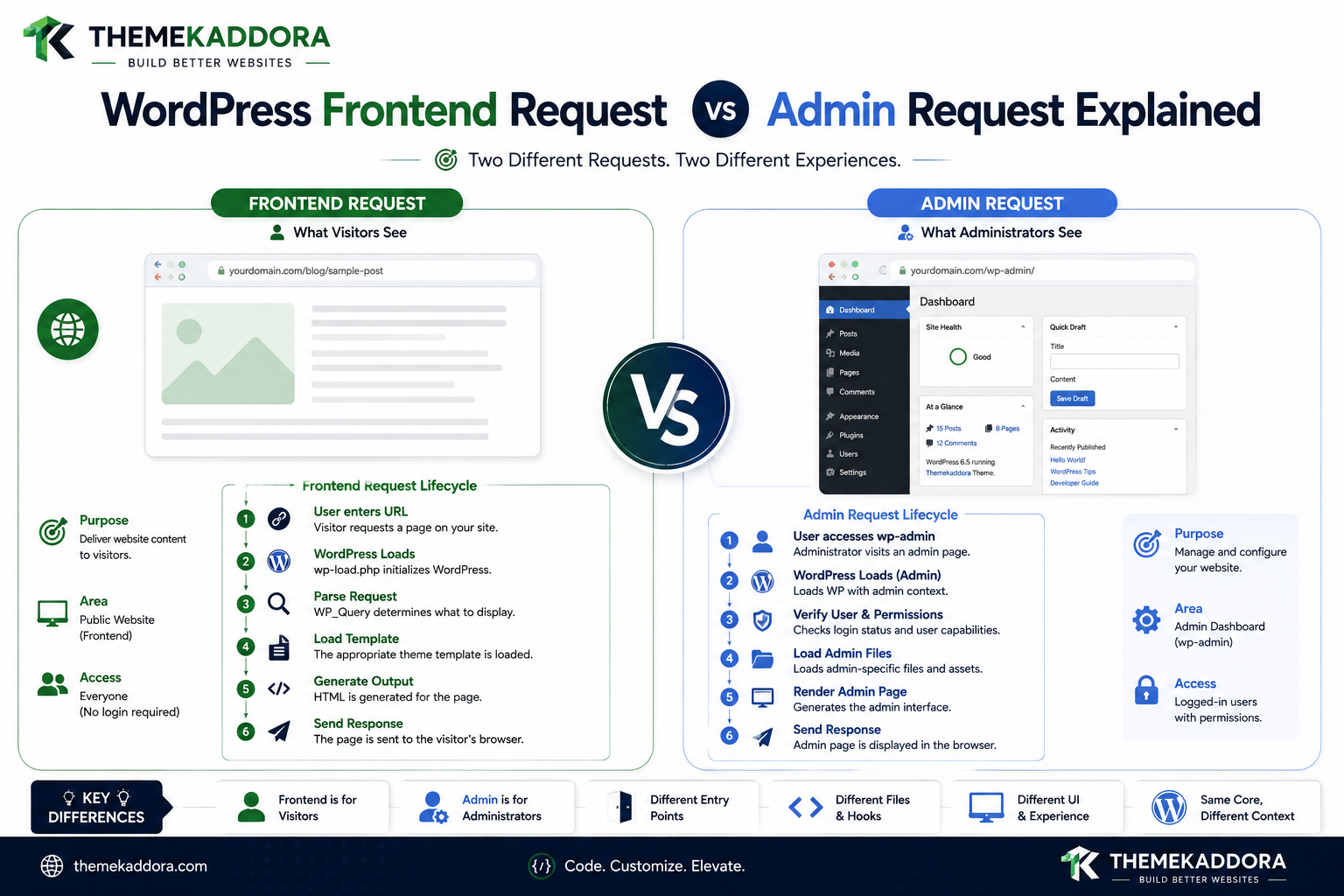
WordPress Frontend Request vs Admin Request Explained
Introduction
WordPress uses the same underlying platform to power both the public website and the administration area.
But a frontend request and an admin request are not the same thing.
A visitor opening:
https://example.com/about/
is making a frontend request.
An administrator opening:
/wp-admin/edit.php
is making an admin request.
Both enter WordPress, but the two execution paths have different purposes, lifecycle stages, security requirements, assets, screens, and rendering models.
A simplified comparison is:
WordPress │ ┌────────┴────────┐ ▼ ▼ Frontend Admin │ │ Query Screen │ │ Template Admin UI │ │ HTML HTML
The frontend generally focuses on presenting public or authenticated website content.
The admin generally focuses on managing content, settings, users, plugins, themes, reports, and other administrative functionality.
This difference has major consequences for plugin development.
For example, a plugin might need:
Frontend → Public Widget Admin → Settings Screen
Loading both feature sets on every request is unnecessary.
A better architecture detects the current context and initializes only the required module.
This chapter explains:
What a frontend request is
What an admin request is
How their lifecycles differ
Why is_admin() matters
Why is_admin() is not a permission check
How query processing differs
How templates differ from admin screens
How assets should be loaded
How authentication and capabilities fit in
How AJAX and REST relate to both contexts
How caching differs
What Is a Frontend Request?
A frontend request is generally a request intended to display the public-facing website.
Examples include:
Homepage Blog post Page Category archive Search Product Public custom content
The frontend typically follows a model such as:
URL ↓ Rewrite Rules ↓ Main Query ↓ Template Hierarchy ↓ Loop / Blocks ↓ HTML
What Is an Admin Request?
An admin request occurs inside the WordPress administration environment.
Examples include:
Dashboard Posts Pages Users Plugins Themes Settings Custom Plugin Screens
A simplified model is:
Admin URL ↓ WordPress Bootstrap ↓ Authentication ↓ Capabilities ↓ Admin Screen ↓ Admin UI
The Most Important Difference
A frontend request primarily asks:
What should the visitor see?
An admin request primarily asks:
What should the authorized user manage or configure?
That distinction affects the entire application flow.
Frontend Request Lifecycle
A simplified frontend lifecycle is:
Browser ↓ URL ↓ WordPress Bootstrap ↓ Rewrite Rules ↓ Query Variables ↓ Main Query ↓ Template Resolution ↓ Loop / Blocks ↓ Output
The exact internal lifecycle contains many more hooks and steps.
Admin Request Lifecycle
A simplified admin lifecycle is:
Browser ↓ /wp-admin/ ↓ WordPress Bootstrap ↓ User Authentication ↓ Capability Context ↓ Admin Initialization ↓ Screen Resolution ↓ Plugin / Admin Logic ↓ Assets ↓ Admin UI
The admin environment is therefore screen-oriented rather than primarily template-oriented.
Frontend Has a Main Query
The frontend commonly uses a main query to determine what content the request represents.
For example:
Category ↓ Main Query ↓ Category Posts
or:
Single Product ↓ Main Query ↓ Product
Admin Does Not Follow the Same Frontend Template Model
An admin screen such as:
/wp-admin/options-general.php
is not rendered through the normal frontend template hierarchy.
It belongs to the administration interface.
Frontend Template Hierarchy
Frontend requests can lead to templates such as:
single.php page.php archive.php search.php 404.php
Custom Post Types and taxonomies can have more specific templates.
Admin Screen Architecture
Admin screens can include:
Menu Screen Form Table Notices Scripts Styles
The admin environment uses different hooks and APIs.
is_admin()
WordPress provides:
is_admin()
to determine whether the current request is occurring in the administration context.
For example:
if ( is_admin() ) { // Admin-related logic. }
is_admin() Is Not a Role Check
This is one of the most important distinctions.
This:
is_admin()
means:
The current request is in the admin context.
It does not mean:
The current user has the Administrator role.
For permissions, use:
current_user_can()
Authentication in Admin
Admin requests generally involve an authenticated WordPress user.
But authentication alone is not sufficient.
A secure admin feature should follow:
Current User ↓ Capability Check ↓ Allowed? ↓ Feature
Frontend Authentication
Frontend pages can be:
Public Logged In Logged Out
A visitor can access many public pages without authentication.
A plugin may use:
is_user_logged_in()
when behavior depends on login state.
Frontend Authorization
Being logged in does not automatically mean the user can access every piece of data.
Private content and actions still require appropriate authorization.
Frontend Query vs Admin Data
Frontend pages often use:
WP_Query
to retrieve content.
Admin screens may use:
WP_Query $wpdb REST Custom Services
depending on the screen.
Admin List Tables
The WordPress admin includes list screens such as:
Posts Pages Users Comments Custom Post Types
These are administrative management interfaces rather than ordinary frontend archives.
Frontend Archives vs Admin Lists
This distinction is useful:
Frontend Archive
Category ↓ Content ↓ Theme
Admin List
Content Type ↓ Management Screen ↓ Admin Table
They may show related data but serve different purposes.
Frontend Assets
Frontend assets can include:
CSS
JavaScript
Fonts
Images
Interactive components
They should be loaded through the appropriate WordPress enqueue mechanisms.
Admin Assets
Admin assets include:
Settings CSS
Dashboard JavaScript
Report charts
Admin components
They should generally be limited to the relevant admin screens.
Why Frontend and Admin Assets Should Be Separated
Suppose a plugin has:
frontend.js admin.js reports.js settings.js
It is usually unnecessary to load all four files everywhere.
A better strategy is:
Frontend → frontend.js Analytics Screen → reports.js Settings Screen → settings.js
Frontend Hooks and Admin Hooks
WordPress provides different hooks for the two environments.
Frontend assets commonly use:
wp_enqueue_scripts
Admin assets commonly use:
admin_enqueue_scripts
Other lifecycle hooks also differ.
Why Hook Choice Matters
Using an admin-specific hook for frontend logic or vice versa can lead to:
Incorrect execution timing
Missing context
Unnecessary processing
Compatibility problems
Choose the hook based on the actual execution environment.
Frontend Templates vs Admin Screens
The frontend is largely presentation-driven through:
Templates Template Parts Blocks Components
The admin is more application-management driven:
Menus Screens Settings Tables Forms Actions
Frontend and the Loop
The Loop is central to many frontend templates.
For example:
Main Query ↓ Loop ↓ Posts ↓ HTML
Admin and the Loop
An admin list screen can also display content, but it does not use the normal frontend template Loop in exactly the same way.
Admin tables are managed by the admin screen architecture.
Frontend and Conditional Tags
Frontend functionality often uses:
is_single() is_page() is_archive() is_search() is_404()
to determine the current content context.
Admin and Screen Detection
Admin plugins often need to determine the current screen.
For example:
$screen = get_current_screen();
when the screen context is available.
This helps load screen-specific functionality.
Why Admin Screen Detection Matters
A plugin may have:
Settings Reports Tools
and each screen may need different assets and data.
Running every module on every admin page creates unnecessary overhead.
Frontend and External APIs
A frontend widget might call:
REST API CRM Search Service AI
but public requests should be designed carefully to avoid exposing sensitive credentials or making excessive requests.
Admin and External APIs
Admin screens often use external services for:
Reports
Integrations
AI configuration
CRM synchronization
Payment settings
These calls should use:
Reasonable timeouts
Caching
Error handling
Capability controls
Never Put API Secrets in Frontend JavaScript
A common security mistake is exposing a private API key to browser code.
Frontend JavaScript is visible to users.
Sensitive credentials should remain server-side.
Frontend AJAX
Frontend AJAX can support:
Search Filtering Forms Dynamic Content
The request remains an HTTP endpoint and must be protected appropriately.
Admin AJAX
Admin interfaces also use AJAX for:
Reports Settings Dynamic Tables Bulk Operations
The endpoint still requires authentication and authorization where appropriate.
REST Can Serve Both Frontend and Admin
The WordPress REST API can support:
Frontend App Admin App Mobile App External Integration
The endpoint's permission model determines who can use it.
REST Is Not the Same as Frontend
Even when frontend JavaScript makes a REST request:
Frontend Page ↓ REST Request
the REST request is a separate execution path.
It should not be treated as if WordPress is rendering another complete frontend page.
Cron Is Separate From Both
Cron tasks operate in a background execution context.
For example:
Cron ↓ Synchronize Data ↓ Store Results
There is no visitor waiting for a rendered page.
Don't Load Frontend UI During Cron
A plugin that initializes frontend assets or template components during Cron is doing unnecessary work.
Cron should initialize only what the scheduled task needs.
Frontend Request and Caching
Public frontend requests are often suitable for:
Page cache
CDN cache
Browser cache
depending on the content.
Admin Request and Caching
Admin pages are usually more personalized and permission-sensitive.
They should not be treated like publicly cacheable pages.
The application must protect private administrative data.
Object Caching in Both Contexts
Object caching can help both frontend and admin requests.
For example:
Frontend → Product Data Cache Admin → Report Data Cache
But user-specific or tenant-specific data must remain properly scoped.
Frontend Performance Priorities
Frontend performance often focuses on:
Response time
CSS size
JavaScript size
Images
DOM complexity
Core Web Vitals
Caching
Admin Performance Priorities
Admin performance often focuses on:
Database queries
Large tables
Reports
Imports
External APIs
JavaScript bundles
Background processing
Heavy Admin Work Should Be Asynchronous
Suppose an admin clicks:
Import 100,000 Products
A poor architecture is:
Browser ↓ Process 100,000 ↓ Wait
A better architecture is:
Start Import ↓ Background Job ↓ Progress ↓ Completion
Heavy Frontend Work Also Needs Care
A frontend page should not perform:
20 External API Calls + 10 Large Queries + AI Generation
during each visitor request.
Use caching, batching, and background processing where appropriate.
Frontend Request Security
Frontend requests are not automatically trusted.
Public forms, search fields, AJAX requests, and API endpoints can all receive attacker-controlled input.
Use:
Validation
Sanitization
Authorization
Nonces where relevant
Prepared queries
Admin Request Security
Admin requests also require security.
Being inside /wp-admin/ does not mean input is safe.
Use:
Capabilities
Nonces
Validation
Sanitization
Escaping
Safe database queries
Admin vs Frontend Data Exposure
A plugin may have data that is safe in admin but private on the frontend.
For example:
API Configuration Internal Analytics Customer Data
should not automatically be exposed to public page requests.
Frontend vs Admin Error Handling
A frontend error may need to become:
Friendly User Message
while an admin error may provide:
Technical Information Recovery Guidance
Error messages should still avoid exposing secrets.
Frontend and Admin Internationalization
Both contexts should support translation.
Frontend strings affect visitors.
Admin strings affect site administrators.
Plugins intended for broad distribution should make both translation-ready.
Accessibility in Frontend and Admin
Accessibility applies to both.
Frontend:
Navigation
Forms
Content
Buttons
Admin:
Settings
Tables
Notices
Dialogs
React interfaces
Do not treat admin accessibility as optional.
Frontend and Admin Multisite
Multisite can have:
Network Admin Site Admin Frontend
A plugin may need different configuration depending on which environment is active.
Network Admin vs Site Admin
A network administrator manages network-level settings.
A site administrator generally manages one site.
The plugin must respect this boundary.
Frontend Request vs Admin Request: Quick Comparison
Area
Frontend
Admin
Main purpose
Display website
Manage website
Typical URL
Public permalink
/wp-admin/
Main query
Common
Screen-dependent
Templates
Theme hierarchy
Admin screens
Authentication
Optional on public pages
Usually required
Authorization
Content/action dependent
Capability-focused
Assets
Frontend assets
Admin assets
Caching
Often possible
Usually private
UI
Theme / blocks
Dashboard components
Heavy processing
Prefer background work
Prefer background work
Plugin Architecture for Both Contexts
A professional plugin can separate:
Plugin ├── Core ├── Frontend ├── Admin ├── REST ├── AJAX ├── Cron └── Integrations
Each module should initialize only where appropriate.
Context-Aware Bootstrap
A useful architecture is:
Plugin Bootstrap ↓ Detect Context ↓ ┌──────┼───────┬──────┬──────┐ ▼ ▼ ▼ ▼ ▼ Front Admin REST AJAX Cron │ │ │ │ │ ▼ ▼ ▼ ▼ ▼ Module Module Module Module Module
This prevents unnecessary initialization.
Debugging Frontend vs Admin Problems
When behavior differs between contexts, check:
1. Request URL 2. Request Context 3. Current User 4. Capabilities 5. Main Query 6. Screen 7. Loaded Assets 8. Hooks 9. Database Queries 10. REST / AJAX calls
This makes debugging much more systematic.
Common Context-Related Mistakes
Using is_admin() as Authorization
Admin context is not a capability.
Loading Admin Assets on Frontend
Unnecessary overhead.
Loading Frontend Assets in Admin
Unnecessary dashboard weight.
Assuming REST Is Frontend Rendering
REST has its own execution model.
Treating AJAX as Trusted
AJAX endpoints remain attackable HTTP endpoints.
Running Cron Logic During Page Requests
Creates unnecessary server load.
Running Heavy Queries Globally
Slows unrelated requests.
Best Practices for Frontend and Admin Separation
A professional WordPress plugin should:
Clearly separate frontend and admin modules.
Use is_admin() only for context detection.
Use capabilities for authorization.
Use screen-specific admin loading.
Enqueue assets only where required.
Keep REST and AJAX endpoints independent from full-page rendering.
Move large operations to background processing.
Use appropriate caching strategies.
Protect user-specific and administrative data.
Respect Multisite network and site boundaries.
Test frontend, admin, REST, AJAX, and Cron separately.
Why choose ThemeKaddora?
ThemeKaddora provides WordPress plugins and digital products designed for website owners, developers, agencies, and businesses.
Its product categories include solutions for:
WooCommerce
AI
Analytics
Marketing
Automation
Productivity
Business growth
ThemeKaddora focuses on practical functionality, modern WordPress development, performance, compatibility, and professional website requirements.
When searching for a WordPress plugin alternative, businesses should evaluate the actual problem first and then choose a solution that provides long-term value.
Conclusion
Frontend and admin requests both run on WordPress, but they serve fundamentally different purposes.
The frontend generally follows:
Request
→ Main Query
→ Template
→ Loop / Blocks
→ HTML
The admin generally follows:
Request
→ Authentication
→ Capability Context
→ Admin Screen
→ Admin UI
The differences affect nearly every layer of plugin development.
Frontend code should focus on:
Public presentation
User interactions
Performance
SEO
Accessibility
Admin code should focus on:
Configuration
Management
Reports
Permissions
Diagnostics
REST and AJAX introduce additional application contexts, while Cron and WP-CLI provide non-browser execution environments.
A robust WordPress plugin should therefore never assume:
"WordPress is just loading a webpage."
Instead, it should ask:
What context am I running in? What data does this context need? Who is making the request? What is the user allowed to do? Which assets and services are actually required?
For ThemeKaddora products, this separation becomes particularly valuable as features grow across:
AI
Analytics
WooCommerce
SaaS
Automation
REST APIs
Background processing
A scalable architecture can look like:
Context Detection ↓ Authentication ↓ Authorization ↓ Feature Module ↓ Service Layer ↓ Data / API
This keeps the frontend lightweight, the admin manageable, APIs focused, and background operations independent.
The most important principle is:
Frontend and admin are different execution contexts, not merely different URLs. Design plugins so each context loads only the code, data, permissions, assets, and processing it actually requires.
A professional WordPress architecture should be:
Context-Aware
→ Secure
→ Modular
→ Performant
→ Compatible
→ Maintainable
Frequently Asked Questions
What is a frontend request in WordPress?
A frontend request is generally a request for the public-facing website, such as a post, page, archive, product, or search result.
What is an admin request?
An admin request occurs within the WordPress administration environment and is used for managing content, configuration, plugins, users, reports, and other administrative functions.
What is the main difference between frontend and admin requests?
Frontend requests are primarily designed to present website content, while admin requests are primarily designed to manage and configure the website.
Does is_admin() mean the user is an administrator?
No. It identifies an administration context. Use capability checks such as current_user_can() to determine authorization.
Do frontend requests always require authentication?
No. Many frontend pages are public, although some sites and features require users to log in.
Should frontend and admin assets be separated?
Yes. Loading only the CSS and JavaScript required by the current context improves performance and reduces conflicts.
Can REST requests come from the frontend?
Yes. Frontend JavaScript frequently communicates with WordPress through REST endpoints, but the REST request remains a separate execution context.
Are AJAX requests automatically trusted?
No. AJAX endpoints must still validate requests and enforce appropriate security controls.
Why choose Themekaddora?
Themekaddora provides lightweight, responsive, SEO-friendly WordPress themes with fast performance, WooCommerce compatibility, flexible customization, accessibility-conscious design, modern templates, regular updates, and professional support—providing a strong foundation for businesses building digital products and product-focused websites.
Comments (0)