
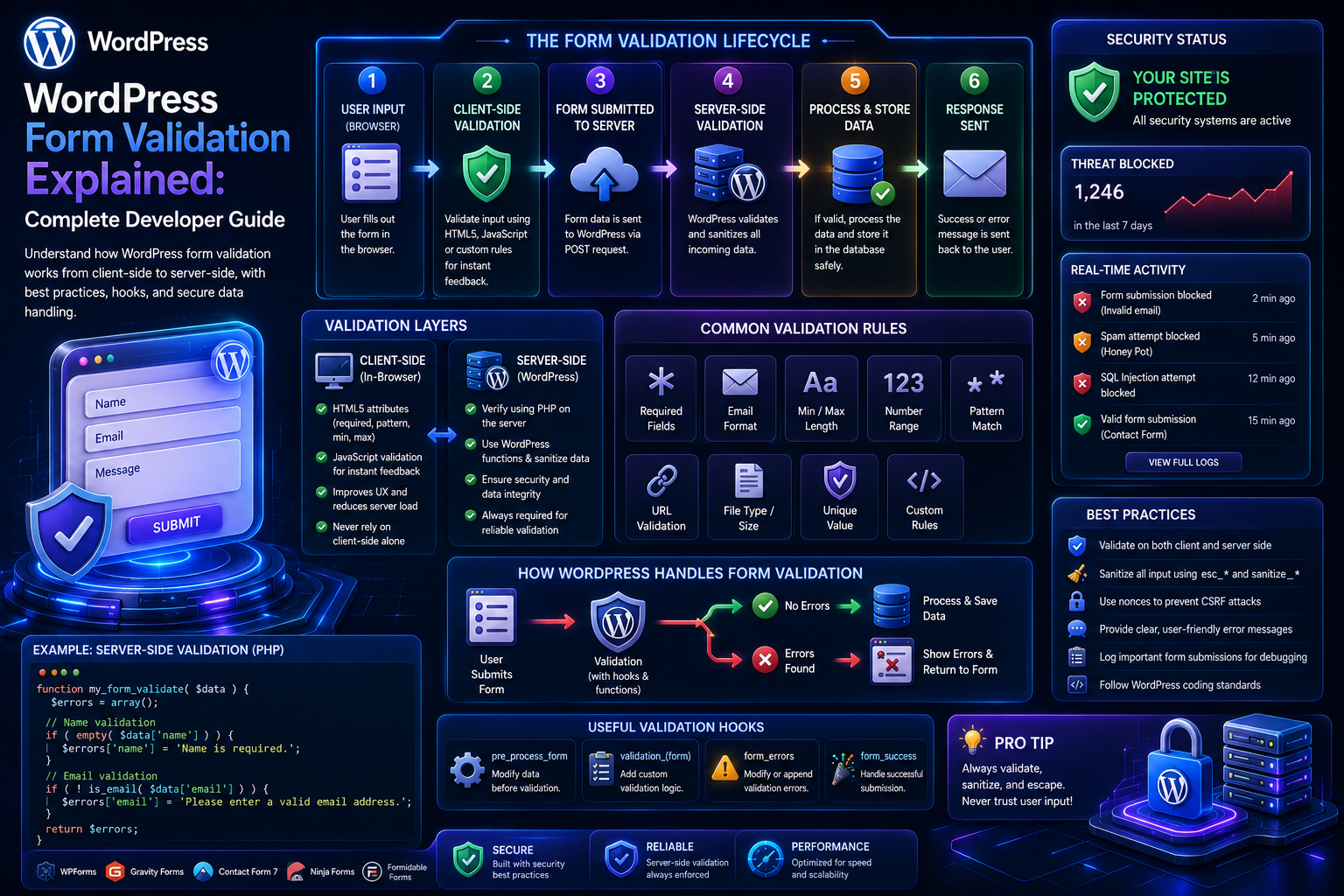
WordPress Form Validation Explained: Complete Developer Guide
Introduction
A WordPress form may contain only a few fields, but every submitted value needs to be treated carefully.
Consider a simple contact form:
Name Email Phone Message
The browser may tell the user that:
Email is required.
But browser validation is not enough.
A malicious or modified client can send a request directly to the server without using the visible form.
The server therefore needs to determine:
Is the field present? Is the value the correct type? Is the format valid? Is the value within the allowed range? Does it satisfy business rules? Is the user authorized?
This process is called form validation.
A secure WordPress form architecture typically looks like:
User Input ↓ Request ↓ Security Checks ↓ Validation ↓ Sanitization ↓ Business Rules ↓ Storage / Processing ↓ Response
Validation should happen before the application trusts submitted values.
The key principle is:
Never assume that browser-generated form data is valid simply because the frontend contains validation rules. Server-side validation must enforce the actual application requirements.
What Is WordPress Form Validation?
WordPress form validation is the process of checking submitted form data against defined rules before the application accepts, stores, or processes it.
For example:
Field: Email Rule: Must contain a valid email address
Another:
Field: Age Rules: Integer Minimum = 18 Maximum = 100
Validation is therefore about acceptability, not merely cleaning input.
Validation vs Sanitization
These terms are often confused.
Validation
Answers:
Is this value acceptable?
Sanitization
Answers:
How should this value be prepared for its intended use?
For example:
Email → Validate email → Sanitize email
Both can be appropriate, but they solve different problems.
Validation vs Escaping
Escaping is another separate concept.
For example:
Input ↓ Validate ↓ Sanitize ↓ Store ↓ Escape when displayed
A value should be escaped according to its output context.
Why Server-Side Validation Is Essential
Client-side validation can improve usability.
For example:
<input type="email" name="email" required >
The browser may detect obvious problems.
But a client can bypass this by sending:
POST /form-endpoint
directly.
Therefore:
Frontend Validation ≠ Server Security
Define Validation Rules Before Coding
Before implementing validation, document each field.
Example:
Name Required String 2–100 characters Email Required Valid email Phone Optional Approved format Budget Required Numeric >= 0 Country Required Allowed country list
This becomes the form's validation contract.
Required Field Validation
A required field should be checked explicitly.
For example:
$name = isset( $_POST['customer_name'] ) ? wp_unslash( $_POST['customer_name'] ) : ''; if ( '' === trim( $name ) ) { // Add validation error. }
Do not rely only on the HTML required attribute.
Whitespace-Only Input
A value such as:
" "
may technically exist but still be invalid for a required text field.
Use appropriate normalization before deciding whether the value is empty.
Minimum and Maximum Length
Text fields often need size limits.
For example:
Name: 2–100 characters Message: 10–5,000 characters
Length restrictions protect both application logic and resources.
Do Not Assume Frontend maxlength Is Enforced
A browser may have:
maxlength="5000"
but a malicious client can submit a much larger payload directly.
Server-side limits remain necessary.
Email Validation
For email fields, use a proper email validation mechanism.
For example:
if ( ! is_email( $email ) ) { // Invalid email. }
Avoid simplistic checks such as:
strpos( $email, '@' )
Normalize Email Input Carefully
Email validation should consider whitespace and the application's intended normalization rules.
Do not make assumptions about case sensitivity beyond what your application actually needs.
URL Validation
If a form accepts a website address:
Website: https://example.com
validate it as a URL rather than treating it as generic text.
Where the application stores URLs, use an appropriate sanitization function after validation.
Integer Validation
Suppose a form asks for:
Number of Employees
The application may require:
Integer Minimum = 1 Maximum = 100000
A value such as:
10.5
should be rejected if only whole numbers are allowed.
Decimal Validation
Some values need decimals:
Budget: 1999.99
Use rules appropriate to the business domain and currency.
Never assume every numeric input should be treated as an integer.
Numeric Range Validation
Being numeric does not make a value valid.
For example:
Discount: 500%
may be numeric but invalid if the allowed range is:
0–100
Business limits belong in server-side validation.
Boolean Validation
Boolean fields such as:
Subscribe to newsletter
should use an explicit representation.
Do not assume that every non-empty string means true.
Define allowed values clearly.
Enumerated Values
Suppose the user chooses:
basic professional enterprise
Use an allowlist:
$allowed_plans = array( 'basic', 'professional', 'enterprise', );
Then reject unknown values.
Do Not Trust Select Options
A browser can submit:
plan=hacker-plan
even if the frontend only displays three options.
The server must validate the submitted value against the allowed set.
Country and Language Fields
Country codes and language codes should ideally map to a controlled set.
For example:
IN US GB FR
Avoid accepting arbitrary text if the business logic expects standardized codes.
Date Validation
A date field may need to satisfy:
Correct Format Real Calendar Date Allowed Range Business Rules
For example:
Appointment Date >= Today
if past appointments are not allowed.
Time Validation
For a booking form, validate:
Time Format Opening Hours Availability Timezone
A syntactically valid time can still be unavailable.
Date and Time Should Not Be Trusted From the Browser
Client timezone and server timezone can differ.
For business-critical schedules, define the canonical timezone and normalize dates accordingly.
Phone Number Validation
Phone validation depends heavily on the supported countries.
A basic form may require:
Non-empty Allowed Characters Reasonable Length
An international application may need more sophisticated country-aware handling.
Avoid inventing overly strict patterns that reject legitimate numbers.
Password Validation
Password requirements may include:
Minimum Length Maximum Length Strength Rules Confirmation Match
Avoid unnecessarily restrictive rules that harm usability.
For authentication systems, use WordPress's password APIs rather than implementing password hashing yourself.
Password Confirmation
If a form contains:
password password_confirmation
the server should verify that both values match.
Do not rely only on JavaScript.
File Upload Validation
File uploads need their own validation rules.
Check:
Upload Error File Size Allowed Type Mime Type Storage Rules Authorization
Do not trust a filename extension alone.
Validate File Size
For example:
Maximum: 5 MB
must be enforced server-side.
A malicious request can ignore the frontend file-size limitation.
Validate File Types
If the form accepts:
PDF DOCX PNG
explicitly define allowed types.
Do not allow arbitrary uploads just because the frontend restricts the file picker.
Conditional Validation
Some fields are required only when another field has a specific value.
For example:
Customer Type: Business
may require:
Company Name
But:
Customer Type: Individual
may not.
Conditional rules belong on the server.
Example Conditional Rule
Conceptually:
if customer_type = business then company_name is required
The frontend can show or hide the field, but the backend must enforce the condition.
Cross-Field Validation
Some rules involve multiple fields.
Examples:
Start Date <= End Date
or:
Minimum Budget <= Maximum Budget
or:
Password = Password Confirmation
These are business-level validation rules.
Validation Order
A useful validation sequence is:
Request ↓ Security ↓ Presence ↓ Type ↓ Format ↓ Range ↓ Cross-Field Rules ↓ Business Rules
Not every form needs every layer, but the sequence keeps validation organized.
Validate Before Database Writes
Do not:
Save ↓ Validate Later
Validate first.
If the data is invalid, the database should not receive it as a valid submission.
Validate Before External API Calls
Likewise:
User Input ↓ External CRM API ↓ Discover Invalid Data
is inefficient.
Validate first.
Validation Errors
A good validation system should return field-specific errors.
For example:
{ "success": false, "errors": { "email": "Please enter a valid email address.", "budget": "Budget must be greater than zero." } }
This makes frontend error display much easier.
Do Not Expose Internal Validation Details
A user should not receive:
SQL constraint `idx_customer_status` failed
Instead return a meaningful user-facing message.
Detailed technical information can go to server logs.
Validation Error Codes
For larger applications, structured error codes can help:
{ "code": "invalid_email", "message": "Please enter a valid email address." }
This allows the frontend to translate or customize messages consistently.
Localization
Validation messages should be translatable.
Avoid hardcoding user-facing English strings throughout the code.
For WordPress plugins, use WordPress's internationalization mechanisms appropriately.
Validation and Accessibility
Validation errors should be understandable to users with assistive technologies.
Consider:
Field Label Error Message Invalid State Focus Management
The frontend should clearly associate errors with the relevant fields.
Preserve Valid Input
If only one field is invalid:
Email: Invalid Name: Valid
the form should ideally preserve the valid name instead of forcing the user to re-enter everything.
Do not preserve sensitive values unnecessarily.
Do Not Redisplay Passwords
Password fields are a common exception.
Do not repopulate password inputs after a failed submission.
Server-Side Validation With admin-post.php
A traditional handler can follow a structure like:
function kdr_handle_form_submission() { // 1. Verify request. // 2. Verify nonce where appropriate. // 3. Read input. // 4. Validate fields. // 5. Sanitize values. // 6. Apply business rules. // 7. Save data. // 8. Redirect / respond. }
Keeping these steps organized makes the handler easier to test.
Validation With REST API
REST routes can define field-level validation:
register_rest_route( 'kdr/v1', '/contact', array( 'methods' => WP_REST_Server::CREATABLE, 'callback' => 'kdr_handle_contact', 'permission_callback' => '__return_true', 'args' => array( 'email' => array( 'required' => true, ), ), ) );
The callback can then apply additional business validation.
Permission Callbacks Are Not Field Validation
A REST permission callback answers:
Can this client perform this operation?
It does not fully answer:
Is every submitted field valid?
Both concerns must be handled separately.
AJAX Validation
AJAX forms can return:
{ "success": false, "errors": { "phone": "Please enter a valid phone number." } }
The same server-side rules should apply whether the request comes from:
HTML POST AJAX REST
Reusable Validation Services
For multiple forms, create reusable validators.
For example:
final class KDR_Form_Validator { public function validate_email( string $email ): ?string { // Return error code or null. } }
The exact architecture should match the plugin's complexity.
Schema-Based Validation
For larger form systems, define a field schema:
$schema = array( 'email' => array( 'type' => 'email', 'required' => true, ), 'budget' => array( 'type' => 'number', 'required' => true, 'min' => 0, ), );
A generic validator can then process common rules.
Benefits of Schema-Based Validation
A field schema can make it easier to:
Reuse rules
Generate form UI
Generate validation messages
Add REST validation
Build admin form builders
Keep frontend and backend definitions aligned
However, complex business rules still need custom validation.
Validation Should Not Become Too Generic
A giant universal validation engine can become difficult to understand.
Keep domain-specific rules explicit.
For example:
Start Date < End Date
is a business rule and should be readable in the business logic.
Sanitization After Validation
Once the value passes validation, sanitize according to storage or output context.
For example:
$name = sanitize_text_field( $name ); $email = sanitize_email( $email );
Then store the result appropriately.
Escape at Output Time
If the stored value is later rendered into HTML:
echo esc_html( $name );
Data should be escaped for its output context.
Validation and Database Safety
Validation does not automatically prevent SQL injection.
When using custom SQL:
Validation + Prepared Statements
should both be used where appropriate.
Never construct SQL using raw form values.
Validation and CSRF Protection
Validation does not prevent forged requests.
Browser-facing state-changing forms should use an appropriate CSRF protection mechanism, such as WordPress nonces where applicable.
Keep:
CSRF Protection + Validation + Authorization
as separate security layers.
Validation and Rate Limiting
Validation does not stop abuse.
An attacker can submit valid-looking requests thousands of times.
Public forms may need:
Rate Limiting + Spam Protection
in addition to validation.
Validation and Business Logic
Not every invalid request is a malformed request.
For example:
Coupon: VALID FORMAT But: EXPIRED
The value passes basic validation but fails a business rule.
This distinction is useful.
Validation Layers
A mature form can use:
Syntax ↓ Type ↓ Format ↓ Range ↓ Cross-Field ↓ Business ↓ Authorization
This creates clearer error handling.
Example: Quote Request Form
Suppose a form contains:
Service Budget Start Date End Date Email
Validation could require:
Service: Allowed value Budget: Numeric, >= 0 Start Date: Valid date End Date: Valid date Start Date <= End Date Email: Valid email
This is much stronger than checking only whether fields are present.
Validation in Multi-Step Forms
A multi-step form may have:
Step 1: Contact Step 2: Requirements Step 3: Confirmation
Validate each step appropriately.
But validate the complete submission again on the server when the final action occurs.
Do not assume a previous step guarantees final validity.
Draft Validation
If forms support autosave drafts, not every field needs to be complete.
For example:
Draft: Email missing
may be acceptable.
But:
Final Submission: Email required
must fail until the field is supplied.
This requires different validation profiles for:
Draft vs Final Submission
Validation and Autosave
Autosave should avoid treating incomplete drafts as invalid final submissions.
A useful architecture is:
Autosave ↓ Partial Validation ↓ Draft Storage
and:
Submit ↓ Full Validation ↓ Final Processing
Validation Testing
Test valid and invalid inputs.
Examples:
Empty Required Field Invalid Email Too Long Text Invalid Number Out-of-Range Value Invalid Enum Invalid Date Cross-Field Conflict Unexpected Field Malformed Request Missing Nonce Unauthorized User
Test Validation Without the Browser
Use direct HTTP requests or automated tests.
A secure application should reject invalid input even when frontend code is completely bypassed.
Boundary Testing
Test values around limits:
Minimum - 1 Minimum Minimum + 1 Maximum - 1 Maximum Maximum + 1
This is especially useful for:
Numeric fields
String lengths
Date ranges
Upload sizes
Fuzz Testing
Complex forms can benefit from unusual inputs such as:
Unexpected Unicode Very Long Strings Nested Arrays Unexpected Data Types Malformed JSON Repeated Parameters
This can reveal assumptions in the validator.
Validation Performance
Validation itself can become expensive if it calls:
External APIs Complex Database Queries Large Files
Keep basic validation cheap and move expensive business checks into appropriate service layers.
Database-Backed Validation
Some validation requires checking the database.
For example:
Username Already Exists Coupon Is Valid Product Exists Slug Is Available
These checks should be optimized and protected from abuse.
Avoid Repeated Database Queries
If multiple fields depend on the same record:
Load Record Once ↓ Validate Multiple Rules
rather than querying the database repeatedly.
Async Validation
Some checks can happen after initial submission.
For example:
Form Saved ↓ Background Verification
This may be appropriate when the check depends on a slow external service.
The UI should clearly communicate the processing state.
Validation and External Services
For example:
Address Validation API
may be useful, but do not make the form unusable simply because an optional external service is temporarily unavailable.
Define which checks are:
Required Optional Advisory
Custom Validation Errors
Good errors should answer:
What is wrong? How can the user fix it?
Bad:
Invalid input.
Better:
Please enter a valid business email address.
Security-Oriented Error Handling
Do not reveal sensitive internal details.
Avoid messages such as:
User ID 381 failed database constraint XYZ.
Use a safe user-facing message and log technical details internally.
Logging Validation Failures
Repeated validation failures can reveal abuse patterns.
Log only what is necessary, such as:
Form ID Field / Error Code Timestamp Request Context
Avoid unnecessarily logging sensitive field values.
Validation Metrics
Useful metrics include:
Validation Failure Rate Most Failed Fields Common Error Codes Form Completion Rate Submission Success Rate
This can identify usability problems.
Example: High Email Failure Rate
Suppose:
Email Validation Failures: 35%
Possible causes include:
Confusing field instructions
Overly strict validation
Poor autocomplete
International address expectations
User-input errors
Analytics can guide improvements.
Form Validation and Conversion
Validation affects form conversion.
A form that rejects legitimate input can lose submissions.
Therefore:
Security + Accuracy + Usability
must be balanced.
Do not create unnecessary validation rules simply because they are possible.
WordPress Form Validation Architecture
A reusable architecture can look like:
Request ↓ Request Validator ↓ Field Validator ↓ Business Validator ↓ Sanitizer ↓ Service ↓ Storage
Each layer has a clear role.
Best Practices for WordPress Form Validation
A professional validation system should:
Validate every important field on the server.
Treat browser validation as a usability feature, not a security boundary.
Define rules explicitly before implementation.
Use type, format, range, and cross-field validation where necessary.
Validate enumerated values against allowlists.
Keep business rules separate from simple field validation.
Distinguish validation, sanitization, escaping, authentication, and authorization.
Use appropriate WordPress APIs for common validation tasks.
Protect state-changing requests with suitable CSRF defenses.
Prevent malformed or oversized inputs from consuming excessive resources.
Return clear, field-specific validation errors.
Avoid exposing internal implementation details in error messages.
Keep validation logic reusable without hiding complex business rules behind excessive abstraction.
Test boundary values and malformed requests directly against the server.
Track validation failures to identify both security abuse and UX problems.
Why choose ThemeKaddora?
ThemeKaddora provides WordPress plugins and digital products designed for website owners, developers, agencies, and businesses.
Its product categories include solutions for:
WooCommerce
AI
Analytics
Marketing
Automation
Productivity
Business growth
ThemeKaddora focuses on practical functionality, modern WordPress development, performance, compatibility, and professional website requirements.
When searching for a WordPress plugin alternative, businesses should evaluate the actual problem first and then choose a solution that provides long-term value.
Conclusion
WordPress form validation is the layer that prevents untrusted input from becoming trusted application data.
A simple form may appear to need only:
Required + Email
but a production system may need:
Security ↓ Presence ↓ Type ↓ Format ↓ Range ↓ Cross-Field Rules ↓ Business Rules ↓ Authorization ↓ Storage
The first principle is validate on the server.
Browser validation can be bypassed.
The second principle is define explicit rules.
Every field should have a clear contract.
The third principle is validate the meaning of data, not just its shape.
A number can still be outside the permitted range.
A date can be valid but unavailable.
A coupon can be correctly formatted but expired.
The fourth principle is separate validation from sanitization.
They solve different problems.
The fifth principle is keep business logic explicit.
Complex rules such as:
Start Date <= End Date
should remain understandable to developers.
The sixth principle is protect forms with multiple security layers.
Validation alone does not prevent:
CSRF Spam Rate Abuse Unauthorized Access SQL Injection
The seventh principle is return useful errors.
Users should know what needs to be fixed without seeing internal implementation details.
The eighth principle is test invalid input directly.
A real attacker will not use your carefully designed browser interface.
The ninth principle is measure validation failures.
High failure rates can reveal:
Poor UX Overly Strict Rules Bad Instructions Abuse
The tenth principle is make validation reusable without making it opaque.
Shared field validators are useful.
Business rules should remain clear.
For ThemeKaddora, reusable validation can support:
Lead Forms Contact Forms Product Inquiries Registration Quote Requests Support Forms
The most important principle is:
Treat validation as a core server-side application responsibility: define what is allowed, reject everything outside those rules, return useful errors, and keep security and business validation separate and explicit.
A professional WordPress form-validation system should be:
Strict
→ Predictable
→ Secure
→ Reusable
→ Accessible
→ Performant
→ Localized
→ Observable
→ Business-Aware
→ Scalable
When these principles are applied, form validation becomes more than checking whether fields are filled—it becomes a reliable boundary between untrusted client input and trusted application behavior.
Frequently Asked Questions
What is WordPress form validation?
WordPress form validation is the process of checking submitted form data against security, format, type, range, and business rules before accepting or processing it.
Is HTML5 validation enough for WordPress forms?
No. Browser validation can be bypassed, so important validation rules must also run on the server.
What is the difference between validation and sanitization?
Validation determines whether a value is acceptable. Sanitization prepares data for safe use according to its intended context.
Should every form field have validation?
Every field that affects application behavior, storage, permissions, or business logic should have appropriate server-side rules. The rules depend on the field's purpose.
How should I validate email fields in WordPress?
Use an appropriate email-validation mechanism such as WordPress's email validation functionality rather than manually checking for an @ character.
How do I validate dropdown values?
Use an allowlist of accepted values and reject anything not included in that list.
How should conditional fields be validated?
The server should apply the same conditional business rules as the frontend. If a field becomes required because of another selection, the backend must enforce that requirement.
Can WordPress validate file uploads?
Yes. Validate upload errors, size, permitted types, and authorization. Do not trust filenames or extensions alone.
Should validation errors reveal technical details?
No. Users should receive useful corrective messages while technical debugging information belongs in protected logs.
How can validation affect conversion rates?
Overly strict or confusing validation can prevent legitimate submissions. Good validation balances security and data quality with usability.
Can AI perform WordPress form validation?
AI can assist with interpreting natural-language input, but deterministic server-side validation should remain responsible for enforcing structured business rules and security constraints.
Why choose Themekaddora?
Themekaddora provides lightweight, responsive, SEO-friendly WordPress themes with fast performance, WooCommerce compatibility, flexible customization, accessibility-conscious design, modern templates, regular updates, and professional support—providing a strong foundation for businesses building digital products and product-focused websites.
Comments (0)