
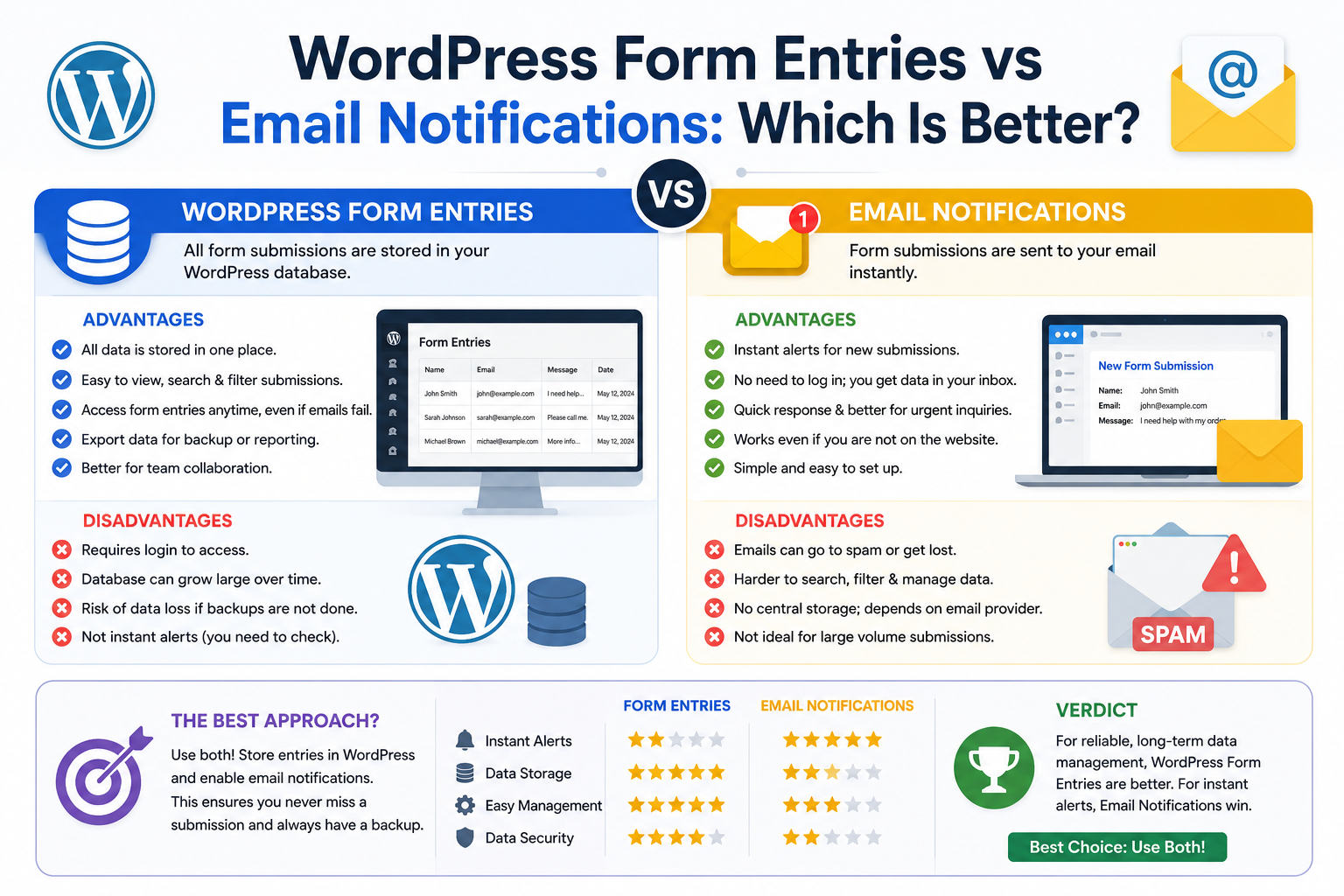
WordPress Form Entries vs Email Notifications: Which Is Better?
Introduction
When someone submits a WordPress form, there are two common ways to handle the submission.
The first is to send an email:
Form ↓ Email Notification
The second is to save the submission as a structured entry:
Form ↓ Database Entry
At first, these approaches may appear interchangeable.
They are not.
Email is primarily a notification mechanism.
A form entry is primarily a data-storage mechanism.
A business might receive an email saying:
New Quote Request Name: John Smith Email: john@example.com Budget: $5,000
That is useful for immediate awareness.
But a database entry can support:
Search Filter Status Assignment Reports Exports Audit History CRM Sync Automation
The strongest architecture often uses both:
Form Submission ↓ Validate ↓ Save Entry ↓ Event ┌────┴─────────────┐ ↓ ↓ Email Automation Notification / CRM
This separates the authoritative submission from the notification layer.
The key principle is:
Use database entries as the authoritative record when submissions matter operationally, and use email notifications as a delivery mechanism for awareness and workflow alerts.
What Is a WordPress Form Entry?
A form entry is a stored record representing a submitted form.
For example:
Entry ID: 1024 Form: Quote Request Name: John Smith Email: john@example.com Status: Pending Created: 2026-08-22
The record can remain available after the notification email has been read or deleted.
What Is a WordPress Email Notification?
An email notification is a message automatically sent after a form event.
For example:
Form Submitted ↓ Email ↓ Sales Team
The email might include:
Name Email Message Product Budget
The email is useful for alerting a person or another approved mailbox.
The Fundamental Difference
The simplest distinction is:
Form Entry = Stored Business Record Email Notification = Message About an Event
An email is not automatically a reliable database.
A database entry is not automatically a notification system.
They solve different problems.
Why Email Notifications Are Useful
Email is valuable because it provides immediate awareness.
For example:
New Lead ↓ Sales Team Receives Email
Benefits include:
Immediate notification
Familiar workflow
No special dashboard required
Easy forwarding
Useful for small teams
Easy customer confirmations
For simple contact forms, this may be enough.
Limitations of Email-Only Storage
Using email as the only record can create problems.
Over time, businesses may receive:
500 1,000 10,000
form notifications.
Finding:
All pending leads from last month
inside an inbox is difficult.
Email is designed for communication, not structured business-record management.
Why Form Entries Are Useful
Stored entries provide structured access.
For example:
Status = Pending Created = Last 30 Days Form = Quote
can be queried directly.
A business can then create:
Pending Leads Today's Requests Unassigned Tickets Monthly Submissions
without searching through individual messages.
Searchability
With form entries, administrators can search by fields such as:
Name Email Reference Status Date Form Tenant
Email clients also offer search, but email search is not equivalent to structured database queries.
Filtering
A form-entry system can support filters such as:
Status = Pending AND Created After = August 1 AND Form = Quote Request
This is much more useful for operational workflows.
Status Management
Email generally represents an event:
New Submission
A stored entry can represent the current business state:
Pending Processing Assigned Completed Rejected
This distinction becomes important as workflows grow.
Assignment
A database entry can be assigned to a specific team member:
Entry: KDR-2026-10501 Assigned To: Sales Team
The assignment can be tracked independently of email delivery.
Audit History
A structured system can record:
Created Assigned Reviewed Updated Approved Rejected Completed
with timestamps and actors where appropriate.
Email alone is usually not sufficient for this kind of workflow history.
Reporting
Form entries make reporting much easier.
For example:
Leads This Month Conversion Rate Average Processing Time Pending Requests Submissions by Form
A mailbox is not a good analytics database.
Automation
A stored form entry can trigger:
CRM Sync ERP Update Task Creation Notification Follow-Up Webhook
The entry becomes the source event for the business process.
Email Can Still Be Part of Automation
Email does not have to be replaced.
A strong architecture may be:
Form Entry ↓ Event ├── Save ├── Email ├── CRM ├── ERP └── Analytics
This is more flexible than treating email as the entire workflow.
Reliability of Email Delivery
Email delivery can fail for many reasons:
Mail Configuration Delivery Failure Spam Filtering Provider Problems Recipient Issues
Therefore:
Email Sent
should not automatically mean:
Submission Safely Stored
A business-critical submission should ideally be stored independently.
Database Entry as the Source of Truth
A safer model is:
Form Submission ↓ Validate ↓ Store Entry ↓ Commit ↓ Send Notification
If email fails:
Entry: Saved ✓ Email: Failed ✗
the business still has the submission.
Email as a Secondary Delivery Layer
Once the entry is stored:
Stored Entry ↓ Notification Queue ↓ Email
the notification becomes a secondary processing step.
This makes retrying email possible without losing the original request.
What Happens If the Database Fails?
Suppose:
Form Submitted ↓ Database Error
The system should not falsely tell the user:
Submission Successful
unless the submission was actually persisted or a reliable alternative mechanism exists.
What Happens If Email Fails?
Suppose:
Entry Saved ↓ Email Failed
The system can:
Retry Queue Alert Admin
while keeping the entry intact.
This separation improves reliability.
Customer Confirmation Emails
A form may send:
Thank You Your request has been received. Reference: KDR-2026-10501
The reference should come from the stored entry when the business process requires a durable identifier.
Email Should Not Be the Only Customer Record
If the customer loses the email, the system should still be able to retrieve the request.
A reference number can connect:
Customer Email + Form Entry
without relying on mailbox history.
Privacy Considerations
Email often contains personal or business information.
A database may also contain the same information.
Using both can create multiple copies:
Database + Email Mailbox + Email Backup
Think carefully about:
Retention Access Exports Deletion
for both storage systems.
Minimize Email Content
The notification does not always need the entire form submission.
For example, instead of sending:
Every Field Every Note Private Attachment Internal Metadata
the email may contain:
New Lead Reference Name Summary Link to Entry
This can reduce unnecessary data duplication.
Link to the Entry
For admin notifications, a useful pattern is:
New Submission: KDR-2026-10501 View Entry →
The email acts as a notification while the database remains the authoritative record.
Access to the entry must still be authorized.
Security of Email Notifications
Never allow arbitrary form input to control:
Notification Recipient Email Headers BCC Reply-To
without appropriate validation and server-side rules.
Email Header Injection
Public forms can be abused if user-controlled values are inserted unsafely into email headers.
Keep:
Recipients From Address Headers
under server-side control.
User-submitted email addresses should be validated before being used in approved contexts.
HTML Email Content
If form values are inserted into HTML email, escape them appropriately.
Do not treat submitted form content as trusted HTML merely because the message is being sent internally.
Attachments
A form may upload files.
Email notifications can include attachment references or attachments, but this increases:
Storage Email Size Privacy Security Delivery Complexity
Consider linking to a protected entry rather than copying sensitive files into every notification.
Form Entries for High-Volume Systems
Suppose a business receives:
50,000 submissions per month
Email-only workflows can become difficult to manage.
A structured entry system can support:
Pagination Search Filtering Assignments Automation Reporting Archiving
This is much more suitable for high-volume workflows.
Email Notifications for High-Volume Systems
Email can still be useful for alerts:
High-Priority Lead New Support Ticket Payment Issue System Failure
But it should not be the database for every operational event.
Notification Frequency
A high-volume system may use:
Immediate Notification Daily Summary Escalation Alert
rather than one email for every low-priority submission.
Email Digests
For internal teams, a digest can summarize:
25 New Leads 10 Pending Tickets 5 Unassigned Quotes
while detailed information remains in the application.
Form Entries for Workflow Automation
A stored entry can move through:
Pending ↓ Assigned ↓ Processing ↓ Completed
Each state change can trigger an appropriate action.
For example:
Pending → Notify Sales Completed → Send Customer Confirmation
Email Notifications and CRM
A common mistake is:
Form ↓ Email
and then manually copying information into the CRM.
A better architecture is:
Form ↓ Entry ↓ Event ├── Email └── CRM
This reduces manual work.
Email Notifications and ERP
For business processes:
Quote Form ↓ Entry ↓ ERP
The ERP integration can use the stored entry as a stable source.
Email can notify the relevant team simultaneously.
Form Entry and Webhook Processing
A saved entry can trigger:
Webhook
with a stable:
entry_id reference event_id
The receiver can then process the event independently.
Retry Failed Notifications
If email fails:
Entry: Saved ✓ Notification: Pending
A background worker can retry.
This prevents temporary mail issues from losing business events.
Retry With Idempotency
If a notification workflow retries, it should not create duplicate business actions.
Track an operation or event ID:
event_id = 100501
where downstream systems support idempotency.
Email vs Entry: Reliability Comparison
Capability
Form Entry
Email Notification
Structured storage
Yes
No
Search by field
Yes
Limited
Workflow status
Yes
No
Assignment
Yes
Not inherent
Reporting
Strong
Limited
Automation
Strong
Possible
Immediate awareness
Optional
Strong
Audit history
Yes
Limited
Retry processing
Yes
Yes, if built
Long-term record
Yes
Not ideal
The exact implementation depends on the email and form system.
When Email Alone Is Enough
Email-only handling can be reasonable when:
Low Submission Volume Simple Contact Form No Workflow No Reporting No Assignment No CRM Integration
For example:
Small Business Contact Form
may only need:
Form ↓ Email
When Form Entries Are Better
Use database entries when you need:
Search Filtering Status Assignment Audit Trail Reporting Exports Automation CRM Integration High Volume
When You Need Both
For many businesses, the strongest model is:
Form ↓ Validation ↓ Entry ↓ Event ├── Admin Email ├── Customer Email ├── CRM └── Automation
This separates persistence from notification.
Example: Contact Form
Simple site:
Form ↓ Email
This may be sufficient.
Growing site:
Form ↓ Entry ├── Email └── Analytics
Enterprise workflow:
Form ↓ Entry ├── Email ├── CRM ├── ERP ├── Task └── Analytics
The architecture can evolve with the business.
Example: Quote Request
A quote form may create:
Quote Request
with:
Reference Customer Budget Status Assigned Team
Then:
Entry Created ↓ Sales Notification ↓ CRM ↓ Follow-Up Task
Example: Support Form
A support form could create:
Ticket Status: Open Priority: High
Email can notify the support team.
The database remains responsible for ticket state.
Example: Registration Form
Registration workflows should not rely on email alone.
The system may need:
User Account Verification State Created At Plan Status
Email is one part of the workflow, not the source of account state.
Example: Product Inquiry
A marketplace can store:
Product ID Customer Question Status
Then notify the seller or support team through email.
Form Entry Dashboard
A database-backed dashboard can provide:
Total Pending Processing Completed Failed
with filters and search.
This is difficult to reproduce reliably using only email notifications.
Email Notification Dashboard
Email providers may offer:
Sent Delivered Failed Opened
These metrics describe communication.
They do not describe the business state of the form entry.
Separate Operational and Communication Status
An entry may be:
Status: Completed
while its notification may be:
Email: Failed
These are different states.
Do not combine them into one field.
Notification Status Fields
If needed, store:
email_status email_sent_at email_failed_at
separately from:
entry_status
This makes troubleshooting easier.
Notification Preferences
Different teams may want different notifications.
For example:
Sales: New Lead Support: High Priority Ticket Management: Daily Summary
The underlying entry remains the same.
Form Entry Database Security
Stored entries require:
Access Control Authorization Tenant Isolation Retention Backup
An email mailbox has its own access controls and retention policies.
If information exists in both places, both systems need appropriate protection.
Data Retention
Define how long:
Entries Notifications Attachments Logs
should remain available.
Retention policies should cover both application storage and associated communication data where appropriate.
Deletion
Deleting an entry from WordPress may not delete:
Email Copies CRM Records ERP Records Backups Exports
A complete data-lifecycle strategy should identify all copies.
Form Entries vs Email for Compliance
For business-critical or regulated workflows, structured storage often makes:
Access Audit Retention Deletion
easier to manage.
The exact requirements depend on the data and applicable rules.
Performance Considerations
Email notification alone may appear lightweight, but sending mail synchronously can slow requests depending on the mail setup.
A stored entry plus queue-based notification can provide:
Fast User Response + Reliable Persistence + Asynchronous Notification
Recommended Architecture
For most business-critical forms:
User ↓ Form ↓ Validation ↓ Store Entry ↓ Commit ↓ Dispatch Event ├── Email ├── CRM ├── ERP └── Automation
This architecture provides a clear source of truth.
Common Mistakes
Using Email as the Only Record
Hard to report and manage at scale.
Saving Entries but Never Notifying Anyone
Storage without operational awareness can also fail the business workflow.
Treating Email as Proof of Persistence
Email delivery does not prove the database has a durable record.
Sending Email Before Saving
If email succeeds and storage fails, the business may have a notification without an authoritative entry.
One Status for Everything
Entry status and notification status should generally be separate.
Duplicating Data Everywhere
Every extra copy increases security and retention complexity.
WordPress Form Entries vs Email Notifications Checklist
- [ ] Decide whether the submission is business-critical - [ ] Estimate submission volume - [ ] Determine whether search is needed - [ ] Determine whether workflow status is needed - [ ] Decide whether database storage is required - [ ] Define notification recipients - [ ] Store before triggering downstream work - [ ] Separate entry status from notification status - [ ] Queue expensive email operations where appropriate - [ ] Retry failed notifications - [ ] Use idempotency for important workflows - [ ] Protect stored entries - [ ] Minimize duplicate copies - [ ] Define retention policies - [ ] Secure exports - [ ] Track operational and notification metrics - [ ] Monitor failed integrations - [ ] Test database and email failure scenarios
Best Practices for WordPress Form Entries and Email Notifications
A professional form system should:
Decide whether the submission needs a durable business record.
Use form entries for structured storage, workflow state, reporting, and automation.
Use email for immediate awareness, customer communication, and operational alerts.
Store important submissions before triggering non-essential downstream notifications.
Keep entry status separate from email-delivery status.
Move high-volume or slow email processing into background jobs.
Retry failed notifications without recreating the underlying form entry.
Avoid putting unnecessary sensitive data into emails.
Prefer links to authorized entry pages over duplicating entire records in notifications when practical.
Protect database entries, email recipients, exports, and attachments independently.
Minimize the number of places sensitive data is copied.
Define retention and deletion policies for both application records and communication copies.
Use CRM, ERP, webhook, and automation integrations from the authoritative entry rather than directly from raw browser input.
Monitor both business-state metrics and notification-delivery metrics.
Why choose ThemeKaddora?
ThemeKaddora provides WordPress plugins and digital products designed for website owners, developers, agencies, and businesses.
Its product categories include solutions for:
WooCommerce
AI
Analytics
Marketing
Automation
Productivity
Business growth
ThemeKaddora focuses on practical functionality, modern WordPress development, performance, compatibility, and professional website requirements.
When searching for a WordPress plugin alternative, businesses should evaluate the actual problem first and then choose a solution that provides long-term value.
Conclusion
WordPress form entries and email notifications are not competing technologies.
They solve different problems.
Email provides:
Awareness Communication Alerts
Form entries provide:
Storage Search Status Assignment Reporting Automation
The first principle is understand the role of each system.
Email is a notification channel.
The database is a structured record system.
The second principle is make the entry authoritative when the submission matters.
A business-critical form should not disappear simply because a notification email was deleted or lost.
The third principle is save before notifying.
A strong workflow is:
Validate ↓ Store ↓ Commit ↓ Notify
The fourth principle is keep operational and communication status separate.
A lead can be completed while its email notification is temporarily failed.
The fifth principle is use email as a secondary delivery layer.
Notifications can be retried independently of the original submission.
The sixth principle is avoid unnecessary data duplication.
A full copy of every submission in email, database, CRM, ERP, logs, and exports increases security and retention complexity.
The seventh principle is use structured entries for workflow.
Statuses, assignment, timestamps, and audit history are much easier to manage in an application than in an inbox.
The eighth principle is move high-volume email processing asynchronously.
This keeps customer-facing form requests responsive.
The ninth principle is track both systems separately.
Measure:
Submission Success Entry Processing Email Delivery CRM Sync
The tenth principle is choose the simplest architecture that matches the business.
A small contact form may only need:
Form ↓ Email
while a growing business may need:
Form ↓ Entry ├── Email ├── CRM ├── ERP └── Automation
For ThemeKaddora, the second architecture is useful for:
Leads Quotes Support Product Inquiries Registrations Business Automation
The most important principle is:
Use form entries as the authoritative source for important submissions and use email notifications as a communication layer built on top of that stored record.
A professional WordPress form architecture should be:
Reliable
→ Structured
→ Searchable
→ Secure
→ Notification-Aware
→ Automation-Ready
→ Auditable
→ Recoverable
→ Privacy-Conscious
→ Scalable
When these principles are applied, forms become reliable business workflows instead of isolated emails that disappear into inboxes.
Frequently Asked Questions
What is the difference between a form entry and an email notification?
A form entry is a structured stored record. An email notification is a message sent to inform someone about an event.
Should I save WordPress form submissions in the database?
For business-critical, searchable, workflow-driven, or high-volume forms, durable database entries are generally more useful than email-only storage.
Is email enough for a simple contact form?
For a small website with low submission volume and no workflow requirements, email-only handling may be sufficient.
Should I use both database entries and email notifications?
For many business workflows, yes. Store the submission first and then send notifications and trigger other processing from the stored entry.
What happens if email delivery fails?
If the submission was already stored, the application can retry the email independently without losing the original form entry.
What happens if the database fails but email succeeds?
The system may have a notification without a durable record. For important forms, storing the submission before sending non-essential notifications is usually safer.
Can form entries support CRM integration?
Yes. A saved entry can trigger CRM synchronization through an event or background job.
Should notification status be stored separately from entry status?
Usually yes. The business record might be completed while an email notification is failed or pending.
Can I search form entries?
Yes. A structured entry database can support search by fields such as email, reference, status, date, form, and tenant.
How should email notifications handle sensitive form data?
Send only the information necessary for the notification. For sensitive records, an authorized link to the application entry can be safer than copying the complete submission into every email.
How should form entries and notifications work in a multi-tenant SaaS?
Entries, notifications, exports, and automation should remain within the correct tenant scope and use appropriate authorization.
Why choose Themekaddora?
Themekaddora provides lightweight, responsive, SEO-friendly WordPress themes with fast performance, WooCommerce compatibility, flexible customization, accessibility-conscious design, modern templates, regular updates, and professional support—providing a strong foundation for businesses building digital products and product-focused websites.
Comments (0)