
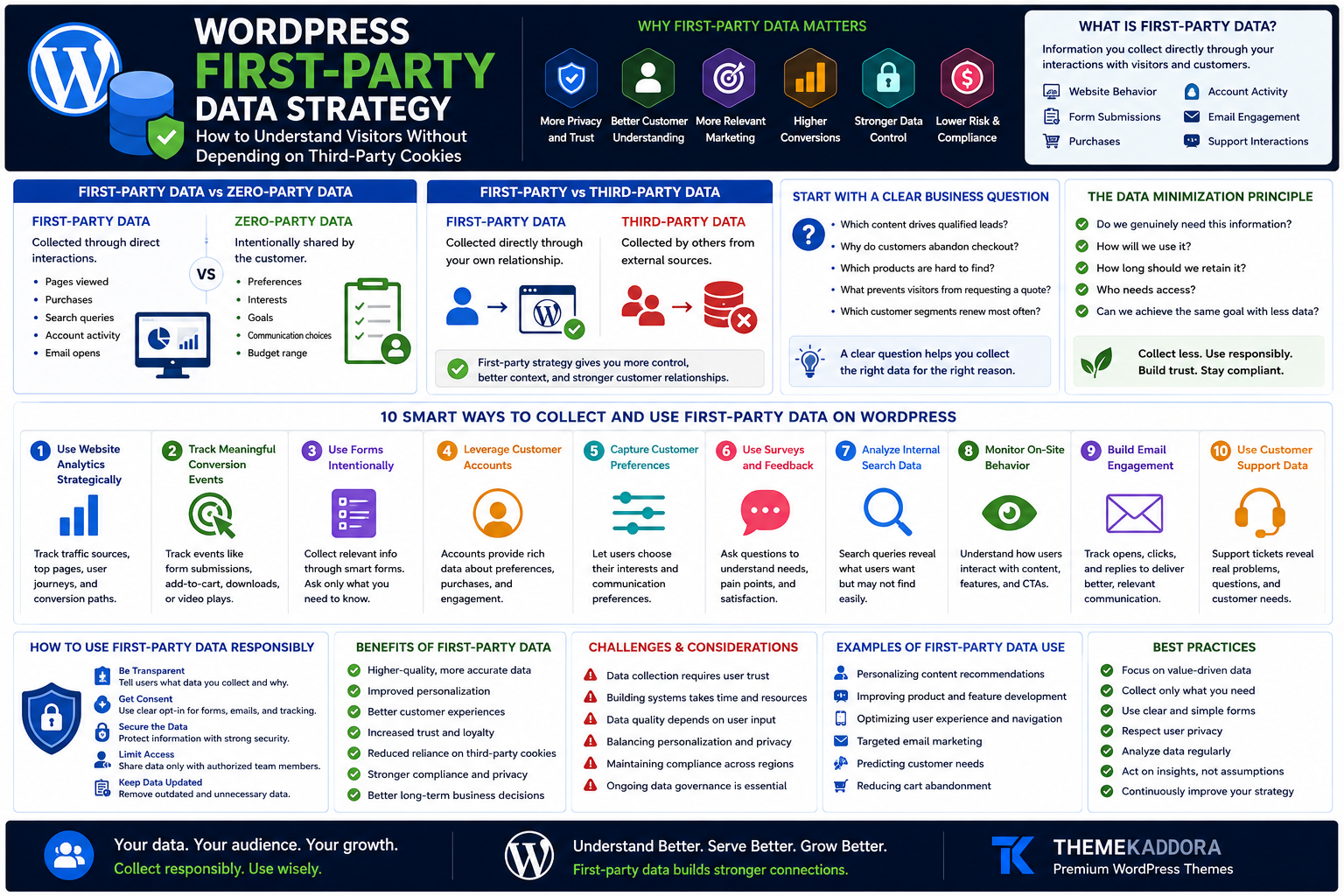
WordPress First-Party Data Strategy: How to Understand Visitors Without Depending on Third-Party Cookies
Introduction
For years, many digital marketing strategies depended heavily on external tracking systems.
Businesses used advertising platforms, third-party cookies, cross-site tracking, and external audience profiles to understand potential customers.
But the digital environment is changing.
Privacy expectations are increasing.
Browser technologies are evolving.
Regulatory requirements vary across regions.
Customers are becoming more aware of how their information is collected and used.
This creates an important question for WordPress website owners:
How can you understand your audience without depending entirely on third-party tracking?
One answer is a stronger first-party data strategy.
First-party data comes from direct interactions between your business and your audience.
It may include:
Website behavior
Form submissions
Purchases
Customer accounts
Email preferences
Internal search queries
Survey responses
Support conversations
When collected responsibly, first-party data can help businesses improve:
Content
Products
User experience
Customer journeys
Marketing relevance
Retention
In this guide, you'll learn how to build a practical first-party data strategy for a WordPress website while keeping transparency, usefulness, and responsible data practices at the center.
What Is First-Party Data?
First-party data is information a business collects directly through its own interactions with customers, prospects, subscribers, and website visitors.
Examples include:
Website interactions
Purchase history
Form submissions
Account activity
Email engagement
Customer support requests
Survey responses
Product preferences
The defining characteristic is the direct relationship.
The business collects the information through its own channels rather than purchasing or receiving it from an unrelated external source.
What Is Zero-Party Data?
Zero-party data is information that people intentionally and proactively provide.
Examples include:
Preferred product category
Communication preferences
Business size
Content interests
Shopping preferences
Goals
Budget range
For example, a visitor may select:
I am interested in WordPress themes for:
Agencies
Restaurants
Online stores
Blogs
That preference can help create a more relevant experience.
First-Party Data vs Zero-Party Data
The terms are related but different.
First-Party Data
Collected through direct interactions.
Examples:
Pages viewed
Purchases
Search queries
Account activity
Zero-Party Data
Intentionally shared by the customer.
Examples:
Preferences
Interests
Goals
Communication choices
Both can support a stronger customer understanding strategy.
First-Party Data vs Third-Party Data
First-Party Data
Collected directly through your own customer relationships.
Third-Party Data
Collected and aggregated by external organizations from sources outside your direct relationship.
A first-party strategy gives businesses greater control over:
Data quality
Customer context
Collection methods
Governance
But greater control also creates greater responsibility.
Why First-Party Data Matters for WordPress Websites
WordPress websites often serve as central digital hubs.
They may support:
Content
Lead generation
eCommerce
Memberships
Customer support
Online courses
Product discovery
This creates many opportunities to learn from direct interactions.
A stronger strategy can help businesses:
Understand customer needs
Improve content
Identify friction
Personalize experiences
Improve product discovery
Build stronger customer relationships
Start With a Clear Business Question
Do not collect information simply because you can.
Start with a question.
Examples:
Which content topics attract qualified leads?
Why do customers abandon checkout?
Which products are difficult to find?
What prevents visitors from requesting a quote?
Which customer segments renew most often?
A clear question helps determine what information is genuinely useful.
The Data Minimization Principle
A strong strategy does not require collecting everything.
Ask:
Do we genuinely need this information?
How will we use it?
How long should we retain it?
Who needs access?
Can we achieve the same goal with less data?
Collecting less can simplify:
Security
Governance
Compliance
Customer communication
More data is not automatically better data.
1. Use Website Analytics Strategically
Website analytics can help answer questions about:
Landing pages
Traffic sources
Popular content
User journeys
Conversion paths
Device performance
Focus on metrics connected to decisions.
Avoid tracking large amounts of information without a clear purpose.
2. Track Meaningful Conversion Events
Page views alone provide limited insight.
Consider meaningful events such as:
Form submissions
Product views
Add-to-cart actions
Purchases
Demo requests
Downloads
Newsletter signups
The appropriate events depend on your business model.
3. Learn From Contact Forms
Forms can reveal direct customer needs.
A service business may ask:
Service required
Project type
Preferred timeline
But avoid unnecessary fields.
Every question should have a purpose.
4. Use Progressive Profiling
Do not ask for everything at once.
Progressive profiling collects information gradually across interactions.
For example:
First Interaction
Later Interaction
Content interest
Customer Stage
Product preference
This can reduce form friction.
5. Use Surveys for Direct Insights
Analytics shows what people do.
Surveys can help explain why.
Useful questions include:
What brought you here today?
Did you find what you needed?
What nearly stopped you from purchasing?
Which feature matters most?
Keep surveys short and purposeful.
6. Add Post-Purchase Surveys
After a purchase, ask relevant questions.
Examples:
What influenced your decision?
How did you discover us?
What almost prevented your purchase?
These answers can reveal insights that click data cannot.
7. Analyze Internal Search Queries
Your website search bar can become a valuable source of first-party insight.
Visitors may search for:
Products
Features
Pricing
Support
Comparisons
Repeated searches can reveal:
Content gaps
Product demand
Navigation problems
Customer language
Internal search is often underused.
8. Study Zero-Result Searches
A zero-result search occurs when a visitor searches but finds nothing.
Examples:
Missing product
Missing topic
Different terminology
Typo
Weak search configuration
Zero-result data can guide:
New content
Product development
Search improvements
Synonym mapping
9. Learn From WooCommerce Purchase Data
Online stores can study direct customer behavior such as:
Products purchased
Order frequency
Average order value
Repeat purchases
Category preferences
Use this information responsibly to improve:
Merchandising
Recommendations
Retention
Inventory decisions
10. Analyze Cart Behavior
Cart activity may reveal:
Product combinations
Abandonment patterns
Shipping concerns
Price sensitivity
Checkout friction
Do not assume every abandoned cart has the same cause.
11. Use Customer Accounts Carefully
Accounts may provide useful context such as:
Purchase history
Saved preferences
Subscription status
Support activity
However, collect only information necessary for legitimate functionality and customer value.
12. Build Preference Centers
Instead of forcing everyone into the same communication experience, allow users to choose.
Preferences may include:
Product updates
Tutorials
Offers
Industry news
Communication frequency
This can improve relevance.
13. Segment Email Subscribers by Interest
A subscriber interested in WooCommerce may not want the same content as someone interested in blogging themes.
Possible segments include:
eCommerce
Agencies
Small businesses
Bloggers
Developers
Use segmentation to improve relevance rather than increase unnecessary messaging.
14. Use Content Engagement Signals
Content behavior may help identify interests.
For example, a visitor repeatedly reading:
WordPress SEO guides
Core Web Vitals articles
Performance tutorials
may have a strong interest in optimization.
Use such signals carefully and avoid making overly confident assumptions.
15. Learn From Customer Support
Support conversations contain valuable direct feedback.
Common patterns may reveal:
Confusing features
Missing documentation
Product limitations
Onboarding problems
Customer language
Support data should inform product and content strategy.
16. Analyze Frequently Asked Questions
Repeated questions indicate information gaps.
If customers constantly ask:
Does this theme work with WooCommerce?
consider improving:
Product page
FAQ
Documentation
Comparison content
Better information can reduce support demand.
17. Use Onboarding Questions
During onboarding, ask only useful questions.
Examples:
What are you trying to build?
Which feature matters most?
What is your experience level?
Use answers to improve guidance.
18. Create Interactive Quizzes Carefully
A quiz can help visitors identify suitable options.
Examples:
Which WordPress theme fits your business?
Which website plan is right for you?
What type of hosting do you need?
The quiz should provide genuine value.
19. Use Calculators and Assessment Tools
Interactive tools can generate valuable direct insights.
Examples:
Pricing calculator
ROI estimator
Website audit
Cost calculator
Readiness assessment
Be transparent about how submitted information is used.
20. Connect Data Across the Customer Journey
Customer information often exists in separate systems:
WordPress
WooCommerce
Email platform
CRM
Support system
Analytics
Disconnected data creates incomplete understanding.
Where appropriate, create clear relationships between systems while maintaining appropriate security and governance.
Create a First-Party Data Map
Document:
What data is collected
Where it comes from
Why it is collected
Where it is stored
Who can access it
How long it is retained
This creates operational clarity.
Build a Data Purpose Matrix
Use a table like this:
Data
Purpose
Source
Retention
Newsletter
Signup Form
Defined Policy
Purchase
Order Fulfillment
WooCommerce
Business Requirement
Search Query
Improve Discovery
Site Search
Defined Period
Survey Answer
Product Research
Survey
Defined Period
Every important data category should have a clear purpose.
First-Party Data and Personalization
First-party data can support personalization.
Examples:
Relevant content recommendations
Customer-specific account information
Product suggestions
Onboarding guidance
Personalization should remain useful and understandable.
Avoid experiences that feel invasive or unpredictable.
First-Party Data and SEO
First-party insights can indirectly improve SEO strategy.
Internal data may reveal:
Customer terminology
New questions
Content gaps
Product interests
Search intent patterns
These insights can guide more relevant content.
First-Party Data and Conversion Optimization
Direct behavioral data can reveal:
Form abandonment
Checkout friction
Weak CTAs
Poor landing pages
Mobile problems
Use these insights to improve journeys.
Privacy and Transparency
A responsible strategy should clearly communicate relevant data practices.
Depending on your business and jurisdiction, considerations may include:
Privacy notices
Consent mechanisms
User controls
Data access
Retention
Security
Legal requirements vary.
Seek qualified advice when necessary.
Security Matters
First-party data becomes a responsibility once collected.
Protect systems through appropriate measures such as:
Access controls
Software updates
Strong authentication
Backups
Monitoring
Secure integrations
Do not collect information you cannot responsibly manage.
Common First-Party Data Mistakes
Avoid:
Collecting data without purpose
Asking for too much information
Using confusing consent language
Keeping data indefinitely without reason
Ignoring security
Creating excessive tracking
Treating every visitor identically
Assuming behavior always reveals intent
Failing to document data flows
Using personalization in intrusive ways
A good strategy should create value for both the business and the customer.
WordPress First-Party Data Checklist
Use this checklist:
✅ Define business questions
✅ Map data sources
✅ Track meaningful events
✅ Review internal search
✅ Analyze forms
✅ Study customer feedback
✅ Use surveys selectively
✅ Review WooCommerce insights
✅ Create preference options
✅ Document data purposes
✅ Define retention practices
✅ Protect access
A 30-Day First-Party Data Plan
Week 1: Audit
Identify:
Data sources
Forms
Analytics
Customer systems
Search data
Week 2: Simplify
Remove:
Unnecessary fields
Duplicate collection
Unused tracking
Redundant tools
Week 3: Improve
Add:
Meaningful events
Better surveys
Search analysis
Preference options
Week 4: Activate
Use insights to improve:
Content
Products
Customer journeys
Personalization
Support
Continue reviewing regularly.
Why Your WordPress Theme Matters
Your theme influences many direct customer interactions.
It affects:
Forms
Account pages
Search
WooCommerce
Content discovery
Mobile experience
Conversion journeys
A flexible theme makes it easier to create clear and useful experiences.
Why Choose Themekaddora for Modern WordPress Websites?
Themekaddora WordPress themes provide a flexible foundation for businesses, agencies, blogs, and online stores.
Key benefits include:
Lightweight architecture
Responsive layouts
SEO-friendly code
Fast loading performance
WooCommerce compatibility
Flexible customization
Clean HTML5 and CSS3 standards
Cross-browser compatibility
Regular updates
Professional support
These features help businesses create modern WordPress experiences that support direct customer relationships, content discovery, and long-term growth.
Conclusion
The future of customer understanding should not depend entirely on following people across the internet.
WordPress websites already create valuable opportunities for direct relationships.
Visitors:
Search
Read
Subscribe
Purchase
Ask questions
Share preferences
Request support
These interactions can help businesses understand real customer needs.
A strong first-party data strategy begins with clear questions, purposeful collection, responsible governance, and useful activation.
The goal is not to collect everything.
The goal is to understand what matters.
Themekaddora WordPress themes provide lightweight architecture, responsive design, SEO-friendly code, WooCommerce compatibility, and flexible customization to help businesses build professional websites centered around stronger direct customer experiences.
Collect less.
Understand better.
Use responsibly.
And build relationships that do not depend entirely on third-party tracking.
Frequently Asked Questions (FAQs)
What is first-party data?
First-party data is information a business collects directly through interactions with its own customers, prospects, subscribers, or website visitors.
What is zero-party data?
Zero-party data is information that customers intentionally provide, such as preferences, interests, goals, or communication choices.
What is the difference between first-party and third-party data?
First-party data comes from direct relationships and owned channels, while third-party data is collected and aggregated by external organizations.
How can WordPress websites collect first-party data?
Common sources include website analytics, forms, WooCommerce purchases, internal search, surveys, customer accounts, support interactions, and email preferences.
Is first-party data the same as personal data?
Not necessarily. First-party data describes the source relationship, while whether information qualifies as personal data depends on the information itself and applicable legal definitions.
Can first-party data improve SEO?
It can provide insights into customer questions, terminology, content gaps, and search intent, which may help improve content strategy.
Can first-party data improve conversions?
Yes. Direct insights can help identify form friction, checkout problems, weak landing pages, and customer needs.
Why choose Themekaddora WordPress themes?
Themekaddora themes provide lightweight architecture, responsive layouts, SEO-friendly code, fast performance, WooCommerce compatibility, and flexible customization, supporting modern WordPress websites built for stronger customer experiences.
Comments (0)