
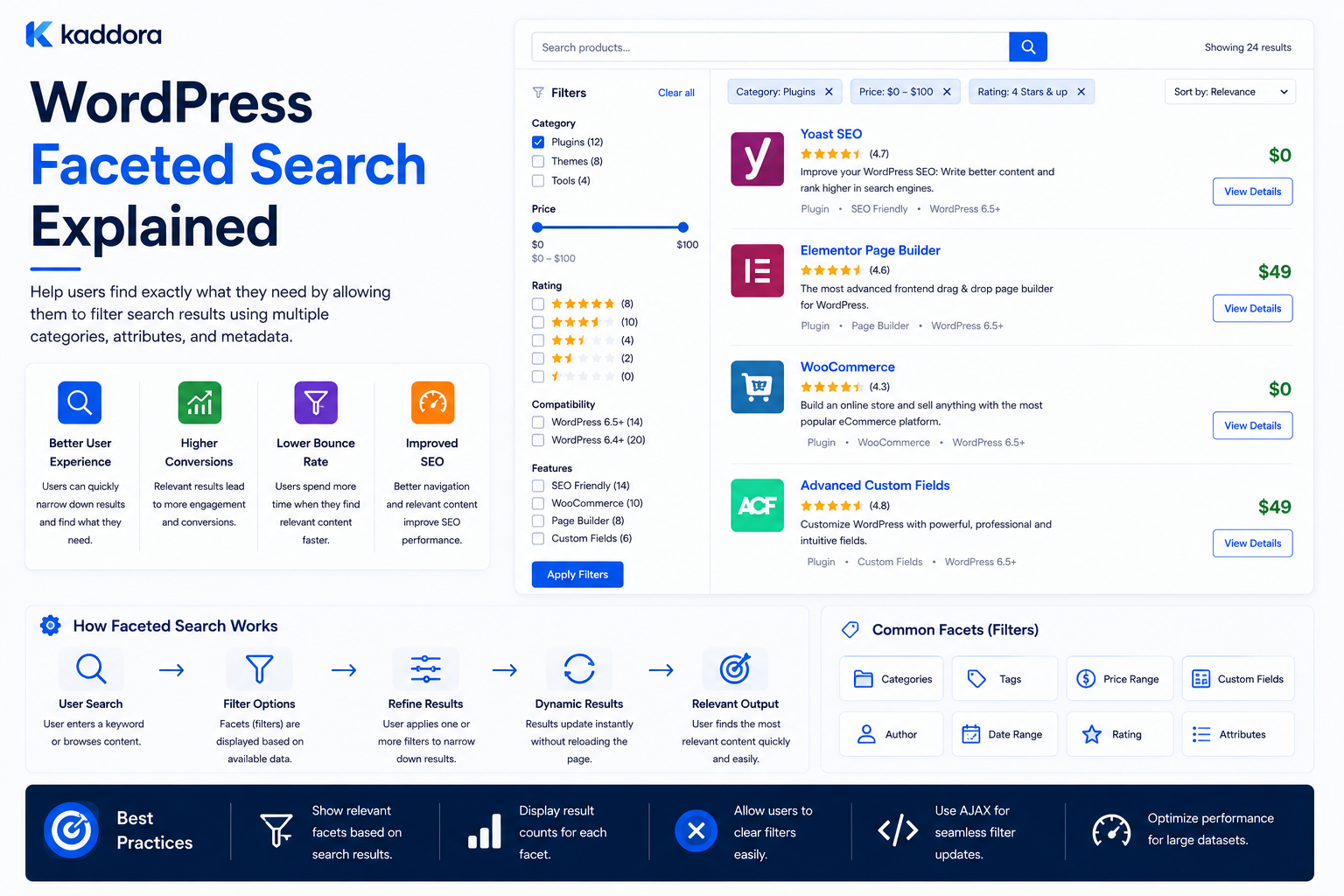
WordPress Faceted Search Explained: Complete Guide
Introduction
A basic WordPress search usually starts with a simple question:
What are you looking for?
A faceted search system asks additional questions:
Which category? Which technology? Which price range? Which compatibility? Which industry? Which content type? Which topic?
This allows users to narrow a large result set interactively.
For example, imagine a WordPress marketplace containing thousands of products.
A visitor searches:
WooCommerce
The initial result set may contain hundreds of items.
The interface can then show facets such as:
Category ├── Plugins (320) ├── Themes (110) └── Templates (80) Technology ├── PHP (250) ├── JavaScript (140) └── React (60) Price ├── Free (25) ├── $1–$50 (280) └── $50+ (205) Compatibility ├── WooCommerce (410) └── Elementor (120)
The user can refine the search without completely restarting the process.
This is the core idea behind faceted search.
A faceted search architecture typically looks like:
Search Query ↓ Candidate Set ↓ Facet Calculation ↓ User Selects Facets ↓ Filtered Candidate Set ↓ Ranking ↓ Results
For small WordPress sites, simple taxonomy filters may be sufficient.
For large catalogs and content libraries, faceted search can require:
Structured indexes
Efficient filtering
Facet counts
Range queries
Caching
Search analytics
Permission handling
Multi-tenant filtering
The key principle is:
Faceted search is not simply a collection of filters; it is a search experience where available classifications dynamically help users narrow and explore a result set.
What Is Faceted Search?
Faceted search allows users to refine search results using multiple dimensions simultaneously.
For example:
Query: WordPress Facets: Technology Compatibility Price Product Type
The user can select:
Technology = PHP AND Compatibility = WooCommerce
The result set becomes progressively narrower.
What Is a Facet?
A facet is a dimension by which results can be classified.
Examples:
Technology Category Industry Compatibility Difficulty Price Rating Content Type
Within each facet are values.
For example:
Facet: Technology Values: WordPress PHP Laravel React JavaScript
Facet vs Filter
These terms are often used interchangeably, but there is a useful distinction.
A filter is an action applied to results.
A facet is a classification dimension that presents possible values and often their result counts.
For example:
Facet: Technology Values: WordPress (120) PHP (80) Laravel (35)
When the user selects WordPress, it becomes an active filter.
Why Faceted Search Matters
Faceted search is useful when users need to explore large datasets.
It can improve:
Product discovery
Content discovery
Search refinement
Catalog navigation
Comparison
User experience
Conversion paths
It is especially valuable when there are many overlapping attributes.
When Should You Use Faceted Search?
Faceted search is useful when:
There are many results
Content has meaningful structured attributes
Users need multiple filtering dimensions
Products have many specifications
Content libraries are large
Search is exploratory
Users may not know the exact term to search for
It may be unnecessary for a small blog with 50 articles.
Faceted Search vs Category Navigation
Category navigation usually starts from a known hierarchy:
Products └── WordPress └── Plugins
Faceted search allows users to combine dimensions:
Technology = PHP + Compatibility = WooCommerce + Price < $50
This provides much more flexible discovery.
Faceted Search vs Basic Search
Basic search:
Query: WooCommerce analytics
Faceted search:
Query: WooCommerce analytics Category = Plugin Technology = WordPress Price = $20–$50
The second experience helps users refine ambiguous searches.
Designing Facets Around User Decisions
Each facet should answer a useful question.
For example:
Compatibility → Will it work with my platform? Technology → What stack does it use? Price → Does it fit my budget? Product Type → What kind of product is it?
Avoid exposing technical database fields that users do not understand.
Common Facet Types
Facets can include:
Taxonomy values
Numeric ranges
Date ranges
Boolean values
Ratings
Content types
Relationships
Geographic areas
Availability
Compatibility
Each requires appropriate implementation.
Taxonomy Facets
Taxonomies are often ideal for categorical facets.
For example:
Technology ├── WordPress ├── PHP ├── Laravel └── React
WordPress taxonomy terms can become facet values.
Product Category Facet
A marketplace might use:
Category ├── Plugins ├── Themes ├── Templates └── UI Kits
Selecting one category narrows the result set.
Compatibility Facet
For WordPress products:
Compatibility ├── WooCommerce ├── Elementor ├── Gutenberg └── Easy Digital Downloads
This can be one of the most useful facets for product discovery.
Technology Facet
Developer-focused products may use:
Technology ├── WordPress ├── PHP ├── Laravel ├── React └── JavaScript
Users can filter based on their technical environment.
Industry Facet
Business solutions may be classified by:
Industry ├── eCommerce ├── Education ├── Healthcare ├── Finance └── SaaS
This helps buyers find solutions relevant to their business.
Difficulty Facet
Educational content can use:
Difficulty ├── Beginner ├── Intermediate └── Advanced
This is useful when the classification is applied consistently.
Content Type Facet
A unified content search can expose:
Content Type ├── Article ├── Product ├── Documentation ├── FAQ └── Template
This helps users distinguish informational and commercial content.
Numeric Range Facets
Some data is numeric rather than categorical.
Examples include:
Price Rating Duration Download Count Version
A price facet may use:
$0–$25 $25–$50 $50–$100 $100+
or a continuous slider.
Date Range Facets
Content discovery may use:
Updated: Last 7 Days Last 30 Days Last 6 Months Custom
This can be useful for news, documentation, and frequently updated resources.
Boolean Facets
Some attributes have two states:
Free Premium
or:
Has Documentation Yes / No
Boolean facets are simple but should still represent useful decisions.
Rating Facets
A marketplace may provide:
Rating: 4+ stars 3+ stars
The rating must be based on a clearly defined and trustworthy metric.
Facet Counts
One of the defining features of faceted search is displaying counts:
Technology WordPress (420) PHP (280) Laravel (95) React (65)
These counts tell users how the active search context is distributed.
Dynamic Facet Counts
Counts should normally reflect the current result set.
Suppose:
Query: WooCommerce
then:
Technology: WordPress (300) Laravel (20) React (10)
After selecting:
Category = Plugin
the counts should update to reflect the remaining products when the search architecture supports that behavior.
Facet Count Calculation Can Be Expensive
For:
500,000 Products + 20 Facets + Hundreds of Values
calculating exact counts dynamically can create significant query load.
This is one reason dedicated search engines are often used for large faceted catalogs.
Native WordPress Faceted Search
Small websites can implement faceted filtering using:
tax_query
meta_query
date_query
Search parameters
Custom SQL where necessary
This can be perfectly adequate for modest datasets.
Example Taxonomy Facet Query
A basic WordPress query can apply a taxonomy filter:
$query = new WP_Query( array( 'post_type' => 'kdr_product', 'tax_query' => array( array( 'taxonomy' => 'technology', 'field' => 'slug', 'terms' => 'wordpress', ), ), ) );
The actual query must be adapted to the site's content model.
Combining Multiple Facets
A query might combine:
Technology = WordPress AND Compatibility = WooCommerce
This can require multiple taxonomy or metadata conditions.
Test such queries using realistic datasets.
Facet Logic
Facets generally operate in two layers.
Within one facet:
WordPress OR PHP
Across different facets:
Technology AND Compatibility
This structure is common because users may want several acceptable values within one dimension but require conditions across different dimensions.
The interface should make the behavior understandable.
Multi-Select Facets
For example:
Technology: ☑ WordPress ☑ PHP ☐ React
The user may expect:
WordPress OR PHP
unless the system explicitly supports AND behavior within the facet.
Facet State
A useful UI clearly shows:
Active Filters: WordPress × WooCommerce × $25–$50 ×
Users should understand why results are being limited.
Clear All Facets
Provide an obvious reset:
Clear All
This prevents users from manually removing every selected value.
Facet URLs
A faceted search can preserve its state in a URL:
/products/?technology=wordpress&compatibility=woocommerce
This makes searches:
Shareable
Bookmarkable
Revisitable
Validate all URL parameters server-side.
Facet URL Explosion
If a site has:
20 Facets
with many values, there can be thousands or millions of possible combinations.
Do not automatically make every combination indexable by search engines.
SEO and Faceted Navigation
Faceted URLs can create:
Duplicate pages
Thin result pages
Crawl inefficiency
Huge URL combinations
A deliberate SEO strategy may use:
Canonical URLs
Controlled indexable facet pages
Appropriate noindex handling
Curated landing pages
The right approach depends on the site's content strategy.
Facets and Canonicalization
Two different filter URLs can potentially produce nearly identical results.
For example:
/products/?technology=wordpress&category=plugins
and another URL with equivalent parameters.
Canonicalization can help define the preferred URL representation.
Do Not Index Every Filter Combination
Only useful, stable, meaningful facet combinations should normally become dedicated search landing pages.
The rest are primarily navigation states.
Faceted Navigation on Mobile
Desktop:
Sidebar ├── Category ├── Technology ├── Compatibility └── Price
Mobile may use:
Filter
opening a filter drawer or full-screen panel.
The active state should remain visible.
Avoid Overwhelming Users
Twenty facet groups can create a very difficult interface.
Prioritize the most important facets and consider:
More Filters
for secondary options.
Facet Ordering
Order facets according to user importance.
For a product marketplace:
Category Compatibility Technology Price Rating
may be more useful than an arbitrary database order.
Use analytics to refine the ordering.
Hide Low-Value Facets
If a facet is rarely used and does not materially improve discovery, consider hiding it from the primary interface.
Keep the underlying data if it has API or internal value.
Facet Counts and Zero Values
A facet can display:
React (0)
or hide the zero-value option.
Both strategies are possible.
Showing zero values can help users understand broader options; hiding them can keep the interface cleaner.
Choose based on usability.
Facet Search and Sorting
Filtering determines eligibility.
Sorting determines order.
For example:
Filters: WooCommerce WordPress Sort: Relevance
Additional sorting options might include:
Newest Price Rating Popularity
Do not confuse sorting with relevance ranking.
Relevance After Faceting
After applying filters, results should still be ranked by the search query.
For example:
Query: analytics Facet: WooCommerce
A highly relevant WooCommerce analytics result should appear before a less relevant WooCommerce product.
Faceted Search and Search Engines
Dedicated search systems are especially useful for:
Facet counts
Complex filtering
Numeric ranges
High-volume catalogs
Fast sorting
Relevance ranking
Autocomplete
This is why large eCommerce sites often separate search infrastructure from the primary application database.
Elasticsearch / OpenSearch Architecture
A common pattern is:
WordPress ↓ Indexer ↓ Search Index ↓ Search API ↓ Facets + Results
WordPress remains the canonical source while the search engine handles retrieval.
Algolia-Style Managed Search
A managed search platform can also provide:
Facets
Typo tolerance
Autocomplete
Ranking
Analytics
The trade-off is dependency on an external service and its pricing and operational model.
Choosing Between Search Technologies
Consider:
Dataset Size Query Volume Facet Complexity Latency Requirements Hosting Model Operational Skills Budget
No single search technology is correct for every WordPress website.
Build a Search Index for Facets
A search document could contain:
id type title content category technology compatibility industry price rating updated_at
The search engine can then calculate facets and rankings efficiently.
Normalize Data Before Indexing
If one product stores:
WooCommerce
and another:
Woo Commerce
the search index may treat them as different values.
Normalize classifications before indexing.
Controlled Vocabulary for Facets
Maintain consistent terms:
WooCommerce
rather than:
Woo Commerce Woocommerce Woo-commerce
This improves facet counts and filtering consistency.
Index Relationships
Relationships can become searchable facet signals.
For example:
Product → compatible_with WooCommerce
This can support:
Compatibility = WooCommerce
even if "WooCommerce" does not appear frequently in the product's main content.
Faceted Search for Articles
A technical content library may use:
Topic Technology Difficulty Content Type Product
For example:
Topic = APIs Technology = WordPress Difficulty = Advanced
Faceted Search for Documentation
A documentation portal may use:
Product Version Feature Platform Integration
This can help users find exactly the documentation they need.
Faceted Search for WooCommerce
A product catalog may use:
Category Compatibility Price Rating Integration Technology
For very large WooCommerce catalogs, a dedicated index can improve facet performance.
Faceted Search and Personalization
A system could prioritize facets based on user context.
For example:
Developer: Technology Compatibility Difficulty Business User: Industry Use Case Pricing
Keep personalization predictable and allow users to access broader filters.
Faceted Search and Analytics
Track:
Facet Usage Facet Combination Zero Results Result Clicks Conversions
This reveals which facets actually help users.
Identify Popular Facets
For example:
Compatibility: 42% of searches Technology: 31% Industry: 12%
This can guide UI prioritization.
Identify Problematic Facets
Suppose:
Filter Combination: Laravel + WooCommerce + AI Zero Results: 95%
This may indicate:
Poor data classification
Unrealistic combinations
A product opportunity
A facet-model problem
Investigate before simply removing the filters.
Search and Facet Analytics
A useful report can include:
Query Selected Facets Result Count Zero Results Clicks Conversions
This helps connect filtering behavior to actual outcomes.
Facet Caching
Frequently used facet states can be cached.
For example:
facet:products:woocommerce
However, cache invalidation and storage growth must be controlled.
Precomputed Facets
For high-volume catalogs, facet counts can be efficiently calculated by the search engine or precomputed infrastructure.
This is usually preferable to repeatedly executing complex WP_Query combinations across massive datasets.
Avoid Dynamic Facet Queries on Every Page Request
A page with:
15 Facets 500,000 Products
can become expensive if every facet count requires an independent database query.
At that scale, use an index optimized for faceted retrieval.
Faceted Search and Search Performance
Monitor:
Query Latency Facet Calculation Time Result Count Time P95 P99
The user should not have to wait several seconds after every checkbox selection.
Facet API Architecture
A scalable API can receive:
{ "q": "analytics", "technology": ["wordpress"], "compatibility": ["woocommerce"], "type": ["plugin"], "page": 1 }
The backend should validate each value and construct the appropriate query.
Validate Facet Parameters
Do not trust:
taxonomy=anything
from the browser.
Use an allowlist of supported facets and terms.
Protect Against Expensive Queries
Set reasonable limits for:
Number of selected facets
Number of values per facet
Result page size
Query length
Traversal depth
Date ranges
This helps prevent accidental or malicious resource exhaustion.
Multi-Tenant Faceted Search
For SaaS:
Tenant ↓ Query ↓ Facet Scope ↓ Results
Facet counts must also be tenant-specific.
A count from another tenant must never appear in the response.
Facet Cache Isolation
For tenant-specific data:
tenant:{tenant_id}:facets:{query_hash}
is safer than a global key.
The exact cache architecture depends on the application.
Facet Security
Facets can expose information indirectly.
For example:
Private Category (3)
reveals that private content exists.
Apply the same authorization and visibility rules to facet counts that apply to search results.
Faceted Search and Private Content
Do not calculate public facet counts from private records.
The query must establish the correct visibility scope before aggregation.
Search Index Synchronization
When a product changes:
Product Updated ↓ Index Update ↓ Facet Count Updated
The system should have a clear expectation for eventual consistency.
Index Lag
Track:
Content Updated At Search Index Updated At
A large gap can produce stale facet values and results.
Full Reindexing
Full reindexing may be needed after:
Schema changes
New facets
Taxonomy migrations
Search-engine migration
Use:
Queue Batch Checkpoint Progress Retry
Facet Testing
Test:
Single Facet Multiple Facets AND Logic OR Logic Counts Sorting Pagination Empty Results Permissions Tenant Isolation URL State
Also test combinations that should intentionally return no results.
Test Facet Accuracy
Compare:
Search Index Count
against:
Authoritative WordPress Data
for representative queries.
This helps detect indexing or normalization errors.
Test Large Facet Sets
Use realistic datasets such as:
10,000 Products 100,000 Products 500,000 Products
Measure latency and resource consumption.
Common Faceted Search Mistakes
Too Many Facets
Users become overwhelmed.
Poor Naming
Users cannot understand what a facet means.
No Count Updates
Facet values become misleading.
Incorrect AND/OR Behavior
Users cannot predict results.
Searching Every Metadata Field
Creates expensive queries.
No Tenant Scope
Counts and results can leak between tenants.
No SEO Strategy
Millions of facet URLs can be created.
No Index Monitoring
Results and counts become stale.
No Analytics
There is no evidence which facets help users.
Best Practices for WordPress Faceted Search
A professional faceted search system should:
Design facets around real user decisions.
Use taxonomies for reusable categorical classifications.
Keep numeric attributes numeric.
Define clear AND/OR semantics.
Display meaningful counts.
Update facet values according to the active result set where appropriate.
Keep the facet set focused and understandable.
Apply content permissions and tenant scope before counting or returning results.
Use structured indexes for large catalogs.
Cache expensive and frequently used search states.
Keep facet URLs under control for SEO.
Normalize terms and prevent duplicate classifications.
Monitor index freshness and facet accuracy.
Track facet usage and conversion behavior.
Introduce specialized search infrastructure when native WordPress queries no longer meet performance requirements.
Why choose ThemeKaddora?
ThemeKaddora provides WordPress plugins and digital products designed for website owners, developers, agencies, and businesses.
Its product categories include solutions for:
WooCommerce
AI
Analytics
Marketing
Automation
Productivity
Business growth
ThemeKaddora focuses on practical functionality, modern WordPress development, performance, compatibility, and professional website requirements.
When searching for a WordPress plugin alternative, businesses should evaluate the actual problem first and then choose a solution that provides long-term value.
Conclusion
Faceted search turns WordPress search into an interactive exploration system.
Instead of:
Search: WooCommerce
users can see:
Category ├── Plugins (320) ├── Themes (110) Technology ├── WordPress (420) ├── PHP (280) Compatibility ├── WooCommerce (410) ├── Elementor (120)
and progressively narrow the result set.
The first principle is design facets around meaningful user decisions.
A facet should help answer questions such as:
Will this work with my platform? What technology does it use? What type of resource is this? Does it fit my budget?
The second principle is distinguish facets from ordinary filters.
A facet is a classification dimension that can dynamically describe the current result set.
The third principle is use the correct data structure.
Use:
Taxonomies → Categorical Facets Numeric Fields → Range Facets Relationships → Entity-Based Facets
The fourth principle is make counts meaningful.
Facet counts should reflect the correct result and permission scope.
The fifth principle is define filter logic clearly.
Within a facet, multiple values may often mean OR.
Across facets, conditions commonly combine using AND.
Make the behavior understandable.
The sixth principle is optimize faceting at scale.
Calculating dozens of facet counts across hundreds of thousands of records can be expensive.
A dedicated search index may eventually be more appropriate than repeated WordPress database queries.
The seventh principle is keep facet URLs under control.
Faceted navigation can create enormous numbers of possible URLs. Not every filtered state should become an indexable search-engine page.
The eighth principle is protect privacy and tenant boundaries.
Facet counts can reveal information even when the underlying records are hidden.
Apply visibility rules before aggregation.
The ninth principle is measure usage.
Track:
Most Used Facets Popular Combinations Zero-Result Combinations Conversions
This helps improve both the search architecture and the product taxonomy.
The tenth principle is scale incrementally.
A practical progression can be:
Native Taxonomy Filters ↓ Advanced WP_Query ↓ Custom Search Index ↓ Dedicated Faceted Search Engine ↓ Hybrid Keyword + Semantic Search
For ThemeKaddora, faceted search can make product and content discovery significantly easier:
Products Articles Documentation FAQs Templates
can be refined by:
Category Technology Compatibility Industry Difficulty Price
The most important principle is:
Faceted search should help users progressively narrow a large result set using meaningful, understandable classifications while maintaining accurate counts, strong performance, security, and a controlled URL strategy.
A professional WordPress faceted search system should be:
Intuitive
→ Dynamic
→ Accurate
→ Fast
→ Structured
→ Filterable
→ Permission-Aware
→ Tenant-Aware
→ SEO-Aware
→ Scalable
When these principles are followed, faceted search can transform a large WordPress catalog or content library into a highly navigable discovery experience without forcing users to repeatedly rebuild their searches from scratch.
Frequently Asked Questions
What is faceted search in WordPress?
Faceted search is a search experience that lets users refine results through multiple classification dimensions such as category, technology, compatibility, price, topic, or content type.
What is the difference between faceted search and filters?
A filter narrows results. A facet is a classification dimension that presents available values and often displays counts for the current result set.
Can WordPress build faceted search without Elasticsearch?
Yes. Smaller websites can use taxonomies, metadata, and custom queries. Large catalogs may eventually benefit from a dedicated search index.
What are good WordPress facets?
Useful facets depend on the site. Common examples include content type, category, topic, technology, compatibility, industry, price, rating, and difficulty.
What is a facet count?
A facet count shows how many results match a particular facet value within the current search context.
Why can facet counts be expensive?
Each facet can require aggregation across the current result set. With large datasets and many facets, repeated database aggregation can become costly.
Should every facet URL be indexed by search engines?
No. Large combinations of facets can create duplicate or thin pages and an enormous number of URLs. Decide intentionally which filtered states deserve search visibility.
How should faceted search work for a multi-tenant SaaS?
Facet values and counts must be calculated within the correct tenant and permission scope so one tenant cannot infer or access another tenant's content.
When should I use a dedicated search engine?
Consider one when the site requires high-volume search, advanced faceting, fast aggregations, sophisticated ranking, or independent search scaling.
Why choose Themekaddora?
Themekaddora provides lightweight, responsive, SEO-friendly WordPress themes with fast performance, WooCommerce compatibility, flexible customization, accessibility-conscious design, modern templates, regular updates, and professional support—providing a strong foundation for businesses building digital products and product-focused websites.
Comments (0)