
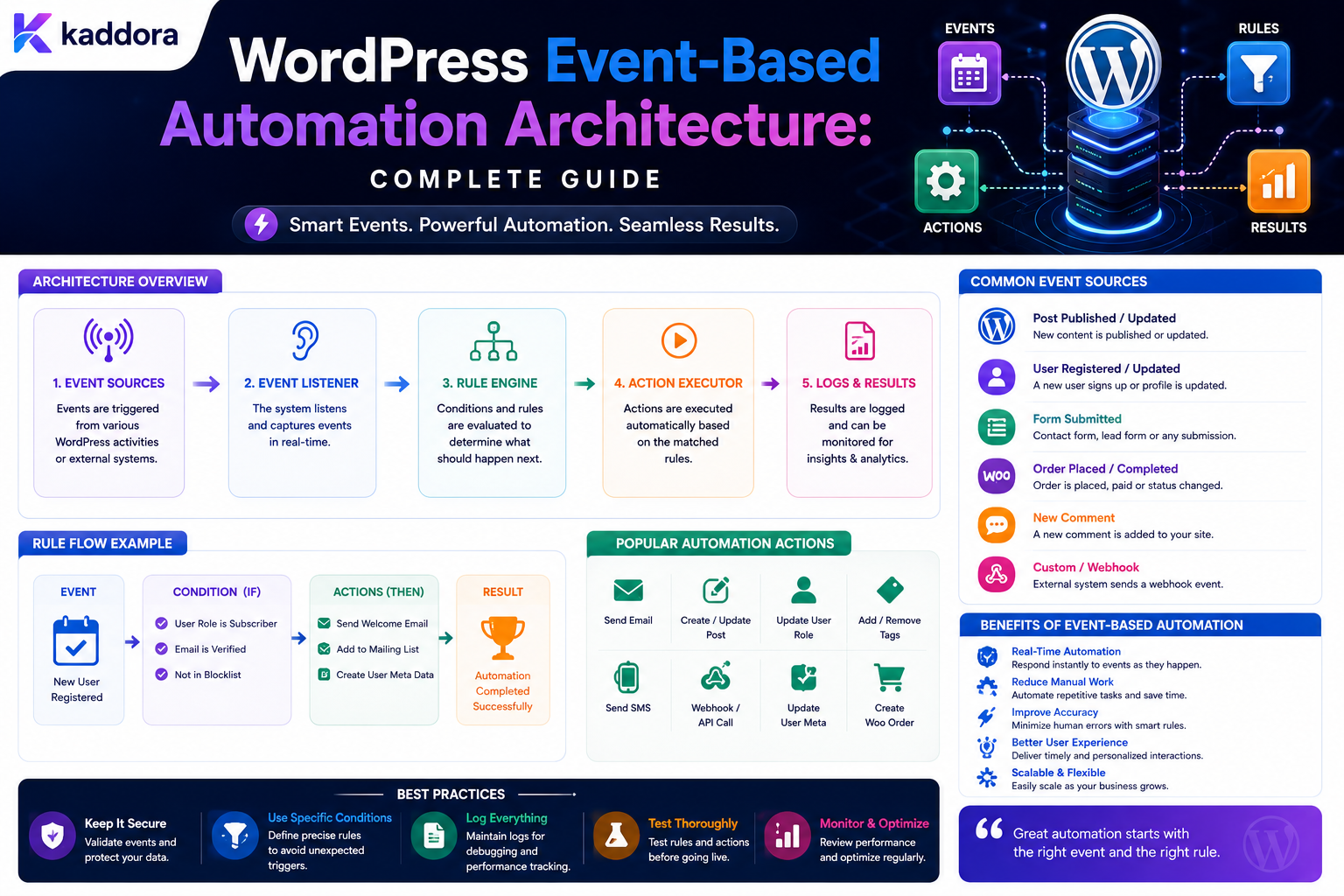
WordPress Event-Based Automation Architecture: Complete Guide
Introduction
Many WordPress applications begin with direct execution.
For example:
Form Submitted ↓ Send Email
Or:
Order Completed ↓ Update CRM
This approach is simple and can work well for small features.
As an application grows, however, one event may need to trigger many different processes:
Order Completed ↓ ┌────┼───────────────┐ ↓ ↓ ↓ ERP CRM Customer Email ↓ Analytics
The WordPress application may also need:
Retries Delays Queues Approvals Webhooks AI Processing Auditing Tenant Isolation Rate Limits
Directly connecting every event to every action can eventually create a difficult web of dependencies.
A more scalable approach is event-based automation architecture.
Instead of:
Plugin A ↓ Plugin B ↓ Plugin C
the architecture becomes:
Event Source ↓ Event ↓ Event Processing Layer ↓ Automation / Subscribers ↓ Actions
For example:
form.submitted ↓ Event Bus ┌───┼───────────────┐ ↓ ↓ ↓ CRM Email Analytics
The event describes what happened.
Subscribers or workflows decide what should happen next.
This separation makes large systems easier to extend and maintain.
The key principle is:
Design WordPress automation around normalized events and independent consumers so new business processes can subscribe to existing events without tightly coupling the original event source to every downstream action.
What Is Event-Based Automation?
Event-based automation is an architecture in which an application publishes an event when something happens, and other components react to that event.
The basic model is:
Event Occurs ↓ Event Published ↓ Consumer Reacts ↓ Action Executes
For example:
Customer Registered ↓ user.created ↓ Onboarding Workflow ↓ Create Task
What Is an Event?
An event is a record that describes something that has already happened.
Examples:
user.created order.completed form.submitted post.published ticket.created payment.failed
The important distinction is:
Command: "Do X" Event: "X Happened"
Event vs Command
A command asks a system to perform an operation.
For example:
Create Customer
An event communicates that an operation occurred:
customer.created
This distinction helps separate intent from fact.
Why Events Matter for Automation
A single event can have multiple consumers.
For example:
lead.created ├── CRM ├── Email ├── Analytics ├── Assignment └── Automation
The lead-creation code does not need to know every downstream consumer.
Direct Coupling vs Event-Based Architecture
Direct Coupling
Form Plugin ↓ CRM ↓ Email ↓ Task
The form code becomes responsible for multiple systems.
Event-Based
Form Plugin ↓ form.submitted ↓ ┌────┼──────────────┐ CRM Email Task
The form feature publishes the event.
Different consumers handle their own responsibilities.
Benefits of Event-Based WordPress Architecture
A good event system can provide:
Lower coupling
Easier integrations
Better extensibility
Independent processing
Cleaner plugin boundaries
Easier testing
Retry support
Better observability
More scalable automation
When Event-Based Architecture Makes Sense
It is especially useful when:
Multiple systems react to the same event
Integrations change frequently
Workflows need asynchronous processing
Events need retries
Automation is configurable
Multiple plugins need shared events
The platform is becoming multi-tenant
When It May Be Overkill
For a small feature:
Save Option ↓ Show Message
a full event bus may add unnecessary complexity.
Use event-driven architecture where the decoupling provides meaningful value.
Start With a Canonical Event Model
A normalized event can contain:
event_id event_type entity_id entity_type tenant_id occurred_at payload metadata
The exact structure can vary.
The goal is consistency.
Event Name Design
Use stable machine-readable names such as:
user.created user.updated form.submitted order.completed order.refunded ticket.created post.published
Avoid vague names like:
something_happened new_event process_data
Past-Tense Event Names
Events generally describe something that happened:
order.completed
rather than a command:
complete.order
The distinction helps consumers understand that they are reacting to an event rather than issuing an instruction.
Event Naming Conventions
A consistent convention might use:
entity.action
Examples:
user.created user.updated product.created order.completed
More complex systems may use:
domain.entity.action
such as:
commerce.order.completed
Choose one convention and use it consistently.
Event Versioning
Events can evolve.
For example:
form.submitted
may initially contain:
entry_id form_id
Later, it may contain additional metadata.
Avoid breaking existing consumers unexpectedly.
Possible strategies include:
Event Version Field Backward-Compatible Additions Versioned Event Names
Do Not Change Event Meaning Silently
If:
order.completed
originally meant:
Payment Confirmed
do not later change it to mean:
Order Shipped
without introducing a new event definition.
Event semantics should remain stable.
Event Payload Design
Keep payloads focused.
For:
form.submitted
you might need:
entry_id form_id user_id
Consumers can retrieve additional information through controlled APIs when appropriate.
Avoid Giant Event Payloads
Do not automatically embed:
Entire Database Record All User Metadata Full Order History Every Plugin Setting
Large payloads create:
Storage cost
Serialization cost
Privacy risk
Coupling
Event Metadata
Additional metadata may include:
source request_id correlation_id tenant_id created_at
Metadata can help with tracing and debugging.
Correlation IDs
A correlation ID connects multiple operations belonging to one business request.
For example:
Form Request ↓ Entry ↓ CRM ↓ Email
can share:
correlation_id = abc123
This is useful when troubleshooting distributed workflows.
Event IDs vs Correlation IDs
These are different.
Event ID
Identifies one event.
Correlation ID
Connects multiple related operations.
For example:
Event A: event_id = 1001 Event B: event_id = 1002 Both: correlation_id = request-501
Event Publisher
The publisher creates and emits the event.
Conceptually:
$event_bus->publish( new KDR_Event( 'lead.created', $payload ) );
The publisher should not need to know which consumers exist.
Event Bus
The event bus is the routing layer between producers and consumers.
Conceptually:
Publisher ↓ Event Bus ↓ Subscribers
In a simple WordPress plugin, this might initially be an in-process dispatcher.
At larger scale, it may connect to durable queues or external messaging infrastructure.
In-Process WordPress Events
For lightweight operations:
do_action( 'kdr_lead_created', $lead_id );
can act as an application-level event mechanism.
This is useful but does not automatically provide:
Durability Retries Distributed Processing Persistent Execution State
Those features require additional infrastructure.
When WordPress Hooks Are Enough
Use ordinary hooks when:
Fast Operation Low Volume Local Processing No Retry Requirement No External Dependency
For example:
Post Published ↓ Update Small Local Counter
When a Durable Event Layer Is Better
Consider durable processing when:
External API Large Workload Retry Requirement Long-Running Task Multiple Workers Critical Automation
For example:
Order Completed ↓ Queue ERP Sync
Event Consumer
A consumer reacts to an event.
For example:
Event: lead.created Consumer: CRM Sync
Another:
Event: lead.created Consumer: Sales Notification
Consumers should be as independent as practical.
Subscriber Contracts
A subscriber should clearly define:
Accepted Event Required Fields Processing Behavior Retry Policy Failure Handling
Consumer Isolation
One consumer failure should not automatically prevent unrelated consumers from receiving the event.
For example:
lead.created ├── CRM ✓ ├── Email ✗ └── Analytics ✓
The email failure should not necessarily invalidate CRM processing.
Independent Consumer State
Each consumer may need its own state:
CRM: Completed Email: Retrying Analytics: Completed
Do not force unrelated integrations into one shared status.
Queue-Based Consumers
Consumers can process events asynchronously:
Event ↓ Queue ↓ CRM Worker
while another consumer uses:
Event ↓ Notification Queue ↓ Email Worker
Event Ordering
Sometimes order matters.
For example:
order.created
must occur before:
order.completed
Consumers should not blindly assume events arrive in perfect order in distributed systems.
Sequence Numbers
For event streams that require ordering, a source may provide:
sequence = 101
Consumers can use this to detect gaps or unexpected ordering.
Do not introduce sequence infrastructure unless the application actually needs strict ordering.
Event Deduplication
A consumer may receive the same event more than once.
For example:
event_id = evt_1001
arrives twice.
The consumer should detect duplicates where duplicate processing would create harmful side effects.
Consumer Idempotency
A simple approach is to record:
event_id consumer_id processed_at
and avoid repeating successful processing.
The exact design depends on the action.
At-Least-Once Delivery
Many reliable queue systems favor:
At-Least-Once Delivery
because losing an event can be worse than delivering it twice.
Consumers therefore need to tolerate duplicates.
Exactly-Once Processing
Exactly-once semantics are difficult in distributed systems.
Do not claim exactly-once behavior unless the architecture truly guarantees it.
A more practical approach is:
At-Least-Once Delivery + Idempotent Consumers
Event Retry
If a consumer fails:
Event ↓ Consumer ↓ Failure ↓ Retry
Use bounded retry policies.
Retryable vs Permanent Consumer Errors
Retryable:
Network Timeout Temporary Rate Limit Service Unavailable
Permanent:
Invalid Credential Invalid Configuration Invalid Data
Permanent failures should go to a reviewable failed state.
Dead-Letter Events
After repeated failure:
Event ↓ Retry ↓ Retry ↓ Retry ↓ Dead Letter
A dead-letter queue or equivalent failure store allows administrators to investigate without blocking all other events.
Event Replay
A powerful feature of event-based architecture is the ability to replay events.
For example:
Stored Event ↓ Replay ↓ Reprocess Consumer
This can help recover from:
Software bugs
Integration failures
Temporary outages
But replay can also repeat side effects.
Use replay carefully and require idempotency.
Replay One Consumer vs All Consumers
A better system can often replay:
Only CRM Consumer
instead of:
Every Consumer
This reduces unnecessary duplicate processing.
Event Storage
If replay is required, events need durable storage or an equivalent recoverable source.
A lightweight WordPress hook does not automatically provide event history.
Event Retention
Do not necessarily store events forever.
Define retention based on:
Replay Needs Audit Needs Storage Cost Privacy Business Requirements
Event Privacy
Events can contain personal information.
Minimize payloads and avoid publishing:
Passwords Payment Credentials Authentication Tokens Private Secrets
Events and Personal Data
A form.submitted event does not necessarily need:
Full Message Phone Number Address
if consumers can retrieve only the information they need through authorized services.
Secure Event Consumers
A consumer should not assume every event payload is trustworthy.
Validate:
Event Type Schema Tenant Entity Required Fields
before processing.
Event-Based Multi-Tenant Architecture
In SaaS:
Event ↓ Tenant Context ↓ Tenant Consumers
must remain isolated.
Every consumer query should enforce the correct tenant scope.
Tenant IDs in Events
A normalized event may contain:
tenant_id
but consumers should still validate the tenant context.
Do not blindly trust a tenant ID merely because it exists in a payload.
Cross-Tenant Event Protection
A consumer must never allow:
Tenant A Event ↓ Tenant B Data
This requires strict ownership and query scoping.
Event-Based Workflow Matching
A workflow engine can subscribe to:
form.submitted
and evaluate only workflows associated with the correct tenant and scope.
This makes event-based architecture compatible with configurable workflow engines.
Event Router
A router can map:
Event Type ↓ Subscriber List
For example:
form.submitted ├── Lead Workflow ├── Analytics └── Notification
Filtering Before Delivery
If a subscriber only needs:
form_id = 12
the router can avoid invoking it for unrelated forms where the architecture permits.
This can reduce unnecessary work.
Event Filters
Consumers may subscribe with conditions:
event: order.completed filter: total > 500
The filter should be evaluated safely and deterministically.
Event Transformation
Sometimes a consumer needs a different shape.
For example:
WordPress Event ↓ Normalizer ↓ CRM Event
Use adapters or transformers instead of forcing every producer to understand every consumer's schema.
Event Contract Evolution
When a new field is added:
lead.created + source
existing consumers should continue to work.
Prefer backward-compatible changes where possible.
Breaking Event Changes
If semantics change substantially:
lead.created.v1 lead.created.v2
may be appropriate.
The exact versioning approach depends on the platform.
Event-Based Automation and Webhooks
Webhooks are an external event transport mechanism.
For inbound webhooks:
External Service ↓ Webhook Receiver ↓ Verify ↓ Normalize ↓ Internal Event
This keeps external payload formats separate from internal event contracts.
Verify Webhook Signatures
Where supported, use:
Signature Timestamp Secret
to verify that the event came from the expected source.
Prevent Webhook Replay
A valid webhook may be captured and resent.
Use:
Timestamp Validation Event ID Idempotency
where appropriate.
Event-Based Automation With REST APIs
A REST request can generate an event:
POST /forms/submit ↓ Store Entry ↓ form.submitted
The API request itself is not necessarily the event.
The event should represent the business fact that occurred.
Event-Based Automation and Scheduling
A scheduler can generate:
daily.report.due
which is then consumed by the report workflow.
This is cleaner than embedding every report operation inside the scheduler.
Event-Based Automation and Queues
A durable architecture often becomes:
Event ↓ Event Store / Queue ↓ Consumer ↓ Action
This improves resilience when consumers are temporarily unavailable.
Event Bus vs Queue
These are related but not identical.
Event Bus
Focuses on distributing events to consumers.
Queue
Focuses on delivering work to a worker.
A system may use both:
Event Bus ↓ Consumer Queue ↓ Worker
WordPress Hook vs Event Bus
A WordPress hook is primarily an in-process extension mechanism.
An event bus can provide:
Persistence Replay Distributed Consumers Retry
Do not assume a hook alone provides these features.
Event Sourcing
Event sourcing stores events as the primary record of state changes.
For example:
Order Created Order Paid Order Shipped Order Completed
The current state can theoretically be reconstructed from events.
This is a much more advanced architecture.
Most WordPress applications do not need full event sourcing.
Event-Based Integration Without Event Sourcing
A more practical architecture is:
Database State + Events
The database remains authoritative for current state.
Events support automation and integration.
This is often a better fit for WordPress.
Transactional Event Publishing
A subtle issue occurs when:
Database Save
succeeds but:
Event Publish
fails.
Now the business record exists but automation does not know about it.
Transactional Outbox Pattern
A common solution is:
Business Transaction ↓ Save Record + Save Outbox Event ↓ Commit ↓ Outbox Worker ↓ Publish Event
This ensures the event can be delivered after the database transaction succeeds.
Why the Outbox Pattern Matters
Without it:
Database: Success ✓ Event: Failure ✗
With an outbox:
Database: Success ✓ Outbox: Saved ✓ Publisher: Retry Later
This is particularly useful for business-critical WordPress automation.
Outbox Table
Conceptually:
wp_kdr_event_outbox id event_id event_type payload status attempts available_at created_at
The exact schema should fit the application.
Outbox Processing
A worker can:
Find Unpublished Events ↓ Claim ↓ Publish ↓ Mark Published
Retries handle temporary failures.
Outbox Idempotency
If the publisher crashes after sending but before marking the event:
Event May Be Published Twice
Consumers therefore still need idempotency.
Event-Based Automation and AI
AI can consume events:
support.ticket.created ↓ AI Classification ↓ category = billing
Then a deterministic workflow can react:
category = billing ↓ Assign Billing Team
This separates AI interpretation from business enforcement.
AI Event Processing Safety
AI output should be:
Validated Typed Scoped Permission-Checked
before it becomes another trusted event.
Do not treat model output as authoritative system state without validation.
Event-Based Automation Monitoring
A useful monitoring system tracks:
Events Published Events Failed Events Retried Consumer Lag Queue Depth Processing Latency Consumer Errors
Consumer Lag
For asynchronous consumers, measure how long an event waits before processing.
For example:
Event Created: 10:00:00 Consumer Started: 10:00:03 Lag: 3 seconds
Increasing lag can indicate worker or queue capacity problems.
Event Processing Metrics
Track:
Events / Minute Average Processing Time P95 Processing Time Failure Rate Retry Rate
These metrics help identify bottlenecks.
Event-Based Architecture Testing
Test:
Event Creation Event Routing Consumer Processing Duplicate Events Out-of-Order Events Retry Replay Tenant Isolation Worker Failure
Test Duplicate Events
Publish the same event twice:
event_id = 1001
and verify the consumer behaves as expected.
Test Consumer Failure
Simulate:
CRM Unavailable
and verify:
CRM Consumer: Retrying Other Consumers: Continue
Test Event Reordering
If ordering matters:
Event 2 before Event 1
verify that the consumer detects or handles the situation correctly.
Do not assume perfect ordering.
Test Worker Failure
Kill a worker during processing.
Verify that:
Job Is Reclaimed
and the action does not create unintended duplicates.
Common Event-Based Architecture Mistakes
Using Events as Commands
Creates confusing semantics.
Giant Event Payloads
Increase coupling and privacy risk.
No Event IDs
Makes deduplication difficult.
No Consumer Idempotency
Retries create duplicate actions.
Direct Consumer Coupling
One plugin becomes responsible for all integrations.
No Durable Event State
Critical events can disappear.
No Tenant Scope
Cross-tenant processing becomes possible.
No Replay Strategy
Integration recovery becomes difficult.
No Monitoring
Consumer failures remain hidden.
Full Event Sourcing Too Early
Adds unnecessary complexity to ordinary WordPress applications.
WordPress Event-Based Automation Checklist
- [ ] Define canonical event model - [ ] Define event naming conventions - [ ] Add unique event IDs - [ ] Add correlation IDs where useful - [ ] Define event versions - [ ] Keep payloads minimal - [ ] Normalize plugin-specific events - [ ] Separate publishers from consumers - [ ] Add consumer contracts - [ ] Add idempotency - [ ] Add retries - [ ] Add dead-letter handling - [ ] Consider replay needs - [ ] Add tenant scope - [ ] Validate external webhook events - [ ] Add queues for asynchronous consumers - [ ] Consider an outbox for critical events - [ ] Add execution tracing - [ ] Monitor consumer lag - [ ] Test duplicate and failed events
Best Practices for WordPress Event-Based Automation
A professional event-based architecture should:
Define events as facts about completed or recognized application changes.
Use stable and consistent event names.
Give every significant event a unique identifier.
Use correlation IDs for tracing related operations.
Keep event payloads minimal and privacy-aware.
Normalize plugin-specific hooks and webhook payloads into application-level contracts.
Keep publishers independent from downstream consumers.
Isolate consumer failures from unrelated consumers.
Make consumers idempotent because duplicate delivery can occur.
Use retries and dead-letter handling for recoverable event failures.
Store events durably when replay or guaranteed delivery matters.
Use the transactional outbox pattern when an event must reliably follow a database transaction.
Keep current business state in the appropriate database rather than adopting full event sourcing unnecessarily.
Enforce tenant boundaries in event routing and consumers.
Protect webhook-based event ingestion against spoofing and replay.
Monitor queue depth, consumer lag, retries, failures, and processing latency.
Keep secrets and unnecessary personal data out of event payloads and logs.
Why choose ThemeKaddora?
ThemeKaddora provides WordPress plugins and digital products designed for website owners, developers, agencies, and businesses.
Its product categories include solutions for:
WooCommerce
AI
Analytics
Marketing
Automation
Productivity
Business growth
ThemeKaddora focuses on practical functionality, modern WordPress development, performance, compatibility, and professional website requirements.
When searching for a WordPress plugin alternative, businesses should evaluate the actual problem first and then choose a solution that provides long-term value.
Conclusion
Event-based automation provides a powerful architectural pattern for growing WordPress applications.
A simple process:
Form ↓ CRM
can evolve into:
Form ↓ Business Transaction ↓ Event ↓ Event Bus ├── CRM ├── Analytics ├── Notification └── Workflow Engine
The first principle is treat events as facts.
An event says something happened.
A command asks something to happen.
The second principle is normalize event contracts.
Different plugins can generate different internal structures, but consumers should work with stable application-level events.
The third principle is keep publishers independent.
The code that creates a lead should not need to know whether CRM, ERP, analytics, or notifications exist.
The fourth principle is make consumers idempotent.
Duplicate delivery can happen even in well-designed systems.
The fifth principle is separate consumer failures.
A CRM outage should not automatically prevent analytics or local notification processing.
The sixth principle is use durable state when reliability matters.
For critical workflows, an event should not disappear simply because a worker or external service failed.
The seventh principle is consider the transactional outbox pattern.
When database state and event publication must remain consistent, an outbox can bridge the two operations.
The eighth principle is keep event payloads minimal.
Large payloads increase storage, coupling, and privacy risks.
The ninth principle is monitor the event pipeline.
Track:
Event Rate Consumer Lag Failures Retries Queue Depth
The tenth principle is do not over-engineer.
A full distributed event platform is unnecessary for many small WordPress sites.
Start with application-level events and evolve toward durable queues and event infrastructure when actual requirements justify it.
For ThemeKaddora, event-based architecture can provide a shared foundation for:
Forms Lead Management WooCommerce CRM ERP Support Analytics AI Workflow Automation
The most important principle is:
Use events to decouple WordPress business operations from downstream automation, while keeping event contracts stable, consumers idempotent, failures recoverable, and sensitive data protected.
A professional WordPress event-based architecture should be:
Decoupled
→ Event-Driven
→ Durable
→ Idempotent
→ Observable
→ Retryable
→ Tenant-Aware
→ Privacy-Conscious
→ Extensible
→ Scalable
When these principles are applied, event-based automation allows WordPress to evolve from a collection of tightly connected callbacks into a modular platform where forms, WooCommerce, CRM, ERP, analytics, AI, and workflow systems can react to business events independently.
Frequently Asked Questions
What is event-based automation in WordPress?
It is an architecture where WordPress or another application component publishes an event when something happens, and one or more consumers react to that event.
What is the difference between an event and a command?
An event describes something that already happened. A command asks a system to perform an action.
Can WordPress hooks be used for event-based automation?
Yes. WordPress hooks can provide a lightweight in-process event mechanism. Durable queues, retries, replay, and distributed processing require additional infrastructure.
Why should WordPress events have unique IDs?
Unique IDs allow systems to identify duplicate deliveries, trace executions, and implement idempotency.
What is an event consumer?
A consumer is a component that reacts to a particular event and performs its own processing or workflow.
Should all consumers run synchronously?
No. Fast local processing can be synchronous, while external APIs, heavy work, and retryable operations are often better handled asynchronously.
What is the transactional outbox pattern?
It stores the business change and the event to be published in the same database transaction, then publishes the event asynchronously. This helps avoid cases where the database succeeds but event publication fails.
What is event replay?
Replay means processing a previously stored event again, usually to recover from an integration problem or after fixing consumer logic.
How should duplicate events be handled?
Consumers should use event IDs or other idempotency mechanisms so repeated delivery does not unintentionally repeat business side effects.
Should WordPress use full event sourcing?
Usually not. For most applications, keeping the normal database as the source of current state and using events for automation and integrations is simpler.
How should event-based automation work in multi-tenant WordPress SaaS?
Every event, consumer, query, workflow, and background job must enforce the appropriate tenant boundary.
Can event-based automation use AI?
Yes. AI can consume events for classification or extraction, but its outputs should be validated before they influence sensitive business actions.
Why choose Themekaddora?
Themekaddora provides lightweight, responsive, SEO-friendly WordPress themes with fast performance, WooCommerce compatibility, flexible customization, accessibility-conscious design, modern templates, regular updates, and professional support—providing a strong foundation for businesses building digital products and product-focused websites.
Comments (0)