
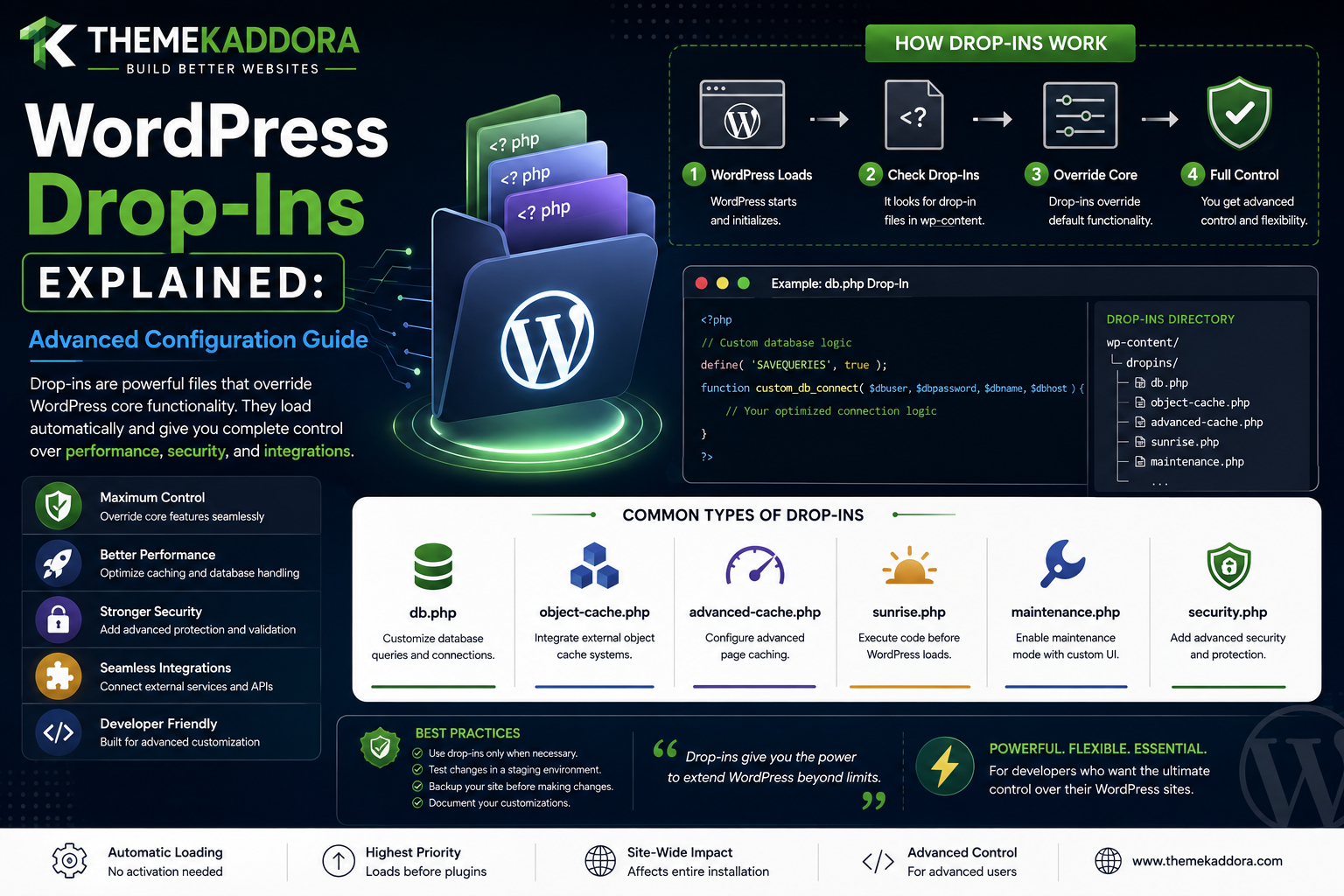
WordPress Drop-Ins Explained: Advanced Configuration Guide
Introduction
Most WordPress developers are familiar with normal plugins.
A typical plugin lives under:
wp-content/plugins/
and follows the familiar lifecycle:
Install ↓ Activate ↓ Load
WordPress also has another advanced extension mechanism called drop-ins.
A drop-in is a special PHP file placed in a specific WordPress location that can replace or extend part of the platform's low-level behavior.
Unlike ordinary plugins, drop-ins are usually associated with specific filenames and specific WordPress subsystems.
Examples include:
advanced-cache.php object-cache.php db.php sunrise.php
These files are not simply arbitrary plugins.
WordPress recognizes particular filenames for particular purposes.
A simplified architecture looks like:
WordPress Bootstrap ↓ Special Drop-In Detection ↓ Low-Level Integration ↓ Normal WordPress Runtime
This makes drop-ins extremely powerful.
It also makes them considerably more advanced than ordinary plugins.
For example:
object-cache.php
can replace or provide the persistent object-cache implementation.
Similarly:
advanced-cache.php
can participate in advanced page-caching behavior very early in WordPress execution.
These capabilities make drop-ins useful for:
Persistent object caching
Full-page caching
Database abstraction
Multisite domain mapping or early bootstrapping
Hosting infrastructure
Low-level performance systems
Platform-specific integrations
But their power also introduces risks.
A broken normal plugin can often be deactivated from the WordPress admin.
A broken drop-in may execute before normal WordPress management interfaces are available.
This means a faulty drop-in can affect:
Frontend
Admin
REST
AJAX
Cron
Database access
Cache behavior
The entire WordPress bootstrap
In other words:
A WordPress drop-in should be treated as infrastructure code, not as an ordinary feature plugin.
In this guide, you'll learn what WordPress drop-ins are, how they differ from normal plugins and must-use plugins, how WordPress discovers special drop-in files, what advanced-cache.php does, how object-cache.php works, what db.php is used for, where sunrise.php fits into advanced setups, how drop-ins affect performance, how to debug broken drop-ins, how hosting platforms use them.
What Is a WordPress Drop-In?
A WordPress drop-in is a special PHP file with a recognized filename that WordPress can load as part of a particular subsystem.
Unlike a normal plugin, the filename itself has a special meaning.
For example:
wp-content/object-cache.php
can be recognized as the site's object-cache drop-in.
The basic concept is:
Special Filename ↓ WordPress Recognizes It ↓ Special Subsystem Uses It
Why Are Drop-Ins Different From Plugins?
A normal plugin is a general extension.
A drop-in is more specialized.
Compare:
Normal Plugin → Adds Feature
with:
Drop-In → Replaces / Integrates With Specific Core Subsystem
This is why drop-ins are commonly associated with caching and infrastructure.
Drop-Ins vs Must-Use Plugins
These concepts are related but different.
Must-Use Plugin
Usually loaded automatically from:
wp-content/mu-plugins/
and behaves like a plugin that should always be active.
Drop-In
Uses a recognized filename in a specific WordPress location and participates directly in a supported subsystem.
A useful mental model is:
MU Plugin → Always-Loaded Plugin Layer Drop-In → Specialized Subsystem Override
Why Drop-Ins Exist
Some WordPress functionality needs to be modified before normal plugins can fully initialize.
Examples include:
Caching Object Cache Database Layer Multisite Bootstrap
A drop-in provides a standardized extension point for these systems.
Important Drop-In Files
Depending on the WordPress environment and configuration, developers may encounter recognized files such as:
advanced-cache.php object-cache.php db.php sunrise.php
They do not all serve the same purpose.
advanced-cache.php
One of the most well-known drop-ins is:
wp-content/advanced-cache.php
It is associated with advanced caching.
When configured correctly, WordPress can load this file very early in the bootstrap process.
Why advanced-cache.php Is Important
A full-page caching system wants to know whether it can serve a cached response before WordPress performs the normal amount of application work.
Conceptually:
Request ↓ Advanced Cache ↓ Cached? ├── Yes → Serve Cached Response └── No → Continue WordPress Bootstrap
This can significantly reduce application work for cacheable pages.
WP_CACHE
Advanced caching systems commonly use WordPress's cache configuration.
A typical configuration can include:
define( 'WP_CACHE', true );
This configuration tells WordPress that advanced caching functionality may be available.
The exact behavior depends on the caching implementation.
Full-Page Caching
Consider a normal WordPress request:
Request ↓ PHP ↓ WordPress ↓ Database ↓ Theme ↓ HTML
With a working full-page cache:
Request ↓ Cache ↓ HTML
This can eliminate much of the normal application processing for repeated public requests.
Why Full-Page Cache Is Powerful
A cache can prevent repeated work such as:
WordPress bootstrap
Plugin initialization
Database queries
Template rendering
PHP execution
for cacheable public pages.
object-cache.php
Another important drop-in is:
wp-content/object-cache.php
This file can provide a persistent object-cache implementation.
What Is Object Caching?
WordPress uses object caching to avoid repeatedly retrieving the same data.
Conceptually:
Request ↓ Need Data ↓ Object Cache ↓ Cached? ├── Yes → Return Data └── No → Retrieve + Cache
Default Object Cache vs Persistent Object Cache
WordPress includes an object-cache API.
Without a persistent cache backend, cached objects are typically available only for the current request.
A persistent object-cache drop-in can store objects across requests.
Common backends include systems such as:
Redis
Memcached
depending on the hosting environment and plugin implementation.
Why Persistent Object Cache Helps
Suppose many requests repeatedly need:
Product Settings Popular Content Options User Data
A persistent cache can reduce repeated database work.
The architecture becomes:
Request ↓ Object Cache ↓ Database only when needed
How object-cache.php Is Used
The WordPress object-cache API calls functions such as:
wp_cache_get() wp_cache_set() wp_cache_delete()
The drop-in can provide the backend implementation.
This means application code can continue using WordPress cache APIs without knowing whether the underlying system is Redis, Memcached, or another implementation.
Why Developers Should Not Hardcode Redis Logic Everywhere
A poor architecture might do:
Plugin ↓ Direct Redis Connection
A better approach is often:
Plugin ↓ WordPress Object Cache API ↓ Cache Backend
This keeps the plugin more portable.
db.php
Another recognized WordPress drop-in is:
wp-content/db.php
It can replace or extend the WordPress database class behavior.
This is an advanced feature and is much less common than caching drop-ins.
Why db.php Is Powerful
Database access is fundamental to WordPress.
A database drop-in can affect:
Queries
Connection behavior
Database abstraction
Specialized storage integrations
Because so much of WordPress depends on $wpdb, a broken database drop-in can affect nearly the entire application.
When Would You Use db.php?
Potential use cases can include specialized infrastructure where WordPress's normal database abstraction needs to be integrated with another database system or behavior.
This should only be done when there is a strong architectural reason.
Why db.php Is Risky
A database drop-in sits extremely close to the foundation of WordPress.
A bug may cause:
Frontend Failure + Admin Failure + Plugin Failure + REST Failure
In other words, the entire application can be affected.
sunrise.php
Another advanced drop-in filename is:
wp-content/sunrise.php
It is associated with early bootstrap behavior and has historically been used in specialized Multisite and domain-mapping configurations.
Its use is much more specialized than ordinary caching drop-ins.
Why sunrise.php Is Advanced
It can participate very early in WordPress bootstrap.
This makes it useful for specialized domain and network-level routing.
But early execution also means:
Mistakes can happen before many normal WordPress systems are ready.
Domain Mapping Use Case
A Multisite environment might use specialized domain handling such as:
site-a.example.com site-b.example.com
or custom domains:
customer-a.com customer-b.com
A low-level bootstrap layer can help map the incoming domain to the appropriate site.
Drop-Ins and Multisite
Drop-ins become particularly interesting in Multisite because a single platform can serve many sites.
Examples include:
Network Cache Object Cache Domain Mapping Shared Infrastructure
A mistake in one shared drop-in can potentially affect many sites.
Drop-Ins and Hosting Platforms
Managed WordPress hosting providers often use drop-ins or similar low-level integrations for:
Page caching
Object caching
Monitoring
Hosting-specific optimization
This allows infrastructure features to integrate tightly with WordPress.
Why Hosting Providers Use Drop-Ins
The hosting layer knows:
Server Cache PHP Database Network
and the drop-in allows it to communicate with WordPress at an application level.
Drop-Ins and Performance
Drop-ins can improve performance significantly when used correctly.
For example:
advanced-cache.php → Full-Page Cache object-cache.php → Persistent Object Cache
Together:
Page Cache + Object Cache = Less PHP + Less Database Work
Full-Page Cache vs Object Cache
These are not the same thing.
Full-Page Cache
Caches the final page response.
Request → HTML
Object Cache
Caches reusable application data.
Request → Objects / Data
A website can use both.
Example Combined Architecture
Browser ↓ Page Cache ↓ HTML
For a cache miss:
Browser ↓ WordPress ↓ Object Cache ↓ Database ↓ Template ↓ HTML
Cache Invalidation
A cache is only useful if it becomes stale data is managed correctly.
For example:
Product Updated ↓ Old Cached Product
The cache must eventually be invalidated or refreshed.
Why Cache Invalidation Is Difficult
A plugin may update:
Product Price Stock Options Related Content
while several layers may have cached those values.
A good caching architecture defines clear invalidation rules.
Drop-Ins and Cache Invalidation
A caching drop-in can provide low-level mechanisms, but individual plugins still need to invalidate the data they modify appropriately.
For example:
Product Update ↓ Invalidate Product Cache ↓ Next Request ↓ Fresh Data
Drop-Ins and WordPress Object Cache APIs
Plugins should normally use:
wp_cache_get() wp_cache_set() wp_cache_delete()
instead of talking directly to the drop-in implementation.
This preserves abstraction.
Drop-Ins and Transients
WordPress transients can also interact with caching systems.
A plugin may use:
set_transient() get_transient()
without knowing whether the underlying environment uses persistent object caching.
This improves portability.
Drop-Ins and Database Queries
Persistent object caching can reduce repeated database reads, but it does not make every database query disappear.
A poorly designed query can still be slow on a cache miss.
Developers should optimize the underlying query architecture when necessary.
Drop-Ins Do Not Replace Good Code
A common misconception is:
"Redis will make every WordPress plugin fast."
Not necessarily.
If a plugin performs:
1000 Expensive Queries
a cache can help only when those requests can meaningfully benefit from cached results.
Bad application architecture still needs fixing.
Drop-Ins and Cache Stampedes
If many requests simultaneously miss the same cache:
100 Requests ↓ Cache Miss ↓ 100 Database Queries
the database can become overloaded.
Advanced caching architectures may need lock or stampede-protection strategies.
Drop-Ins and Cache Groups
WordPress object cache APIs support concepts such as cache groups.
A plugin can organize cached data:
kdr_products kdr_reports kdr_ai
This can help manage related data.
Persistent Cache and User-Specific Data
Developers must be careful with:
User Data Cart Data Private Dashboard Data
A cache must not accidentally return one user's data to another user.
Object Cache and Multisite
Multisite environments need careful cache key design so site-specific values remain isolated.
For example:
Site A → Product X Site B → Product X
must not collide in the shared cache.
Cache Keys Should Include Context
For multi-tenant systems, cache keys may need to include:
Site ID Tenant ID User Context Resource ID
depending on whether the data is public or private.
Drop-Ins and WooCommerce
WooCommerce can benefit from object caching and page caching, but commerce introduces dynamic areas such as:
Cart
Checkout
Account
Customer-specific data
These should not be cached as if they were static public pages.
Drop-Ins and AI Plugins
AI results can sometimes be cached.
For example:
Prompt + Context ↓ AI Request ↓ Cache Result
But caching strategy should consider:
User context
Prompt changes
Model version
Data freshness
Privacy
Drop-Ins and Analytics
Analytics dashboards often benefit from object caching.
For example:
Raw Events ↓ Aggregation ↓ Cache ↓ Dashboard
The dashboard does not need to re-run the full aggregation every time.
Drop-Ins and SaaS Applications
SaaS systems can use persistent object caches for:
Tenant configuration
Feature flags
Permissions
Session-related data where appropriate
Aggregated metrics
Cache isolation is especially important in multi-tenant architectures.
Drop-Ins and REST APIs
REST endpoints can also benefit from object caching.
For example:
REST Request ↓ Cache ↓ Data
Public responses may be cacheable, while private responses require more careful rules.
Drop-Ins and AJAX
AJAX responses may also use cached application data.
But avoid caching user-specific response data globally.
Drop-Ins and Cron
Background jobs can benefit from persistent object caching, especially when repeatedly processing:
Large datasets
However, cache invalidation and locking become important.
How to Identify Existing Drop-Ins
Developers can inspect:
wp-content/
for recognized drop-in files such as:
advanced-cache.php object-cache.php db.php sunrise.php
The exact set of files present depends on the hosting environment and installed systems.
Why You Should Inspect Before Installing Another Cache Plugin
A site may already have:
object-cache.php
provided by hosting or another caching solution.
Installing another object-cache implementation without understanding the existing architecture can create conflicts.
Multiple Drop-Ins Can Conflict
Some drop-in types are effectively singleton extension points.
For example:
object-cache.php
cannot simply have multiple independent implementations active at once.
This is why cache plugins and hosting systems need coordination.
Cache Plugin Conflicts
A common issue is:
Hosting Cache + Plugin Cache + Custom Drop-In
all trying to control overlapping behavior.
Developers should identify which system owns each cache layer.
Debugging Drop-Ins
When WordPress behaves unexpectedly:
1. Inspect wp-content 2. Identify Drop-Ins 3. Identify Owning System 4. Check Configuration 5. Check Logs 6. Disable Safely 7. Retest
Drop-In Debugging and Recovery
Because drop-ins can load early, a broken file may prevent normal WordPress administration.
A recovery strategy may involve:
Filesystem ↓ Temporarily Remove / Rename Problematic Drop-In ↓ Test WordPress ↓ Restore Correct Version
This should be performed carefully in a controlled environment or according to the hosting provider's recovery process.
Drop-Ins and Version Control
Drop-in files should be treated as deployment-managed infrastructure.
Avoid silently overwriting them from unrelated plugins.
Drop-Ins and Deployment
A production workflow should include:
Backup
Staging
Compatibility testing
Controlled release
Monitoring
Rollback
Drop-Ins and PHP Compatibility
A drop-in executes very early.
A PHP compatibility problem can therefore break the application before other components can compensate.
Test supported PHP versions carefully.
Drop-Ins and WordPress Compatibility
The same applies to WordPress core versions.
A drop-in using undocumented internals may break when WordPress changes implementation details.
Prefer documented interfaces and stable APIs where available.
Avoid Unnecessary Core Coupling
A drop-in should not depend on:
Private WordPress Internals
unless the architecture genuinely requires it and the compatibility implications are understood.
Drop-Ins and Security
Because drop-ins are low-level, they should follow strict security standards.
Review:
File permissions
Code ownership
Deployment controls
Input validation
Database security
External HTTP requests
Secrets
Logging
Drop-Ins and File Permissions
Restrict write access to drop-in files.
If an attacker can modify:
object-cache.php
or:
db.php
they may gain control over core application behavior.
Drop-Ins and Supply Chain Security
Only deploy trusted drop-in code.
This is especially important when drop-ins are installed by:
Hosting platforms
Cache systems
Third-party packages
Custom deployment scripts
Drop-Ins and Logs
Infrastructure errors should be logged clearly, but logs should not contain:
Passwords
API keys
Tokens
Sensitive customer data
Professional Drop-In Architecture
A scalable infrastructure model can look like:
WordPress Request │ ┌─────────────┴─────────────┐ ▼ ▼ Advanced Cache Normal Bootstrap │ │ Cache Hit? ▼ ├── Yes → HTML MU Plugins └── No ↓ Normal Plugins ↓ Object Cache ↓ Database
A database or multisite drop-in can participate at an even lower level when the environment requires it.
Drop-In Decision Framework
Before creating a drop-in, ask:
1. Does this need low-level integration? 2. Can a normal plugin solve it? 3. Can an MU plugin solve it? 4. Does WordPress provide a supported API? 5. Will this run during every request? 6. Is the bootstrap lightweight? 7. Is there a rollback plan? 8. Is there a single owner for this drop-in type?
If a normal plugin or MU plugin can solve the problem safely, a drop-in may be unnecessary.
Drop-In Testing Checklist
Test:
☑ Frontend ☑ Admin ☑ REST ☑ AJAX ☑ Cron ☑ WP-CLI ☑ Single Site ☑ Multisite ☑ Cache Hit ☑ Cache Miss ☑ Logged-In User ☑ Logged-Out User ☑ WooCommerce ☑ High Traffic ☑ Failure / Recovery
Drop-In Performance Checklist
Review:
☑ Bootstrap cost ☑ Cache hit ratio ☑ Cache miss behavior ☑ Database reduction ☑ Object cache latency ☑ Memory usage ☑ Serialization overhead ☑ Network latency ☑ Cache invalidation
Common WordPress Drop-In Mistakes
Installing Multiple Competing Cache Drop-Ins
Can create conflicts.
Using a Drop-In for an Ordinary Feature
Adds unnecessary infrastructure complexity.
Ignoring Existing Hosting Drop-Ins
Can cause duplicate or conflicting cache systems.
Heavy Work in object-cache.php
Can affect almost every WordPress request.
Unsafe Database Drop-In
Can destabilize the entire application.
No Recovery Plan
A broken drop-in may make normal admin access difficult.
Relying on Private Internals
Core updates may break the implementation.
Best Practices for WordPress Drop-Ins
A professional drop-in should:
Have a clearly defined low-level purpose.
Use a recognized WordPress extension point.
Have a single clear owner.
Avoid unnecessary dependencies.
Keep bootstrap work lightweight.
Use stable APIs where possible.
Be tested across supported WordPress and PHP versions.
Integrate carefully with hosting and CDN layers.
Protect cache and database data.
Use version control and controlled deployment.
Maintain a documented rollback process.
Monitor cache behavior and failures.
Why choose ThemeKaddora?
ThemeKaddora provides WordPress plugins and digital products designed for website owners, developers, agencies, and businesses.
Its product categories include solutions for:
WooCommerce
AI
Analytics
Marketing
Automation
Productivity
Business growth
ThemeKaddora focuses on practical functionality, modern WordPress development, performance, compatibility, and professional website requirements.
When searching for a WordPress plugin alternative, businesses should evaluate the actual problem first and then choose a solution that provides long-term value.
Conclusion
WordPress drop-ins are one of the most advanced extension mechanisms available in the platform.
They are different from both normal plugins and must-use plugins.
A useful architectural model is:
Normal Plugin → Feature MU Plugin → Platform Layer Drop-In → Specialized Low-Level Subsystem
Common drop-ins include:
advanced-cache.php object-cache.php db.php sunrise.php
Each exists for a different purpose.
advanced-cache.php can participate in very early full-page caching.
object-cache.php can provide a persistent object-cache implementation.
db.php can modify or replace database-layer behavior.
sunrise.php can participate in specialized early bootstrap scenarios, particularly in advanced Multisite or domain-mapping architectures.
The most important lesson is:
A drop-in is infrastructure, not a normal plugin feature.
Because drop-ins operate at a lower level, they can have a much larger impact on the WordPress runtime.
A broken cache drop-in can make pages slow or inaccessible.
A broken object-cache drop-in can produce inconsistent application behavior.
A broken database drop-in can affect the entire WordPress installation.
Therefore, drop-ins should be:
Small
→ Purpose-Specific
→ Fast
→ Secure
→ Well-Tested
→ Recoverable
For ThemeKaddora, the preferred order of architectural decisions should usually be:
Can a Normal Plugin Solve It? ↓ If Not → Can an MU Plugin Solve It? ↓ If Not → Is a Drop-In Truly Required?
This avoids introducing low-level infrastructure complexity unnecessarily.
Caching is one area where drop-ins can be especially valuable.
A well-designed system can use:
Full-Page Cache + Persistent Object Cache + Efficient Database
to improve performance significantly.
But caching is not a substitute for good application architecture.
If a plugin performs inefficient database queries or expensive external API calls, the underlying code may still need optimization.
The most important principle is:
Use WordPress drop-ins only for genuine low-level infrastructure requirements, keep their bootstrap lightweight, define clear ownership, and always maintain a reliable rollback strategy.
That approach allows drop-ins to provide powerful infrastructure benefits without turning them into hidden sources of application-wide risk.
Frequently Asked Questions
What is a WordPress drop-in?
A WordPress drop-in is a specially named PHP file that WordPress recognizes as an override or integration point for a particular subsystem.
How are drop-ins different from plugins?
Normal plugins provide general functionality and usually require activation. Drop-ins use specific recognized filenames and can participate in low-level WordPress subsystems.
What is advanced-cache.php?
It is a recognized drop-in associated with WordPress advanced caching systems and can participate very early in the request lifecycle.
What is object-cache.php?
It is the standard WordPress drop-in location for a persistent object-cache implementation.
What is db.php?
It is a database-related drop-in that can replace or extend the WordPress database abstraction in specialized environments.
What is sunrise.php?
It is an advanced early-bootstrap drop-in historically used for specialized Multisite and domain-mapping scenarios.
Should every WordPress site have drop-ins?
No. Drop-ins are specialized infrastructure components and are only needed when the site's environment or architecture requires them.
Can multiple plugins install the same drop-in?
Some drop-in types represent a single integration point, so multiple systems may conflict if they each attempt to own the same file.
Should I delete an existing object-cache.php?
Not without understanding which system installed it and what it does. It may be provided by hosting or an existing cache implementation.
Can drop-ins improve WordPress performance?
Yes. Full-page and persistent object caching drop-ins can significantly reduce PHP and database work when properly configured.
Why choose Themekaddora?
Themekaddora provides lightweight, responsive, SEO-friendly WordPress themes with fast performance, WooCommerce compatibility, flexible customization, accessibility-conscious design, modern templates, regular updates, and professional support—providing a strong foundation for businesses building digital products and product-focused websites.
Comments (0)