
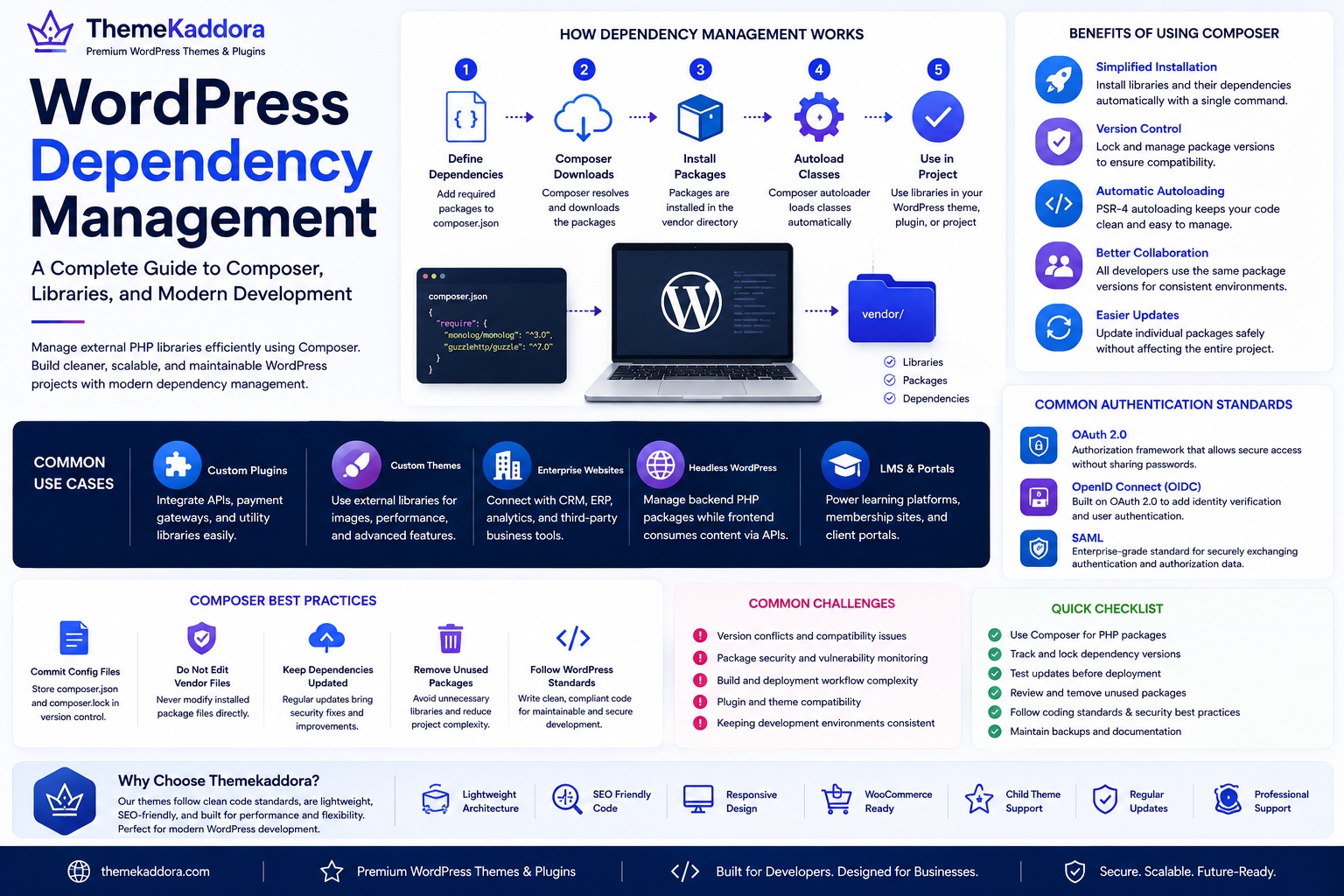
WordPress Dependency Management: A Complete Guide to Composer, Libraries, and Modern Development
Introduction
Modern WordPress development goes far beyond installing themes and plugins. Professional developers often build custom themes, plugins, and enterprise applications that rely on external PHP libraries to add functionality efficiently.
Managing these libraries manually can quickly become difficult. Different versions, compatibility issues, and update conflicts can lead to unstable websites and time-consuming maintenance.
This is where dependency management becomes essential.
Dependency management allows developers to install, organize, update, and maintain external packages in a structured and predictable way. The most widely used tool for PHP projects, including many WordPress workflows, is Composer.
Whether you're developing custom plugins, enterprise WordPress solutions, or scalable business websites, understanding dependency management helps you write cleaner code, simplify updates, and improve long-term maintainability.
What Is Dependency Management?
Dependency management is the process of handling external software packages that your project depends on.
Instead of copying third-party code directly into your project, you define required packages in a configuration file and use a package manager to install and maintain them.
Benefits include:
Consistent project structure
Easier updates
Improved code organization
Better collaboration
Reduced duplication
Version control
This approach makes development more efficient and reliable.
What Is Composer?
Composer is the standard dependency manager for PHP.
It downloads and manages external libraries required by a project while ensuring compatible versions are installed.
With Composer, developers can:
Install PHP packages
Update libraries
Resolve dependency conflicts
Autoload classes automatically
Lock package versions
Share consistent project setups across teams
Composer has become an essential tool in modern WordPress development.
Why Dependency Management Matters in WordPress
As WordPress projects grow, they often integrate multiple libraries for tasks such as:
Payment processing
Image manipulation
Email delivery
API integrations
Authentication
PDF generation
Data validation
Logging
Managing these libraries manually increases the risk of errors.
Dependency management keeps projects organized and easier to maintain.
Benefits of Using Composer
Simplified Library Installation
Composer automatically downloads required packages and their dependencies.
This saves time and reduces manual work.
Version Control
Projects can specify compatible package versions, helping prevent unexpected issues caused by incompatible updates.
Automatic Autoloading
Composer generates an autoloader that eliminates the need to manually include PHP files.
This results in cleaner and more maintainable code.
Better Team Collaboration
Every developer works with the same package versions, reducing environment differences and improving consistency.
Easier Updates
Developers can update individual libraries without replacing the entire project.
This makes maintenance more manageable.
Common WordPress Use Cases
Dependency management is commonly used when building:
Custom Plugins
Plugins often require external APIs, payment gateways, or utility libraries.
Custom Themes
Advanced themes may use helper libraries for performance, image processing, or templating.
Enterprise Websites
Large projects frequently integrate CRM platforms, ERP systems, analytics services, and other business tools.
Headless WordPress Projects
Composer helps manage backend packages while frontend frameworks consume WordPress content through APIs.
Composer Best Practices
Commit Configuration Files
Store configuration files in version control so every developer uses the same dependency definitions.
Avoid Editing Vendor Files
Never modify installed package files directly.
Instead, extend or configure libraries as intended.
Keep Dependencies Updated
Regularly update packages to receive:
Security fixes
Performance improvements
Bug fixes
New features
Test updates before deploying to production.
Remove Unused Packages
Unused libraries increase project complexity and may introduce unnecessary security risks.
Review dependencies periodically.
Follow WordPress Coding Standards
Composer improves project organization, but WordPress coding standards remain essential for maintainable development.
Common Challenges
Dependency management also introduces considerations such as:
Version conflicts
Package compatibility
Security monitoring
Build workflows
Deployment automation
Planning your development workflow helps minimize these challenges.
Composer and Plugin Compatibility
Some plugins bundle their own libraries, which can occasionally create version conflicts.
Developers should:
Test integrations thoroughly
Isolate custom functionality
Avoid duplicate package loading
Follow package documentation
Careful testing reduces compatibility problems.
Dependency Management and Website Performance
Dependency management itself does not directly improve website speed.
However, it contributes to better performance by:
Encouraging clean code
Reducing duplicate libraries
Simplifying maintenance
Supporting optimized development workflows
Well-maintained code is generally easier to optimize.
Why a Developer-Friendly Theme Matters
Professional development begins with a strong foundation.
A high-quality WordPress theme should provide:
Clean code
Standards-compliant architecture
Child theme compatibility
Responsive layouts
WooCommerce support
Accessibility features
Regular updates
These qualities simplify long-term maintenance and customization.
Why Choose Themekaddora?
Themekaddora WordPress themes are built using modern development principles that prioritize flexibility, maintainability, and performance.
Our themes include:
Lightweight architecture
Clean coding standards
SEO-friendly structure
Responsive layouts
WooCommerce compatibility
Child theme support
Flexible customization
Cross-browser compatibility
Regular updates
Professional support
Whether you're developing custom business solutions or enterprise WordPress applications, Themekaddora themes provide a reliable foundation for modern workflows.
WordPress Dependency Management Checklist
Before starting a development project, make sure you:
✅ Use Composer for PHP packages
✅ Track dependency versions
✅ Commit configuration files
✅ Remove unused libraries
✅ Test package updates
✅ Follow WordPress coding standards
✅ Review package security
✅ Document project dependencies
✅ Test plugin compatibility
✅ Back up your project before major updates
Conclusion
Dependency management is a fundamental part of modern WordPress development. By using tools like Composer, developers can organize external libraries, reduce maintenance overhead, improve collaboration, and build more scalable applications.
Whether you're creating custom plugins, advanced themes, or enterprise websites, adopting a structured dependency management workflow leads to cleaner code, easier updates, and greater long-term stability.
Combined with developer-friendly WordPress themes from Themekaddora, dependency management helps create professional websites that are easier to maintain, extend, and scale.
Frequently Asked Questions
What is WordPress dependency management?
It is the practice of organizing and maintaining external PHP libraries and packages used in WordPress projects to improve maintainability and consistency.
What is Composer?
Composer is the standard dependency manager for PHP that installs, updates, and manages external libraries required by a project.
Is Composer required for WordPress?
No. Standard WordPress websites can function without Composer, but it is highly beneficial for custom development, enterprise projects, and plugin or theme development.
Can Composer improve website performance?
Composer does not directly increase speed, but it supports cleaner code organization, easier maintenance, and more efficient development practices.
Why choose Themekaddora?
Themekaddora themes provide lightweight architecture, clean coding standards, responsive layouts, SEO-friendly design, WooCommerce compatibility, child theme support, and regular updates, making them ideal for modern WordPress development workflows.
Comments (0)