
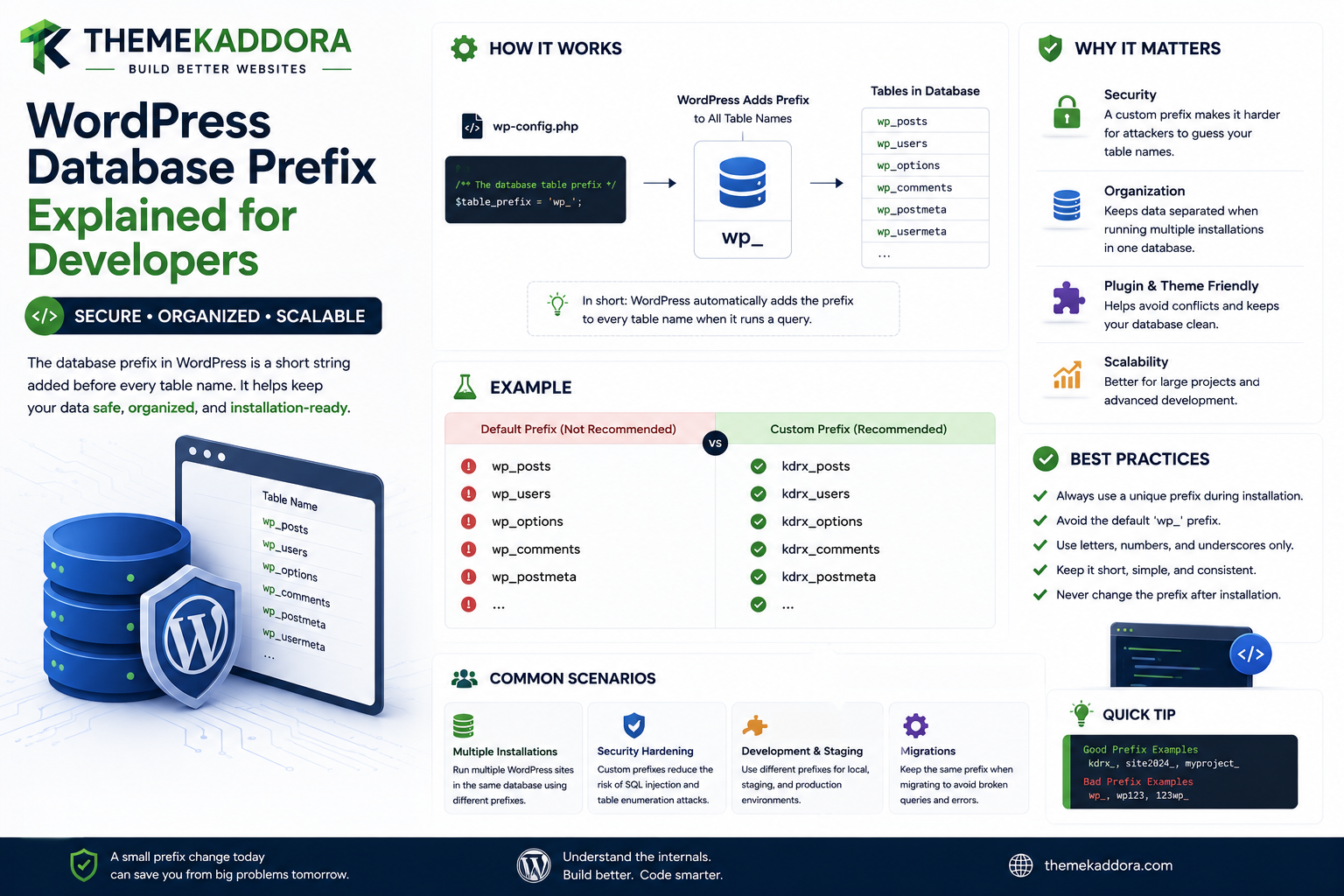
WordPress Database Prefix Explained for Developers
Introduction
WordPress stores much of its dynamic application data in database tables.
A standard installation may contain tables such as:
wp_posts wp_postmeta wp_users wp_usermeta wp_options wp_terms wp_termmeta
The part:
wp_
is the database table prefix.
However, developers should never assume that every WordPress installation uses wp_.
A site might use:
abc_ kdr_ site1_ custom_
or another configured prefix.
This matters because plugins and custom code frequently need to work with WordPress database tables.
A fragile plugin might write:
$table = 'wp_posts';
and work perfectly on one installation while breaking on another.
A portable WordPress plugin should instead use:
global $wpdb; $table = $wpdb->posts;
or:
$table = $wpdb->prefix . 'custom_table';
depending on what it needs to access.
A simplified architecture is:
WordPress Configuration ↓ Database Prefix ↓ Core Tables ↓ WordPress Database APIs ↓ Plugins / Themes
The prefix becomes even more important in:
Multisite
Custom plugin tables
Migrations
Database imports
Staging environments
Hosting migrations
Backup restoration
SaaS-style WordPress applications
Multi-tenant architectures
Developers also need to understand the difference between:
$table_prefix
and:
$wpdb->prefix
and why hardcoding wp_ is a compatibility problem.
In this guide, you'll learn what the WordPress database prefix is, where it comes from, how WordPress uses it, how $wpdb->prefix works, why core table properties are often preferable, how plugins should create custom tables, how Multisite changes table prefixes, how database migrations can break prefix assumptions, how prefix-related security misconceptions should be handled, and how ThemeKaddora plugins can build portable database architecture.
What Is a WordPress Database Prefix?
The database prefix is a string placed before WordPress database table names.
For example:
wp_posts
can be broken into:
wp_ + posts
The prefix is:
wp_
A site using:
kdr_
would have:
kdr_posts kdr_postmeta kdr_options
instead.
Why Does WordPress Use a Prefix?
The prefix helps WordPress separate its tables from other tables in the same database.
For example:
Application Database ├── wp_posts ├── wp_options ├── wp_users └── another_app_users
This can make it possible for multiple applications to coexist in one database, although using separate databases is often preferable when appropriate.
The wp_ Prefix Is Only the Default Example
Many tutorials use:
wp_posts
because wp_ is the common default.
But developers should understand:
wp_ is a convention, not a universal guarantee.
A production plugin must not assume it.
Where Is the Prefix Configured?
WordPress defines the table prefix during its configuration.
A common configuration variable is:
$table_prefix = 'wp_';
inside:
wp-config.php
The actual prefix can be customized.
Why Custom Prefixes Exist
Administrators may use a custom prefix because of:
Existing database conventions
Multiple applications
Migration requirements
Legacy installations
Infrastructure policies
Organization standards
The important point for developers is compatibility.
$wpdb->prefix
WordPress exposes the current site's prefix through:
global $wpdb; $prefix = $wpdb->prefix;
For example:
Default: wp_ Custom: kdr_
This is the correct abstraction for plugin-generated table names in many cases.
Example: Creating a Custom Plugin Table
Suppose a plugin needs:
events
The plugin should normally construct the table name using the current prefix:
global $wpdb; $table = $wpdb->prefix . 'kdr_events';
This produces:
wp_kdr_events
on one site and:
kdr_kdr_events
if the configured site prefix is kdr_.
The plugin's own table suffix should therefore be chosen carefully to avoid confusing naming.
A more common pattern might be:
$table = $wpdb->prefix . 'kdr_events';
where kdr_ is the plugin namespace within the site's database namespace.
Why Hardcoding wp_ Is a Mistake
Avoid:
$table = 'wp_kdr_events';
because another site could use:
site_
and the plugin would create or query the wrong table.
Core Table Properties
For WordPress core tables, $wpdb provides properties such as:
$wpdb->posts $wpdb->postmeta $wpdb->users $wpdb->usermeta $wpdb->options $wpdb->terms $wpdb->termmeta
These are often preferable to manually constructing their names.
Why Use $wpdb->posts Instead of $wpdb->prefix . 'posts'?
Both can represent the current posts table, but:
$wpdb->posts
communicates intent more clearly.
It also uses WordPress's own table mapping.
For WordPress core tables, use the provided $wpdb properties when available.
Example Query
Instead of:
$sql = "SELECT * FROM {$wpdb->prefix}posts";
developers can often use:
$sql = "SELECT * FROM {$wpdb->posts}";
when directly querying the posts table.
$wpdb->prefix vs $table_prefix
These variables are related but have different roles.
$table_prefix
This is the configuration-level prefix defined by WordPress.
$table_prefix = 'wp_';
$wpdb->prefix
This is the database abstraction's current prefix value.
For plugin development, $wpdb->prefix is generally the more appropriate runtime interface.
Why Plugins Should Use $wpdb
A plugin should normally access the database through WordPress's database abstraction:
global $wpdb;
rather than opening a separate database connection for normal WordPress data.
This provides integration with the WordPress database environment.
Custom Tables Should Use the Current Prefix
A plugin-created table should generally be:
Current Prefix + Plugin Namespace + Table Name
For example:
wp_kdr_events
rather than:
kdr_events
with no WordPress prefix.
The correct convention depends on the plugin's architecture, but using the site's prefix often improves consistency with the installation.
Why Plugin Table Naming Matters
A large WordPress database may contain many custom tables:
wp_kdr_events wp_kdr_logs wp_kdr_reports wp_kdr_integrations
Clear names make database administration easier.
Avoid Generic Table Names
Do not create a table such as:
wp_events
unless there is a strong reason.
Another plugin could use the same name.
A better approach is to namespace the table:
wp_kdr_events
Prefix and Plugin Namespacing
A useful naming pattern is:
{site_prefix}{plugin_identifier}_{table}
For example:
wp_kdr_analytics_events
This combines:
WordPress site namespace
Plugin namespace
Purpose
WordPress Database Prefix Is Not a Security Boundary
A common misconception is that changing:
wp_
to:
random_
makes the database secure.
It does not.
A custom prefix can make some automated assumptions less convenient, but it should not be treated as a security mechanism.
What Actually Protects Database Data?
Database security depends on:
Proper credentials
File permissions
Database permissions
Prepared queries
Authentication
Authorization
Input validation
Secure hosting
Updates
Secrets management
Changing a table prefix does not replace these controls.
$wpdb->prepare()
A custom prefix does not make SQL safe.
For user-controlled values, use prepared queries appropriately:
$sql = $wpdb->prepare( "SELECT * FROM {$wpdb->posts} WHERE ID = %d", $post_id );
The table name is structural SQL, while the value is parameterized.
Why You Cannot Treat Table Names Like User Input
Database identifiers such as table names are not the same as ordinary SQL parameters.
A plugin should build table names from trusted configuration or $wpdb properties, not concatenate arbitrary user input into identifiers.
Prefix and SQL Injection
Using:
$wpdb->prefix
does not protect against SQL injection if the rest of the query is built unsafely.
Developers must still validate and prepare values correctly.
WordPress Prefix and Migrations
Database migrations are a common place where prefix assumptions break.
Suppose a staging database uses:
stg_
and production uses:
wp_
A migration script that hardcodes:
wp_posts
can fail immediately.
Portable Migration Scripts
Migration logic should resolve table names dynamically.
For example:
global $wpdb; $events_table = $wpdb->prefix . 'kdr_events';
This allows the migration to run under different prefixes.
Staging and Production Differences
A professional development workflow may have:
Local: dev_ Staging: stg_ Production: wp_
Application code should continue working without source-code changes.
Prefix and Database Backups
A database backup may contain tables with the original prefix.
If a site is restored into another installation with a different prefix, the migration process needs to understand the table structure rather than blindly assuming the new prefix.
Search and Replace With Prefixes
Domain migrations and table-prefix migrations are different operations.
Changing:
example.com
to:
newexample.com
does not necessarily require changing:
wp_
to:
new_
Do not combine unrelated migration tasks without a reason.
Multisite Changes Everything
WordPress Multisite uses site-specific table naming.
For example, a network may contain:
wp_posts wp_options wp_2_posts wp_2_options wp_3_posts wp_3_options
depending on the installation and site IDs.
This makes hardcoded table names even more dangerous.
Main Site Tables in Multisite
The primary site may use tables such as:
wp_posts wp_options
while additional sites use site-specific numbered tables.
The exact naming depends on the Multisite setup.
$wpdb->prefix in Multisite
The value of $wpdb->prefix reflects the current site's table prefix context.
After:
switch_to_blog( 2 );
the database context changes for site-specific operations.
This is one reason plugins should not cache table names globally without considering site context.
switch_to_blog() and Database Tables
Suppose:
Site 1 → wp_posts Site 2 → wp_2_posts
A plugin switches from Site 1 to Site 2.
The WordPress database abstraction adjusts its site-specific table mappings accordingly.
After processing:
restore_current_blog();
should be called.
Why Restoring Blog Context Matters
If a plugin forgets:
restore_current_blog();
subsequent code may use the wrong site context.
This can lead to:
Incorrect queries
Wrong URLs
Incorrect options
Wrong cache keys
Cross-site data errors
Multisite Network Tables
Some WordPress tables are network-wide rather than site-specific.
Plugins should understand whether their data belongs to:
Site
or:
Network
before creating or querying custom tables.
Custom Multisite Table Strategies
A plugin may choose:
Per-Site Tables
wp_kdr_events wp_2_kdr_events wp_3_kdr_events
Shared Network Table
wp_kdr_network_events
with a site identifier column.
Neither architecture is universally correct.
The data model should follow the business requirement.
Which Strategy Is Better?
Ask:
Is the data isolated to each site, or shared across the network?
For analytics:
Site-specific analytics → Per-site data may be appropriate. Network-wide reporting → Shared network table may be appropriate.
Prefix and SaaS Architecture
SaaS-like WordPress systems may have multiple logical tenants.
If each tenant is represented by a WordPress site, the site prefix can help isolate database tables physically.
But prefix isolation alone does not provide application-level authorization.
Tenant Data and Table Prefixes
A strong architecture combines:
Database Scope + Application Tenant Context + Authorization
rather than relying solely on table naming.
Prefix and WooCommerce
WooCommerce uses WordPress database conventions and, depending on the data and WooCommerce version, may store information across WordPress tables and WooCommerce-specific structures.
Custom WooCommerce plugins should use supported APIs where possible rather than relying on hardcoded table names.
Prefix and WordPress Plugin Development
A plugin that creates custom tables should document:
Table Name Purpose Schema Version Indexes Data Ownership
This makes upgrades and troubleshooting easier.
Table Creation During Activation
For a custom table:
Plugin Activation ↓ Resolve Prefix ↓ Build Table Name ↓ Create Schema
The same table name should be generated dynamically in migrations and runtime queries.
Use Schema Helpers
WordPress provides database schema utilities such as dbDelta() for certain table creation and update workflows.
Developers should understand its behavior and use it appropriately rather than treating it as a generic migration framework.
Why Schema Versioning Still Matters
Even with schema helpers:
Plugin Version + Database Schema Version
should be tracked for controlled migrations.
Prefix and Indexes
A custom table might contain indexes such as:
PRIMARY KEY KEY user_id KEY created_at
The indexes should be defined independently of the prefix.
The table name is dynamic; the schema remains structurally consistent.
Prefix and Table Creation SQL
The table name can be dynamically resolved:
$table_name = $wpdb->prefix . 'kdr_events';
while the SQL schema defines the columns and indexes.
Charset and Collation
Custom tables should use the database character set and collation appropriate for the WordPress installation.
WordPress provides:
$wpdb->get_charset_collate()
to help generate compatible table definitions.
Why get_charset_collate() Matters
The database may use a configuration such as:
utf8mb4
with a particular collation.
Hardcoding a different character set can create compatibility issues.
Example Custom Table Pattern
A typical conceptual structure is:
global $wpdb; $table_name = $wpdb->prefix . 'kdr_events'; $charset_collate = $wpdb->get_charset_collate();
Then the schema can use the generated values.
Prefix and Direct SQL
There are situations where direct SQL is appropriate for custom data.
But the table name should come from trusted dynamic construction:
$wpdb->prefix
and values should use:
$wpdb->prepare()
when appropriate.
Prefer WordPress APIs When Possible
For standard WordPress data, use APIs such as:
get_post() wp_insert_post() get_option() update_option() get_user_by() get_metadata()
rather than querying core tables directly for every operation.
This reduces coupling to database implementation details.
When $wpdb Is Appropriate
Direct database access can make sense for:
Custom tables
Complex reports
High-volume analytics
Aggregation
Specialized data structures
The key is to use it deliberately.
Prefix and Query Performance
The prefix itself usually does not determine query performance.
Performance depends more on:
Query design
Indexes
Dataset size
Database resources
Application behavior
Do not assume a custom prefix makes a database slower or faster.
Prefix and Table Name Length
Extremely long prefixes can make table names unnecessarily verbose.
Choose a reasonable prefix for the site or application environment.
Prefix and Database Portability
Using the WordPress prefix abstraction improves portability across:
Hosting providers
Local development
Staging
Production
Multisite
Migrations
This is one of the strongest reasons developers should never hardcode wp_.
Prefix and Third-Party Plugins
A third-party plugin may create its own custom tables.
Don't assume:
wp_plugin_table
will always exist exactly as documented across every installation.
For integrations, use the plugin's APIs or table definitions where appropriate.
Prefix and Plugin Uninstallation
When a plugin creates custom tables, it should have a documented strategy for whether those tables are removed during uninstall.
Do not delete tables on ordinary deactivation unless the product explicitly requires that behavior.
Prefix and Data Ownership
A custom table should clearly belong to the plugin that owns it.
For example:
wp_kdr_analytics_events
is clearly associated with a Kaddora analytics system.
This helps avoid accidental deletion by unrelated plugins.
Prefix and Database Security
Database prefix should not be exposed as a secret.
It can be visible in application code, SQL diagnostics, or database tools.
Security should come from:
Access controls
Secure credentials
Least privilege
Proper validation
Secure deployment
Prefix and Least-Privilege Database Users
The database user should have only the permissions required by the application.
A custom prefix is not a replacement for proper database access control.
Prefix and WordPress Security Plugins
Security plugins may inspect database tables dynamically.
Plugins that hardcode prefixes can interfere with these systems.
Portable code should use WordPress abstractions.
Prefix and Database Restoration
When restoring a database:
Backup Prefix
may differ from:
Target Installation Prefix
A restoration plan should account for this explicitly.
Prefix and Cloning Websites
Staging clones often use a different URL but may or may not use a different database prefix.
Applications should not rely on the prefix to identify the environment.
Use environment configuration separately.
Prefix and Environment Detection
Avoid:
if prefix == 'stg_'
to determine staging.
The database prefix is a database configuration detail, not a reliable environment identifier.
Prefix and Caching
Cache keys should not depend solely on the database prefix.
For multisite or tenant-aware systems, use explicit site or tenant context.
This creates clearer application behavior.
Prefix and REST APIs
REST APIs should use application-level identifiers and routes rather than exposing raw database table names.
A REST response should not normally require clients to know:
wp_kdr_events
exists.
Prefix and GraphQL
The same principle applies to GraphQL.
The API should expose domain objects, not database implementation details.
Professional Database Prefix Architecture
A scalable application can use:
WordPress Configuration │ ▼ Current DB Prefix │ ┌─────────┴─────────┐ ▼ ▼ Core Table APIs Custom Table Builder │ │ ▼ ▼ WordPress Data Plugin Repository │ │ └─────────┬─────────┘ ▼ Business Services │ ▼ Features
The prefix remains a database concern rather than a business-logic concern.
Database Prefix Testing Checklist
Test:
☑ Default `wp_` prefix ☑ Custom prefix ☑ Local environment ☑ Staging environment ☑ Production environment ☑ Multisite ☑ Site switching ☑ Database migration ☑ Backup restoration ☑ Plugin activation ☑ Plugin upgrade ☑ Plugin uninstall ☑ Custom tables
Database Prefix Performance Checklist
Review:
☑ Queries use correct tables ☑ Indexes are appropriate ☑ No unnecessary direct SQL ☑ Custom tables are scoped correctly ☑ No full-table scans without reason ☑ Multisite context is restored
Database Prefix Security Checklist
Verify:
☑ No hardcoded credentials ☑ Prepared SQL values ☑ Database user permissions ☑ Input validation ☑ Capability checks ☑ Table ownership ☑ Secure migration procedures
Common WordPress Database Prefix Mistakes
Hardcoding wp_
Breaks compatibility on custom-prefix installations.
Confusing $table_prefix With $wpdb->prefix
Configuration-level and runtime database abstractions serve different purposes.
Hardcoding Core Table Names
Use $wpdb properties where appropriate.
Ignoring Multisite
Site-specific prefixes and tables can differ.
Forgetting restore_current_blog()
Can cause later queries to target the wrong site context.
Using Prefix as Security
A custom prefix is not an access-control mechanism.
Prefix-Based Environment Detection
A staging prefix is not a reliable environment identifier.
Creating Generic Custom Tables
Plugin-specific namespaces reduce collision risks.
Best Practices for WordPress Database Prefixes
A professional WordPress application should:
Never assume the prefix is wp_.
Use $wpdb->prefix for dynamically named plugin tables.
Use core $wpdb table properties where available.
Use $wpdb->prepare() for dynamic SQL values.
Use get_charset_collate() for compatible custom table schemas.
Namespace custom tables clearly.
Track schema versions for migrations.
Respect Multisite site and network scope.
Restore blog context after switch_to_blog().
Keep database naming separate from business logic.
Avoid using the prefix as a security or environment mechanism.
Prefer WordPress APIs for standard WordPress data.
Why choose ThemeKaddora?
ThemeKaddora provides WordPress plugins and digital products designed for website owners, developers, agencies, and businesses.
Its product categories include solutions for:
WooCommerce
AI
Analytics
Marketing
Automation
Productivity
Business growth
ThemeKaddora focuses on practical functionality, modern WordPress development, performance, compatibility, and professional website requirements.
When searching for a WordPress plugin alternative, businesses should evaluate the actual problem first and then choose a solution that provides long-term value.
Conclusion
The WordPress database prefix is a small configuration detail with major implications for plugin compatibility.
The default:
wp_
is only one possible prefix.
A production site can use:
custom_ kdr_ site_
or another configured value.
This is why a professional WordPress plugin should never assume:
wp_posts wp_options wp_users
are always the correct table names.
For core WordPress tables, use $wpdb properties such as:
$wpdb->posts $wpdb->postmeta $wpdb->users $wpdb->options
For custom plugin tables, dynamically build the name:
$wpdb->prefix . 'kdr_events'
The bigger principle is abstraction.
The plugin should understand:
"Analytics Events"
rather than spreading:
wp_kdr_analytics_events
through every class in the application.
A better architecture is:
Database Configuration
→ Data Access Layer
→ Business Services
→ Features
This makes the application easier to migrate and test.
The prefix becomes especially important in Multisite.
A network can contain tables such as:
wp_posts wp_2_posts wp_3_posts
depending on site context.
After:
switch_to_blog()
the database context changes.
Failing to call:
restore_current_blog();
can therefore cause later queries and operations to use the wrong site context.
Another important lesson is security.
Changing the prefix from:
wp_
to:
random_
is not a meaningful replacement for proper database security.
Real security depends on:
Database access control
Secure credentials
Prepared SQL
Input validation
Authorization
File security
Updates
Deployment controls
For ThemeKaddora plugins, this architecture is especially valuable because products may be installed across many different hosting environments.
A plugin should work correctly on:
Local Staging Production Multisite Custom Hosting
without changing its SQL source code.
The most important principle is:
Treat the WordPress database prefix as environment-specific infrastructure, never as a hardcoded assumption, and keep database naming details inside the data-access layer rather than spreading them through business logic.
A professional database architecture should be:
Portable
→ Prefix-Aware
→ Multisite-Aware
→ Secure
→ Migration-Friendly
→ Well-Namespaced
→ Maintainable
When these practices are followed, WordPress plugins become significantly more reliable across custom installations, staging environments, migrations, Multisite networks, and large production systems.
Frequently Asked Questions
What is the WordPress database prefix?
It is the string WordPress places before database table names, such as wp_ in the common default configuration.
Is wp_ always the WordPress database prefix?
No. Administrators can configure a custom prefix.
How do I get the current WordPress table prefix?
Use the $wpdb->prefix property in WordPress runtime code.
What should I use for core WordPress tables?
Where appropriate, use $wpdb properties such as $wpdb->posts, $wpdb->options, and $wpdb->users.
How should a plugin create its own table?
Build the table name dynamically using the current prefix and a unique plugin-specific namespace.
Why should I avoid hardcoding wp_?
Hardcoded prefixes break compatibility on installations that use a custom prefix.
Does changing the database prefix improve security?
Not by itself. Prefix changes are not a substitute for database permissions, secure credentials, prepared SQL, or proper application security.
Does the database prefix change in Multisite?
WordPress uses site-specific table naming in Multisite, so developers must account for the current site context rather than assuming one global table name.
What happens after switch_to_blog()?
WordPress changes the site-specific database context. Developers should call restore_current_blog() after the operation is complete.
Should I use database prefix to detect staging or production?
No. The prefix is a database configuration detail, not a reliable environment identifier.
Why choose Themekaddora?
Themekaddora provides lightweight, responsive, SEO-friendly WordPress themes with fast performance, WooCommerce compatibility, flexible customization, accessibility-conscious design, modern templates, regular updates, and professional support—providing a strong foundation for businesses building digital products and product-focused websites.
Comments (0)